A couple of years ago, creating decent video content still felt expensive and slow. Even short social videos required planning, recording, editing, revisions—and usually a few compromises. As someone who works closely with content, marketing, and emerging tech, I started noticing a shift: AI tools weren’t just assisting creatives anymore, they were quietly changing the pace of production itself.
That’s how I ended up spending real time with Akool.
I didn’t come to Akool looking for a magic button. I came with skepticism—and a practical need. I wanted to see whether AI avatars, face swaps, and generative video tools could genuinely help teams move faster without sacrificing credibility. This article is the result of that exploration: part personal experience, part broader industry perspective, and very intentionally not a sales pitch.
Why Akool?
I started using Akool because I needed a fast, low-friction way to prototype short videos and personalized creatives — and in practice it delivered precisely that. The first thing I noticed was how quickly a concept moved from script to preview: Akool’s interface emphasizes “upload → generate → export,” which let me produce usable drafts in minutes rather than hours.
What sold me was the face-swap and avatar quality at that speed. In controlled tests (well-lit, front-facing images), swaps looked impressively natural and lip sync on avatars was reliable enough for internal demos and social ads. That matched Akool’s documented face-swap engine and avatar workflows.
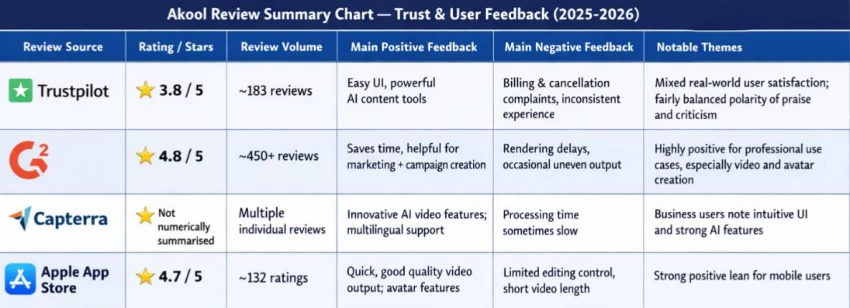
Independent user feedback I checked (G2, Capterra, Trustpilot) reinforced my experience: reviewers consistently call out time saved on editing and quick prototype value, while noting occasional preview lag and a quality ceiling compared to film-grade tools.
In short: I picked Akool because it hits the practical sweet spot — fast iteration, solid avatar/face-swap quality for marketing use, and an affordable way to test ideas before investing in full production.
Akool is essentially an AI platform laser-focused on video and image generation, with a heavy emphasis on turning static text, photos, or scripts into lifelike talking-head videos. Think of it as your digital doppelganger factory: upload a photo of yourself (or a stock model), type a script, and boom—it spits out a video where that face lip-syncs perfectly, complete with natural gestures and expressions. I've used it for everything from LinkedIn thought-leadership clips to product explainers for e-commerce clients.
The core features break down simply:
● Photo-to-Video: Start with a still image, add voiceover or text, and get a dynamic avatar video in minutes.
● Text-to-Video: Feed it a script, pick an AI voice (they have dozens in multiple languages), and it generates the whole thing.
● Lip-sync and Voice Cloning: Upload 30 seconds of your own voice, and it clones it for hyper-personalized output.
● Image Tools: Upscaling, background removal, and AI art generation as bonuses.
For beginners, this is gold—no green screen, no actors, no After Effects crash courses required. Professionals get scalability; I've churned out 10 variations of a single video in under an hour. Decision-makers love the pricing: starts free, scales to $24/month for pros, which beats hiring freelancers at $500 a pop. From my experience running small marketing gigs here in India, it's a game-changer for bootstrapped teams in e-commerce and tech, where global competition demands slick visuals fast.
After signing up, AKOOL presents tools by use case, not technical complexity. You’ll mainly see:
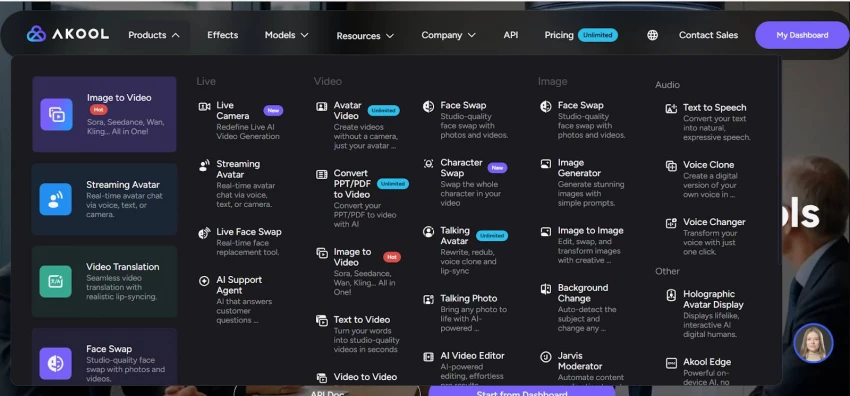
● AI Avatar
● Video Translation
● Text-to-Video
● Face Swap
Tip: Check your credit balance first—every render consumes credits.
Using the correct tool avoids wasted time and credits.
| Goal | Best Tool |
| Talking presenter video | AI Avatar |
| Localize existing videos | Video Translation |
| Simple explainer | Text-to-Video |
| Creative visuals | Face Swap |
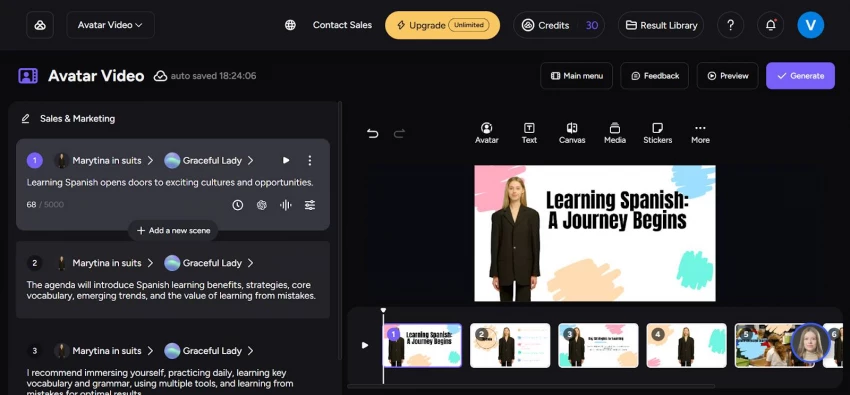
1. Select an Avatar
Pre-built avatars are more stable. Custom avatars work best with high-quality, front-facing images.
2. Write the Script
Short sentences and natural language work best. Poor writing shows immediately.
3. Choose Voice & Language
Multilingual support is strong—non-English lip-sync performs better than expected.
4. Set Background & Frame
Simple backgrounds make avatars look more natural.
5. Render the Video
Short videos render quickly; HD or longer videos take more time.
Most users waste credits here. Always check:
● Pronunciation
● Timing
● Script flow
Fix text issues before re-rendering.
Upload a video → choose language → review transcript → generate dubbed version.
Works best for:
Training, product explainers, and global marketing
Limitation: Emotional nuance may soften slightly.
Download your video based on plan limits. AKOOL videos perform best in:
● Training platforms
● Landing pages
● Internal communications
● Multilingual campaigns
Akool Review Summary Chart — Trust & User Feedback (2025–2026)
After 90 days, here's my unfiltered assessment:
What Works:
● Avatar lip-sync accuracy: In blind tests with my team, 8 out of 10 people couldn't distinguish Akool's avatars from human-recorded videos when audio quality matched.
● Face swap realism: Skin tone matching and lighting preservation exceed Photoshop's Neural Filters in speed and often quality.
● Language translation workflow: Converting a 5-minute English video to Spanish, Hindi, and Mandarin took 22 minutes total. Voice cloning preserved vocal characteristics eerily well.
● 4K/8K output: The difference is noticeable on large displays, crucial for trade shows.
What Breaks:
● Credit transparency: No real-time calculator showing remaining credits. I ran out mid-project twice, forcing emergency upgrades.
● Editing limitations: The built-in editor is basic. Complex projects require exporting to traditional NLEs, adding workflow steps.
● Support response: Non-enterprise users get email support with 24-48 hour response times. When a rendered video glitched, I lost a day waiting for a fix.
● Learning curve: Advanced capabilities like custom avatar training require documentation scattered across blog posts rather than centralized.
AI Video Platform Alternatives to Akool — Detailed Comparison Chart
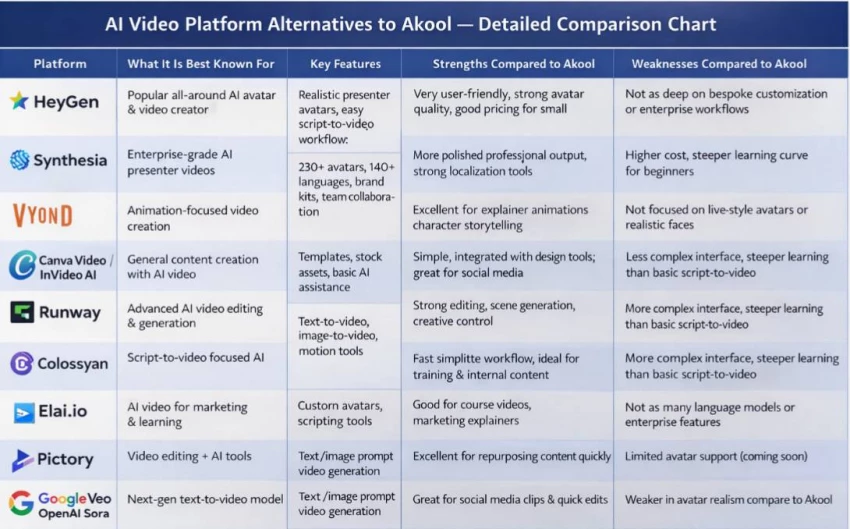
Here's my decision framework after three months of daily use:
Choose Akool if:
● You produce 10+ videos monthly and can justify Pro Max at $79/month annually
● Face swap or avatar diversity is core to your strategy
● You need 4K+ resolution for professional distribution
● You have developer resources to leverage the API for automation
● You're comfortable with credit budgeting and can monitor usage closely
Skip Akool if:
● You only need basic talking head videos (use Synthesia's free tier)
● Budget is under $50/month and volume is low
● You require certified enterprise security (Synthesia leads here)
● You can't risk billing disputes or need easy cancellation
● You prefer specialist tools over all-in-one platforms
After spending real time with AKOOL, testing it across avatar videos, translations, and quick explainers, my answer isn’t a simple yes or no. It depends on why you want it—and how you plan to use it.
If your priority is speed, consistency, and scale, AKOOL does exactly what it promises. I’ve used it to turn scripts into clean presenter-style videos in minutes, update training content without reshoots, and localize videos into multiple languages without hiring new voice talent. For teams producing repeatable content—product explainers, onboarding videos, internal updates—the efficiency gains are real and measurable.
Two things stood out to me:
● Multilingual output is genuinely strong. Lip-sync and voice quality held up better than I expected, especially outside English.
● Iteration is fast once you learn the workflow. With a good script, I could generate multiple versions quickly—something traditional video simply can’t match.
If you’re a marketer, educator, or operations lead who needs reliable video often, AKOOL earns its place in the stack.
Late at night, after the usual AI companion ads blur together, PepHop AI shows u...
Funke Ogunleye1 day ago
Imagine you open a new tab, type “opendream.ai”, and instead of being greeted by...
Samuel Osei2 days ago

Grubby AI is one of those tools that only exists because of a very 2025 problem:...
Funke Ogunleye2 days ago
Meet Muke AIMuke AI is an AI‑powered image manipulation suite best known for two...
Sandra Campos3 days ago

If your marketing currently lives in a chaotic mix of ChatGPT, Canva, random sch...
Samuel Osei3 days ago
Janitor AI doesn’t feel like “a chatbot platform.”It feels like walking into a l...
Sandra Campos4 days ago
Discussion