There are two kinds of presentation makers in the world. One group genuinely enjoys nudging text boxes by one pixel, testing fonts like it’s a personality trait, and aligning shapes until the slide looks “balanced.” The other group would happily hand that entire job to a robot and never think about it again.
Gamma.app was built for that second group.
Instead of making you build slides the old-fashioned way, Gamma flips the workflow. You bring the messy notes, the rough outline, or even a half-baked idea. Gamma turns it into a structured presentation, a web-based document, or a shareable page that actually looks like it was designed on purpose. Using it feels less like operating slide software and more like giving direction to a digital assistant that takes care of layout and formatting in the background.
Gamma.app is an AI-first platform designed to create visual, structured content without forcing users into traditional slide editing. While it can absolutely generate slide decks, it’s more accurate to think of Gamma as a “content builder” that outputs presentations, interactive documents, proposals, and web-style pages.
Unlike PowerPoint or Google Slides, where you spend most of your time arranging elements, Gamma prioritizes automation. Layout decisions, spacing, typography consistency, and visual hierarchy are handled for you. Gamma reportedly uses multiple AI models to improve structure, polish text, and keep the design coherent across sections. Instead of encouraging slide-by-slide perfectionism, it encourages narrative flow.
That storytelling-first focus is what makes Gamma feel different.
If Gamma has one standout strength, it’s speed.
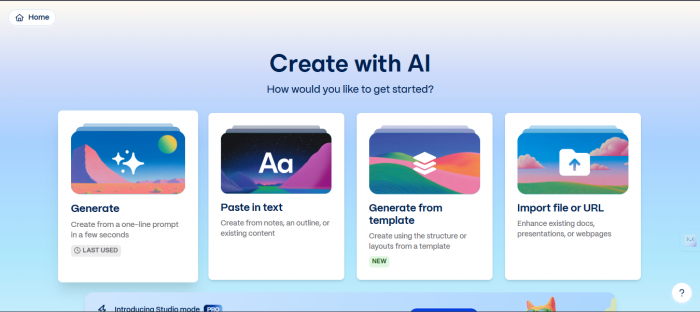
You can start with a short prompt, an outline, a chunk of notes, or even imported content, and Gamma will generate a full deck with sections, formatting, themes, and clean visual organization. It doesn’t just dump text onto slides. It tries to arrange information so it reads like a story instead of a pile of bullet points.
The result is that the “first draft” of a presentation can appear in minutes, not hours. With traditional tools, a surprising amount of time disappears into layout work—fixing alignment, spacing, font sizes, and slide consistency. Gamma removes most of that friction, so your time goes into clarity and messaging instead of design chores.
For founders rushing to prepare investor decks or teams assembling proposals under deadline pressure, that time savings is the entire selling point.
One reason Gamma stands out is that it doesn’t trap your content inside “slides only.”
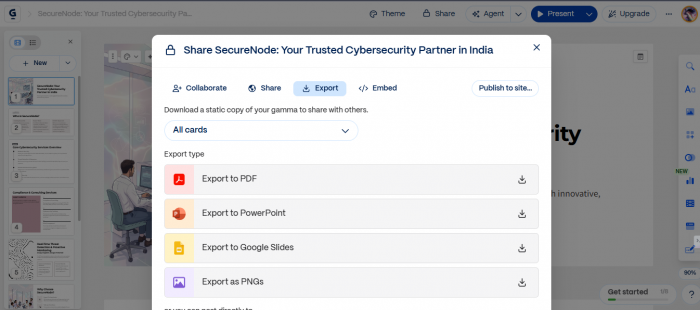
A single Gamma project can be shared as a live web link, published like a lightweight website, exported as a PDF, converted into PowerPoint, or opened in Google Slides. That flexibility matters because in real life, the same content often needs to appear in different forms.
A pitch deck might also need to work as a link you send investors. A report might need to function as a scrollable document. A proposal might need to be downloadable and printable. Gamma reduces the need to recreate the same material in multiple tools.
It’s less about “making slides” and more about “packaging ideas.”
Gamma’s editing style is also different from traditional slide tools. In PowerPoint, editing often means moving things around. In Gamma, editing feels more like revising content.
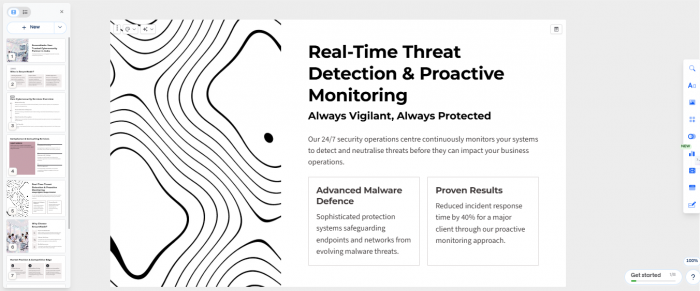
Instead of dragging boxes and resizing elements, you adjust sections, rewrite paragraphs, ask the AI to simplify language, expand a point, change tone, translate text, or improve layout with one action. The system then rebalances the design automatically.
This is a huge win for people who are not designers. But it comes with a tradeoff: if you rely only on automation and don’t add your own taste, the result can sometimes feel “template-like.” Gamma can make things look clean, but uniqueness still depends on human direction.
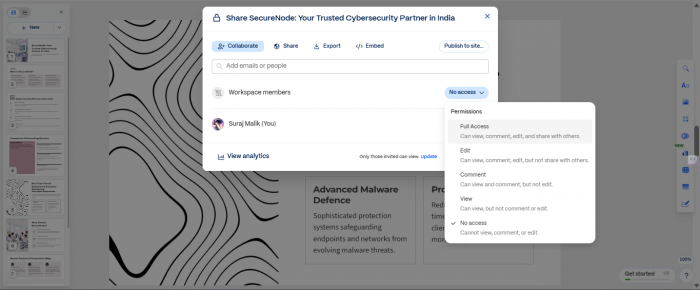
Gamma also works well for teams because collaboration is not an afterthought. Multiple people can edit at the same time, leave comments directly on sections, and share workspaces without bouncing files back and forth.
It also tracks engagement on shared links, which is useful when you’re sending decks or proposals and want to know whether people actually opened them. For teams tired of version-control chaos—“final_v7_really_final_this_one”—Gamma’s centralized workflow is a relief.
It behaves more like a shared work environment than a static slide file.
For advanced users and organizations, Gamma’s Beta API adds a different kind of value. It enables programmatic creation of presentations and structured documents, making it possible to integrate Gamma into broader workflows.
This is especially useful for companies that generate repeated decks, proposals, or reports at scale. Traditional slide tools rarely offer automation at this level. Gamma’s approach hints at a future where content pipelines can generate visual assets on demand, not manually.
For most individual users, the API won’t matter today. But for teams and platforms building repeatable workflows, it’s a strong signal of where Gamma is heading.
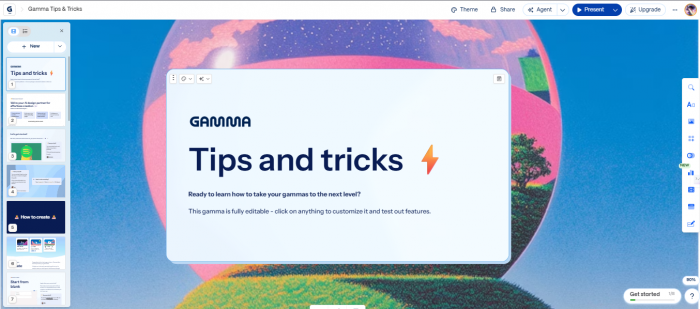
Gamma performs best when you care more about speed, clarity, and structure than absolute design control. It’s especially strong for early drafts and rapid iteration cycles, where you want something polished quickly and then refine the message.
It fits naturally for founders building investor decks, sales teams creating proposals, marketers publishing lightweight pages, educators building lesson materials, and agencies preparing client presentations. In all of those cases, the bottleneck is usually time and formatting—not ideas.
Gamma attacks that bottleneck directly.
Gamma doesn’t completely replace professional design tools, and it doesn’t claim to. If you need detailed brand systems, complex animations, advanced interactive websites, or full offline editing, you may run into limitations.
It’s also cloud-based, which is a practical advantage for collaboration but a consideration for teams handling sensitive information. Anyone working with confidential internal material should review privacy and data policies before uploading content.
Gamma makes presentation building easier, but it’s not a replacement for deep creative control.
Gamma’s biggest benefit isn’t that it uses AI. It’s that it removes the most annoying part of presentations: repetitive formatting work.
By automatically handling alignment, spacing, structure, and layout consistency, Gamma shortens the path from raw notes to something polished and shareable. It shifts presentation creation away from design labor and toward communication clarity.
For people who love pixel-perfect slide crafting, Gamma may feel limiting. But for everyone else—the founders, marketers, educators, consultants, and teams who just need clean output fast—it’s a genuine upgrade.
And if it saves you from manually aligning bullet points ever again, that alone might be worth the trial.

AI character chat platforms have expanded far beyond simple chatbot conversation...
Peter Woods1 day ago
Artificial intelligence has dramatically changed how visual content is produced...
Peter Woods3 days ago

Artificial intelligence has dramatically changed how visuals are created. Only a...
Alexander Hughes5 days ago

AI video creation has shifted from curiosity to competitive advantage. What used...
Peter Woods1 week ago

As video continues to dominate online engagement, AI-powered talking head tools...
Noura Belkacem1 week ago

Autodraft AI entered the writing tools space with a straightforward promise: str...
Peter Woods1 week ago
Discussion