Blooket is a browser‑based, game‑style quiz platform that lets teachers turn question sets into fast, competitive games students play on their own devices in class or at home. It sits in the same category as Kahoot, Quizizz, and Gimkit but differentiates itself with a larger variety of arcade‑like game modes and strong student engagement metrics.

Blooket is a gamified learning platform where teachers host trivia or review games and students answer questions to earn points, coins, or virtual characters called “Blooks.” It is entirely web‑based (no app install), created by Tom and Ben Stewart, and is primarily used across K–12 but also appears in higher education and training contexts.
The platform supports most school subjects (math, vocabulary, grammar, science, social studies, etc.) through custom or premade question sets, making it suitable for both content review and formative assessment. Its arcade‑like interface and bright design are particularly appealing to younger learners, which is why many reviews position it as strongest in elementary and middle school.
Blooket typically runs in three classroom‑friendly formats:
● Live hosted game (teacher‑led) – The teacher starts a game from the dashboard, selects a mode, and shares a game code, QR code, or join link with students to join in real time.
● Solo play – Students play independently on their own devices, which works well for centers, stations, early finishers, or individual practice.
● Assigned as homework – The teacher assigns a game in homework/assignment mode so students can complete it asynchronously before a due date, with results available in the teacher’s reports.
Blooket bundles content creation, game mechanics, and analytics into a single platform. From a teacher’s perspective, several features define its value:
● Large library of premade question sets plus the option to build custom sets from scratch or import from other quiz tools.
● Multiple hosting options: live games for synchronous lessons and homework/solo modes for asynchronous practice.
● Basic reporting for free users and enhanced analytics (detailed accuracy, question‑level performance, individual and class reports) in paid plans.
● Token and “Blook” system that rewards continued participation and adds light collection mechanics for students.
● Browser‑based, ad‑free gameplay with cross‑device compatibility (desktops, tablets, smartphones).
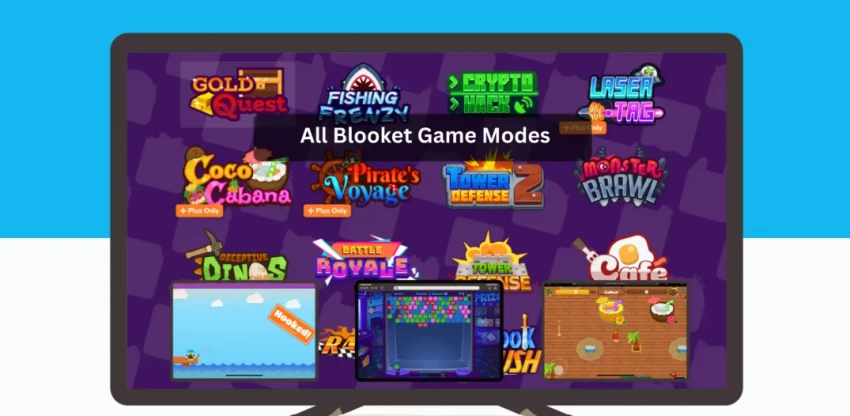
Blooket offers more than 25 game modes, with 12 currently hostable live and others available for solo or homework assignments. Modes differ in pacing, strategy level, and ideal group size, so teachers can align the game style with learning goals.
Some of the most commonly used modes are:
● Gold Quest – Students answer questions to open chests that may add, multiply, or steal gold, emphasizing speed and luck.
● Crypto Hack – Correct answers “mine” crypto; students then hack others to steal currency, making it good for memory and quick decision‑making.
● Factory – Students earn cash from correct answers to unlock and upgrade Blooks in a production line, emphasizing speed and strategy.
● Tower Defense / Tower Defense 2 – Players use earnings from correct answers to place and upgrade defensive Blooks on a path, demanding planning and long‑term strategy.
● Racing – Correct answers move students’ avatars along a track; ideal when speed and competition are the focus.
● Café – Students manage a virtual café, serving food by answering questions; balancing tasks builds time‑management and recall.
● Classic – A more traditional quiz race format that feels closest to Kahoot‑style gameplay but still wrapped in Blooket’s design.
● Crazy Kingdom, Tower of Doom, Monster Brawl – Scenario‑based or RPG‑style modes that add narrative and deeper strategy, especially useful for longer sessions or repeated play.
Blooket also runs seasonal modes (Candy Quest, Santa’s Workshop, Egg Hunt) that appear during specific times of the year and can boost novelty and motivation.
Step‑by‑step overview (teacher side)
1. Visit blooket.com and create a free teacher account using an email address.
2. Browse the public library or create/import a question set; question sets are the core building blocks for all game modes.
3. Click “Host” on a chosen set, select a game mode (e.g., Gold Quest, Factory, Tower Defense), and configure settings such as time limit, number of questions, and power‑up rules.
4. Share the generated game code with students; they join at play.blooket.com from any browser and enter the code.
5. Run the game and monitor performance; after the session, review basic or advanced reports to identify which questions or students need additional support.
Students can participate without accounts by simply entering the game code, though registered student accounts unlock features like progress tracking and avatar customization.
Blooket uses a freemium model with a permanent free tier (“Starter”) and two paid tiers aimed at individual teachers, plus group options. Pricing data is updated periodically, so teachers should always check the official site, but recent data gives a clear range.
● Starter (Free) – Price: $0/month, with support for up to 60 simultaneous players per game. It Includes core game modes, basic question set creation, and standard reports, making it sufficient for many classrooms.
● Plus – Reported at around $59.88/year (about $4.99/month billed annually). the plan raises the limit to 300 players.Adds enhanced reports, question set folders, audio questions, duplication/copying of sets, student bonus tokens, and sometimes early event access, depending on the source.
● Plus Flex – Month‑to‑month version of Plus with no annual commitment; recent figures put it around $9.99/month in editorial analysis and around $5/month in a software directory, again with a 300‑player limit and the same feature set as Plus.
● Higher engagement for review: Game modes, points, and leaderboards make repetitive practice more tolerable, and studies in science and English classes report significantly higher student engagement when Blooket is used for review activities.
● Gains in vocabulary and recall: Blooket helps in a significant increase in engagement, confidence, and academic performance, especially in vocabulary mastery, when Blooket was paired with reflection and follow‑up tasks.
● Support for peer collaboration: Classroom observations show that higher‑achieving students often help classmates during Blooket sessions, which improves both social interaction and conceptual understanding.
● Flexible delivery formats:Teachers can run live, teacher‑paced games, solo practice, or homework/assignment modes, making Blooket usable in in‑person, remote, and hybrid settings.
● Shallow learning if badly designed: Because many modes emphasize points, stealing, or upgrades, students may focus on “winning” over understanding if questions are too easy or poorly aligned with learning objectives.
● Variable quality of public sets: User‑generated question sets can contain factual errors or inconsistent quality, so teachers need to review or edit content before using it for assessment.
● Moderate analytics compared with rivals: Even with paid tiers, multiple reviews describe Blooket’s analytics as functional but less advanced than platforms like Gimkit, making it better for low‑stakes checks than deep assessment.
User feedback is mixed in a productive way: highly positive about engagement, but realistic about limitations in analytics and complexity.
● Teachers on education blogs and review sites consistently highlight Blooket’s ability to “transform basic review activities into fun learning experiences” and say students “look forward” to assessments when delivered via Blooket.

● Gamified modes are frequently credited with better participation from shy or previously disengaged students; one synthesis of teacher experiences notes clear gains in engagement, confidence, and vocabulary outcomes when Blooket is used thoughtfully.
● On third‑party comparison sites, Blooket is often recommended as “best for younger students who enjoy fun and competition” and “maximum engagement and game variety,” whereas competitors may be preferred for stronger analytics or high‑stakes assessments.
Commonly cited limitations include:
● Learning curve for more complex modes such as Factory or Tower Defense, which can be confusing without explanation.

● Reporting that is “functional but not exceptional,” particularly when compared to Gimkit’s more advanced analytics; this is partially mitigated in paid tiers but still a noted gap in some reviews.

● Reliance on reliable connectivity; studies note that unstable internet can disrupt game flow and reduce effectiveness.
Student data protection is a critical concern for any classroom tool, and Blooket’s policies and external audits give a reasonably transparent picture.
● A detailed privacy evaluation from Common Sense Education notes that Blooket collects a minimal set of personal data (name, username, email, IP, and payment details for subscriptions), while student users are required only to provide a username.
● The same report highlights that Blooket does not track users over time or across third‑party sites for targeted advertising and that gameplay is ad‑free, a meaningful distinction from many free ed‑tech tools.
● Blooket asserts compliance with key student data regulations and contracts, including COPPA for children under 13 (with verifiable parental consent), FERPA, and state‑level student data privacy agreements such as SOPIPA and specific district NDPA contracts.
However, the Common Sense review also notes some gaps:
● Retention policies can allow backups to persist for up to 18 months after account deletion, and timelines for deleting inactive accounts are not always clearly disclosed. commonsenseprivacy
● The platform allows messaging between teachers and students, but public documentation does not clearly explain moderation of these interactions.
For schools with strict compliance requirements, reviewing the district’s data privacy agreement with Blooket and involving IT or legal teams is advisable before full adoption.
Blooket competes most directly with Kahoot, Quizizz, and Gimkit as a formative, gamified quiz tool.
| Platform | Core strength | Best age group | Free player limit* | Analytics depth* |
| Blooket | Game variety and high student engagement via arcade‑style modes | Especially strong for elementary and middle school | Around 60 players in the free Starter plan. | Basic reports in free; improved but still mid‑range in paid tiers. |
| Kahoot | Fast, real‑time quizzes with a huge public library. | Widely used from elementary to higher education. | Typically supports larger live sessions than many rivals on free plans (classroom scale). | Strong, standards‑aligned analytics in paid versions. |
| Quizizz | Flexible live and homework quizzes with robust question banks | Works well across K–12 and adult learning. | Generous free features and homework options. | Solid, teacher‑friendly reporting. |
| Gimkit | Strategy‑heavy games with deep analytics. | Often recommended for older or highly competitive students. | Free use is limited; meaningful use usually needs a paid plan. | Among the most advanced analytics in this category |
Viewed objectively, Blooket is a high‑engagement, quiz‑based game platform that excels at making low‑stakes review and vocabulary practice feel like a casual game, backed by a large and growing user base and promising engagement data. Its strengths lie in game variety, student motivation, and ease of adoption, while its main limitations are moderate analytics and occasional complexity in certain game modes for new users.
For educators evaluating game‑based learning tools, Blooket functions best as a complementary formative practice and engagement layer, especially in younger grades rather than a standalone assessment system, and should be adopted with the same privacy due diligence applied to any tool that handles student data.
1. Can I cap Blooket games at a certain time or score?
Yes, when hosting you can set limits like time, goal amount, or number of questions, depending on the game mode.
2. Can students join Blooket on shared devices (e.g., two per laptop)?
Yes, multiple students can play from a single device by taking turns or sharing controls, although it may affect individual data tracking.
3. Can I reuse the same question set across different Blooket modes?
Yes, any question set you create or import can be used across multiple game modes without rebuilding it.
4. Does Blooket let me see which individual questions students struggled with?
Yes, in reports you can see question‑level performance, with more detail available in paid plans.
5. Can I stop students from using nicknames I don’t want in my game?
Yes, you can remove or block inappropriate nicknames from the lobby before starting or during a session.
6. Can I limit which public sets my students see?
No, students generally access only the game you host; they do not browse the full public library during a hosted session.
7. Can I host Blooket without showing my screen to students?
Yes, students can still play via their own devices, but certain modes are easier if they can also see the teacher display (timer, rankings, events).
8. Can my students play assigned Blooket games without logging in?
Yes, homework/assigned games can be completed just with a game code or link, though accounts give better tracking.

What Is GoMyFinance.com?GoMyFinance.com is a financial content and tools platfor...
John Nyarko15 hours ago
What exactly is AaryaEditz.org? AaryaEditz.org is a resource-focused websit...
Ina Gupta1 day ago

1) Are “Gramhir AI” and “Gramhir Pro” the same thing?Best-supported conclusion-T...
Ina Gupta5 days ago

Moneydisquantified.org operates as an entry‑level personal finance content site...
Ina Gupta1 week ago
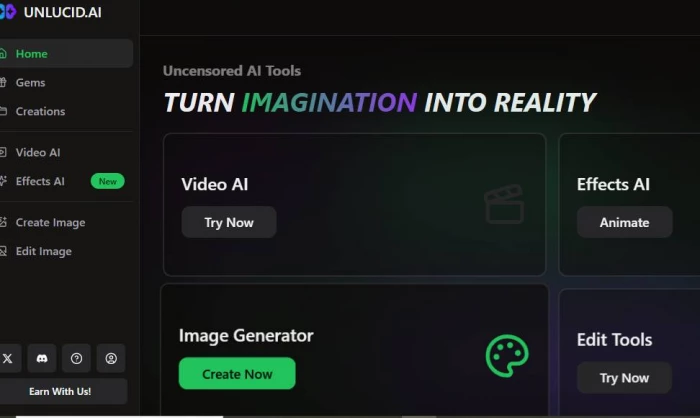
What Is Unlucid.ai?Unlucid.ai is a website that helps you create pictures a...
Ina Gupta1 week ago

Noblu glasses are marketed as blue light blocking, “auto-adjusting” smart glasse...
John Nyarko1 week ago
Discussion