Imagine you open a new tab, type “opendream.ai”, and instead of being greeted by yet another screaming hero banner about “revolutionary AI,” you treat the whole thing like a laboratory. Not a gallery, not a toy, a lab where every click, slider, and delay is a datapoint. That’s the lens for this review: OpenDream AI not as a magical art machine, but as a system you can poke, stress, and draft into your creative workflow.
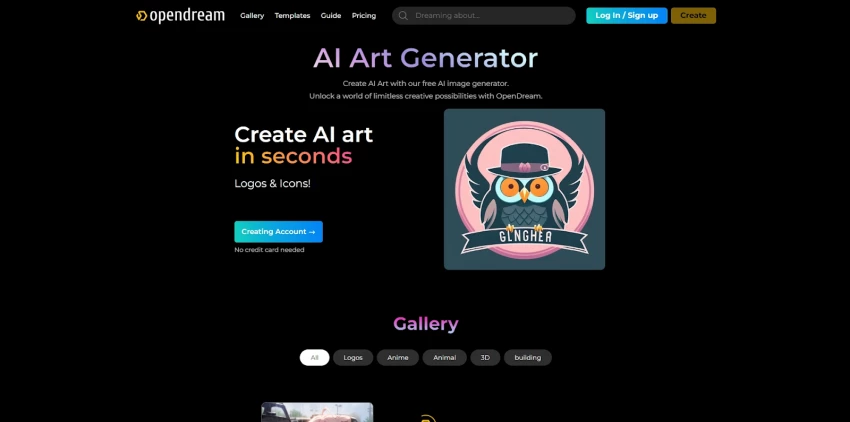
Most AI art tools behave like nightclubs: neon promises outside, bouncers at the login wall. OpenDream is more like a mid‑sized coworking space , you can walk in, look around, and start working without 14 steps of onboarding.
You arrive in a browser, not in a Discord server or an executable file. There’s a prompt box, some models to choose from, a handful of sliders and presets, and a generate button that doesn’t require you to know the difference between a GPU and a toaster. You can usually try things on a free tier or limited demo, then level up to paid plans if you want speed and consistency. The friction isn’t zero, but it’s low enough that a marketer, a student, and a hobbyist artist can all sit down and get something on screen in minutes.
Under the friendly surface, OpenDream is not a single‑button generator. It’s a stack of diffusion models and controls pretending to be simple.
You’re not locked into one mystery model. Depending on the current configuration and plan, you’ll see:
● Familiar diffusion families (Stable Diffusion, SDXL‑class options).
● Fine‑tuned “house” models tuned for photoreal portraits, anime, or stylized art.
● The usual suspects of control: steps, CFG (how obedient the model is to your text), seed, resolution, aspect ratio, sometimes sampler choice.
For casual users, all of this can be ignored. You can live entirely in presets – “realistic portrait”, “anime style”, “product shot” – and let OpenDream decide. But the moment you decide you care about consistency, or you want to reproduce a look, those boring‑looking sliders become the real product.
That’s the quiet promise here: OpenDream is not trying to be an Instagram filter. It’s closer to a simplified cockpit, where you can fly on autopilot until you’re ready to take the controls.
Every AI art tool looks impressive in marketing screenshots. The only fair test is to run your own gauntlet. Think of five prompts like “test probes”:
● A cinematic portrait with shallow depth of field.
● A clean product shot on a white background.
● An epic landscape.
● A logo‑style image with text.
● A stylized or anime character scene.
Here’s how OpenDream tends to behave if you treat it like a test bench rather than a toy:
● Portraits and concept art: often surprisingly strong, especially on photoreal and stylized models. Skin, lighting, and composition can feel competitive if you give prompts a bit of care.
● Landscapes: reliably good, particularly when you trade time for quality (more steps, larger resolution). Environmental scenes are one of its safer bets.
● Product imagery: useful for mockups and internal decks, not quite plug‑and‑play for polished brand campaigns. Expect a few rounds of iteration and some external editing.
● Logos and text: very much in “AI 2026 reality” – interesting for exploration, unreliable for clean, final typography. A graphic designer is still not out of a job.
Speed is part of the story too. On lighter models and moderate settings, images appear in seconds. Push the resolution or use heavier models, and you start counting in tens of seconds or a minute. Free users will feel the queues first; paying users get the smoother ride. The important bit: once you understand that “fast, high‑res, and super detailed” is a triangle you can’t fully optimize at once, OpenDream behaves predictably.
OpenDream does not bill in adjectives (“affordable”, “premium”), it bills in credits and tiers. That’s where many reviews stop; yours shouldn’t.
The structure usually looks like a staircase:
● At the bottom, a free tier: a limited number of generations, standard models, slower queues, and some guardrails on content and usage rights.
● In the middle, an “Essential”‑style paid tier: thousands of credits, access to better models, faster generations, more parallel jobs.
● Above that, “Pro” or heavier tiers: more credits, priority access, NSFW options where the policy allows, and a smoother experience overall.
● For power users and teams, business‑oriented options designed for volume rather than one‑off fun.
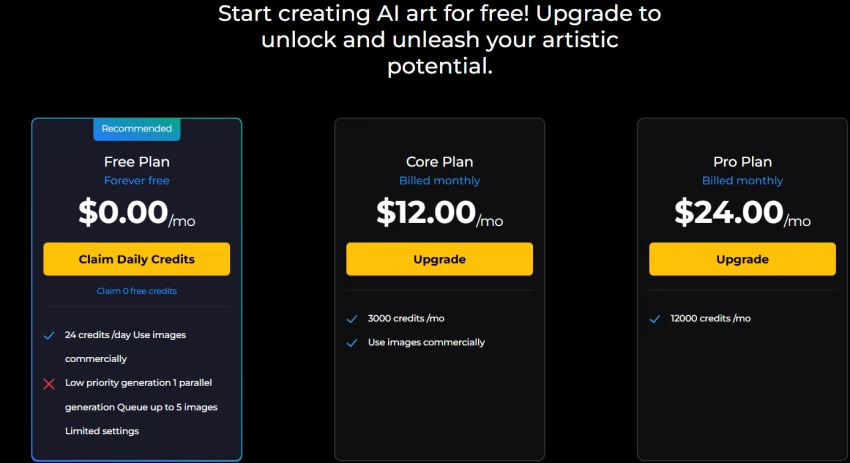
The trick is to translate this into something your reader can feel: “On Plan X, you can realistically produce Y decent images a month before you hit the wall.” At that point, OpenDream stops being an abstract price and becomes a cost per usable asset. That’s where it often looks attractive, not necessarily the absolute cheapest line item in the universe, but a reasonable cost for the control and quality it gives.
Forget features for a moment and imagine actual people, sitting in front of screens.
They need YouTube thumbnails, blog headers, social posts. OpenDream gives them:
● A browser‑based space with templates or presets that already lean toward “clickable visuals.”
● Fast iterations: four variations, tweak the prompt, run again, export the winner.
They’ll still jump into Canva, Figma, or Photoshop to handle text, cropping, and brand colors, but the “blank canvas” problem is gone.
They’re not ready to spend big on studio shoots. They need product‑style images and moodboards.
OpenDream lets them:
● Quickly explore lighting, backgrounds, and styles.
● Build “vibe boards” for what a future professional shoot might target.
Will they ship pure AI product images for serious campaigns? Probably not. Will they discover what they want visually, faster and cheaper? Absolutely.
They write stories, build RPG campaigns, sketch comics. OpenDream is:
● A tireless collaborator for character exploration, locations, artifacts.
● A way to “see” their world before they ever commission an illustrator.
Here, perfection is less important than imagination. OpenDream fits comfortably.
They care about reliability, policy, and brand risk. For them, OpenDream becomes:
● An ideation engine – a way to generate rough compositions and style tests.
● A way to speed up pitch decks, moodboards, and early client conversations.
But for final work, they’ll still reach for human designers, stricter tools, and well‑defined contracts. OpenDream sits in the “thinking with images” phase, not the “brand guideline bible” phase.
It’s easy to ignore the unglamorous bits of an AI platform, right up until something breaks.
Most of the time, OpenDream behaves like a reliable web app: prompts go in, images come out, and you forget that GPU clusters are doing the heavy lifting somewhere far away. When things strain, traffic spikes, heavier models, free users will feel the slowdown first. Paid users mostly experience the service as “stable enough to trust for daily work,” though not immune to the occasional bottleneck.
When something goes wrong, you’re not shouting into a void. OpenDream leans on:
● Help centers and documentation to explain features and limitations.
● Standard support channels (tickets, email) to handle issues.
Support is not the “hero feature” here, but it exists and matters: if you’re using this for real work, knowing someone will eventually answer when billing or generation weirdness shows up is part of the product.
In 2026, pretending safety doesn’t exist is not an option. OpenDream, like its peers, draws a line:
● There are categories of prompts it will not happily serve – illegal, abusive, or clearly harmful requests.
● NSFW and explicit content is fenced off by policy and, in some configurations, by plan level.
● Ownership and usage rights follow the now‑familiar pattern: you get broad rights to use what you generate, especially on paid tiers, but the platform may retain certain rights for research or improvement unless you’re on stricter plans.
For your reader, the takeaway is simple: OpenDream is a tool, not a legal advisor. Treat its outputs with the same caution you’d apply to any commercial asset, especially around trademarks, likeness, and sensitive topics.
If you draw that line down your notebook and label the left side “Strengths,” OpenDream’s entries look like this:
● Low‑friction entry: browser‑based, no Discord, no local installs, quick path from curiosity to first image.
● Real control without intimidation: multiple models, meaningful sliders, and presets that let you grow from casual to serious within the same interface.
● A free tier that actually works: enough credits and access to make side projects and experiments real, not just tease the experience.
● Versatile everyday output: strong for portraits, concept art, landscapes, and general creative assets once you learn how to talk to it.
● Reasonable value for solo and small‑team users: a balance between cost, control, and quality that makes sense if you generate regularly but not at industrial scale.
This side of the page answers, “Why would I pick this over doing nothing, or over a completely closed black‑box app?”
On the right side of the notebook, you write the things OpenDream doesn’t do for you.
● It’s not the loudest or biggest: it doesn’t yet have Midjourney‑level culture, Discord buzz, or a giant ecosystem of third‑party tutorials and tools.
● Defaults don’t always “wow”: you can get stunning results, but sometimes they require better prompts or more tweaking than a casual user wants to invest.
● It carries the usual AI art scars: odd hands, inconsistent text, and logo‑grade work that still needs human designers and vector tools.
● The free tier demands patience: generous in capability but limited by slower queues and credit caps, which is exactly when you’re most likely to be experimenting heavily.
● It’s not a complete enterprise pipeline: for heavily regulated, brand‑critical, or integration‑heavy environments, it’s a component, not a full infrastructure.
These limits don’t make OpenDream a bad tool. They simply define its realistic job description.
A review that ignores the neighbors is incomplete. OpenDream lives in a crowded neighborhood with names like Midjourney, Leonardo, and others casting long shadows.
If you zoom out:
● Midjourney is the charismatic artist: incredible default outputs, a massive Discord‑powered culture, and less explicit control for non‑experts.
● Leonardo and similar platforms are the workflow architects: templates, asset management, integrations, pipelines.
● OpenDream is the adaptable lab: more control than “one‑button” tools, more accessible than hardcore model‑hosting platforms, with a genuinely usable free tier.
Where OpenDream wins:
● No Discord requirement, no convoluted entry path.
● Enough sliders and model choice to keep power users interested.
● A pricing structure that doesn’t punish experimentation.
Where it loses:
● It doesn’t yet have Midjourney’s “wow on default” effect for casual users.
● It doesn’t yet match the depth of ecosystem and integrations some more mature platforms offer.
● It shares the common diffusion weaknesses: weirdness on hands, text, and edge‑case prompts.
In simple terms: if the AI art world were a city, Midjourney is the famous gallery, Leonardo is the design studio complex, and OpenDream is the workshop you go to when you want to actually get your hands on the tools instead of just admiring finished pieces.
Viewed as a hype machine, OpenDream will disappoint you. It will misinterpret prompts. It will get fingers wrong sometimes. It will make your logo look like it survived a glitch festival. It will occasionally slow down when everyone else discovers it at once.
Viewed as a practical tool, it becomes something else entirely:
● A browser tab where your ideas can turn into usable visual drafts in minutes.
● A lab bench for testing prompts, styles, and compositions without buying hardware.
● A bridge between “I can’t draw” and “I can still explore visually.”
OpenDream is not the final destination for every project. It’s the place where many projects can safely begin. For hobbyists, marketers, solo creators, and even cautious agencies, it earns a spot in the stack: not as the only brush you use, but as the one you reach for when you want to see possibilities quickly.
Late at night, after the usual AI companion ads blur together, PepHop AI shows u...
Funke Ogunleye1 day ago
Grubby AI is one of those tools that only exists because of a very 2025 problem:...
Funke Ogunleye2 days ago
Meet Muke AIMuke AI is an AI‑powered image manipulation suite best known for two...
Sandra Campos3 days ago

If your marketing currently lives in a chaotic mix of ChatGPT, Canva, random sch...
Samuel Osei3 days ago
Janitor AI doesn’t feel like “a chatbot platform.”It feels like walking into a l...
Sandra Campos4 days ago

MyImg AI is one of the most aggressive NSFW‑focused AI image and video editors o...
Samuel Osei5 days ago
Discussion