Artificial intelligence has dramatically changed how visuals are created. Only a few years ago, generating concept art, marketing graphics, or cinematic portraits required design skills, powerful hardware, and hours of manual editing. Today, tools built on models like Stable Diffusion can produce impressive visuals from a simple text prompt.
The challenge is that many of these systems still demand technical knowledge. Installing models, managing GPU memory, and configuring software like Automatic1111 or ComfyUI can quickly overwhelm casual users.
That’s exactly the problem OpenDream attempts to solve.
OpenDream is a cloud-based AI art generator designed to give creators access to Stable Diffusion without the complexity of running it locally. Instead of installing software or managing hardware, users simply open a browser, write a prompt, choose a style, and generate images within seconds.
For many creators, this convenience alone is reason enough to explore the platform.
At its core, OpenDream is a web-based interface built around Stable Diffusion models. The platform transforms written prompts into AI-generated images while handling all the technical infrastructure behind the scenes.
Unlike self-hosted tools that require GPU hardware and configuration, OpenDream runs entirely on cloud servers powered by enterprise-grade GPUs. This means anyone with an internet connection can generate images regardless of their device’s computing power.
The result is a tool that makes advanced AI image generation accessible to designers, marketers, content creators, and hobbyists who want results quickly without diving into technical setups.
In simple terms, OpenDream acts as a bridge between powerful AI technology and everyday creative workflows.

Using OpenDream feels surprisingly straightforward. The platform provides a clean browser interface where users can describe the image they want using a text prompt.
After entering a prompt, users choose a model or visual style, adjust a few generation parameters, and launch the rendering process. Within seconds, the system returns several image variations based on the prompt.
All the heavy computation happens on remote servers, so the user’s device doesn’t need to perform any AI processing. This eliminates the typical barriers associated with running Stable Diffusion locally, such as VRAM limitations, driver conflicts, and model downloads.
For creators who want to focus on ideas rather than infrastructure, this approach can feel refreshingly simple.
The primary function of OpenDream is turning text descriptions into images. A prompt such as “cinematic portrait of a futuristic astronaut, ultra-detailed lighting” can produce several unique visual interpretations within seconds.
This capability allows creators to generate a wide range of visual assets including:
Because the system generates multiple variations for each prompt, users can explore different creative directions quickly. This iterative workflow often leads to better results than traditional manual design processes.
One of OpenDream’s notable strengths is its support for multiple Stable Diffusion models. Instead of forcing users into a single aesthetic, the platform offers several model options that emphasize different visual styles.
For example, photorealistic models can produce images that resemble professional photography, while anime-focused models generate stylized characters and illustrations.
Other models provide a balanced mix of realism and creativity suitable for concept design or abstract imagery.
This flexibility allows users to experiment with different visual directions without installing separate AI checkpoints or switching platforms.
Unlike many beginner-friendly AI art tools that hide technical parameters, OpenDream exposes several controls that help refine output quality.
Users can adjust elements such as guidance scale, sampling steps, image aspect ratio, and random seed values. These settings influence how closely the AI follows the prompt and how detailed the final image becomes.
Negative prompts are also supported, allowing users to exclude unwanted visual elements. For example, adding terms like “blurry,” “distorted,” or “low quality” can help improve image clarity and composition.
This combination of accessibility and control makes OpenDream suitable for both beginners and intermediate users.
A standout capability of OpenDream is its depth-guided generation feature.
This tool allows users to upload a reference image that provides spatial information about the scene. The AI then uses this depth map to maintain the structural layout while altering visual style or content.
For example, a user could upload an architectural sketch and generate a photorealistic building while preserving the original structure.
This feature is particularly valuable for architecture visualization, interior design concepts, and environment art where spatial consistency matters.
OpenDream also includes tools that extend beyond basic image generation.
The platform’s AI upscaling system increases image resolution while preserving detail. This allows generated visuals to be used for higher-resolution applications such as presentations, digital banners, or printed materials.
Higher-tier plans also support batch generation, enabling users to produce dozens of variations simultaneously. This feature is especially useful during early creative exploration when users want to test multiple prompt variations quickly.
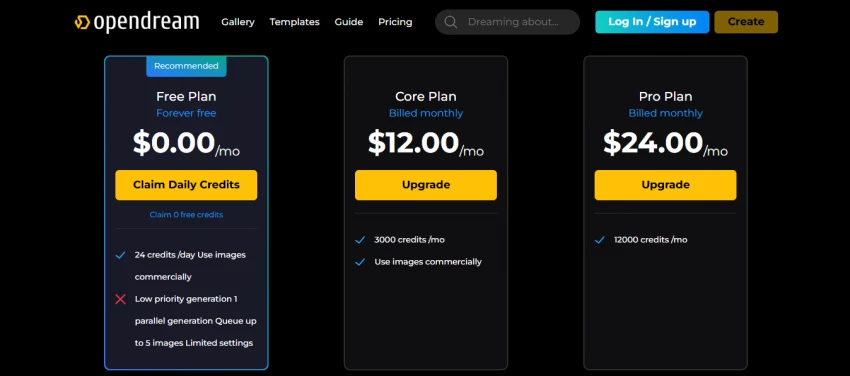
OpenDream follows a freemium model that allows new users to test the platform before committing to a subscription.
The free plan typically includes a limited number of daily credits, which are consumed each time an image is generated. While this is enough for experimentation, users who generate images frequently will likely reach the limit quickly.
Paid plans expand the available credits and provide faster processing speeds. Entry-level subscriptions usually cost around ten dollars per month, while higher tiers offer additional generation capacity, private outputs, and faster rendering queues.
Business plans may also include expanded usage limits and priority support for professional teams.
OpenDream’s greatest advantage is simplicity. By hosting Stable Diffusion in the cloud, the platform eliminates the need for powerful hardware and complicated installations.
Users can focus on prompt design and creative experimentation rather than technical configuration.
Other strengths include fast generation speeds, multiple artistic styles, and practical features such as upscaling and batch rendering.
The free tier also lowers the barrier for newcomers who want to explore AI art generation without immediate financial commitment.
While OpenDream provides convenience, it also introduces certain limitations.
Users are restricted to the models and features available within the platform’s ecosystem. Advanced Stable Diffusion users who prefer custom models, LoRAs, or experimental extensions may find the system less flexible than self-hosted solutions.
The free credit system can also limit experimentation for users who generate images frequently.
Additionally, because the platform runs on centralized infrastructure, performance may occasionally vary depending on server demand.
The main difference between OpenDream and self-hosted Stable Diffusion comes down to control versus convenience.
Running Stable Diffusion locally provides complete flexibility. Users can install custom models, apply advanced extensions, and experiment with complex workflows.
However, that freedom requires technical knowledge and powerful hardware.
OpenDream takes the opposite approach. It sacrifices some customization in exchange for accessibility, allowing users to generate AI art without worrying about infrastructure.
For many creators, the convenience of a managed platform outweighs the limitations.
OpenDream is particularly well suited for creators who need quick visual assets without managing technical setups.
Content marketers, social media creators, and small businesses can use the platform to generate graphics for digital campaigns. Writers and game designers can create character concepts and environment artwork for storytelling projects.
Designers who already work with tools like Photoshop or Canva may also use OpenDream as an idea generator before refining visuals manually.
However, AI enthusiasts who prefer deep experimentation with custom models may prefer self-hosted Stable Diffusion environments.
OpenDream represents a practical middle ground in the evolving world of AI image generation.
It offers the creative power of Stable Diffusion while removing the technical barriers that often discourage newcomers. By handling the hardware, infrastructure, and model management behind the scenes, the platform allows creators to focus entirely on visual ideas.
It may not satisfy advanced users who want complete customization, but for most creators seeking fast and reliable AI-generated visuals, OpenDream delivers exactly what it promises.
In 2026, as AI art tools continue to evolve, OpenDream stands out as one of the easiest ways to turn imagination into images without becoming an AI engineer.
AI character chat platforms have expanded far beyond simple chatbot conversation...
Peter Woods1 day ago
Artificial intelligence has dramatically changed how visual content is produced...
Peter Woods3 days ago
AI video creation has shifted from curiosity to competitive advantage. What used...
Peter Woods1 week ago
As video continues to dominate online engagement, AI-powered talking head tools...
Noura Belkacem1 week ago
Autodraft AI entered the writing tools space with a straightforward promise: str...
Peter Woods1 week ago
There are two kinds of presentation makers in the world. One group genuinely enj...
Alexander Hughes1 week ago
Discussion