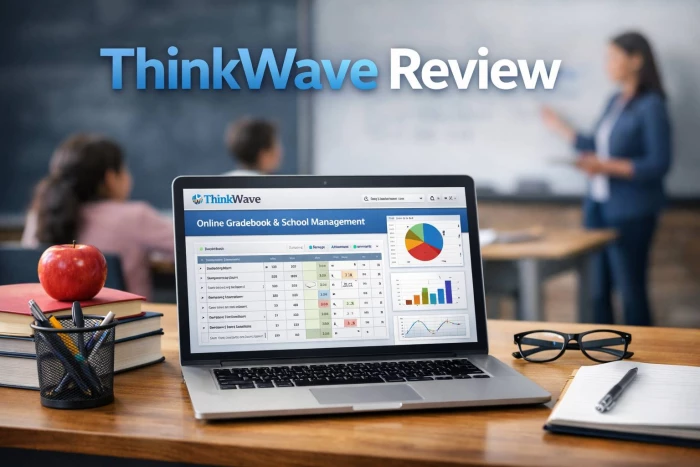
ThinkWave is trying to solve a very specific problem: schools drowning in spreadsheets, emails, and half‑baked portals, but not ready for a massive, enterprise‑grade SIS project. In that gap, it shows up as a lean, cloud‑based “operating system” for grades, records, and parent communication that you can actually roll out without a full IT department.

At its heart, ThinkWave is a web-based student information system wrapped around an online gradebook and portals for administrators, teachers, students, and parents. It lives entirely in the browser, which means no servers in the basement, no local installs, and no long-winded rollout cycles; you spin it up online and start moving your school’s academic life into one place. Its philosophy is clear: do the essentials records, grades, attendance, communication well, instead of sprawling into every possible school function.
There are really two distinct “faces” to this ecosystem. ThinkWave Administrator is the full school management side, designed for institutions that want to centralize their records and reports. ThinkWave Educator is the free, ad‑supported gradebook that lets an individual teacher run a professional‑looking portal without waiting on the school to make a decision. The first is a whole‑school decision; the second is a “start tomorrow” option.
ThinkWave is laser‑aligned with small to mid‑sized K‑12 schools, private academies, vocational programs, and after‑school setups that feel the pain of chaos but don’t want a heavyweight SIS. If you’re currently juggling Excel gradebooks, WhatsApp parent groups, and PDFs on a shared drive, you’re exactly the audience this tool is courting.
The full Administrator product makes sense when the institution is ready to put all students, teachers, classes, and attendance into one cloud system. The Educator variant, on the other hand, is perfect for a single teacher or tutor who just wants a serious, online gradebook with student/parent logins—no institutional buy‑in required. Very large, multi‑campus, or heavily regulated organizations can still use ThinkWave, but they may start bumping up against its limits faster than its core audience.
Strip away the marketing and you’re left with four main pillars:
● A central student information hub
● An integrated online gradebook
● Parent and student portals
● Built‑in workflows for assignments, distance learning, and communication
Everything else is basically an extension of those ideas.
For administrators, ThinkWave acts like a living database of the entire school. You can create and manage students, attach custom fields (anything from test scores to special programs), build schedules, mark attendance, and log behavior all from a browser. Instead of piecing together information from homeroom teachers, Excel sheets, and departmental lists, you’ve got one system that everyone feeds.
One of the big wins is how ThinkWave handles reporting. Because teachers are grading inside the same environment, the system can auto‑assemble report cards and transcripts rather than forcing admins to re‑enter data. Need PDFs for parents or records for transfers? Those can be generated straight from the data the teachers are already inputting, which is where a lot of the time savings come from.
For teachers, ThinkWave’s gradebook is where the real relationship with the product begins. The interface looks familiar - rows of students, columns of assignments but it adds the kind of logic that spreadsheets can’t natively enforce. You can build your grading scheme using points, percentages, letter grades, pass/fail, or custom scales, then apply weighted categories so that tests, quizzes, homework, and projects count exactly how your policy says they should.
Because the gradebook is connected to the student and parent portals, every grade you enter is more than just a number on your screen. It becomes live feedback to the student and their family. Many teachers highlight the ability to open a student’s view in a discussion and show: “Here’s what you’ve done, here’s what’s missing, here’s what would happen if you aced the next project.” That clarity is something ad‑hoc spreadsheets rarely deliver cleanly.
On top of grading, teachers can post assignments, attach files, and accept uploads. Assignments and submissions stop living in email threads and end up where they actually belong right next to the grades.
A huge part of ThinkWave’s promise is transparency. Students and parents get logins where they can see grades, missing assignments, upcoming work, handouts, and in many cases, emailed or downloadable report cards. For parents with multiple children, the platform is smart enough to show all their kids in a single account, which removes a lot of login fatigue.
From a school culture perspective, that changes the default. Instead of “we’ll tell you every quarter how your child is doing,” the stance becomes “you can see how your child is doing right now.” That tends to reduce grade‑related surprises and moves conversations from emotional shock to data‑driven coaching.
ThinkWave wasn’t born as a pandemic‑era tool, but its architecture is almost tailor‑made for hybrid and remote setups. Because all the content, assignments, and grading already live online, flipping into distance mode is more about policy than technology. Teachers post tasks, students submit from home, and grades update in the same place.
Communication is baked in via announcements and messaging that can target all students, specific classes, or parents. Instead of juggling WhatsApp, SMS, and email lists, schools can keep most official communication inside the environment where grades and assignments already live. It’s not a full‑blown communication suite, but it hits the essentials.
Let’s take an example of a small private school that has been trying to survive on Excel and email. An administrator spends hours each term collecting updated grades from each teacher, consolidating them into a master sheet, and then building report cards in a word processor. Every change or correction triggers another round of “send me your latest file.”
Once ThinkWave is in place, that dance changes.
● Teachers enter grades into their online gradebooks.
● Attendance feeds directly into each student’s record.
● The system compiles report cards and transcripts based on the live data.
The administrator’s role shifts from data hunter to data reviewer. The time formerly spent reconciling spreadsheets goes to checking outliers, validating records, or looking at trends.
For a teacher, the Monday routine changes too. Instead of marking attendance on paper and then transferring it later, they mark it once online. Instead of posting homework on a noticeboard and hoping students remember, they upload it and know it appears in student and parent dashboards. Instead of manually replying to “what is my child’s grade?” emails, they point parents to the portal.
For a private tutor or enrichment teacher running just a handful of students in the free Educator version, the benefit is even more immediate: you get a gradebook and portal that look like something a full school might use, without needing the school to adopt anything.
The business model is straightforward: the full ThinkWave Administrator is a subscription tied to your total student count, delivered entirely as a cloud service. That subscription covers the hosting, upgrades, and the user access across admin, teacher, student, and parent roles. There’s no hardware to buy, no local install, and no separate maintenance contract just to keep the thing breathing.
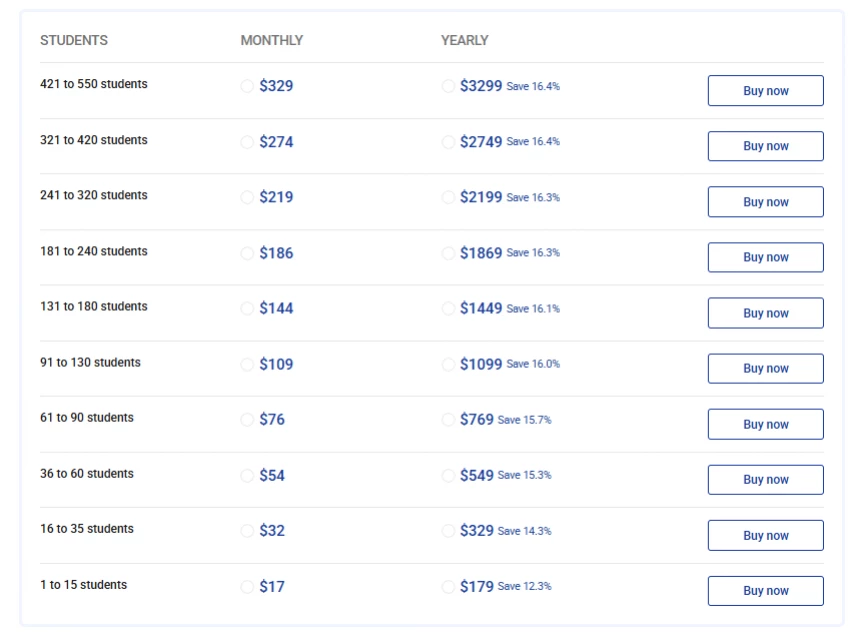
ThinkWave Educator, the solo‑teacher version, flips the model: it’s free to use but supported by ads. That’s intentional. It lowers the barrier for individual teachers to adopt it while leaving the full, ad‑free school deployment as a paid, institutional decision.
In terms of value, ThinkWave tends to sit in a price band where many competitors still only handle grading or basic classroom management. Here, you get a functioning SIS, integrated gradebooks, portals, and report generation. For a small or mid‑sized school that doesn’t need enterprise‑grade analytics or dozens of integrations, the cost‑to‑benefit ratio is compelling. For very large institutions, the story is less about raw price and more about whether the platform can keep up with complex needs over time.
ThinkWave’s interface is not trying to be the shiniest thing in edtech. It leans toward a pragmatic, slightly old‑school web design that prioritizes structure over visual flair. That can be a plus or minus depending on your expectations. The advantage: new users, especially those coming from spreadsheets, don’t feel like they’re learning a brand‑new paradigm. The layout is familiar, the metaphors straightforward.
There is, however, an initial setup hill to climb. You need to define grading structures, classes, terms, and custom fields before the system feels “natural.” Once that groundwork is done, many schools report that day‑to‑day use becomes almost routine.
Performance is tied directly to internet quality. Because everything is server‑side, there’s no offline mode; if your school’s connection is patchy, the experience will reflect that. On modern connections, though, the lack of local infrastructure is a relief—updates happen centrally, and you’re not babysitting servers or installing patches on every machine.
One area where ThinkWave does show its age is mobile. Instead of a deeply marketed native app, the experience is focused on access through the browser on phones and tablets. It works, but if your community is expecting an app‑first experience with push notifications and native UI, that’s something to weigh carefully.
If we zoom out, ThinkWave’s core strengths line up neatly around five themes:
● Centralization: Everything academic that matters—grades, attendance, schedules, basic records lives in one system. That reduces duplication, errors, and the “where is that file?” scramble.
● Time savings for admins: Auto‑building report cards and transcripts from live gradebooks is not just a convenience; it’s hours reclaimed every term.
● Transparency for families: Students and parents no longer wait for the next report cycle or chase teachers for “how am I doing?” updates. The data is always there.
● Practical support for hybrid/remote learning: Because assignments, uploads, and communication are integrated with grading, switching between in‑person and remote doesn’t require adopting a second platform.
● Accessible pricing: For many small and mid‑sized schools, ThinkWave delivers “SIS‑like” depth at a cost more typical of stand‑alone gradebook tools.
No tool is a fit‑all, and ThinkWave is no exception. Its biggest limitations tend to show up when schools push beyond its intended scope.
● Enterprise expectations: Large, complex institutions often need deep API access, broad integrations (finance, HR, learning analytics), and highly customized workflows. ThinkWave isn’t trying to be that kind of platform, and you can feel that boundary when you compare it with the big names in the SIS space.
● Mobile‑first demands: If your parent and student base expects a polished, native app experience across iOS and Android, ThinkWave’s browser‑first approach may feel underwhelming.
● Internet‑fragile environments: Schools with unreliable connectivity have to think carefully. A cloud‑only system is a blessing with good bandwidth and a headache without it.
● Free tier compromises: The ads in the free Educator version are part of the trade‑off. For some independent educators, that’s fine; for others trying to present a very polished brand, it can be a sticking point.
On the reliability side, ThinkWave’s biggest selling point is that it’s “just there” in the cloud. Schools that adopt it generally move away from worrying about backups, upgrades, and server uptime. Support tends to be delivered through email and documentation, and many users describe responses as prompt and helpful, especially during setup and the first reporting cycles.
The trust question often comes from larger institutions asking about security and compliance. While the platform outlines its cloud hosting and access controls, it doesn’t market itself as a heavyweight, compliance‑badge‑everywhere enterprise product. For small and mid‑sized schools, that’s rarely a blocker; for very large ones, it’s a cue to have a deeper conversation with the vendor before committing.
The school management space includes a mix of heavyweight SIS platforms and lighter, gradebook‑centric tools. ThinkWave competes more strongly in the latter category.
Among school management suites, names like PowerSchool SIS, Infinite Campus, and Gradelink offer deeper integrations, broader modules (HR, finance, advanced analytics), and extensive customization often at significantly higher cost and implementation complexity. Compared to these, ThinkWave positions itself as faster to deploy, easier to learn, and more budget‑friendly for smaller schools that do not need enterprise‑grade extensibility.
In the gradebook‑centric space, ThinkWave Educator contends with tools like TrackMyGrades and various teacher‑focused apps that offer free or low‑cost grading and reporting. Its differentiator here is the upgrade path: a teacher can start with a free gradebook and, if the school chooses, graduate to a full SIS without switching ecosystems. Locally focused ERPs (for example, India‑centric products) may offer more region‑specific features such as local language support or country‑specific compliance, but often at the cost of a more complex interface.
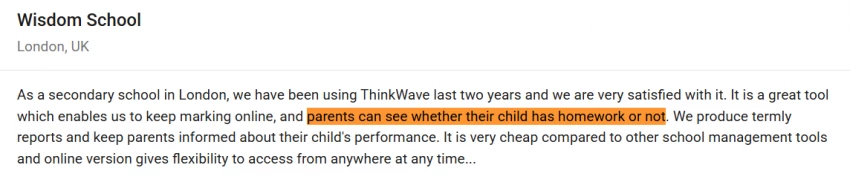
User feedback gives a good sense of ThinkWave’s real‑world impact. A program director in Seattle credits ThinkWave with fundamentally changing their program by consolidating spreadsheets, streamlining scheduling and record‑keeping, and saving “countless hours.” Teachers in reviews highlight the ability to show students exactly what they must do to reach desired grades as a standout benefit of the gradebook.
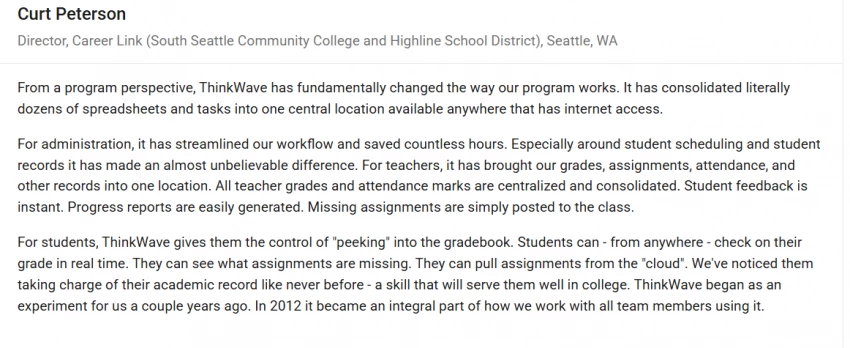
Other testimonials emphasize the effect on families: one school notes that ThinkWave “enables us to keep marking online, and parents can see whether their child has homework or not,” while also calling attention to its low cost compared with other management tools. For Upward Bound‑style programs, admins report improved student accountability, better deadline adherence, and the ability to troubleshoot issues faster because data is always up to date.
ThinkWave is best understood as a lightweight, cloud‑based SIS and gradebook that delivers strong value to small and mid‑sized institutions and solo educators who want clarity, transparency, and time savings without enterprise bloat. If you’re a small to mid‑sized school or program that’s currently balancing on the shaky scaffolding of spreadsheets, email chains, and disconnected tools, ThinkWave is absolutely worth serious consideration. It gives you a coherent, cloud‑based home for grades, attendance, records, and family communication without demanding an IT overhaul or enterprise‑grade budget.
If you’re a solo teacher or tutor, the free Educator gradebook is an easy way to step into professional‑level online grading and parent visibility, and it keeps the door open for a wider school rollout later.
If, however, you’re running a large, multi‑campus institution with a complex tech stack and detailed integration needs, ThinkWave is more likely to feel like an entry‑level SIS than a long‑term backbone. In that scenario, it can still be a great stopgap or pilot, but you’ll want to benchmark it carefully against the more powerful (and pricier) SIS platforms on the market.

In recent months, CrossMarket.ai has quietly gained attention across social medi...
Ina Gupta11 hours ago

HINAI Web is an enterprise‑grade, web‑based Hospital Information / Health Inform...
Noura Belkacem1 week ago
TL;DRTwelve Labs is a developer‑first video intelligence platform that provides...
Grace Howard1 week ago

FaceCheck ID sits at a strange intersection of online safety, facial recognition...
Funke Ogunleye1 week ago

A student opens their laptop in exam season, looks at the stack of PDFs, s...
Grace Howard1 week ago

Voomixi.com is the kind of site that makes big promises without saying much out...
Noura Belkacem2 weeks ago
Discussion