On the surface, UltraViewer almost feels too good to be true. A remote desktop application that’s incredibly small in size, installs almost instantly, runs on very old Windows systems, and doesn’t constantly push users toward paid plans sounds like a rare find in today’s software market.
Compared to heavyweight competitors with strict limitations and high prices, UltraViewer initially comes across as a modest but impressive alternative.
Then users start sharing their experiences online. And the narrative quickly becomes more layered.
This isn’t a story about a fake application or hidden malware. Instead, it’s about a legitimate remote desktop tool that, over time, became closely associated with scams, mixed experiences, and sharply divided opinions.
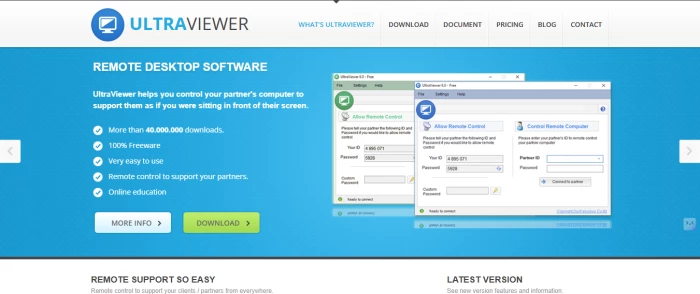
UltraViewer doesn’t waste time with elaborate introductions. The installer is just over 1 MB, which feels almost out of place in an era of bloated software. Setup takes moments, and there’s no account registration or configuration maze to navigate. Once launched, a connection ID and password appear, and remote access is immediately possible.
That level of simplicity is exactly what attracts many users. IT support workers, freelancers, family members helping relatives, and individuals accessing their own computers remotely often appreciate how quickly UltraViewer gets out of the way.
It performs well even on outdated machines, uses minimal system resources, and works through most firewalls without manual adjustments. The experience feels refreshingly old-school—functional, direct, and trusting.
What UltraViewer Actually Delivers
At its core, UltraViewer focuses on doing the basics correctly. Screen sharing is responsive, keyboard and mouse input feel natural, and transferring files between systems is straightforward. A built-in chat feature helps clarify actions during a session, which is particularly useful when assisting less technical users.
Paid plans build on these basics with practical upgrades rather than flashy extras. Higher transfer limits, session recording, improved performance, address books, and support for multiple simultaneous connections are available at prices far lower than most competitors.
For freelancers and small teams, this pricing can feel almost unreal—offering similar functionality to well-known tools at a fraction of the cost.
When Ease of Use Attracts the Wrong Attention
This is where UltraViewer’s reputation takes a turn.
The software didn’t gain notoriety because it malfunctioned. It gained attention because its simplicity made it attractive to scammers.
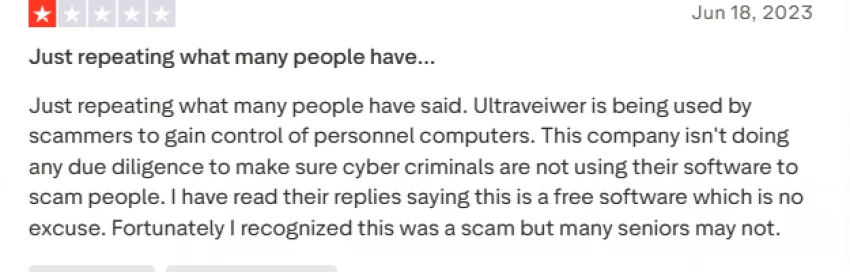
Fraud schemes involving fake security alerts, urgent phone calls, and impersonated tech support often end with a familiar instruction: download UltraViewer so “support” can take control. Victims comply, and within moments, scammers gain full access to the system.
Numerous online reviews describe devastating losses, often involving elderly or non-technical users. Importantly, these incidents are not the result of malicious code within UltraViewer itself. They stem from deception and social engineering. Still, public perception rarely separates tools from how they are misused.
A User Interface That Assumes Trust
UltraViewer’s design philosophy assumes users know who they’re connecting with. Active session indicators are subtle, and it isn’t always immediately obvious when someone is connected. If access credentials are compromised, repeat connections can occur without strong visual alerts.
Experienced users can manage these risks, but less technical individuals may not notice warning signs. In that sense, UltraViewer relies heavily on user awareness—an approach that can be risky in real-world scenarios.
The Free Version: Praised and Questioned
UltraViewer’s unlimited free usage is one of its most praised features. There are no enforced session timeouts or aggressive upgrade prompts, which feels rare in the remote desktop space.
However, some users report stability issues in the free version that seem to improve after upgrading. There’s no verified proof of intentional limitations, but the perception exists—and online perceptions can shape trust just as much as facts.
When combined with accusations of unreliable reviews, the overall picture becomes harder to evaluate.
Strong Technical Security, Human-Level Weaknesses
From a technical standpoint, UltraViewer includes expected security measures such as strong encryption, secure key exchange, brute-force protection, and digitally signed software. Against direct hacking attempts, it holds up reasonably well.
What no software can fully defend against is social manipulation. When users voluntarily grant access under pressure, technical safeguards lose much of their power.
While UltraViewer has added reporting options and responds to some abuse cases, critics argue that these efforts address problems after they occur rather than preventing them.
Who UltraViewer Works Well For—and Who Should Avoid It
In controlled environments, UltraViewer can be a solid choice. Trusted internal teams, personal device access, and small support operations that verify connections carefully often find it reliable and cost-effective.
For vulnerable users, non-technical individuals, or scenarios involving sensitive data, the risks outweigh the convenience. The tool assumes awareness and caution that not all users possess.
The Overall Impression, Without Passing Judgment
UltraViewer isn’t a bad product, nor is it a flawless one. It demonstrates how powerful, accessible software can be both helpful and harmful depending on how it’s used.
It delivers strong performance at a low cost and avoids many of the restrictions imposed by larger competitors. At the same time, its reputation has been shaped by misuse, quiet operation, and design choices that prioritize ease over safeguards.
Using UltraViewer can feel like leaving a door unlocked. For some, it’s practical. For others, it’s risky.
And once those stories circulate online, they tend to stick.






Discussion