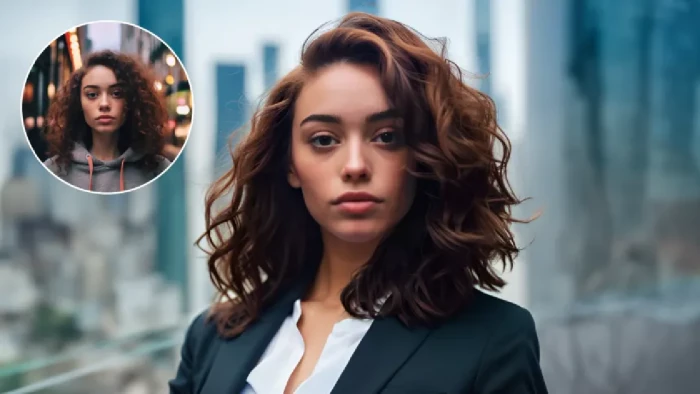
Professional headshots have become essential in 2026. Whether you are updating your LinkedIn profile, launching a personal brand, applying for a new job, running a business, or building a portfolio, a polished headshot is often the first impression people have of you. But traditional photography sessions cost hundreds of dollars, take hours to schedule, and leave you with limited variations. AI has completely changed this equation.
Today, anyone with a smartphone and a few reference photos can generate studio-quality headshots at home, in minutes, and for a fraction of the price. This guide walks you through exactly how to use AI to create professional headshots that look natural, polished, and ready for any use case.
The reason AI headshots have exploded in popularity is simple: they solve every major limitation of a traditional photo shoot.
For freelancers, executives, remote employees, and content creators, AI headshots have become a genuine alternative to traditional photography.
The tool you use makes the biggest difference. Some platforms offer basic headshot generation with limited customization, while others give you full studio-level control over style, lighting, and background. For most people in 2026, the smartest starting point is a versatile AI picture generator like ImagineArt, which offers cinematic image quality, access to multiple leading AI models, and full creative control from a single dashboard.
ImagineArt is not just an image generator, it is a complete creative suite designed for professional-quality visual output.
For anyone serious about producing high-quality headshots, ImagineArt gives you the flexibility of an entire creative studio in one workspace.
Before generating anything, prepare a strong set of reference photos. This step decides how accurate your final headshot will look.
Quality references produce accurate, natural-looking results. If your inputs are blurry or inconsistent, the AI will struggle to preserve your likeness.
The beauty of AI is that you can generate any style you want. Before writing your prompt, decide on the vibe you are going for.
Common professional headshot styles include:
A clear style direction makes every prompt more effective and every result more usable.
The prompt is where AI headshots go from average to exceptional. Be specific and descriptive.
"Professional corporate headshot of a 30-year-old professional woman wearing a black blazer, soft studio lighting, blurred neutral background, portrait mode with 85mm lens, confident subtle smile, cinematic realism, square 1:1 aspect ratio."
Small tweaks like changing lighting or lens style can produce dramatically different results.
Once your prompt is ready, generate multiple variations. Do not settle for the first result. AI headshots are best when refined through iteration.
Tips for better refinement:
Using a platform like AI picture generator tools inside ImagineArt gives you access to multiple models at once, which is invaluable for headshots. Some models are better at skin texture, others at lighting, and others at composition. Testing them side by side helps you find the version that captures you at your best.
Before using your headshot, take a few minutes to polish the final image.
Most AI tools include built-in enhancement features, but a quick pass in your favorite editor can make the difference between a good headshot and a great one.
Once you have your final images, they can be used almost anywhere a professional photo is required.
The consistency and quality of AI headshots also make it easy to build a full brand kit around a single photo shoot session.
AI has made professional headshots accessible to everyone. What used to require expensive studio time, professional photographers, and multiple hours of coordination can now be done in minutes with the right tools and prompts. Platforms like ImagineArt combine multiple leading AI models, cinematic-quality output, and a full creative suite in one workspace, making them the strongest choice for anyone who wants realistic, polished, and versatile headshots. Whether you are a founder, a freelancer, a professional, or a creator, AI headshots let you show up as your best self across every platform, without ever stepping into a studio.
Yes. Modern AI tools like ImagineArt produce headshots that are indistinguishable from studio photography in most cases. Many professionals now use AI headshots for LinkedIn, company websites, speaker profiles, and marketing materials.
Most platforms offer free plans that let you generate a limited number of headshots at no cost. Paid plans typically start at affordable monthly tiers and unlock higher generation limits, faster processing, and commercial usage rights.
Yes. AI-generated headshots are allowed on LinkedIn, resumes, business profiles, and most professional platforms. The key is choosing a natural, realistic style that accurately represents you.
I started exploring Redeepseek.io because the name itself creates curiosity. At...
Grace Howard4 months ago
Nomi AI isn’t just another chatbot; it’s a full‑blown AI companion platform buil...
Alexander Hughes7 months ago
Artificial intelligence was originally built to support human decision-making. E...
Peter Woods7 months ago
Speech-to-text technology has matured significantly over the past few years. Wha...
Grace Howard7 months ago
Anthropic has accused three prominent Chinese AI companies of systematically “mi...
Sandra Campos7 months ago
In what might be the most unexpected AI benchmarking milestone of 2026, Elon Mus...
Peter Woods7 months ago
Discussion