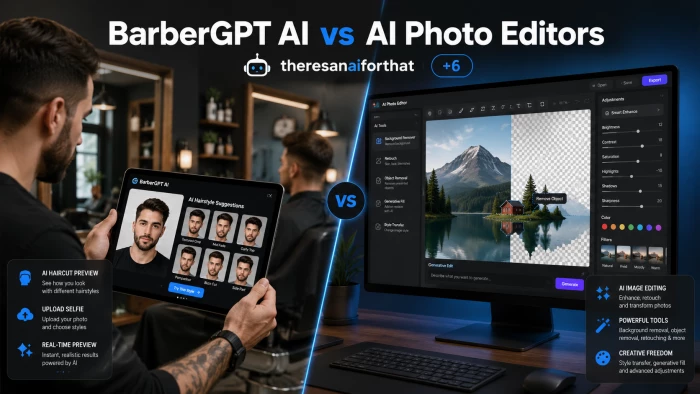
Picture the situation. A man stares at his reflection on a Sunday evening, scissors-curious. He has been wearing the same haircut for three years. A bold change feels overdue, but the last impulsive cut ended in a regrettable buzz that took six months to grow out. He picks up his phone and types into Google: "how to see myself with a different haircut." Two completely different categories of tools come back.
On one side: BarberGPT AI, a small, focused tool that does exactly one thing - preview hairstyles on a photo. On the other side: AI photo editors like Photoshop, Picsart, Canva, and YouCam Makeup, generalist platforms with hairstyle options buried inside dozens of unrelated features. Both can technically answer the question "what would a fade look like on me?" but they answer it in radically different ways, with very different costs, time investments, and quality outcomes.
This guide separates the two categories cleanly. Where each excels, where each disappoints, and which one a real person should reach for depending on what they actually need to accomplish.
| The decision between BarberGPT and a general AI photo editor is not really a feature comparison. It is a decision about whether the goal is one specific outcome or a flexible toolkit. |
Most software comparisons assume the two products are doing the same job and the question is which one does it better. That framing breaks down here. BarberGPT and AI photo editors are not running the same race.
BarberGPT is a single-purpose tool. The entire product exists to answer one question: how would a different haircut look on this face? Everything in the interface - photo upload, hair masking, style picker, generation engine - funnels toward that one outcome. The credits-based pricing reflects the same logic. Pay for the previews actually generated, walk away when done.
AI photo editors are toolboxes. Inside Photoshop, Picsart, or Canva sits a sprawling collection of capabilities: background removal, color correction, object cloning, face retouching, text overlays, layout templates, and dozens of other features. Hair manipulation is one item on a long menu, and it is rarely the headline. Subscriptions cover the entire toolbox whether the user touches the hair tool once or never.
| Frame | BarberGPT AI | AI Photo Editors |
|---|---|---|
| Tool philosophy | Specialist - one job, done well | Generalist - many jobs, varying depth |
| Native output | Realistic hairstyle previews on a face | Almost any image manipulation |
| Effort to first result | Less than a minute | 3 minutes to 30+ minutes depending on tool |
| Pricing model | Pay-per-generation credits, no subscription | Monthly or annual subscription |
| Skill required | None - upload, click, wait | Some - masking, layers, blending modes |
Reading feature lists tells less than seeing the actual workflow. The next two subsections walk through what it takes to produce a single hairstyle preview using each approach, using realistic timing based on documented user experiences and review consensus through May 2026.
1. Open barbergpt.ai in any browser. No account creation, no email verification, no app download.
2. Upload a clear front-facing photo with the hairline visible. Phone camera quality is enough.
3. Use the masking tool to highlight the hair region - typically takes 10 to 15 seconds.
4. Pick a target style from the library: fades, buzz cuts, longer textured looks, swept styles, and roughly 40 variations in total.
5. Click generate. The AI produces the preview in around 30 seconds.
6. Compare results side by side, save the preferred preview, or delete the uploaded photo when finished.
Total time, including upload and masking: typically under two minutes. Total cost, after the three free generations: $0.05 to $0.14 per preview depending on the credit pack purchased.
1. Open the chosen tool - Photoshop, Picsart, Canva, YouCam Makeup, or another generalist editor. Most require sign-in and an active subscription.
2. Import the photo into the workspace.
3. Locate the hair-related feature, which is rarely the default landing screen. Photoshop users typically navigate through Generative Fill or use selection tools manually. Picsart and YouCam offer dedicated hair filters but with fewer style choices than BarberGPT.
4. Mask the hair region - automated in some tools, manual in Photoshop unless using AI-assisted selection.
5. Apply the style or use a generative prompt like "replace this hair with a textured crop fade." Iteration is usually required to get a believable result.
6. Refine edges, adjust blending, and re-export. This is the step that swings total time most heavily.
Total time depends sharply on the tool: roughly three minutes in Picsart's hair tool, eight to fifteen minutes in Canva or Photoshop with Generative Fill, and twenty to thirty minutes for a manual edit. Total cost: the relevant subscription, regardless of how few previews are actually produced.
Speed is one of the largest gaps between the two approaches. The chart below visualizes the realistic time to produce a single hairstyle preview, including upload, masking, generation, and reasonable refinement.
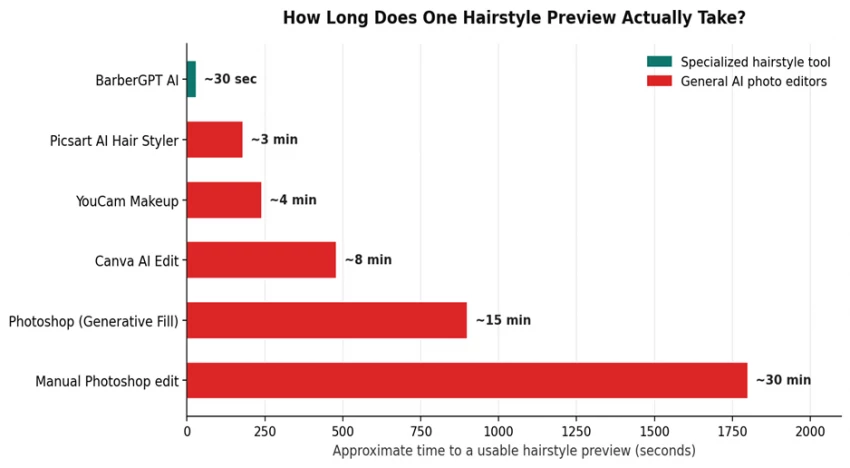
The 30-second figure for BarberGPT is not theoretical - the platform was built around that benchmark, and most reviews confirm sub-minute total time including upload. The Photoshop and Canva figures assume a user familiar with the tool; first-time users typically take longer.
Speed alone does not decide the question. The matrix below maps ten capabilities that buyers commonly evaluate when comparing styling tools to general photo editors. The pattern that emerges is exactly the one a specialist-versus-generalist trade-off would predict.
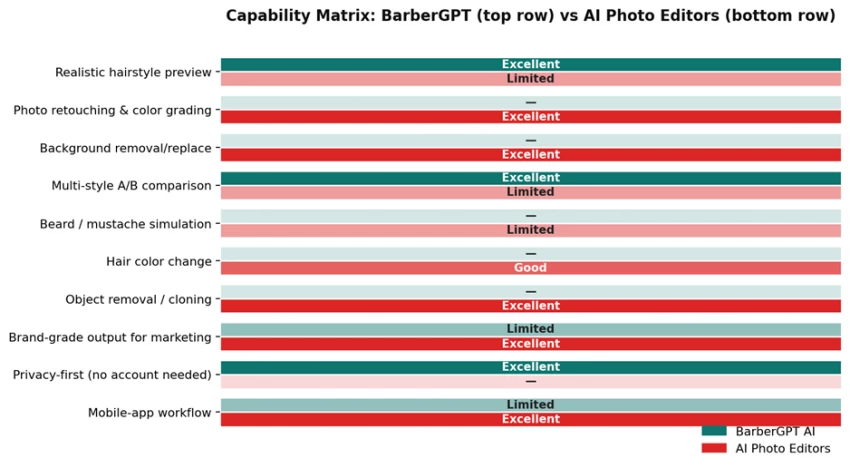
Three observations stand out. First, BarberGPT wins decisively on its own ground - hairstyle preview, multi-style A/B comparison, and privacy. Second, AI photo editors win decisively on everything else - retouching, backgrounds, color, object work, and brand-grade output. Third, neither side actually does what the other does well; the categories barely overlap in capability terms.
| If the goal is one specific outcome, specialists win. If the goal is flexibility, generalists win. The mistake is treating these as the same product. |
Headline pricing rarely captures the actual economics. A $15 BarberGPT credit pack and a $22.99 Photoshop subscription look comparable on paper. Once cost is reframed as price-per-preview produced, the gap becomes hard to ignore.
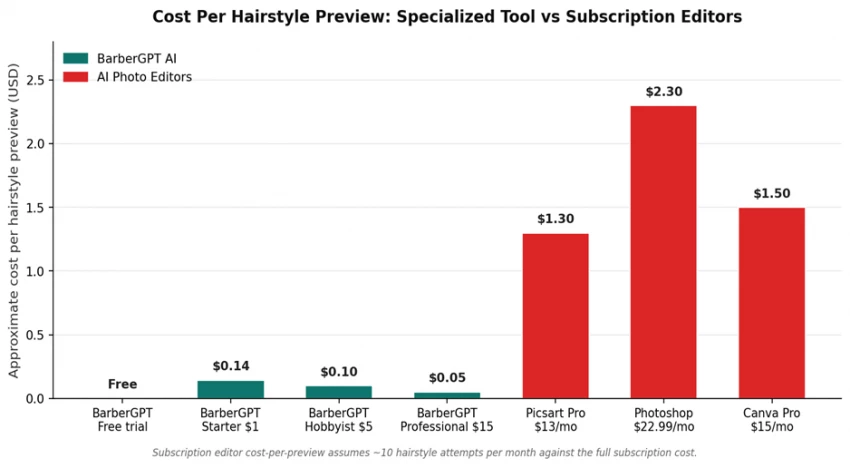
The chart assumes someone using a general photo editor produces around ten hairstyle previews per month - a generous estimate, since most users never produce that many. At a realistic two or three previews per month, the per-preview cost on a Photoshop subscription climbs above $7.50, and on Canva above $5.00. BarberGPT's Hobbyist plan delivers 50 previews for $5 - a per-preview cost roughly fifty times lower.
The economics flip, however, the moment a user is already paying for the photo editor for unrelated work. A graphic designer who already pays for the Adobe stack incurs no marginal cost when adding a hair edit to the existing workflow - though the time cost remains very real.
| Plan | Price | Generations included | Cost per preview |
|---|---|---|---|
| Free trial | $0 | 3 | $0.00 |
| Starter | $1 | 7 | $0.143 |
| Hobbyist | $5 | 50 | $0.10 |
| Professional | $15 | 300 + early access | $0.05 |
Pricing and time matter, but a tool only earns its place if the actual output is convincing. This is where the comparison gets interesting, because each side wins quality battles in different lanes.
Reviews are consistent on a few points. On a clear desktop-quality photo, BarberGPT produces hairstyle previews that look genuinely close to a real haircut on the user's face. Lighting, face angle, and skin tone are preserved. Hair texture matches the chosen style. The masking is the weakest link: imperfect lighting or shadows around the hairline can produce visible blending artifacts, and the mobile experience is documented as less precise than the desktop one. The tool also does not yet handle longer hair, beards, or color changes well - these are simply outside its scope.
Strong photo editors with skilled users can produce results that exceed BarberGPT's quality, particularly when the goal is a polished marketing-grade image rather than a quick personal preview. Photoshop's Generative Fill, used carefully, can handle long hair, color shifts, and unusual angles that BarberGPT cannot. The cost is time and skill: average users frequently produce blended-but-obvious results that fall short of what a specialized tool delivers in seconds. Picsart and YouCam Makeup democratize this somewhat with one-tap hair filters, but the style libraries are smaller and less photorealistic than BarberGPT's.
A useful framing: BarberGPT delivers consistent, decent output with almost no effort. AI photo editors deliver variable output ranging from worse-than-BarberGPT to noticeably better-than-BarberGPT, depending entirely on the operator's skill and the time invested.
Most comparison articles default to two-column pros and cons tables, which tend to flatten everything into binary positives and negatives. The honest version of this section is messier.
The product nails its core promise. A man wanting to preview a haircut before committing gets a fast, cheap, private answer with no friction. The browser-only design and lack of mandatory account creation removes obstacles that kill use of similar tools. Per-preview pricing means experimenting with twenty styles costs less than a single barber consultation. The 40-plus style library covers most real-world haircut decisions for short and medium men's hair.
Scope is the defining problem. The tool does not handle female hairstyles, beards, mustaches, hair color changes, or long-hair precision. Mobile masking accuracy is documented as inconsistent. Photo quality really matters - bad lighting, side angles, or busy backgrounds reduce result quality more than other tools. The tool also cannot help with anything beyond hair: no skin retouching, no background changes, no marketing-grade output.
Flexibility is the headline win. The same Photoshop subscription that handles a hair preview also handles a product photoshoot, an event poster, a website banner, and a professional headshot. Skilled operators can produce hairstyle results that exceed what any specialized tool offers. The learning investment, when made, pays back across hundreds of unrelated tasks. For agencies, designers, and businesses already paying the subscription, hair edits cost effectively nothing extra.
For the specific task of "preview a haircut on my face," generalist photo editors are overengineered. The interface friction, learning curve, and time cost are all higher than the task warrants. A first-time Photoshop user trying to swap a hairstyle will frequently produce a worse result, in more time, at higher cost, than they would have on BarberGPT. Subscription pricing punishes occasional users who want one specific outcome a few times a year.
Generic decision frameworks tend to feel abstract. Six concrete scenarios make the right choice obvious in most situations someone might actually find themselves in.
A 32-year-old office worker is bored of his current cut. He has never used Photoshop, does not pay for any subscription, and just wants to see what a textured fringe would look like before booking the appointment. The right tool is BarberGPT. The free trial alone may answer the question; if not, the $1 Starter pack covers seven previews.
A barber wants to show clients potential cuts before starting. The shop already runs a lean tech setup with a tablet at the chair. BarberGPT's no-account, no-install browser flow fits the use case cleanly. Buying the Professional pack at $15 covers 300 client consultations.
A small agency needs to produce hero images for a haircare brand's campaign - multiple models, varied hairstyles, polished backgrounds, brand-consistent lighting. The right tool is a full AI photo editor, almost certainly Photoshop. BarberGPT's output is not built for hero-image quality, and the lack of background or lighting control is disqualifying.
A grooming-focused content creator wants to post hairstyle transformation videos. The workflow needs both - BarberGPT to produce realistic preview stills quickly and a video editor (often a separate tool entirely) to assemble the before-and-after clips. A subscription photo editor is overkill for the still-image step.
A graphic designer who already pays for Creative Cloud occasionally wants to preview a hairstyle on a personal photo. The marginal cost of using Photoshop's existing tools is zero, and the result will likely be better than BarberGPT's if they invest the time. Photoshop wins because the subscription is already a sunk cost.
Someone uncomfortable with uploading personal photos to platforms that retain image data wants a quick preview. BarberGPT's no-account flow and explicit support for manual photo deletion is the more privacy-friendly path. Most general photo editors store uploaded assets indefinitely under their default account terms.
| Scenario | Recommended tool |
|---|---|
| Personal pre-haircut preview, no other editing needs | BarberGPT AI |
| Barbershop in-chair client consultations | BarberGPT AI |
| Agency producing marketing-grade hero images | AI photo editor (Photoshop) |
| TikTok creator making transformation reels | BarberGPT AI + a video tool |
| Existing Photoshop subscriber, occasional hair edit | AI photo editor already paid for |
| Privacy-conscious user wary of account-based platforms | BarberGPT AI |
Privacy is rarely the first thing buyers think about with image tools, but it deserves attention here because the two categories handle uploaded photos in genuinely different ways.
BarberGPT processes uploads inside the browser session, does not require an account, and provides a manual delete option. Reviewers including ScamAdviser have flagged the domain as low-risk. The product's commercial model - pay per generation rather than monthly subscription - also reduces incentive to retain user data for retention-driven analytics.
Mainstream AI photo editors generally require account creation, store uploaded images under platform terms of service, and retain assets for varying periods depending on the plan. Adobe, Canva, and Picsart each have detailed data-handling policies that allow specific uses of uploaded content for product improvement unless users explicitly opt out. None of this is unusual for SaaS products, but it is meaningfully different from BarberGPT's no-retention approach.
For users uploading photos of others - a barber showing a client a preview, for instance - the privacy difference becomes more than theoretical. Asking a client to consent to long-term storage on a third-party platform is a different conversation than processing the photo locally and deleting it after the session.
Both sides of this comparison have genuine limitations that no marketing copy will surface. The list below names them directly.
• The 40-plus style count is real but skews toward short and medium men's cuts; longer hair styles are limited.
• Mobile masking accuracy is documented as inconsistent - the desktop version is the reliable experience.
• The tool produces no native variations for women's hairstyles or unisex/long looks at the time of writing.
• Beards, facial hair, and hair color changes are explicitly outside the current scope.
• Output is a flattened image, not a layered file - refining the result outside BarberGPT requires re-importing into another tool anyway.
• Out-of-the-box hair filters in tools like Picsart and YouCam Makeup offer fewer styles and less realism than BarberGPT.
• Photoshop's Generative Fill produces strong results only with skilled prompting; first attempts often look obviously synthetic.
• Subscription pricing penalizes users who only need the hair use case, since they pay for hundreds of unrelated features.
• Time-to-result is typically 5 to 30 times longer than a specialized tool, even for experienced operators.
• Default account-based retention means uploaded personal photos sit on third-party servers indefinitely unless actively deleted.
BarberGPT and AI photo editors are not really competing. Treating them as alternatives obscures what is actually a clean division of labor. BarberGPT exists because a generalist photo editor is the wrong tool for a specific job that millions of men try to do - visualize a haircut before committing. The fact that a $5 credit pack does this better than a $22.99 monthly subscription is not a quirk; it is the whole point of specialist software.
The future of personal-grooming AI tools likely follows the same pattern playing out across other software categories. Generalist platforms keep adding broad capabilities. Specialists keep emerging in the gaps where one specific outcome warrants one focused tool. Both layers persist, and the right choice depends on which job is in front of the user at any given moment.
For someone deciding between BarberGPT and a photo editor right now, the smarter question is not which is better. The smarter question is what the actual job to be done is. Once that is named clearly - preview a haircut, produce a marketing image, retouch a photo, run a barbershop consultation - the right tool reveals itself almost without further analysis.
| Specialists win when one outcome matters most. Generalists win when many outcomes share one workflow. The choice is the job, not the tool. |

New Claude Model Targets Agentic AI WorkflowsAnthropic has launched Claude Sonne...
Samuel Osei3 months ago

Gemini’s Image Tools Get a Wider RolloutGoogle is expanding access to Gemini’s p...
Alexander Hughes3 months ago

Two AI video generators, two very different first days. I ran PixVerse through i...
Alexander Hughes3 months ago

Two of the most talked-about AI chat platforms. I opened both, picked a characte...
Alexander Hughes3 months ago

The two-minute versionIf you only read one thing, read this. The rest of the doc...
Alexander Hughes3 months ago

Why Seedance 2.5 mattersSeedance 2.5 is the latest release in ByteDance’s Seedan...
Alexander Hughes3 months ago
Discussion