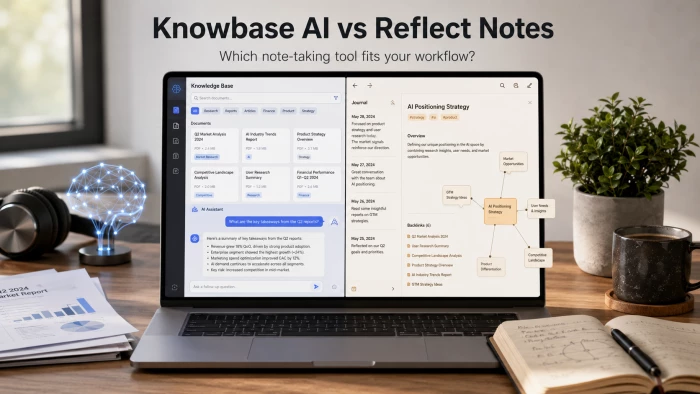
Two AI tools dominate very different ends of the personal-knowledge spectrum. Knowbase AI behaves like a chatty Dropbox: documents, recordings, and YouTube videos go in, and natural-language answers come out. Reflect Notes behaves like a fast, encrypted second brain: notes link to one another, and an AI palette helps shape them as the writing happens.
The two products often show up in the same shortlist, but they answer different questions. The one that feels more intelligent in practice depends almost entirely on the kind of work being done. The breakdown below pulls together features, pricing, privacy, and real task fit so the trade-off becomes easy to see.
Quick verdict Knowbase AI feels more intelligent when the task is retrieval - pulling a specific fact out of dense PDFs, transcripts, or videos. Reflect Notes feels more intelligent when the task is thinking - turning rough thoughts into structured ideas and linking them across days, projects, and sources. Heavy multimedia archives lean toward Knowbase. Daily writers, researchers, and journalers lean toward Reflect. |
A side-by-side look at how each tool positions itself before any deeper analysis.
| Dimension | Knowbase AI | Reflect Notes |
|---|---|---|
| Core idea | Chat with stored files | Networked notes with AI palette |
| Best for | Retrieving answers from documents | Capturing and connecting ideas |
| AI engine | ChatGPT-based document chat | GPT-4o + Claude 3.5 Sonnet + Whisper |
| Knowledge structure | Library of files | Backlinks + daily notes |
| Multimedia handling | PDF, MP4, MP3, PPTX, DOCX, YouTube | Voice transcription, web clips, Kindle import |
| Privacy posture | Standard cloud encryption | End-to-end encryption, zero-knowledge |
| Free tier | 100 MB storage, 25 questions/month | 14-day full-access trial only |
| Entry paid plan | Around USD 9 per month | USD 10 per month, USD 100–120/year |
| Mobile | Web-based, browser-friendly | iOS native; web; no Android app |
Knowbase AI describes itself as a fusion of Dropbox and ChatGPT. The workflow is straightforward: a user uploads files into a Library, the platform processes those files, and a chat window then answers questions about the contents. Supported formats include PDF, MP4, MP3, TXT, PPTX, DOCX, and YouTube links. Bulk uploads of up to 100 files are allowed at once, and transcription works across more than 50 languages.
In effect, Knowbase AI sits closer to a retrieval-augmented generation (RAG) tool than a writing tool. The intelligence is in the answer engine, not in the structuring of new ideas. A researcher with twenty academic PDFs, a sales lead with three months of Zoom recordings, or a student with lecture videos in a foreign language all get the same magic moment - typing a plain-language question and watching the platform pull the relevant passage.
Reflect Notes is a note-taking app first, an AI assistant second. Built by Alex MacCaw (founder of Clearbit), the app is wired around three ideas: speed, privacy, and networked thought. Each day opens to a fresh Daily Note. New notes can backlink to people, projects, books, and earlier ideas, building a graph that grows organically.
The AI Palette is summoned with a keystroke (Cmd+J on macOS). It runs on GPT-4o or Claude 3.5 Sonnet, with the choice exposed in preferences. Whisper handles voice transcription, including system audio from meetings. Reflect operates with end-to-end encryption and a zero-knowledge architecture, meaning the platform itself cannot read user content.
A useful way to compare the two tools is to ask a single question: where does the smartness happen - at storage, at retrieval, or at composition? The answer separates Knowbase AI and Reflect Notes more sharply than any feature list.
Knowbase AI concentrates intelligence at retrieval. Files arrive raw. The system indexes them, embeds the contents, and waits for a question. The smartness is the ability to find the right paragraph in the right document and explain it conversationally. That is genuinely useful - and genuinely narrow.
Reflect Notes concentrates intelligence at composition and connection. Notes are not raw imports - they are written, linked, tagged, and revisited. The AI Palette helps refine ongoing thought: list the action items in this meeting, find the counter-arguments to that paragraph, summarise yesterday's journal. The smartness is in shaping content, not retrieving it.
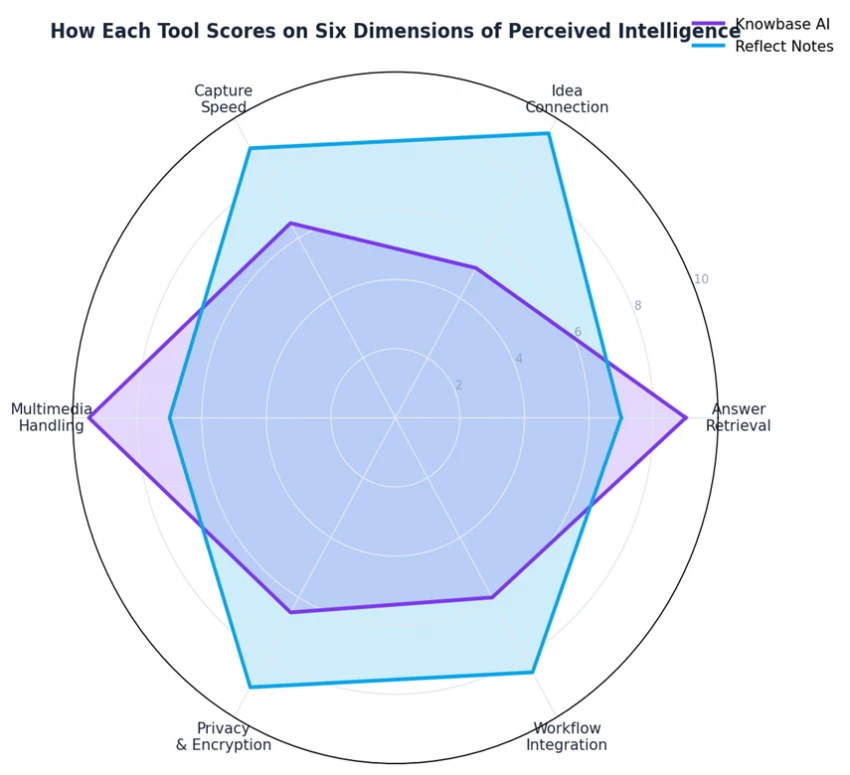
The radar above maps both tools across six dimensions. Knowbase AI takes the lead on Answer Retrieval and Multimedia Handling - both natural strengths of a document-chat platform. Reflect Notes leads on Idea Connection, Capture Speed, Privacy, and Workflow Integration. The shape of the overlap explains why most users do not feel forced to choose: the two tools rarely solve the same problem on the same day.
A cleaner read of the same product pages, with marketing language stripped away.
| Feature | Knowbase AI | Reflect Notes |
|---|---|---|
| Document chat (RAG) | ✓ Native - primary use case | - Not the focus; AI works on note text only |
| Backlinked notes | - No backlinks; flat library | ✓ Native; graph view available |
| Daily notes structure | - Not present | ✓ Default landing page |
| Voice / audio transcription | ✓ Up to 1800 minutes (Pro) | ✓ Whisper-based, system audio capture |
| Video file ingest | ✓ MP4 up to 1 GB per file | - Not supported |
| YouTube link ingest | ✓ Native | - Manual copy-paste only |
| AI model choice | - Single ChatGPT-based engine | ✓ GPT-4o or Claude 3.5 Sonnet |
| Custom AI prompts | - Limited | ✓ Saveable prompt library |
| End-to-end encryption | - Standard cloud encryption | ✓ Zero-knowledge architecture |
| Calendar integration | - Not advertised | ✓ Google Calendar |
| Browser web clipper | - Manual upload | ✓ Native extension |
| Kindle highlight sync | - Not native | ✓ Native |
| Mobile app | - Browser experience | ✓ iOS native (no Android) |
| Offline mode | - Cloud-dependent | ✓ Works offline, syncs later |
| Sharing | ✓ Shareable chat with knowledge | ✓ One-click web publish |
| MCP server (for AI agents) | - Not available | ✓ Official MCP server |
Feature lists rarely settle the “which is smarter” argument. Real tasks settle it faster.
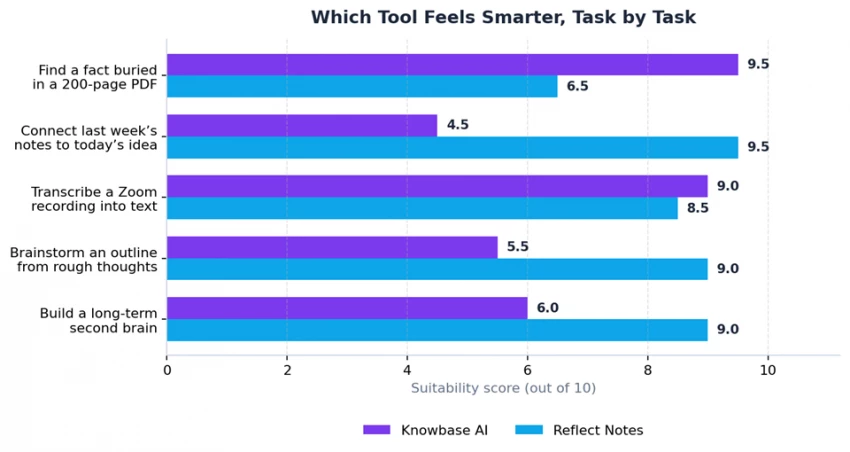
• Pulling a single fact out of a dense, multi-document archive - research papers, contracts, technical manuals.
• Making sense of meeting recordings without manually scrubbing the timeline.
• Cross-referencing a YouTube tutorial, a PDF, and a slide deck without opening three apps.
• Sharing a chatbot version of a knowledge base with a colleague or client.
• Daily journaling with linked entries that build a personal knowledge graph over months.
• Turning a noisy brainstorm into a tight outline using the AI Palette.
• Holding sensitive notes - therapy, legal drafts, journalism - under end-to-end encryption.
• Voice-dumping after a walk and letting Whisper plus GPT-4o produce a structured summary.
A useful mental model Knowbase AI is a librarian: hand it a stack of material, ask a question, get a sourced answer. Reflect Notes is a writing partner: think out loud, watch ideas connect, refine in place. A librarian does not draft an essay. A writing partner does not catalogue a 200-page thesis. Most knowledge workers eventually want both. |
Both products fall in the same monthly price range, but the value mechanics differ. One sells storage and queries; the other sells unlimited capture with capped AI tokens.
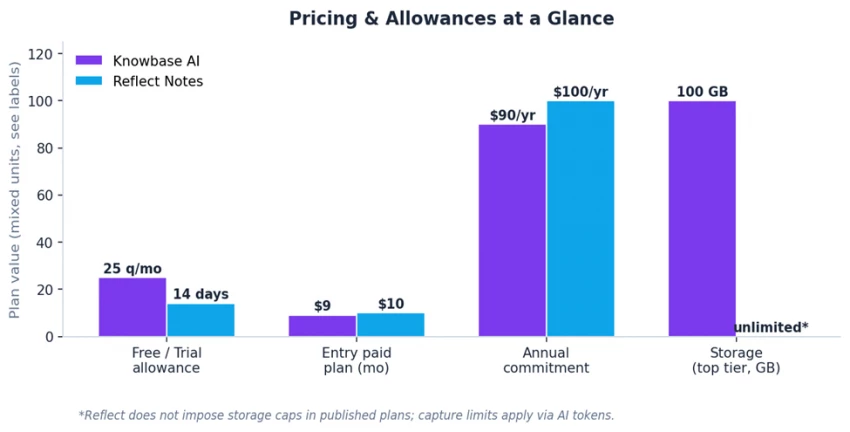
• Free: 100 MB storage and 25 questions per month - useful for evaluation, restrictive for ongoing work.
• Basic: roughly USD 9 per month, with 180 transcription minutes.
• Standard: 10 GB storage and 900 transcription minutes - the most commonly recommended tier.
• Pro: up to 100 GB storage and 1,800 transcription minutes for heavy multimedia archives.
• Free trial: 14 days of full access. No permanent free tier.
• Personal: USD 10 per month, billed monthly, or USD 100–120 per year.
• AI tokens: free accounts had a 10,000 tokens/day cap historically; paid accounts get a far larger budget.
• No published storage cap - the gating is on AI usage, not file count.
| Knowbase AI | Reflect Notes |
|---|---|
Strengths • Document chat that pulls source-cited answers from large libraries. • Wide format support: PDF, video, audio, presentations, YouTube. • Bulk upload of up to 100 files at once. • Multilingual transcription across 50+ languages. • Free tier exists for evaluation, with no credit card required. Limitations • Free plan caps at 100 MB and 25 queries - restrictive in real use. • No backlinking, no daily notes, no graph view. • Standard cloud encryption rather than zero-knowledge. • Smaller community footprint compared with mainstream notes apps. • Quality of answers depends heavily on file structure and clarity. | Strengths • Networked notes with backlinks and an organic graph view. • End-to-end encryption with zero-knowledge architecture. • Choice of AI model - GPT-4o or Claude 3.5 Sonnet. • Whisper-powered voice and meeting transcription built in. • Native iOS app, calendar integration, web clipper, Kindle sync. Limitations • No permanent free tier - paid subscription required after 14 days. • No native Android app; mobile use limited to browser on Android. • Folder-style organisation is absent; backlinks are the only structure. • Limited rich formatting compared with Notion-style block editors. • Login historically requires emailed magic link, which can lag. |
The encryption story is the single most consequential gap between the two products. Reflect Notes runs end-to-end encryption with a zero-knowledge model: the platform can verify an account without reading its contents. A recovery kit is generated on signup, because losing the password means losing the data - there is no backdoor.
Knowbase AI uses standard cloud encryption suitable for typical business documents, but it is not zero-knowledge. For most use cases - research libraries, training material, marketing assets - that is acceptable. For sensitive client material, legal drafts, medical records, or journalism source notes, the architecture matters, and Reflect Notes carries a clear advantage.
Important nuance for AI-assisted features Reflect's AI Palette and AI Search only transmit highlighted text or selected search results to the model provider. Notes that are never sent to AI features stay encrypted and unreadable to the platform. OpenAI deletes API request logs after 30 days, and Reflect explicitly states user data is not used for training. |
• Researchers and academics who maintain large PDF libraries and need quick answer retrieval.
• Sales, customer success, and support teams turning recorded calls into searchable knowledge.
• Content creators transcribing videos and podcasts to repurpose into articles or scripts.
• Small teams building a shareable, chat-style knowledge base from existing documents.
• Anyone whose primary problem is information overload from files, not idea generation.
• Writers, founders, and consultants who want a daily-notes habit with AI assistance built in.
• Journalers and personal-development users who value privacy as a non-negotiable.
• Knowledge workers who think in connections - backlinks beat folders for this group.
• Apple-first users who want a polished iOS app with calendar, Kindle, and clipper integrations.
• Anyone whose primary problem is structuring fresh ideas, not searching old documents.
A reasonable both-and approach A growing number of knowledge workers run both - Knowbase AI as a long-term archive of files received from elsewhere, Reflect Notes as the active workspace where original thinking happens. The two roles do not collide because the inputs are different: imports versus drafts. |
Intelligence in software is not a single dimension. It shows up in three different places: at the moment of capture, at the moment of retrieval, and at the moment of composition. Each tool optimises for a different one.
At retrieval - finding the buried answer in a wall of imported content - Knowbase AI feels more intelligent. The conversational interface is the right metaphor for the job, and the multimedia coverage is hard to beat at this price.
At composition and idea-linking - taking rough thought and shaping it, then connecting it to last month's thinking - Reflect Notes feels more intelligent. The AI palette, voice transcription, and backlinked daily notes form a tighter loop than a chat-with-files interface ever can.
On the narrow question posed by the title, neither tool wins outright. The honest answer is that Reflect Notes feels smarter for the kind of work most knowledge workers do every day - writing, planning, deciding - while Knowbase AI feels smarter for the work that happens less often but matters intensely when it does - extracting insight from someone else's archive.
Knowbase AI and Reflect Notes are not really competitors. They are two different theories of how AI should help people think. One bets on retrieval over an existing archive; the other bets on connection between fresh thoughts. Both bets have paid off, in different ways, for different audiences.
For workflows dominated by imported documents, recordings, and reference material, Knowbase AI is the smarter pick. For workflows dominated by writing, planning, and reflection, Reflect Notes is the smarter pick. The honest answer to the question in the title is that intelligence belongs to the tool whose theory matches the task at hand.

New Claude Model Targets Agentic AI WorkflowsAnthropic has launched Claude Sonne...
Samuel Osei3 months ago

Gemini’s Image Tools Get a Wider RolloutGoogle is expanding access to Gemini’s p...
Alexander Hughes3 months ago

Two AI video generators, two very different first days. I ran PixVerse through i...
Alexander Hughes3 months ago

Two of the most talked-about AI chat platforms. I opened both, picked a characte...
Alexander Hughes3 months ago

The two-minute versionIf you only read one thing, read this. The rest of the doc...
Alexander Hughes3 months ago

Why Seedance 2.5 mattersSeedance 2.5 is the latest release in ByteDance’s Seedan...
Alexander Hughes3 months ago
Discussion