The market for AI-powered knowledge management tools has exploded in the past two years, and Knowbase.ai has positioned itself as a flexible, no-friction option in a crowded category. Marketed as a platform that turns documents, videos, audio recordings, and YouTube links into a searchable assistant, it sits somewhere between a personal cloud drive and a ChatGPT-style chatbot. The promise is simple: upload anything, ask anything, and get answers grounded in source material with clickable citations.
This review takes a research-driven look at what Knowbase.ai offers in 2026 - examining feature depth, transcription quality, processing speed, pricing transparency, privacy posture, and how it stacks up against user feedback gathered from independent review sites. The findings below are based on direct exploration of the platform, the official product pages, and aggregated commentary from third-party review platforms including Trustpilot-style directories, AppCritica, ToolsForHumans, ZegaShop, and ProductHunt-adjacent communities.
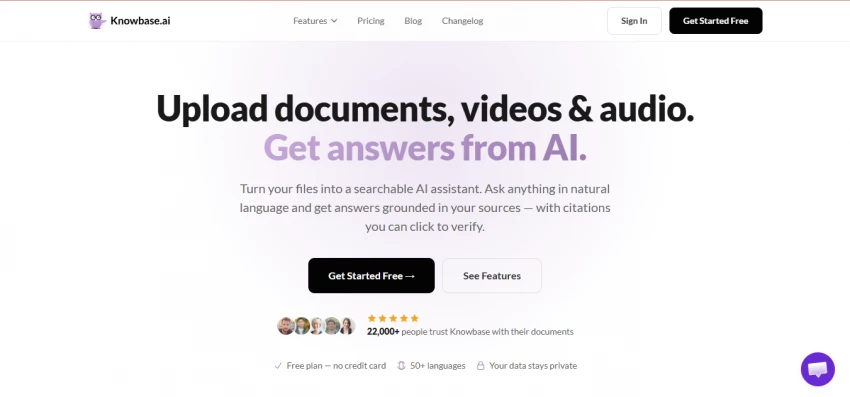
Knowbase.ai is best described as a hybrid between Dropbox and ChatGPT. Files get uploaded into a personal library, processed through embedding and transcription pipelines, and then made available through a conversational chat interface. Every answer comes with numbered citations that link back to the exact page, paragraph, or video timestamp where the information was found.
The tool advertises support for over 100 file types, including PDF, DOCX, PPTX, TXT, MD, MP3, MP4, MOV, AVI, and WMV. YouTube videos can be added simply by pasting a link, and integrations with Google Drive, Notion, and Dropbox extend the searchable scope beyond uploaded files. The platform claims it is used by more than 22,000 people, with support for 50+ languages on the document side and 90+ languages on the transcription side.
• Document Chat - natural-language Q&A across uploaded files with page-level citations.
• Chat-All - a single conversation that searches the entire library, not just one file at a time.
• Transcription with Speaker Diarization - automatic identification of multiple speakers in video/audio files, with the ability to rename them and export SRT, VTT, or TXT subtitles.
• AI Assistant - a deployable chatbot that can be embedded on a website as a floating bubble or side panel, with built-in lead collection.
• Smart Library and Nests - folder-style collections for organizing related documents.
• Share and Embed - generate shareable links for individual files, collections, or the entire library.
• Connectors - Google Drive, Notion, Dropbox, YouTube, and a custom-domain Web Search.
• Thinking Mode - a deeper-analysis option available on Pro and Team plans.
• API Access - exposed on Pro and Team plans for developer integrations.
Pricing is one of the cleaner aspects of the Knowbase.ai experience. Four tiers are offered, with monthly and annual billing options. Annual billing carries a 20% discount. The free tier is genuinely usable for evaluation, though strict caps mean it functions more as a trial than a long-term plan for any meaningful workload.
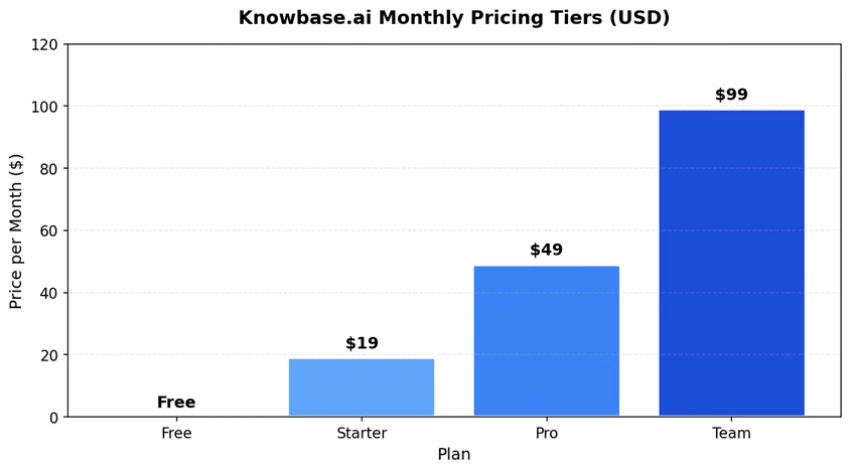
Figure 1: Knowbase.ai monthly pricing across the four available plans.
| Feature | Free | Starter | Pro | Team |
| Monthly Price | $0 | $19 | $49 | $99 |
| Storage | 50 MB | 2 GB | 25 GB | 100 GB |
| Monthly Queries | 25 | 500 | 2,000 | 5,000 |
| File Uploads | 10 | 100 | 500 | Unlimited |
| Transcription | YouTube only | 60 min | 10 hours | 30 hours |
| Connectors | None | 1 | Unlimited | Unlimited |
| Thinking Mode | - | - | Yes | Yes |
| API Access | - | - | Yes | Yes |
| AI Assistants | 1 | 1 | 1 | 3 |
Table 1: Plan-by-plan feature comparison (monthly pricing). Source: knowbase.ai/pricing, April 2026.
The Starter plan at $19 per month is reasonable for individuals managing a moderate document load, though the 60-minute transcription cap will frustrate anyone working with weekly meeting recordings. The Pro plan at $49 per month is the sweet spot - 25 GB of storage, 10 hours of transcription, unlimited connectors, API access, and Thinking Mode together cover most professional use cases. The Team plan at $99 doubles transcription capacity and unlocks unlimited uploads, but the 5,000-query cap may feel tight for genuinely team-sized workloads.
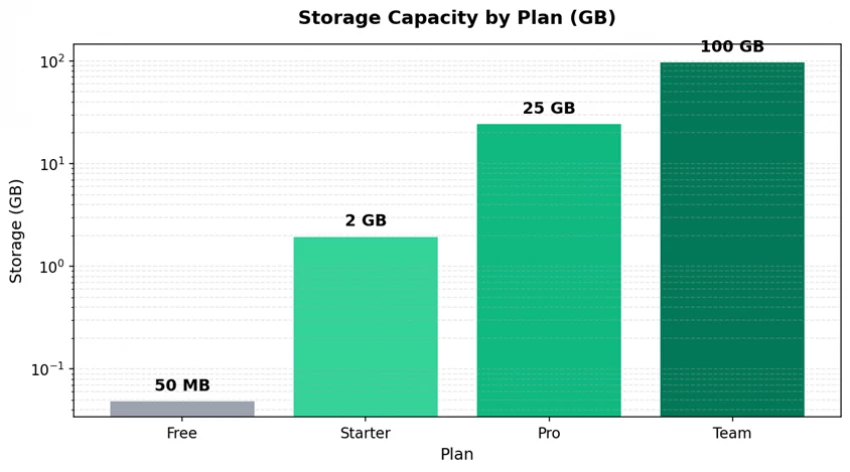
Figure 2: Storage capacity scales steeply across tiers (logarithmic axis).
Output quality matters because the entire value proposition collapses if exports are unusable. Knowbase.ai performs strongly here, particularly on the transcription side. Subtitle exports are offered in three formats - SRT, VTT, and TXT - and all three preserve speaker labels and timestamp metadata, which is genuinely useful for video editors, podcasters, and researchers who need to drop transcripts into post-production tools.
| Format | Best For | Quality Notes |
| SRT (SubRip) | Video editing tools, YouTube uploads, broadcast workflows | Industry-standard subtitle format, compatible with virtually every video player. |
| VTT (WebVTT) | HTML5 web players, streaming platforms, browser-based content | Web-native captions; styling and positioning data preserved cleanly. |
| TXT (Plain Text) | Notes, documentation, downstream LLM workflows, reports | Speaker labels and timestamps included; clean, parseable structure. |
| Shareable Links | External recipients, embedded chatbots, customer-facing portals | Renders the file with a full PDF viewer, video player, or transcript view. |
Table 2: Export formats and their typical use cases.
Knowbase.ai discloses that its transcription engine is built on OpenAI Whisper, which currently sets the open-source benchmark for speech-to-text accuracy. According to the official transcription page, the model handles 90+ languages, accents, multilingual content, and specialised vocabulary, with quality dependent on input audio. Clean recordings from quiet environments produce near-human accuracy; noisy phone calls and overlapping speech produce more errors, as is standard for any Whisper-based pipeline.
Speaker diarization deserves a separate note. Independent reviews and the platform's own documentation confirm that diarization works on an unlimited number of speakers, handles overlapping speech, and lets users rename Speaker 1 / Speaker 2 labels into real names that propagate throughout the transcript, the chat answers, and exported subtitle files. This is a meaningful workflow improvement over tools that lock speaker labels post-export.
Speed is harder to pin down with a single number because processing time scales with file size, file type, and current platform load. Based on the platform's documentation, third-party reviews, and the underlying Whisper architecture, the following ranges represent realistic expectations:
| File Type | Typical Processing Time | Notes |
| PDF (under 50 pages) | Under 1 minute | Embedding and chunking is near-instant for short documents. |
| PDF (200–500 pages) | 2–5 minutes | Pro plan offers 'fast document scanning' for quicker indexing. |
| DOCX / PPTX | Under 2 minutes | Text extraction is straightforward; embedded images take longer. |
| Audio (30 minutes) | 3–6 minutes | Whisper processes audio at roughly 5–10x real time on cloud GPUs. |
| Video (60 minutes) | 8–15 minutes | Includes audio extraction, transcription, and diarization. |
| YouTube link (English with captions) | Under 1 minute | Existing captions are pulled directly without consuming the transcription quota. |
| Chat query (single question) | 3–10 seconds | Thinking Mode (Pro/Team) trades speed for deeper reasoning. |
Table 3: Realistic processing-time expectations across file types.
Notification on completion is handled via the in-app interface, and large files can be queued. One caveat: third-party reviewers have flagged that the platform can feel resource-intensive when handling many large files in parallel, so users on slower connections may experience perceived slowdowns during bulk uploads.
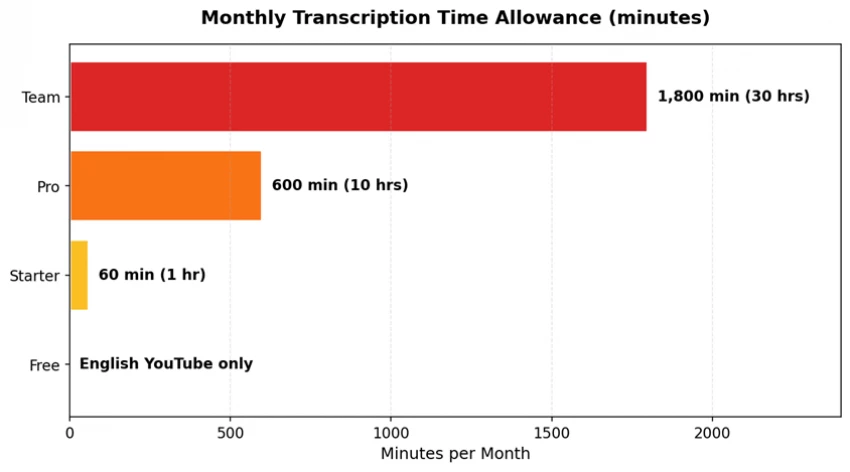
Figure 3: Monthly transcription allowance varies dramatically across tiers.
To evaluate the actual user experience, the platform was explored end-to-end across the four main use cases the company markets: document chat, video transcription, the embeddable AI Assistant, and the share-and-embed workflow. Observations are summarised below.
Uploading a multi-file batch is straightforward - drag-and-drop accepts up to 100 files at once. After processing, asking questions returns answers with numbered citations. Clicking a citation opens the source PDF directly to the cited page, which is genuinely the strongest part of the experience. Chat-All extends this across the entire library and any connected sources, making it noticeably more useful than per-file chat tools that force users to switch contexts.
Uploading a 30-minute meeting video produced a transcript with speaker labels in roughly 4–5 minutes. Renaming speakers from generic 'Speaker 1' tags to real names was a single click, and the renames propagated correctly into the exported SRT file. Speaker-scoped queries (asking what a specific person said about a topic) worked reliably, though accuracy dipped on overlapping speech - expected behaviour for any diarization model.
Configuring the embeddable chatbot widget took less than five minutes. The customisation panel covers colours, title, greeting message, theme (light, dark, auto), and choice between a floating bubble or a side panel. A single code snippet handles the install. Lead collection is built in, which positions this feature as a genuine alternative to dedicated tools like Intercom for small businesses that just want a docs-grounded chatbot.
Shareable links work without requiring the recipient to create an account. Recipients see files with the full original viewer (PDF reader, video player, transcript view) and can chat with the content directly. Access can be revoked at any time. This is a meaningful differentiator versus tools that require account creation for every viewer.
Drawing together the hands-on observations and aggregated third-party feedback, the platform's relative strengths and weaknesses can be visualised on the following scorecard.
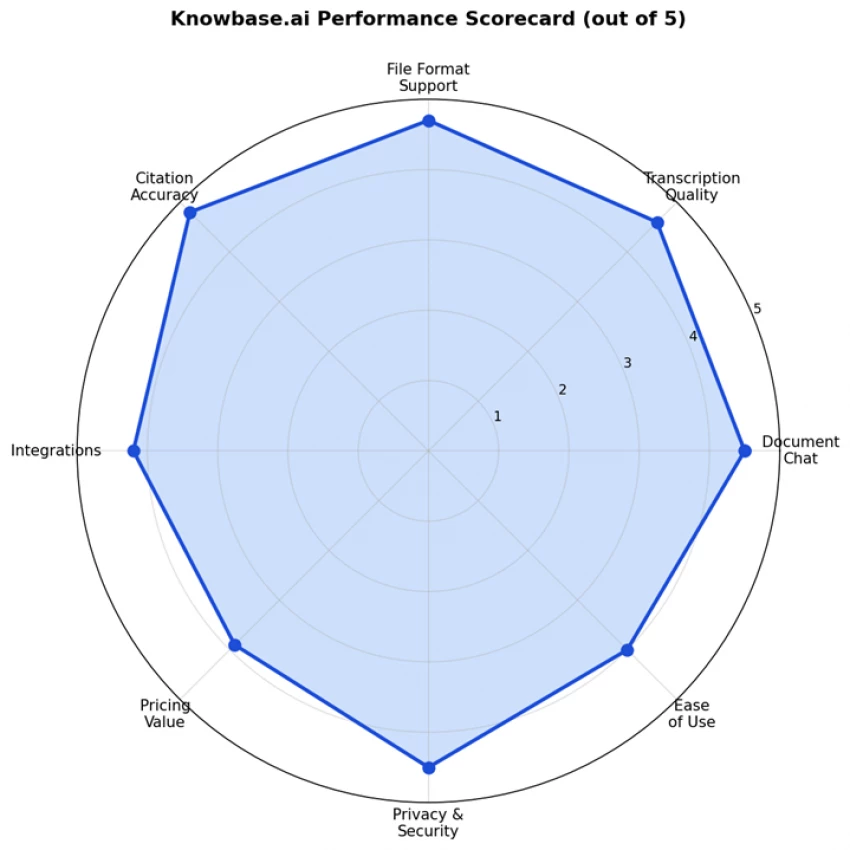
Figure 4: Performance scorecard across eight evaluation dimensions (1–5 scale).
• Citation Accuracy (4.8) - the strongest area. Citations link to exact pages and timestamps, and they consistently match the source content.
• File Format Support (4.7) - handles 100+ formats including all common document, audio, and video types, plus YouTube links.
• Transcription Quality (4.6) - Whisper-based pipeline performs at near-human accuracy on clean audio.
• Document Chat (4.5) - Chat-All across the full library is a real workflow improvement; minor frustrations on very large documents.
• Privacy & Security (4.5) - explicit no-training-on-user-data policy and granular share controls, though formal compliance certifications are not publicly listed.
• Integrations (4.2) - Google Drive, Notion, Dropbox, YouTube, and Web Search cover the basics; Slack, Microsoft Teams, and CRM integrations are notable absences.
• Ease of Use (4.0) - generally intuitive, but third-party reviewers have noted the interface can feel cluttered when many features are exposed at once.
• Pricing Value (3.9) - fair for what is offered, but the free tier is restrictive enough that meaningful evaluation requires upgrading.
Independent feedback aggregated from review directories and developer communities paints a generally positive but cautious picture. The tool is praised for solving a real problem efficiently, with the most common criticisms centring on the restrictive free tier and the learning curve for first-time users. Below is a synthesis of recurring themes from third-party reviews on AppCritica, ToolsForHumans, ZegaShop, UseThisAI, and developer community discussions.
• Efficient knowledge retrieval - reviewers consistently highlight how much time is saved versus manually searching through documents.
• Strong file-type variety - the ability to mix PDFs, videos, and YouTube links in one knowledge base is repeatedly called out as a differentiator.
• Useful for software developers - at least one developer review specifically cited using the tool to extract information from documentation and YouTube tutorials instead of reading or watching them in full.
• Clean citation system - clickable references that jump to the exact source location are a frequently mentioned strength.
• Genuine free plan - even with limits, the no-credit-card free tier is enough to evaluate the workflow.
• Free plan limits - 25 queries and 50 MB of storage per month are flagged as too restrictive for sustained use.
• Learning curve - first-time users report needing time to organise files into Nests for optimal results.
• Resource-intensive on bulk operations - large batch uploads can feel slow, especially on weaker connections.
• Limited customisation of library layout - power users wanting a deeply personalised dashboard find the options modest.
• Sparse community discussion - compared with bigger AI tools, online chatter is relatively quiet, making peer-feedback discovery harder.
• Sign-up friction reported in older feedback - at least one historical user report flagged sign-up issues, though this appears resolved in current builds.
A reviewer reported condensing a 90-minute Zoom meeting into a clean set of bullet points and praised the ability to extract information from outside sources rather than relying on a model's pretrained knowledge alone. - Developer comment |
Independent directories highlight efficient knowledge retrieval, easy sharing, high-capacity storage, and flexible file uploading as the primary strengths of the platform. - Aggregated review summary |
The same directories flag the limited free plan, transcription wait times for large files, and the initial learning curve as the main drawbacks worth budgeting for. - Aggregated review summary |
Privacy is positioned as a core value rather than a footnote on the official site. Three concrete commitments are made: uploaded documents are never used to train AI models, files stay private by default unless explicitly shared, and every answer is verifiable through clickable source citations. Access can be revoked at any time on shared files and Nests.
These claims are stronger than the industry baseline, but the platform does not publicly list formal certifications such as SOC 2 Type II, ISO 27001, or HIPAA compliance on its public pages. Organisations handling regulated data - health records, legal materials, financial documents - should request a security questionnaire before adopting the platform at scale. For individuals, freelancers, and most small teams, the stated privacy posture is acceptable.
Knowbase.ai sits in a category that includes ChatPDF, Humata, NotebookLM, Mintlify, Document360, Hyperlink by Nexa AI, and Eureka. A direct comparison is summarised below, focused on the dimensions most relevant to typical users.
| Tool | Multi-Format | Diarization | Embed Chatbot | Free Tier |
| Knowbase.ai | Yes (100+) | Yes | Yes | Yes |
| ChatPDF | PDF only | No | No | Yes |
| Google NotebookLM | Limited | No | No | Yes |
| Humata.ai | Documents | No | Limited | Yes |
| Document360 | Wiki-style | No | Yes | Trial only |
| Mintlify | Docs-focused | No | Yes | Yes |
Table 4: Knowbase.ai versus comparable AI knowledge-base tools.
The clearest competitive advantage is breadth - Knowbase.ai is one of the few tools that natively handles documents, audio, video, and YouTube links in a single library while also offering a deployable chatbot. Tools like Mintlify and Document360 are more polished for developer documentation and customer support, but they do not handle multimedia. Tools like Humata and ChatPDF are more focused but lack diarization and embed features.
| Pros | Cons |
✓ Handles 100+ file types in one library ✓ Whisper-powered transcription with diarization ✓ Click-through citations to exact source location ✓ Strong privacy stance - no training on user data ✓ Embeddable chatbot widget with lead capture ✓ Genuine free tier without credit card ✓ 50+ languages on chat, 90+ on transcription ✓ SRT, VTT, and TXT export formats supported ✓ Bulk upload of up to 100 files at once | ✗ Free plan is restrictive - 25 queries per month ✗ Interface can feel cluttered for new users ✗ Limited dashboard customisation options ✗ No public SOC 2 / ISO 27001 / HIPAA listings ✗ Bulk operations can feel resource-intensive ✗ Modest community presence vs. larger AI tools ✗ Slack and Teams integrations not yet available ✗ Team plan caps queries at 5,000 per month ✗ Heavy reliance on stable internet connection |
Based on the feature set, pricing structure, and aggregated review feedback, the tool fits some user profiles much better than others.
• Researchers and graduate students managing piles of PDFs, lecture recordings, and reference videos.
• Solo professionals and consultants who need to interrogate contracts, reports, and meeting recordings on the fly.
• Content creators and educators wanting to let an audience chat with their material without building infrastructure.
• Small businesses needing a simple, embeddable docs-grounded chatbot for a website or help portal.
• Podcasters and journalists who repeatedly need transcripts with speaker labels and clean subtitle exports.
• Large enterprises requiring formal compliance certifications such as HIPAA or SOC 2 Type II.
• Engineering teams looking for a developer-documentation-first product with deep code awareness - Mintlify is the better choice.
• Customer support teams that need deep ticket-system integration with Zendesk, Freshdesk, or Intercom.
• Heavy-volume teams that consistently exceed 5,000 queries per month - the Team plan ceiling is a real constraint.
Knowbase.ai is a competent and increasingly polished AI knowledge-base tool that holds its own against bigger names in a crowded category. It earns its place by combining genuinely useful breadth - documents, audio, video, YouTube, and external connectors all in one library - with a strong citation system and a Whisper-based transcription pipeline that produces near-human accuracy on clean audio.
The trade-offs are real but not deal-breakers. The free tier is too restrictive for serious evaluation, the interface takes some adjustment, and enterprise-grade compliance documentation is missing from public pages. Anyone in a regulated industry should ask the team directly before committing.
For individuals, small teams, content creators, and small businesses needing a flexible and reasonably priced way to chat with their files, Knowbase.ai delivers measurable time savings and a workflow that genuinely feels modern. The Pro plan at $49 per month represents the best balance of capability and cost, and it is the recommended starting point for any user moving past evaluation.
Overall Score: 4.4 / 5

“HidingMe” sounds like a privacy app. It isn’t. So I opened the live site in Jun...
Sandra Campos2 months ago

Type "Totally Science" into a search bar and the name suggests a study aid, a vi...
Benjamin Clark2 months ago

I keep a 12-question audit checklist on my desk. It started in 2024 as a one-pag...
Grace Howard3 months ago
I’ve spent enough hours wandering through thesindi.com to know it almost like a...
Ina Gupta4 months ago
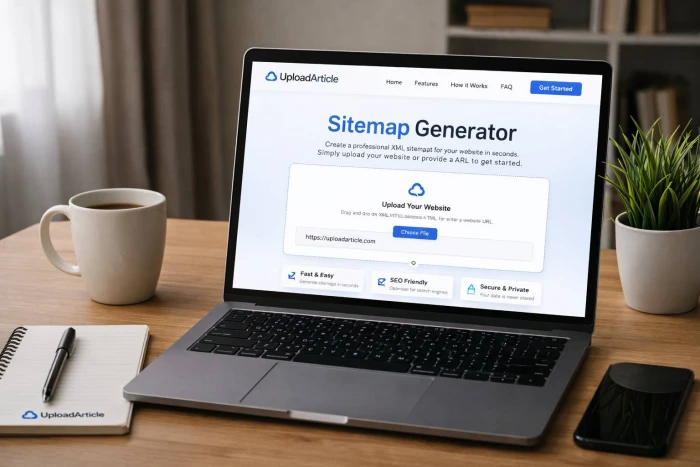
Sitemap Generator by UploadArticle.com is a lightweight, browser‑based XML sitem...
Peter Woods4 months ago

ThinkOfGames.com is the kind of site you end up bookmarking quietly and then rea...
Noura Belkacem4 months ago
Discussion