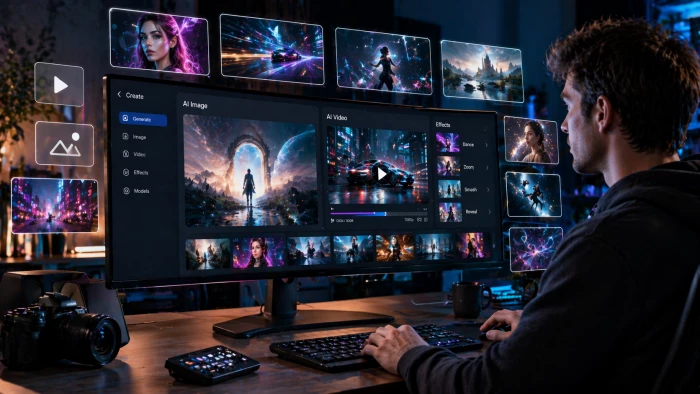
Let me be honest about how I found Unlucid AI. A friend dropped the link in a group chat with the message: "You have to try this - it does things Midjourney and Runway just won't." That was enough to make me curious. I opened the site, half-expecting another overhyped tool hiding behind a paywall, and was immediately greeted by four bold words across the hero section:
"Uncensored AI Tools for Dreamers, for Free."
Okay. Bold claim. I spent the better part of a week poking, prodding, and genuinely trying to break this platform. What I found was a genuinely interesting tool with a personality of its own - one that gets a lot right, makes some puzzling choices, and has a few rough edges that the team really needs to sort out. This is that story.
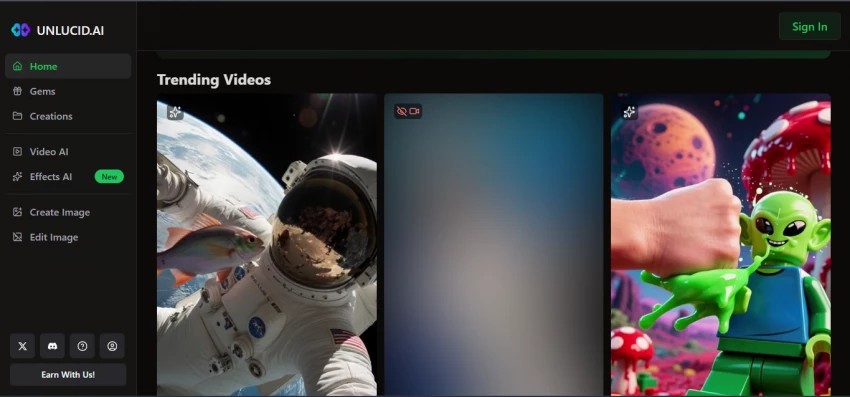
Unlucid AI, found at unlucid.ai, is a web-based AI creative platform that sits at the intersection of image generation, image editing, and video animation. You don't install anything - it all runs in the browser, which is genuinely refreshing. The platform launched quietly but has been gaining traction among artists, content creators, and people tired of getting their prompts rejected by stricter AI tools.
Its toolkit, at a glance, covers four main areas:
• Video AI - Generate videos from text prompts or animate still images with motion
• Effects AI - Apply preset animated effects (Dance, Squish, Fly, Thor's Thunder Eyes, and 15+ more) to images
• Image Generator - Create images from text prompts across styles like Realistic, Anime, Cartoon, 3D, and Sketch
• Image Editor - Remove objects, change outfits, swap elements, and clean up photos without design software
💡 My First Impression Clean, minimal, fast to load. No overwhelming dashboard, no seven-step onboarding. I signed up in under a minute and was generating content within two. That simplicity deserves genuine credit. |
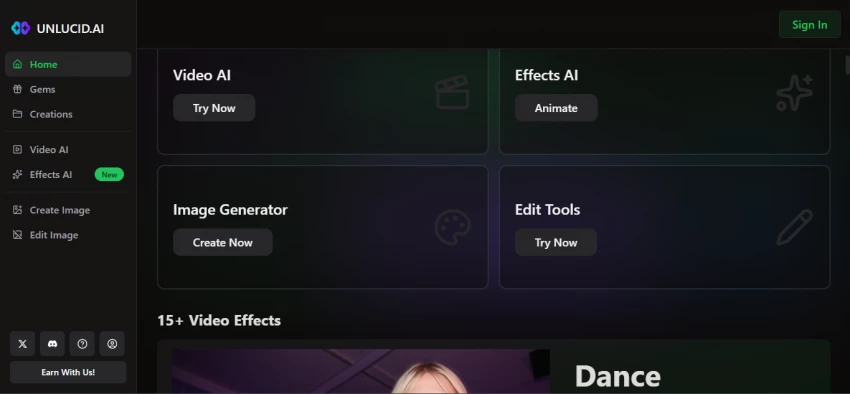
This is the feature that people talk about, and rightly so. You upload a photo - of yourself, a friend, a character, or anything really - and the platform applies a motion effect to bring it to life. The effects library has grown to 15+ templates: Dance, Squish, Crush, Zoom, Flying, Slo-Mo Smash, 360 Microwave, Birthday Party, Thor's Thunder Eyes, Muscles, and others that are visible only once you sign in.
The Squish effect, for instance, makes hands appear out of nowhere and compress the subject - it's weirdly satisfying. The Dance effect animates the figure with fluid, rhythmic movement. These aren't just GIFs; they're short AI-generated video clips with real motion physics. When they work, they look genuinely impressive. When they don't - and sometimes they don't - the limbs go slightly wrong, and the realism crumbles. But I'd say roughly two out of three outputs hit the mark.
The text-to-image generator supports five aesthetic styles: Realistic, Cartoon, 3D, Anime, and Pencil/Sketch. It also lets you upload a reference image, lock a seed for consistent outputs, and upscale the results. On a good prompt, this thing produces genuinely beautiful results - photorealistic portraits with lighting that would take hours to achieve in traditional tools.
But here's the catch: the output is extremely prompt-dependent. Vague prompts return generic images. Detailed prompts return striking ones. New users who don't understand prompt engineering will get frustrated quickly. There's a Prompt Enhancer (currently experimental) that tries to help, but it's hit-or-miss.
In September 2025, the team rolled out a completely upgraded Video AI module, complete with faster processing, longer video durations, and custom text-to-video prompting. You can now generate a short video from scratch using only a text description - or combine an image with a prompt to give the AI visual context. It's not Runway quality. It's not Sora. But for free? For casual use? It punches above its weight.
The processing time can be slow during peak hours. I once waited nearly eight minutes for a ten-second clip. That's a patience test, not a dealbreaker - but it's worth knowing.
Perhaps the most underrated part of the platform. The editing tools let you remove objects (people, backgrounds, logos), add elements, change clothing or appearance, and adjust colours - all through simple brush tools and AI inference. It's not Photoshop. It's not trying to be. But for someone who needs a quick fix on a photo without paying for an Adobe subscription, it genuinely gets the job done.
The before-and-after samples on the About page show someone removing extra people from a group photo. I tested this with a cluttered street scene, and the results were surprisingly clean.
Based on a week of hands-on testing, here's how the individual features stack up:
| Feature | Performance Bar | Score |
| Effects AI | ████████████████░░░░ | 8/10 |
| Image Generator | ██████████████░░░░░░ | 7/10 |
| Video AI | ████████████░░░░░░░░ | 6/10 |
| Image Editor | ██████████████░░░░░░ | 7/10 |
| UI & Onboarding | ████████████████░░░░ | 8/10 |
| Output Consistency | ██████████░░░░░░░░░░ | 5/10 |
| Pricing Value | ████████████░░░░░░░░ | 6/10 |
| Privacy & Trust | ████████░░░░░░░░░░░░ | 4/10 |
| Customer Support | ██████░░░░░░░░░░░░░░ | 3/10 |
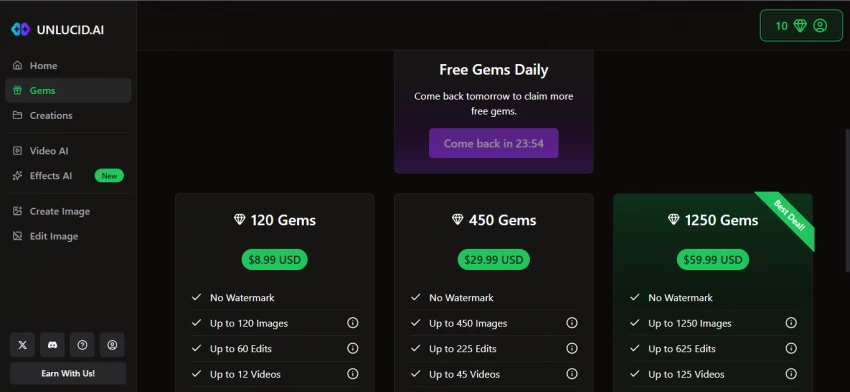
Unlucid AI uses a virtual credit model called Gems. Every action costs a set number of Gems - generating an image, applying an effect, editing a photo. You get a small daily allowance for free (enough to test but not enough to work), and you top up with paid bundles:
| Plan | Price | Images | Edits | Videos | Watermark |
| Free Tier | $0 | ~5/day | ~2/day | ~1/day | Yes |
| 120 Gems | $8.99 | Up to 120 | Up to 60 | Up to 12 | No |
| 450 Gems | $29.99 | Up to 450 | Up to 225 | Up to 45 | No |
| 1250 Gems ⭐ | $59.99 | Up to 1250 | Up to 625 | Up to 125 | No |
The pricing isn't terrible on its face. $8.99 for 120 images sounds decent until you realize that getting a good output often takes 3–5 attempts, and generating a video can eat Gems fast. Power users consistently report that costs scale up quicker than expected.
Payments can be made by credit card, Telegram Pay, or crypto - which is actually a thoughtful range. The crypto option, in particular, shows the platform is catering to an international audience that might have trouble with traditional payment rails.
"The Gems model divides reviews sharply. Some like the pay-as-you-go flexibility. Others feel it's a quiet way to lock users into micro-payments that accumulate faster than expected." - GeniusFirms User Review Compilation, |
Because Unlucid is still a relatively small and niche platform, independent reviews are scattered - mostly in Reddit threads, niche AI directories, and blog-style roundups. I pulled from several sources to get a balanced picture. Here's the sentiment breakdown:
| Aspect | Positive 👍 | Neutral 😐 | Negative 👎 |
| Ease of Use | 78% | 12% | 10% |
| Output Quality | 52% | 15% | 33% |
| Creative Freedom | 85% | 8% | 7% |
| Pricing Fairness | 40% | 20% | 40% |
| Privacy & Trust | 28% | 22% | 50% |
| Customer Support | 20% | 18% | 62% |
"looks good and promising. i signed up for an account, but i wish there was a few more gems for fresh accounts. otherwise, really cool" - User on There's An AI For That |
"Great for drafts, concepts, and social visuals - not always client-ready. But the creative freedom is the standout. This is where Unlucid receives its strongest praise." - GeniusFirms Aggregated Review |
"Unlucid AI is a fantastic tool for hobbyists, artists, and anyone wanting to experiment with AI video without spending a dime. It's a powerful sketchbook, not a professional production suite." - SmartPostly Review |
"Some users report account suspensions without explanation when they have remaining Gem balances, with no available contact method to resolve issues. This represents a serious concern for paying customers." - AIListingTool Review |
This is the section I was most looking forward to writing. Because for all the things Unlucid does well, it also has some genuinely puzzling choices that make you tilt your head.
A significant number of the trending videos on the homepage are locked behind a "Sign in to view" message - even before you've created an account. From a marketing standpoint, this is baffling. If you want to convert a curious visitor into a registered user, showing them your best work upfront is the play. Instead, the homepage feels like a locked showcase where every third item is hidden.
Among the playful effects like "Birthday Party" and "Thor's Thunder Eyes" are names that are quite explicit. Several effects in the trending section are labelled "Sign in to view" - and based on their thumbnail images, they're clearly sexual in nature. The platform makes no formal age-verification or content disclosure visible on the homepage. This creates an odd first impression: a landing page that shows birthday cakes and lightning bolts alongside adult content thumbnails, without any warning or filter.
⚠️ Content Transparency Issue The platform's homepage mixes family-friendly effects (Birthday Party, Dancing) with clearly adult content thumbnails - without any visible age gate or content warning. First-time visitors, including minors, land on this page without any filter. This is an inconsistency that the team should urgently address. |
ScamDoc, a website trust analysis tool, gives unlucid.ai a "Poor" trust score of 45% - citing limited company transparency and hidden WHOIS data. ScamAdvisor has flagged similar concerns. These automated scores aren't necessarily definitive, but for a platform asking for payment information and photo uploads, it does raise fair questions about who is behind the product and where the data goes.
When you upload a photo to animate or edit, what happens to that photo afterward? Is it stored? For how long? Is it used to train future models? The Terms and Conditions exist, but reviewers have noted that the platform doesn't clearly communicate these answers in an accessible way. In 2026, when AI data ownership is a mainstream concern, this vagueness stands out.
Multiple users in review threads report having their accounts suspended without warning - often while still holding a Gem balance they paid for. The absence of a visible customer support channel (no live chat, no visible help desk email, no phone number) means these users have no way to appeal or recover their credits. For a paid service, this is a significant red flag.
The affiliate program offers 30% commission with "lifetime recurring commissions" - which sounds great. But payouts are processed exclusively via cryptocurrency. For creators in regions where crypto transactions are legally grey or practically difficult, this limits who can actually participate. It also adds another layer of anonymity to the platform's financial operations, which combined with the hidden WHOIS, gives privacy-conscious users pause.
| ✅ What Works Well | ⚠️ What Falls Short |
| Zero technical skills required | Output quality is inconsistent across sessions |
| Effects AI produces genuinely impressive results | No age gate despite adult content on homepage |
| Completely browser-based, no install needed | Low trust scores from ScamDoc & ScamAdvisor |
| Broader creative freedom than mainstream tools | No visible customer support channel |
| Daily free Gems to test before committing | Account suspensions without explanation |
| Multiple payment options including crypto | Vague data storage and ownership policies |
| Regularly updated with new features | Gems deplete faster than expected for heavy use |
| Affordable entry price ($8.99 to start) | Template-driven effects feel repetitive over time |
Unlucid doesn't try to be Runway. But how does it perform when placed side by side with its nearest rivals?
| Tool | Ease of Use | Output Quality | Creative Freedom | Value for Money | Support |
| Unlucid AI | ★★★★★ | ★★★☆☆ | ★★★★★ | ★★★★☆ | ★★☆☆☆ |
| Runway ML | ★★★★☆ | ★★★★★ | ★★★☆☆ | ★★☆☆☆ | ★★★★☆ |
| Pika Labs | ★★★★★ | ★★★★☆ | ★★★☆☆ | ★★★☆☆ | ★★★☆☆ |
| PixVerse | ★★★★☆ | ★★★★☆ | ★★★☆☆ | ★★★★☆ | ★★★★☆ |
| Stable Diffusion | ★★☆☆☆ | ★★★★★ | ★★★★★ | ★★★★★ | ★★☆☆☆ |
★★★★★ = Excellent | ★★★★☆ = Good | ★★★☆☆ = Average | ★★☆☆☆ = Below Average | ★☆☆☆☆ = Poor
The pattern is clear: Unlucid wins on creative freedom and ease of use, ties on value for money, and loses on output quality, trust, and professional support. If your priority is unrestricted creative play on a budget, it's hard to beat. If you need polished, client-ready deliverables, you'll outgrow it quickly.
• You're a hobbyist exploring AI creativity without needing professional results
• You want to animate photos for fun, memes, or social media without learning video editing
• You're frustrated by the content filters on tools like Midjourney, Adobe Firefly, or DALL-E
• You want a pay-as-you-go model rather than a monthly subscription
• You're a concept artist who needs quick visual drafts to share with clients or collaborators
• You need production-ready, commercial-grade video or image output
• You work with sensitive or private photos and care about data privacy
• You need reliable customer support when things go wrong
• You're building a business that depends on consistent, predictable output quality
• You have concerns about being associated with adult content on shared platforms
Overall Rating: 6.5 / 10 "A diamond in the rough for creative freedom. But rough it genuinely is." |
Unlucid AI is the creative tool equivalent of that independent restaurant tucked down a side street - inconsistent in ways that can annoy you, not always sure what it wants to be, but occasionally producing something that blows you away and sends you straight back for more.
The Effects AI is legitimately impressive for its price point. The Image Generator produces stunning results when you give it detailed, thoughtful prompts. The editor is a genuine time-saver for casual use. And the total absence of the content restrictions that plague other platforms is refreshing in a way that's hard to fully appreciate until you've been blocked mid-creative by a filter that doesn't understand context.
But the trust issues are real and need to be taken seriously. The hidden WHOIS data, the vague privacy policy, the opaque account suspension process, the lack of visible support - these aren't minor UX inconveniences. They're structural transparency failures for a platform that's asking people to upload their photos and hand over their payment details. The adult content on the homepage without a content warning is also, frankly, irresponsible.
My recommendation: Start with the free daily Gems. Test the Effects AI, generate a few images, play with the editor. If the quality meets your needs and you're comfortable with the platform's approach to privacy, the $8.99 starter pack is a reasonable bet. Just don't upload anything private, don't rely on it for anything commercial, and keep your expectations calibrated to "creative sketchpad" rather than "professional suite."
Unlucid calls itself a tool "for dreamers." That's exactly right. Just make sure your eyes are wide open while you're dreaming.

New Claude Model Targets Agentic AI WorkflowsAnthropic has launched Claude Sonne...
Samuel Osei2 months ago

Gemini’s Image Tools Get a Wider RolloutGoogle is expanding access to Gemini’s p...
Alexander Hughes2 months ago

Two AI video generators, two very different first days. I ran PixVerse through i...
Alexander Hughes2 months ago

Two of the most talked-about AI chat platforms. I opened both, picked a characte...
Alexander Hughes2 months ago

The two-minute versionIf you only read one thing, read this. The rest of the doc...
Alexander Hughes2 months ago

Why Seedance 2.5 mattersSeedance 2.5 is the latest release in ByteDance’s Seedan...
Alexander Hughes2 months ago
Discussion