Managing social media today requires more than simply posting content. Brands, creators, and marketing teams need tools that help them plan campaigns, schedule posts across multiple platforms, analyze engagement, and maintain a consistent publishing workflow. Social media management platforms like Later and SocialBee were created to streamline these tasks.
Both tools allow users to manage multiple social media accounts from a single dashboard and automate the publishing process. However, they approach social media management differently. Later focuses on visual content planning and influencer marketing tools, while SocialBee prioritizes automation, content recycling, and category-based scheduling.
Understanding how these platforms differ can help determine which one fits your workflow and marketing strategy.
Later started as an Instagram scheduling tool and gradually expanded into a broader social media management platform. The platform remains heavily focused on visual content planning, making it popular among creators, influencers, and ecommerce brands that rely on visual platforms like Instagram and TikTok.
Later provides tools that allow users to plan social media feeds visually. This includes drag-and-drop content calendars, media libraries for organizing assets, and scheduling features that automatically publish posts across multiple platforms.
Another distinctive feature of Later is its “Link in Bio” system, which allows creators and brands to turn Instagram posts into clickable shopping or traffic links. The platform also integrates influencer marketing features and campaign analytics designed to help brands track creator partnerships and social commerce performance.
Because of these capabilities, Later is often used by visual brands and creators who care about aesthetic planning and influencer marketing workflows.
SocialBee approaches social media management from a different perspective. Instead of focusing primarily on visual planning, the platform emphasizes automation and content strategy.
The tool allows users to categorize content into different types such as promotions, educational posts, and engagement content. Posts can then be scheduled automatically within these categories, ensuring that the content mix remains balanced over time.
Another notable feature is evergreen content recycling. SocialBee allows posts to be reused automatically by creating variations of the same content, making it easier to maintain an active social media presence without constantly creating new material.
SocialBee also includes features such as AI-assisted caption generation, scheduling tools, analytics dashboards, and collaboration features that allow teams to manage social media accounts more efficiently.
Because of its automation capabilities, SocialBee is often used by consultants, agencies, and small businesses that want to scale their social media publishing without increasing manual work.
| Feature | Later | SocialBee |
| Main Focus | Visual content planning | Automation and scheduling |
| Ideal Users | Creators, ecommerce brands | Agencies, marketers, small teams |
| Content Planning | Visual drag-and-drop calendar | Category-based scheduling |
| Automation | Limited automation features | Strong automation tools |
| Supported Platforms | Major social networks | Broad multi-platform support |
| User Ratings (G2) | 4.5 / 5 | 4.7 / 5 |
This comparison highlights a key difference in philosophy. Later focuses on visual marketing and influencer workflows, while SocialBee focuses on content automation and operational efficiency.
Scheduling posts is a core feature of both platforms, but the experience differs significantly.
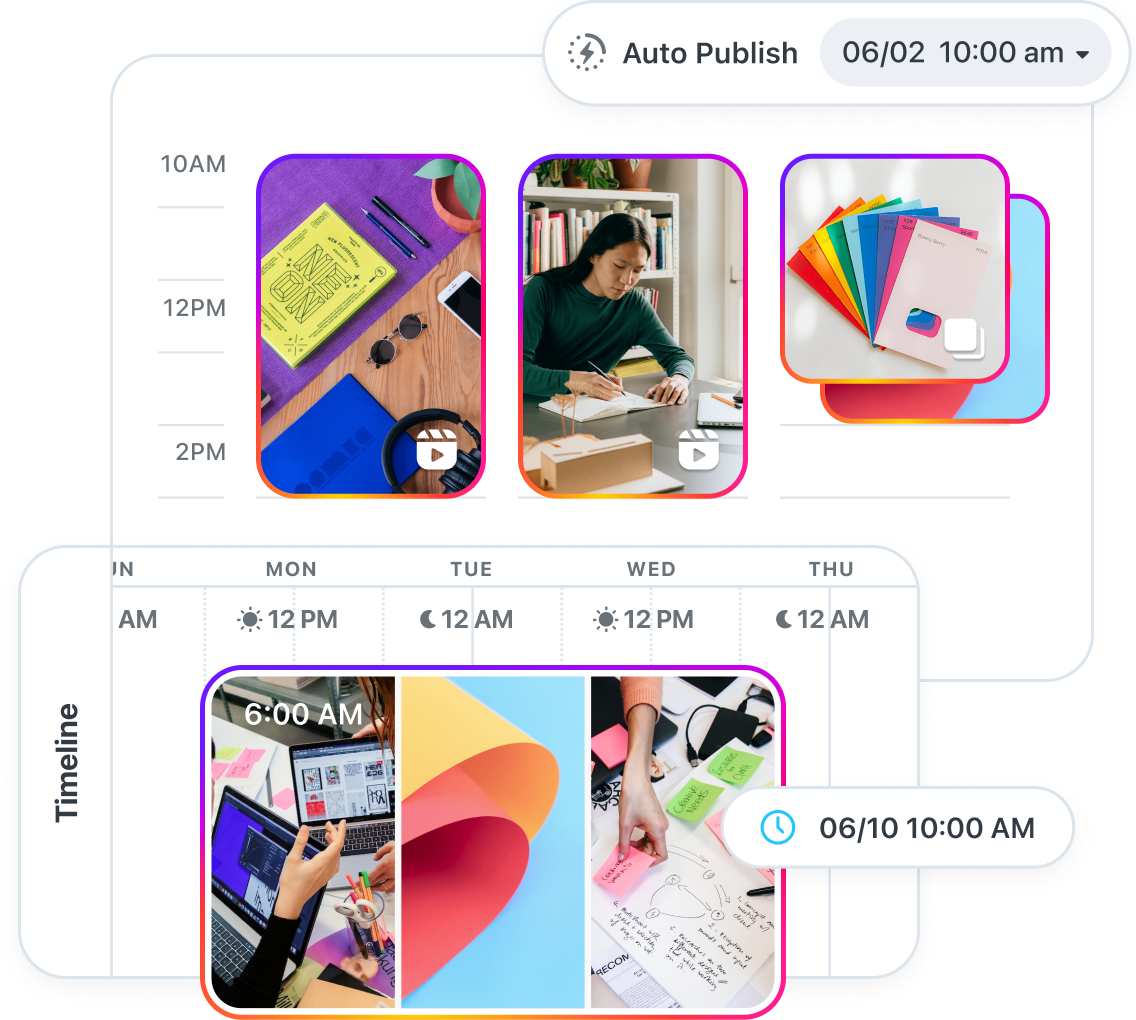
Later emphasizes visual planning. Users can see their entire social media feed before publishing, which is particularly useful for platforms like Instagram where visual consistency matters. This makes it easier for brands to maintain a cohesive aesthetic.
SocialBee focuses more on structured scheduling. Instead of organizing posts visually, users create content categories and schedule posts automatically within those categories. This system ensures that promotional posts, educational content, and engagement posts appear in a balanced rotation.

In practice, Later feels more like a visual planner, while SocialBee behaves more like a content automation engine.
To understand how these platforms actually perform, I spent time using both Later and SocialBee for scheduling content across Instagram, LinkedIn, and Twitter. While both tools solve the same problem, the experience of using them feels quite different once you start managing real posts.
With Later, the biggest advantage becomes obvious immediately: the visual planner. When I uploaded several Instagram posts into the media library and dragged them into the calendar, I could instantly see how the grid would look before publishing. For anyone who cares about maintaining a consistent Instagram aesthetic, this is extremely helpful.
I tested this by scheduling a week of Instagram posts for a small project that included product photos, quotes, and carousel posts. The drag-and-drop layout made it easy to rearrange posts until the feed looked balanced. It felt more like designing a social media feed rather than simply scheduling posts.

The Link in Bio feature was also surprisingly useful. I connected it to a few posts to simulate driving traffic to external pages, and the setup process was straightforward. For ecommerce or creators promoting products, this feature alone could simplify a lot of Instagram traffic workflows.
When I switched to SocialBee, the workflow felt less visual but more structured. Instead of focusing on the feed layout, the platform encourages you to organize content into categories. I created categories such as educational posts, promotional content, and engagement posts, then assigned different posting schedules to each category.
After setting this up, the automation became noticeable. Posts from each category were automatically scheduled according to the defined rotation. This meant I did not have to manually plan every individual post in the calendar.
The evergreen content recycling feature stood out the most during testing. I scheduled a few posts that were designed to repeat over time, and SocialBee automatically reintroduced them into the publishing queue. For businesses that rely on evergreen educational content or recurring promotions, this can significantly reduce the amount of manual scheduling required.
After using both tools for a few days, the differences became clear.
Later feels more like a visual content planner, especially useful for Instagram-heavy strategies.
SocialBee behaves more like a content automation system, where posts can run automatically once categories and schedules are configured.
Neither approach is objectively better, but they serve different workflows. If your priority is maintaining a visually consistent social media feed, Later feels more intuitive. If your goal is reducing manual scheduling and automating a long-term publishing strategy, SocialBee can save a significant amount of time.
Pricing is another area where the platforms differ.
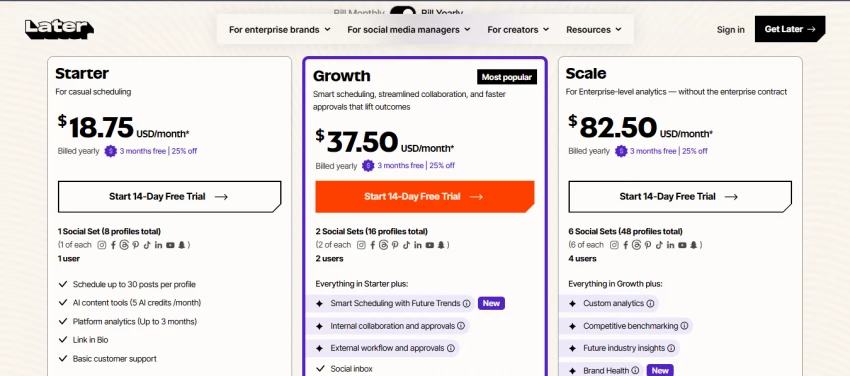
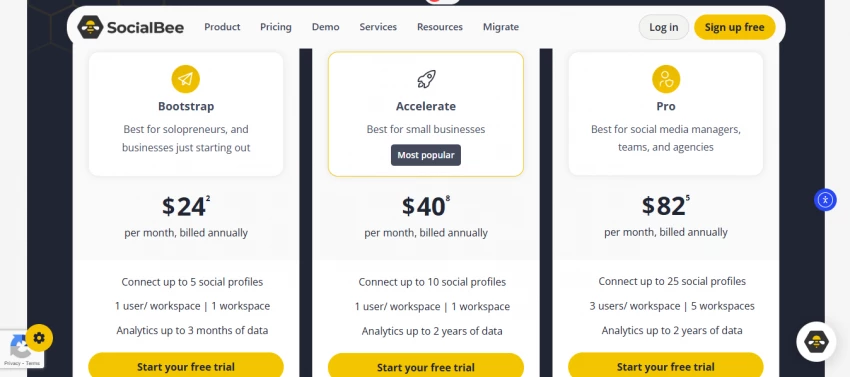
| Plan Level | Later Price | SocialBee Price | Key Features (Later) | Key Features (SocialBee) |
|---|---|---|---|---|
| Entry Plan | $18.75 / month (Starter) | $24 / month (Bootstrap) | 1 social set (8 profiles), 1 user, scheduling tools, analytics up to 3 months | 5 social profiles, 1 user, analytics up to 3 months |
| Mid Plan | $37.50 / month (Growth) | $40 / month (Accelerate) | 2 social sets (16 profiles), 2 users, collaboration tools, approvals | 10 social profiles, 1 user, analytics up to 2 years |
| Advanced Plan | $82.50 / month (Scale) | $82 / month (Pro) | 6 social sets (48 profiles), 4 users, advanced analytics, brand health | 25 social profiles, 3 users, analytics up to 2 years |
Later’s paid plans typically begin around $25 per month and scale depending on the number of accounts and advanced features included.
SocialBee plans start around $29 per month and include automation features such as content recycling and category-based scheduling.
While the pricing difference is small at the entry level, the feature sets target different types of users.
Both tools support several major social media networks.
| Platform | Later | SocialBee |
| Yes | Yes | |
| Yes | Yes | |
| Yes | Yes | |
| Yes | Yes | |
| TikTok | Yes | Yes |
| YouTube | Yes | Yes |
| Google Business Profile | Limited | Yes |
SocialBee supports a slightly wider set of integrations, including Google Business Profile and additional publishing automation options.
Later is usually the better option when visual content planning is the main priority.
It works particularly well for:
• influencers and content creators
• ecommerce brands
• businesses focused on Instagram marketing
• teams running influencer campaigns
The visual planner and link-in-bio tools make it especially useful for brands that rely on visual storytelling.
SocialBee becomes more useful when automation and content management are the main priorities.
It works best for:
• marketing agencies
• consultants managing multiple clients
• businesses that rely on evergreen content
• teams that want automated posting workflows
The platform’s content recycling and category scheduling system can reduce the amount of manual posting required.
Later and SocialBee are both strong social media management tools, but they are designed for different strategies.
Later is best for brands and creators that prioritize visual planning, influencer marketing, and aesthetic consistency across social media platforms.
SocialBee is better suited for teams that want automation, structured content scheduling, and the ability to reuse evergreen content efficiently.
The right choice ultimately depends on how you manage social media. If visual planning and influencer campaigns are central to your workflow, Later may be the better fit. If automation and scalable publishing are more important, SocialBee is likely the stronger option.

ClickFunnels is still everywhere in marketing circles, but it is no longer the d...
Grace Howard6 months ago
Managing several social media accounts at the same time can quickly become compl...
Alexander Hughes7 months ago

Meta has agreed to acquire Manus, a Chinese founded artificial intelligence...
John Nyarko9 months ago
In today’s fast-paced digital workplace, communication software plays a critical...
John Nyarko9 months ago
Discussion