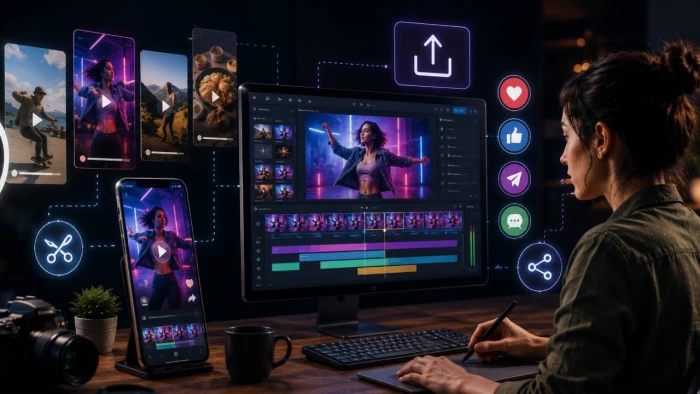
There’s something incredibly satisfying about capturing a perfect moment and sharing it instantly. Whether it’s a funny reaction, a memorable sports highlight, a product demonstration, or a quick tutorial, short looping animations have become one of the internet’s favorite ways to communicate.
Unlike long-form videos that demand time and attention, animated clips deliver a message within seconds. They autoplay on many platforms, are easy to consume, and often leave a stronger impression because viewers can watch them repeatedly without even realizing it.
For creators, marketers, educators, and everyday social media users, transforming longer videos into compact, eye-catching visuals is no longer just a trend, it’s an effective content strategy.
If you've ever wanted to quickly share the best part of a longer recording, using a video to gif converter can make the process simple while preserving the most engaging moments. Instead of asking someone to watch a two-minute clip, you can highlight the exact five or ten seconds that matter most.
People naturally engage with content that's quick to understand. A looping animation removes unnecessary details and focuses attention on a single action, expression, or idea. This makes it perfect for today's fast-scrolling audiences.
One of the greatest strengths of this format is its versatility. Nearly every industry can use short animations effectively.
Brands regularly use animated clips to:
● Showcase new products
● Highlight customer reactions
● Announce promotions
● Preview upcoming launches
● Demonstrate product features
Because these clips loop automatically, they often catch attention more effectively than static images.
Teachers and trainers frequently simplify complex ideas with short visual demonstrations.
Imagine explaining a science experiment, a software shortcut, or a cooking technique. Instead of writing lengthy instructions, a looping animation can show the exact movement repeatedly until viewers understand it.
Many businesses now replace long help articles with simple visual guides.
Showing customers how to reset a password, navigate a menu, or complete a setup process takes only a few seconds and often eliminates confusion.
Companies increasingly use animated visuals during presentations or documentation.
Instead of describing a workflow in several paragraphs, a short loop demonstrates each step clearly and consistently.
Not every part of a video deserves to become a looping animation.
The best clips usually feature:
● A clear beginning and ending
● Visible movement
● One primary idea
● Emotional reactions
● Before-and-after comparisons
● Quick demonstrations
For example, if you're reviewing a product, viewers probably don't need the entire five-minute review. They only need the few seconds where the feature is actually demonstrated.
One common mistake is trying to include too much.
The most engaging animated clips are often between three and eight seconds long.
Shorter content:
● Loads faster
● Keeps file sizes manageable
● Holds attention longer
● Encourages repeated viewing
● Works well across multiple platforms
If the message requires more explanation, consider creating multiple short clips rather than one long animation.
Although these files are generally smaller than videos, quality still matters.
Whenever possible:
● Start with a high-resolution video.
● Trim unnecessary footage.
● Keep the subject centered.
● Avoid shaky camera movement.
● Ensure lighting is clear.
● Choose the smoothest section of the recording.
A clean, focused clip feels far more professional than one that's cluttered or difficult to follow.
Sometimes visuals alone aren't enough.
Adding a short caption or headline helps viewers immediately understand what they're watching.
Examples include:
● "Watch this simple trick."
● "Before vs. After"
● "30-second transformation"
● "The easiest way to organize your desk"
Even just a few words can dramatically improve engagement.
Imagine a local bakery launching a new pastry.
Instead of uploading a lengthy promotional video, the owner creates a six-second looping clip showing warm chocolate filling being poured into a freshly baked croissant.
The animation appears in Instagram Stories, email newsletters, and the bakery's website.
Customers immediately understand the product's appeal without needing additional explanation. Many stop scrolling simply because the smooth loop naturally catches the eye.
Sometimes one perfectly chosen moment is more persuasive than an entire commercial.
One of the smartest content strategies is making more from what you've already created.
A single long video can produce:
● Multiple social posts
● Website visuals
● Email graphics
● Presentation materials
● Product pages
● Blog illustrations
● Customer support resources
Instead of creating brand-new content every week, you maximize the value of your existing library.
This saves time while keeping your content calendar active.
Even experienced creators occasionally overlook the basics.
Try to avoid:
● Clips that are too long
● Low-quality source footage
● Distracting backgrounds
● Excessive text
● Poor timing
● Abrupt cuts
● Huge file sizes
The goal isn't to include everything—it's to communicate one idea exceptionally well.
Before creating any visual, ask yourself:
● What emotion should people feel?
● What action should they take afterward?
● What is the single most important moment?
● Would someone understand this without additional explanation?
Answering these questions helps you produce content that feels intentional instead of random.
Different audiences respond to different styles. Professionals may appreciate concise demonstrations, while entertainment audiences often prefer humorous or surprising moments.
The easier your content is to consume, the more likely people are to share it.
Looping visuals work especially well because they:
● Require no sound
● Load quickly
● Capture attention immediately
● Communicate ideas visually
● Fit naturally into social feeds
These qualities make them ideal for today's mobile-first audiences.
Creating engaging content doesn't always require expensive equipment, advanced editing skills, or lengthy productions. Often, the most memorable moments are the shortest ones.
By identifying the strongest scenes, keeping your visuals focused, and thinking from your audience's perspective, you can transform everyday footage into content that's informative, entertaining, and highly shareable.
Whether you're promoting a business, teaching a concept, or simply telling a story, short looping visuals offer an effective way to communicate quickly and leave a lasting impression.
Seedance 2.5, MiniMax H3, and Wan 3 all promise something bigger than the old pr...
Grace Howard2 months ago
Anthropic’s chatbot is attracting more consumer attention, but ChatGPT still rem...
Samuel Osei3 months ago
Meta is testing a redesigned Creator Studio app with AI tools for content planni...
Benjamin Clark3 months ago

China's humanoid robots are stepping out of the lab and onto the factory floor,...
Sandra Campos3 months ago
Social media platforms are beginning to give users more direct control over the...
Peter Woods3 months ago
Google has officially released Android 17, bringing a wider set of multitasking...
Noura Belkacem3 months ago
Discussion