
Two of the most talked-about AI chat platforms. I opened both, picked a character, and tried to actually talk to them, with no tutorials and no shortcuts. One let me dive straight in. The other would not say a word. Here is exactly what I saw.
CONTENDER 1 The power-user's workshop. Bring your own AI model, tweak everything, very few content limits. 60k+ characters · from $5/mo | CONTENDER 2 The mainstream giant. Sign up, tap a character, and you are chatting in seconds. Tightly moderated. 10M+ characters · $9.99/mo |
THE SHORT VERSION
Character AI won my test on first impressions, easily. I went from landing page to a vivid, in-character scene in under a minute.
Chub AI looks more powerful and freer, but as a brand-new visitor I hit a wall of errors and could not get a single reply. The twist is that this is by design, not a broken site. More on that below.
I wanted the real beginner experience, so I treated each site like a curious newcomer who just heard about it. I opened the homepage, picked whatever character looked fun, and tried to start chatting. No reading guides first, no setup. Whatever happened, happened, and I screenshotted all of it.
Most comparison articles just line up feature lists. I wanted to show what actually happens when you click around for the first time.
I could look around freely, but could not get a reply
Chub makes a great first impression on the surface. The trouble started the moment I tried to chat.
TEST 01 - Landing page, no login needed to look around
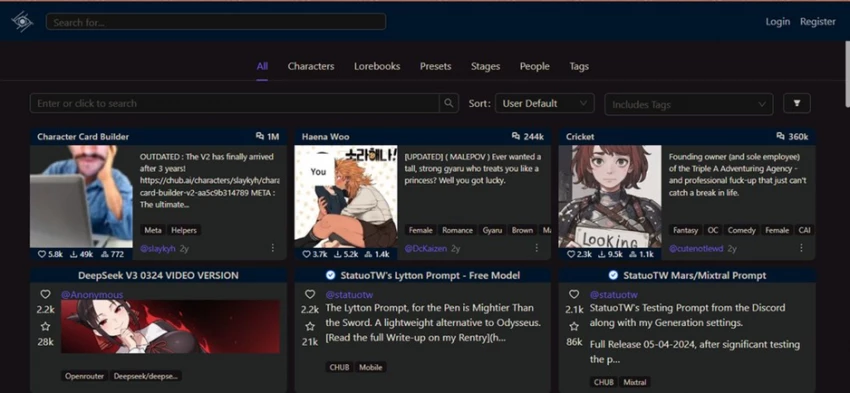
First thing I noticed: I did not have to sign up just to explore. The homepage drops you into a grid of community-made characters with download counts, tags, and presets. It feels like a busy marketplace.
MY TAKE
Strong start. Open browsing is welcoming and the number of characters is impressive. I also spotted a lot of mature tags right away, so this is clearly an 18+ leaning platform.
TEST 02 - Picking a character: Haena Woo
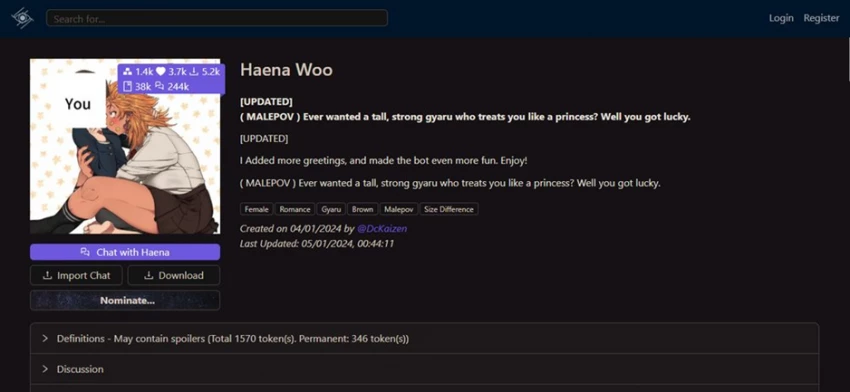
I picked a character called Haena Woo as my chat companion. The character page is genuinely useful: greeting previews, tags, token counts, a creator name, and big Chat, Import Chat, and Download buttons. You can tell creators put real work into these.
MY TAKE
I liked this. Seeing the token count and tags up front made me feel in control. Hitting Chat felt exciting, until the next screen.
TEST 03 - I started chatting and hit a wall of errors
This is where it fell apart for me. The character's opening message loaded fine, so I typed a reply. Then the screen lit up with red error pop-ups, over and over, on every message I sent.
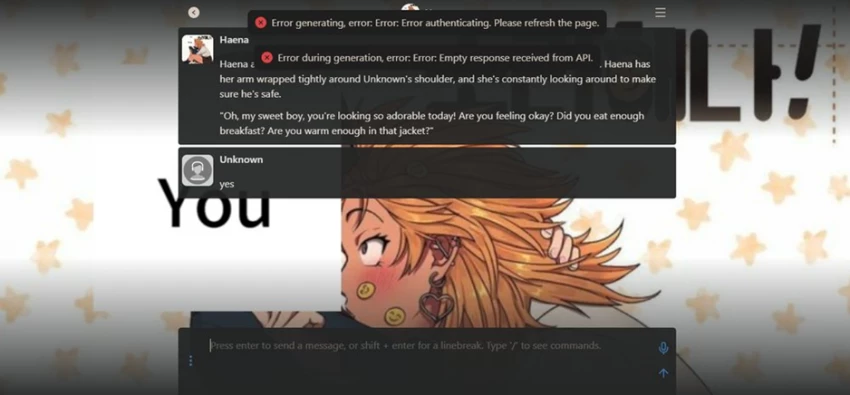
WHAT THE POP-UPS KEPT SAYING ✗ Error authenticating. Please refresh the page. ✗ Empty response received from API. |
MY TAKE As a first-timer this felt completely broken. The greeting showed, so I assumed the bot worked, then nothing I typed got a reply. Refreshing did not help. Honestly frustrating. |
TEST 04 - I blamed the character, so I switched to Cricket
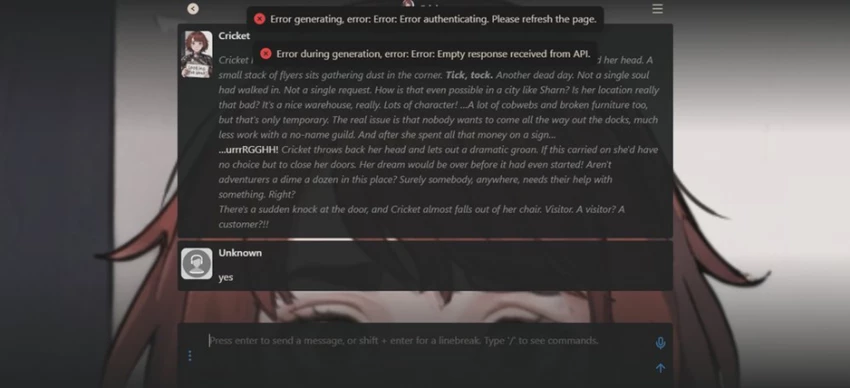
I figured maybe Haena was just a broken card, so I tried a different popular character called Cricket. Same detailed intro message, and the same red errors the second I replied.
MY TAKE
Two characters, same failure, means it is the platform and not the character. At this point a normal person would just close the tab. I almost did.
Why did Chub keep erroring? The fair version
Here is the thing I only understood after digging in: those errors were not really a bug. Chub is a bring your own model platform. It does not run its own AI brain by default. Before it can reply, you have to either log in and connect an API key (from a provider like OpenRouter or OpenAI) or pay for one of Chub's built-in model plans.
I did none of that. I was logged out with no model connected, so the character could show its pre-written greeting but had no engine to actually generate a reply. That is exactly what “Error authenticating” and “Empty response from API” mean.
So is it fair to call it a fail? For raw first impressions, yes. A brand-new user gets no help and just sees errors. But to be honest, once you do the setup Chub works fine and becomes very powerful. It is a friction problem, not a quality problem.
Landing page to living scene in under a minute
A completely different feeling. Everything just worked, right away, with zero setup from me.
TEST 05 - The landing page, polished and guided
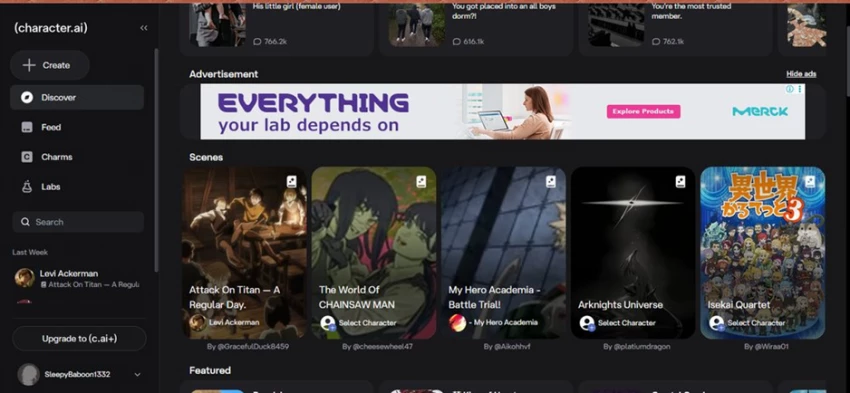
Character AI's home page feels like a streaming app. Neat sidebar, trending characters, and a row called Scenes, which are ready-made roleplay setups built around shows and games. It is much more tap-and-go than Chub's marketplace.
MY TAKE
Cleaner and friendlier than Chub for a newcomer. I did spot an ad on the page, which is the free-tier tradeoff here. Still, I knew exactly where to click.
TEST 06 - I picked a Scene: Cyberpunk Edgerunner
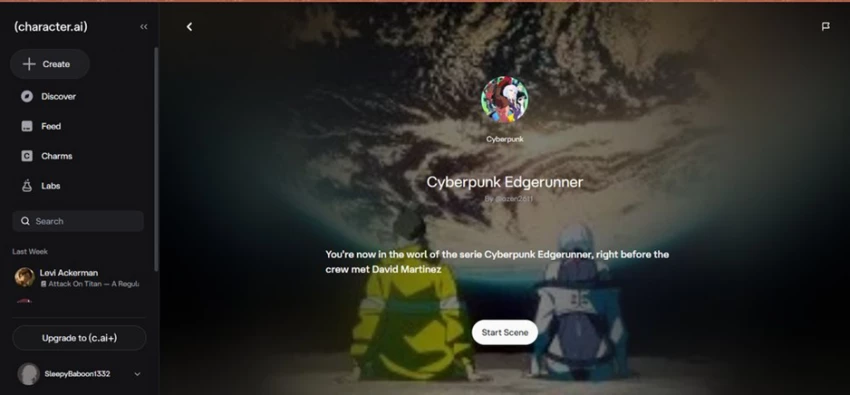
I chose a scene called Cyberpunk Edgerunner. Instead of dumping me into a blank chat, it showed a little intro card: a title, the creator, and a one-line setup saying I was now in the world of the series, right before the crew met David Martinez. Then one button: Start Scene.
MY TAKE
This is smart onboarding. It tells you where you are and what is happening, so you are never staring at an empty box wondering what to say. Great for beginners.
TEST 07 - I started chatting, instant and in-character
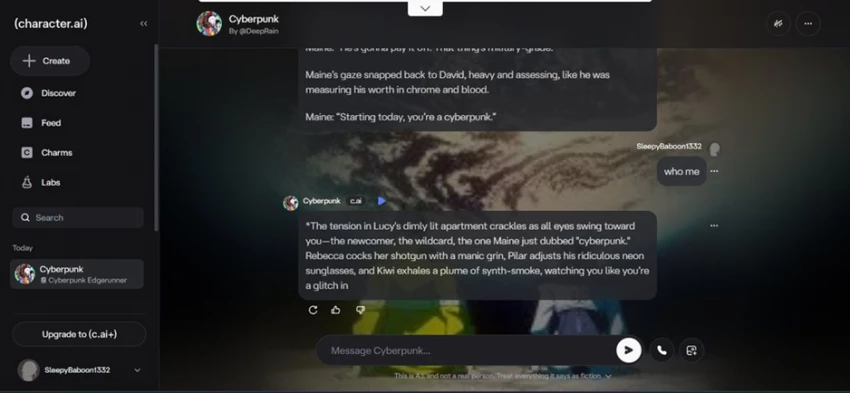
I hit start and was chatting instantly. The scene described the setting and the characters' emotions in rich detail. I typed a simple “who me” and got a fully immersive reply that named the actual crew, described the tension in the room, and treated me like a character in the story. No errors, no setup, no API key. It just played.
MY TAKE
This is the experience newcomers want. From homepage to a story I was part of took me under a minute, and the writing was fun to read. Zero friction.
The quick comparison table
Beyond my session, here is how the two stack up on the things people actually ask about.
| Chub AI | Character AI | |
|---|---|---|
| Best described as | A customizable workshop for serious roleplayers | A plug-and-play chat app for everyone |
| Try without logging in | You can browse, but chatting needs login and setup | You can browse, chatting needs a free account |
| Who powers the AI | You do, with your own model or API key, or paid built-in models | Their own in-house models, nothing to set up |
| Time to first reply (me) | Blocked, I never got one without setup | Under a minute, zero setup |
| Free tier | Limited messages, really needs an API key to shine | Generous unlimited text, but with ads and some limits |
| Paid plans | From about $5/mo up to about $20/mo | $9.99/mo, or about $7.92/mo billed yearly |
| Content rules | Very relaxed and uncensored, strictly 18+ | Strict and family-friendly, no explicit content |
| Standout features | Lorebooks, deep character control, model choice | Scenes, voice calls, group chats, instant immersion |
| Library size | 60,000+ characters | 10,000,000+ characters |
| Learning curve | Steep, built for tinkerers | Almost none, built for beginners |
| Beginner verdict | Frustrating until you set it up | Effortless on day one |
How I would rate them, out of 10
My honest scores from this session plus what each platform is known for.
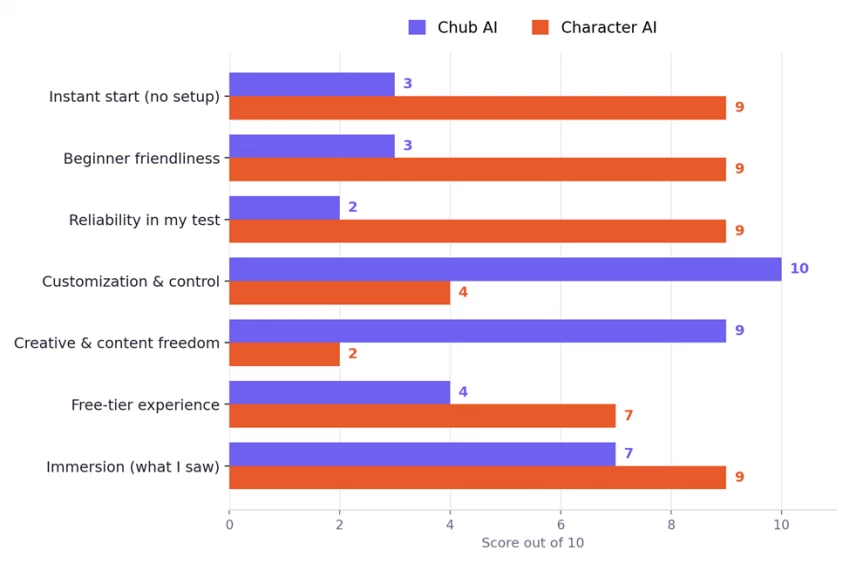
My personal scores from one test session plus each platform's known strengths. Your experience may differ.
For a first-time user, Character AI wins. For a power user, the answer flips.
If you just want to open a site and start a fun, immersive chat today, Character AI is the obvious pick, and it is not close. My test proved it. I was inside a living Cyberpunk story in under a minute with zero setup. That ease is its superpower.
But easy comes with a leash. Character AI is tightly moderated, shows ads on the free tier, and you cannot swap out the AI brain. Chub is the opposite. It greeted me with errors, but only because it hands you the keys. Once you log in and connect a model, you get freedom, deep customization, and far fewer content limits than Character AI offers.
So neither is better in a vacuum. They are built for different people. Here is how I would actually choose:
Pick Chub AI if You are a tinkerer who likes control over the AI model and settings You want deep, long roleplay with lorebooks and persistent worlds You need fewer content filters, and you are 18+ You do not mind a setup step before the fun starts | Pick Character AI if You are new to AI chat and want it to just work You value speed and zero setup over deep customization You like guided Scenes, voice calls, and a polished app You are fine with family-friendly limits and the odd ad |
If I am handing this to a friend who has never touched an AI chatbot, I send them to Character AI, no question. If I am talking to a roleplay veteran who has hit walls on other apps and wants real freedom, I tell them Chub is worth the setup. Winner on first impressions: Character AI. Most powerful once you commit: Chub AI.
A note on this test: everything above comes from one real hands-on session as a regular user, captured in the seven screenshots shown. The Chub errors reflect the genuine out-of-the-box experience of a logged-out visitor with no API key connected, not a permanent flaw. Prices, features, and tiers for both platforms can change over time, so check the official sites before subscribing. Scores are my own opinion, not objective measurements. Both platforms are meant for users 18+ where required.

New Claude Model Targets Agentic AI WorkflowsAnthropic has launched Claude Sonne...
Samuel Osei3 months ago

Gemini’s Image Tools Get a Wider RolloutGoogle is expanding access to Gemini’s p...
Alexander Hughes3 months ago

Two AI video generators, two very different first days. I ran PixVerse through i...
Alexander Hughes3 months ago

The two-minute versionIf you only read one thing, read this. The rest of the doc...
Alexander Hughes3 months ago

Why Seedance 2.5 mattersSeedance 2.5 is the latest release in ByteDance’s Seedan...
Alexander Hughes3 months ago
WSUP AI3.5 /10AS TESTED TODAYCould not send a single message. Stuck in read-only...
Alexander Hughes3 months ago
Discussion