
Two AI video generators, two very different first days. I ran PixVerse through its own homepage like a brand-new user, then put Pika through the same kind of real task. Here is exactly what happened, in plain English, with my honest read after each step and a verdict at the end.
THE Short VERSION
If you only read one thing • Both make AI video. PixVerse chases polished, multi-shot, 1080p clips with built-in sound. Pika chases fast, fun, effect-driven shorts. • Pika is the easier, cheaper place to start and it is plain fun, but when I tested it, asking for a still gave me a video, and it re-imagined my subject instead of keeping her. • PixVerse V6 is the stronger engine on paper: longer clips, native audio, better character consistency, if you are willing to pay for credits. • The catch I hit: PixVerse never let me generate a single clip for free. The template it promotes wanted 160 credits; my new account had 90. |
PixVerse is an AI video generator built around polish and control. Its newest model, V6, pushes longer clips (up to ~15 seconds), 1080p output, multi-shot scenes, native audio, and noticeably stronger character consistency. Its on-ramp is a deep library of community templates and trending effects: instead of writing a prompt from scratch, you remix something that already looks good.
Pika (by Pika Labs) is an AI video generator built around speed and play. You give it a prompt or a photo and it animates a short, stylized clip. Its signature is Pikaffects (melt, explode, inflate) and tools like Pikaswaps. It is one of the most fun, lowest-friction tools in the category, with a genuinely generous free tier. The trade-off: it re-imagines your scene rather than preserving it, so exact faces and details tend to drift.
| PixVerse (V6) | Pika (2.5) | |
| Primary output | Polished, multi-shot clip | Short, stylized clip |
| Max length | Up to ~15 seconds | ~3 to 10 seconds |
| Max resolution | Up to 1080p | Up to 1080p (480p free) |
| Native audio | Yes (V6) | Limited / sound effects |
| Keeps your subject? | Strong consistency | Weak, re-imagines scene |
| Signature move | Templates + multi-shot | Pikaffects, Pikaswaps |
| Learning curve | Low (remix a template) | Near zero |
| Free tier | ~90 start + ~60/day, watermark | ~80 credits/mo, 480p, watermark |
| Watch out for | Showcase templates cost > free credits | Failed renders still burn credits |
I went through PixVerse exactly the way a brand-new user would: I landed on the homepage, picked one of the trending templates it pushes front and center, made an account, and pressed Create. No insider tricks, no API, no pre-loaded credits. Then I ran Pika through the same kind of real task (one portrait, one plain-English brief), so I am comparing what each is genuinely like to use, not just reading spec sheets back to you.
Fair warning up top: my PixVerse run ended at a wall. I am treating that as a finding, not a footnote, because “can I actually make something?” is the first question that matters.
Five steps, five screenshots, my honest read after each. Keep an eye on the credit math; it is the whole story in miniature.
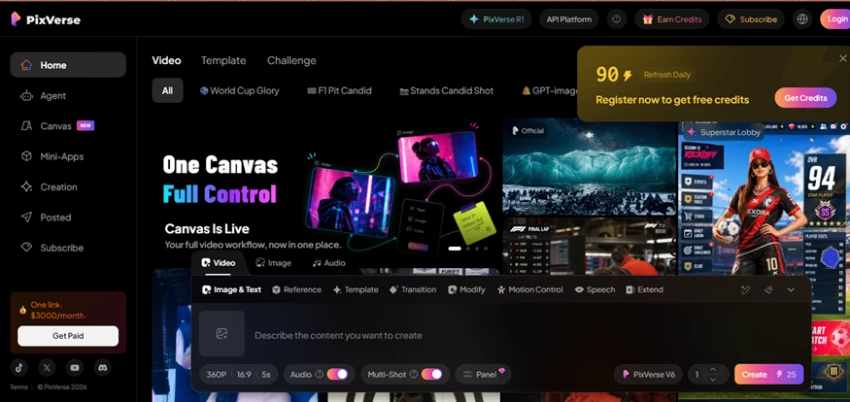
The landing dashboard: a “register for free credits” popup, an affiliate banner, rows of templates, and the generator all fighting for the same screen.
MY TAKE
There is clearly power here, but as a first impression it is noisy. Before I had even found where to type, I was looking at a subscription popup in one corner, a “$3000/month, get paid” affiliate banner in another, and three competing content rows in between. Capable, but cluttered enough that a first-timer has to hunt for the actual point of the page.
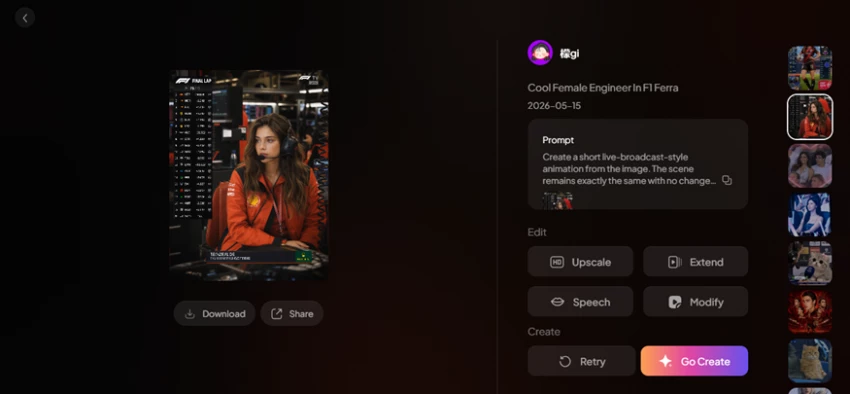
“Cool Female Engineer in F1 Ferrari”: a live-broadcast-style animation built by another creator, with Upscale, Extend, Speech and Modify ready to go.
MY TAKE
This is PixVerse at its best. Instead of staring at a blank prompt box, I picked a community-made template that already looked sharp and just made it mine. The library is genuinely deep, and remixing something proven is a far friendlier on-ramp than writing a cinematic prompt from scratch. I liked this part a lot.
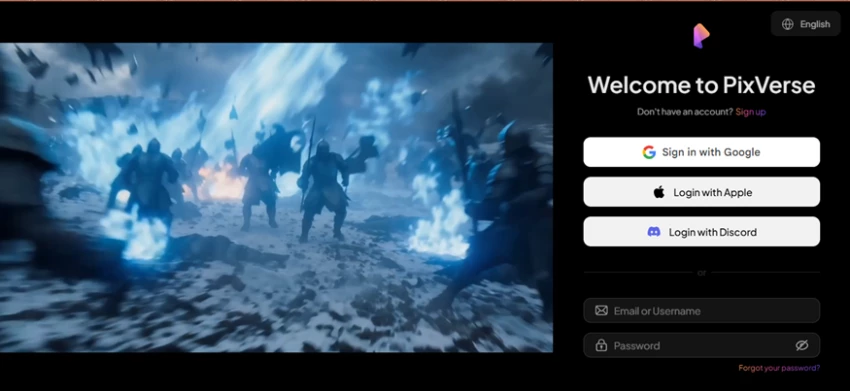
The moment I tried to use the template, a “Welcome to PixVerse” wall appeared: Google, Apple, Discord, or email.
MY TAKE
Expected, but worth flagging: you cannot even reach the generation screen to poke around until you have made an account. It is minor friction, and most tools do this, but it is still a door you have to open before you can window-shop.
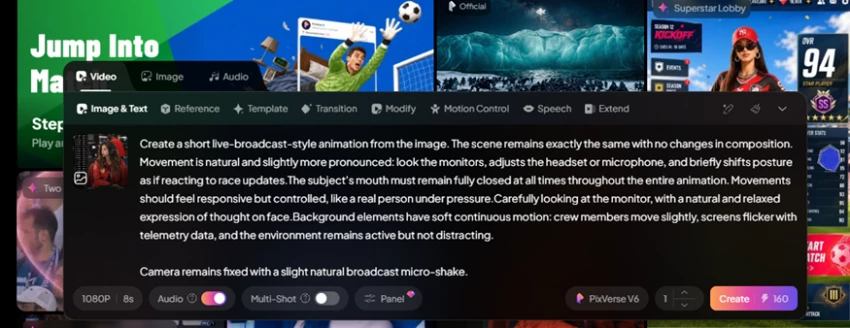
The complete template prompt: a long, detailed broadcast-animation brief (fixed camera, subtle movement, mouth stays closed, background telemetry flickering). Set to 1080P, 8s, V6. Cost: 160 credits.
MY TAKE
The prompt engineering baked into these templates is genuinely impressive: a tightly written brief most people could not produce on their own, down to “the subject’s mouth stays closed” and “a slight natural broadcast micro-shake.” If it had run, I would have bet on a clean result. But the number I could not stop staring at was that quiet little 160.
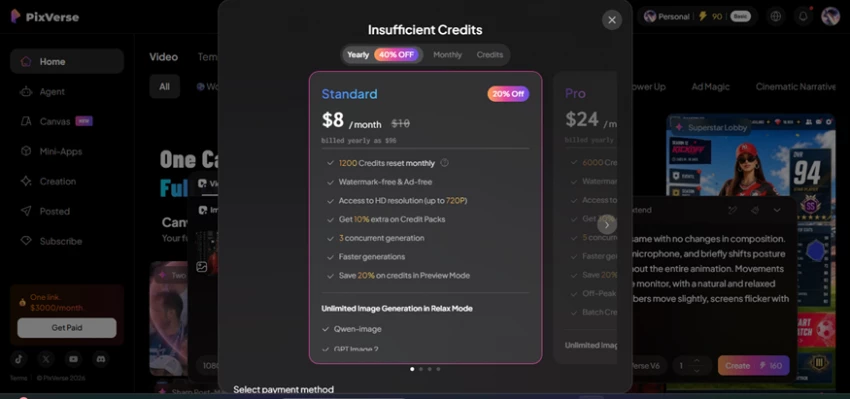
Instead of a render, an “Insufficient Credits” popup pushing me straight to pricing: Standard at $8/mo, Pro at $24/mo (billed yearly).
This is the moment that defined the whole run. The very template PixVerse promotes on its homepage costs nearly double the free credits a brand-new account starts with. I never got a single frame out of it without reaching for my card. For a product selling “press one button, get a viral clip,” that is a rough day one.
To be fair to PixVerse: the free tier does refill ~60 credits a day, so you can make cheaper, lower-res clips (the basic generator runs about 25 credits). The problem is the showcase templates it puts in front of you cost far more than a new account can spend, so the “free” experience and the advertised experience do not line up.
My PixVerse run stalled at a paywall before it made a single frame. Pika is the opposite on entry: it just lets you create. So I ran it through the same kind of real task: one portrait, one simple brief, and I watched where it went. Two rounds, my honest read after each.
Note: the original Pika screenshots live on my site, so each step below is rebuilt as a clean view of what I set up and what came back.
image → video
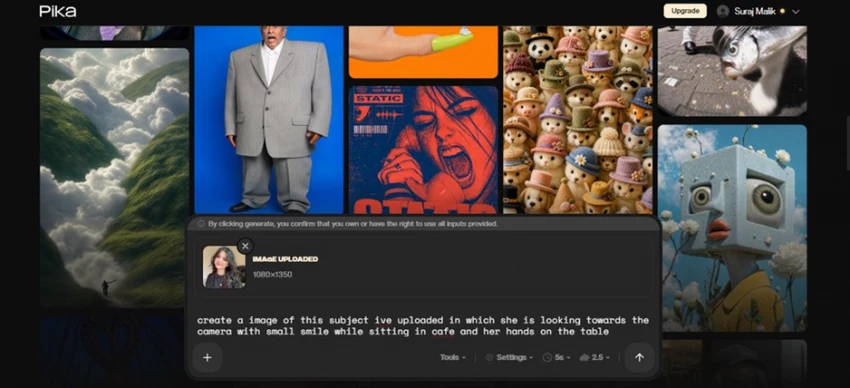
WHAT I SET UP
prompt › create a image of this subject ive uploaded in which she is looking towards the camera with a small smile while sitting in a cafe and her hands on the table
Image attached (1080×1350) · Model: Pika 2.5 · Length: 5s
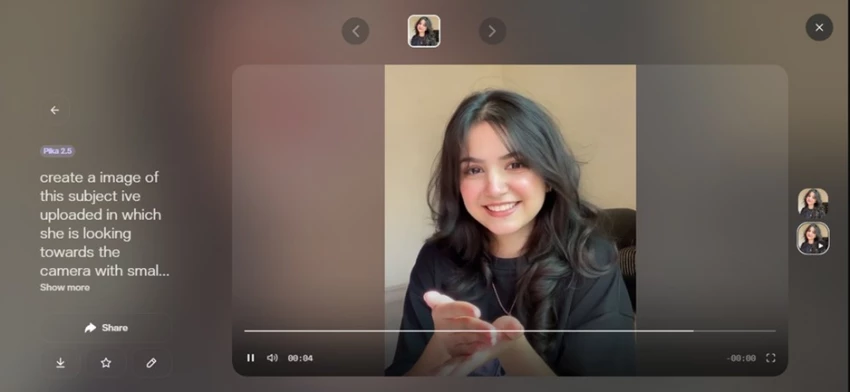
WHAT CAME BACK - A ~4-second video clip, not a still: play controls, a 00:04 timer, and a different face in motion.
MY TAKE
Not what I expected, on two fronts. It picked up the smile and the general mood, but everything else drifted, and the real surprise was the format: I asked for an image and got a video. It caught the vibe yet lost her actual face and the specific cafe setup I described. In fairness, that is not a glitch: I pointed a video tool at a still-image job, so of course it animated something loosely inspired by the photo instead of editing the photo itself.
⟳ Pikaswaps
WHAT I SET UP
swap › turn the overall background into a cafe theme, keep her exactly as she is
Reference image attached · “this image will replace the selected area”
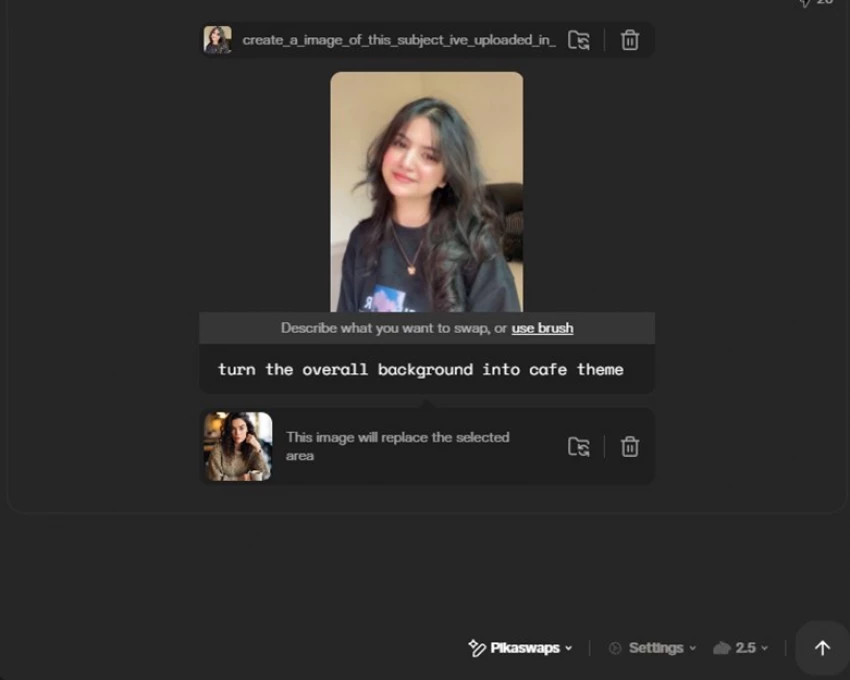
WHAT CAME BACK - Another clip, and it did not just swap the background. New sweater, new framing, a coffee cup that was not in the original.
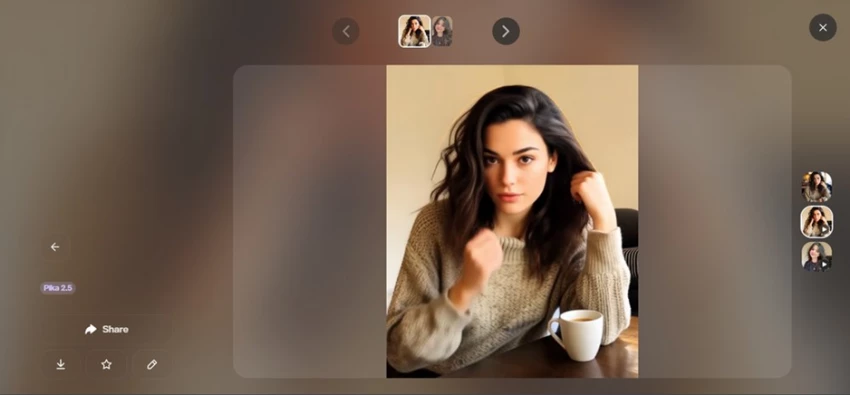
MY TAKE
Disappointing. I asked it to keep her and restyle only the background, and instead it re-imagined the entire shot: different outfit, different pose, a different person. The one thing I wanted held constant, her, is exactly what it changed most. Same root cause as round one: Pikaswaps regenerates a region as video, so it was never going to do a surgical, photo-editor-style background swap.
What the Pika test actually proved: Pika did not really “fail”; it did its job a little too faithfully. It is a video generator, so it kept handing me video and kept regenerating the scene. The mismatch was my expectation, not the tool. And that rhymes with my PixVerse run: both are genuinely powerful, and both have one sharp edge. PixVerse walls its best templates behind credits; Pika reinvents your subject instead of preserving it.
Two last honest notes from my time in Pika. It is stylized, not photoreal, but that was never the goal; it is a short-form effects toy, and a really good one. And the gotcha that stings: a failed render still eats your credits, so a few unlucky generations quietly drain your balance. Where PixVerse blocked me at the door, Pika threw it open and let me play; it just does not pretend to be a precision tool.
Six dimensions, scored 0 to 10 from how each performed in my testing and across aggregated reviews. This is a directional picture of where each tool’s strength sits, not a lab benchmark. Notice how cleanly they trade places.
| Dimension | PixVerse | Pika |
| Output quality / fidelity | 8.5 █████████░ | 6.0 ██████░░░░ |
| Keeps your exact subject | 8.0 ████████░░ | 4.0 ████░░░░░░ |
| Ease & fun | 6.5 ███████░░░ | 9.0 █████████░ |
| Speed to a result | 7.0 ███████░░░ | 9.0 █████████░ |
| Make something for free | 4.0 ████░░░░░░ | 8.5 █████████░ |
| Value for money | 6.5 ███████░░░ | 7.5 ████████░░ |
The free-tier math that stopped my PixVerse run Free credits on a new account: 90 Credits the promoted template needed: 160 Short by: 70 credits → no video without paying. |
Prices below reflect publicly listed plans at the time of writing and can change, so always check the current plan page before you pay. Yearly billing usually knocks ~20% off the monthly rate.
| Plan | Monthly | Yearly | Credits | Notes |
| Free | $0 | N/A | ~90 + 60/day | Watermark, lower-res |
| Standard | $10 | $8 | 1,200 / mo | Up to 720p, 3 jobs |
| Pro | $30 | $24 | 6,000 / mo | 1080p, 5 jobs, batch |
| Premium | $60 | ~$48 | More | Higher limits |
| Ultra | $199 | N/A | Most | Free off-peak generation |
| Plan | Monthly | Yearly | Notes |
| Free | $0 | N/A | ~80 credits/mo, 480p, watermark |
| Standard | ~$10 | $8 | More credits, still watermarked, personal use |
| Pro | ~$35 | $28 | 1080p, watermark-free, commercial use (the real entry point) |
| Fancy | ~$95 | $76 | High volume, faster generation |
• Monthly credits usually expire; purchased add-on credits usually do not.
• Higher resolution and audio multiply the credit cost of a single clip.
• Generations are non-deterministic, so budget for 2 to 5 retries to land the shot you want.
• PixVerse: the showcase templates it advertises cost far more than a new free account can spend.
• Pika: a failed render still burns credits.
After running both through real tasks (PixVerse straight into a paywall, Pika into a scene it kept reinventing), my honest read is that there is no single winner here. There is a winner for you, and it hangs on two things: what kind of clip you want, and how much you are willing to spend to get it.
PixVerse 7.5 / 10 For its job: polished, multi-shot, sound-on video, held back by credit friction and a busy UI. | Pika 8.0 / 10 For its job: fast, surreal, genuinely fun shorts, weak on keeping your exact subject. |
Scored against what each tool is built to do, not against each other.
• You want a clean, higher-fidelity clip with sound baked in.
• Character consistency across a multi-shot scene actually matters.
• You are doing real, repeatable work and will pay for credits.
• You would rather remix a strong template than write a prompt.
• You want to make something today, free, without a card.
• You are chasing surreal effects: melt, explode, inflate.
• It is for TikTok / Reels and “close enough” beats “pixel-perfect.”
• Speed and fun matter more than holding an exact face.
If you make me choose right now
For me, the deciding factor in this test was not quality; it was access. Pika let me make something on day one; PixVerse asked for my card before it would make anything at all. So if you are experimenting, learning, or simply broke, start with Pika: it is the lower-friction, more forgiving, more fun place to land.
But do not write PixVerse off. V6 is the stronger engine (longer clips, native audio, better consistency, a richer template library) and if you are doing client work or anything that needs to look polished, it is worth paying for. Just go in with eyes open: budget for credits, expect a few retries, and treat the homepage’s “free” promise as marketing, not reality.

New Claude Model Targets Agentic AI WorkflowsAnthropic has launched Claude Sonne...
Samuel Osei3 months ago

Gemini’s Image Tools Get a Wider RolloutGoogle is expanding access to Gemini’s p...
Alexander Hughes3 months ago

Two of the most talked-about AI chat platforms. I opened both, picked a characte...
Alexander Hughes3 months ago

The two-minute versionIf you only read one thing, read this. The rest of the doc...
Alexander Hughes3 months ago

Why Seedance 2.5 mattersSeedance 2.5 is the latest release in ByteDance’s Seedan...
Alexander Hughes3 months ago
WSUP AI3.5 /10AS TESTED TODAYCould not send a single message. Stuck in read-only...
Alexander Hughes3 months ago
Discussion