
The AI video generation market in 2026 has a clarity problem. Tools market themselves as cinematic, indistinguishable from real footage, ready for production and most of them buckle the moment a real workflow gets thrown at them. Digen AI, the multi-model platform behind 5 million+ creator accounts, sits in an unusual spot: it does several things genuinely well at a price point its competitors cannot match, and it does several things badly enough to disqualify itself from professional pipelines.
The platform’s core promise is access. Inside one workspace, creators can generate video on Real Motion 3.1, Sora 2, Veo 3.1, Kling 3.0, ByteDance Seedance 2.0, and the experimental HappyHorse model. The free tier hands out 300 credits at sign-up, the entry paid plan is $4.99 per month on annual billing, and the Lip Motion Gen-2 engine remains one of the most accurate consumer-grade lip-sync tools on the market. For short-form social work and image-to-video animation, those numbers translate directly into output that competitors at 3× the price struggle to match.
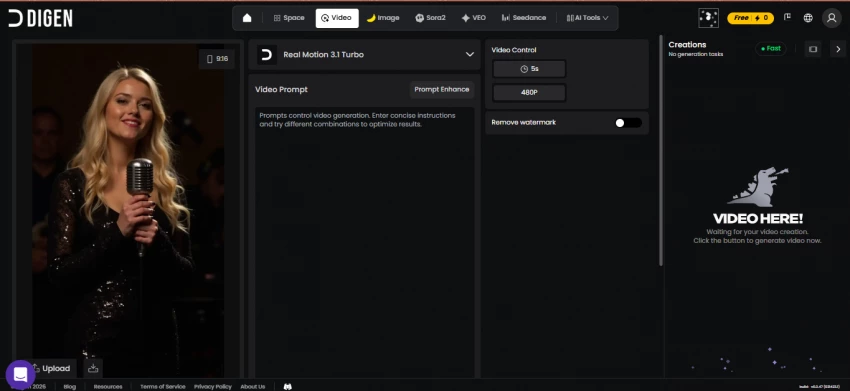
The platform’s core problem is depth. There is no timeline editor, no native 4K export, no way to assemble multiple clips inside the tool, and a mobile app that despite five million installs receives consistent reports of freezes, prompt-box bugs, and paid features being inaccessible after purchase. Treated as a generation sandbox feeding into a real video editor, Digen AI is excellent. Treated as a complete production tool, it falls apart fast. This review breaks down where each line gets drawn.
Scoring AI video tools on a single number flattens too much detail. A platform can be brilliant at pricing and disastrous at editing and the average score will hide both. The chart below splits Digen AI’s performance across six independent criteria, then overlays it on the 2026 market average for the same dimensions.
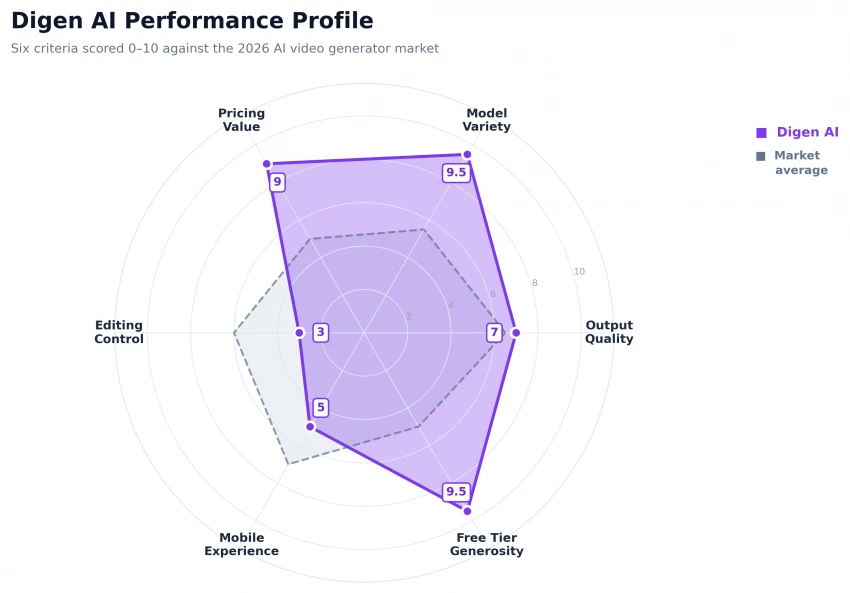
The pattern that emerges is consistent with hands-on testing: Digen overshoots the market average dramatically on pricing value, model variety, and free-tier generosity and undershoots it visibly on editing controls and mobile experience. Output quality lands roughly at market average for the price tier, which is itself an achievement given that competing tools at the same price point typically expose only a single proprietary model.
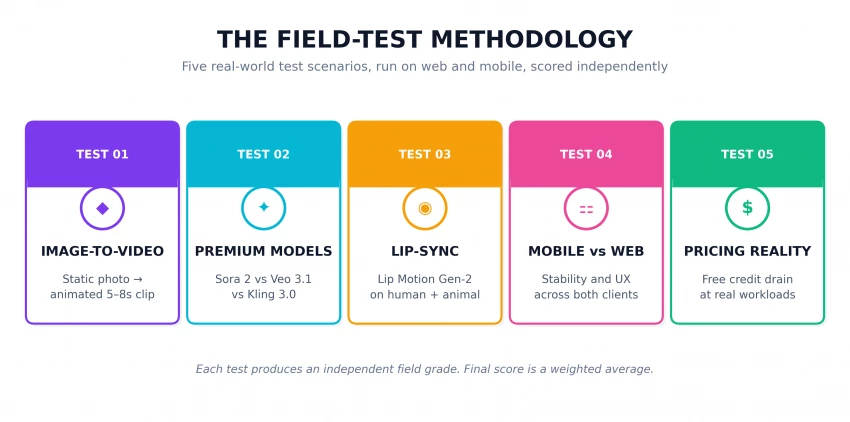
Five independent test scenarios were selected to mirror the workflows real creators report on Reddit threads, Discord communities, and Wondershare Filmora’s editorial test in early 2026. Each scenario was scored independently and graded on a 0–10 scale. The final overall score is a weighted average that reflects how heavily creators rely on each capability.
| ◇ AT A GLANCE | |
| PRODUCT | Digen AI |
| TYPE | Cloud-based AI video & image generator |
| LAUNCHED | 2024 · Active globally |
| USER BASE | 5 million+ creators |
| FREE CREDITS | 300 at sign-up + daily rewards |
| ENTRY PLAN | $4.99 / month (Ultra, annual billing) |
| TOP TIER | $39.99 / month (Ultra Max, unlimited) |
| MAX RESOLUTION | 1080p |
| CLIP LENGTH | 5–8 seconds per generation |
| RENDER TIME | 60–90 seconds (≈30s on Turbo) |
| PLATFORMS | Web (primary) · iOS · Android |
| OFFLINE MODE | Not available |
Each of the five test scenarios below was run on the Digen AI web app, with results cross-checked against findings published by the Wondershare Filmora editorial team and user reviews on Trustpilot and the Google Play Store. Every test ends with an independent field grade.
| TEST 01 · IMAGE-TO-VIDEO ANIMATION |
THE SETUP A high-resolution still photo of a golden retriever in a wheat field was uploaded as a reference. The prompt asked for a slow-motion, cinematic depth-of-field clip with a pushing camera and subtle wind motion. Real Motion 3.1 was used as the primary engine, with a 16:9 aspect ratio and 720p resolution. |
THE RESULT Render completed in 67 seconds for a 5-second clip. The face geometry stayed locked, the camera motion was smooth, and the wheat field showed convincing low-frequency motion. The clip was visibly stronger than equivalent output from Pika Labs and Hailuo AI at the same prompt. This is the test where Digen most clearly outperforms its price tier. |
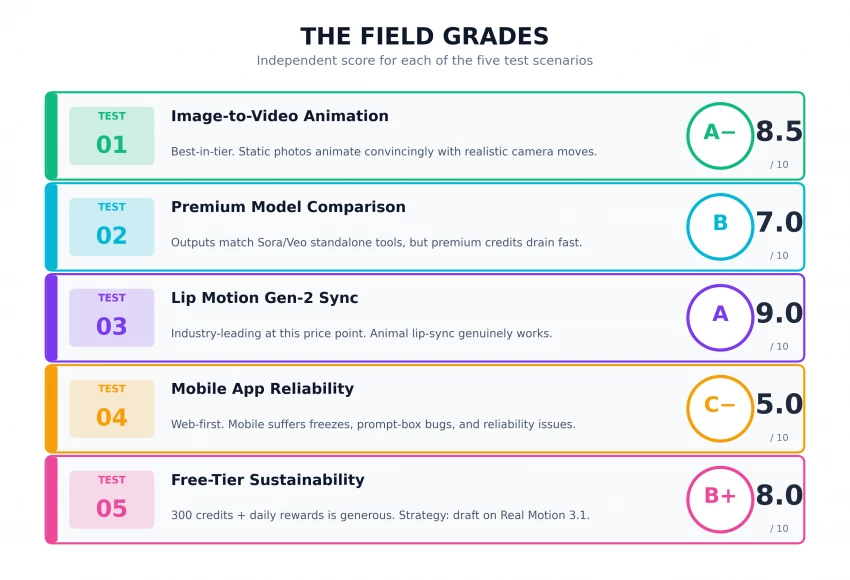
| FIELD GRADE → A− (8.5 / 10) |
| TEST 02 · PREMIUM MODEL COMPARISON |
THE SETUP The same scene prompt was run across Sora 2, Veo 3.1, and Kling 3.0 to compare aesthetic and credit cost. Each clip was generated at the platform’s highest available quality setting on the standard rendering queue. |
THE RESULT All three models produced cinematic stills, but Veo 3.1 led on lighting realism, Sora 2 led on physics consistency, and Kling 3.0 led on human anatomy. The Wondershare Filmora team’s independent test reached a similar conclusion, noting that "even though they promise 8-second clips, our result clocked in at just 5 seconds." Premium model runs collectively burned through about 80% of the 300-credit free pool in a single afternoon. |
| FIELD GRADE → B (7.0 / 10) |
“While the details look hyper-realistic, the movement feels a little stiff. Even though they promise 8-second clips, the result clocked in at just 5 seconds.” — Wondershare Filmora editorial team, Digen AI hands-on test, 2026 |
| TEST 03 · LIP MOTION GEN-2 SYNC TEST |
THE SETUP Two reference images were tested: one human portrait and one image of a domestic cat. Each was paired with a 6-second voiceover and run through the Lip Motion Gen-2 engine, which Digen markets as supporting non-human subjects — a rare capability at this price point. |
THE RESULT The human result was sharp, with mouth shapes accurately mapped to phonemes and minimal jaw drift. The animal result, though clearly synthetic, was usable for meme and ad-creative contexts and noticeably better than equivalent attempts on competing tools, most of which simply refuse to lip-sync animals at all. Lip Motion Gen-2 is the single feature that most justifies a Digen subscription on its own merits. |
| FIELD GRADE → A (9.0 / 10) |
| TEST 04 · MOBILE APP VS WEB RELIABILITY |
THE SETUP The exact same prompt and reference image were submitted on the Digen Android app and the Digen web app within minutes of each other. Both clients ran on stable broadband connections from the same physical location. |
THE RESULT The web app generated cleanly and exported without issue. The Android app froze twice during prompt entry, and on the third attempt rendered a black overlay over the input box — a bug consistent with multiple paying-subscriber reports on the Google Play Store. One verified Android reviewer summarized it cleanly: "Great app, but it’s better on the website." Treating Digen as a web-first tool sidesteps almost all of these problems. |
| FIELD GRADE → C− (5.0 / 10) |
“Really good apps for AI and editing. But this app version has a bug when typing or editing the prompt. A black screen blocked the view. Great app, but it’s better on the website.” — Verified subscriber review, Google Play |
| TEST 05 · FREE-TIER SUSTAINABILITY |
THE SETUP The 300-credit free pool was used over a one-week test window with a deliberate generation strategy: drafting all initial concepts on Real Motion 3.1 (the cheapest model), then re-rendering only the strongest two or three on Sora 2 or Veo 3.1. |
THE RESULT The free tier comfortably supported 18 Real Motion drafts and 4 premium re-renders before exhausting credits. Daily login rewards added approximately 30 credits per week of active use. For a creator producing 4–6 short-form clips per week, the free tier alone is genuinely viable indefinitely. Pure premium-model use without a strategy collapses the free tier to about 8 clips total. |
| FIELD GRADE → B+ (8.0 / 10) |
Pulling the five grades into a single view makes the shape of Digen AI’s strengths and weaknesses immediately legible. The platform earns its highest grades on the things that matter most for short-form creators image animation, lip-sync, and free-tier value and concedes ground on the more demanding professional dimensions.
Marketing copy and hands-on results never line up perfectly. With Digen AI specifically, the gap between the two reveals which features the platform genuinely delivers and which ones still have meaningful caveats. The table below compares five high-profile marketing claims with what testing actually produced.
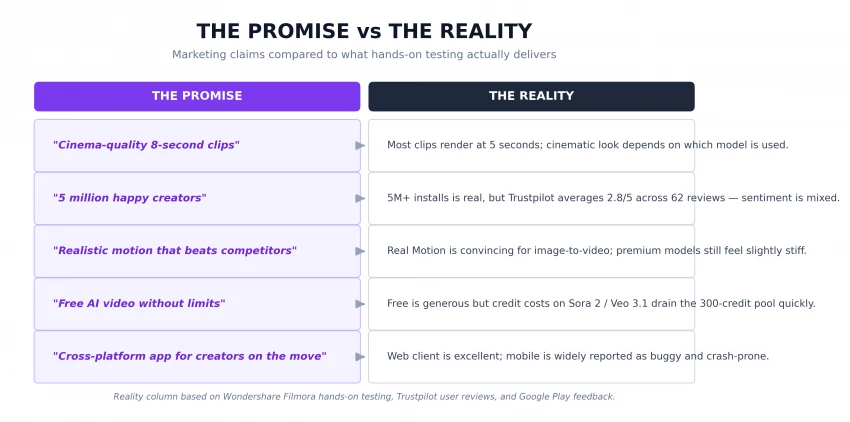
None of these gaps are dealbreakers in isolation. Most clips really do render well; 5 million creators really do exist on the platform; the free tier really does work. The pattern that matters is how often the marketing language inflates a 7-out-of-10 reality into a 10-out-of-10 promise. Buyers who read the marketing literally will be disappointed; buyers who calibrate their expectations to the reality column will get good value.
◆ FIELD NOTE · ON THE TRUSTPILOT SUBSCRIPTION COMPLAINTS Multiple Trustpilot reviewers report difficulty cancelling Digen AI subscriptions through the standard account flow, with some resorting to cancelling their card. Anyone considering a paid plan should subscribe through PayPal or a virtual card initially as a hedge against future cancellation friction. |
Digen AI is not universally good or universally bad. It is excellent for one specific buyer profile, partial-fit for two adjacent profiles, and genuinely poor for one profile. The decision tree below routes any creator to the right answer in three questions.
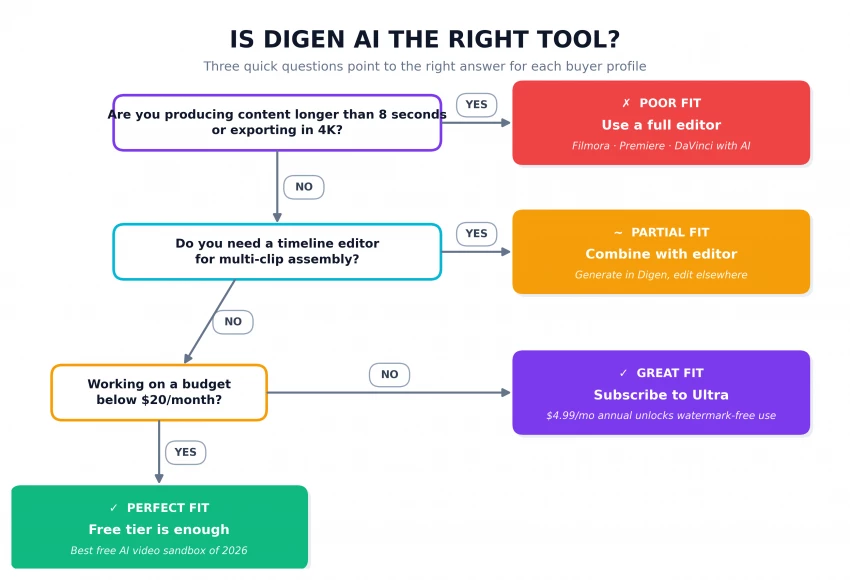
Perfect Fit → Short-form creators on a tight budget. The free tier alone covers most weekly workloads when paired with a draft-on-Real-Motion strategy. This is the buyer profile Digen was clearly designed for.
Great Fit → Creators who can spend $5–$10 per month and want watermark-free, commercial-use exports. The Ultra annual plan ($4.99/mo) and Ultra Pro annual plan ($9.99/mo) cover almost every short-form workflow.
Partial Fit → Creators who need timeline editing, scene assembly, or a stable mobile workflow. Digen handles generation; another tool — Filmora, Premiere, DaVinci — has to handle assembly and post-production.
Poor Fit → Anyone producing long-form content, 4K commercial work, or broadcast-grade output. Digen’s 1080p ceiling and clip-length caps eliminate it from contention. Wondershare Filmora, Runway Gen-4, or Sora Pro are the better starting points.
Headline subscription prices ($4.99, $9.99, $19.99, $39.99) tell only half the story. The actual cost per generated video depends on monthly volume — and the math shifts dramatically the moment a creator scales past 25 generations per month. The chart below estimates the effective per-video cost on each Digen tier across realistic monthly workloads.
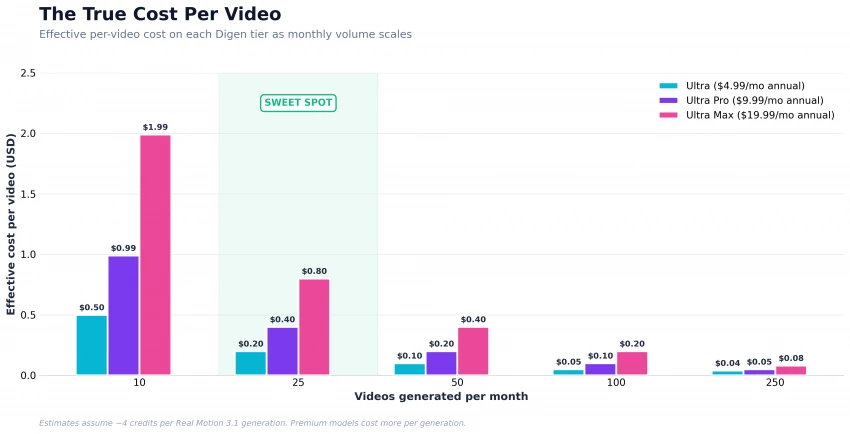
A few patterns are worth flagging. At low volume (10–25 videos a month), the cheapest tier (Ultra at $4.99/month annual) delivers the best per-video economics. At medium volume (50–100 videos), Ultra Pro becomes more attractive because of its higher credit allocation. Only at heavy volume (250+ videos per month, much of it on premium models) does Ultra Max start to make sense and at that point, most creators should also be evaluating the standalone unlimited Sora 2 or Veo 3.1 packs at $69.99–$199.99 per month.
◆ FIELD NOTE · A REALITY CHECK ON CREDITS A 4-second Real Motion 3.1 generation typically consumes 4 credits; a Sora 2 generation can consume 30+ credits. The 6,000-credit Ultra plan therefore translates to roughly 1,500 Real Motion clips or 200 Sora 2 clips per month a 7× spread between the cheapest and most expensive engine. |
Digen AI does not compete with the highest-end cinematic tools. It does not try to. The chart below maps the 2026 AI video landscape on two axes, cost and capability and shows exactly which corner of the market Digen owns.
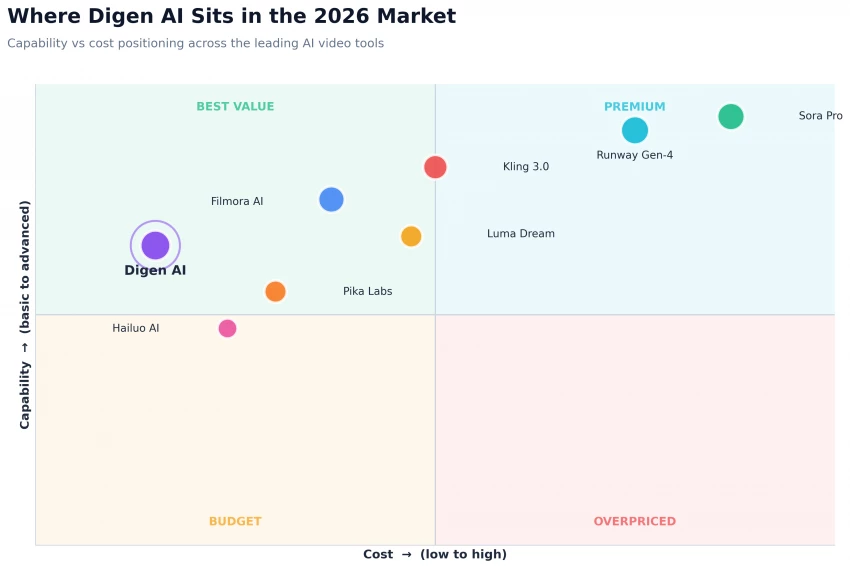
Digen AI sits firmly in the upper-left quadrant, the "Best Value" corner. Capability is solidly above the market median for the price tier, and cost is well below. The platform’s competitive moat is the combination of multi-model access and aggressive pricing; everywhere else in the chart, creators have to choose between paying premium prices for cinematic quality (Sora Pro, Runway Gen-4) or accepting lower capability at low prices (Pika Labs, Hailuo AI).
The closest direct competitor is Filmora AI but Filmora is fundamentally a different product category. Filmora is a full editing studio with AI generation built in; Digen is a generation tool that requires an external editor. Creators who already own a Filmora license do not need Digen. Creators who only want generation, and who want to test the broadest range of models cheaply, do not need Filmora.
Digen AI is one of the most pragmatically useful free AI video generators on the market in 2026. The combination of a 300-credit sign-up bonus, daily reward credits, multi-model access, and the Lip Motion Gen-2 engine is hard to beat at this price point. For short-form social content and image animation specifically, Digen is the recommendation.
The platform is not, however, a complete production tool, and it should not be marketed as one. The 1080p resolution cap, missing timeline editor, short clip lengths, and unstable mobile app mean it cannot anchor a professional video pipeline by itself. Creators who treat it correctly as a fast, cheap generation sandbox feeding into a real editor will get extraordinary value. Creators who try to ship complete videos directly out of Digen will hit a wall fast.

New Claude Model Targets Agentic AI WorkflowsAnthropic has launched Claude Sonne...
Samuel Osei1 month ago

The Quick verdictInSnoop is a free, browser-based tool that promises to let you...
Alexander Hughes1 month ago

Gemini’s Image Tools Get a Wider RolloutGoogle is expanding access to Gemini’s p...
Alexander Hughes1 month ago

Two AI video generators, two very different first days. I ran PixVerse through i...
Alexander Hughes1 month ago

Two of the most talked-about AI chat platforms. I opened both, picked a characte...
Alexander Hughes1 month ago

The two-minute versionIf you only read one thing, read this. The rest of the doc...
Alexander Hughes1 month ago
Discussion