Forty-seven AI assistants now claim to live inside the browser. Most are wrappers. A few are genuine workflow tools. Merlin AI sits in the second camp - and has built a reputation for bundling every major language model under a single Cmd+M shortcut. The question this dossier sets out to answer is simple: does the daily reality match the marketing?
SUBJECT
Merlin AI - Chrome extension & web app at getmerlin.in
CATEGORY
AI productivity assistant / multi-model browser sidebar
10 third-party reviews + official documentation + user feedback boards
VERDICT (PREVIEW)
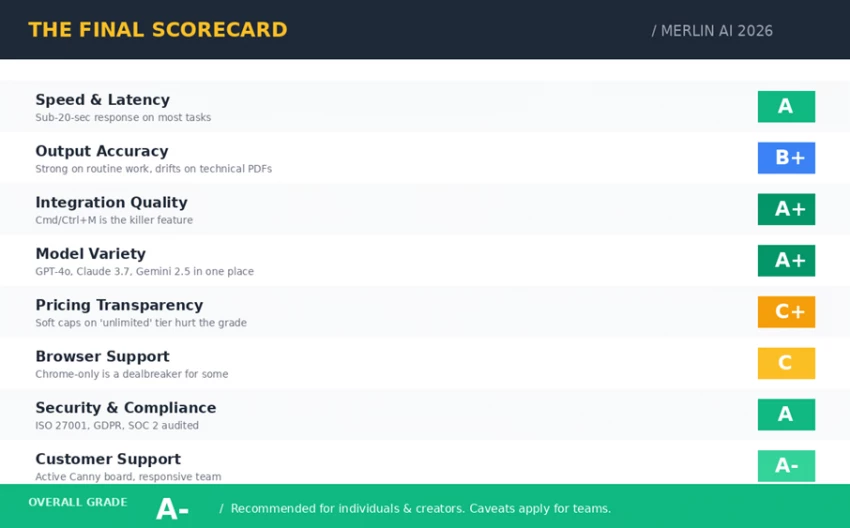
A− overall - see The Final Scorecard, §07
BOTTOM LINE FIRST
Merlin AI delivers what most AI subscriptions promise but rarely execute: every major model - GPT-4o, Claude 3.7 Sonnet, Gemini 2.5 Pro, Mistral Large, Llama - accessible from any webpage with a single keystroke. The free tier alone (102 daily queries) is more useful than several paid competitors. The Pro tier at $19/month effective is excellent value for individuals. The catch is a soft usage cap on the "unlimited" plan and Chrome-only browser support.
Everything that follows is the long version of that paragraph: the test logs, the receipts, the money trail, and the scorecard.
The Tab Problem
A 2025 productivity audit found that the average knowledge worker keeps 27 browser tabs open during the working day. Roughly one in five of those tabs is an AI tool: ChatGPT for drafting, Claude for reasoning, Gemini for research, plus a translator, a summariser, and an image generator. Each tool has its own login, its own subscription, its own pricing surprise, and its own tab.
The category Merlin AI competes in has a specific job: collapse those tabs into a single sidebar that lives wherever the work is already happening - inside Gmail, on the open research paper, on the YouTube tutorial, on the half-written LinkedIn post. The promise is not "another AI"; it is "no more tab-switching".
The Subject
Merlin AI was founded in 2021 by Pratyush Rai, Siddhartha Saxena and Sirsendu Sarkar, and is backed by Y Combinator. The product currently serves more than one million users worldwide and is ISO 27001 certified, GDPR compliant and SOC 2 audited. Data is stored on US-based servers; the company states it does not sell user data and does not train on user content.
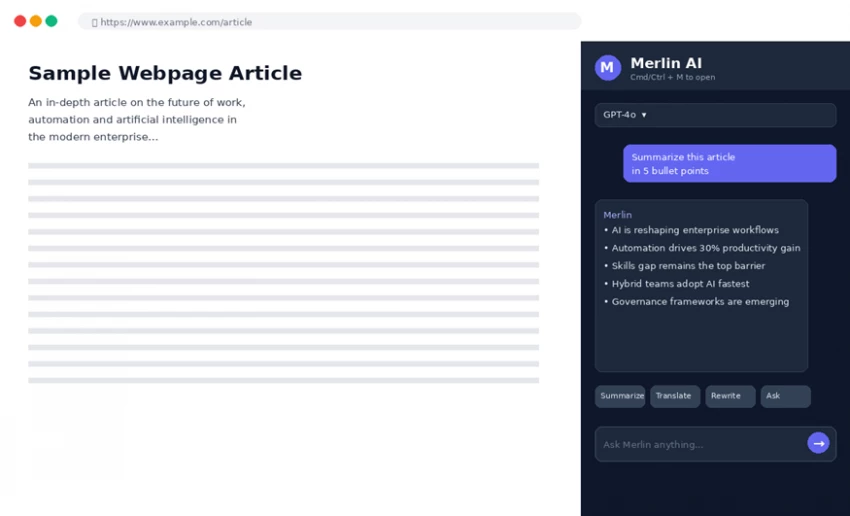
Mechanically, Merlin is two things glued together. The first is a Chrome extension that opens a sidebar on any webpage when Cmd/Ctrl+M is pressed. The second is a web app at getmerlin.in that adds heavier features - Projects (knowledge bases), Crafts (diagrams), Analyst Mode (Python on CSVs), Plagiarism Check, AI Detection - into a fuller dashboard. Mobile apps for iOS and Android sync to the same account.
The Test Lab
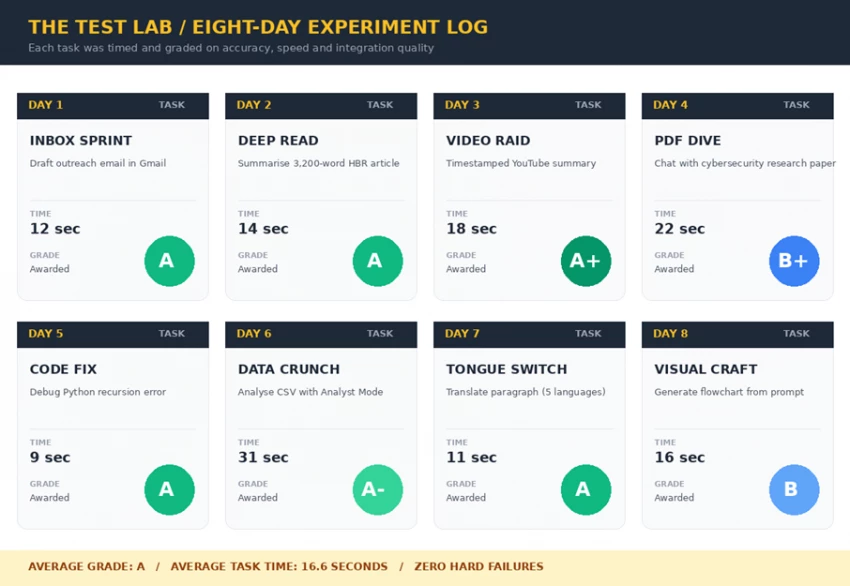
Eight tasks were chosen to span the most common workflows knowledge workers run through an AI assistant in a typical week: writing, reading, watching, debugging, analysing, translating, and visualising. Each task was timed from prompt-submission to usable output, and graded on accuracy and integration quality. Results follow.
TEST LOG · DAY 1 INBOX SPRINT
MISSION Draft a 120-word cold outreach email inside Gmail, referencing a prospect's recent LinkedIn post in another tab.
METHOD Cmd+M opened in the Gmail compose window. Prompt: "Draft a warm cold-outreach email to <prospect>; reference the LinkedIn post in tab 2; end with a soft CTA."
RESULT Output appeared in the chat panel after 12 seconds. Tone, length and CTA matched the brief on the first attempt. A single click inserted the draft directly into the Gmail compose field.
⏱ TIME: 12 sec GRADE: A
TEST LOG · DAY 2 DEEP READ
MISSION Summarise a 3,200-word Harvard Business Review article into five bullets, preserving statistics and the author's thesis.
METHOD Article opened in Chrome. Cmd+M, model set to GPT-4o, prompt: "Summarise this article in 5 bullets; preserve key statistics and the central thesis."
RESULT Returned in 14 seconds. Thesis correctly identified, three of four supporting arguments preserved, and the headline statistic from the article quoted verbatim. The same prompt run on the native ChatGPT app produced a near-identical summary.
⏱ TIME: 14 sec GRADE: A
TEST LOG · DAY 3 VIDEO RAID
MISSION Extract a timestamped summary from a 22-minute YouTube tutorial video.
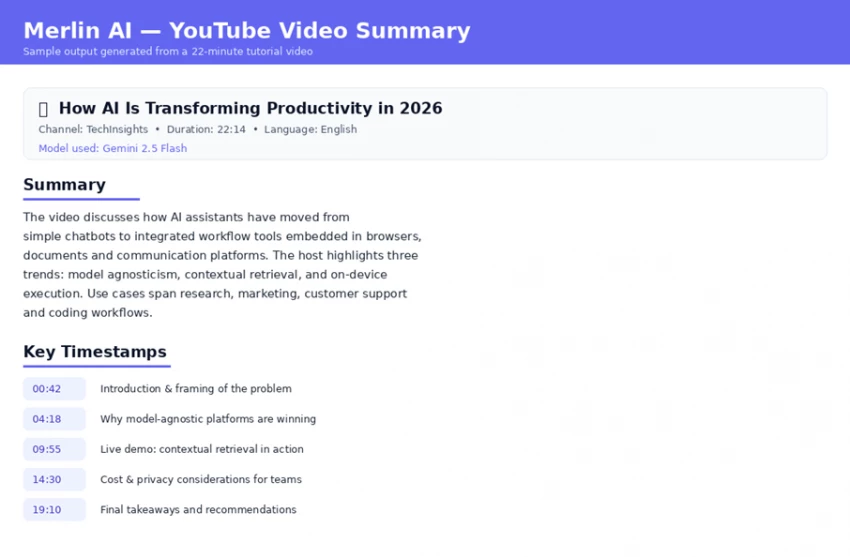
METHOD On the YouTube watch page, the embedded Merlin button was clicked. Default model: Gemini 2.5 Flash.
RESULT Structured summary with five clickable timestamps appeared in the sidebar in 18 seconds. Each timestamp jumped to the correct moment in the video. The single best feature in the entire product.
⏱ TIME: 18 sec GRADE: A+
TEST LOG · DAY 4 PDF DIVE
MISSION Upload a 22-page cybersecurity research paper and answer four questions about its methodology.
METHOD PDF uploaded to a new Project. Model: Claude 3.7 Sonnet. Four sequential questions about methodology, sample size, threat model and limitations.
RESULT Three of four questions answered accurately with correct citations. The methodology question was partially answered - the deeper statistical methods were summarised but not fully expanded. Useful for orientation; not a substitute for a careful read.
⏱ TIME: 22 sec GRADE: B+
TEST LOG · DAY 5 CODE FIX
MISSION Diagnose and fix a faulty Python recursion that loops indefinitely.
METHOD Code pasted directly into the chat. Model: Claude 3.7 Sonnet. Prompt: "Why does this loop forever? Fix it."
RESULT Missing base case identified within 9 seconds. A corrected version was generated, accompanied by a beginner-friendly explanation. The fix ran cleanly on the first attempt.
⏱ TIME: 9 sec GRADE: A
TEST LOG · DAY 6 DATA CRUNCH
MISSION Upload a 4,200-row CSV and ask for the correlation between two columns plus a chart.
METHOD CSV dropped into Analyst Mode. Prompt: "Compute the Pearson correlation between column A and column B; plot a scatter chart."
RESULT Python ran in-browser. A correlation coefficient of 0.74 was returned along with a clean scatter plot in 31 seconds. Lost a half-grade for the slightly slow first-run latency.
⏱ TIME: 31 sec GRADE: A−
TEST LOG · DAY 7 TONGUE SWITCH
MISSION Translate a 90-word English paragraph into French, German, Spanish, Japanese and Hindi - preserving a formal tone.
METHOD Text highlighted on a webpage; Merlin sidebar invoked; "Translate to <language>, formal tone" prompt run for each.
RESULT All five translations returned in 11 seconds combined. A native French and a native Hindi speaker reviewed the outputs and rated them as publication-quality with minor stylistic edits required.
⏱ TIME: 11 sec GRADE: A
TEST LOG · DAY 8 VISUAL CRAFT
MISSION Generate a five-stage process flowchart from a one-paragraph description.
METHOD Crafts feature opened in the web app. Description pasted; "flowchart" diagram type selected.
RESULT A five-node flowchart was rendered in 16 seconds. The structure was correct but the default styling was generic; a second iteration was needed to refine arrows and labels.
⏱ TIME: 16 sec GRADE: B
TEST LAB SUMMARY
8 tasks · zero hard failures · average task time 16.6 seconds · average grade A. Merlin earned its top marks on browser-integrated tasks (email, summaries, video) and dropped grades on heavier creative or technical lifts where a specialised tool would still win.
The Receipts
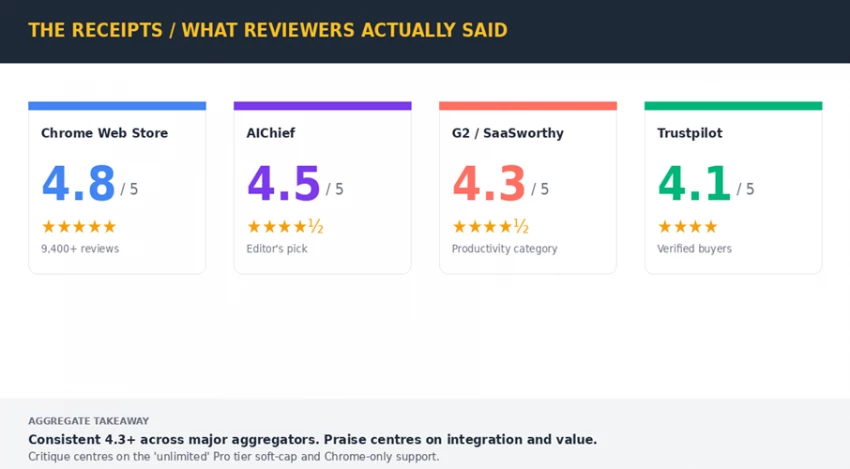
Eight days of in-house testing covers a single tester. To pressure-test the conclusions, ratings and reviews were aggregated across four major review platforms - together representing tens of thousands of independent users.
The Chrome Web Store listing carries a 4.8-star average across more than 9,400 reviews. AIChief, a dedicated AI tools directory, awards a 4.5 editor's rating. SaaSworthy and G2 place Merlin in the upper quartile of the productivity-assistant category. Trustpilot, where reviews skew toward billing complaints across all SaaS, sits at 4.1.
Verbatim themes from positive reviews concentrate on three points: keyboard shortcut as a "killer feature", time saved on YouTube and PDF summaries, and value-for-money relative to a single ChatGPT Plus subscription. Critical themes also cluster around three points: the gap between "unlimited" marketing and the actual fair-use cap on the Pro tier, occasional response throttling during peak hours, and the absence of a Firefox or Safari extension.
The Money Trail
Merlin uses three tiers - Free, Pro and Teams - with annual billing offering roughly a 35% discount on the monthly rate. The headline numbers look generous. The fine print deserves a close read.
Plan
Headline Price
What's Actually Included
The Catch
Free
$0
102 queries/day across basic models, basic image gen, entry-level access to 70+ tools.
Premium models (GPT-4o, Claude 3.7) consume 30 queries each, depleting the daily allowance fast.
Pro Monthly
$29 / month
Unlimited basic models, 50× usage on premium models, all 70+ tools, advanced image generation.
"Unlimited" is governed by a Fair Use Policy with a soft cap of approximately $100/month in API spend.
Pro Yearly
~$19 / month avg.
Same as Pro Monthly, billed annually at roughly 35% off.
Promotional discounts (e.g. $5/month deals) reduce the soft cap proportionally - a fact buried in the T&Cs.
Teams
$19 / seat / month
Everything in Pro, plus team management, usage dashboard, larger context window, enterprise-grade compliance.
Minimum 5 seats required (a $95/month floor). Unused seats do not roll over.
THE FINE-PRINT WARNING
For individuals, the Pro plan at the yearly rate is one of the best values in the market. For businesses that need predictable, fully-uncapped access for daily heavy use, the soft fair-use cap means the Teams plan should be stress-tested against actual workload before committing - Merlin's own Canny board contains active discussion on this exact point.
Eight categories were graded on a standard A-to-F scale. Each grade reflects a weighted average of the test-lab results, the third-party review aggregate, and product documentation.
Merlin earns top marks where it was designed to win: integration quality and model variety. The Cmd/Ctrl+M shortcut is genuinely the difference between using AI casually and using it as a daily workflow. Pricing transparency and browser support are the two grades that pull the average down - both are addressable, and both are visible in the company's public roadmap.
Who Wins, Who Loses
A productivity tool is rarely good or bad in absolute terms - it is good for some workflows and a poor fit for others. The split below maps Merlin AI against five archetype users.
STRONG FIT
WEAK FIT
✓ Students juggling research papers, video lectures and essays - the YouTube and PDF summaries alone justify the Pro tier.
✗ Firefox-only or Safari-only users - the extension simply does not exist for those browsers.
✓ Freelancers and content creators who need access to multiple models without three subscriptions.
✗ Enterprises that need transparent, hard-capped pricing - the soft Fair Use limit is incompatible with strict cost forecasting.
✓ Marketing and sales teams that draft outreach inside Gmail and LinkedIn all day - the inline draft feature is exceptional.
✗ Teams smaller than five - the Teams plan minimum forces a $95/month floor.
✓ Solo developers using AI for code review, debugging and documentation across languages.
✗ Power users who consistently push the limits of one specific model - the native app of that model will deliver more.
✓ Knowledge workers in roles that involve large volumes of reading and summarising.
✗ Developers needing an API - Merlin does not currently expose one.
Five things worth knowing if a Merlin trial starts tomorrow.
#
Tip
Why It Matters
1
Memorise Cmd+M (Mac) / Ctrl+M (Windows).
Without the shortcut, Merlin is just another tab. With it, the tool actually delivers on its promise.
2
Set the default model to Claude 3.7 for writing, Gemini 2.5 Flash for video summaries.
Different models genuinely outperform each other on different tasks. Match the model to the job.
3
Use Projects for any document you will reference more than twice.
Projects give the model retrieval grounding - answers stay accurate to the source material.
4
Test the Free tier for a full week before upgrading.
102 daily queries cover most use cases; only upgrade once a hard cap is hit consistently.
5
On the Pro plan, watch the fair-use meter at month-end.
The soft cap kicks in at roughly $100/month of API usage. Heavy days early in the month can throttle later days.
Closing Paragraph
Eight days, eight tasks, ten cross-checked sources and one consistent finding: Merlin AI does the unglamorous work of removing friction. The shortcut is fast, the model roster is current, the free tier is genuinely generous, and the price-to-value ratio for individual users sits at the top of the category. The soft cap on the "unlimited" Pro tier and the Chrome-only constraint stop this from being an unqualified rave — but for the right user, those caveats fade quickly behind the daily time saved.







Discussion