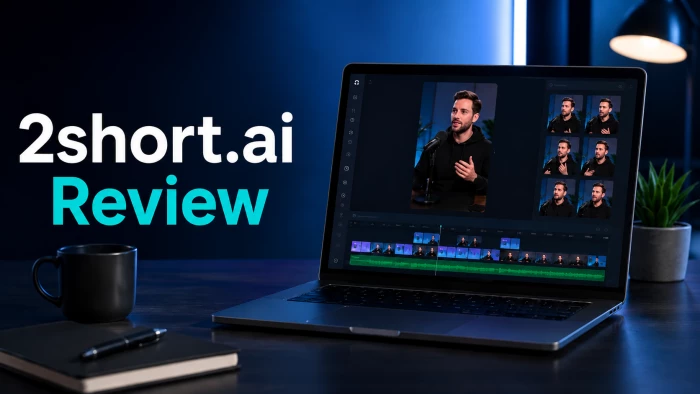
For a while now I'd been sitting on a backlog of long videos (a few podcast episodes, a couple of recorded talks) with no realistic way to slice them into the short vertical clips everyone keeps insisting I post. So I did what most people do when they hit that wall: I went searching for an AI tool that could handle the cutting for me. One name kept surfacing in the results, and the reviews around it were positive enough that I decided to stop reading other people's takes and just run the thing myself.
That tool was 2short.ai, and what follows is exactly what I saw when I tried it cold, as a first-time user, with no account and no insider setup. Some of it impressed me. One part of it left me staring at a loading screen for ten minutes. Here's the full story, plus where it fits against the rivals and who I think should actually pay for it.
Strip it back and 2short.ai is a video repurposing tool. You hand it a long video, usually by dropping in a YouTube link, and its AI works through the footage, flags the moments most likely to land with an audience, and trims them into vertical clips with animated captions already burned in. It's clearly designed around spoken-word material, so podcasts, interviews, lectures, and commentary are its natural home, and it relies heavily on the original video having captions to work from.
The part I didn't expect: it isn't only a clipper anymore. Open the dashboard and you land on a compact little content suite. The Short clip maker sits alongside an idea generator and three scripting tools (a Script writer, a Script outline builder, and a "rewrite the script of any video" option). The whole thing lives in the browser, and a recent update lets you pull footage in from Google Drive as well as from public links.
I deliberately approached this the way a typical newcomer would: on the free, signed-out path, no account, nothing customized. I landed on the homepage, opened the Short clip maker, pasted in an ordinary YouTube link, and sat back to wait for clips. When that route didn't produce anything, I pivoted to the Script writer instead, choosing a template, setting a length, typing in a topic, and trying to generate from there.
Everything below comes from that single, uninterrupted run. I've laid it out as a timeline so you can see not just what happened but when it happened.
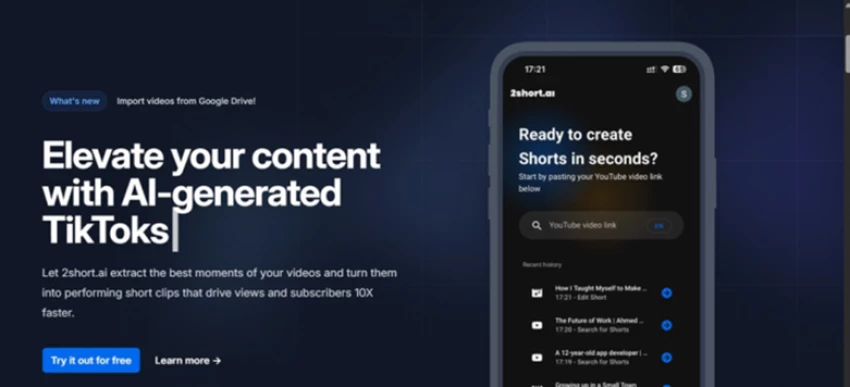
The landing page led with the core pitch and a paste-your-link box, with a phone mockup showing a recent-clips history.
The messaging is tight and exactly on point: paste a YouTube link, get Shorts back. That phone mockup with its running "history" list quietly suggests this is a fast loop you'll repeat often, and a "What's new" callout about Google Drive imports tells you the product is still being actively built. Crucially, the input box is right there before you scroll, so the way in feels frictionless from the first second.
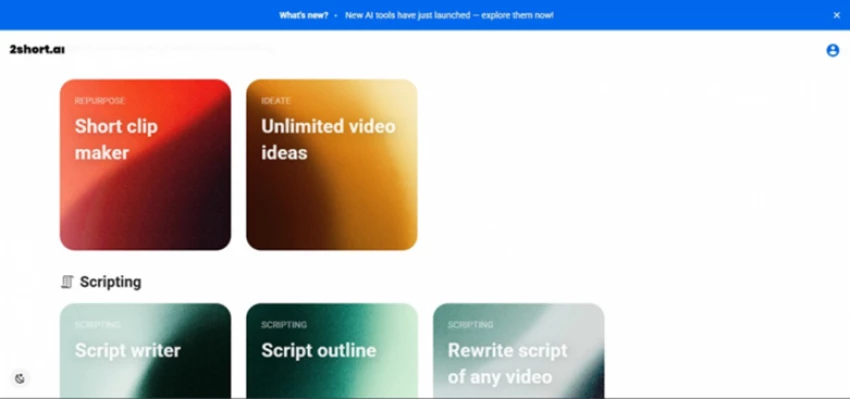
After hitting "Try it out for free," the dashboard opens up into Repurpose, Ideate, and Scripting tools.
This is where the pleasant surprise kicked in. 2short isn't a one-trick clipper now. It's growing into a small toolkit, with the clip maker, an idea generator, and three scripting tools all sorted into colour-coded cards by what job they do. I headed straight for the flagship: the Short clip maker.
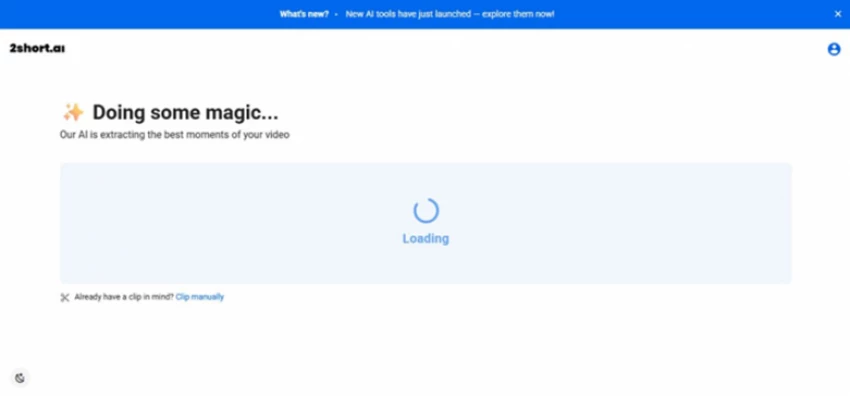
A "Doing some magic" screen appeared and then never resolved. Ten minutes on, it was still loading.
And this is where my run fell apart. After I pasted the YouTube link, the extractor threw up a "Doing some magic" screen, and then it just kept spinning. Past ten minutes. No clip, no error, no explanation. There's a "Clip manually" escape hatch sitting there, which is a considerate touch, but the automatic flow, the entire reason you'd reach for this tool in the first place, simply never delivered for me. It might have been the signed-out attempt, a video without usable captions, or plain server load. Whatever the cause, a silent ten-minute hang is a rough way to meet a new user.
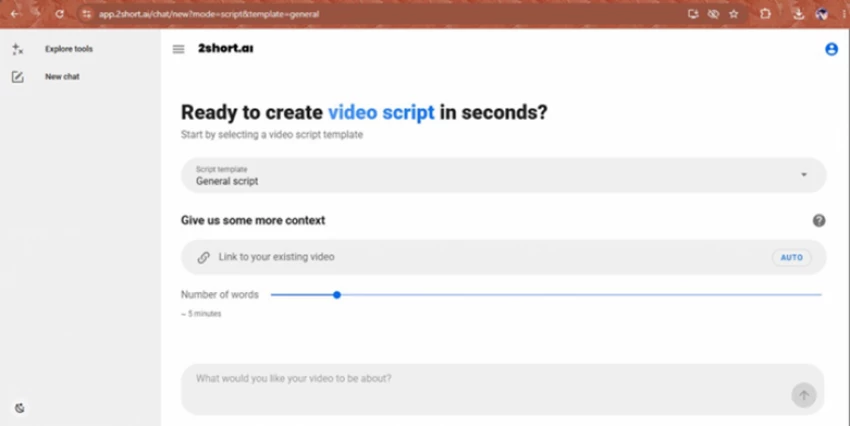
The Script writer setup: pick a template, optionally add a reference link, set a length, describe your topic.
With the clipper frozen, I jumped over to the Script writer to find out whether the newer tools behaved any better. The setup here is clean and considered: choose a script template, optionally feed it a reference video, set your length with a simple slider (I went with around five minutes), then describe what you're after. It reads like a proper, modern writing assistant rather than a bolt-on afterthought.
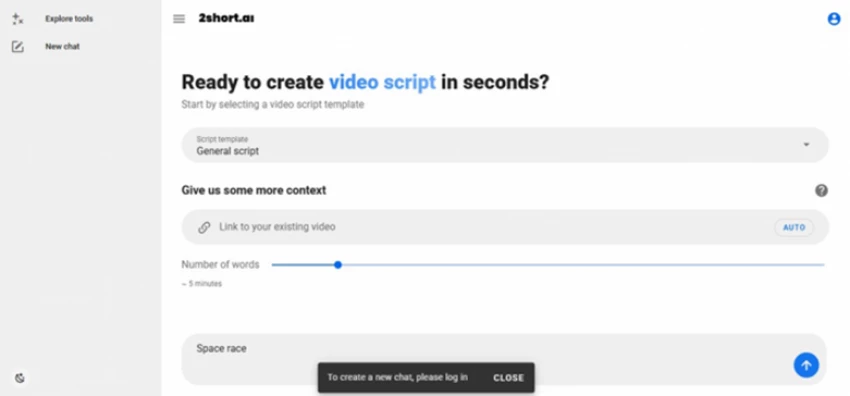
Typing in a topic and hitting go produced a "please log in" banner before anything was generated.
And there's the gate. The instant I typed a topic ("Space race") and pressed go, a banner popped up asking me to log in before it would create a thing. That's a fair enough requirement, since plenty of tools want an account before they'll generate, but stacked on top of the stalled clipper, it meant I came out of the whole session without a single finished clip or script to show for it on the free, signed-out path.
Being straight about it, my verdict is mixed. The pitch, the interface, and the surprisingly wide toolset all landed well, and that homepage history strip strongly implies plenty of people run clips here without any drama. But in my session, the core clip maker hung and the script tool sat behind a login, so I never got to judge the output quality first-hand on the free route.
I'm treating that as a reliability-and-onboarding flag rather than a final verdict on the whole product. The independent user ratings lean positive (more on that shortly), which tells me the extractor usually does its job. If you want a genuinely complete evaluation, plan on signing in and feeding it a public video that already carries captions, rather than expecting the signed-out flow to hand you a finished clip.
Automatic highlight detection. The headline act. Point it at a long video (a YouTube link, public URL, or Google Drive import) and it hunts down the segments most likely to perform, then trims them into shorts. It's tuned for spoken-word formats and leans on the source having captions.
Animated captions and face tracking. Clips arrive with auto-transcribed, customizable animated subtitles, and the AI keeps the speaker centred as it reframes landscape footage into vertical 9:16, which genuinely matters for talking-head content.
Aspect ratios, brand presets, and exports. You get vertical, square, and horizontal outputs, plus brand presets for your logo and colours. Paid plans export up to 1080p with no watermark, though the editor itself is built around captions rather than being a full production suite.
Languages and the new script tools. It handles roughly two dozen languages, and the recently added idea generator and script writer push it past pure clipping toward planning and writing, though, as I discovered, those want an account before they'll run.
There's a free tier and three paid plans. The main thing separating them is how many hours of AI video analysis you get each month and how quickly your exports process. Prices are in US dollars and can shift; annual billing brings the monthly rate down.
| Plan | Price | AI analysis / month | Exports | Notable |
|---|---|---|---|---|
| Free (Starter) | $0 | 30 minutes | View and export generated clips | All features; ads |
| Lite | $9.90 / mo | 5 hours | 60 min fast server-side | Google Drive + URL import; no ads |
| Pro | $19.90 / mo | 15 hours | Unlimited fast exports | For regular creators |
| Premium | $49.90 / mo | 50 hours | Unlimited | Priority support, beta access |
One thing to flag: no plan gives you truly unlimited clip generation. Every single tier is capped by monthly analysis hours. The figures here reflect the published USD rates at the time of writing and may vary by region or change later.
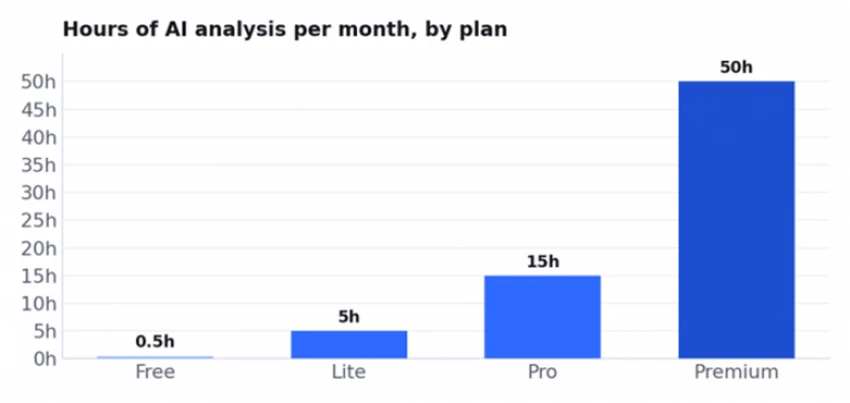
The real leap is Free to Lite: half an hour jumps to five hours. Beyond that, you’re mostly paying for more hours and faster exports.
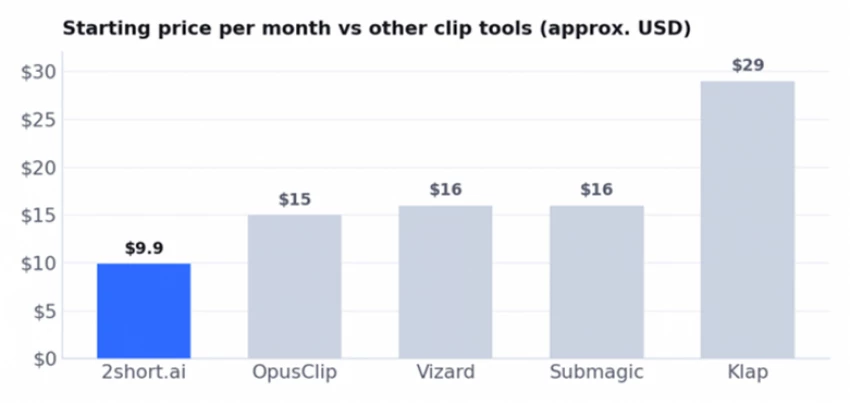
Rough entry prices in US dollars, most cheaper on annual billing. 2short.ai is one of the more affordable on-ramps into AI clipping, but always check current pricing before you commit.
What I liked
• Dead-simple to start: paste a YouTube link or import from Google Drive and you're moving
• Auto animated captions, face tracking, and multiple aspect ratios out of the box
• Cheap entry at $9.90/mo, with a free tier so you can test before paying
• More than a clipper these days, with idea and script tools bundled in
• 1080p exports with no watermark on the paid plans
• Copes with roughly two dozen languages
What held it back
• In my test the clip maker hung past ten minutes and produced nothing
• Generating clips or scripts requires an account
• The AI can miss context and pick weak moments (per user reviews)
• The editor is caption-focused, not a real editing suite
• Every plan caps your monthly analysis hours, so there's no unlimited tier
• It only works from existing footage, and commercial use depends on your source rights
2short.ai has a small but favourable presence on review sites. Over on G2 it sits at around 4.5 out of 5, though from only a handful of reviews, so treat that as a directional signal rather than something statistically watertight. The praise is consistent: reviewers love how quick it is and how it removes the need for a separate editor, repeatedly singling out the speed with which it breaks a full video down into shorts. They also call out the easy setup, the captions and branding options, and support that actually responds.
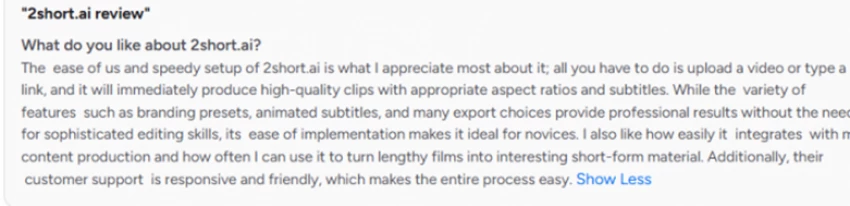
The complaints line up neatly with what you'd expect, and with my own run. A few note that the AI sometimes misreads a video's context and hands back weak clips that then need tidying up by hand. Others mention that clip-to-clip transitions can feel abrupt, and that every plan caps your hours, so there's no genuinely unlimited option. It's a small sample, but it matches the picture of a tool that's fast and handy when it works, and occasionally needs a human to finish the job.

2short.ai is playing in a crowded field. If the limits I've described matter to you, here's where the main competitors pull ahead, and where 2short.ai stays in the fight on price.
| Tool | Best for | From (USD) | How it compares to 2short.ai |
|---|---|---|---|
| OpusClip | The market-leading AI clipper | free; ~$15/mo | More mature, with clip ranking and a bigger free quota, but pricier |
| Vizard | Clipping with a generous free plan | free; ~$16/mo | Similar idea, often more free minutes, comparable editor |
| Submagic | Caption-first short-form polish | ~$16/mo | Stronger captions and B-roll; less about auto-finding clips |
| Klap | Hands-off YouTube to Shorts | ~$29/mo | Similar output, but no free export and a higher price |
| Creatify / Pexo | Generating original video and ads | ~$9 to $19/mo | A different category: they build new video from a URL or script rather than clip existing footage |
Prices are rough starting points and change often; several drop on annual billing. Use this as a directional comparison rather than a final spec sheet.
2short.ai is a strong match for spoken-word creators sitting on long-form footage: podcasters, interviewers, educators, and commentary YouTubers who want cheap, fast, captioned clips and have no interest in learning an editor. At $9.90 a month, it's one of the lowest-risk ways to start repurposing what you've already recorded.
It's a poor match if you need original or AI-generated video for ads and campaigns (look at Creatify or Pexo instead), if you want heavier editing and production (CapCut, Filmora, or Veed), if you need rock-solid reliability at volume or the polish of the category leader (OpusClip), or if you simply don't have long-form source video you own the rights to.
For me, 2short.ai lands at 3.8 out of 5. The concept is solid, the interface is friendly, the price is genuinely low, and the toolset is quietly broadening from clipping into ideas and scripts. What drags my score down is my own experience: a clip run that stalled past ten minutes, plus a login gate before anything would generate, all sitting on top of the usual repurposing constraints (you need captioned footage you have the rights to). Independent users rate it higher, which suggests the extractor normally works fine, so I'd frame the whole thing as promising and cheap, but worth testing yourself before you lean on it.
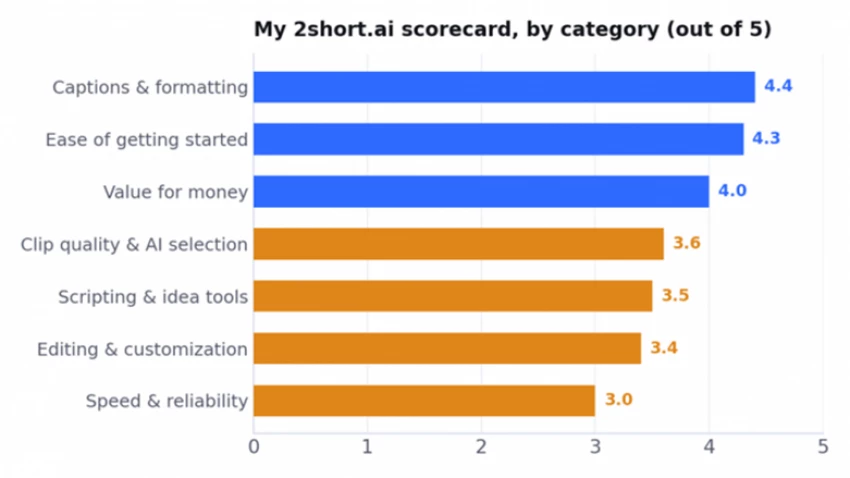
Captions, ease, and value carry the score; speed and reliability pull it back down after my stalled session.
Pay for it if: you regularly turn long spoken-word videos into Shorts and want the cheapest capable option with captions and face tracking. Lite at $9.90/mo is a low-risk place to start.
Stay on free if: you just want to kick the tyres. The 30-minutes-a-month tier is enough to try it on a captioned, public video before spending anything.
Look elsewhere if: you need original generated video (Creatify, Pexo), the ranking and polish of the leader (OpusClip), or heavier editing (CapCut, Filmora, Veed).

New Claude Model Targets Agentic AI WorkflowsAnthropic has launched Claude Sonne...
Samuel Osei1 month ago
The Quick verdictInSnoop is a free, browser-based tool that promises to let you...
Alexander Hughes1 month ago

Gemini’s Image Tools Get a Wider RolloutGoogle is expanding access to Gemini’s p...
Alexander Hughes1 month ago

Two AI video generators, two very different first days. I ran PixVerse through i...
Alexander Hughes1 month ago

Two of the most talked-about AI chat platforms. I opened both, picked a characte...
Alexander Hughes1 month ago

The two-minute versionIf you only read one thing, read this. The rest of the doc...
Alexander Hughes1 month ago
Discussion