A creator uploads a still product shot, a white ceramic mug on a wooden table, and asks for a slow, dramatic camera pull-back. About 6 minutes later, LensGo returns a 3-second clip with a faint breathing motion and a soft lighting shift. It works for a scroll-stopping social post. It is not the shot that was requested. That gap, between the move a creator directs and the move the model decides to make, is the reason most people go looking for something else.
LensGo earns its audience honestly. It bundles text-to-image, image-to-video, anime style transfer, and voice into one low-cost platform, with an entry price near 3 EUR per month, and its video-to-anime restyling remains a genuine differentiator. The catch shows up the moment a project needs precision. Reviewers consistently describe the platform as interpreting motion prompts conservatively, which keeps results safe but flat, and its style controls are thin for brand-specific work. For mood boards and quick experiments, that tradeoff is fine. For a shot a creator actually wants to own, it is the ceiling.
This guide climbs past that ceiling. The 5 tools below were chosen for one quality LensGo lacks: they hand the creator the controls. Each wins on a different kind of control, so the structure here is a ladder, not a leaderboard.
Most "best AI video tool" lists rank on output quality. For anyone leaving LensGo, the more useful axis is control: how much of the final result the creator gets to decide rather than discover. These 6 kinds of control matter most in 2026:
• Motion control: which part of the frame moves, and how fast (motion brushes, motion paths).
• Camera control: the move itself, such as a dolly, orbit, crane, or crash zoom.
• Frame control: anchoring a clip to a chosen start frame and end frame.
• Character control: locking a face or subject so it stays consistent across shots.
• Editing control: fixing a generated clip without rerolling the whole thing.
• Commercial control: knowing the output is licensed and safe to sell.
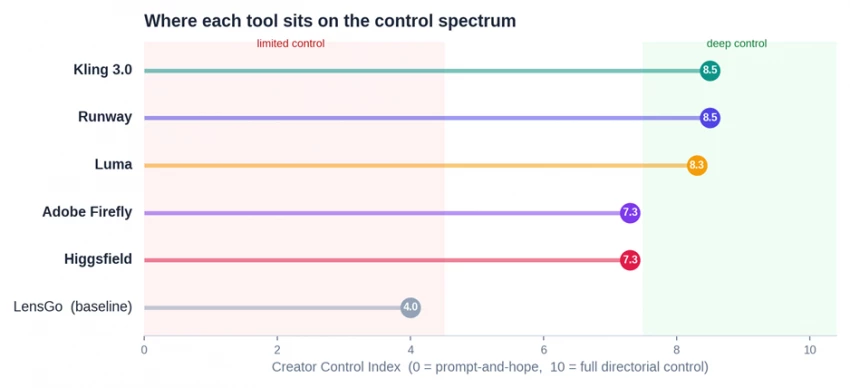
LensGo touches a little of each and masters none. Every tool below goes deep on at least one, and the chart maps where they land.
LensGo anchors the low-control end. All 5 alternatives sit well above it on the Creator Control Index.
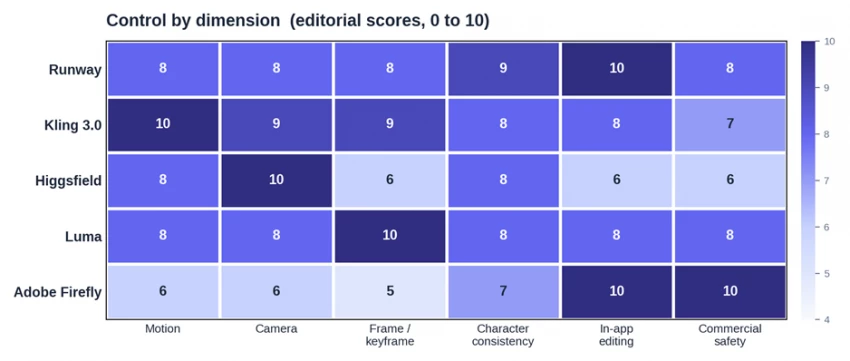
Each platform was scored from 0 to 10 across the 6 control dimensions above, producing a single Creator Control Index, or CCI. The scores are editorial assessments, drawn from current 2026 plan documentation, platform release notes, and hands-on testing observations reported across independent reviews, not vendor benchmarks. Pricing was verified in 2026 and changes often, so every figure here is approximate and worth confirming on the platform before subscribing. Where a tool has a documented weakness, this guide states it plainly. The goal is not to crown one winner for everyone, but to match each kind of creator to the control they actually need.
Read across each row to see where a tool concentrates its control. The dark cells are where it leads.
Runway is the closest thing the category has to a full production suite, and it is the reference point professionals reach for. Its control stack is the deepest on this list. Motion Brush 3.0 lets a creator paint specific regions of a frame and assign each one a direction and speed, Director Mode handles camera intent, and the Aleph in-video editor can change elements inside an already generated shot without regenerating it. Act-Two captures performance and motion, and Workflows lets teams build repeatable pipelines. In 2026 Runway also became a multi-model marketplace, so a single subscription reaches Runway's own models alongside Google Veo, Kling, and others from one dashboard.
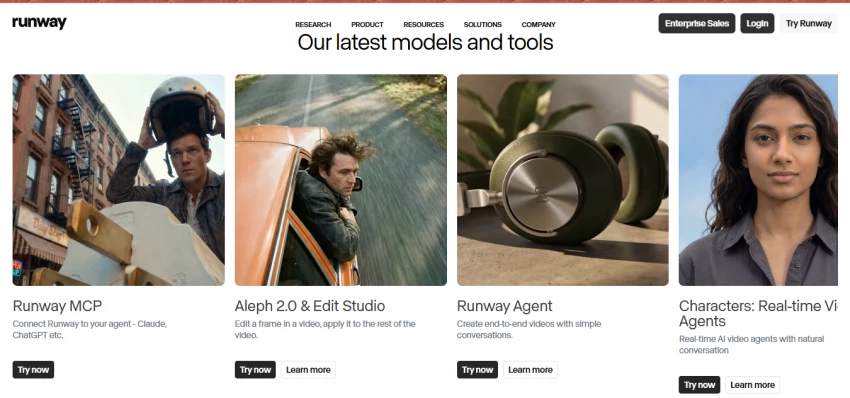
The Aleph editor is the real separator. Most tools force a reroll and a hope that the next generation lands closer. Runway lets a creator direct the fix instead.
Best for: filmmakers, studios, and creators doing narrative work who want the most complete control and are comfortable paying for it.
Where it falls short: pricing is per seat on higher tiers, credits burn on every generation whether the result is kept or not, and there is no native branded voiceover, so audio still needs a separate tool. Plans run from a free trial tier through a roughly $12 to $15 entry plan (about 625 credits, near $0.10 per second of Gen-4 video) up to Pro and Unlimited tiers around $35 to $95 per month.
If Runway is the suite, Kling 3.0 is the director's tool, and it offers the strongest motion control on this list. Its Motion Brush lets a creator draw a custom motion path that the model follows, which is the missing link between typing a prompt and actually choreographing a shot. Start frame and end frame control anchor a clip's beginning and end, a multi-shot storyboard mode sets duration, angle, and pacing per shot, and up to 4 reference images lock a character's look across generations. The feature no rival matches is reference-video motion extraction, where Kling pulls the motion pattern out of an uploaded clip and applies it to a completely different subject. Version 3.0 adds native 4K output, multilingual audio, and improved lip sync.
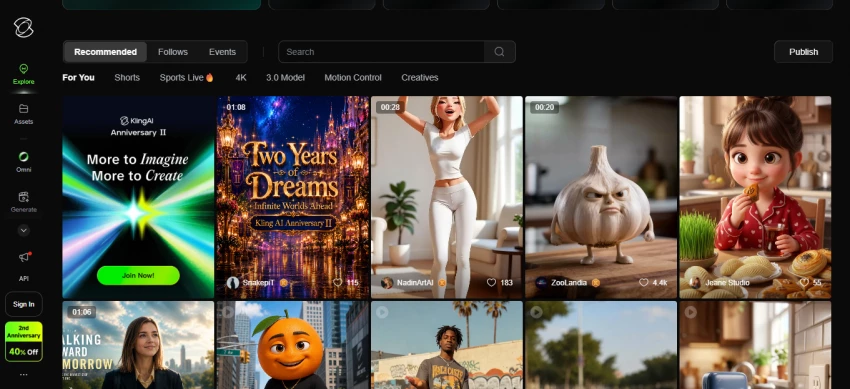
Best for: creators and short-form storytellers who want directorial control over movement and scene structure at a friendly price.
Where it falls short: faces can still warp on quick movement or complex angles, professional mode costs noticeably more credits than standard, and the free tier's daily credits are too thin for real output. Consumer plans start near $6.99 per month, with 4K and the highest tiers around $59.99 to $64.99.
Higgsfield made a single bet that pays off for one kind of creator: camera movement. Where other tools treat camera motion as one prompt among many, Higgsfield ships 70+ cinematic presets, including crash zooms, crane shots, FPV drone moves, and the Snorricam, plus a Cinema Studio and a director-of-photography mode for shot-level direction. Soul ID keeps characters consistent, and the platform aggregates 15+ underlying models so a creator can push for the highest visual ceiling on a given shot.
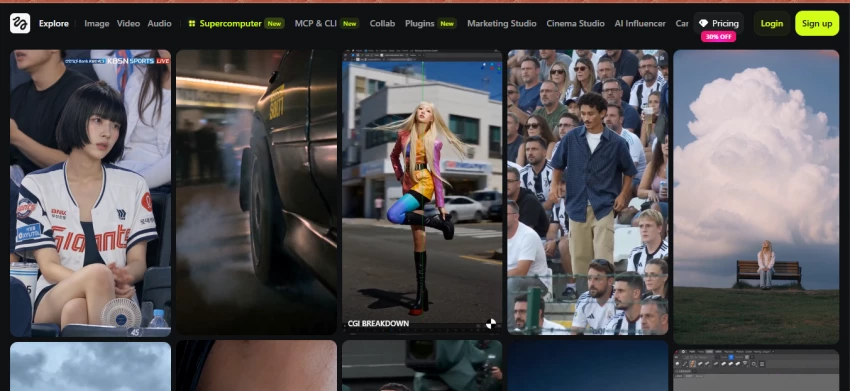
Best for: social-first creators, ad makers, and short-form filmmakers who want hero shots with deliberate camera language.
Where it falls short: the credit economy is the recurring complaint, not the output. Monthly credits do not roll over, top-up packs expire, and premium models such as Sora 2 or Veo 3.1 can cost 40 to 70 credits per clip. Its public Trustpilot rating sits around 3.2 out of 5 across more than 1,200 reviews, with praise aimed at the cinematic control and criticism aimed at billing and support. Plans run from a roughly $5 entry tier through Plus and Ultra tiers in the $34 to $99 range.
Luma's Dream Machine gives the most precise control over how a clip moves from point A to point B. Its Director Mode uses a timeline where a creator places keyframes for camera position, and the model generates a smooth transition between a chosen start frame and end frame. Camera controls cover truck, dolly, pan, tilt, and roll, the Modify feature handles video-to-video transformation with character reference, and Brainstorm reduces prompt trial and error. The Ray3.14 update brought native 1080p, roughly 4x faster generation, and lower cost per clip, with 4K upscaling and HDR available on higher tiers.
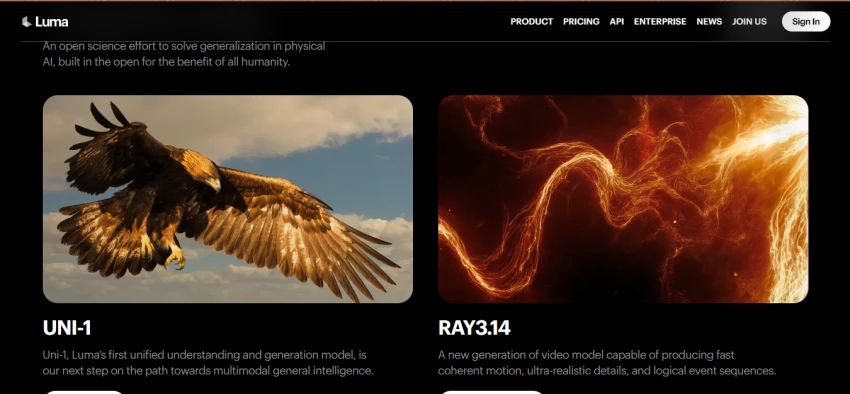
Best for: creators who think in transitions and need a clip to hit exact framing at the start and end, such as product reveals and motion loops.
Where it falls short: credit burn is steep at high resolution (a single 1080p clip at 10 seconds can cost hundreds of credits), and the platform does not offer custom face fine-tuning, so identity work relies on image-to-video. The practical entry plan lands around $29.99 per month for 150 generations with commercial rights and no watermarks.
Firefly offers a different kind of control, and for a working professional it may be the most important kind: control over risk and workflow. Its models are trained on licensed and public-domain content, and Adobe backs enterprise output with indemnity, which means assets are designed to be safe to use in paid client campaigns. Content Credentials travel with each file. Just as importantly, Firefly lives inside the apps designers already use: Generative Fill and Generative Expand in Photoshop, vector generation in Illustrator, and video tools in Premiere Pro. By 2026 it also runs as a multi-model hub, offering partner models from Runway, Luma, and Google inside one interface, plus custom brand models for teams.
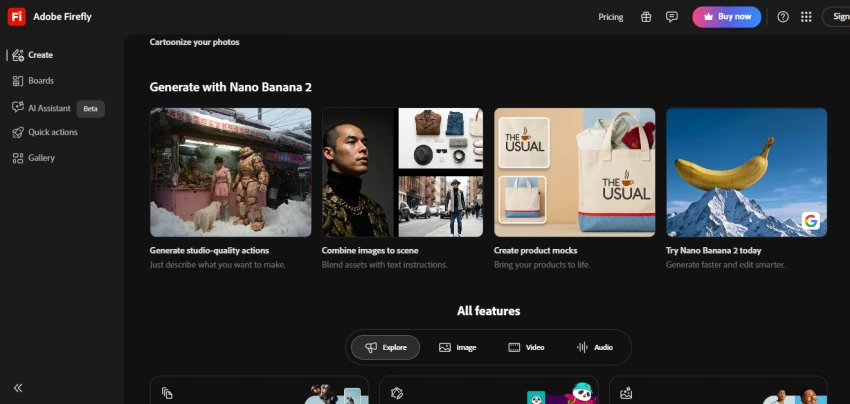
Best for: agencies, brand teams, and designers who need commercially defensible output and want AI generation inside an existing Creative Cloud workflow rather than a separate tab.
Where it falls short: it requires an Adobe subscription, video generation spends credits (roughly 100 credits per 5-second clip), and its raw motion and camera control trail the dedicated video specialists above. Standalone Firefly plans start near $9.99 per month, with a Pro tier around $29.99 and Creative Cloud bundles in the $55 to $70 range.
Control is not free. The chart below pairs each tool's entry plan with the tier most creators actually need for serious work, against LensGo's roughly 3 EUR starting point. Higgsfield and Kling open the cheapest, while the price climbs fast once 4K, higher credit volumes, and team seats enter the picture.
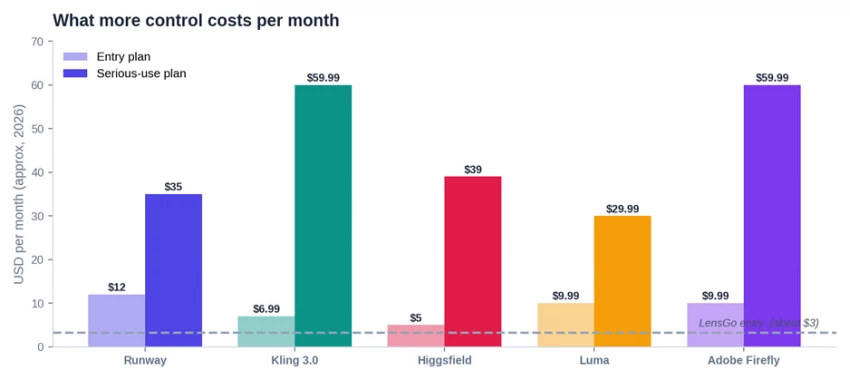
Approximate published plans in 2026. Verify current rates on each platform, since prices change frequently.
One row per tool, with its standout control feature, its Creator Control Index score, the entry and serious-use price, and a one-line read.
| Tool | Control superpower | CCI /10 | Entry/mo | Serious/mo | In one line |
|---|---|---|---|---|---|
| Runway | Edit-inside-the-shot pipeline (Aleph) | 8.5 | $12 | $35 | Deepest control; the pro pick |
| Kling 3.0 | Motion paths + reference-video motion | 8.5 | $6.99 | $59.99 | Best control per dollar |
| Higgsfield | 70+ cinematic camera presets | 7.3 | $5 | $39 | Camera-move specialist |
| Luma | Keyframe + start/end frame control | 8.3 | $9.99 | $29.99 | Best for precise transitions |
| Adobe Firefly | Licensed, indemnified, in Creative Cloud | 7.3 | $9.99 | $59.99 | Commercial-safe brand work |
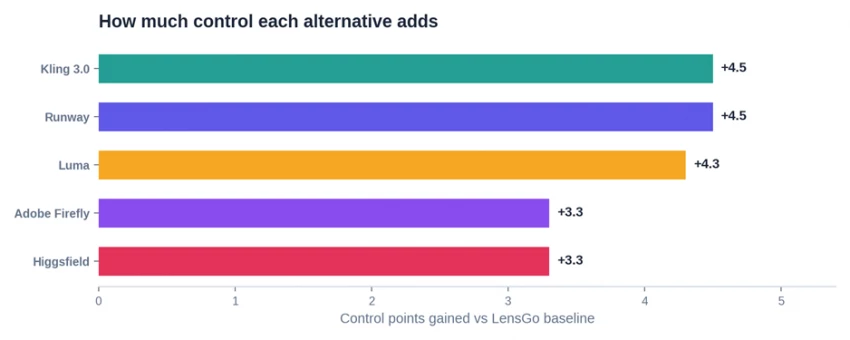
Every alternative adds at least 3 full control points over LensGo. Kling and Runway add the most.
There is no single winner, because the 5 tools are built to win different arguments. Still, a clear pick emerges for each kind of creator.
• Overall control: Runway. The deepest, most complete stack, and the only one that lets a creator edit inside a generated shot rather than reroll it. If control depth is the priority and the budget allows, this is the pick.
• Best control per dollar, and motion champion: Kling 3.0. The strongest motion and shot direction on the list, with native 4K and audio, at a consumer price. For most creators leaving LensGo, this is the smartest first move.
• Camera moves: Higgsfield. Nothing else gives this much deliberate camera language, as long as the credit math is watched.
• Precise transitions: Luma Dream Machine. The keyframe and start-to-end framing control is best in class for reveals and loops.
• Commercial-safe brand work: Adobe Firefly. The only choice that pairs real creative control with licensing safety and a Creative Cloud workflow.
LensGo is a fine on-ramp to AI creation, and for mood boards, quick social motion, and anime restyling on a tight budget it still earns its place. The moment a project needs the shot to obey the creator rather than surprise them, the ladder above is the upgrade path. Runway sits at the top for sheer control depth and is the choice when the work is narrative and the budget is real. Kling 3.0 is the most sensible step up for the largest number of creators, pairing the strongest motion control with a consumer price. Higgsfield, Luma, and Firefly each win their specialty outright: camera moves, precise transitions, and commercial safety. The throughline across all 5 is a tradeoff worth naming: more control means more to manage, in credits, in learning curve, and in cost. That tradeoff, not raw output quality, is the real decision for anyone moving past LensGo.

New Claude Model Targets Agentic AI WorkflowsAnthropic has launched Claude Sonne...
Samuel Osei3 months ago

Gemini’s Image Tools Get a Wider RolloutGoogle is expanding access to Gemini’s p...
Alexander Hughes3 months ago

Two AI video generators, two very different first days. I ran PixVerse through i...
Alexander Hughes3 months ago

Two of the most talked-about AI chat platforms. I opened both, picked a characte...
Alexander Hughes3 months ago

The two-minute versionIf you only read one thing, read this. The rest of the doc...
Alexander Hughes3 months ago

Why Seedance 2.5 mattersSeedance 2.5 is the latest release in ByteDance’s Seedan...
Alexander Hughes3 months ago
Discussion