AI & ML
14 min read
AutoDraft AI Review: I Tested It Step-by-Step Until It Hit a Paywall
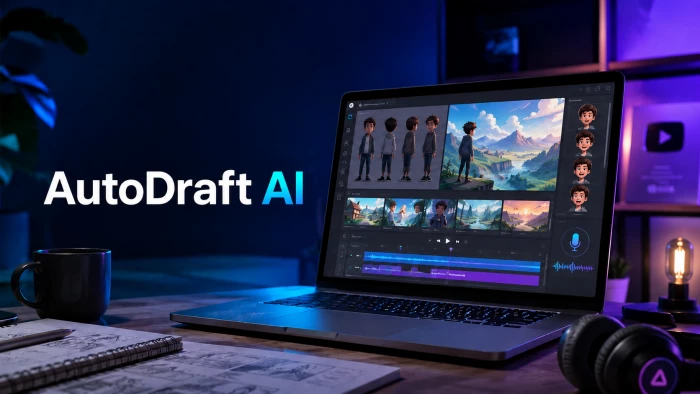
Rated 3.4 out of 5
A clever, cheap, beginner-friendly studio, held back by speed, support, and a paywall that lands at the worst moment.
Great onboarding and a genuinely deep toolset. But I couldn’t generate anything on the free tier without paying, and paying users keep flagging slow, failed generations.
Quick read
Free-tier credits at first “Generate”: 0 of about 20. Out of credits before my first image.
AutoDraft AI is worth a free trial if you want quick cartoon characters and story scenes without hiring an illustrator. The character-consistency idea is genuinely smart and the price is low. It’s much harder to recommend for anyone who needs reliable, fast, finished output, because the loudest, most consistent complaint from paying creators is that generation can be slow or fail outright.
| Bottom line It nails the start of a project (clean UI, deep toolset, cheap entry). It struggles with the finish (speed, reliability, support), and on the free plan, I couldn’t even reach the start without hitting an upgrade wall. |
I’ll back every claim below with what I saw on screen and what verified buyers report. If you only have 30 seconds: start on the free tier, run your own speed-and-consistency test, and only pay once you’ve confirmed it behaves on your account.
AutoDraft AI (autodraft.in) is a browser-based generative-AI studio built for comics, webtoons, animation, and visual storytelling, not a general chatbot. It’s run by an India-based company, ALLBOTS TECHNOLOGIES, and the entire product is built around visual creation rather than text.
In practice that means text-to-image and image-to-image generation, AI inpainting, a pose maker, background and object removers, an upscaler, plus AI character generation, AI voiceover, copyright-free background music, and a video and animation pipeline. The pitch is one all-in-one studio so creators don’t juggle five separate subscriptions.
Its marketing aims squarely at YouTube story and kids channels, educators, marketers, and comic and webtoon creators who need lots of assets in a consistent style. The homepage leans hard on monetization (“Best AI Animation Tool for YouTubers,” “5x Faster Channel Growth,” and “1500+ channels monetized”) and lists big numbers elsewhere (150K+ creators, 350K+ minutes downloaded, 30M+ assets).
| In one line Think of it as a junior animation studio in your browser: fast at first drafts, built around keeping characters on-model, priced for solo creators. |
Here’s the part that separates this review from the ones currently ranking: I didn’t just read the marketing. I created a free account and went through the exact path a brand-new creator would, capturing a screenshot at every step: the landing page, the forced signup, onboarding, the model gallery, the image-generation screen with a real test prompt, and whatever happened when I clicked Generate.
At each step I noted, honestly, what I liked and what I didn’t. Then I cross-checked my hands-on experience against verified buyer reviews on AppSumo, the G2 listing, Product Hunt, and several independent review sites, reading for repeated patterns around output quality, speed, character consistency, billing, and support.
Honesty note - I’ll be upfront: on the free tier I hit a paywall before I could generate my own image, so my scores for output quality and speed lean on documented evidence from paying users, while everything about onboarding, interface, pricing transparency, and the funnel is my own direct, first-hand experience.
Six screens, from “never heard of it” to “please enter your card.” Each card below shows exactly what I saw, plus my like or dislike at that moment.
Test 01 The landing page · First impression
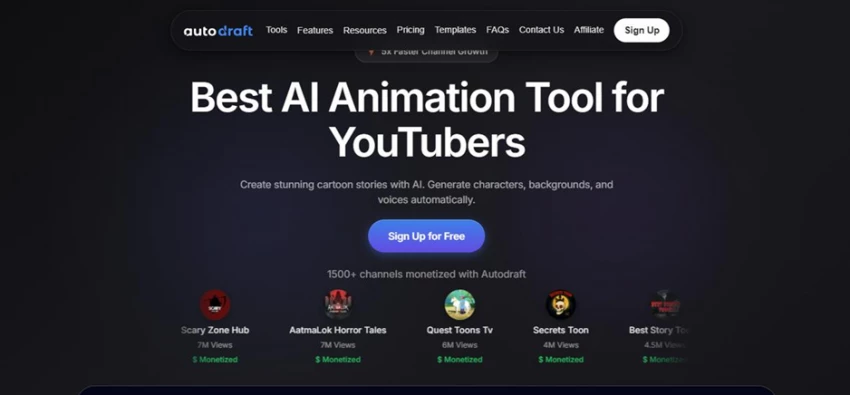
The homepage leads with monetization and shows real channels with view counts and “$ Monetized” tags
What I liked
You know who it’s for in two seconds. The hero (“Best AI Animation Tool for YouTubers”) is specific, and the social proof is concrete: real channel avatars with 7M, 6M and 4M views and “$ Monetized” labels, plus “1500+ channels monetized.” For a creator deciding fast, that’s persuasive.
What I didn’t
The “Best” claim is unbacked, and the whole page sells the money angle (monetize, 5x growth) more than craft or output quality. It reads like a YouTube-income pitch, which quietly raises the bar the tool has to clear later.
Micro-verdict: Strong, confident positioning and real social proof, just very monetization-forward.
Test 02 Straight to signup · The gate
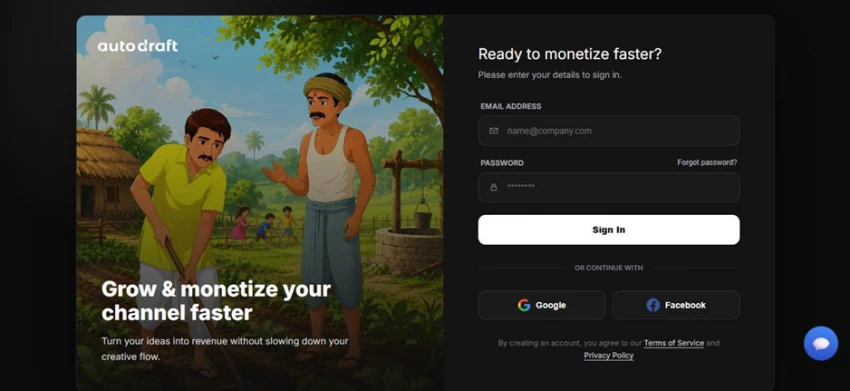
No demo or sandbox first: you land on a sign-in screen, with the village-cartoon art style as the backdrop.
What I liked
No credit card to start, and Google and Facebook sign-in make it quick. The illustrated panel is a smart, honest preview of the village-cartoon style AutoDraft is actually known for, and the “Grow and monetize your channel faster” line stays on message.
What I didn’t
You’re dropped onto a signup screen with no product tour, sandbox, or demo. You hand over an email before seeing a single thing generate. For a tool that brands itself “90% free,” making you commit before showing any value is friction.
Micro-verdict: Low-commitment signup, but “try before you sign up” isn’t an option.
Test 03 The dashboard · After onboarding
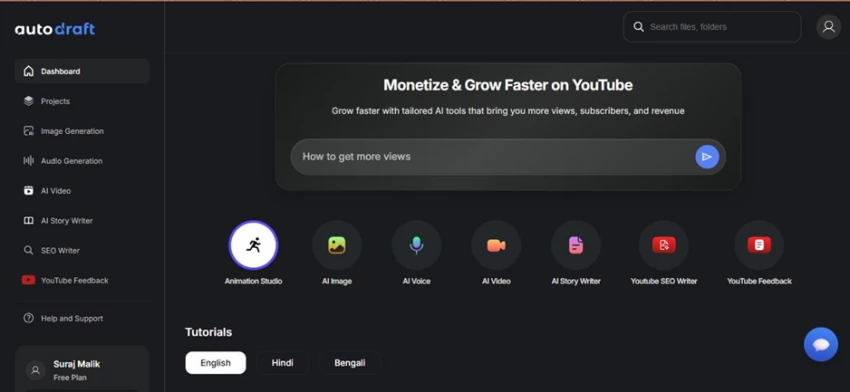
After a couple of basic questions, the dashboard puts every tool in one sidebar, with multilingual tutorials.
What I liked
It’s clean and genuinely well-organized. Everything lives in one sidebar (Image Generation, Audio Generation, AI Video, AI Story Writer, SEO Writer, YouTube Feedback), and there’s an AI helper box (“How to get more views”) plus tutorials in English, Hindi, and Bengali. The all-in-one promise looks real here.
What I didn’t
It’s a lot at once, and the “Free Plan” badge under my name is a quiet reminder that limits are coming. A few tiles (YouTube SEO Writer, YouTube Feedback) feel more like growth-hacking funnels than core animation tools.
Micro-verdict: One of the better-organized creator dashboards I’ve used; the depth is real.
Test 04 Picking an image model · Village Style
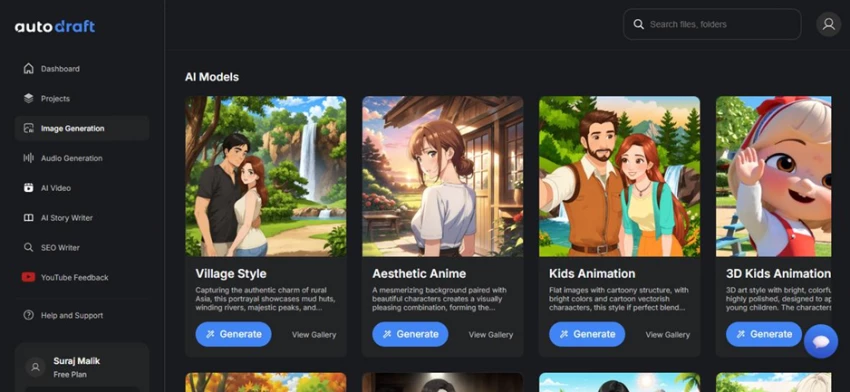
The AI Models gallery. I chose Village Style (the first option) to start my test.
What I liked
This was the most exciting screen. The gallery (Village Style, Aesthetic Anime, Kids Animation, 3D Kids Animation) has strong, appealing sample art, each with clear “Generate” and “View Gallery” buttons. It genuinely makes you want to start creating.
What I didn’t
Those polished samples set a high bar, and verified users report custom prompts only land well around 70% of the time, so the gallery is likely best-case, not typical. There’s also still no hint of what a generation will cost in credits.
Micro-verdict: The style gallery is the best sales pitch in the whole product; set expectations accordingly.
Test 05 The generation screen and my prompt · Controls
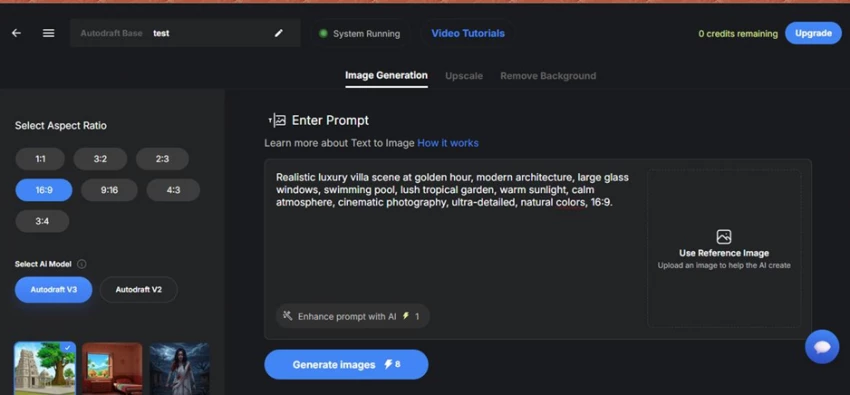
Aspect ratios, a V3/V2 model toggle, a reference-image slot, and a prompt enhancer. Note “0 credits remaining” up top.
The exact prompt I used to test:
“Realistic luxury villa scene at golden hour, modern architecture, large glass windows, swimming pool, lush tropical garden, warm sunlight, calm atmosphere, cinematic photography, ultra-detailed, natural colors, 16:9.”
What I liked
The controls feel pro: seven aspect ratios, an Autodraft V3/V2 toggle, a reference-image slot, a one-click “Enhance prompt with AI,” and Upscale and Remove Background tabs. The prompt area is clean and uncluttered.
What I didn’t
Two red flags. Top-right already read “0 credits remaining,” and the buttons quietly show costs (“Generate images: 8 credits” and “Enhance prompt: 1 credit”) with no running explainer of what 8 credits actually buys. The “System Running” pill also nods to the warm-up delays buyers complain about.
Micro-verdict: Thoughtful, capable interface, but the credit meter was already empty before I generated anything.
Test 06 The paywall · The wall
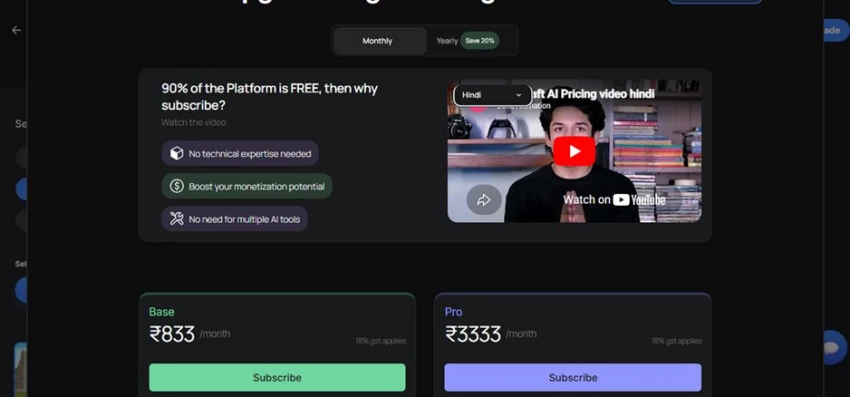
The moment I clicked Generate, this subscription screen appeared. Plans here are localized (shown in INR plus GST during testing).
What I liked
To its credit, the pricing page is upfront: “90% of the Platform is FREE,” a Monthly/Yearly toggle with “Save 20%,” a localized explainer video, and clear Base vs Pro cards. The plans aren’t buried.
What I didn’t (the big one)
I only discovered I was out of credits after signing up, answering onboarding questions, choosing a model, and writing a full prompt. The very first time I clicked Generate, the app blocked me and pushed Upgrade. Hitting the wall at the exact moment of payoff, not before I invested all that effort, was the single most frustrating part of the whole test.
Micro-verdict: Honest pricing page, badly timed gate. The funnel spends your effort, then asks for your card.
The takeaway from my test AutoDraft is a pleasure to set up and a genuinely deep toolbox. But the free tier’s tiny credit pool means a new creator can do everything right and still be stopped at the finish line. Treat the free plan as a quick look at the UI, not a real trial of the output.
AutoDraft localizes its pricing. During my test in India it showed ₹833 per month (Base) and ₹3,333 per month (Pro) plus 18% GST. Converted to USD, and matching AutoDraft’s international listings, here’s what you’re actually paying. (Figures are rounded and subject to change; always confirm on the live pricing page.)
| Plan | Price (USD) | Credits | Best for | Watch out for |
|---|---|---|---|---|
| Free | $0 | About 20 to 30, watermarked | A first look at the UI | Runs out fast; can’t finish a real project |
| Base | $10/mo (about $8/mo annual) | 1,000 / month | Casual creators | Credits go fast with retries |
| Pro | About $35/mo (about $28/mo annual) | 4,000 / month | Best: regular creators | Worth it only with real volume |
| Enterprise | Custom | Unlimited plus custom training | Teams and studios | Talk-to-sales only |
Pro is listed between about $29 and about $39 across sources; about $35/mo is the most consistent recent figure. Annual billing saves about 20%.
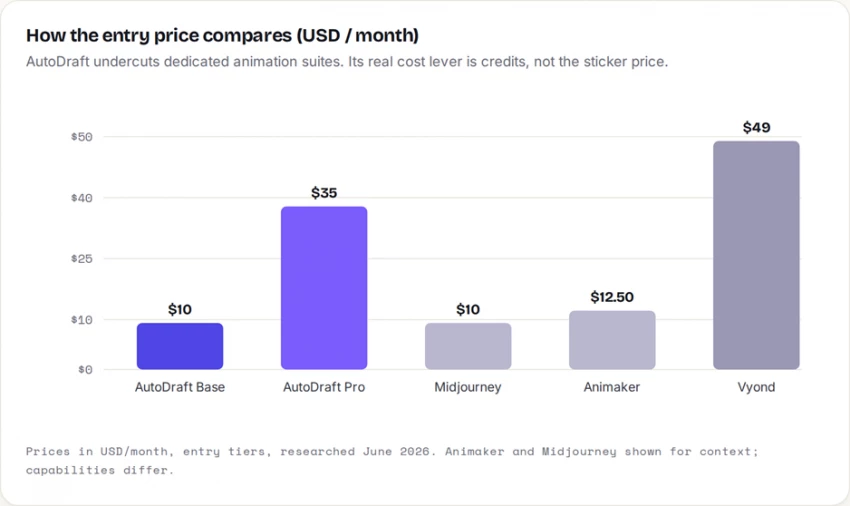
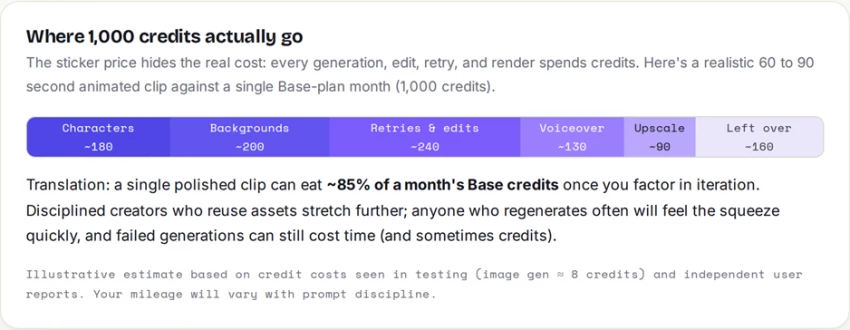
On value, the math favors regular use. If you produce character and concept visuals often, the credit allowances plus unlimited 4K downloads make Base or Pro reasonable, and they clearly undercut heavier suites like Vyond. If you only need an image or two a month, the free tier (or a pay-as-you-go competitor) is the smarter pick. Two things to confirm before paying: support is email-only, and the exact credit cost per action isn’t clearly documented.
AutoDraft bundles a wide toolset into one workspace. The range is impressive; the depth varies tool to tool. Here’s how the headline features hold up in real use.
| Feature | What it’s for | How it performs |
|---|---|---|
| Custom model training | Keep one character consistent across scenes | Standout: the real reason to pick AutoDraft, but training can stall, so test it |
| AI character generation | Story leads, mascots, thumbnails | Good for drafts; faces and hands often need cleanup; about 70% prompt success |
| Cartoon and 2D styles | Posts, panels, story art | The comfort zone: looks more usable than its attempts at realism |
| Text-to-image | Fast concept drafts | Beginner-friendly; clear, specific prompts beat short ones |
| Editing (inpaint, upscale, bg removal) | Refine an output vs restart | Genuinely handy; watch credits: retries spend them |
| AI voiceover and BGM | Narrate scenes, add music | Fast and usable; longer output can sound synthetic; non-English lip-sync weaker |
| Video and animation pipeline | Assemble scenes into clips | Functional but complex; results don’t yet beat traditional tools |
The honest summary: AutoDraft is strongest when the output is a creative starting point, not a final, pixel-perfect asset. Custom-model training is the genuine edge over generic image generators: keeping the same character recognizable across a full story is the real job for comic and YouTube creators, and it’s the thing AutoDraft is actually built to solve.
The clearest pattern in the feedback is a split: tool directories and the official pages describe a beginner-friendly, all-in-one studio, while people who actually paid (especially on AppSumo) describe a rockier reality. Both pictures are true for different people, so here’s the balanced view.
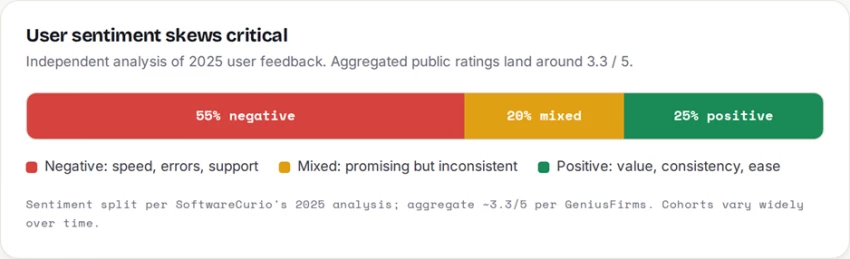
Multiple buyers describe an 8 to 10 minute “warm-up” before the tool will generate at all, then several minutes, sometimes about 20, per single prompt, with generation errors for days. AppSumo, verified buyers · Speed and reliability |
One creator who trained a custom model on resized 512 by 512 images reported very good output and called it “a keeper, for fun and work.” AppSumo, verified buyer · Custom models |
A reviewer praised the clean, uncomplicated interface, the per-feature tutorials, and the fact that prompts, edits, and generations are saved for easy re-editing. SoftwareFinder user · Ease of use |
Several buyers reported slow or absent email replies, a sense the product felt neglected for stretches, and asked for refunds, the familiar lifetime-deal worry. AppSumo and directories · Support |
Supporters point to low cost, a generous free tier, commercial rights to what you create, and character consistency as a genuine edge over generic image tools. G2 and Product Hunt · Value |
A Product Hunt reviewer noted that while backgrounds and webtoon work shine, the animation tools feel too complex and time-consuming for the results they produce. Product Hunt · Animation depth |
Does this match my own test? I couldn’t run a generation on the free tier, so the fairest thing to say is this: the speed and support complaints are consistent enough across independent buyers to take seriously, while the upside is real for the specific cartoon and character use cases the tool is built around. If you go in, your own speed test on day one matters more than any single review.
AutoDraft sits in an unusual spot, between simple image generators and full animation suites. Here’s how it stacks up against the tools creators usually weigh against it.
| Tool | Entry price | Better for | Where AutoDraft wins |
|---|---|---|---|
| AutoDraft AI | $10/mo | Cartoon and character story drafts | Baseline (the tool under review) |
| Vyond | $49/mo | Corporate and explainer polish | Far cheaper plus AI character generation |
| Animaker | $12.50/mo | Template-driven animation | Custom character consistency focus |
| Midjourney | About $10/mo | Artistic still images | Built for character and story video, not just stills |
| Canva AI | Freemium | Social-media design | More focused on story characters |
| Leonardo AI | Freemium | Fine control over images | Simpler, animation-oriented workflow |
After lining them up, AutoDraft is less a universal image generator and more a tool for creators who want fast cartoon and character drafts with a real attempt at consistency, and who can tolerate some rough edges to get a low price.
Use AutoDraft if you’re… ✓ Running a YouTube story or kids channel that needs consistent cartoon characters ✓ Making webtoon and comic concepts, character references, or storyboards ✓ Producing thumbnail and social-post concepts you’ll polish afterward ✓ A beginner who wants a first result fast, with templates and tutorials ✓ On a small budget and fine treating output as a starting point | Skip it (for now) if you’re… ✕ On a deadline that can’t absorb slow generation, retries, or email-only support ✕ A pro illustrator needing precise, full control over every element ✕ A brand needing strict visual consistency or documented licensing ✕ Expecting photoreal output; cartoon and stylized work is the real strength ✕ Someone who needs just one image occasionally (a plan is hard to justify) |
Here’s how I’d score AutoDraft AI after walking the full funnel and weighing my hands-on experience against verified buyer feedback. Onboarding, interface, and pricing transparency are scored from my own test; output quality, speed, and support lean on documented evidence from paying users.
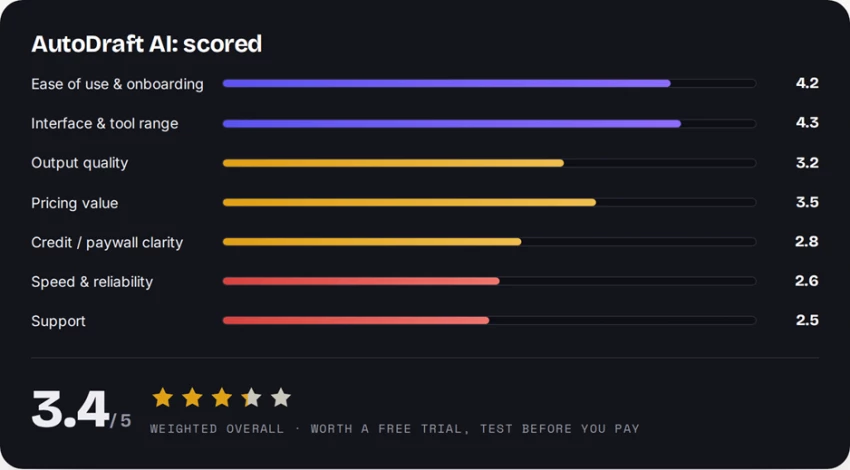
My honest take: AutoDraft AI is the rare tool that makes you want to create. The onboarding is smooth, the dashboard is one of the cleanest creator workspaces I’ve used, the style gallery is genuinely exciting, and the generation screen has pro-grade controls. The character-consistency idea, training a model so your hero looks the same across twenty panels, is a real, specific reason to look closer if you publish character-driven video.
But I have to score what I actually experienced. I did everything right and still couldn’t generate a single image on the free tier: the credit meter was empty, and my first Generate click became an upgrade wall. Stack that on top of the steady, independent buyer complaints about slow warm-ups, failed generations, and slow email-only support, and the picture is clear: this is a promising studio that quietly breaks content schedules when you lean on it.
Recommendation: start on the free tier purely to feel the interface, then, before paying a cent, train a small custom model and run your own speed test. If generation speed and support feel acceptable on your account, Base or Pro is fair value for regular cartoon and character work. If you need finished, reliable, photoreal output on a deadline, pick a more polished tool.

New Claude Model Targets Agentic AI WorkflowsAnthropic has launched Claude Sonne...
Samuel Osei1 month ago

The Quick verdictInSnoop is a free, browser-based tool that promises to let you...
Alexander Hughes1 month ago

Gemini’s Image Tools Get a Wider RolloutGoogle is expanding access to Gemini’s p...
Alexander Hughes1 month ago

Two AI video generators, two very different first days. I ran PixVerse through i...
Alexander Hughes1 month ago

Two of the most talked-about AI chat platforms. I opened both, picked a characte...
Alexander Hughes1 month ago

The two-minute versionIf you only read one thing, read this. The rest of the doc...
Alexander Hughes1 month ago
Discussion