AI moved from the margins of student life to its center in under two years. A 2026 BestColleges survey found that more than 85 percent of college students now use AI for schoolwork in some form, and the most effective among them rarely lean on a single app. They assemble a stack: one tool for grounded study, another for sourced research, a third for polishing writing, and a calculator-grade engine for the math that general chatbots still fumble.
The deeper split that matters is not free against paid but grounded against ungrounded. Tools that anchor every answer in a verifiable source or in uploaded course material protect understanding, while tools that produce fluent but unsourced text can quietly erode it. The eight platforms below were chosen to cover the full academic workflow, from lecture notes to literature reviews, and each was scored against the same rubric so the trade-offs stay in plain view.
Each platform was run through the Coursework Fit Test, a rubric built around what actually helps a student learn rather than what simply finishes an assignment. Five lenses each carry up to ten points, for a ceiling of fifty. Scores reflect editorial assessment from hands-on use on representative academic tasks, not vendor claims, which keeps very different tools comparable on the same scale.
| Lens | What it measures |
|---|---|
| Learning value | Whether the tool builds genuine understanding or simply produces an answer to copy. |
| Accuracy and grounding | Resistance to fabrication, quality of citations, and how easily a claim can be verified. |
| Workflow fit | How cleanly it slots into studying, research, writing, or problem-solving routines. |
| Ease of use | Learning curve, accessibility, and how quickly a new student becomes productive. |
| Student value | Strength of the free tier and the cost of any student or entry pricing. |
A high total signals breadth across the academic workflow. Several lower-scoring tools are the clear best choice inside one subject or task.
NotebookLM leads because it grounds every response in a student's own uploaded material, which removes most of the fabrication risk that drags down general chatbots. The research and writing assistants cluster close behind, separated mainly by how transparently they show their sources. The subject specialists, Wolfram Alpha and Consensus, score lower on breadth yet remain indispensable inside STEM and academic research respectively.
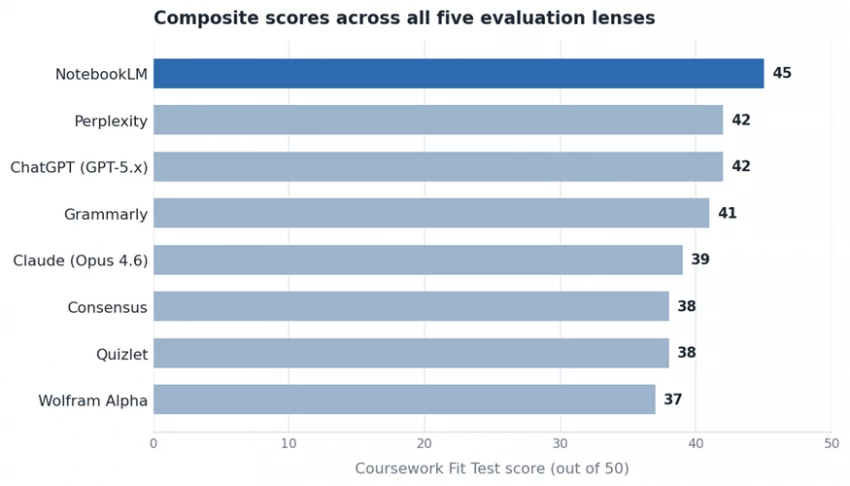
Composite Coursework Fit Test scores, out of a possible fifty points.
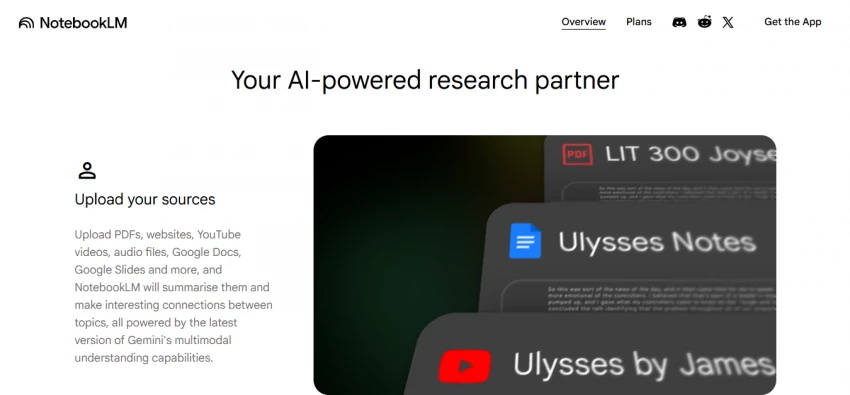
NotebookLM is the rare AI study tool that cannot invent facts, because it answers only from the documents a student feeds it: lecture slides, PDFs, textbook chapters, Google Docs, even YouTube transcripts. Ask it to summarize a chapter or explain a theory in plain language and the response stays tied to the uploaded source, with citations back to the exact passage. Its Audio Overviews turn a reading pile into a podcast-style discussion, which suits revision on the move.
Pricing: A generous free tier covers 100 notebooks, 50 sources per notebook, and 50 chat queries a day. Paid access arrives through Google AI Pro at 19.99 dollars per month, which roughly quintuples the limits, and verified US students aged 18 and over pay 9.99 dollars per month for the first year.
Strengths: Source grounding that all but eliminates hallucination, strong free limits, and audio summaries that make dense material easier to review.
Limitations: It reasons only over uploaded sources, so it cannot answer general questions, and the paid tier is bundled into a wider Google subscription rather than sold on its own.
Best for: Studying from a fixed set of course materials and reading-heavy or research-heavy modules.
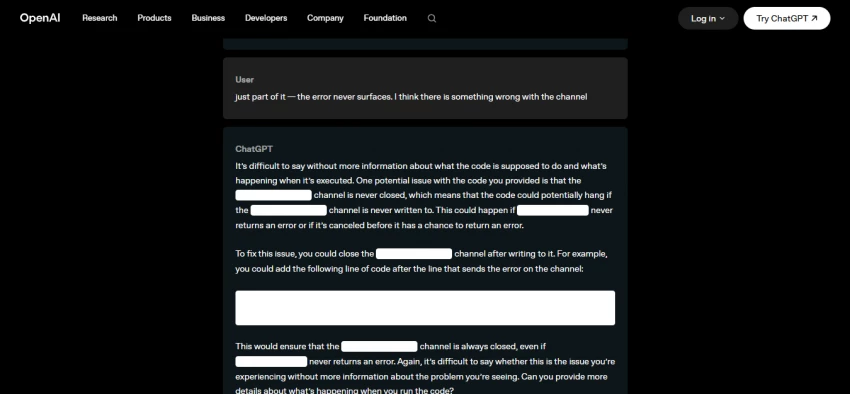
ChatGPT remains the most versatile single tool a student can open, handling explanations, essay outlines, coding help, and exam practice across nearly every subject. Its Study Mode takes a Socratic approach, asking guiding questions rather than handing over finished answers, which nudges the tool toward teaching instead of doing. The free tier now runs on a current model and covers the bulk of everyday study needs.
Pricing: A capable free tier is available. The Go plan costs 8 dollars per month, Plus is 20 dollars per month and adds unlimited messages plus deeper research features, and Pro runs from 100 to 200 dollars per month. There is no broad student discount, though many universities provide access through ChatGPT Edu.
Strengths: Unmatched range across subjects and tasks, a gentle learning curve, and a free tier strong enough for most coursework.
Limitations: It can state wrong information confidently and does not cite sources by default, so every fact needs checking before it reaches an assignment.
Best for: A flexible all-rounder for explanations, brainstorming, and study practice across mixed subjects.
Claude is the strongest writing partner in the group for students who care about structure and tone. It holds an argument across a long essay, follows detailed instructions about format and register, and explains its reasoning in a way that helps a student see how a piece fits together. The Opus 4.6 model handles lengthy readings and multi-section drafts without losing the thread, which suits dissertations and term papers.
Pricing: A limited free tier is available. Pro costs 20 dollars per month, or 17 dollars per month billed annually. Higher Max tiers run at 100 and 200 dollars per month for heavier workloads.
Strengths: The clearest long-form writing and structured reasoning here, careful handling of nuanced instructions, and a generous context for big documents.
Limitations: No built-in web search or citation engine on its own, and no dedicated student pricing, so research still needs a sourced tool alongside it.
Best for: Essays, theses, and any assignment where writing quality and structure carry the grade.
Perplexity behaves like a research scout rather than a chatbot. Every answer arrives with inline citations linking to the underlying pages, so a student can verify each claim and build a bibliography in the same pass. That transparency makes it the most academically defensible of the general research tools, since the work of checking sources is built into the workflow rather than bolted on afterward.
Pricing: The free tier allows unlimited basic searches and five advanced searches a day. Pro is 20 dollars per month, or about 16.67 dollars billed annually. Verified students pay 10 dollars per month for Education Pro, and a referral program running through May 2026 can extend free Pro access well beyond a single month.
Strengths: Source-cited answers that double as a reference list, a genuinely usable free tier, and current information pulled live from the web.
Limitations: It is built for search rather than polished writing, and free-tier queries may be used to improve the underlying models, so sensitive material does not belong there.
Best for: Sourced research where verifying every claim and gathering citations matters.
Quizlet turns raw material into active recall, the study method most consistently linked to retention. Magic Notes converts uploaded class notes into flashcards, practice tests, and summaries, while Q-Chat acts as a conversational tutor that uses guiding questions instead of plain answers. A library of more than 700 million student-made sets means many topics already have a starting deck.
Pricing: A free tier covers manual flashcards and limited study rounds. Quizlet Plus runs about 7.99 dollars per month, or roughly 35.99 dollars per year, which works out near 3 dollars per month on the annual plan. A higher unlimited tier sits around 9.99 dollars per month.
Strengths: Excellent spaced-repetition and recall tools, AI that builds study sets from notes, and the lowest effective annual price in this comparison.
Limitations: Once-free features now sit behind the paywall, user-generated sets vary in accuracy, and the term-and-definition format does not handle multi-step STEM problems.
Best for: Memorization-heavy subjects, vocabulary, and exam revision through flashcards and quizzes.
Grammarly is the editing layer that sits on top of whatever a student writes, catching grammar, clarity, tone, and conciseness issues across almost any text field in a browser or word processor. It refines work rather than generating it, which keeps it firmly on the acceptable side of most university AI policies and makes it a safe complement to the drafting tools above.

Pricing: A useful free tier handles basic grammar, spelling, and tone. Pro costs 12 dollars per month billed annually, or 30 dollars billed monthly, and student discounts through services such as UNiDAYS or Student Beans bring the effective rate closer to 6 to 9 dollars. Many universities provide Pro access at no cost through campus licenses.
Strengths: Strong editing and tone guidance, near-universal coverage across writing surfaces, and frequent free access through institutions.
Limitations: It edits rather than writes, AI prompts are capped on the paid tier, and brand or custom style guides require a team plan.
Best for: Proofreading and tightening essays, applications, and any writing produced elsewhere.
Wolfram Alpha is a computational engine, not a language model, and that distinction is its strength. It solves equations, plots functions, and works through calculus, algebra, physics, and chemistry by symbolic computation rather than by predicting text, which makes its core results far more reliable than a chatbot on the same problem. The value for students lies in the step-by-step workings that show how an answer is reached.
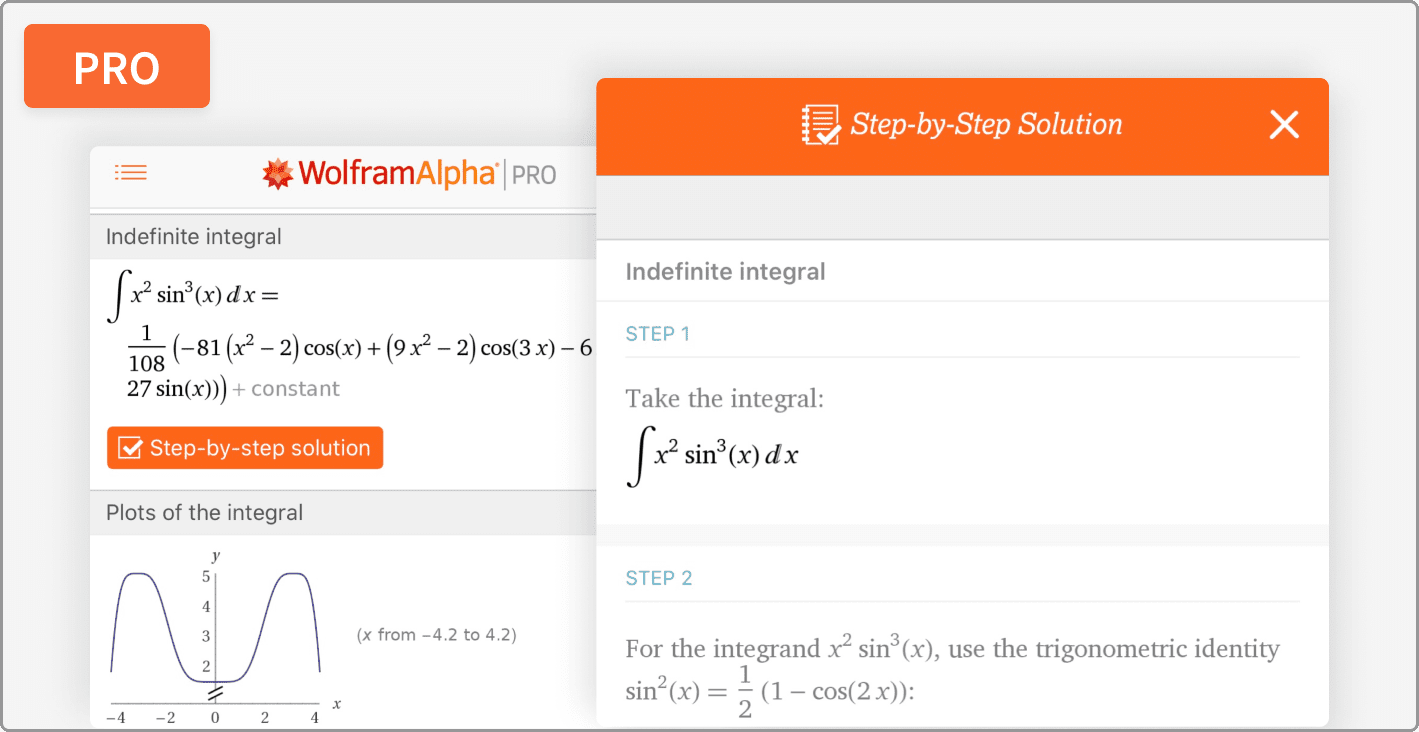
Pricing: The free version returns answers but withholds the steps. The student Pro plan costs 5 dollars per month, billed at 60 dollars a year, and unlocks step-by-step solutions, practice problems, and guided calculators. A Premium tier near 8.25 dollars per month adds further features.
Strengths: Dependable computation across STEM, worked solutions that teach method, and low student pricing for the paid steps.
Limitations: The step-by-step solver is occasionally unreliable, the free version is ad-heavy, and the interface is built for queries rather than conversation.
Best for: Math, physics, and chemistry coursework that needs precise answers and visible working.
Consensus answers research questions using only peer-reviewed literature, which sets it apart from general chatbots that draw on blogs and opinion alongside studies. Ask a question and it returns synthesized findings drawn from published papers, with the source studies attached. For anyone writing a literature review or building an evidence-based argument, that narrow focus is exactly the point.
Pricing: A limited free tier allows a set number of queries. Premium runs around 8.99 dollars per month and lifts those caps while adding deeper synthesis and analysis features.
Strengths: Evidence drawn strictly from peer-reviewed research, fast synthesis across many studies, and citations suited to academic writing.
Limitations: Its scope is deliberately narrow, so it is unhelpful outside research questions, and the free tier caps queries quickly during a heavy literature search.
Best for: Literature reviews, research papers, and any work that must rest on published evidence.
Cost is rarely the barrier it looks like, because most of these tools carry a real free tier and several add steep student discounts on top. The chart shows the lowest paid tier relevant to students, while the table that follows pairs each tool with its free option and the academic job it does best. A capable study stack can be assembled for very little, and in many cases for nothing at all.
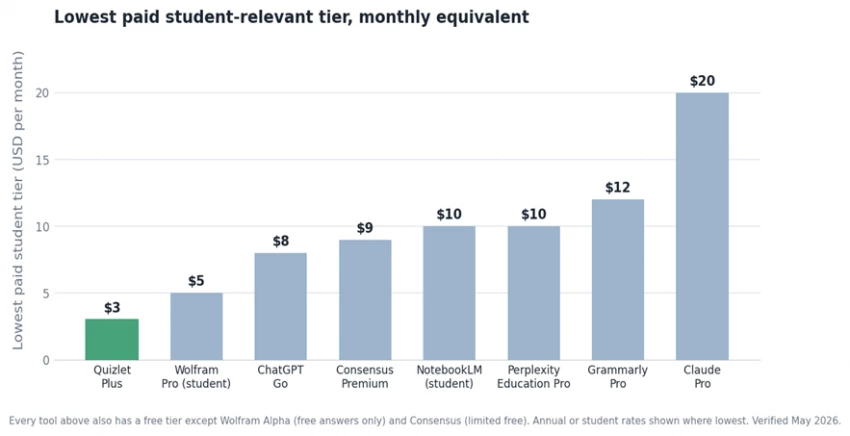
Lowest paid student-relevant tier for each tool, in US dollars per month.
| Tool | Free tier | Lowest paid | Best academic use |
|---|---|---|---|
| NotebookLM | Yes | 9.99 / mo* | Source-grounded study from uploaded materials |
| ChatGPT (GPT-5.x) | Yes | 8 / mo | Versatile all-round study assistant |
| Claude (Opus 4.6) | Yes | 17 / mo* | Long-form essays and structured writing |
| Perplexity | Yes | 10 / mo* | Sourced research with inline citations |
| Quizlet | Yes | 3 / mo* | Flashcards and active-recall revision |
| Grammarly | Yes | 12 / mo* | Editing and proofreading written work |
| Wolfram Alpha | Answers only | 5 / mo* | STEM problems with step-by-step working |
| Consensus | Limited | 8.99 / mo | Peer-reviewed literature and reviews |
Prices in US dollars. An asterisk marks an annual-billing or verified-student rate, the lowest published option. Student discounts and free promotions vary by region and change often, so eligibility is worth confirming before subscribing.
The strongest results come from pairing tools by task rather than betting on one to do everything. A common and nearly free setup combines a grounded study tool, a sourced research tool, and an editing layer, with a STEM engine added only when the coursework demands it. The right combination follows the dominant kind of work in a given term.
• Reading-heavy or revision-focused study: NotebookLM for grounded summaries, with Quizlet for active recall on the material that must be memorized.
• Research papers and literature reviews: Perplexity for sourced web research and Consensus for peer-reviewed evidence, then Claude to draft and Grammarly to polish.
• STEM-heavy coursework: Wolfram Alpha for worked solutions, supported by ChatGPT for conceptual explanations of the same problems.
• General, mixed workloads on a tight budget: the free tiers of ChatGPT and NotebookLM cover most needs at no cost, with paid upgrades added only where a limit bites.
Budget shapes far less than it once did. The free tiers alone handle a large share of academic work, and the paid student rates, often well under the price of a single textbook chapter, mostly buy higher limits rather than fundamentally different capability.
The fastest way to turn a study aid into a liability is to submit its output as original work. Most universities updated their AI policies for 2026, and the boundaries now tend to separate acceptable support, such as proofreading, summarizing, generating practice questions, and organizing notes, from prohibited use, such as having a tool write an assignment, sit an exam, or supply code that is copied without understanding. Approved-tool lists remain inconsistent between institutions, so confirming a course policy before submitting anything is the safest habit.
The tools that protect a student academically are the ones that keep the thinking with the student. Grounded and source-cited platforms make claims easy to verify, step-by-step engines reveal method instead of just answers, and Socratic study modes prompt reasoning rather than replace it. Used that way, AI accelerates understanding. Used to shortcut it, the same tools quietly remove the learning they were meant to support.
No single tool wins every subject, and the composite scores show why: each one is built for a different stage of academic life. NotebookLM tops the ranking because grounding answers in a student's own materials serves the widest range of study tasks while protecting accuracy. ChatGPT and Perplexity sit just behind as the most useful general assistants, the first for breadth and the second for sourced research, and Claude leads on writing. For specialized work, Wolfram Alpha and Consensus are difficult to beat inside STEM and research.
The practical move is to match each tool to the work it does best and lean on free tiers wherever they suffice. That approach produces stronger results, costs almost nothing, and keeps the student doing the learning, which is the only outcome that survives past the next exam.
New Claude Model Targets Agentic AI WorkflowsAnthropic has launched Claude Sonne...
Samuel Osei3 months ago

Gemini’s Image Tools Get a Wider RolloutGoogle is expanding access to Gemini’s p...
Alexander Hughes3 months ago

Two AI video generators, two very different first days. I ran PixVerse through i...
Alexander Hughes3 months ago
Two of the most talked-about AI chat platforms. I opened both, picked a characte...
Alexander Hughes3 months ago
The two-minute versionIf you only read one thing, read this. The rest of the doc...
Alexander Hughes3 months ago
Why Seedance 2.5 mattersSeedance 2.5 is the latest release in ByteDance’s Seedan...
Alexander Hughes3 months ago
Discussion