
Some tools scream for attention with neon dashboards and a hundred buttons; Cutout.Pro feels more like that quiet colleague who just gets through a mountain of work while everyone else is still opening Photoshop. It doesn’t promise to make you an artist, it promises to chew through repetitive, soul-sucking image tasks so you can get back to selling, designing, or creating.
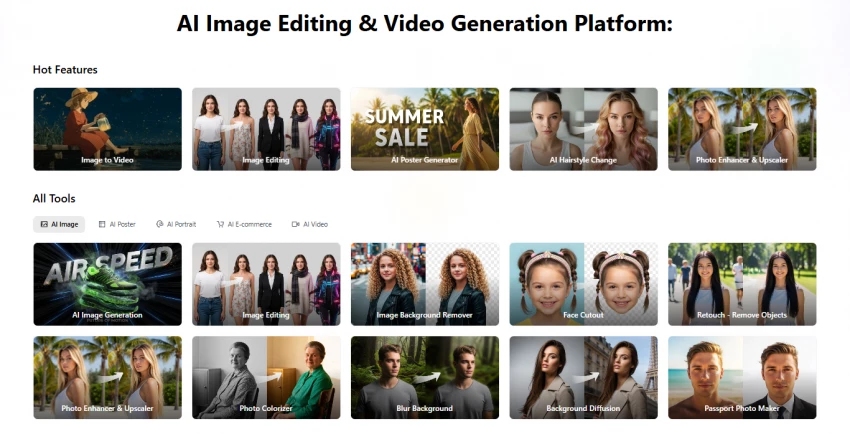
At its core, Cutout.Pro is an AI-powered visual production platform that specialises in background removal, image and video enhancement, restoration, and e‑commerce‑ready visuals. It runs in your browser, on mobile, and via API, and it’s built less like a fancy creative studio and more like a highly efficient factory line for images and videos.
Think of it like this:
| Aspect | Detail |
| Role | AI visual “production assistant” |
| Core jobs | Remove backgrounds, enhance & upscale, restore, prep e‑commerce images |
| Where it lives | Web app, mobile apps, API endpoints |
| Media types | Photos and videos (including video background removal) |
You don’t use Cutout.Pro to design your entire campaign; you use it to clean up the raw assets that feed that campaign.
If you’re sitting on a hard drive full of product shots, shot in different rooms, lighting conditions, and moods, Cutout.Pro is essentially a triage center. You feed in chaos, it pushes out clean, consistent catalog shots with standardised backgrounds and sizes.
For Amazon, Shopify, WooCommerce and multi‑channel sellers, that alone can be the difference between a scattered store and a visually coherent brand.
Agencies and studios don’t earn money by spending hours manually tracing edges around shoes and handbags. Cutout.Pro lets you offload background removal, basic enhancement, upscaling, and even old photo restoration, so your team spends more time concepting and less time cleaning pixels.
Print‑on‑demand sellers, merch designers, and solo creators can use Cutout.Pro to chop, clean, and prep artwork and product photos before dropping them into mockups or design tools. It won’t win design awards by itself, but it will quietly keep your pipeline moving.
If your idea of a “good day” is zooming to 400% and painting individual eyelashes in Photoshop, this is not your main tool. If you want a full Canva-style marketing suite with templates, brand kits, and social calendars, this is also not your main tool. Cutout.Pro is much more “factory floor” than “art director’s lounge.”
Let’s break this into the four big “zones” of the product.
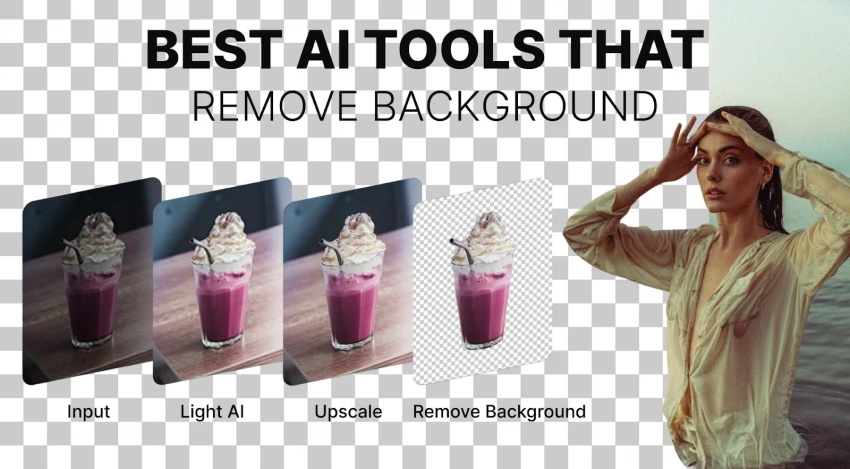
Image Background Remover (with batch superpowers)
The headline act. You upload one image or a whole batch, think 100 sneaker shots from a new campaign and Cutout.Pro surgically strips out the background. Clean edges, solid handling of common product shapes, and batch processing that makes catalog work go from “I’ll do it next week” to “Done before lunch.”
Video Background Removal (no green screen required)
You throw in an MP4 or similar, and the platform separates your subject from the background as if you shot on a green screen. For talking‑head content, product demos, and social promo clips, it’s like having an instant chroma key stage without the physical setup. It’s not a full editing suite, but it’s a strong pre-processing step.
Face Cutout & Hair-aware Segmentation
For profile photos, avatars, or portrait-heavy campaigns, specialised models try to keep hair, face edges, and tricky contours intact. This matters when you’re working with fashion, beauty, or any visuals where bad cutouts are instantly noticeable.
Photo Enhancer & Upscaler (up to 4K)
You load in a soft, slightly noisy image and get back a sharper, cleaner, higher-res version that holds up full-screen or in print. For e‑commerce, that means your older or user-generated images don’t have to be thrown away; you can rescue and repurpose them at higher quality.
Old Photo Restoration & Colorisation
Scan that faded, cracked family photo, run it through the restoration tool, and suddenly you’ve got something you’d actually frame. For studios, this can be a premium add-on service; for families, it’s a way to bring archives into the present without becoming a retouching expert.
This is where Cutout.Pro steps out of the generic AI-editor crowd.
AI E‑commerce Product Image Design
Instead of just cutting out images, Cutout.Pro tries to help you present products better: consistent backgrounds, controlled shadows, and layouts that sit nicely on product pages. The goal isn’t to be wildly creative; it’s to be reliably on‑brand and marketplace-friendly.
E‑commerce Image Effects
Want all your listings to have the same soft grey background and drop shadow? You can standardise that look in a few clicks, instead of trying to copy settings between dozens of PSD files. For multi‑SKU catalogues, consistency is half the battle, and this gives you a low-friction way to get there.
Passport & ID Photo Maker
It sounds niche until you realise how many small studios, print shops, and even coworking spaces churn out passport and ID photos. Preset formats, background colours, and framing rules make those quick jobs faster and less error-prone.
Virtual Try-On & Virtual Staging
Fashion sellers can place clothing on models; home and decor brands can drop products into staged rooms. It won’t replace a full 3D render pipeline, but it significantly reduces the gap between “we have packshots” and “we have lifestyle imagery that actually sells.”
AI Posters, Backgrounds, and Quick Promos
Need a quick campaign poster, a background for your social ad, or a promo graphic for a sale? Cutout.Pro has AI-based generators and design modules that let you cobble together decent visuals without ever leaving the platform.
Cartoon Selfies & Fun Filters
Cartoon avatars, stylised portraits, and playful filters aren’t the main reason to buy Cutout.Pro—but they’re handy if you’re handling social media content, branding experiments, or community campaigns where these flourishes get engagement.
A brand with 500+ SKUs shoots product photos in-house. Lighting isn’t always perfect, backgrounds vary, and a designer spends days cleaning them up.
With Cutout.Pro in the mix:
1. The team uploads images in bulk.
2. Backgrounds get removed and replaced with a marketplace-compliant white or brand-consistent alternative.
3. E‑commerce effects standardise shadows, framing, and crop.
4. Key hero images get upscaled to 4K for future campaign use.
The end result: one person can process what used to be a week’s worth of cleanup in a day.
A print‑on‑demand seller creates designs for T‑shirts, phone cases, and mugs. Assets come from scanned sketches, random photos, and UGC.
With Cutout.Pro:
● Sketches and logos get cut out cleanly and saved as transparent PNGs.
● Product photos get cleaned and standardised for storefronts and ads.
● The enhancer ensures designs don’t look soft or pixelated on the final print.
Less time fighting with edges, more time creating new designs and running campaigns.
A studio that shoots weddings and family sessions wants to add “heritage restoration” as a premium service.
Cutout.Pro gives them:
● A restoration pipeline for scanned prints.
● Optional colourisation for old black-and-white shots.
● Upscaling for large framed prints or albums.
They position it as high-touch nostalgia, but under the hood, a lot of the work is AI-assisted.
The honest answer: for most business use cases, yes and fast enough that the occasional imperfect edge is still a net win.
1. Standard products (shoes, bottles, electronics, accessories) usually come out clean and ready-to-list with minimal or no manual intervention.
2. More complex hair, fur, or transparent objects can sometimes reveal the limits of automation, but for many brands, “95% of the way there in seconds” is still a huge upgrade over manual work.
3. Enhancement and restoration tools provide impressive “before/after” leaps, especially when the input isn’t totally destroyed to begin with.
4. Video background removal is strong enough for social clips, explainers, and product videos, especially if you’re not chasing cinema-level perfection.
If your bar is “better than what we can do by hand in the same amount of time,” Cutout.Pro easily clears it. If your bar is “pixel‑perfect for a global luxury campaign,” you’ll still treat it as a helper, not the final stop.
Cutout.Pro uses a credit system, which is both its flexibility and its headache.
● Simple tasks like standard background removal typically cost 1 credit per image.
● Heavier tasks (certain enhancements, colourisation, special effects, passport tools) can cost 2 credits per image.
● Video background removal follows a per‑minute style pricing rather than per-image.
This lets them price tasks according to compute cost, but it also means you need a basic mental model of “what burns what” to budget properly.
● Free plan: Enough credits to test quality and run a small batch; good for “is this worth my time?” experiments.
● Subscriptions: Monthly credit allowances that can roll over (up to multiple months’ worth), which is ideal for teams with uneven workloads—big campaign months and quiet months.
● Pay‑as‑you‑go: Buy credit packs, use them when you need them, and forget about monthly commitments.
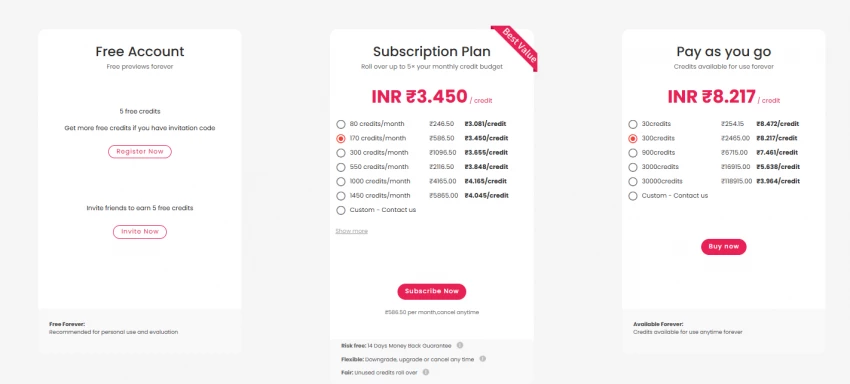
From a value perspective, the real metric isn’t “credits vs dollars” but “credits vs hours of manual labor replaced.” For a solo creator, saving a few hours per week may be worth a modest subscription. For a brand or agency, freeing dozens of hours of production time every month can make the tool feel absurdly cheap.
Cutout.Pro is designed so that even the most non‑technical person on your team can use it within minutes.
● The interface is simple: upload, wait, review, download.
● Most tools share the same mental model, so once someone understands background removal, they’re halfway to understanding enhancement and restoration.
● Batch uploads and straightforward previews mean you can hand off grunt work to junior staff, VAs, or clients themselves without a training manual.
It’s closer to “drag‑and‑drop appliance” than “creative software suite,” which is exactly what many businesses want from an AI tool.
Where this platform gets really interesting is when you stop thinking of it as a website and start thinking of it as a background service.
● The API allows you to automate background removal and other operations directly from your own app, your marketplace backend, or your internal tooling.
● E‑commerce and catalog workflows can be wired so that images get processed automatically upon upload, long before a human ever opens a listing.
For developers, marketplaces, SaaS products, or agencies building internal tools, Cutout.Pro becomes less of a “tool I visit in a browser” and more of a hidden layer in the production pipeline.
● It’s genuinely good at the boring stuff: background removal, cleanups, standardisation, and upscaling.
● The feature set is clearly tuned for commerce and production, not just fun effects.
● It offers different pricing modes (free, subscription, pay‑as‑you‑go) that scale from solo freelancers to agencies and brands.
● The API and automation angle gives it a long runway if you grow from “we just need a tool” to “we need infrastructure.”
● The credit system introduces an extra mental step: you’re not just thinking in “images,” but in “what kind of images and how many credits.”
● If you’re a perfectionist, some edge cases—literally edges—will still push you back into manual tools.
● As a production workhorse, it doesn’t try to be your main creative environment, which means you’ll still need design tools beside it.
Even a strong tool makes sense only in context. Here’s how Cutout.Pro generally stacks up conceptually against common alternatives.
| Tool | Best for | Pricing style | Standout strength |
| Cutout.Pro | Bulk e‑commerce and production workflows | Credits + subs + PAYG | Broad toolset (BG, enhancement, restoration, e‑com) |
| Remove.bg / Removal.AI | Pure background removal at high accuracy | Pay-per-image + subs | Strong cutouts, focused feature set |
| Canva / Adobe Express | Everyday design & marketing visuals | Flat subscription | Templates, brand kits, multi-page design |
| Topaz / Luminar etc. | Photographers needing fine image quality | One-time or license | Deep photo enhancement and local control |
Cutout.Pro isn’t the flashy AI toy you show off to friends for jaw-dropping generative art, it’s the kind of tool you plug into your daily workflow to keep product photos clean, videos usable, and archives ready to reshare. If you regularly process large batches of product or client images, prioritize speed and consistency over microscopic manual control, and are comfortable thinking in credits to save serious hours each month, Cutout.Pro is very likely worth a serious trial and possibly a long-term spot in your stack. However, if you’re chasing pixel-perfect luxury imagery or want a fully branded content suite in one place, it’s best viewed as a specialist sidekick rather than your main creative hub.
1. Is Cutout.Pro free or paid?
Cutout.Pro offers a limited free version, but high-resolution downloads and advanced tools require credits or a paid subscription.
2. How good is Cutout.Pro for background removal?
Cutout.Pro performs well for clear subjects like people and products, using AI to separate them from the background in seconds.
3. Can Cutout.Pro remove backgrounds from videos?
Yes. Cutout.Pro includes AI video background removal that lets users replace or edit video backgrounds without a green screen.
4. Do I need to download software to use Cutout.Pro?
No. Cutout.Pro works completely online, so you can edit images directly in your browser.
5. Can Cutout.Pro improve low-quality images?
Yes. The platform offers AI image enhancement and upscaling tools that improve resolution and sharpen blurry photos.
6. Who typically uses Cutout.Pro?
It is widely used by e-commerce sellers, marketers, designers, and social media creators who need fast image editing.
7. Does Cutout.Pro support batch image editing?
Yes. Cutout.Pro allows batch processing, which helps users remove backgrounds or enhance multiple images at the same time.

“HidingMe” sounds like a privacy app. It isn’t. So I opened the live site in Jun...
Sandra Campos2 months ago

Type "Totally Science" into a search bar and the name suggests a study aid, a vi...
Benjamin Clark2 months ago

I keep a 12-question audit checklist on my desk. It started in 2024 as a one-pag...
Grace Howard3 months ago

The market for AI-powered knowledge management tools has exploded in the past tw...
Grace Howard4 months ago

I’ve spent enough hours wandering through thesindi.com to know it almost like a...
Ina Gupta4 months ago

Sitemap Generator by UploadArticle.com is a lightweight, browser‑based XML sitem...
Peter Woods4 months ago
Discussion