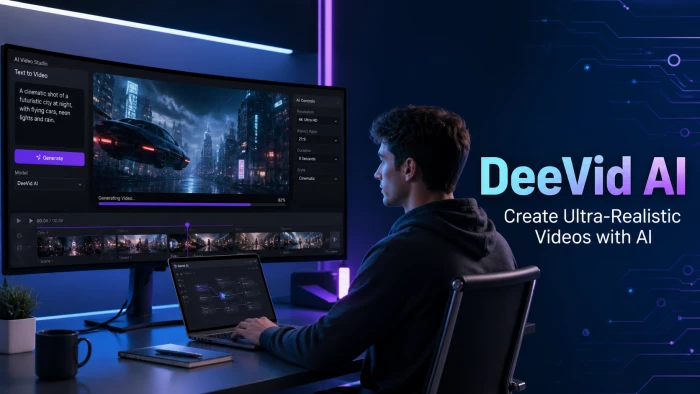
Short-form AI video has become one of the loudest categories in the creator-economy stack. According to research surfaced by Wondershare’s editorial team, around two-thirds of social media users now interact with at least one AI-generated video clip every day, and creators are racing to feed that demand. DeeVid AI - based in Las Vegas and launched in 2024 - is one of the platforms positioning itself for that wave. Rather than building a single proprietary model, it bundles several of the strongest commercial models (Veo 3, Sora 2, Kling AI, Runway, Seedance, PixVerse and Google’s Nano Banana) under one subscription and one workflow.
This review pulls together findings from official DeeVid AI documentation, independent hands-on tests published by Pollo AI, GoEnhance AI, Genmi AI, MagicLight, Filmora (Wondershare), Skywork.ai, Lovart, HIX AI and DigitalizeLife, plus user feedback aggregated on Trustpilot and the App Store. The goal is a single, factual reference that explains what the platform actually does, where it performs well, where it falls short, and which kind of creator should consider it.
| 30-second take. DeeVid AI is a multimodal AI video generator that lets users create 5–10 second clips from text, images or existing footage using several leading AI models from a single dashboard. Strengths: speed, breadth of models and beginner-friendly UI. Weaknesses: inconsistent visual quality on complex prompts, opaque per-mode credit pricing and a strict refund policy. Best fit: short-form social-media and ad creators willing to iterate and curate. |
Before diving into hands-on observations, the table below summarises the verifiable, on-record facts about the platform - the kind of details that should anchor any purchase decision.
| DeeVid AI – Quick Facts | |
|---|---|
| Category | AI video generator (multimodal aggregator) |
| Founded | 2024 • Based in Las Vegas, USA |
| Underlying AI models | Veo 3, Sora 2, Kling AI, Runway, Seedance, PixVerse, Nano Banana |
| Primary inputs | Text prompt, image, existing video |
| Output formats | MP4, 720p (Lite) or 1080p (Pro/Premium) |
| Generation speed | Approx. 30 sec – 3 min depending on model & quality |
| Free tier | 20 starter credits (~4 videos), watermarked, non-commercial |
| Paid plans | Lite $14/mo • Pro $35/mo • Premium $159/mo (29% off annually) |
| Mobile apps | iOS and Android (Google Play + Apple App Store) |
| Commercial use | Allowed on all paid plans |
| Best suited for | Marketers, social-media creators, e-commerce sellers, SMBs |
DeeVid AI describes itself on its iOS App Store listing as a “next-generation AI video agent designed for everyone,” built on top of the world’s most advanced video models “optimised for every scenario.” In plain English, it is a web-based and mobile platform that converts text prompts, still images or short video clips into AI-generated videos in roughly one to three minutes.
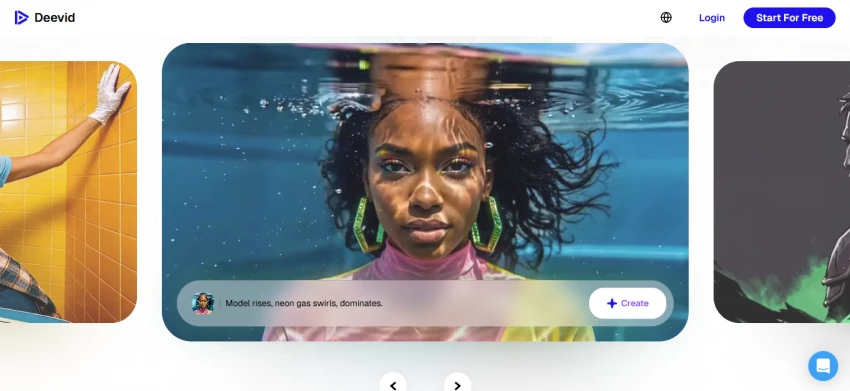
The defining design choice is its aggregator positioning. Independent reviewer GoEnhance AI notes that the platform pulls together Sora 2, Veo 3.1, Kling and roughly ten other AI video models under one subscription - a pitch directly aimed at marketers and creators who would otherwise juggle separate Runway, Pika and Kling accounts. DeeVid AI describes this internally as a “producer-led video agent” that “precisely matches the best-fit model to your task,” according to the official deevid.ai homepage and the Pollo AI editorial overview.
Three proprietary modes sit on top of these underlying models: Fast V2.0 for rapid iteration, Quality V2.0 for higher-resolution output, and Master V2.0, which adds audio generation and lip-sync into a single pass. The combination, as documented by Genmi AI’s testing team, is intended to remove the multi-tool stitching most AI video projects still require.
The deevid.ai home page and Apple App Store listing collectively document a feature stack that goes well beyond simple text-to-video. The infographic below summarises the six creation modes most commonly used by reviewers.
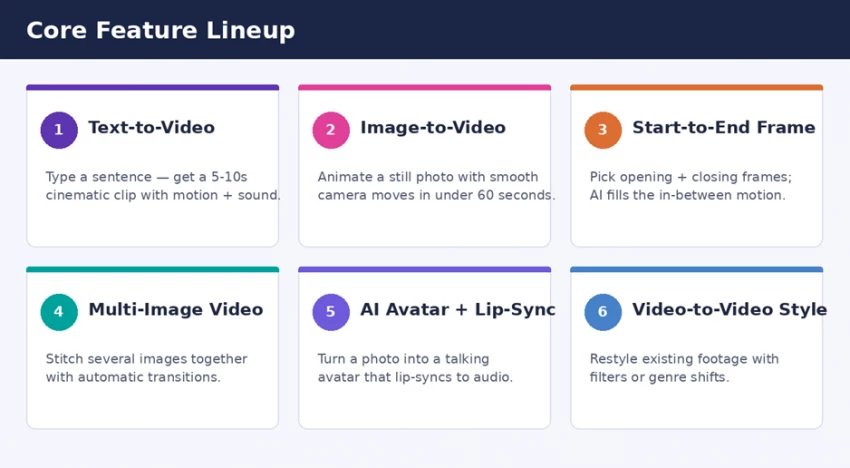
DeeVid AI - the six core creation modes documented across the official site and app stores.
A single sentence is enough to generate a fully animated clip with cinematic motion and ambient sound. Reviewer DigitalizeLife notes that short clips on the Fast V2.0 model can finish in 30–60 seconds, while Quality V2.0 and Master V2.0 typically take between one and three minutes. Output resolution is 720p on the Lite plan and 1080p on Pro and Premium.
Uploading a static photo (JPG, PNG or WEBP) triggers automatic animation - camera pans, zooms and scene transitions are applied based on the AI’s scene-detection logic. According to DeeVid AI’s own image-to-video documentation, this works for any photo type: portraits, landscapes, product shots or illustrations.
This mode lets a user lock in the opening shot and the final shot of a clip; the AI then fills in the motion in between. Pollo AI’s editorial coverage highlights this as a strong feature for product explainers and storyboarded transitions, where exact start/end framing matters more than free-form generation.
Several stills can be combined into a single animated sequence, or a single photo can be turned into a personalised AI avatar that speaks via lip-sync to uploaded audio. The AI Lip Sync engine, per the deevid.ai feature listings, accepts both a face image and a video plus an audio file as inputs.
Existing footage in MP4, AVI or MOV format can be restyled - for example, transforming a live-action clip into anime, or applying a cinematic filter set. The deevid.ai video-to-video page lists pre-built styles such as anime-to-realism, vintage and retro, plus the option to upload a reference image whose aesthetic the AI then mimics.
A library of more than 50 viral-format effects - including the AI Hug, AI Kissing, Ghibli AI conversion, AI Curly Hair and an AI 360° “microwave” effect - gives creators one-tap shortcuts into trending TikTok and Reels formats, as documented on Google Play.
Across multiple independent reviews, the typical creation path is consistent and short. The diagram below maps it for the image-to-video mode, which is the most common entry point for new users.
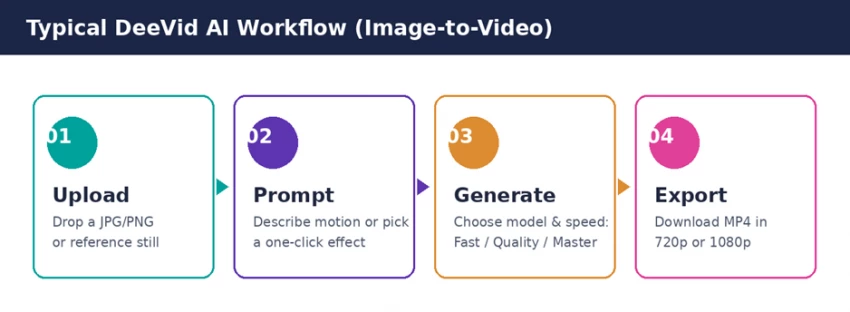
Typical four-step DeeVid AI workflow: upload, prompt, generate, export.
Filmora’s Wondershare review walked through the same flow in practice and noted that beginners can produce a publishable clip without ever opening a manual. The interface is described by HIX AI’s testing team as “minimalistic,” with each tool clearly labelled - no need to hunt through nested menus. The Lovart and DigitalizeLife reviews both emphasise a similar point: the tool deliberately trades fine-grained editing control (no timeline, no frame-level adjustment) for raw speed.
Quality is where AI video tools earn or lose their reputation, and DeeVid AI’s record across reviews is mixed. The synthesised scorecard below blends findings from official documentation, independent hands-on tests and aggregated user feedback.
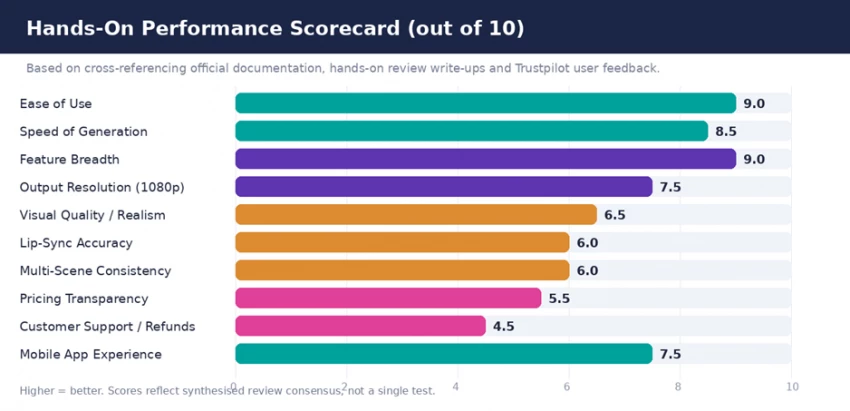
Performance scorecard synthesising independent hands-on reviews and user feedback.
Across the reviews, three strengths show up repeatedly. First, speed: DigitalizeLife’s testing reports most videos generating in under two minutes, with some clips finishing in roughly a minute. Second, ease of use: every reviewer surveyed describes the learning curve as effectively zero - Lovart calls it “practical and efficient,” and HIX AI describes the dashboard as built to “simplify short-form video production.” Third, breadth: the multi-model aggregator design genuinely removes the operational tax of running parallel Runway, Kling and Pika accounts, as GoEnhance AI’s review explicitly acknowledges.
Visual fidelity is the most common point of criticism. Genmi AI’s hands-on test of a complex underwater scene produced output that “appeared more like a 3D video game render” with stiff diver movements and clear render artefacts. Pollo AI’s reviewer flagged distortions and imperfect lip-sync renders during their tests. Trustpilot reviews echo this in everyday language - one reviewer noted that DeeVid “adds way too much camera shake” and that prompt adjustments only sometimes fix it. Magnetic visuals work well on simple, single-subject prompts; complex multi-element scenes are where the cracks appear.
A second pattern is identity drift in multi-clip sequences. Skywork.ai’s 2025 review explicitly warns that productions requiring “consistent, repeatable characters across many scenes” should expect drift and plan for manual curation. This is a current-state limitation of AI video as a category rather than a DeeVid-specific failure, but it is worth knowing before committing to long-form projects.
DeeVid AI uses a credit-based subscription model. New users receive 20 free credits on registration, which the official pricing page describes as enough for approximately four short videos. After that, three paid tiers gate higher credit allowances, watermark removal, 1080p export and full commercial-use rights.
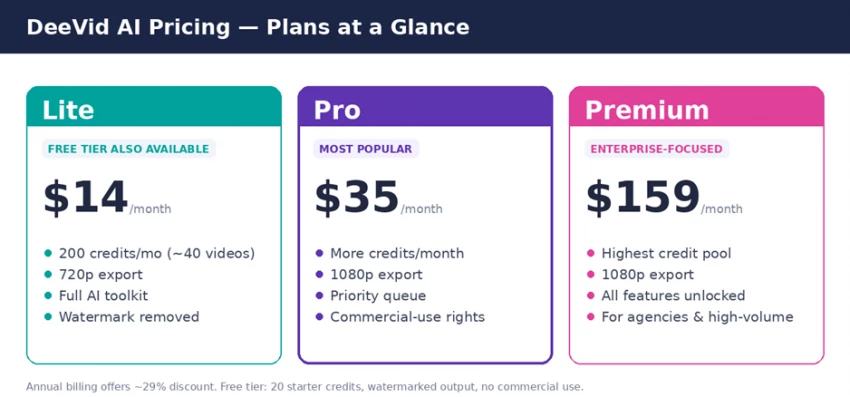
DeeVid AI pricing tiers (USD, monthly billing). Annual plans typically discount around 29 percent.
For working out cost-per-clip, the most useful published figures come from DigitalizeLife’s breakdown: Fast V2.0 typically uses around 5 credits per short clip, Quality V2.0 slightly more, and Master V2.0 (with audio and lip-sync) runs 7–10 credits per video. That puts Lite-plan users at roughly 40 short clips per month before they need a top-up. Skywork.ai’s 2025 review flagged a legitimate concern, though: there is no public, detailed credit-cost table broken down by mode and resolution. Buyers who need predictable per-output pricing are advised to budget conservatively and trial the platform before committing.
On commercial use, the situation is clear. Free-tier outputs include a watermark and are limited to evaluation; all paid plans remove the watermark and grant commercial-use rights for advertising, social marketing and promotional content, per DeeVid AI’s own terms-of-service summary.
| Watch the refund policy. Multiple Trustpilot reviewers and the GoEnhance AI write-up document that refund requests on DeeVid AI are frequently denied. Credits are deducted the moment a generation begins, regardless of the result. The recommended approach: trial the free tier with realistic prompts before subscribing, and start on the Lite plan rather than committing annually. |
The reviewer consensus is that DeeVid AI is firmly built for short-form, social-first video - not for long-form film production. The use-case fit can be summarised as follows.
| Who it suits | Why it fits |
|---|---|
| Social-media creators | Trending effects, fast turnarounds and vertical-friendly outputs for TikTok, Reels and Shorts. |
| E-commerce sellers | Convert product photos into 5–10s ad clips with cinematic motion and zero editor-time. |
| Small business marketers | Multiple AI models bundled in one subscription remove the cost of testing four separate platforms. |
| Content marketers / agencies | Batch generation, brand-safe templates and 1080p export support repeatable A/B testing. |
| Hobbyists & casual users | Photo-to-video for tributes, family memories or animated illustrations using a phone app. |
| High-end VFX or film teams | A poor fit - the platform lacks per-frame control, long-form output and consistent realism. |
Pulling together every reviewed source, the strengths and limitations cluster into a clear pattern. The table below collapses them into a single reference.
| What works | What needs work |
|---|---|
✓ Aggregator design - one subscription covers Veo 3, Sora 2, Kling, Runway and others. ✓ Genuinely fast: most clips render in 60–180 seconds. ✓ Beginner-friendly interface with a near-zero learning curve. ✓ 1080p export and full commercial rights on Pro/Premium plans. ✓ Mobile apps offer parity with the web version. ✓ Built-in TTS and royalty-free AI music for soundtrack work. | ✗ Visual quality is inconsistent - artefacts and distortions appear in complex prompts. ✗ Lip-sync accuracy varies across speakers and styles. ✗ Credit consumption can rise quickly when retries are needed. ✗ No transparent per-mode credit cost table is publicly published. ✗ Refund policy is strict; multiple Trustpilot users report denied requests. ✗ Limited fine-grained editing - no timeline, no per-frame control. |
User reviews on the App Store, Google Play and Trustpilot offer a useful counterweight to vendor messaging. The feedback splits cleanly along two axes.
• Praise for speed and ease of use: one Trustpilot reviewer described turning “a single image” into “a TikTok-ready promo video” in seconds, with motion and lighting effects on point.
• Strong feedback on memory and tribute use cases - for example, animating a 19th-century family photograph into a gentle motion sequence.
• Multi-model variety is appreciated: testers note that switching between underlying models genuinely produces different visual “vibes,” from cinematic to stylised.
• Credit consumption is a recurring complaint. Both Google Play reviewers and Filmora’s editorial team note that lower-tier plans burn through credits quickly when retries are needed.
• Customer-support friction: several Trustpilot users report that paid generations they consider unsatisfactory are not refunded, with the company citing standard AI-output disclaimers.
• Quality variance on complex prompts: anatomy errors and unnatural motion are reported in a non-trivial share of outputs, particularly when human figures and detailed actions are combined.
DeeVid AI does not operate in a vacuum. Its closest comparable platforms - based on coverage from Pollo AI, GoEnhance AI, Filmora, MagicLight, HIX AI and Genmi AI - span both single-model specialists and rival aggregators.
• Runway: single-ecosystem incumbent. Higher entry price (~$35/month for comparable production features per GoEnhance AI’s 2026 comparison), but more stable, more repeatable output.
• Kling AI: comparable entry price (~$14.9/month), strong cinematic motion, but limited to its own model rather than aggregating multiple.
• Pika: starts ~$25/month, geared towards stylised and playful aesthetics; less strong on long-form realism.
• Pollo AI: another aggregator covering Sora 2, Veo 3, Seedance, Kling and Runway; competes most directly with DeeVid AI on positioning, with reviewers split on which produces more reliable output.
• Synthesia, HeyGen and similar avatar-first platforms: stronger for talking-head explainers and corporate training, weaker for the stylised social-format clips DeeVid AI targets.
The honest takeaway from GoEnhance AI’s comparative review is that DeeVid AI wins on the aggregator angle and entry-price advantage, but loses to specialist tools on consistency and refund flexibility. Buyers who already know which underlying model they prefer typically get more value subscribing to that model directly. Buyers who are still in exploration mode benefit most from the bundled approach.
DeeVid AI’s policy materials, summarised in its blog tutorials and in Skywork.ai’s 2025 documentation review, describe a privacy-first stance: encrypted file handling, private-by-default project storage, no third-party data sharing, AI-moderated outputs to filter unsafe content, and regular security updates. User-controlled deletion is supported, and no advertiser sharing is disclosed. While these claims are vendor-stated rather than third-party audited, the documented posture is more conservative than several free-tier rivals.
Final verdict - DeeVid AI scores 7.2 / 10 on synthesised criteria.
DeeVid AI sits in a specific, clearly defined slot in the AI video market. It is not the most cinematic generator in the category, and it is not the choice for anyone chasing pixel-perfect realism in long-form sequences. What it is, undeniably, is one of the most accessible multi-model aggregators currently available, with a beginner-grade learning curve, fast generation times and a price floor that undercuts most direct rivals on entry-level functionality.
For social-first creators, e-commerce sellers and small-business marketers producing high volumes of short clips, the platform earns its keep - particularly when paired with realistic expectations about retries and credit burn. For agencies, premium ad shops or any team that needs repeatable, frame-accurate output across long sequences, the more controlled (and more expensive) Runway-class tools remain the safer choice.
Treated as what it actually is - a fast, broad, occasionally rough multi-model AI video studio for short-form work - DeeVid AI is a credible, useful addition to a creator’s toolkit. Treated as a substitute for a professional production pipeline, it will disappoint. The free tier costs nothing to test, and that is the right place to start.
DeeVid AI offers genuine value for creators who shoot for engagement velocity rather than cinematic perfection. Its strengths are speed, breadth and accessibility; its weaknesses are quality variance, credit opacity and an unforgiving refund stance. Used inside its design intent - short-form social and ad creation - it consistently delivers. Used outside it, expectations have to be managed carefully. Either way, the free tier should be the first stop, not the paid plan.

New Claude Model Targets Agentic AI WorkflowsAnthropic has launched Claude Sonne...
Samuel Osei1 month ago

The Quick verdictInSnoop is a free, browser-based tool that promises to let you...
Alexander Hughes1 month ago

Gemini’s Image Tools Get a Wider RolloutGoogle is expanding access to Gemini’s p...
Alexander Hughes1 month ago

Two AI video generators, two very different first days. I ran PixVerse through i...
Alexander Hughes1 month ago

Two of the most talked-about AI chat platforms. I opened both, picked a characte...
Alexander Hughes1 month ago

The two-minute versionIf you only read one thing, read this. The rest of the doc...
Alexander Hughes1 month ago
Discussion