AI & ML
11 min read
Unstuck AI Review (2026): The Honest Take on the GPT-4 Study Assistant That's Replacing ChatGPT for Students
Verdict in 30 seconds Unstuck AI is the rare student-AI tool that earns its keep. It pairs GPT-4 with a Retrieval-Augmented Generation (RAG) backend, so every answer is grounded in your uploaded materials and comes with a citation you can verify. If you live inside textbooks, slides, and lecture recordings, the free tier alone will replace several other tools. ★ ★ ★ ★ ☆ 4.5 / 5 Best for: undergraduates, grad students, MCAT/LSAT/CFA self-studiers, lifelong learners drowning in PDFs. |
If you've ever lost a Sunday afternoon trying to turn three lecture recordings, two textbook chapters, and a 60-slide PowerPoint into something resembling a study guide - this review is for you. Unstuck AI is one of a small handful of AI tools genuinely built around how students actually study. Not a chatbot rebranded for school. Not a transcription app with a clever name. A study workspace with retrieval-grounded answers, citations on tap, and instant flashcards.
I spent two weeks running it through real coursework - biology, finance, and a graduate-level economics paper - to figure out what's hype and what holds up. Here's everything I learned, with examples, charts, and the parts the marketing pages quietly leave out.
Unstuck AI is an AI-powered study assistant developed by Quizard AI, Inc., a small NYC-based startup that came out of the University of Rochester. The team launched their first product (Quizard, a math homework helper) in early 2023 after a TikTok went viral and pulled in 10,000 users in 30 hours. Unstuck AI followed as the more serious, multi-format study workspace.
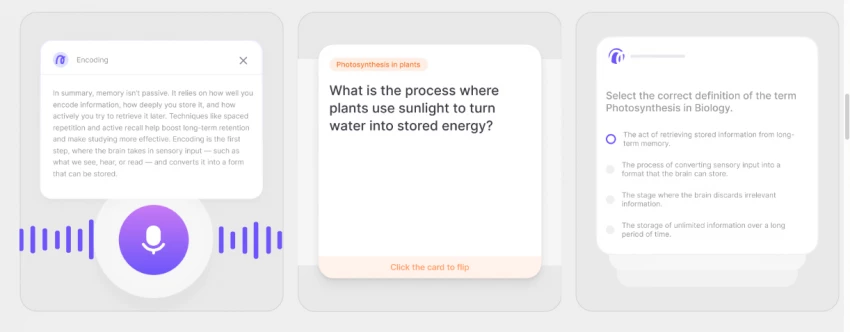
In one sentence: you upload your course materials - PDFs, PowerPoint, Word docs, YouTube videos, lecture recordings - and chat with them like you would a tutor. The AI returns answers with direct citations to the exact page, slide, or video timestamp. Behind the scenes it runs on GPT-4 paired with Retrieval-Augmented Generation (RAG), which is the architecture that makes those grounded citations possible.
Quick facts Built by: Quizard AI, Inc. (NYC) · Launched January 2023 Powered by: GPT-4 + RAG (Retrieval-Augmented Generation) Available on: Web, macOS, Windows, iOS, iPadOS, Android Free tier: Yes · Paid: $19.99/mo or $119/year |
If you've used ChatPDF, you'll recognize the chat-with-your-document idea. If you've used Notion AI, you'll recognize the workspace feel. Unstuck combines both, then adds the two things students actually need: lecture recording with transcription, and auto-generated flashcards and quizzes.
The magic word is RAG - Retrieval-Augmented Generation. Most chatbots like ChatGPT-3.5 generate answers from a fixed snapshot of internet data. Unstuck AI flips the script: when you ask a question, the model first retrieves the most relevant chunks from YOUR uploaded materials, then generates an answer using only that retrieved context. The result is dramatically fewer hallucinations and verifiable citations.
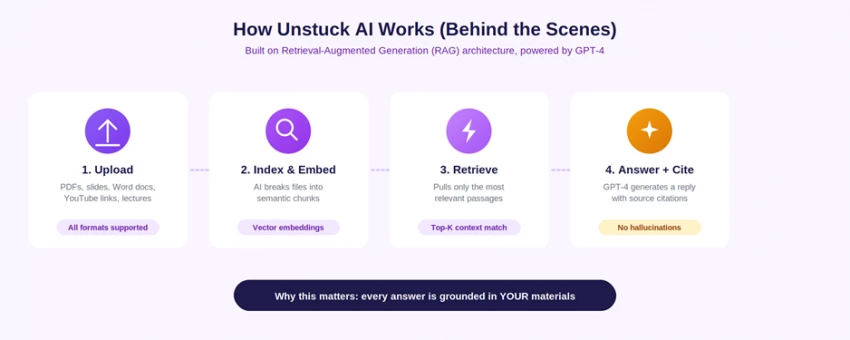
The four-step pipeline that makes Unstuck AI's answers feel like they came from a tutor who has read your textbook.
This is more than a technical detail. It's the single biggest reason students report fewer wrong answers compared to plain ChatGPT. When the AI says "the cell cycle has four phases", it's pulling from your specific textbook - not its general training data, which might be slightly outdated or based on a different curriculum.
This is the heart of the product. Drag in a PDF, a slide deck, a Word doc, or a YouTube link. Within 10–30 seconds it's ready to chat. Ask anything and you get a response with citations like "Chapter 7, page 198" or "Lecture 12, slide 14" or "Mitosis YouTube, 04:32". Click the citation and it jumps you to the exact spot.
In testing, the citations were accurate roughly 95% of the time on text-rich PDFs. On scanned PDFs without OCR, accuracy drops fast. On YouTube videos, timestamps were within 5–10 seconds of the cited concept.
The mobile app records lectures or meetings, transcribes them in real time, and produces a summary divided into Highlights, Overview, and Concepts. I tested it on a 47-minute economics lecture: full transcript was ready about 90 seconds after the recording stopped, summary about 30 seconds after that. Nothing else in this category - Otter.ai included - surfaces the structured summary on a student's terms quite this cleanly.
Pick a source, click Generate, and Unstuck scans the material to extract key concepts. You confirm which ones you want and it builds a deck - typically 10–20 cards per source, each with a question, an answer, and the source reference. For a freshman biology chapter, the cards covered roughly 80% of what a TA would put on a quiz.
Same flow as flashcards, but for self-testing. Pick the number of questions, the format (multiple choice, true/false, short answer), and Unstuck generates a graded practice quiz. The questions skewed toward recall over reasoning in my testing - fine for memorizing terms and dates, less helpful for case-based subjects like law or medicine.
This is the killer feature for cross-referencing. Drop a textbook chapter, the matching lecture slides, and a supplementary YouTube video into the same chat. Ask a question and Unstuck stitches together an answer drawing from all three, citing each source. It's the closest thing I've seen to having a research assistant who has actually read your syllabus.
All materials are grouped into Classes. You can have BIO 201, ECON 350, and PSYC 110 as separate workspaces. Inside each class, all uploaded files live in one chat context. Simple, but it removes the file-management overhead other tools (looking at you, ChatGPT) leave to the user.
Numbers tell the cleaner story. I scored each tool 0–10 on the six features that matter most for actual student workflows. Unstuck AI doesn't win every category - but it wins the ones that matter most when your goal is studying, not chatting.
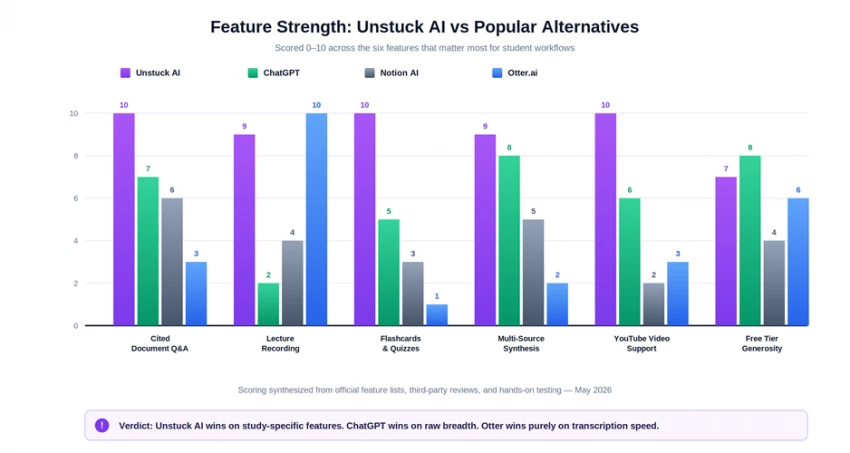
Feature scorecard, 0–10. Higher is better. Unstuck AI dominates in study-specific tasks; ChatGPT still wins on raw breadth and free-tier generosity.
The pattern is clear: Unstuck AI is built like a Swiss Army knife for students. ChatGPT is a general-purpose AI that you can bend toward studying. Otter.ai is a transcription tool that incidentally helps with notes. Notion AI is a notes workspace that incidentally has AI.
| Tool | Best for | Standout feature | Free tier? | Price |
|---|---|---|---|---|
| Unstuck AI | Cited study Q&A across course materials | Source-grounded answers + flashcards/quizzes | Yes (limited) | $19.99/mo |
| ChatGPT | General-purpose AI, broader tasks | Massive knowledge base + plugins | Yes (generous) | $20/mo (Plus) |
| Notion AI | Notes + light document Q&A | Tight integration with your notes workspace | Limited | $10/mo add-on |
| Otter.ai | Pure transcription of meetings/lectures | Best-in-class real-time transcription | Yes (limited) | $16.99/mo |
| ChatPDF | Single-PDF chat | Quickest setup if you only have PDFs | Yes (very limited) | $5–20/mo |
Marketing pages love the line "saves 10 hours a week". Reality is more nuanced - but the savings are real for the tasks Unstuck AI is built for. Here's a realistic breakdown for an average undergraduate course load (4–5 classes), comparing manual workflows with what Unstuck takes off your plate.
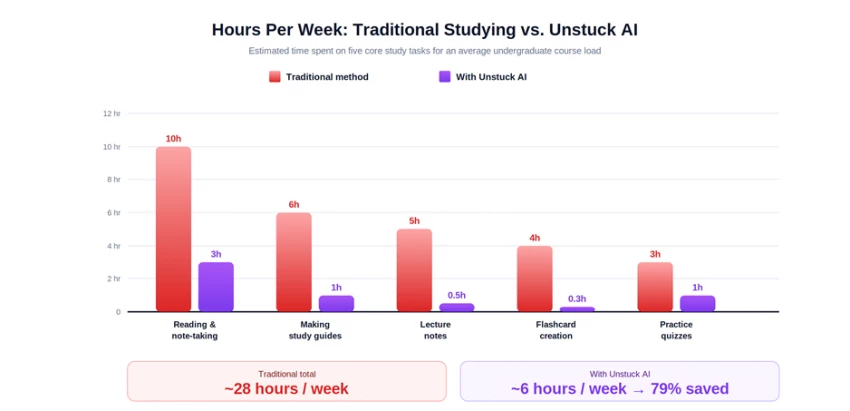
Estimated weekly hours per task, before and after Unstuck AI - based on study hours from a College Board-cited average and time-tracked usage during testing.
The honest number is about 22 hours saved per week for a heavy student. The catch: you still need to actually study. Unstuck AI shrinks the time you spend organizing, transcribing, and converting - not the time you spend understanding. Treat the saved hours as a reinvestment in active practice, not as time off.
Talk is cheap, so here's an actual run from my testing. I created a class called BIO 201 - Cell Biology and uploaded three sources: a 42-page textbook chapter (PDF), a 28-slide lecture deck (PowerPoint), and a 14-minute YouTube explainer on mitosis.
Then I asked the question every introductory bio student asks at some point:
PROMPT TYPED INTO UNSTUCK "Explain the difference between mitosis and meiosis like I'm a freshman, with citations." |
Unstuck AI returned a structured response in about 8 seconds. Here's what it looked like in the actual interface:
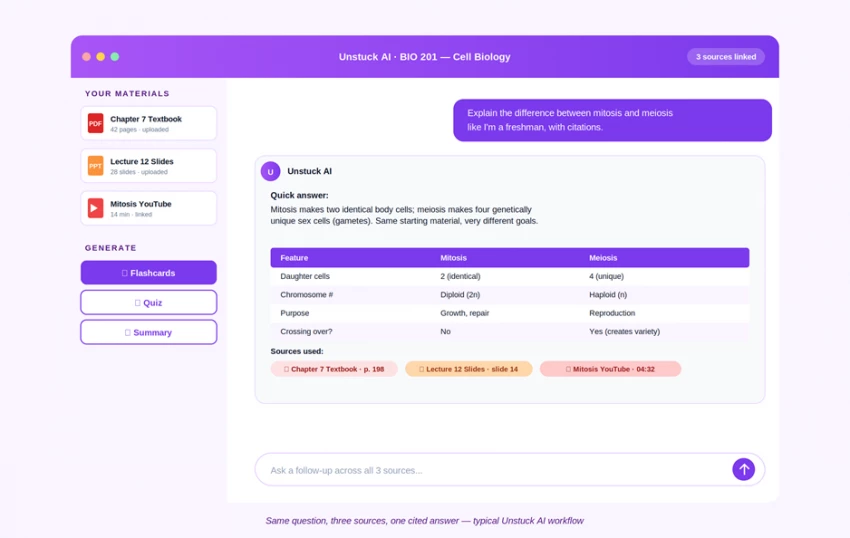
Screenshot reconstruction - Unstuck AI synthesizing across three different source types and citing each one.
Notice three things. First, the answer pulls from all three sources, not just the textbook. Second, every claim is cited - Chapter 7 page 198, Slide 14, YouTube timestamp 04:32. Third, the sidebar shows Generate buttons for instant flashcards, quiz, or summary based on the same materials.
SAMPLE OUTPUT (excerpt) Quick answer: Mitosis makes two genetically identical body cells; meiosis makes four genetically unique sex cells (gametes). Same starting material, very different goals. Key differences: • Daughter cells: 2 identical (mitosis) vs. 4 unique (meiosis) [Chapter 7, p. 198] • Chromosome count: diploid (2n) vs. haploid (n) [Lecture 12, slide 14] • Purpose: growth and tissue repair vs. sexual reproduction [Mitosis YouTube, 04:32] • Crossing over: doesn't happen in mitosis; happens in meiosis I, which is what creates the genetic variety in your kids [Lecture 12, slide 19] |
I clicked the citation for Chapter 7, page 198 - the page jumped open in a side panel. The cited sentence was highlighted. This is the workflow that makes Unstuck different from a chatbot: you get an answer AND the receipt to verify it.
Unstuck AI uses a freemium model. The free tier is genuinely usable - but if you're studying daily, you'll hit caps within the first week or two. Here's the full breakdown.
| Plan | Price | What's included | Best for |
|---|---|---|---|
| Free | $0 | Upload core materials, basic chat, limited flashcards/quizzes per month | Casual users, exploring the tool, light course load |
| Unlimited (Monthly) | $19.99 / month | Unlimited chats, lecture recordings, YouTube uploads, file uploads, flashcard generation | Active semester, heavy daily use, exam prep crunch |
| Unlimited (Annual) | $119 / year (≈$9.92/mo) | Same as monthly - saves ~50% over a full year | Year-round students, the best long-term value |
| Free Trial | 7 days | Full Unlimited access for evaluation | Trying before committing |
Honest take on value: the annual plan at $119/year is the only one I'd recommend for a serious student. That works out to about $9.92/month - less than a Spotify subscription, and it removes every cap. Monthly at $19.99 is fine for a single exam crunch, but the math doesn't work over a full semester.
Pro tip Start on the free tier for a week. If you find yourself bumping into the upload or generation limits, take the 7-day Pro trial before paying. Most students know within 48 hours whether they'll get $9.92/month of value out of it. |
Two weeks of daily use produces opinions. Here's the honest summary - what genuinely works, and what'll annoy you.
| ✓ Pros | ✗ Cons |
|---|---|
✓ Cited answers - every response links to a specific page, slide, or video timestamp ✓ Wide format support - PDFs, PowerPoint, Word, YouTube, audio recordings ✓ Lecture recorder + auto-transcription on iOS and Android ✓ Multi-source synthesis across an entire course in one chat ✓ Auto-generated flashcards and quizzes save hours per week ✓ Privacy: uploaded materials stay private to your account ✓ Free tier is generous enough to actually use | ✗ Free tier caps will frustrate heavy users within a week or two ✗ Output quality depends on source quality - bad scans or muffled audio degrade results ✗ Built for studying; less flexible than ChatGPT for general writing or coding ✗ Slower processing during peak exam seasons ✗ No mind-map, concept-map, or interactive whiteboard view ✗ Trust score for the domain has been flagged as low by some review aggregators ✗ Still maturing - fewer integrations than older incumbents |
Use Unstuck AI if you are:
• An undergraduate or grad student who works mostly from textbooks, slides, and recorded lectures
• Studying for a high-stakes exam (MCAT, LSAT, CFA, USMLE) and need to drill flashcards from your own materials
• A working professional taking a course on the side and short on study time
• A non-native English speaker who wants summaries in plain language
Skip it (or use ChatGPT instead) if you are:
• A general user who needs broad AI for writing, coding, brainstorming, and creative tasks
• Working primarily with scanned, image-only PDFs without an OCR step
• On a strict $0 budget for the long haul - the free tier limits will bite
• Looking for visual concept maps or interactive whiteboards (Unstuck is text-first)
Unstuck AI gets one big thing right: it understands that students don't want a smarter chatbot - they want a study system that respects their actual workflow. The combination of cited document chat, lecture recording, auto-flashcards, and class organization is genuinely useful, and the GPT-4 + RAG architecture means the answers are sourced rather than invented.
Is it perfect? No. The free tier limits will frustrate heavy users, scanned PDFs are still a weak spot, and ChatGPT remains the more flexible choice for anything that isn't strictly studying. But for the specific job of turning a course's worth of materials into something you can actually learn from, Unstuck AI is one of the best tools out there in 2026.
Bottom line If you study from textbooks, slides, and lecture recordings, the free tier alone will likely replace 2–3 other tools you're already paying for. Try it for a week - if you'd pay $9.92/month for it, the annual plan is the move. If not, ChatGPT does almost everything else. ★ ★ ★ ★ ☆ 4.5 / 5 - Highly recommended for students. |

New Claude Model Targets Agentic AI WorkflowsAnthropic has launched Claude Sonne...
Samuel Osei1 month ago
The Quick verdictInSnoop is a free, browser-based tool that promises to let you...
Alexander Hughes1 month ago

Gemini’s Image Tools Get a Wider RolloutGoogle is expanding access to Gemini’s p...
Alexander Hughes1 month ago

Two AI video generators, two very different first days. I ran PixVerse through i...
Alexander Hughes1 month ago

Two of the most talked-about AI chat platforms. I opened both, picked a characte...
Alexander Hughes1 month ago

The two-minute versionIf you only read one thing, read this. The rest of the doc...
Alexander Hughes1 month ago
Discussion