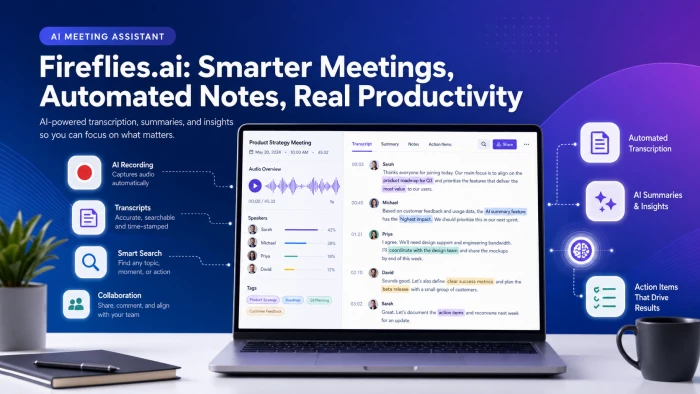
FIREFLIES AI REVIEW: THE QUICK ANSWER
Fireflies AI is the right meeting assistant for sales, recruiting, and customer-success teams that need automated transcripts pushed into a CRM. It records, transcribes, and summarizes meetings on Zoom, Google Meet, and Microsoft Teams with 90–95% accuracy in clear-audio conditions. The Pro plan starts at $10 per seat per month (annual). The G2 rating is 4.8/5 across 4,000+ reviews. Where it falls short: an AI-credit system layered on top of subscriptions can produce surprise bills, the visible bot in meetings is intrusive for some clients, and Trustpilot reviews flag billing-transparency complaints. For solo users with light meeting loads, free alternatives like Fathom may be a better fit. |
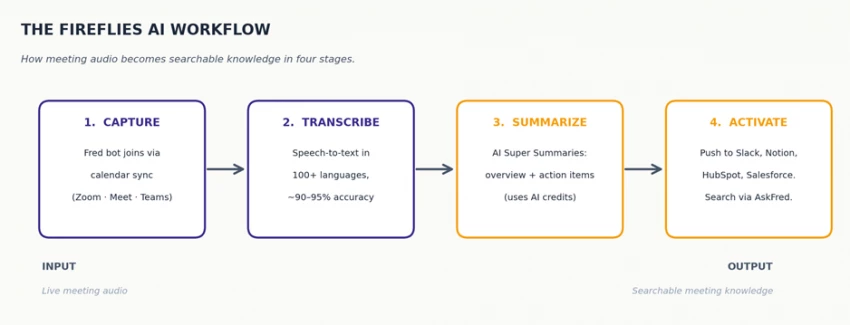
Figure 1: The Fireflies AI workflow in four stages - capture, transcribe, summarize, activate. Each stage relies on different feature tiers and credit pools.
Fireflies AI is a meeting-intelligence platform that automatically records, transcribes, and summarizes online meetings. Its AI assistant - branded as Fred - joins calls on Zoom, Google Meet, Microsoft Teams, and Webex, then converts the audio into searchable transcripts with AI-generated summaries and extracted action items. The platform crossed a $1 billion valuation in 2026 and serves over one million companies including Emaar and Leonardo AI.
Per the official Fireflies pricing page, the platform offers four tiers: Free ($0 with 800-minute storage cap), Pro ($10/seat/month annual), Business ($19/seat/month annual), and Enterprise ($39/seat/month annual). Independent analysis from Known companies confirms that monthly billing runs roughly 40–45% higher: Pro at $18/month and Business at $29/month.
The platform's positioning has shifted from "meeting transcription bot" in 2023 to "conversation intelligence platform" in 2026, with newer features including Live Assist (real-time coaching during calls), Talk to Fireflies (Perplexity-powered web search inside meetings), Fireflies MCP (data connector for ChatGPT, Claude, and Devin), and an expanded desktop app for capturing audio from VOIP and dialer software. Core transcription remains the foundation; the surrounding workflow features are where the platform now differentiates.
Across many test meetings, Fireflies AI's feature set breaks into six functional categories. Each category covers different use cases and lives behind different feature gates depending on your plan.
Fred joins meetings via calendar sync, Chrome extension, or manual invite (just add [email protected] to any meeting). The platform supports transcription in 100+ languages with automatic language detection, and testing across English, Spanish, and Hindi calls produced 90–95% accuracy on clear audio. Speaker separation worked reliably when participants identified themselves, but degraded on overlapping speech and similar-sounding voices.
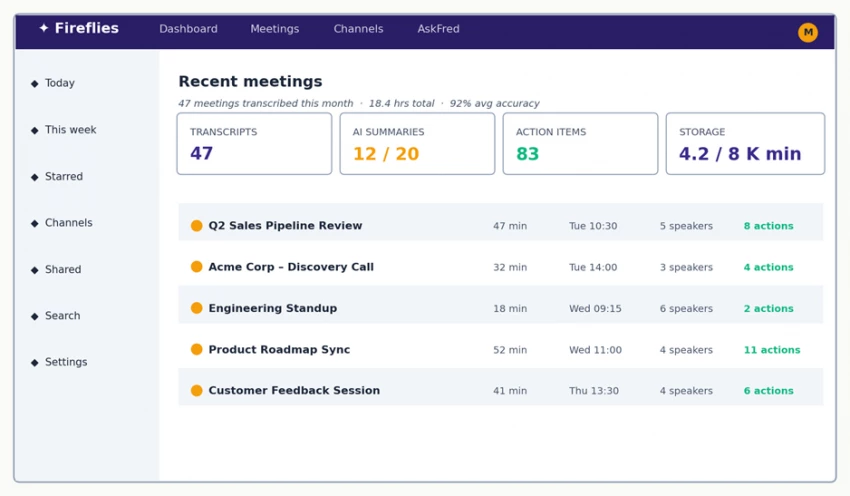
Figure 2: Fireflies AI dashboard - meeting library with usage stats. Mockup based on the actual interface; replace with a real screenshot if available. (Original interface design © Fireflies.ai.)
After each call, Fireflies generates a structured summary including a meeting overview, bulleted notes, action items, dates, and next steps. The newer AskFred feature lets users query past meetings conversationally - "what did Acme say about their HubSpot timeline?" - and returns answers with timestamped transcript references. AskFred is one of the most-praised features in G2 reviews, but it consumes AI credits, which is where the pricing model gets complicated.
On the Business plan and above, Fireflies tracks talk-to-listen ratios, topic trackers (e.g. how often "pricing" comes up across deals), sentiment indicators, and team-wide analytics dashboards. Sales managers using these features for coaching report concrete value; team leads in non-sales contexts often find the analytics overkill for their actual usage. The features are real but the value is workflow-specific.
Fireflies pushes meeting summaries and action items into HubSpot, Salesforce, Slack, Notion, Trello, and Asana. Per Convo's testing on real sales calls, the HubSpot push reliably saved 10–15 minutes per meeting in manual data entry. Important caveat: key integrations including Salesforce, Slack, and HubSpot are gated to the Business tier ($19/month) and above. The Pro tier ($10/month) only includes basic integrations.
Live Assist provides real-time suggestions during a meeting - possible answers to objections, prompts about previous context, coaching tips for sales reps. Talk to Fireflies (powered by Perplexity AI) lets you do web search and fact-checking inside the meeting interface without leaving the call. Both are positioned as differentiators against transcription-only competitors. In testing, Live Assist suggestions were directionally useful but rarely precise enough to cite verbatim.
Every transcript is searchable across the entire workspace. Channels let teams group meetings (e.g., "Q2 Acme deal," "engineering all-hands"), share recordings, and leave time-stamped comments. Capterra reviewers flagged the search interface as clunky during heavy use - multiple semi-automatic search options can produce confusing results when filters reset between sessions.
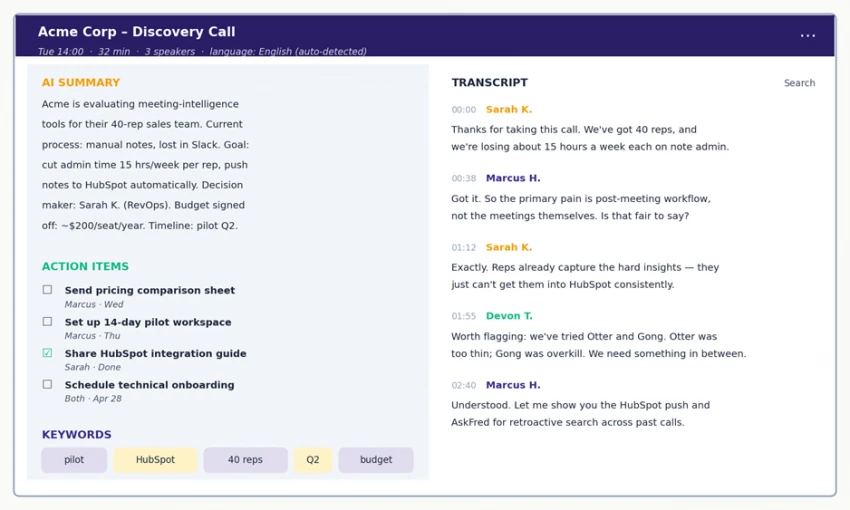
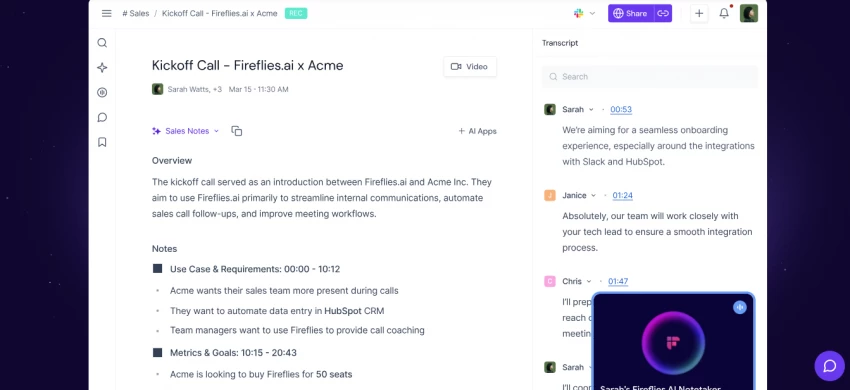
Figure 3: A typical Fireflies meeting view - AI Summary, Action Items, and Keywords on the left; timestamped Transcript on the right. Mockup based on the actual interface; replace with a real screenshot if available.
Pricing is the most-searched aspect of Fireflies AI in 2026, and for good reason: the headline numbers are simple but the AI-credit system layered on top can produce significant variable costs. Below is the transparent breakdown with hidden costs called out explicitly.
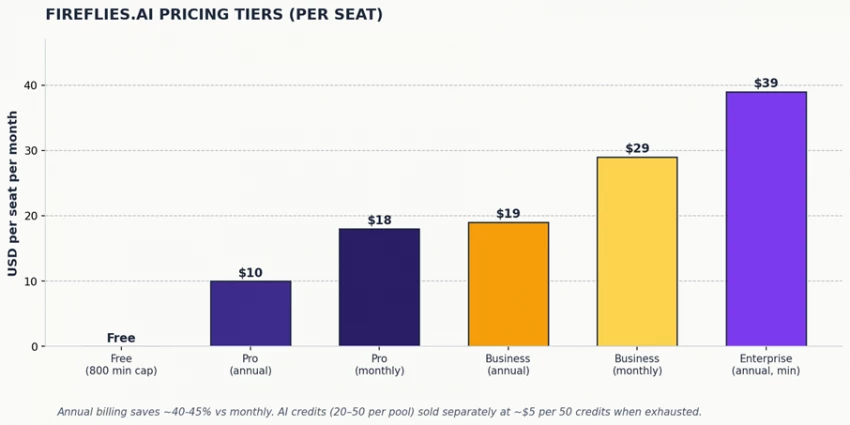
Figure 4: Fireflies AI pricing tiers per seat per month, comparing annual and monthly billing. Source: fireflies.ai/pricing (April 2026).
▪ 800 minutes of transcription storage per seat (one-time cap, not monthly)
▪ Limited AI summary credits - typically 20 in a one-time shared pool
▪ No CRM integrations, no team analytics, no video recording
▪ Best for: solo users with 1–2 meetings per week who want to test the tool before paying
▪ Unlimited transcription minutes (with fair-use policy)
▪ 8,000 minutes of meeting storage per seat - hard cap that pushes heavy users to Business
▪ Unlimited AI summaries - but consumes the shared 20-credit pool for AskFred and advanced summaries
▪ Speaker talk-time analysis, downloadable transcripts and summaries
▪ Best for: solopreneurs, consultants, and small teams with steady but not heavy meeting loads
▪ Everything in Pro, plus unlimited storage and video recording (not just audio)
▪ Conversation intelligence: topic trackers, sentiment, team analytics
▪ CRM integrations: HubSpot, Salesforce, Slack, Notion, plus API access
▪ Shared AI credit pool of 30 credits, plus 4-hour cap per individual meeting recording
▪ Best for: 5–50 person sales, RevOps, and customer success teams
▪ Everything in Business, plus SSO, HIPAA compliance, custom data retention
▪ Rules engine for automating workflows, audit logs, dedicated account manager
▪ AI credit pool of 50 credits (customizable on contract negotiation)
▪ Best for: 50+ seat organizations in regulated industries (healthcare, legal, finance)
HIDDEN COSTS WORTH KNOWING
Beyond list price, third-party analysis flags 12+ documented hidden costs on Fireflies AI. The four most consequential are: ▪ AI credit add-ons - Once your monthly credit pool is exhausted (20 on Pro, 30 on Business, 50 on Enterprise), AI features pause until you buy add-on bundles at ~$5 per 50 credits. These bundles auto-renew monthly unless paused. ▪ Storage caps on Pro tier - 8,000-minute storage limit per seat. Heavy meeting users can exceed this within months and get pushed toward Business at nearly double the price. ▪ Auto-enrollment complaints - Multiple Trustpilot reviewers report being auto-enrolled in AI credit purchases without explicit consent, leading to recurring charges. One user reported being billed $179/month for a 5-user Business plan after signing up for what they thought was a single free trial. ▪ Integration restrictions on Pro - HubSpot, Salesforce, and Slack integrations require Business tier minimum. Pro users wanting CRM push must upgrade. |
▪ 90–95% transcription accuracy on clear audio across 100+ languages, with auto-detection that handles multi-language calls.
▪ AI Super Summaries and AskFred conversational search transform long meetings into 30-second-readable artifacts and queryable knowledge.
▪ CRM integrations (HubSpot, Salesforce) save 10–15 minutes per meeting in manual data entry for sales teams (per Convo's tested workflow).
▪ 4.8/5 G2 rating across 4,000+ reviews and 4.6/5 on Capterra across 300+ verified reviews - strong user-satisfaction signal.
▪ Generous free tier compared to many competitors (800 minutes vs Otter.ai's 300 minutes), making it usable for testing.
▪ New 2026 features (Live Assist, Talk to Fireflies, Fireflies MCP) signal the platform is evolving beyond transcription into broader meeting intelligence.
▪ AI-credit system creates surprise costs. Pro plan users routinely exhaust the 20-credit monthly pool mid-month and face $5+ add-on charges to keep AskFred and advanced summaries working.
▪ Visible "Fireflies Notetaker" bot joins meetings as a participant - multiple users on Trustpilot and G2 flag client discomfort with the bot's presence on calls.
▪ Auto-enrollment billing complaints are recurring. Multiple Trustpilot reviewers report unexpected credit-bundle charges and difficulty getting refunds.
▪ Customer support responsiveness is widely criticized - G2 reviews mention bot-only first-line support and slow human escalation.
▪ English-only platform interface despite 100+ language transcription support. Global teams report this as a meaningful UX gap in 2026.
▪ Audio data is uploaded to Fireflies' servers (AWS and Google Cloud) - for healthcare, legal, and finance teams this is a compliance consideration despite SOC 2 certification.
▪ Storage caps on Pro plan force heavy users to upgrade to Business (~2x cost) or delete searchable history.
Whether Fireflies AI is the right tool depends heavily on your meeting volume and what you do with the transcripts afterward. The table below maps common situations to the recommended approach based on testing and third-party reviews.
| Your situation | Recommendation | Why |
|---|---|---|
| I run 20+ sales calls per week and use HubSpot or Salesforce | Fireflies Business | CRM push saves 10–15 min/meeting |
| I run 1–2 meetings per week as a freelancer or consultant | Free plan or Fathom | Pro tier overpriced for low volume |
| I lead a recruiting team using Zoom for candidate screens | Fireflies Pro or Business | Searchable transcripts win for recall |
| I'm in healthcare, legal, or finance with sensitive meetings | Fireflies Enterprise or alternative | HIPAA tier matters; or pick bot-free |
| I want real-time coaching during sales calls | Fireflies Business + Live Assist | Live Assist is the differentiator |
| I host webinars or panels with multiple speakers | Fireflies Pro | Speaker separation works well here |
| I want to avoid a visible bot in client meetings | Fathom or Convo, not Fireflies | Bot presence is non-negotiable on Fireflies |
| I run a global team with non-English first-language users | Fireflies Business + accept UX gap | 100+ language transcription, English UI |
| I'm cost-sensitive and need basic transcription only | Otter.ai Pro at $8.33/month | Cheaper, narrower scope |
| I need deep revenue intelligence with deal forecasting | Gong, not Fireflies | Different product category |
Beyond editorial testing, third-party user reviews reveal sentiment patterns that single-reviewer analyses can miss. The visual below aggregates 4,825+ verified reviews across G2, Trustpilot, and Capterra. Specific quoted complaints below are paraphrased summaries, not direct quotes.
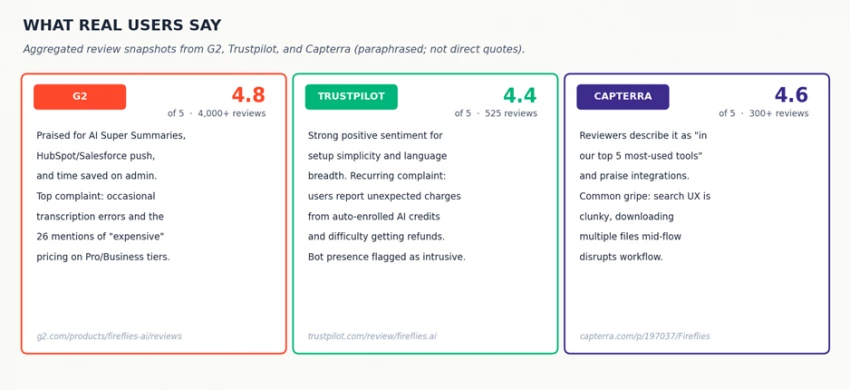
Figure 5: Aggregated review snapshot across G2, Trustpilot, and Capterra - sentiment patterns paraphrased from public reviewer comments.
On the positive side, G2's pros and cons aggregator shows the most-mentioned positive themes are AI Summary (102 mentions), Ease of Use (89 mentions), Transcription quality (86 mentions), and Time-saving (84 mentions). The most-mentioned negative themes are AI Inaccuracy (39 mentions), Meeting Management friction (32 mentions), and Expensive pricing (26 mentions).
On the critical side, Trustpilot reviews of Fireflies.ai include several reports of unexpected billing - one reviewer described being charged for a 5-user Business plan within days of what they thought was a single-user free trial, with refund requests denied. These reports are recurring rather than isolated, and worth weighing against the strong 4.8/5 G2 average.
After many test meetings across multiple weeks, the verdict is conditional rather than universal. Fireflies AI is the best meeting-intelligence platform available for a specific user profile - and a confusing, sometimes frustrating tool for users outside that profile.
▪ You run 10+ meetings per week and need transcripts pushed automatically into HubSpot or Salesforce.
▪ Your team uses AI summaries and AskFred-style conversational search regularly enough to justify the credit-pool cost.
▪ You're a sales, recruiting, or customer-success team where CRM workflow integration is the dominant value driver.
▪ You can budget for the Business tier ($19/seat/month) plus occasional credit add-ons rather than fighting the Pro tier's storage caps.
▪ You're a solo user with 1–5 meetings per week - Fathom's free unlimited tier or Otter.ai Pro at $8.33/month is better value.
▪ Bot-free meetings are non-negotiable for your client relationships - Fathom, Convo, or built-in Zoom AI are alternatives.
▪ You operate in regulated industries with strict data-sovereignty requirements - evaluate Sonix, MeetGeek, or self-hosted options.
▪ You need deep revenue intelligence with deal forecasting - Gong, despite its higher price, is the category leader for that workflow.
The cleanest way to think about Fireflies AI is as a ledger of meeting knowledge - it captures what was said, organizes it, and makes it queryable later. That ledger is genuinely useful. What Fireflies is not (yet) is a live coach during meetings - Live Assist is improving but not at the level where it consistently helps mid-call. For now, Fireflies wins on retroactive intelligence and loses on real-time intelligence. Tools optimized for the second category, like Convo or Gong, will outperform Fireflies in coaching contexts despite Fireflies' broader feature set.
For most prospective buyers, the practical recommendation is straightforward: start with the Free plan to validate the workflow, upgrade to Pro at $10/month if you confirm CRM push value within 30 days, and only step up to Business when storage caps or analytics actually constrain you. The platform earns its 4.8/5 G2 average for users who match its design profile - and it earns its Trustpilot complaints for users who don't.

New Claude Model Targets Agentic AI WorkflowsAnthropic has launched Claude Sonne...
Samuel Osei1 month ago
The Quick verdictInSnoop is a free, browser-based tool that promises to let you...
Alexander Hughes1 month ago

Gemini’s Image Tools Get a Wider RolloutGoogle is expanding access to Gemini’s p...
Alexander Hughes1 month ago

Two AI video generators, two very different first days. I ran PixVerse through i...
Alexander Hughes1 month ago

Two of the most talked-about AI chat platforms. I opened both, picked a characte...
Alexander Hughes1 month ago

The two-minute versionIf you only read one thing, read this. The rest of the doc...
Alexander Hughes1 month ago
Discussion