
Frosting AI (over at frosting.ai) is a text-to-image tool: type a description, get AI art back, all inside your browser. The engine is the Stable Diffusion / SDXL family, topped up with a rotating lineup of community-trained checkpoints, the same models open-source folks already know, Dreamshaper XL among them. Translated out of jargon: whatever a decent mid-range Stable Diffusion rig can produce, Frosting produces too, minus the installs, node graphs, and command-line wrangling.
A bit of background the glowing reviews tend to skip, because it actually shapes what you’re signing up for. The domain dates back to early 2023, there’s a registered company behind it, and the whole thing runs like a lean indie operation with a busy Discord rather than a venture-funded product launch. No Product Hunt spectacle, no press circuit. It spread by word of mouth, which is precisely why it keeps popping up in random comment threads.
The front door also tells you something about the crowd it’s built for. Before you do anything, it asks you to pick a lane: Anime, Furry, or Photorealistic. Read into that what you will.
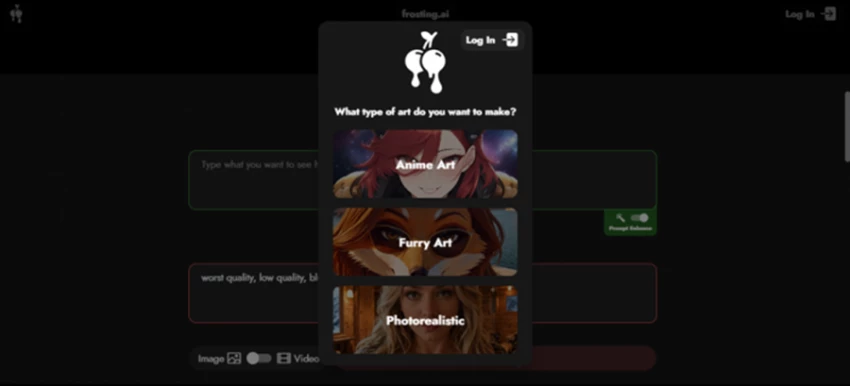
The first thing you see: pick your lane. Anime, Furry, or Photorealistic.
METHODOLOGY
The goal was to mirror an ordinary person’s first hour, not assemble a sponsored highlight reel. The ground rules:
◆ HOW I TESTED Zero account, zero payment info Opened frosting.ai with no login and no card on file, exactly as a curious first-timer would. Real prompts, real output Fired off several photorealistic prompts to judge actual image quality, not cherry-picked demos. Pushed every paywall on purpose Walked into video, the advanced settings, and the checkout flow to surface where the friction lives. Timed and logged everything Clocked each generation and noted every moment the tool tried to sell me something. |
Everything below, including the screenshots, comes straight out of that one session.
WALKTHROUGH
This is the literal path I walked, and you can copy it move for move.
Nothing to download, no app, and (refreshingly) no account wall just to begin. That caught me off guard immediately, since most “free” generators make you register before they’ll even show you a canvas.
A popup asks what you’re after: Anime, Furry, or Photorealistic. I went Photorealistic.
Without signing in at all, a counter showed my remaining free “gens.” I’d already spent a few on test prompts and still had 96 of 100 sitting there. This screen also lets you pick a model (mine defaulted to Lite Dreamshaper XL) and an aspect ratio: portrait, square, or landscape.
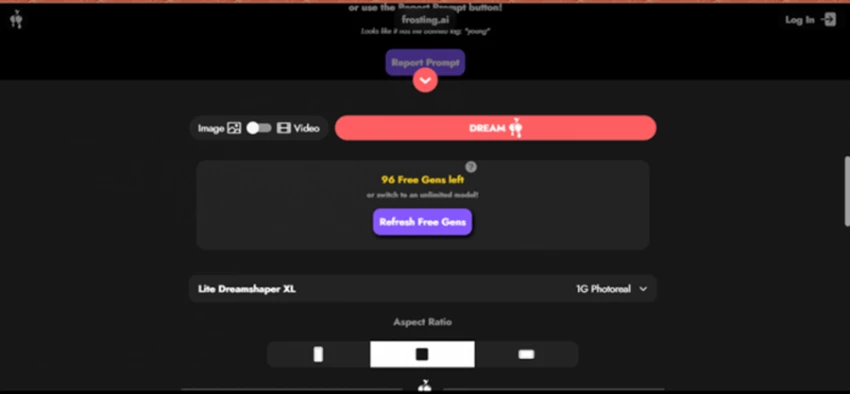
96 free generations remaining, no login. Note the little flag warning about a “banned tag,” which I unpack in the content-rules section.
The big box is your positive prompt. Underneath sits a negative-prompt field (a “do-not-include” list) plus a Prompt Enhance toggle that auto-pads your wording with extra descriptive tokens. (Enhance can rescue a sparse prompt, but it can also drag the result away from what you actually asked for, so I keep an eye on it.) Here’s the prompt I ran:
POSITIVE PROMPT Photorealistic portrait of an adult Indian woman with a simple, natural look, warm gentle smile, casual traditional-modern outfit such as a plain kurti or simple t-shirt, minimal makeup, dark hair, kind expressive eyes, relaxed posture, soft natural daylight, clean background, realistic skin texture, candid photography style, high detail, DSLR quality, shallow depth of field. |
NEGATIVE PROMPT cartoon, anime, overly glamorous, heavy makeup, exaggerated smile, distorted face. |
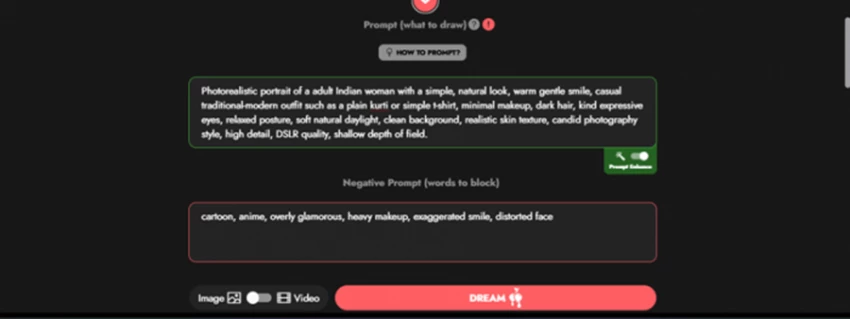
The positive prompt, the negative prompt, and Prompt Enhance switched on.
Pick a quality/step level, confirm your aspect ratio, and smack the big Dream button.
Done. The speed is no exaggeration, and it’s the single best thing this tool has going for it.
OUTPUT
Start with the good news. That first photorealistic portrait landed in about five to ten seconds and, on first look, it’s legitimately impressive: soft natural light, convincing skin, a gentle window-lit backdrop, and an expression that genuinely reads “warm and candid.” For a free render with no tweaking whatsoever, this is exactly the kind of result that earns a tool a wall of five-star reviews.
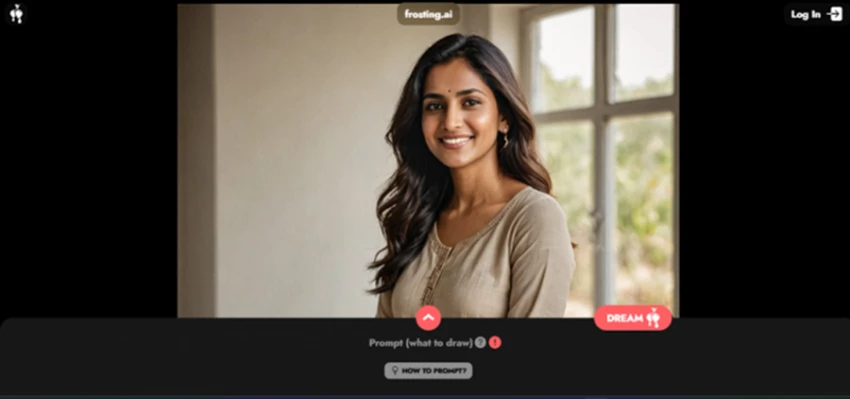
Cropped to the headshot: natural light, realistic skin, a candid feel. Frosting at its best.
Now the part the cheerleading reviews never show you. The instant the frame widens to include more of the body (the hands especially), the spell breaks. In my full-length render the face and outfit stayed solid, but the hands came out warped and anatomically wrong: that unmistakable AI “melted hand” effect where fingers fuse together and bend in directions fingers don’t.
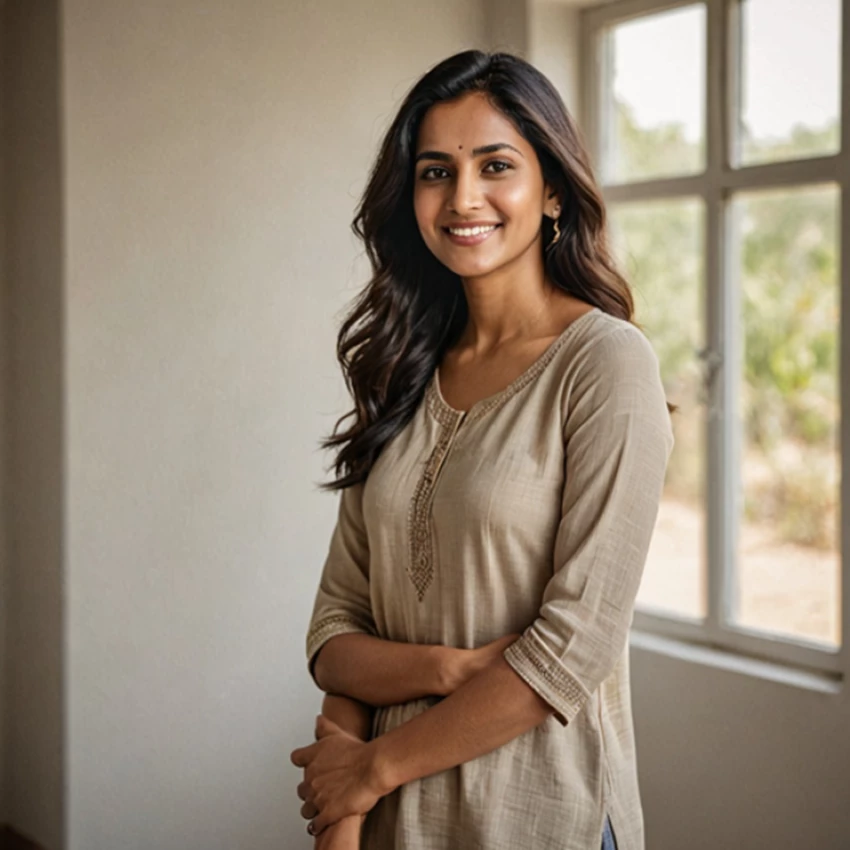
Zoom in on the hands. This is the repeat offender: malformed hands, the exact Stable Diffusion failure mode Frosting inherits.
◆ Why hands specifically? Diffusion models learn from flat 2D photos, where hands show up in a near-infinite range of poses, angles, and partial occlusions, and where fingers constantly overlap or get cropped. The model never learns that a hand has exactly five fingers as a hard rule. Instead it picks up a fuzzy statistical impression of hand-shaped stuff, so it happily renders six fingers or a backward thumb. Faces get far more training data, and more consistent training data, which is why they hold up better. It’s a structural quirk of the technique, not a setting you forgot to flip. |
✦ GET BETTER RESULTS → Generate in batches and cherry-pick. The cheapest fix there is, and free here. → Keep problem anatomy out of frame. Headshots, three-quarter crops, and scenery dodge the hands issue entirely. → Load up the negative prompt with “extra fingers, deformed hands, fused fingers.” Not a guarantee, but it improves the odds. → For full-body shots, use ControlNet (pose) to hand the model a skeleton to follow instead of guessing. → Don’t expect readable text inside images. Generate the picture, then type words on top in any editor. |
To be clear, this isn’t a Frosting bug. It’s a well-documented weakness of the Stable Diffusion lineage it runs on. But it absolutely shapes what you should expect. Treat Frosting as excellent for headshots, landscapes, concept art, and stylized pieces, and unreliable for full-body shots, hands, or anything needing crisp small-scale anatomy or legible text.
THE CATCH, PART ONE
Frosting advertises video generation, and there’s a tidy Image / Video toggle right beside the Dream button. I switched it over expecting to spin up a clip and hit a wall instead.
⬤ THE CATCH You basically can’t test video for free Video doesn’t touch your free image credits at all. It runs on an entirely separate currency called Stardust, and my balance was zero. The interface dangled a “Get Stardust” button next to a “Get 500 free stardust” offer, with a video model named Lynx One priced at 300 Stardust per generation. Stardust is the platform’s all-purpose paid token (it’s also wrapped up in sponsoring the models they train), and the packs don’t come cheap. |
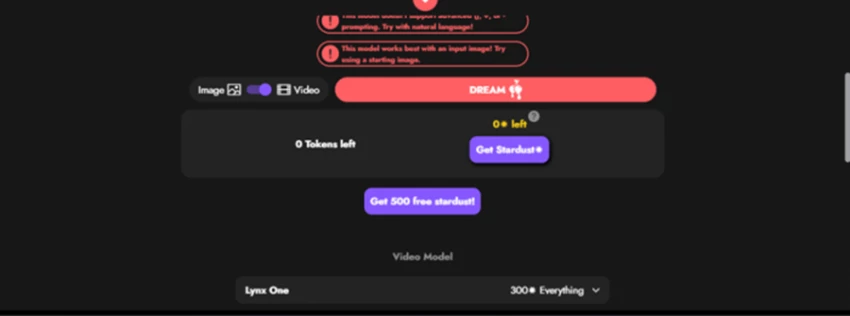
Flip to Video and a different paywall appears: 0 tokens, and the model demands 300 Stardust per run.
Bottom line on video: for free, you’re an image-only user, full stop. The feature technically exists, but you can’t meaningfully judge it without spending money, and several hands-on testers describe the results as basic next to purpose-built AI video tools. File it under “maybe someday,” not a reason to pick Frosting now.
THE CATCH, PART TWO
Scroll into the settings panel and Frosting suddenly looks like serious kit. You get Quality (step count) with Quick, High, and Insane options, a Seed for reproducible results, CLIP Skip, weighted and unlimited prompts, ControlNet (Depth and Canny) for pose and composition, and LoRA support. On paper that’s the exact toolkit power users want, and more than most free generators ever expose.
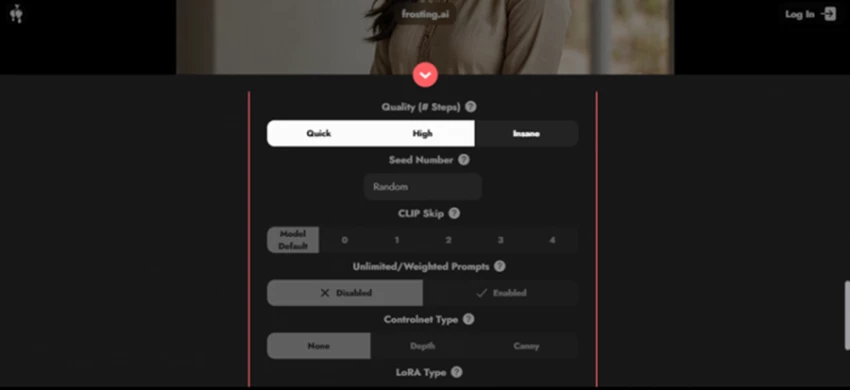
A genuinely deep settings panel: Quality, Seed, CLIP Skip, ControlNet, LoRA. Tempting, until you try to use it.
◆ PLAIN ENGLISH What those controls actually do Quality / Steps How many refinement passes the model makes. More steps means cleaner and slower. Quick, High, and Insane are just presets for low, medium, and high step counts. Seed The random starting number. Reuse the same seed and the same prompt to reproduce an image exactly, or to make small controlled tweaks instead of rerolling from scratch. CLIP Skip A technical dial that changes how deeply the model reads your prompt. Some checkpoints simply look better at CLIP Skip 2. Niche, but power users want the option. ControlNet (Depth / Canny) Feeds the model the structure of a reference image. Depth copies the 3D layout; Canny copies the outlines. This is how you control pose and composition instead of leaving it to luck. LoRA A small add-on file that teaches the base model a specific style, character, or concept. The open-source community trades thousands of them. |
⬤ THE CATCH It’s free until you change anything Those controls are all shown at their defaults, and the moment I tried to switch most of them to anything but the default, the app nudged me straight to the subscription page. So think of the advanced controls less as a free sandbox and more as a preview of what your money would unlock. It’s a clever conversion play, worth knowing before you assume all that pro functionality comes free. |
Two things deserve a plain heads-up before you commit.
First, Frosting does enforce content guardrails. Mid-test, a warning flagged a banned tag (“young”) and offered a “Report Prompt” button. That’s child-safety filtering doing its job, and it’s reassuring to see. It also refuses copyrighted characters: try to summon Batman, Spider-Man, or any Disney or Marvel property and it declines, which quietly keeps you out of legal hot water.
Second, and this is the context the polished reviews tend to bury, Frosting runs a permissive adult-content policy within legal bounds. The site carries the kind of compliance notices (age verification, 2257-style record-keeping, an anti-trafficking policy) that signal a real slice of its user base is there for NSFW work. None of this touches ordinary image generation, and you won’t trip over anything unless you go looking. But if you’re choosing a tool for an office, a classroom, or a brand, it’s simply useful to know the neighborhood before you walk in expecting something squeaky-clean and corporate.
A genuine caveat first: Frosting’s pricing has shifted more than once, tiers have been renamed, and what shows up can vary by the day and the page you land on. Treat the figures below as a snapshot and always double-check the live Subscribe page before paying. Here’s what it listed when I looked:
| Plan | Price | What you get |
|---|---|---|
| Free | $0 | Around 100 generations a day, core models, images only. Genuinely usable on its own. (The real product for most people.) |
| Planet | About $7/mo | More daily credits plus upscaling. The cheapest way in. (Appears in pricing history.) |
| Star | $25/mo | Batch generation and higher resolution. Pitched at content creators. |
| Nebula | $55/mo | Reference images, ControlNet, inpainting, the video beta, and a hefty credit bump. |
| Galaxy | $120/mo | The lot: maximum credits, fastest priority queue, and support. |
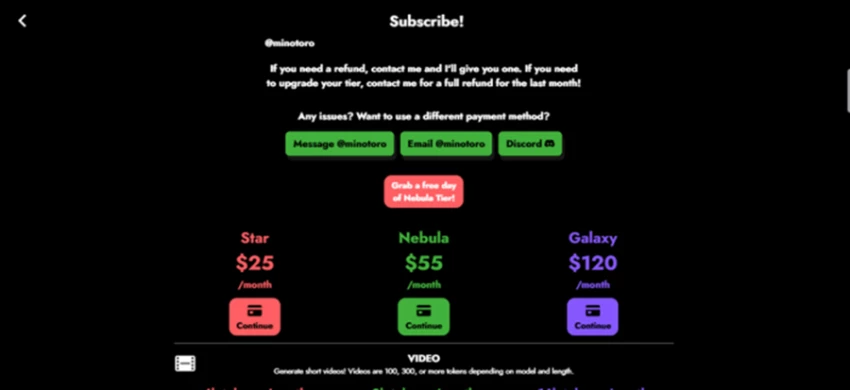
The Subscribe page on my visit: Star $25, Nebula $55, Galaxy $120, plus a free-trial-day offer on Nebula.
◆ The two-currency thing that trips people up Your daily free gens cover images. Video runs on Stardust, a separate paid token you top up in packs (via PayPal), and Stardust also funds the models Frosting trains. Practically, that means a monthly subscription does not hand you a video allowance. You budget for video separately, on top of whatever plan you’re on. |
A few more money notes worth filing away:
• Paying annually shaves roughly 20% off every paid plan, and nonprofits and schools can land up to 50% off, a discount you almost never see elsewhere.
• Nebula usually comes with a one-day trial to sample the premium features.
• Refunds go directly through the operator, and annual plans auto-renew, so cancel ahead of the renewal date if you’re not staying.
The value read: for most people, the free tier is the product. Planet, where it’s offered, is a fair bump for regular users. Nebula and Galaxy climb in price quickly, and at that level you genuinely owe it to yourself to weigh Midjourney or Leonardo before committing.
AT A GLANCE
• Actually free to start: no sign-up, no card, around 100 gens a day.
• Quick: five-to-ten-second images in my test, great for fast iteration.
• Clean, beginner-friendly front end with a real settings panel underneath.
• Several art styles and models, plus negative prompts, ControlNet, and LoRA.
• No watermark on current tiers (it wasn’t always so, so verify for yourself).
• Sensible guardrails that block copyrighted IP and child-safety tags.
• Hands and fine anatomy distort regularly: not dependable for full-body or in-image text.
• Video is walled off behind a separate Stardust token economy.
• Advanced settings push you to subscribe the second you change a default.
• Pricing is inconsistent and has moved around over time.
• Thin public community and no exact model disclosure, so reliability takes a small leap of faith.
• The free queue can drag at busy hours, since paying users get priority.
Go for it if you’re a hobbyist, student, blogger, or social creator who wants good-looking visuals fast and free, you don’t mind generating a few times to land a keeper, and you’re not depending on flawless hands or legible text.
Look elsewhere if you need consistent, production-grade output for a brand, you require perfect anatomy or typography, you want serious AI video, or you want a tool backed by a large, well-documented community and proper support.
ALTERNATIVES
| Tool | Where it beats Frosting | The catch |
|---|---|---|
| Midjourney | Top-tier image quality and coherence. | Paid only, Discord-centric, less granular control. |
| Leonardo AI | Well-rounded toolkit, strong free tier, polished feel. | Slightly steeper learning curve. |
| Krea AI | Real-time generation and newer FLUX-family models. | Can get pricier for heavy use. |
| Civitai | A massive open-source model library. | More technical, closer to rolling your own Stable Diffusion. |
| NightCafe | A big, lively community with lots of prompt sharing. | The credit system can feel limiting. |
The honest summary: Frosting wins on being free, fast, and frictionless. It loses on polish, consistency, and ecosystem. If quality is the priority and you’ve got the budget, Midjourney or Leonardo are the safer picks. If “free and right now” is the priority, Frosting is hard to top.
THE BOTTOM LINE
For nothing? Without hesitation. Go try it today. It’s one of the most generous free image generators going, it’s quick, and it’s honestly good fun. As a free tool, I’d recommend it for casual and creative work in a heartbeat.
As a paid subscription, the math gets trickier. The hand problem, the separate Stardust economy for video, and the fact that the best controls live behind the paywall all mean the paid tiers deserve real comparison shopping, not a reflexive upgrade. Lean on the free tier, and on Nebula’s trial day, to test thoroughly first. Which, conveniently, is exactly what that generous free plan is good for.
3.7 / 5 FINAL VERDICT A brilliant free toy and a solid casual tool, held back from a no-brainer by anatomy quirks and pushy upsells. Excellent free tier. Genuine limitations. And at least honest about which one it is. |
The buzz around Frosting AI is mostly earned, just not for the reasons the recommendation videos suggest. It isn’t a secret pro-grade powerhouse. It’s a fast, free, refreshingly low-friction way to make AI images, with honest limits around hands, video, and paywalled controls. Walk in expecting a great free generator with a couple of catches rather than everything for nothing, and you’ll come away happy. Open it, run a few prompts, and let your own results make the call. That part, at least, is free.
New Claude Model Targets Agentic AI WorkflowsAnthropic has launched Claude Sonne...
Samuel Osei1 month ago

The Quick verdictInSnoop is a free, browser-based tool that promises to let you...
Alexander Hughes1 month ago
Gemini’s Image Tools Get a Wider RolloutGoogle is expanding access to Gemini’s p...
Alexander Hughes1 month ago
Two AI video generators, two very different first days. I ran PixVerse through i...
Alexander Hughes1 month ago
Two of the most talked-about AI chat platforms. I opened both, picked a characte...
Alexander Hughes1 month ago
The two-minute versionIf you only read one thing, read this. The rest of the doc...
Alexander Hughes1 month ago
Discussion