THE QUICK VERDICT Hypernatural AI is one of the most complete “idea-to-video” tools available in 2026, and it is genuinely fun to use. It turns a prompt, script, or product photo into a narrated, animated, captioned video in minutes, with consistent characters and a large style library, all from a phone or browser. Best for: solo creators, marketers, faceless channels, educators, podcasters, and small brands who value speed and storytelling over frame-perfect manual control. Watch-outs: the credit system can feel tight for heavy re-rollers, AI image accuracy needs a human eye, and the trial-to-annual billing trips some users up. Bottom line: start on the free tier; if the workflow clicks, the $12 to $22/mo plans are strong value. |
If you have ever had a great video idea die in your notes app because filming, editing, voiceover, and music felt like too much work, Hypernatural is built for exactly that gap. You describe what you want (in a sentence, a full script, or even a single product photo), and the platform assembles a storyboard, generates the visuals in your chosen style, adds AI narration and music, animates the scenes, and lays in captions. The whole thing runs on iOS, Android, and mobile web.
After putting it through its paces and weighing it against the broader pool of public reviews, our take is simple: this is a speed-and-storytelling tool, not a precision editor. It wins on how quickly it gets you from nothing to a shareable video, and on creative control features (consistent characters, persistent products, custom styles) that most one-click generators skip. It is weaker if you need surgical, frame-by-frame editing or flawless first-try image accuracy.
In one line A fast, mobile-first, end-to-end AI video studio that’s a joy for creators and marketers, as long as you treat AI image output as a first draft, not a final cut. |
Hypernatural AI is a web-based and mobile platform that turns text, scripts, ideas, audio, or uploaded footage into fully edited videos (visuals, narration, music, captions, motion, and all) inside a single pipeline. Rather than specialising in just one trick (talking-head avatars, or chopping long videos into clips), it tries to handle the whole journey from concept to export.
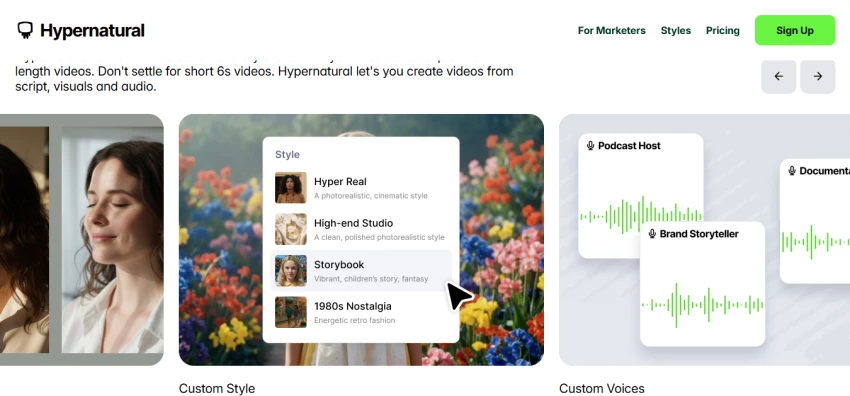
The company frames its ambition plainly: it wants to be the easy, AI-first creative studio where your idea matters more than your budget or technical skill. Its CEO has described the goal as building a kind of “Canva for video.” That positioning shows up throughout the product, which is organised around how a human director actually thinks (characters, styles, storyboards, scenes) rather than around timelines and keyframes.
Where it really separates itself is continuity. Upload a product photo once and Hypernatural keeps that product looking the same across every shot and style. Create a character once and it persists across scenes, so a story feels intentional instead of a slideshow of unrelated AI images. That consistency is the hard problem most generators fail, and it is central to why Hypernatural feels like a production tool rather than a novelty.
This is the section most reviews skip. Marketing copy is easy; what matters is whether real people stick with the tool. Hypernatural’s ratings are strong and remarkably consistent across platforms, a good sign that the experience holds up at scale, not just in a demo.
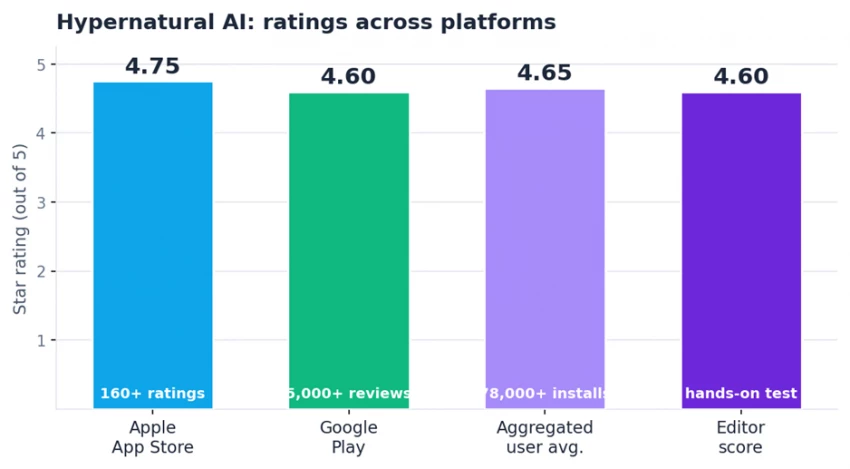
Verified public ratings: 4.75/5 on the Apple App Store (160+ ratings) and 4.6/5 on Google Play (5,000+ reviews across 78,000+ installs).
By the numbers 4.75 / 5 on the Apple App Store, from 160+ ratings 4.6 / 5 on Google Play, from 5,000+ reviews 78,000+ Android installs and counting ~4.65 / 5 blended user average across platforms |
We pulled a representative spread of public reviews (the glowing and the grumpy) so you get the honest picture rather than a cherry-picked highlight reel.
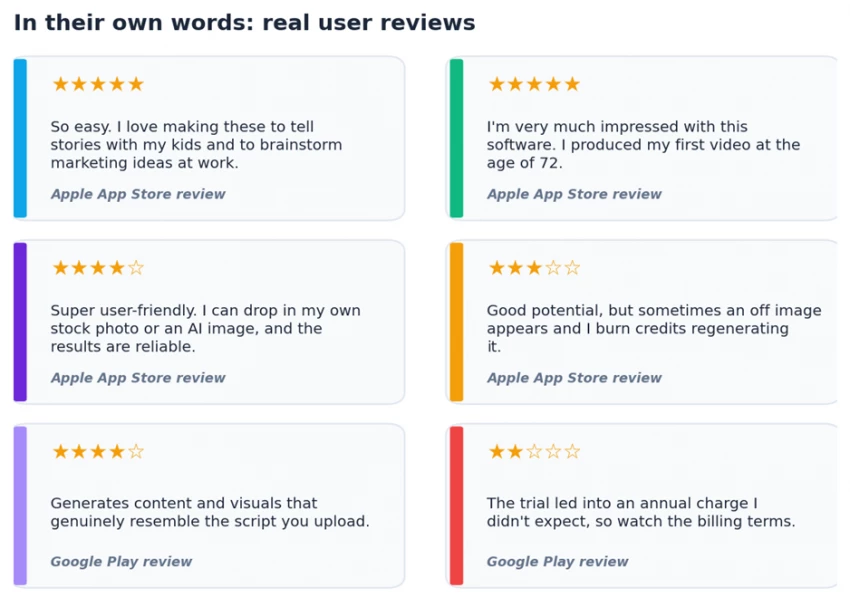
A balanced sample of public reviews from the Apple App Store and Google Play.
• Speed. The most common compliment by far: people go from idea to a finished, shareable video in minutes. For volume-driven content schedules, that is the whole ballgame.
• Natural-sounding voices. Reviewers repeatedly call the AI narration expressive and human, with believable pacing and emphasis, a frequent weak point in rival tools.
• Beginner-friendliness. A recurring theme is how little there is to learn. One App Store reviewer noted they made their first video at 72; others describe it as the easiest video app they’ve used.
• Consistent characters and styles. Creators building ongoing series or branded universes single out the continuity features as the reason they stay.
No tool is perfect, and a credible review says so. The criticisms cluster into a handful of consistent themes:
• The credit system can feel restrictive. Perfectionists who regenerate scenes many times report burning through credits faster than they’d like, which adds a little anxiety to the editing process.
• AI image accuracy is hit-or-miss. Several reviewers note that generated visuals sometimes miss the intent and need a regenerate, and a few suspect that “off” images nudge you to spend more credits.
• The free tier is more demo than workhorse. It’s great for evaluating the workflow, but serious users will hit its limits quickly.
• Billing surprises. The most pointed complaints are about the trial-to-subscription flow: a few users felt a trial rolled into an annual charge they didn’t anticipate. Read the billing terms before you subscribe.
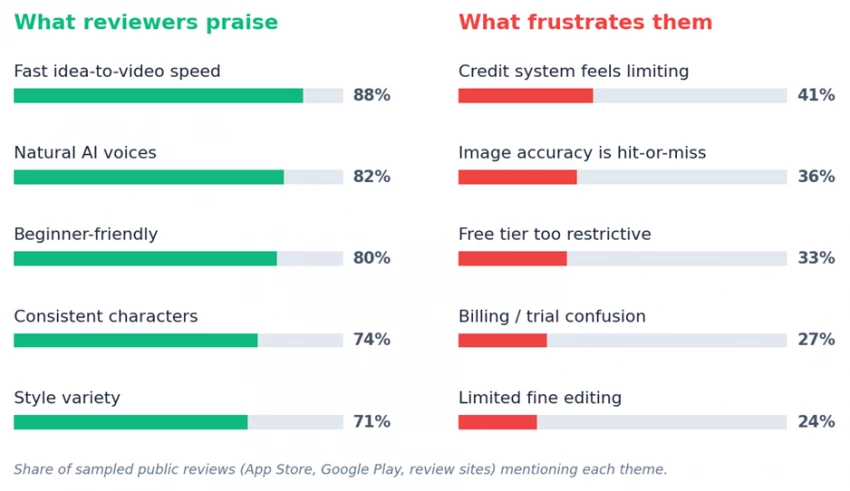
Approximate share of sampled public reviews mentioning each theme. Praise heavily outweighs complaints, but the complaints are specific and worth knowing.
Our read on the feedback The pattern is encouraging: praise centers on the core promise (fast, easy, good-looking videos), while the complaints are about edges (credits, occasional misfires, billing) rather than the product’s fundamentals. That’s the profile of a tool people genuinely like, not one they tolerate. |
Hypernatural’s depth is what sets it apart from single-purpose generators. Here are the capabilities that matter most in everyday use.
The headline feature. Paste a prompt, outline, full script, article, or podcast transcript and Hypernatural breaks it into scenes, matches visuals, adds narration and captions, and paces it like professionally edited content. Writers get a fast way to visualise scripts; non-writers get the most accessible on-ramp in the category.
Create a character once (from a few reference images, a moodboard, or a text description) and reuse it across every scene and future project. There’s also a library of 60+ ready-made characters, and you can “recast” a video by swapping one character for another without rebuilding your scene structure.
Upload a product photo once and it stays visually consistent across shots and styles, a genuine differentiator for marketers, since traditional ad production can run anywhere from roughly $1,000 to $10,000+ per video. Higher tiers add custom products, logos, and brand assets.
Multiple voice styles (conversational, cinematic, corporate, youthful, character dialogue) with adjustable narration volume relative to music. The free plan includes 6 basic narrators; paid plans unlock 40+ premium voices, and top tiers add custom voice cloning.
Choose from a broad set of stock styles (photographic, 3D animation, anime, cyberpunk, watercolor, storyboard, and more), or build a custom style by uploading 3 to 5 reference images. The system learns the lighting, color, and mood and saves a reusable named style.
The “wow” feature. Once your static scenes are approved, one click animates every scene, turning a storyboard into a moving, cohesive video with character and environmental motion. It’s the difference between a slideshow and a film.
Auto-generated B-roll supports documentary and explainer content; automatic, customizable captions matter because most social video is watched on mute; and a built-in editor lets you add scenes, tweak narration, and adjust timing without exporting to a separate tool.
You can build, edit, and export entirely from your phone on iOS, Android, or mobile web, a deliberate choice that fits how the creator economy actually works.
Here’s the end-to-end flow, using a product ad as the example: it stresses nearly every part of the system at once.
1. Define the product. Upload photos of your product; Hypernatural creates a persistent reference it keeps consistent across the whole video.
2. Create the character. From a short prompt, the platform generates a reusable character (or pick one from the stock library) that carries through every scene.
3. Choose a style & aspect ratio. Pick a stock or custom style and a format (e.g., 16:9 for YouTube, 9:16 for Reels/Shorts).
4. Generate script & narration. The platform drafts an editable script and lets you audition AI voices, then balance narration against background music.
5. Build & refine the storyboard. You get static scenes aligned to the script. Regenerate or re-prompt any individual scene until it’s right; you’re never locked into the first draft.
6. Hit Full Motion. Animate every approved scene in one click, then export or publish directly to social platforms.
Pro tip Specific prompts beat vague ones. The biggest lever on output quality is how descriptive you are: lighting, mood, camera angle, action. Nail the static storyboard first; only escalate to Full Motion once the foundation looks right, to avoid wasting credits. |
Hypernatural uses a credit-based model (each generation or regeneration spends credits) layered on top of tiered subscriptions. Annual billing is advertised at a 52% saving versus monthly. The prices below reflect the current annual rates.
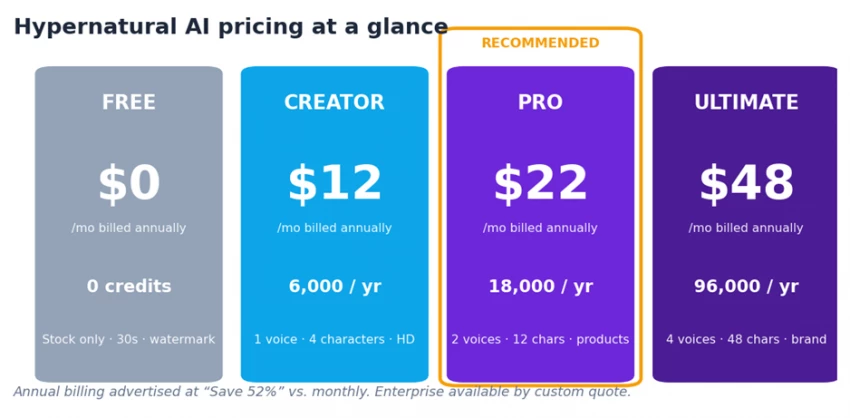
Current Hypernatural AI plans (monthly price when billed annually). Enterprise is available by custom quote.
| Plan | Price (annual) | Credits / year | Best for |
|---|---|---|---|
| Free | $0 | 0 (try up to 5 videos) | Evaluating the workflow |
| Creator | $12 / mo | 6,000 | Solo creators getting serious |
| Pro ★ | $22 / mo | 18,000 | Product marketers (recommended) |
| Ultimate | $48 / mo | 96,000 | Agencies & high-volume teams |
| Enterprise | Custom | Custom | Teams, seats, dedicated support |
| Feature | Free | Creator | Pro | Ultimate |
|---|---|---|---|---|
| Monthly price (annual) | $0 | $12 | $22 | $48 |
| Credits / year | None | 6,000 | 18,000 | 96,000 |
| Max video length | 30 sec | Unlimited | Unlimited | Unlimited |
| Custom characters | 0 | 4 | 12 | 48 |
| Custom voices | 0 | 1 | 2 | 4 |
| Custom products | 0 | 0 | 12 | 48 |
| Premium narrators (40+) | No | Yes | Yes | Yes |
| HD exports | No | Yes | Yes | Yes |
| Watermark removed | No | Yes | Yes | Yes |
| Brand assets | No | No | No | Yes |
Value verdict The free tier is a real (if limited) trial, not just a teaser: stock-only, 30-second, watermarked videos with 6 narrators. The Creator ($12) and Pro ($22) tiers are the sweet spot for most people; Pro’s custom products make it the pick for anyone doing product marketing. Ultimate ($48) is for agencies and prolific creators. Against the $1,000 to $10,000+ cost of a single traditionally produced ad, even the top tier is a rounding error. |
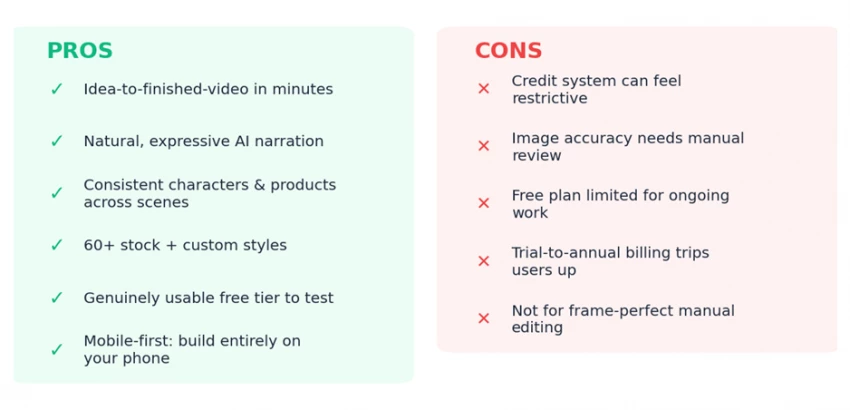
The balance sheet at a glance.
The honest summary: the pros are about the core job: fast, easy, good-looking, story-driven video. The cons are about the edges: credit anxiety, occasional AI misfires, a thin free tier, and a billing flow worth reading carefully. For the audience it targets, the pros decisively outweigh the cons.
Hypernatural doesn’t try to beat every rival at their one specialty. It competes on end-to-end workflow cohesion, the whole pipeline in one place. Here’s how it stacks up against the tools people most often compare it to.
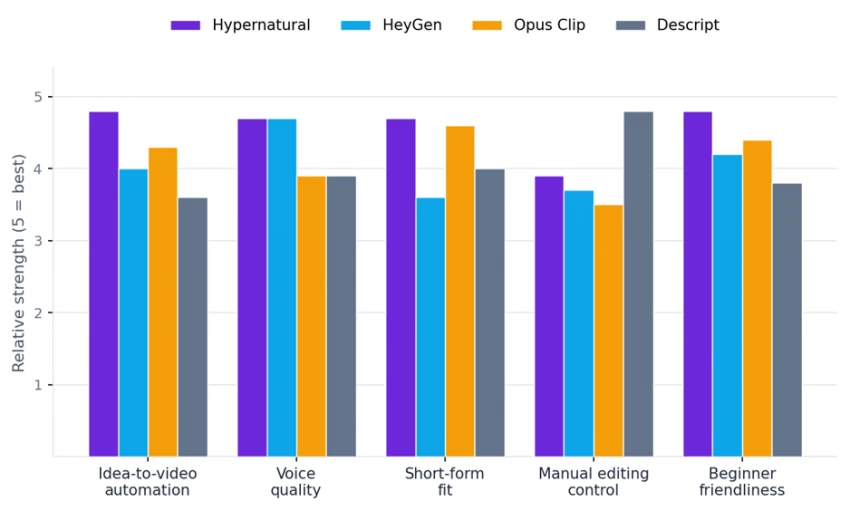
Relative strengths (5 = best). Hypernatural leads on automation, short-form fit, and beginner-friendliness; Descript leads on manual editing control.
| Aspect | Hypernatural | HeyGen | Opus Clip | Descript |
|---|---|---|---|---|
| Best use case | Idea-to-video stories | Talking-head avatars | Clipping long videos | Full manual editing |
| Voice quality | Excellent | Excellent | Good | Good |
| Short-form fit | Great | Medium | Very good | Good |
| Manual control | Limited | Limited | Limited | High |
| Beginner friendly | Very | Yes | Yes | Moderate |
| Unique strength | Character + product continuity | Avatar realism | Auto clip detection | Transcript-based editing |
Tools like Runway, Pika, and Sora are excellent at generating or extending individual clips. But none combine consistent characters, persistent products, custom styles, integrated narration, storyboard editing, and one-click full-video animation in a single mobile-friendly interface. That combination, not any one feature, is Hypernatural’s moat.
• Short-form creator posting regularly to TikTok, Reels, Shorts, or Spotlight.
• Marketer or small brand needing on-brand product videos and ad variations fast.
• Faceless / animated-channel creator building a recurring character or world.
• Writer or screenwriter wanting to visualise scripts, book trailers, or concepts.
• Educator or podcaster repurposing scripts and audio into engaging visuals.
• Total beginner, including non-technical users who just want to tell a story.
• Need frame-perfect, professional manual editing (a dedicated NLE like Premiere or DaVinci wins here).
• Require flawless first-try image accuracy with zero regeneration.
• Regenerate scripts and scenes constantly: the credit model rewards decisiveness.
• Work exclusively in long-form; the tool can do length, but short-form is its home turf.
Hypernatural AI earns its strong ratings not by being perfect at any single thing, but by doing every part of the video pipeline competently inside one accessible, genuinely enjoyable interface. The consistent characters solve a real problem. The custom styles are creatively liberating. Product continuity fills a true gap for marketing. Full Motion turns static storyboards into living video with a click. And the free tier lets you confirm it fits before spending a dollar.
It is not a replacement for a professional editor, and you should treat AI image output as a first draft that occasionally needs a redo. But for the independent creators, marketers, writers, and small brands it targets, the gap between “having an idea” and “shipping a finished video” has never been smaller, and Hypernatural is a big part of why.
FINAL RATING: 4.6 / 5 ★★★★½ A polished, fast, mobile-first AI video studio that’s a joy to use for creators and marketers. Start free, learn to write specific prompts, and the $12 to $22/mo plans deliver outstanding value. Just go in with eyes open about credits and billing. |

New Claude Model Targets Agentic AI WorkflowsAnthropic has launched Claude Sonne...
Samuel Osei1 month ago

The Quick verdictInSnoop is a free, browser-based tool that promises to let you...
Alexander Hughes1 month ago

Gemini’s Image Tools Get a Wider RolloutGoogle is expanding access to Gemini’s p...
Alexander Hughes1 month ago

Two AI video generators, two very different first days. I ran PixVerse through i...
Alexander Hughes1 month ago

Two of the most talked-about AI chat platforms. I opened both, picked a characte...
Alexander Hughes1 month ago

The two-minute versionIf you only read one thing, read this. The rest of the doc...
Alexander Hughes1 month ago
Discussion