I was pretty skeptical when I first heard about Joyland AI. Another AI chatbot? Another platform promising "realistic conversations"? I'd seen it all before. But curiosity got the better of me, and I decided to give it a proper try. After spending several weeks on the platform, creating characters, chatting with different bots, and exploring every feature I could find, I realized this platform is actually quite different from what I expected.
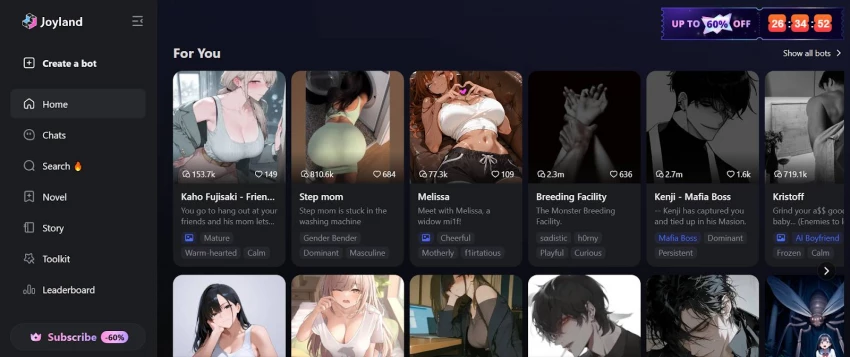
Let me start with the basics. Joyland AI came out in 2023, and it's essentially a platform where you can chat with AI characters. But it's not just about asking questions and getting answers. These characters have actual personalities, backstories, and they even remember what you talked about in previous conversations. That's what caught my attention.
The platform uses something called Large Language Models (you might have heard of ChatGPT, it's similar technology) to create conversations that feel natural and human-like. But what makes Joyland different is the focus on storytelling and roleplay. You're not just chatting, you're creating stories, exploring different scenarios, and building relationships with these AI characters.
Right now, Joyland has over 401,400 AI characters available. Yeah, that number surprised me too. These characters cover everything from anime personalities to fantasy characters, sci-fi companions, gaming buddies, and even historical figures. You can access the platform through your web browser or download it on your Android or iPhone.
The best part? You can start using it for free. They have paid plans too, which unlock more features, but the free version gives you enough to explore and decide if it's worth your time.
Let me break down what Joyland offers, based on my real experience using these features.
Joyland gives you four different ways to create characters:
Quick Create: This is for when you want to get started fast. You can upload a JSON or PNG file with character information, and boom, your character is ready in minutes.
Advanced Create: This is where I spent most of my time. You get complete control over everything, the character's name, personality, appearance, voice, how they talk, their backstory, everything. I created a few characters from scratch, and the level of detail you can add is genuinely impressive.
Upload PDF: If you've written detailed character descriptions in a document, you can just upload it. Perfect for writers who already have characters mapped out.
Game Mode: This turns your character into an interactive adventure companion. Think choose-your-own-adventure style conversations.
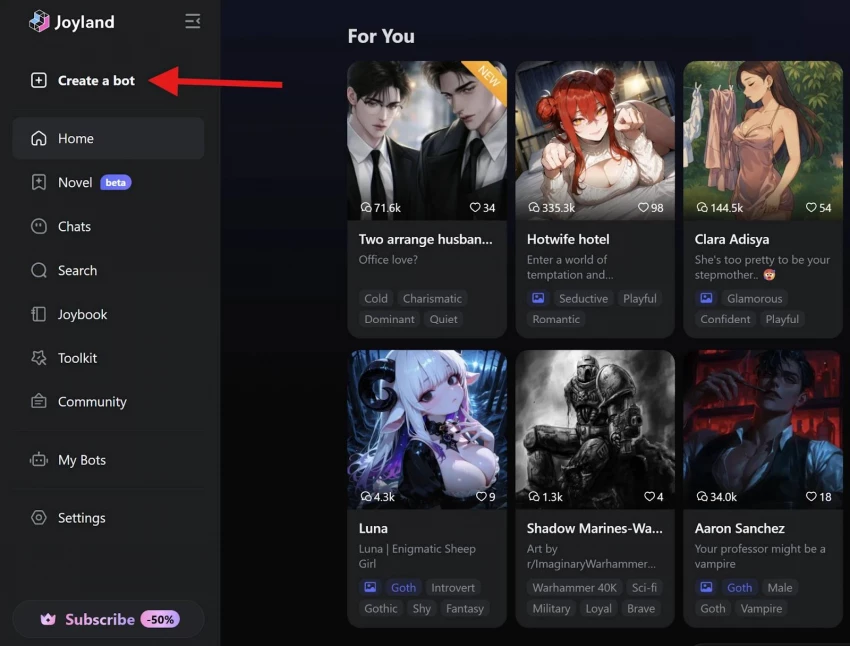
1. Log into your Joyland AI account
2. Look at the top navigation menu
3. Click on "Create a Bot" or "Toolkit"
4. Select "Advanced Create" from the options
5. You'll see a character creation form with multiple fields
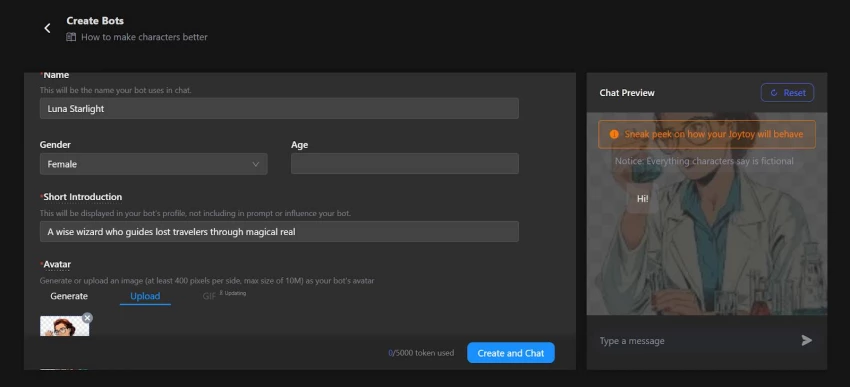
Character Name:
● Choose a name that fits your character's personality
● Can be fantasy names, real names, or creative nicknames
● Example: "Luna Starlight" for a fantasy character, "Alex Chen" for modern scenarios
Character Avatar:
● Upload an image that represents your character visually
● Supported formats: JPG, PNG
● Recommended size: 512x512 pixels or larger
● You can use AI-generated images, artwork, or photos
Character Tagline:
● Write a one-sentence description that appears in search results
● Keep it short and catchy (10-15 words maximum)
● Example: "A wise wizard who guides lost travelers through magical realms"
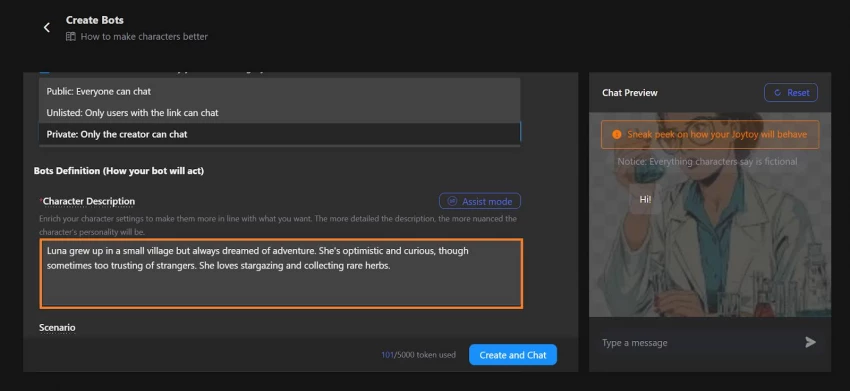
This is where your character comes to life. Fill in these key sections:
Personality Traits:
● Select or write 3-5 core personality characteristics
● Examples: friendly, mysterious, sarcastic, energetic, calm, flirty, serious
● Mix traits to create depth (e.g., "friendly but mysterious")
Character Description:
● Write 2-4 paragraphs describing your character
● Include: background story, motivations, fears, goals, quirks
● Be specific about how they behave and why
● Example: "Luna grew up in a small village but always dreamed of adventure. She's optimistic and curious, though sometimes too trusting of strangers. She loves stargazing and collecting rare herbs."
Speaking Style:
● Describe how your character talks
● Examples: "speaks formally with old-fashioned language," "uses lots of gaming slang," "short sentences, very direct"
● Include catchphrases or verbal habits if applicable
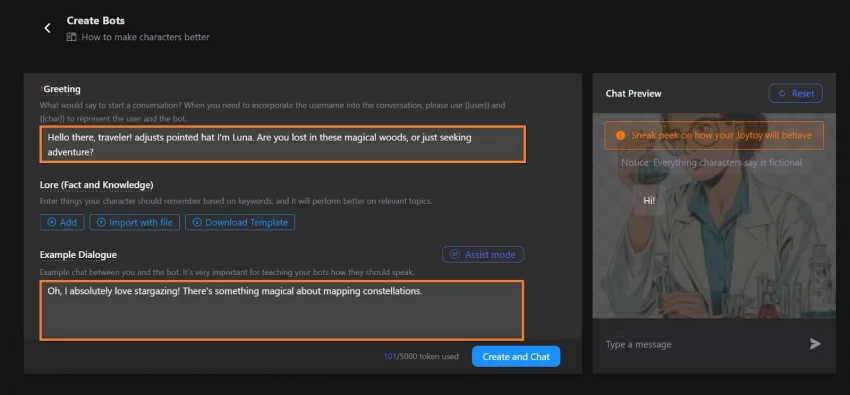
Greeting Message:
● This is the first thing users see when they start chatting
● Make it engaging and in-character
● Example: "Hello there, traveler! adjusts pointed hat I'm Luna. Are you lost in these magical woods, or just seeking adventure?"
Example Conversations:
● Write 3-5 sample exchanges between user and character
● This teaches the AI how your character should respond
● Format:
● User: "What's your favorite hobby?"
● Character: "Oh, I absolutely love stargazing! There's something magical about mapping constellations."
Context and Scenario:
● Describe the setting where conversations happen
● Include time period, location, situation
● Example: "Medieval fantasy world, Luna is a traveling herbalist who helps adventurers in the Moonwood Forest"
Response Length:
● Choose between short (1-2 sentences), medium (3-4 sentences), or long (paragraph) responses
● I recommend medium for most characters
Memory Settings:
● Enable character memory to remember past conversations
● Available on paid plans for unlimited memory
Content Filters:
● Set whether your character allows NSFW conversations
● Requires age verification and paid plan for unlimited NSFW
Visibility:
● Choose "Public" if you want others to discover and chat with your character
● Choose "Private" to keep it personal
Voice Selection:
● Premium users can assign specific voice types
● Choose pitch, tone, and speaking speed
● Test different voices to match personality
Visual Customization:
● Add multiple character images for different moods or situations
● Set up image generation prompts specific to your character
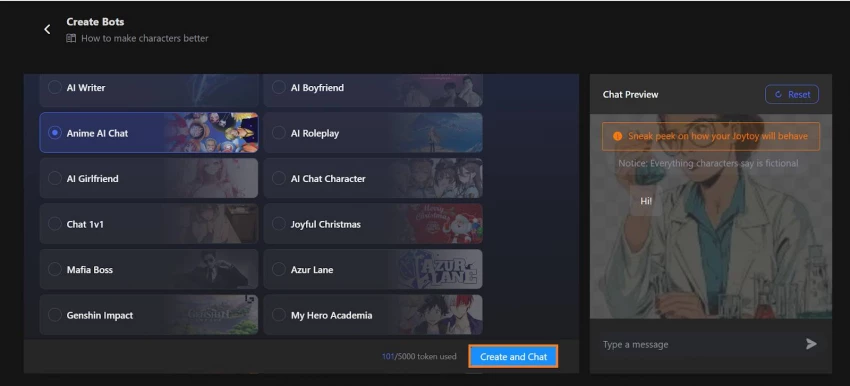
Before publishing:
1. Click "Preview" or "Test Chat"
2. Have a 5-10 message conversation with your bot
3. Check if responses match your intended personality
4. Test memory by mentioning details and seeing if they're remembered
5. Try different conversation topics
What to look for:
● Does the character stay in personality?
● Are responses the right length?
● Does the greeting make sense?
● Are there any awkward or robotic responses?
Based on your test conversation:
1. Click "Edit Character"
2. Adjust personality descriptions if responses felt off
3. Add more example conversations for better accuracy
4. Refine speaking style descriptions
5. Update greeting message if needed
Pro tip: The more detailed your personality description and example conversations, the better your character will perform.
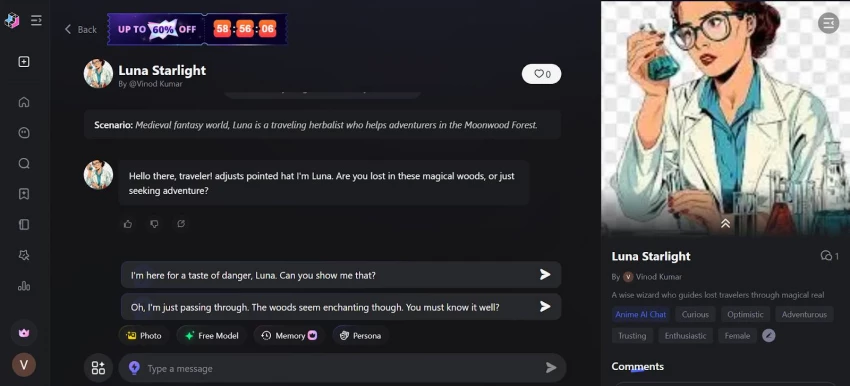
Once you're satisfied:
1. Click "Save and Publish"
2. Your character is now live
3. If set to public, others can discover it in the character library
4. You can continue chatting and building relationship with your bot
After Publishing:
● You can edit your character anytime
● Monitor conversations and make improvements
● Update descriptions based on how it performs
● Share your character link in the community
Joyland has three plans:
| Plan | Price | Daily Credits | Image Messages | NSFW Access | Memory Type | Customization Packs | Bot Gallery |
| Free | $0/month | 50 credits | 3/day | Limited | Short-term (limited) | None | Public bots only |
| Standard | $9.99/month | ~167 credits (5,000/month) | 100/day | Unlimited | Unlimited short-term | 10/month | Credit-unlocked |
| Premium | $19.99/month | 50 credits | Unlimited | Unlimited | Long-term + Short-term | Unlimited | Unlimited access |
Here's What I Think About Each Plan:
The free plan is actually pretty good. You get 50 credits daily and 3 images per day. That's enough to have real conversations and explore what the platform offers without spending anything. Perfect if you just want to try it out or chat occasionally.
The Standard plan at $9.99/month is good for regular users. You get unlimited NSFW access and 100 images per day. The 5,000 monthly credits (about 167 per day) should work for most people, though if you're chatting heavily with multiple characters, you might hit that limit.
The Premium plan at $19.99/month is where you get everything. Unlimited images, long-term memory that remembers conversations across days and weeks, and unlimited customization options. If you're serious about storytelling, roleplay, or building deep AI relationships, this is the one.
| Platform | Type / Focus | Monthly Visits* | Authority Score | Bounce Rate | Notes |
| Joyland.ai | AI character chat, roleplay, storytelling | 3.49M–3.81M | 41 | 53–54% | Mid-sized player with strong focus on customizable characters and stories. |
| spicychat.ai | Uncensored / “spicy” AI chat | 69.57M–73.89M | 57–58 | 55–60% | Huge traffic, popular for fewer content restrictions and adult roleplay. |
| emochi.com | Character chat, high engagement | 2.78M–4.1M | 31–32 | 24–28% | Lower traffic than Joyland but very high pages/visit and strong engagement. |
| wsup.ai | Roleplay / chat platform | 707K–1.03M | 33 | 46–73% | Smaller but growing; engagement varies by month. |
| tipsy.chat | Casual / social AI chat | 885K–964K | 31–34 | 51–53% | Mid-tier competitor with similar audience overlap. |
| dippy.ai | AI character / roleplay | 375K–821K | 37–40 | 32–63% | One of the closest competitors by audience overlap and features. |
| gohiai.com | AI chat / companions | 289K–374K | 15 | 42–65% | Smaller site with lower authority; still appears in Joyland’s audience graph. |
| flipped.chat | Roleplay chat | 419K | 34 | 59% | Appears as a competitor in later Semrush snapshots. |
Joyland demonstrates good safety practices through transparent data handling and clear privacy policies. The platform enforces strict age verification requirements: minimum 13 years old globally and 16+ in the European Union, clearly stating they "do not knowingly collect Personal Information from children."
Safety Features Include:
● Safety Filter: Blocks NSFW content for users who enable it in account settings, providing family-friendly interaction options.
● Zero-tolerance policy against pedophilia, child exploitation, and racial discrimination with immediate account termination for violations.
● Content moderation actively filtering pornography, extreme violence, illegal drugs, and discriminatory material from public bot galleries.
● User privacy controls: Granular settings to manage who can see your content, how personal data is used, and whether conversations are stored.
After using Joyland for weeks, here's where I landed:
● Easy to use: The interface is clean and simple. I didn't need a tutorial to figure things out.
● So many characters: With 401,400+ characters available, I never ran out of options to explore.
● Conversations feel real: The contextual memory made chats feel genuine and personal.
● Great customization: Creating characters from scratch gave me lots of creative control.
● Voice and images matter: These features added emotional depth I wasn't expecting from text chats.
● Storytelling is fun: The interactive stories kept things interesting across multiple sessions.
● Active community: Browsing what others created gave me inspiration and new ideas.
● Works everywhere: Seamless experience across my laptop, tablet, and phone.
● Free plan is generous: 50 daily credits and 3 images let me explore properly before paying.
● Mobile app is cramped: On my phone, longer conversations felt uncomfortable. I ended up using my laptop most of the time.
● NSFW filtering is weird: Sometimes it blocked normal emotions, making characters feel robotic when they shouldn't.
● AI gets stuck sometimes: I had to manually fix conversations when the AI started looping responses.
● 40-bot limit feels low: For someone who loves experimenting with different characters, 40 wasn't enough.
● Premium is pricey: At $19.99/month for all features, it's more expensive than some alternatives.
After weeks of testing, creating characters, having hundreds of conversations, exploring different features, here's what I genuinely think.
Joyland AI is a solid platform for creative expression and AI companionship. The interface is clean, the character variety is massive, and the conversations feel surprisingly natural. The ability to build custom characters and create interactive stories sets it apart from basic chatbots that just answer questions.
For me, the experience was not just about chatting with software; it was about rediscovering what it means to co-create. And for anyone curious about the future of AI interaction where companionship, creativity, and character building converge Joyland AI is a fascinating platform worth exploring.

“HidingMe” sounds like a privacy app. It isn’t. So I opened the live site in Jun...
Sandra Campos2 months ago

Type "Totally Science" into a search bar and the name suggests a study aid, a vi...
Benjamin Clark2 months ago

I keep a 12-question audit checklist on my desk. It started in 2024 as a one-pag...
Grace Howard3 months ago

The market for AI-powered knowledge management tools has exploded in the past tw...
Grace Howard4 months ago
I’ve spent enough hours wandering through thesindi.com to know it almost like a...
Ina Gupta4 months ago

Sitemap Generator by UploadArticle.com is a lightweight, browser‑based XML sitem...
Peter Woods4 months ago
Discussion