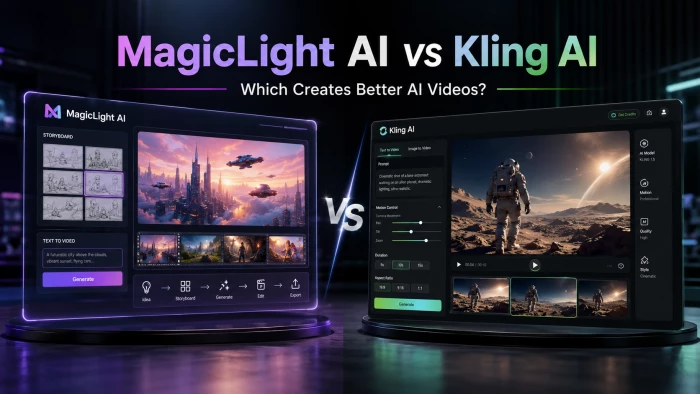
AI video generators have splintered into specialists, and two names that keep colliding in the same head-to-head searches are MagicLight AI and Kling AI. On the surface they look like rivals fighting over one crown. Spend five minutes with each, though, and something more interesting emerges: they’re built to win at almost opposite jobs.
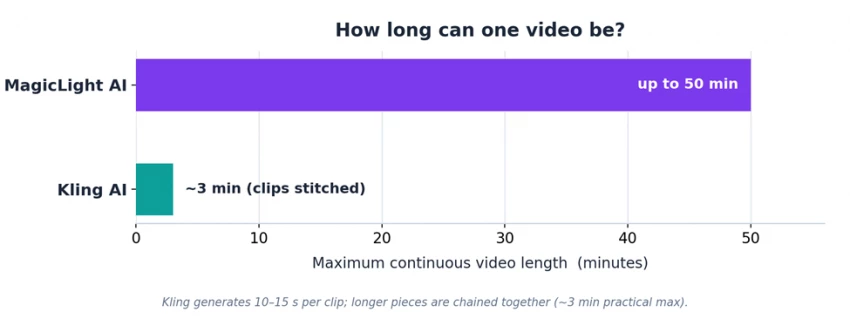
One is a complete long-form story studio that hands you a finished, narrated video up to roughly 50 minutes long. The other is a frontier clip engine that produces some of the most realistic ten-second shots available anywhere. This guide breaks down exactly where each pulls ahead, what they cost, and, most importantly, which one fits the video you actually want to make.
The 30-second verdict Pick MagicLight AI to turn a script or idea into a complete, narrated long-form video (explainers, kids’ stories, faith content, YouTube documentaries) without ever opening an editor. Pick Kling AI for the most realistic, cinematic short clips possible (product shots, ad scenes, music-video moments) if you’re happy stitching clips together yourself. The plot twist: they aren’t a strict either/or. MagicLight actually offers Kling as one of its built-in generation engines, so many creators end up using both. |
Most “X vs Y” video-tool comparisons pit two clip generators against each other. This one is different, because MagicLight and Kling sit at different layers of the stack.
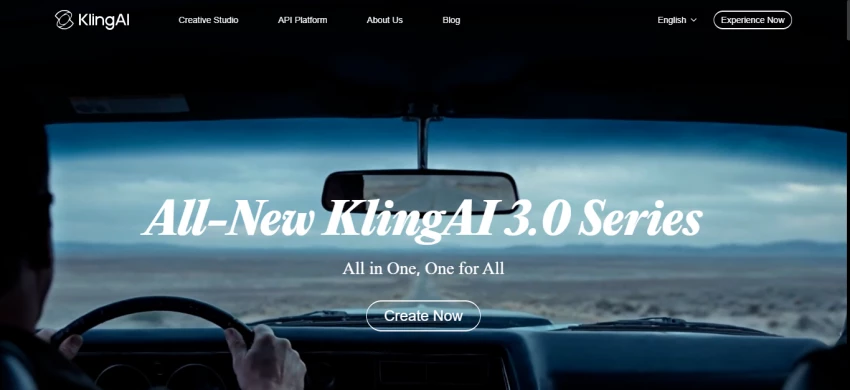
Kling AI, built by Chinese tech company Kuaishou, is a generative model. Give it a prompt or an image and it returns a short, hyper-detailed clip, usually 5 to 15 seconds. It’s regularly ranked the most realistic AI video model available, and its job ends when the clip is done.
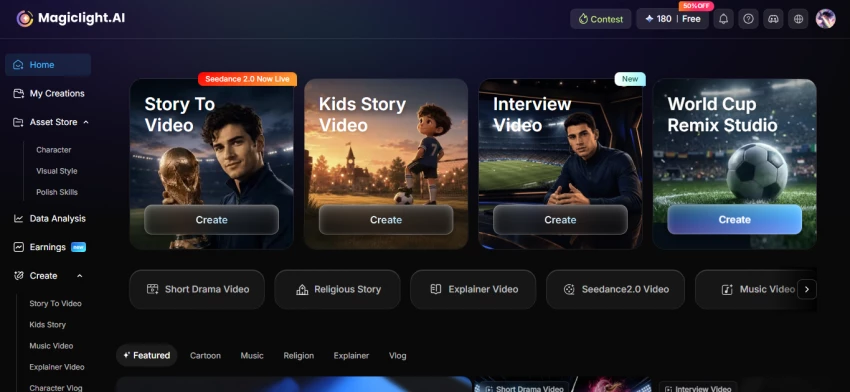
MagicLight AI is an orchestration platform. It takes a story idea and runs the whole production line: script, storyboard, consistent characters, voiceover, subtitles, music and animation, exported as one continuous video up to ~50 minutes. And it doesn’t lean on a single model under the hood; you choose from a menu of engines that includes Sora, Veo, Seedance and Kling itself.
So the honest framing isn’t “which model is better,” it’s “do you need a finished long-form story, or the best possible short shot?” Keep that question in mind. It decides almost everything below.
MagicLight AI The long-form story studio Best at: complete narrated videos up to ~50 min Made by: MagicLight Output: 1080p HD, multi-scene Superpower: script → finished video, no editing skills Watch for: tiny free tier; character drift on long videos | Kling AI The cinematic clip engine Best at: photorealistic short clips (5–15 sec) Made by: Kuaishou Technology (China) Output: up to native 4K, 60fps Superpower: best-in-class realism + Motion Control Watch for: short clips, no editor, credits burn fast |
The full spec sheet, side by side:
| How they compare | MagicLight AI | Kling AI |
|---|---|---|
| Best at | Complete long-form story videos | Photorealistic short cinematic clips |
| Max video length | Up to ~50 minutes (continuous) | ~10–15 sec / clip (~3 min chained) |
| Output resolution | 1080p HD | Up to native 4K (60fps) |
| Realism | Good; stylized / animated focus | Best-in-class; photorealistic |
| Underlying models | Multiple, selectable (Seedance, Sora, Veo, Kling and more) | Kling’s own models (2.6 / 3.0) |
| Voice & audio | 37 voices, cloning, 11 languages, lip-sync, auto music | Native audio (voice/SFX/ambient) in one pass |
| Motion / camera control | Limited (scene + text level) | Advanced (Motion Control, motion brush, multi-shot) |
| Built-in editor | Yes, full storyboard + scene editing | No, export to an external editor |
| Templates | Yes (kids, comedy, faith, explainer and more) | No |
| Ease of use | Very beginner-friendly | Prompt-dependent; steeper learning curve |
| Free plan | 300 one-time credits; watermark-free | 66 credits/day; 720p; watermarked |
| Commercial rights | On paid plans | From the Standard plan up |
| Starting paid price | ~$12 / month | ~$6.99 / month (intro) |
Six rounds, scored honestly. Most go decisively one way, which is the whole point.
Put a single MagicLight clip next to a single Kling clip and Kling usually wins on pure realism. Its faces, skin, fabric and physics are why it sits atop the 2026 benchmarks, and native 4K gives it an edge for anything shown on a big screen. MagicLight’s visuals are strong, but its sweet spot is stylized, animated storytelling rather than photoreal footage, and because it can route individual scenes through frontier engines (including Kling), the gap narrows depending on which engine you pick.
Round winner → Kling AI
This is the clearest split in the whole comparison. Kling generates short clips; reaching even a few minutes means making many clips and stitching them together. MagicLight is purpose-built for the opposite, one coherent video up to ~50 minutes, with the same characters and tone throughout. If your deliverable is a 12-minute explainer or a 20-minute story, this round isn’t close.
Round winner → MagicLight AI
MagicLight is designed for people with zero editing experience: type an idea, pick a style and a voice, tweak the storyboard, export. Everything lives in one place. Kling is more of a craft tool. Output quality leans heavily on prompt skill, most creators run three to five iterations to nail a shot, and there’s no in-platform editor, so post-production happens elsewhere. Power users love that control; beginners often find it slower.
Round winner → MagicLight AI
For directors who care about exactly how the camera moves, Kling is in a different league. Motion Control transfers movement from a reference video, the motion brush directs specific elements, and multi-shot mode choreographs several angles in a single generation. MagicLight offers scene-level and text-driven control, which is plenty for storytelling, but it isn’t trying to be a virtual cinematographer.
Round winner → Kling AI
Both handle audio well, but differently. MagicLight bundles a full pipeline: 37 voices, voice cloning, lip-sync and auto-selected background music across 11 languages, ideal for narrated long-form content. Kling generates native audio (dialogue, sound effects, ambience) in the same pass as the video, which is remarkable for short clips and keeps everything perfectly in sync. For a narrated story, MagicLight’s toolkit is more complete; for a self-contained cinematic moment, Kling’s native audio is hard to beat.
Round winner → Tie, depends on format
Both market consistency hard. Kling’s Elements feature anchors a character with up to four reference images and holds up well within and across short clips. MagicLight promises continuity across an entire long video (a much harder problem), and when it works it’s impressive, but some users report characters drifting in appearance or wardrobe between scenes. Treat consistency as “good, with occasional touch-ups” on both, and run your own test before committing real work.
Round winner → Slight edge: Kling for reliability, MagicLight for ambition
Both run on credits, and both can burn through them faster than the headline numbers suggest. Here’s the lay of the land. Always check the official sites, because pricing in this space changes constantly.
| Tier | MagicLight AI | Kling AI |
|---|---|---|
| Free | 300 one-time credits; watermark-free; not enough for a full video | 66 credits/day; 720p; watermarked; no commercial use |
| Entry | Standard ~$12/mo (~5,000–7,000 credits) | Standard ~$6.99/mo intro (~660 credits) |
| Mid | Plus ~$26/mo (~15,000 credits) | Pro ~$25.99/mo (~3,000 credits) |
| High | Pro ~$35/mo (~35,000 credits), most popular | Premier ~$64.99/mo (~8,000 credits) |
| Top | Ultra / Ultimate ~$90–150/mo | Ultra ~$127.99–180/mo (~26,000 credits) |
| Annual discount | ~50% off | ~20–34% off |
Lined up tier by tier, the crossover is easy to spot:
Kling is cheaper to start; MagicLight is cheaper at the high end.
Reading the fine print. Kling is cheaper to enter and has a genuinely usable (if watermarked) free tier, but credits vanish fast in its higher-quality “Professional” mode, don’t roll over, and reviewers flag intro-vs-renewal price jumps plus credits consumed by failed generations. MagicLight’s free credits, by contrast, aren’t enough to finish even one video (a common new-user complaint), but paid plans are watermark-free from the start and priced aggressively at the top, where a single plan can output dozens of long videos. For low-volume short clips, Kling usually wins on cost; for high-volume long-form work, MagicLight’s upper tiers stretch further.
MagicLight AI
| Strengths | Limitations |
|---|---|
Long-form video up to ~50 minutes Truly beginner-friendly, all-in-one workflow Multiple frontier engines, selectable per scene Rich audio suite: 37 voices, cloning, 11 languages Watermark-free even on the free plan Deep template library for fast starts | Free credits too small to finish a video Credit consumption can be steep Character consistency can drift across scenes Not built for photorealistic footage Some reports of bugs and slow support |
Kling AI
| Strengths | Limitations |
|---|---|
Best-in-class realism (#1 on 2026 ELO) Native 4K at 60fps Motion Control no major rival matches Native audio generated in one pass Strong character anchoring (Elements) Low entry price; very large community | Short clips only (~10–15 sec) No built-in editor Credits burn fast in Pro mode; no rollover Intro-vs-renewal pricing; failed-gen charges Limited customer support Chinese data jurisdiction & content censorship |
Choose MagicLight AI if • You’re making long-form content: explainers, stories, lessons, faith content, YouTube videos. • You have little or no editing experience and want one smooth flow. • Narration, multiple languages and consistent characters matter more than photoreal footage. • You’d rather hit generate once and get a near-finished video. |
Choose Kling AI if • You need the most realistic, cinematic short clips you can get. • You’re producing ads, product shots, music-video moments or B-roll. • You want precise camera and motion control and don’t mind editing clips together. • You’re comfortable iterating on prompts to dial in a shot. |
Use both if You’re a serious creator: storyboard and assemble your long-form video in MagicLight, and generate your hero shots in Kling, or through MagicLight’s built-in Kling engine. Treat them as complementary, not competing. |
Here is the full tally, scored category by category:
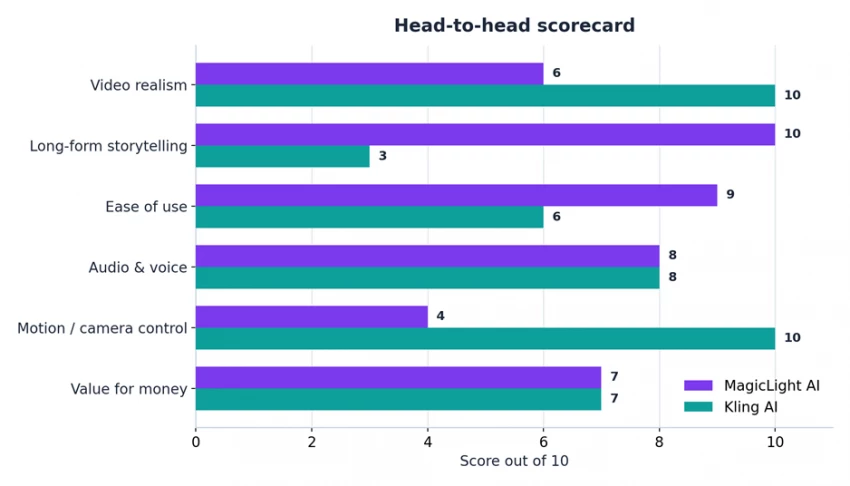
Across six categories the two finish neck-and-neck overall, winning on completely different fronts.
So which creates “better” AI videos? Honestly, they’re nearly tied overall, and that’s exactly the point. Kling makes the better individual shot: more realistic, more cinematic, higher resolution, with motion control nobody else matches. MagicLight makes the better finished video, when “finished” means a complete, narrated, multi-scene story you didn’t have to edit yourself.
Put differently: hand both tools the same brief and Kling gives you a stunning ten seconds, while MagicLight gives you the whole ten minutes. Choose based on which you actually need, and remember you can have both, since MagicLight can run Kling under the hood. For most beginners and storytellers, start with MagicLight. For creators chasing cinematic realism in short form, start with Kling.

New Claude Model Targets Agentic AI WorkflowsAnthropic has launched Claude Sonne...
Samuel Osei3 months ago

Gemini’s Image Tools Get a Wider RolloutGoogle is expanding access to Gemini’s p...
Alexander Hughes3 months ago

Two AI video generators, two very different first days. I ran PixVerse through i...
Alexander Hughes3 months ago

Two of the most talked-about AI chat platforms. I opened both, picked a characte...
Alexander Hughes3 months ago

The two-minute versionIf you only read one thing, read this. The rest of the doc...
Alexander Hughes3 months ago

Why Seedance 2.5 mattersSeedance 2.5 is the latest release in ByteDance’s Seedan...
Alexander Hughes3 months ago
Discussion