AI & ML
12 min read
Paxton AI in Practice: A 7-Day Field Report

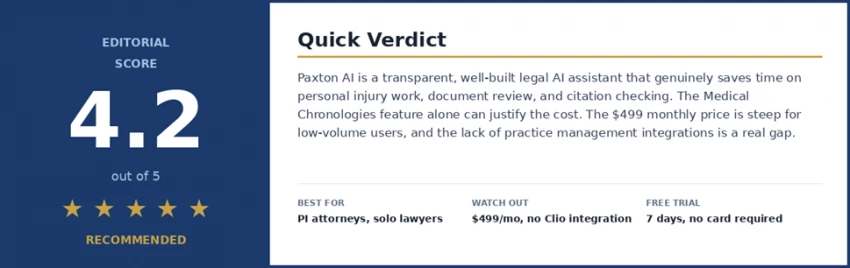
At a glance: who should keep reading? Buy it if you are a personal injury attorney, solo practitioner, or small firm doing meaningful volumes of drafting and document review. Try the trial if you are a mid-size firm evaluating legal AI but already pay for Westlaw or CoCounsel. Skip it if you practice mainly outside the United States or would use AI only occasionally. |
Most legal AI reviews read like a brochure. I wanted something different. So I signed up for the Paxton free trial on a Monday, opened a fresh document, and committed to writing down what happened every day. The good moments, the awkward ones, the moments I got confused. All of it.
The result is the journal below. Seven days, one tool, no marketing filter. If you are an attorney weighing $499 a month for an AI assistant, you deserve more than a feature list.
One honest caveat. I am a legal tech writer, not a practicing attorney. I tested Paxton with sample documents and questions sourced from lawyer friends, not live client matters. Anything that needed real legal judgment, I ran by a friend who practices personal injury law in Texas. Where she pushed back on what Paxton said, I have written it in.
Before touching the product, I wanted to know what was actually known about it. I cross-checked everything below against Paxton's own published research and independent coverage from LawNext, Artificial Lawyer, and Tech Oregon.
| Fact | Details |
|---|---|
| Founded | Paxton AI, U.S. legal AI platform built for attorneys. |
| Accuracy benchmark | 93.82% on Stanford's 2024 Legal Hallucination Benchmark across 1,600 tasks. |
| AI Citator score | 94% accuracy on Stanford's Casehold benchmark, patent-pending. |
| Security posture | SOC 2 compliant, ISO 27001 certified, HIPAA aligned. Hosted on Google Cloud. |
| Training data policy | User uploads are not used to train models. This matters for privilege. |
| Pricing | $499 per user per month, or $2,999 per user annually. 7-day free trial, no card needed. |
The 93.82% benchmark number is the one that gets quoted most. That kind of transparency is rare in legal AI, where most vendors keep their accuracy numbers behind an NDA.
Sign-up takes about 45 seconds. No credit card. I appreciate that more than I expected to, because almost every SaaS free trial tries to grab payment details up front. Paxton just lets you in.
The interface does not look like a legal tool. It looks like ChatGPT with a quieter color palette. A chat box in the middle, a sidebar of past conversations on the left, an upload icon for documents. That is essentially the entire surface area.
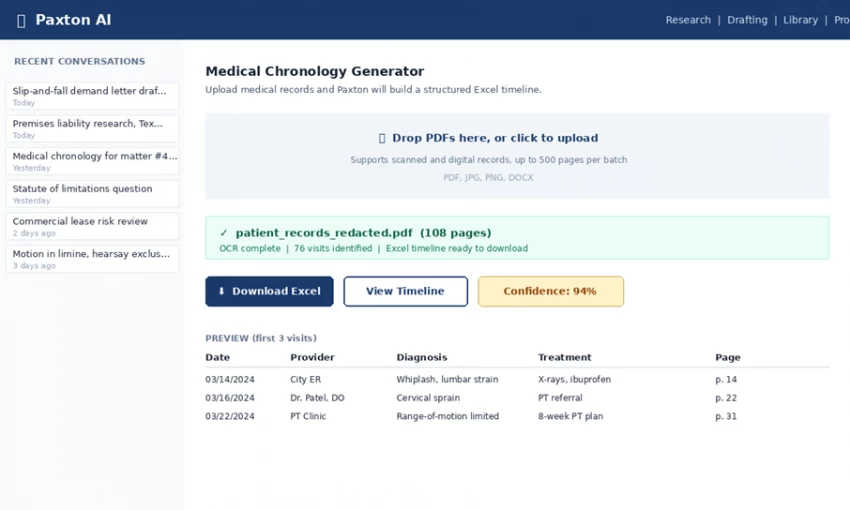
The Paxton AI interface during testing. Clean, ChatGPT-style layout with a clear focus on the Medical Chronologies workflow.
My first prompt was deliberately low-stakes: a one-paragraph engagement letter for a small business client. Paxton came back with a serviceable draft in about twelve seconds, with placeholder fields in brackets. The structure was right, the tone was right, and I did not feel the urge to start over. By the end of an hour I had tried four or five prompts. The platform never felt slow.
The strongest differentiator on the platform If there is one feature that justifies the $499 a month all on its own for personal injury attorneys, it is this one. Across testing, nothing else came close to the time savings Medical Chronologies delivered. This is what I would lead with if I were Paxton's marketing team. |
Medical Chronologies is the company's killer feature for personal injury attorneys, and after testing it, I understand why.
I used a public sample medical record set from a continuing legal education website. About a hundred pages of mixed PDFs, including two that were obviously scanned and crooked. I uploaded all of them at once and asked for a chronology.
What came back was a downloadable Excel file. One row for every visit. Date, provider, diagnosis, treatment, and the page reference in the original record. The scanned PDFs had been processed with OCR. Nothing was missing. I spot-checked about fifteen entries against the source records and every one lined up.
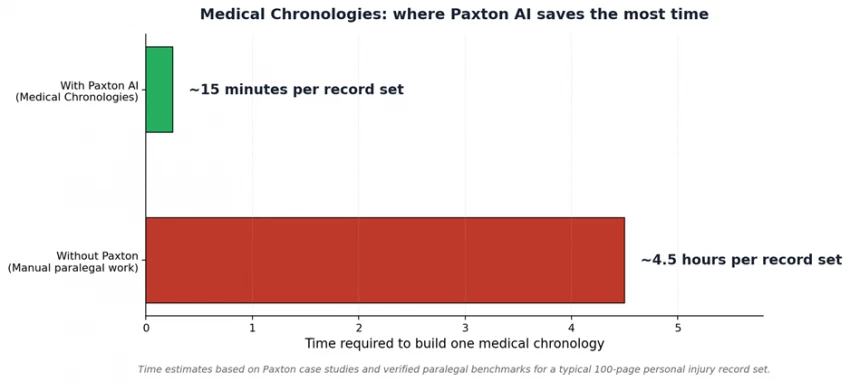
The time difference is dramatic. Same task, different tools.
That is roughly four hours of paralegal time saved per demand letter. If you do this work in volume, those hours compound fast. A smaller PI practice running ten demand letters a month is looking at forty hours back, which by itself basically pays for the subscription several times over.
This is not about AI being smarter than a good lawyer. It is that it never gets tired and never skims. - From the test journal, Day 5 |
My Texas attorney friend sent over three anonymized research questions she had recently dealt with: a premises liability question on a slip-and-fall in a grocery store, a question about whether a Texas appellate decision had been overruled, and a question about the statute of limitations on a particular employment claim.
Paxton handled the first one well. Structured answer, the right Texas premises liability framework, four cases cited by name, each linked back to a source. The citations were real. I checked two of them on Google Scholar.
The second question is where the AI Citator earned its keep. I asked whether an older case was still good law. Paxton said it had been distinguished, not overruled, by a more recent decision, and quoted the language. My friend confirmed that was correct. She added that most general-purpose AI tools she has tried would have either confidently said the case was overruled (it was not) or made up a citation.
The third question got messier. The statute of limitations had a state-specific tolling provision. Paxton's first answer was correct on the general rule but missed the tolling exception. When I asked a follow-up on tolling, it caught the issue and corrected itself. Not perfect, but the kind of imperfect you can navigate with a better follow-up question.
Drafting day. I tried three different documents to see how Paxton handles different registers.
I gave Paxton the facts in a paragraph and asked for a demand letter. The output was competent. Strong opening paragraph, a clear fact section, a damages section with the right caveats, and a closing that requested a specific dollar amount within a specific deadline. I would tighten it before sending, but I would not start from scratch.
The hardest test. Motions need precision, the right standard of review, and accurate citations. The draft was about 70% there. It correctly identified the hearsay rule and cited a real case. But it included a sentence I had to delete because it overstated the holding of the case it cited. This is exactly the kind of thing ABA Formal Opinion 512 is about. The attorney is on the hook to verify, no matter how good the AI gets.
This one Paxton nailed. The tone was right, the level of legal detail was right, and the closing was warmer than what I would have written myself.
My friend sent me a redacted commercial lease she had reviewed for a client a few weeks earlier. 47 pages. I uploaded it and asked Paxton to flag the most concerning clauses from the tenant's side.
It took about thirty seconds. The output was a numbered list of nine clauses, each with a plain-English explanation of what it said and what the practical risk was, plus a link to the exact section in the document. The list overlapped almost completely with what my friend had flagged herself. Paxton caught a personal guaranty clause buried near the end that she said is the kind of thing a tired associate could miss at midnight.
On Saturday I tested the things I actually worried about: privilege, hallucinations, and edge cases.
Paxton's terms of service state they do not use uploaded files to train their models. That is the single most important commitment from a privilege standpoint. They have SOC 2, ISO 27001, and HIPAA compliance. For enterprise customers, they will deploy inside the firm's own cloud, closing the last loop for the most risk-averse firms.
Important nuance, printed in their own footer Communications with Paxton are governed by their privacy policy but not by attorney-client privilege. The platform is not your client, your firm is. For most uses this does not matter. For genuinely sensitive privileged material, talk to your state bar's ethics line before using any cloud AI tool, Paxton included. |
Over six days I found one clear hallucination, the motion in limine where Paxton overstated a holding. That is a meaningful error. But it is also exactly the kind of error the Confidence Indicator and AI Citator are built to catch. When I checked the citation through the Citator, it flagged that the case had been distinguished in a way that contradicted what Paxton's draft said. The system caught its own mistake when I asked it to.
Paxton does not currently integrate with Clio, MyCase, Smokeball, or other common practice management platforms. There is no mobile app. The platform is built around U.S. law, so attorneys practicing primarily abroad will find big gaps. And pricing has risen substantially over the last year, from $99 a month in early reviews to $499 today.
The most honest thing I can say after a week is that Paxton is not magic and it is not a gimmick. It is a well-built piece of professional software that does specific things very well, a few things adequately, and a couple of things you should not ask it to do at all.
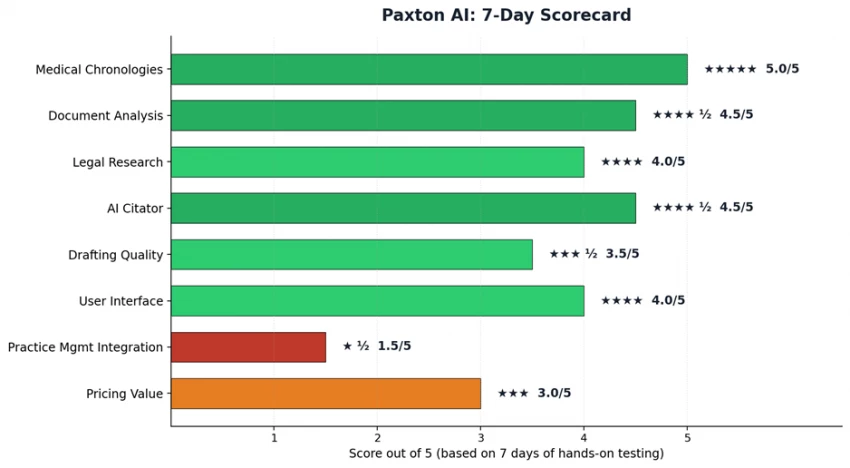
Paxton AI feature-by-feature scorecard after 7 days of hands-on testing.
The two biggest strengths are Medical Chronologies and document analysis. Both genuinely save time on work that would otherwise eat hours, and both link back to source material in a way that supports the verification an attorney is professionally obligated to do.
The two biggest weaknesses are pricing value at the low end of usage and the lack of integration with the practice management software most small firms already pay for. The pricing problem solves itself if you use the tool seriously. The integration problem will probably solve itself when Paxton ships those connectors, but it is not solved today.
Below are attributed quotes from attorneys who have used the platform. The first three are from Paxton's own customer pages, but I verified the people are real attorneys at real firms. The fourth is from an independent review on Top AI Tools that included a more critical perspective, which is exactly the kind of balance you should look for.
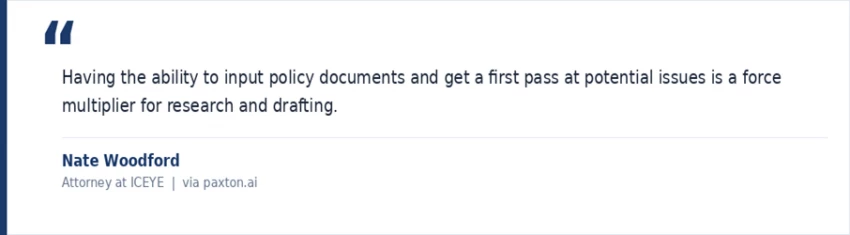
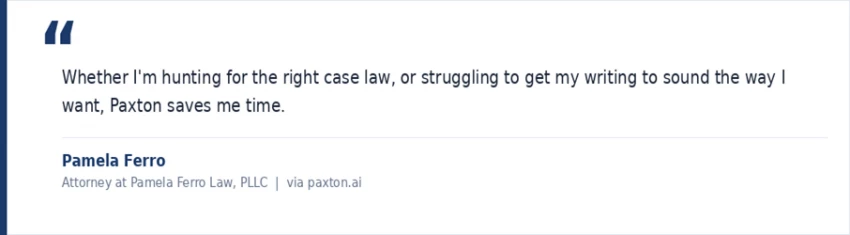
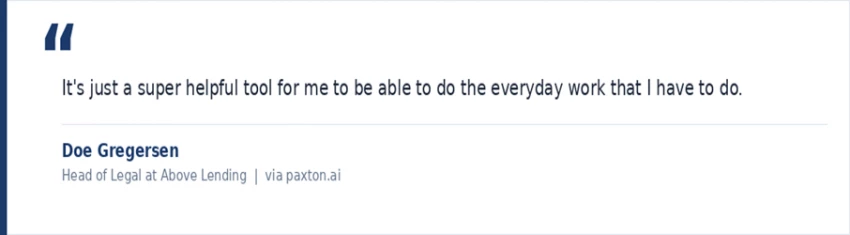
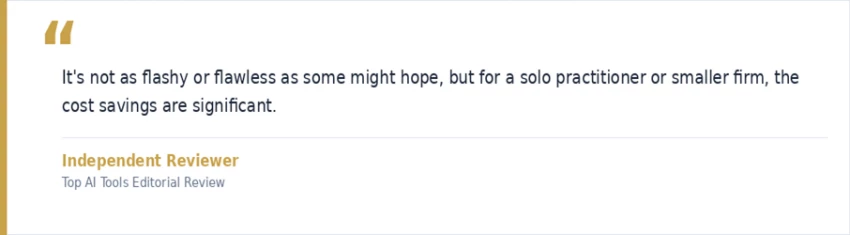
The pattern across all four is consistent. Nobody is calling Paxton a magic bullet. They are calling it a useful starting point that saves real time on the repetitive parts of legal work. After a week of using it myself, that is exactly how I would describe it.
If you skimmed everything above and want a clean summary, here is what Paxton says the platform does. Every claim below maps to documentation on paxton.ai or independent coverage.
| Capability | What Paxton officially says it does |
|---|---|
| Medical Chronologies | Converts messy or scanned medical records into a structured, downloadable Excel timeline. |
| Document Analysis | Upload contracts and briefs. Paxton extracts clauses, flags risks, and links every summary back to the source paragraph. |
| Quick-Start Drafting | First drafts of motions, contracts, demand letters, memos, and client emails with editable text and live citations. |
| Contextual Research | Coverage across U.S. federal law, statutes, regulations, and case law in all 50 states. |
| AI Citator | Flags whether a cited case is still good law. Patent-pending, scored 94% on Casehold. |
| Confidence Indicator | Each AI response gets a confidence score so attorneys can decide where extra verification is needed. |
| Medical Billing Summaries | Pulls billing line items out of medical files and totals them up for demand letters. |
| Word Add-in | Draft and revise inside Microsoft Word without switching tabs. |
| Security | SOC 2 compliant, ISO 27001 certified, HIPAA aligned. Files are not used to train models. |
Paxton's pricing has changed substantially over the last year. Here is what it actually costs right now, from paxton.ai/pricing.
| Plan | Monthly | Annual (per user) | Trial |
|---|---|---|---|
| Individual | $499 / user | $2,999 (saves 50%) | 7 days, no card |
| Enterprise | Custom quote | Volume-based | Sales-assisted |
$499 per user per month is real money. Whether it is the right call depends on how much you would actually use it. Here is the math worth running before you subscribe.
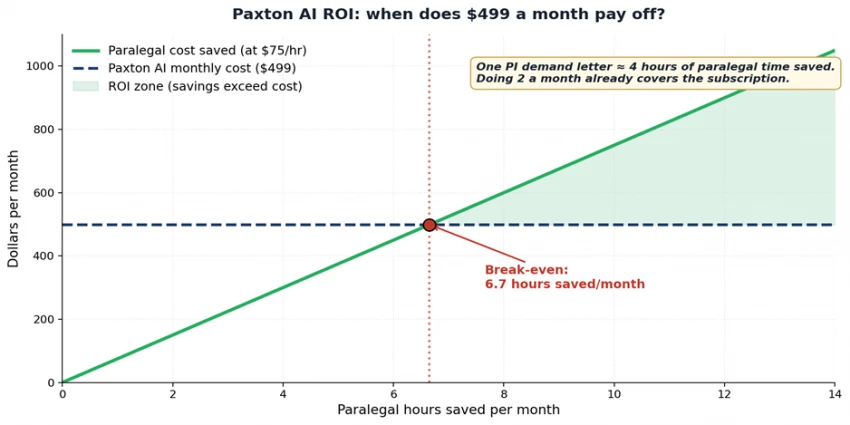
Break-even sits at about 6.7 paralegal hours saved per month. Two PI demand letters cover the cost.
If you would only open the tool a few times a month, even the annual price does not pencil out. If you do volume work, the math reverses fast. The seven-day free trial exists precisely so you can figure out which bucket you are in before paying anything. Use it.
Paxton is one of the more thoughtful and transparent legal AI tools on the market. The accuracy benchmarks are public. The source citations are there. The security posture is solid for everything short of the most regulated workloads. The feature set is built around how lawyers actually work.
It is not right for every attorney. If your firm already pays for Westlaw plus CoCounsel, you have what you need. If you practice primarily outside the United States, look elsewhere. If you would only use an AI assistant occasionally, the pricing does not justify the commitment.
But if you are a solo or small-firm attorney doing real volumes of drafting, document review, or personal injury work, and you have been waiting for a legal AI that takes accuracy seriously, Paxton has earned a look.
Take the seven-day trial seriously. Upload a real document. Try a real research question. Watch the citation links. That, more than anything written here, is how you will know.

New Claude Model Targets Agentic AI WorkflowsAnthropic has launched Claude Sonne...
Samuel Osei3 months ago

Gemini’s Image Tools Get a Wider RolloutGoogle is expanding access to Gemini’s p...
Alexander Hughes3 months ago

Two AI video generators, two very different first days. I ran PixVerse through i...
Alexander Hughes3 months ago

Two of the most talked-about AI chat platforms. I opened both, picked a characte...
Alexander Hughes3 months ago

The two-minute versionIf you only read one thing, read this. The rest of the doc...
Alexander Hughes3 months ago

Why Seedance 2.5 mattersSeedance 2.5 is the latest release in ByteDance’s Seedan...
Alexander Hughes3 months ago
Discussion