Quick VERDICT 3.9 out of 5 ★★★★☆ Fast, friendly, and genuinely useful for everyday photo tasks. Not a pro studio replacement, but a smart shortcut for most people. |
BEST FOR Quick headshots, fun face swaps, rescuing old photos | PRICE Free tier available; paid from ~$9.99/mo | SKIP IF You need commercial-grade or print-quality output |
I had three photos sitting on my phone for months. One was a slightly blurry portrait I wanted to use as a LinkedIn profile photo but never got around to fixing. The second was a faded scan of a family photo from the 1980s. The third was a random selfie I wanted to drop into a funny meme for a group chat.
Instead of downloading three separate apps, I came across Pica AI, which promised to handle all three jobs from one place. I decided to spend a full week putting every tool through real-world tests with actual photos rather than curated demo images.
This is everything I found, written in the order I discovered it.
WHAT IS PICA AI? THE COMPLETE OVERVIEW |
Pica AI is an all-in-one AI photo editing platform that launched in 2023. It is developed by a Hong Kong-based studio listed on the App Store as WEGITAL HK LIMITED. The platform bundles four core tools into a single interface: a Photo Enhancer, an Old Photo Restorer, a Face Swap tool, and an AI Headshot generator called Headshot+.
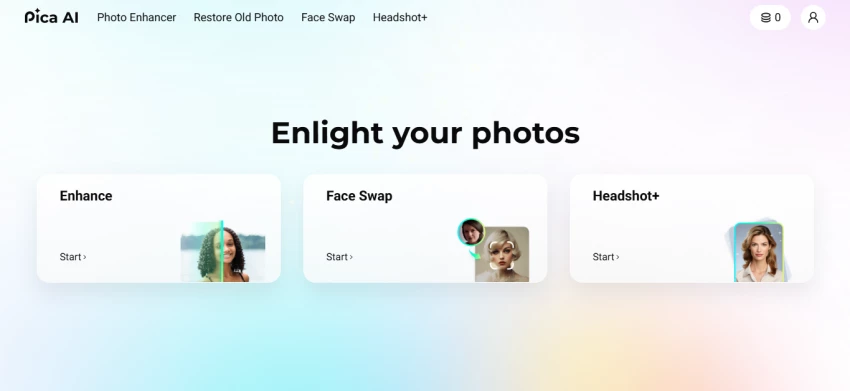
The platform is accessible through a web browser at pica-ai.com and through dedicated iOS and Android apps. Signing up takes under a minute using a Google or Discord account, and the free tier requires no credit card.
The design philosophy is deliberately simple. No layers. No masking. No manual slider adjustments. You upload a photo, let the AI process it, and download the result. That makes it much less powerful than professional tools like Adobe Lightroom or Photoshop, but considerably more accessible for people who just want a quick and solid result.
| Detail | What I Found |
| Product Name | Pica AI |
| Launched | 2023 |
| Developer | WEGITAL HK LIMITED (Hong Kong) |
| Available Platforms | Web (pica-ai.com), iOS, Android |
| Sign-Up Method | Google or Discord; no card needed for free tier |
| Core Tools | Photo Enhancer, Old Photo Restore, Face Swap, AI Headshot (Headshot+) |
| Enhancement Engine | Upgraded to Artguru on October 31, 2025 |
| App Store Rating | 4.5 stars from approximately 835 ratings (April 2026) |
| Free Plan | Yes, with watermarked output and limited credits |
| Paid Plans Start From | Approximately $9.99 per month (verify on official site) |
I did not approach this as a professional photo editor looking for Photoshop-level control. I approached it as a regular person with real photos and normal expectations. That framing matters, because Pica AI is not built for precision work. It is built for people who want a noticeably better result without spending time learning software.
| Test | Input Image | What I Checked |
| Test 1: Photo Enhancer | A slightly blurry, low-resolution portrait taken on a phone camera in average indoor lighting | Sharpness improvement, skin detail, background clarity, overall usability |
| Test 2: Old Photo Restore | A scanned print from the 1980s with fading and light surface scratches | Colour recovery, scratch removal, grain reduction, face detail |
| Test 3: Face Swap | A clear, front-facing selfie with even lighting and no accessories | Face alignment, skin tone matching, lighting consistency, edge blending |
| Test 4: AI Headshot | Ten casual selfies taken in different rooms over two days | Likeness accuracy, professional appearance, background quality, clothing realism |
IMPORTANT CONTEXT All tests used real photos, not marketing demo images. Results will vary depending on the quality and composition of your own photos. I note this clearly throughout the section below. |
Tool By Tool Breakdown |
The photo enhancer is the tool I used first and came away most impressed by. On October 31, 2025, Pica AI migrated its enhancer to run on the Artguru engine, and the difference is visible. This is not a minor backend tweak. The results are noticeably sharper and more detailed than what earlier reviews from 2024 describe.

I uploaded a blurry indoor portrait and clicked the enhance button. The processing took roughly 15 seconds. The result had cleaner skin definition, improved background contrast, and edges that looked more distinct without looking artificially sharpened.
The tool also claims to upscale images toward 4K resolution. In practice, the upscaling holds up well for screen use. For large print formats, I would still use a dedicated upscaling tool. But for social media, LinkedIn, or email, the enhanced output was ready to use with no further editing.
| What I Tested | My Finding |
| Sharpness on soft portraits | Clear improvement; indoor portrait went from usable to strong |
| Skin texture preservation | Good from a distance; some over-smoothing visible at 100% zoom |
| Hair detail | Sharper overall; occasional artificial-looking fine strands |
| Background clarity | Better contrast and detail in most tests |
| Low-light photos | Mixed; noise was reduced but shadow detail was inconsistent |
| Very blurry or motion-blurred shots | Limited improvement; AI cannot recover detail that was never captured |
| Upscaling quality | Works well for digital use; not a replacement for print-grade upscalers |
| Processing speed | Approximately 10 to 20 seconds per image |
MY HONEST TAKE ON THE ENHANCER If your photo is slightly soft, low in contrast, or taken in ordinary indoor conditions, Pica AI Enhance will give you a noticeably better result with zero effort. If the photo is extremely blurry, heavily compressed, or shot in very poor light, the tool improves the surface but cannot rescue the underlying detail. Sharper edges on a blurry smudge still produces a blurry smudge, just with cleaner borders. |
The restoration tool handles fading, colour loss, and surface scratches on older printed photos. For my test I used a scanned family photo from the 1980s with moderate fading and a few light surface marks.

The results were encouraging for that type of input. Colour saturation came back, the skin tones looked more natural, and the lighter scratches disappeared entirely. The photo went from something I would have hesitated to share to something I was happy to print for a family album.
Where the tool struggles is with more severe damage. Photos with heavy creasing, torn areas, water damage, or very dense scratch patterns produce inconsistent results. In some cases, the AI fills in missing areas with plausible-looking but clearly generated content. That works for background fills but can look strange on faces.
| Damage Type | My Result |
| Light fading and colour loss | Strong recovery; colours came back with good accuracy |
| Minor surface scratches | Removed cleanly in most cases |
| Moderate yellowing | Significantly reduced; white areas looked natural again |
| Heavy creasing or tears | Inconsistent; AI fills gaps but results vary |
| Water damage | Limited success; some smearing in the reconstructed areas |
| Face detail in old prints | Generally preserved; check closely before printing large |
| Black and white photos | Handled well; optional colourisation was decent but not perfect |
| Processing time | Slightly longer than the enhancer; typically 20 to 35 seconds |
The face swap tool is where most people come to Pica AI for the first time, and it is the feature with the widest gap between ideal conditions and real-world outcomes.

I tested a clean, front-facing selfie in even lighting. The result was solid. My expression transferred cleanly, skin tone matched without obvious banding, and the edges around the hairline blended naturally. Viewed at normal size it was convincing enough for a meme or a creative social post.
When I introduced variables, the quality dropped. A photo with sunglasses caused the tool to lose track of the eye area and produce a noticeably blended edge. A photo taken at a 45-degree angle came out with a slightly warped cheek and unnatural ear placement. These are known limitations across most AI face swap tools, but they matter if your source photos are not perfectly composed.
It is also worth noting that multiple users in review threads have flagged that a 2025 update made face swaps look slightly more artificial than the 2024 version. I noticed this in edge cases rather than clean front-facing shots, but it is worth testing your specific photos before committing to a paid credit.
| Condition | My Finding |
| Front-facing, even lighting | Convincing result; expressions and skin tone transferred well |
| Profile or angled shots | Noticeable distortion at the cheek and ear edges |
| Sunglasses or obscured eyes | Blending errors around the eye area in most cases |
| Multiple faces in one image | Works but quality drops slightly with more faces |
| Video face swap | Available and functional; frame-to-frame consistency is good but not perfect |
| Processing speed | 10 to 25 seconds for photos; longer for videos depending on length |
| Free credits | Approximately 5 face swaps available on the free tier |
IMPORTANT NOTE ON RESPONSIBLE USE Face swap technology must only be used with photos you own or have explicit permission to use. Creating deceptive or misleading content using someone else's likeness is unethical and may be illegal depending on your location. Pica AI's terms of service prohibit misuse of the tool. |
The Headshot+ tool is arguably Pica AI's most commercially interesting feature in 2026. The concept is straightforward: you upload ten or more casual selfies, the AI analyses your facial features, and it generates a set of polished professional-looking portraits with studio lighting, clean backgrounds, and professional clothing.

The appeal is obvious. A professional headshot session with a photographer typically costs between $150 and $400. Headshot+ delivers something that looks close enough for most professional profiles at a fraction of that cost and with no scheduling required.
My results from ten selfies taken in two different rooms were mixed in the right direction. About six of the twelve generated images were genuinely usable for a LinkedIn profile or a company website bio. Three looked slightly uncanny around the eyes or had collar placement that did not quite match my body shape. Three were clearly not good enough to use.
The key variable is the quality and variety of your input selfies. The tool performs best when you provide photos in different lighting conditions, slight angle variations, and no heavy filters or heavy shadows. The more reference material you give it, the more consistently it can reconstruct your face across different generated contexts.
| Factor | My Finding |
| Input photos used | 10 casual selfies taken across 2 rooms and 2 days |
| Total images generated | 12 headshot variants |
| Images I considered usable | 6 out of 12 |
| Likeness accuracy | Strong in most; occasional uncanny valley effect around eyes |
| Clothing and background | Professional-looking; some collar and shoulder inconsistencies |
| Best output style | Simple dark or light background with business casual clothing |
| Input quality impact | Very high; better selfies produce significantly better headshots |
| Cost vs photographer | Substantially cheaper at any paid tier |
PRO TIP: HOW TO GET THE BEST HEADSHOT RESULTS Upload at least 10 selfies. Vary the lighting between shots. Take some near a window with natural light and some in a well-lit indoor room. Avoid heavy filters, strong shadows across the face, or images where your face is partially covered. The AI needs multiple clean references to generate a consistent and realistic portrait. |
Pica AI's pricing structure is where things get slightly complicated. There is a genuine free tier that lets you test the tools before spending any money. Beyond that, pricing varies between the website and the mobile apps, and costs shift regularly. Always verify current prices on pica-ai.com before committing.
| Plan | Typical Price | What You Get |
| Free | $0 | Limited credits, watermarked output, approximately 5 free face swaps. Good for testing all four tools before buying. |
| Credit Packs | From approximately $3.99 (one-time) | Pay-as-you-go option. Useful if you only need occasional enhancements. Credits do not expire on some plans. |
| Monthly Plan | Approximately $9.99 per month | Removes watermarks, increases credit allocation, full access to all tools. Best for regular use. |
| Annual Plan | Approximately $59.99 per year | Equivalent to approximately $5 per month. Best value for ongoing users. Confirmed by third-party trackers. |
WATCH OUT: CREDIT TERMS AND IN-APP PRICING App Store and Google Play in-app prices can differ significantly from website prices. Some users have reported in-app purchase options as high as $39.99 for larger credit packs. Always check the active price before purchasing inside the mobile app. If a generated result disappoints and uses a credit, the refund process is not always straightforward. Credit use is confirmed before processing on the web version; confirm this is the case on the app version you are using before generating. |
Any tool that processes images of your face raises legitimate privacy questions. I read through Pica AI's published privacy policy and terms of service to provide an honest summary.
| Area | What the Policy States |
| Data collection | Account data and uploaded images are processed on their servers |
| Image storage | Images may be retained temporarily for processing and quality improvement |
| Face data | Used to run the face swap and headshot tools; not explicitly sold to third parties |
| Policy transparency | Standard terms; available on the official site before sign-up |
| Consent | By uploading, you agree to their processing terms |
| Recommendation | Review the privacy policy before uploading sensitive or high-resolution personal images |
My practical advice: Pica AI is not unusual in how it handles image data compared with similar consumer AI tools. That said, no tool in this category should be considered fully private. If you have concerns about biometric data storage, read the current privacy policy on pica-ai.com before uploading.
| Criterion | Score | My Take |
| Ease of Use | 4.6 / 5 | Beginner-friendly, zero learning curve |
| Output Quality | 3.8 / 5 | Good for casual use; not studio-grade |
| Value for Money | 3.3 / 5 | Free tier is generous; credits deplete fast |
| Processing Speed | 3.6 / 5 | Generally fast; occasional slowdowns |
| Privacy & Safety | 3.8 / 5 | Standard policy; review before uploading |
| Feature Range | 4.2 / 5 | Four solid tools covering most everyday needs |
Pros And Cons |
| PROS | CONS |
| ✓ Zero learning curve, works right away | ✗ Credits run out fast on the free plan |
| ✓ Artguru-powered enhancer delivers noticeably sharper results | ✗ In-app pricing differs from website pricing |
| ✓ Free tier lets you test before paying | ✗ Face swap struggles with sunglasses and sharp angles |
| ✓ One platform covers four common photo needs | ✗ No manual adjustment controls after generation |
| ✓ Available on web, iOS, and Android | ✗ Heavily damaged photos often disappoint |
| ✓ Face swap handles front-facing photos well | ✗ Some users report quality drop since 2025 update |
| ✓ AI headshots replace a $150 studio session | ✗ Refund process is not straightforward |
| ✓ Old photo restoration brings faded prints back to life | ✗ Output not suitable for licensed commercial use |
Who Should Use Pica AI (And Who Should Not) |
• People who want a quick LinkedIn or profile headshot without booking a photographer
• Anyone trying to rescue old family photos from fading, yellowing, or light damage
• Social media users who want sharper, cleaner images without editing software
• Content creators who want fun face swap content for memes or entertainment
• Budget-conscious users who need occasional photo fixes and do not want a subscription elsewhere
• Beginners who have never used photo editing software and want results immediately
• Professional photographers or designers who need manual precision and full control
• E-commerce sellers who need consistent, commercially licensed product photo edits
• Users who need print-quality output at large formats
• Anyone who requires a guaranteed refund process when a generated result falls short
• Users with heavily damaged photos who expect complete reconstruction
Several alternatives are worth considering depending on your specific need. No single tool wins across every category, but the table below summarises where Pica AI sits relative to comparable options.
| Tool | Best For | Trade-off |
| Pica AI | Best all-in-one casual tool | Balanced but no specialist depth |
| Remini | Best for portrait and face sharpening specifically | Narrower feature set than Pica AI |
| Reface / Remaker | Best dedicated face swap tools | No enhancement or headshot features |
| Adobe Firefly | Best for professional-grade AI image work | Higher learning curve; requires Adobe account |
| VidMage | Best for video face swap quality | Web and Mac app; stronger for video than photos |
| AI Headshot (dedicated) | Best for maximum headshot quality | Only does headshots; no other tools |
Final Verdict |
Pica AI does what it promises, as long as you understand what that promise actually is. It is not a professional editing suite. It is a fast, friendly, no-skill-required platform that takes an ordinary photo and gives you back a noticeably better version of it within seconds.
The Artguru-powered enhancer is the standout feature in 2026. It delivers reliably sharper results than the 2024 version and covers the most common photo problem most people encounter. The old photo restore tool is genuinely useful for light-to-moderate damage and would have taken me hours to replicate manually in Photoshop. The face swap works well on clean source photos. The AI headshots are good enough to replace a studio session for most professional profile purposes.
The frustrations are real: the credit system requires careful attention, in-app pricing differs from the website, face swaps degrade on imperfect inputs, and heavily damaged photos often disappoint. But none of those issues are unique to Pica AI, and none of them outweigh the core value proposition for the target audience.
If you have casual photo tasks and want quick, good-enough results without learning any software, Pica AI earns its place on your phone. If you have professional standards and precise requirements, your money is better spent on dedicated specialist tools.
FINAL RECOMMENDATION Start with the free tier. Test it on a photo you actually care about. If the result is good enough for your needs, the monthly plan at approximately $9.99 is fair value for regular users. If your photo problems are more complex or your quality standards are higher, explore dedicated tools for each task. |

New Claude Model Targets Agentic AI WorkflowsAnthropic has launched Claude Sonne...
Samuel Osei1 month ago

The Quick verdictInSnoop is a free, browser-based tool that promises to let you...
Alexander Hughes1 month ago

Gemini’s Image Tools Get a Wider RolloutGoogle is expanding access to Gemini’s p...
Alexander Hughes1 month ago

Two AI video generators, two very different first days. I ran PixVerse through i...
Alexander Hughes1 month ago

Two of the most talked-about AI chat platforms. I opened both, picked a characte...
Alexander Hughes1 month ago

The two-minute versionIf you only read one thing, read this. The rest of the doc...
Alexander Hughes1 month ago
Discussion