It started with the reviews. Every time I went looking for a face swap tool this year, the same two names came back, Pica AI and DeepSwap, both with people swearing they were the best thing going. Pica sits at 4.5 stars across 835 App Store ratings, with reviewers calling it the easiest swap app they have used. DeepSwap claims more than 150 million users and a long wall of glowing G2 write-ups about its video swaps.
Plenty of those reviews are real and positive. A few are not. So instead of trusting the star count, I gave each tool the same small job: take a face, swap it, look at the result, and find out what it costs me to get there. The two handled that request in completely different ways, and most of the gap showed up before either one produced a single pixel.
The quick identity check
Same trick, opposite shapes
A two-second read on who each tool is before the test starts. The format they output, and the job they are built around, is where this whole comparison lives.
Pica AI
DeepSwap
Category
Photo and face-swap app
Video face-swap web tool
Primary output
Still image (also swapped video)
Video clip (also photo and GIF)
Free path that works
Yes, about 4 credits to try, watermarked
No usable free swap in my test
Finish a free swap?
Yes
No, paywall hit first
Max video
Short clips, photo is the focus
Up to 30 minutes on premium
Multi-face
Yes, multi-face swap
Yes, up to 6 faces in one clip
Realism
Decent on stills, can read “AI”
Strong on well-lit faces, ~30% can look off
Learning curve
Near zero, one tap
Near zero, but credits need planning
Watch out for
Stingy free tier, watermark, tiny review pool
No free test, credits burn fast, support gripes
Reviewer score
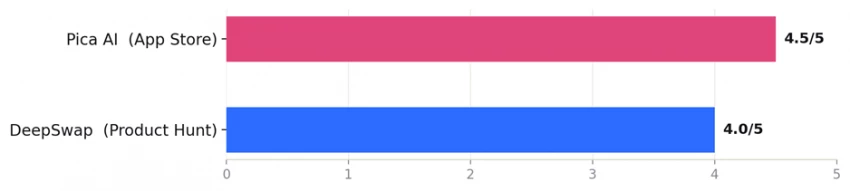
4.5/5 App Store, 835 ratings
~4.0/5 Product Hunt, strong on G2
Where each one wins
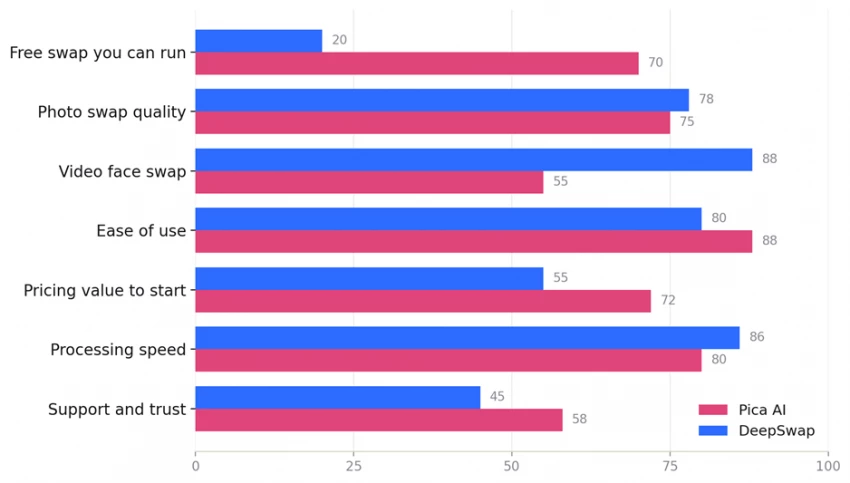
Scored across seven things that matter
Same dimensions, marked from my own run plus what testers and store reviews reported through 2026. A directional read, not a lab benchmark.
Scores 0 to 100. My read, combining this hands-on test with aggregated 2026 reviews.
The brief was the same for both: a plain face swap I could look at and judge, done as cheaply as possible. I started with DeepSwap because its homepage made the boldest claim, then ran Pica AI. Below is every screen, in order, with my note after each one.
DeepSwap, step by step
STEP 01 The landing page
What I saw. The headline reads “Professional Video Face Swap Tool Online,” a sample clip with the face-detection guide lines drawn across it, and one blue button: Faceswap now. A “Choose your plan, up to 50% off” bar runs a live countdown across the top. I clicked Faceswap now to start.
◆ MY OBSERVATION
Clean page, zero confusion about what this is. It is a video tool and it says so. But the discount countdown is already ticking before I have touched a single feature. The selling starts on screen one, which set my expectations for the rest of the visit.
STEP 02 The wall
What I saw. It asked me to log in first, which is normal. I made an account and landed on the upload screen (original video, photo or GIF, up to a 45 minute video, 1.5 GB, five files at a time). The moment I went to add my image, this popup landed: “Important reminder. Insufficient credits! Please purchase more credits.” Two buttons, Not now and Buy credits.
◆ MY OBSERVATION
This is the moment that decided the whole test for me. Brand new account, nothing generated, nothing used, and it already says I am out of credits. There is no real free swap to run here.
The upload screen behind the popup looks capable, with generous file limits, but none of that matters when the tool will not let me finish one test without paying. I could not rate the output quality, because I was never shown any output.
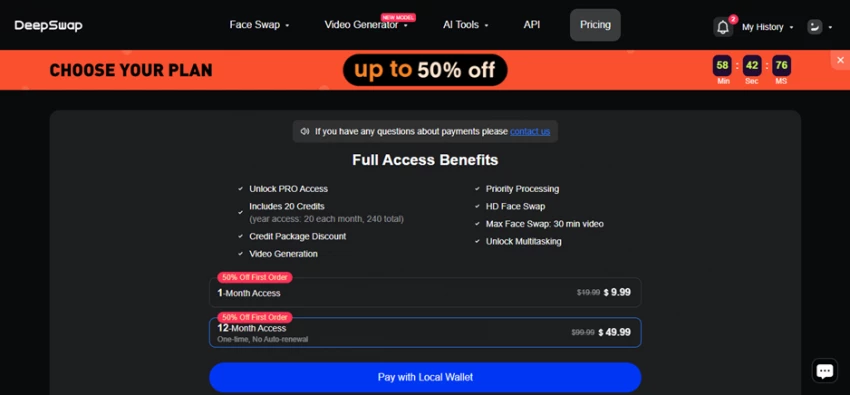
STEP 03 The pricing page
What I saw. Full Access Benefits: PRO access, 20 credits (20 each month, 240 over a year), credit package discount, video generation, priority processing, HD face swap, a 30 minute max video swap, and multitasking. Two plans, both flagged 50% off the first order: 1-Month at $9.99 (from $19.99) and 12-Month at $49.99 (from $99.99, one time, no auto-renewal).
◆ MY OBSERVATION
The offer itself is fair for what you get if you swap video a lot. The catch hides in that “20 credits” line. DeepSwap charges roughly one credit per 15 seconds of video, so 20 credits is about five minutes of video swap a month. A couple of longer clips and the month is gone.
Stack that on top of the countdown timer and the read is clear. DeepSwap is built to turn a curious visitor into a paying one on day one, not to let you test first and decide.
A note for honesty: I never saw a DeepSwap output. So every quality figure I cite for it comes from testers and verified store reviews, not my own generation, because the paywall stopped me before the first swap.
Pica AI, step by step
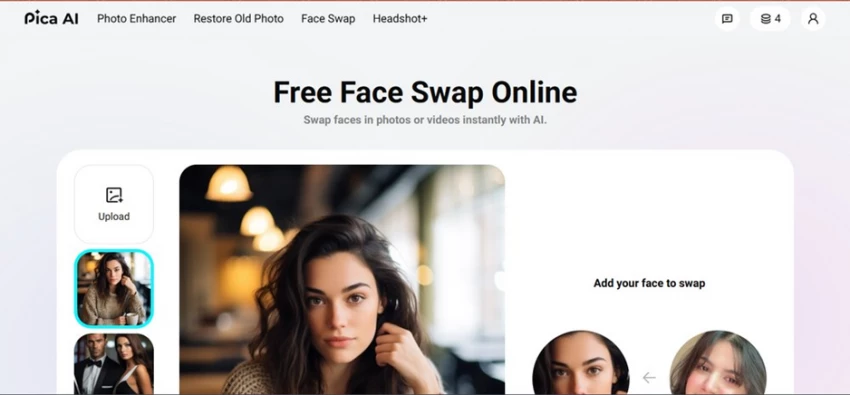
STEP 01 Pick the target, add a face
What I saw. Pica’s Face Swap is a two-box screen. Target scene on the left, “add your face to swap” on the right. No prompt, no settings, no menu to learn, and only four free credits sitting in the corner. I dropped in the photo, added the face, and pressed swap.
◆ MY OBSERVATION
This is what a try-before-you-buy flow actually looks like. It let me start on the free credits instead of stopping me at the door. The whole thing took seconds and asked nothing of me up front.
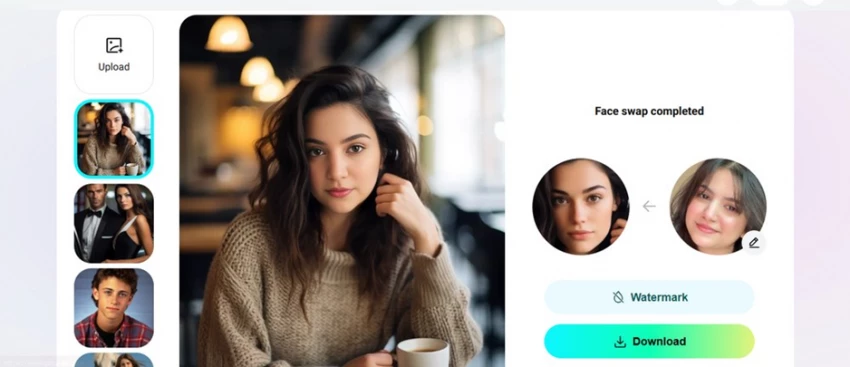
STEP 02 Face swap completed
What I saw. “Face swap completed.” The new face is blended onto the original body and lighting, with watermark and download options sitting underneath.
◆ MY OBSERVATION
It did the job, fast, with the face landing on the body correctly. The blend is fine. It is not flawless though. The result reads a little “AI,” meaning the swapped face does not fully feel like the same person who belongs in that photo. Good enough for a profile picture or a laugh in a group chat. Not good enough to fool anyone paying attention.
That matches what long-time users report: a recent update left many feeling Pica’s swaps now look more artificial than the older results did.
What the test actually showed
The clearest result has nothing to do with which face looked better. It is that only one of these tools let me reach a result at all. Pica handed me a finished swap on free credits and let me judge it. DeepSwap showed me a capable upload screen and a polished pricing page, and put a paywall between me and my first output.
That does not make DeepSwap a weak engine. By every account it is a strong video swapper, which is a harder and pricier job than Pica’s quick photo swap. It does mean the two ask for very different leaps of faith. Pica says try it, then pay if you like it. DeepSwap says pay, then find out.
What real users say
The reviews that sent me here in the first place
My handful of screens is one data point. Here are real reviews pulled from app stores, G2, Product Hunt and independent 2026 tests, paraphrased, the good and the bad. This is the praise that made me try both, plus the complaints that kept me honest.
★★★★★
I have tried a lot of face swap tools and this is the best one for video. It holds up in tricky scenes, closed eyes, an open mouth, even someone eating. The new HD face option made it my go-to. The only knock is the price.
Paraphrased · DeepSwap · G2 verified review, 2026
★★★★★
It really sharpens up my photos. I use it to fix shots where the expression is a bit off, and the swap looks more natural than just running a beautify filter. Easy recommend.
The speed shocked me, a one-minute video came back in about ten seconds. But roughly a third of my swaps looked off, and the quality depended on how close the two face shapes were.
I bought it for some fun edits and it told me I had used my monthly credits before I had even published anything, then pushed me to pay more. I asked for a refund and got a week of run-around.
Single-person swaps blend naturally and finish in seconds. It is the most beginner-friendly one I have used, and the photo enhancer does not over-sharpen the way others do.
Paraphrased · Pica AI · Apple App Store, 2026
★★★☆☆
I loved this app, but a recent update made the swaps look more artificial than they used to. The older results felt more realistic. Hoping they bring that back.
Paraphrased · Pica AI · Apple App Store, 2026
Pica AI
4.5 / 5 · Apple App Store · 835 ratings · 500k+ downloads
+ Single-person photo swaps blend naturally and finish in seconds
+ Genuinely beginner friendly, and the photo enhancer avoids over-sharpening
– Long-time users feel a recent update made swaps look more artificial
– Free tier is stingy at four credits and watermarks everything
– Trustpilot pool is tiny, with billing and support complaints
+ Fast cloud processing, a one-minute video swap in around ten seconds for some testers
+ Real video muscle: up to 30 minute clips, up to 6 faces, HD and 4K output
– No usable free swap, the credit wall hits before you can test
– 20 credits a month burns fast, roughly five minutes of video
– Repeated reports of slow support, hard-to-cancel billing, and an old privacy policy
Reviewer scorecard. Different sources, so read them as separate snapshots, not a head-to-head score. Both tools are well liked inside their own lane.
The money, side by side
Both start near ten dollars, you buy different things
Pica AI
DeepSwap
Free to start
~4 credits, works
Blocked in my test
Entry price
~$5.99 and up
$9.99 / month (first order)
Yearly
Up to ~$59.99 by plan
$49.99 one time, no auto-renewal
Credits
Credit-based, photo first
20 / month (240 / year)
Video cost
Short clips, not the focus
~1 credit per 15 sec of video
What that means
Cheap to start, cheap to fail
Pays for long, multi-face video
The honest framing: Pica is cheaper to start and cheaper to fail with, because failing is free. DeepSwap costs more to even begin, but its credits buy you something Pica is not really built for, which is long video with several faces in frame.
My verdict
Stop asking which is better. Ask which job you have.
If your job is a still image, a profile picture, a meme, a quick group-photo fix, and you want to see the result before you spend anything, Pica AI is the easy pick. It is not perfect and it can look a touch artificial, but it let me run the test and decide for myself, which is the entire point of a free trial.
If your job is video, especially longer clips or scenes with several faces, DeepSwap is the stronger engine, and most of those glowing reviews back that up. Just walk in knowing two things. You will pay before you see a single output, and your 20 monthly credits run out faster than you expect.
Pica AI
7.5 /10
Fast, friendly, free to try, a little “AI” on close inspection. The only one that let me finish my test.
DeepSwap
7.0 /10
Powerful video swaps and quick rendering, dragged down by a hard paywall and a credit budget that empties fast.
Reach for Pica AI when
You want a still image, not a clip
You want to test free before paying
You are working from your phone
You are fixing or enhancing an existing photo
You want one tap and zero learning
Reach for DeepSwap when
You need a video face swap, up to 30 minutes
You need several faces in one clip, up to 6
You want HD or 4K output and will pay for it
You want a browser tool with no app to install
You can plan credits so they do not run dry
For my specific test, a simple swap I wanted to see and judge cheaply, Pica won by default, because it was the only one that let me finish. For a creator who already knows they need 20 minutes of clean video swap with four faces in frame, that result flips and DeepSwap earns its price.
My personal call: if you are only going to keep one and you mostly post photos, get Pica AI. If you live in video and have a budget, DeepSwap. The tool I would keep open depends entirely on whether I am making a picture or a clip. And the one thing I will not forgive in a hurry is being asked to pay before I was allowed to try.








Discussion