Pica AI and Pika AI get mixed up constantly. They share four letters and almost nothing else. So I ran both through a real task, using the same photo of the same girl with the same goal, and watched them go in completely different directions. Here's exactly what happened, what real reviewers say, and which one you actually want.
Pica AI is an AI photo and face-swap editor. You give it a picture, it hands back an edited still image. Built for face swaps, AI headshots, and photo cleanup. (Output: image)
Pika AI is an AI video generator (Pika Labs). You give it a prompt or photo, it animates a short video clip. Built for motion, effects, and TikTok-style content. (Output: video)
The whole confusion comes down to a single consonant: a c versus a k. But under the hood they're built by different teams, for different jobs, with different outputs. Here's the quick identity check before we get into the test.
Pica AI AI photo and face-swap suite
| Pika AI AI video generator · Pika Labs
|
| Pica AI | Pika AI | |
| Category | Photo / face-swap editor | Video generator |
| Primary output | Image | Video clip |
| Engine | Face-detect + generative paste | Pika 2.5 diffusion video model |
| Keeps your subject? | Mostly, swaps face onto the body | No, re-generates the whole scene |
| Realism | Decent for stills, can look “AI” | Stylized, not photorealistic |
| Signature trick | One-click face swap | Pikaffects (melt, explode, inflate) |
| Learning curve | Near zero | Near zero |
| Watch out for | Watermark on free, few Trustpilot reviews | Failed renders still burn credits |
| Reviewer score | 4.5/5 App Store (835 ratings) | ~4.3/5 independent test |
Same six dimensions, scored on how each tool performed in my test and across aggregated reviews. Notice how cleanly they trade places: there's barely any overlap, which is the whole point.
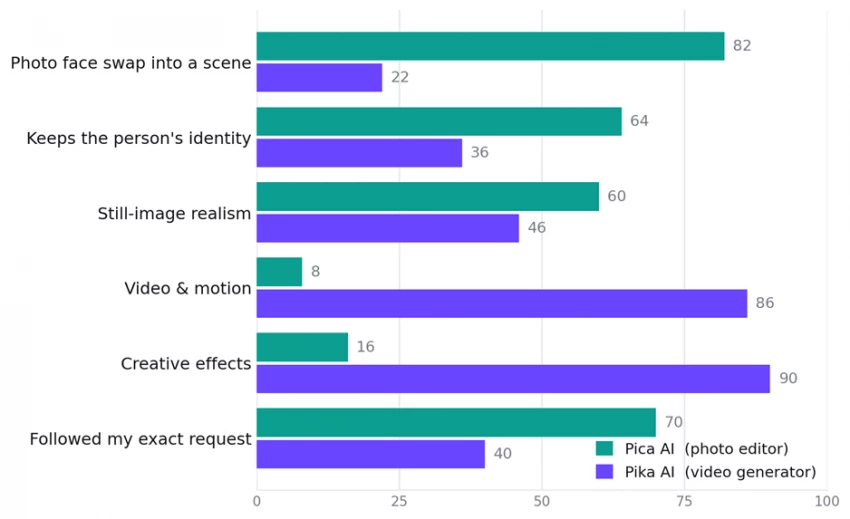
Relative scores (0 to 100), my read from this hands-on test combined with aggregated reviews. Not a lab benchmark, just a directional picture of where each tool's strength sits.
Here's the setup: I took one portrait of a girl and gave each tool the closest version of the same brief, which was to get her looking at the camera with a small smile, sitting in a cafe with her hands on the table. Pica AI doesn't take a text prompt for swaps, so there I tested its Face Swap directly. Pika AI is prompt-driven, so I typed the scene out. Below is every step, exactly as it happened, with my notes after each one.
Pica's Face Swap is as simple as it looks: pick the target photo (the woman in the cafe), then add the face you want dropped in. No prompt, no settings, just upload, add face, swap.
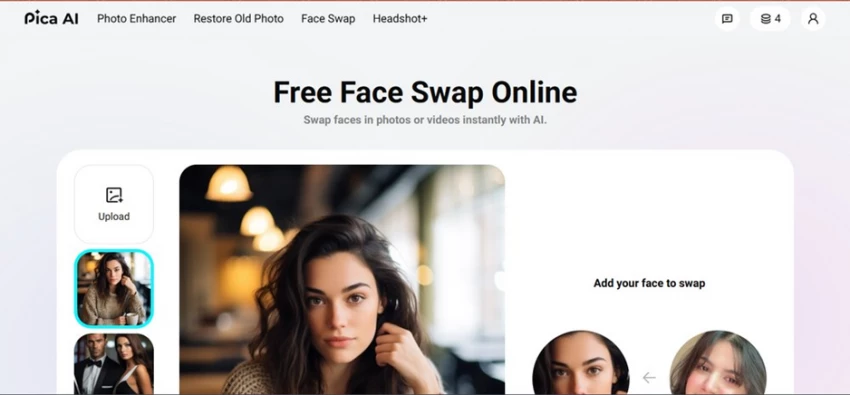
Step 1. Pica AI's Face Swap page. Target scene on the left, “Add your face to swap” on the right. Clean, one-job interface, and only 4 free credits in the corner.
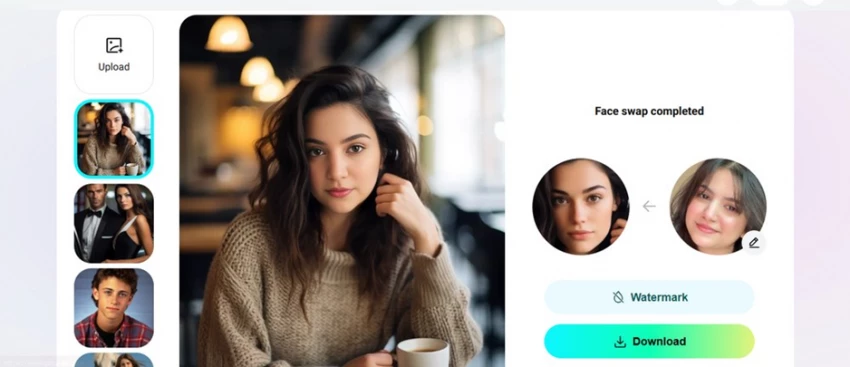
Step 2. “Face swap completed.” The new face is blended onto the original body and lighting, with Watermark and Download options below.
◆ My observation
It did the basic job, fast and no fuss, with the face landing on the body. But it's not quite what I wanted. The blend is fine, yet the result reads a touch “AI”: the swapped face doesn't fully feel like the same person living in that photo. Good enough for a laugh or a profile pic, not good enough to fool anyone.
Reality check: this matches what reviewers report. Pica's swaps are quick and convincing on single, well-lit portraits, but a 2025 update left many long-time users feeling the output now looks more artificial than it used to.
Now the same subject, but Pika is prompt-driven, so I uploaded her photo and described the scene I wanted. Here's the exact prompt I gave it:
Prompt · Pika 2.5
create a image of this subject ive uploaded in which she is looking towards the camera with small smile while sitting in cafe and her hands on the table
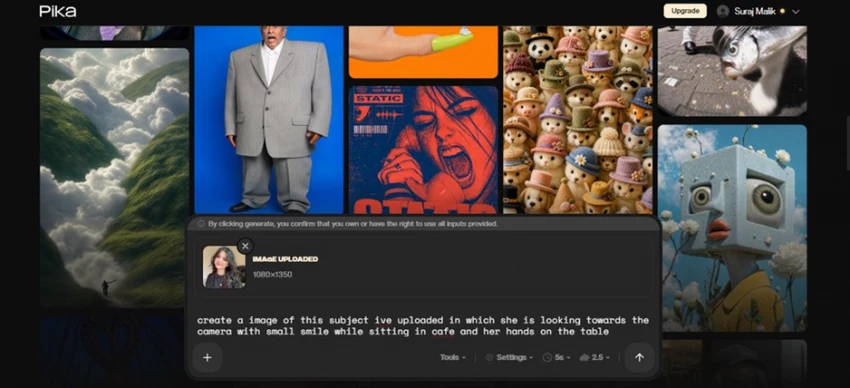
Step 1. Pika's prompt bar with the photo attached (1080 x 1350) and the brief typed out. Model set to Pika 2.5, 5-second length.
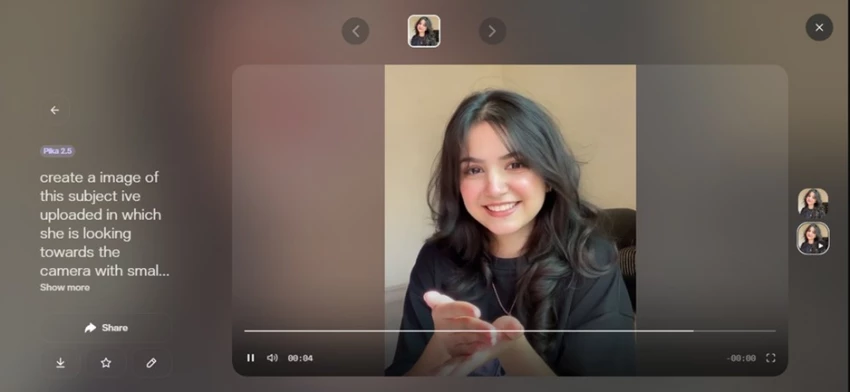
Step 2. The result: note the play controls and 00:04 timer. Pika returned a video, not a photo. It caught the smile and the vibe, but it's a different person in motion.
◆ My observation
Not what I expected. It only followed the smile and the general vision, and the rest drifted. The big surprise: it's a video, not a still. It grabbed the mood but lost the subject's actual face and the specific cafe setup I asked for.
In fairness to Pika, this isn't a bug. I asked an “image” from a tool whose entire job is making clips, so of course it animated something loosely inspired by the photo rather than editing the photo itself.
I figured maybe the wrong feature was the problem, so I switched to Pikaswaps and tried to just change the backdrop instead: keep her, swap the scene to a cafe. The instruction:
Pikaswaps · brush / describe
turn the overall background into cafe theme
reference image attached · “this image will replace the selected area”
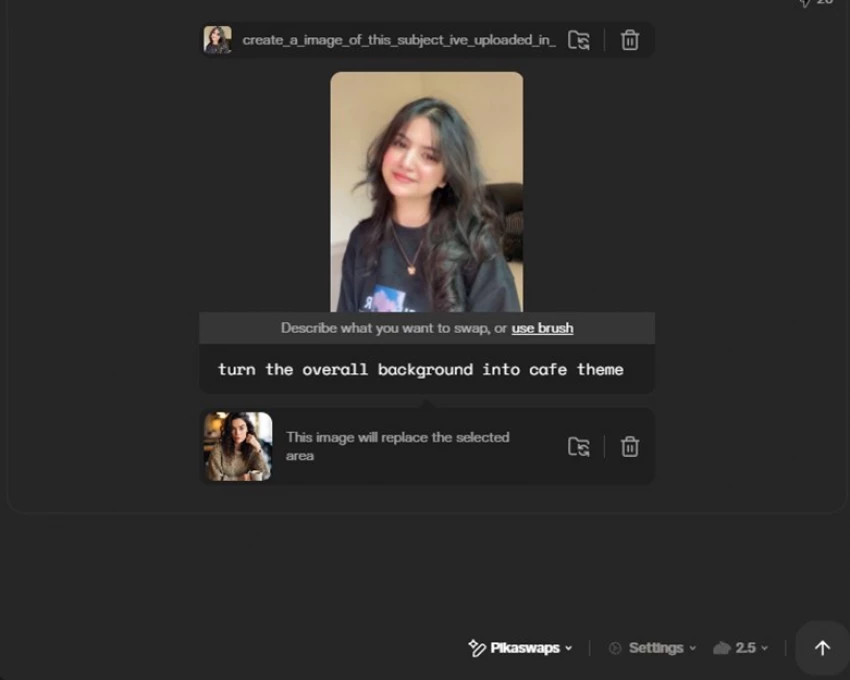
Step 1. Pikaswaps set up. Describe the swap, attach a replacement reference, let it re-render the region.
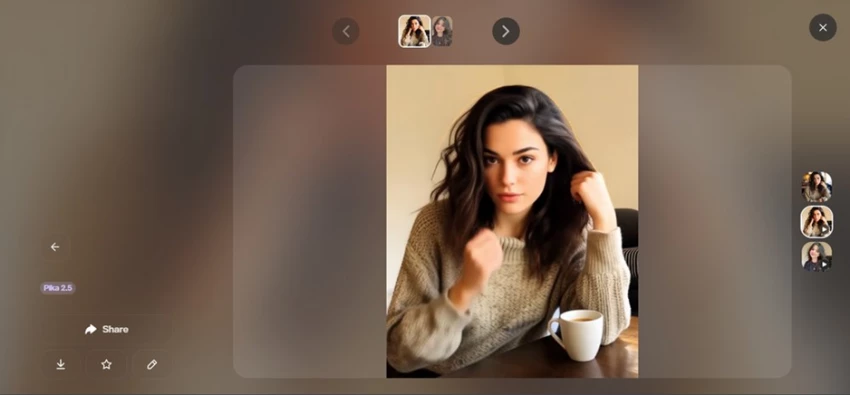
Step 2. The output (again a clip, top-right play icon). It didn't just change the background. It re-imagined the whole shot: new sweater, new framing, a coffee cup that wasn't there.
◆ My observation
Very disappointing. It turned the picture into something else entirely rather than just restyling the background. Different outfit, different pose, different person. The one thing I asked to keep, which was her, is the thing it changed most.
Same root cause as Round 2: Pikaswaps is a video region-replacement tool that regenerates a scene. It was never going to do a precise, photo-editor-style background swap.
Both “failed,” because I was using a hammer to paint a wall.
Reading my three rounds back, the pattern is obvious. Pica did its job (a face swap) but only to the ceiling of what a casual swap tool can do. Pika did its job (generate a video), which is exactly why it kept ignoring the still-image, keep-the-person brief I had in my head.
So this wasn't really “Pica vs Pika.” It was a still-image task accidentally run through a photo editor and a video generator, and graded against an expectation only one category could ever meet. The honest takeaway: don't choose between them, choose the right one for the output you actually want.
My six generations are one data point. Here's how each tool lands across App Store ratings, Trustpilot, Reddit, and independent hands-on reviews published in 2026, the good and the gripes.
Pica AI 4.5 / 5 Apple App Store · 835 ratings · 500k+ downloads + Single-person photo swaps blend naturally and finish in seconds + Genuinely beginner-friendly; photo enhancer avoids over-sharpening – Many users feel a recent update made swaps look more artificial – Free tier is stingy (4 credits) and watermarks everything – Trustpilot pool is tiny (~6 reviews) with billing and support gripes A recurring App Store complaint: the new face swap looks “too AI” versus the older, more realistic results. Paraphrased, Apple App Store reviews, 2026 | Pika AI 4.3 / 5 Independent 2-week test · echoed on Trustpilot and Reddit + Among the fastest, most fun generators, with Pikaffects that are one of a kind + Generous free tier and a near-zero learning curve – Not photorealistic; weak at keeping a consistent identity – Short clips only, and failed renders still burn credits – Support widely described as slow; pricing climbs to $95/mo Reviewers sum it up as the “fastest and most fun” option, but really a short-form effects tool, not a do-everything video studio. Paraphrased, FluxNote, Future Stack and Amrytt, 2026 |
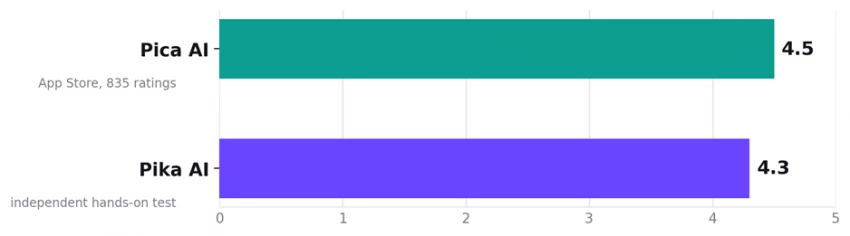
Heads-up: these come from different sources, so treat them as separate snapshots rather than a head-to-head score. Both tools are well-liked within their own lane. The friction is almost always pricing, credits, and support, not core quality.
Stop comparing them. Start matching the job.
After six generations, my honest read is that asking “Pica or Pika?” is the wrong question. It's like asking whether a camera or a camcorder is better. They overlap in name and almost nowhere else. For the specific thing I was chasing, a realistic still of this girl smiling in a cafe, neither nailed it: Pica was at least the right format but only casual-grade on realism, and Pika produced lovely motion of the wrong person. So for that exact brief, Pica gets closer, but a dedicated image-edit tool (or a better source face fed into Pica's swap) would beat both.
Where each genuinely shines, though, it's an easy call:
Reach for Pica AI when… you want a still image You need a quick face swap for a profile pic, meme, or group photo You're cleaning up, enhancing, or restoring an existing photo You want an “AI headshot” for socials and don't need print-perfect realism You value a one-click, zero-learning workflow | Reach for Pika AI when… you want a moving clip You're making short, punchy video for TikTok, Reels, or Shorts You want surreal effects: melt, explode, inflate (Pikaffects) You're animating a still into a 3 to 10s loop and don't need it to stay identical Speed and fun matter more than photoreal accuracy |
Pica 7.5 / 10 for its job: casual swaps, fast, a bit “AI”.
Pika 8.0 / 10 for its job: fun video, weak on identity.
Scored against what each tool is built to do, not against my mismatched still-image brief, which neither was the right pick for.
New Claude Model Targets Agentic AI WorkflowsAnthropic has launched Claude Sonne...
Samuel Osei1 month ago

The Quick verdictInSnoop is a free, browser-based tool that promises to let you...
Alexander Hughes1 month ago
Gemini’s Image Tools Get a Wider RolloutGoogle is expanding access to Gemini’s p...
Alexander Hughes1 month ago

Two AI video generators, two very different first days. I ran PixVerse through i...
Alexander Hughes1 month ago
Two of the most talked-about AI chat platforms. I opened both, picked a characte...
Alexander Hughes1 month ago

The two-minute versionIf you only read one thing, read this. The rest of the doc...
Alexander Hughes1 month ago
Discussion