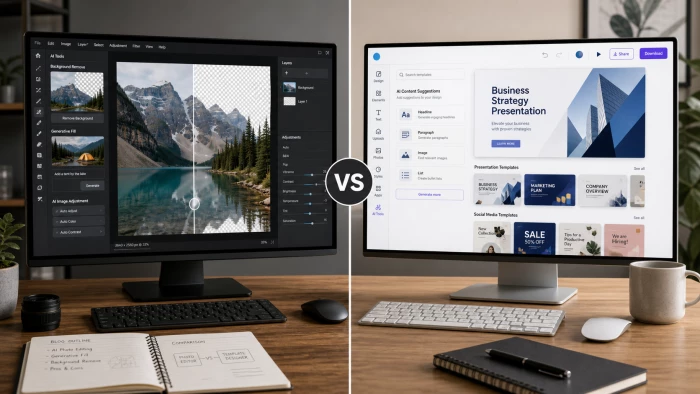
The race to design faster has reshaped the creative software market. Two platforms dominate the conversation among solo creators, small marketing teams, and agencies that produce dozens of visuals per week: Pixlr AI and Canva. Both promise speed. Both lean heavily on artificial intelligence. Yet the workflows they support are fundamentally different.
This comparison breaks down where each tool wins, where each falls short, and which one delivers the shortest path from blank canvas to finished asset. Every number cited reflects pricing and feature availability verified in 2026.
Pixlr AI is the faster tool for photo-driven edits, background removal, and single-image touch-ups. Canva is the faster tool for branded multi-asset campaigns, social media batches, and presentations that require templates.
The 10-second answer Pick Pixlr AI for raw editing speed and a lighter price tag. Pick Canva for template-first workflows, brand consistency, and team collaboration. |
Pixlr launched in 2008 as a browser-based Photoshop alternative and has since evolved into a multi-tool AI suite. The platform groups its products into four main editors:
• Pixlr X: quick-edit interface aimed at beginners and rapid social media production.
• Pixlr E: layer-based advanced editor for serious retouching, masking, and manipulation.
• Pixlr Designer: template-driven layout tool covering posters, ads, and animated graphics.
• Pixlr Express + Batch Editor: one-tap enhancements and bulk image processing.
The platform is built around AI editing rather than AI generation. Tools like Generative Fill, Generative Expand, AI Cutout, Backdrop, Face Swap, and Remove BG sit on top of a traditional editor, so generated content can be refined in the same tab using layers and adjustment tools.
Canva launched in 2013 with a single mission: make design accessible to non-designers. By early 2026 the platform had crossed 260 million active users across 190 countries, a scale no other design tool matches.
Its AI suite, branded Magic Studio, sits on top of an enormous template engine. Key Magic Studio features include:
• Magic Design: generates a full template based on a single uploaded image or prompt.
• Magic Write: inline AI copywriter for headlines, captions, and longer text blocks.
• Dream Lab / Text to Image: image generation directly inside the canvas.
• Magic Eraser, Magic Edit, Magic Expand: object removal, replacement, and outpainting tools.
• Magic Switch: converts one design into multiple formats and languages.
• Brand Kit: locks fonts, logos, and colors across an entire team.
Canva is template-first. The blank canvas is rarely the starting point. Most production work begins with one of millions of pre-built layouts and adapts from there.
Cost remains one of the sharpest differences between the two platforms. Pixlr undercuts Canva by a significant margin at almost every tier.
| Plan | Monthly | Annual (per month) | Key Allowance |
|---|---|---|---|
| Free | $0 | $0 | 20 AI credits, ads, watermarks on some exports |
| Plus | $2.49 | $1.49 | 80 AI credits, ad-free, basic exports |
| Premium | $9.99 | $6.49 | 1,000 AI credits, full template access |
| Team | $16.99 | $11.99 | Up to 5 users, shared assets |
| Plan | Monthly | Annual (per month) | Key Allowance |
|---|---|---|---|
| Free | $0 | $0 | 50 Magic Studio uses, 5 GB storage |
| Pro | $15.00 | $10.00 | 500 AI credits, 1 TB storage, Brand Kit |
| Teams | $30.00 | $10.00/user | 500 credits per user, 3-seat minimum |
| Enterprise | Custom | Custom | Unlimited credits, SSO, admin controls |
Cost takeaway Pixlr Premium ($6.49 annual) costs roughly 35% less than Canva Pro ($10 annual) and ships with double the AI credits. Canva justifies the premium with brand controls, collaboration, and template volume, three areas where Pixlr does not match. |
Both tools have invested heavily in generative AI since 2024. The feature lists overlap on surface, but the engineering philosophy differs.
| AI Capability | Pixlr AI | Canva (Magic Studio) |
|---|---|---|
| Background removal | Free, unlimited, no watermark | Pro only, unlimited |
| Generative fill | 1 credit per use | Counts as 1 Magic Studio use |
| Generative expand / outpaint | 2 credits per use | Counts as 1 Magic Studio use |
| Text-to-image | AI Image Generator (credit-based) | Dream Lab (credit-based) |
| AI face swap | Yes, native | Not available |
| AI copywriting | Limited | Magic Write (full-featured) |
| Template auto-generation | Limited | Magic Design (strong) |
| Resize to multiple formats | Manual | Magic Switch (one-click) |
| Brand voice / brand colors enforcement | Not available | Brand Kit (Pro and above) |
| Batch processing | Batch Editor (native) | Bulk Create (Pro and above) |
Pixlr leans into pixel-level AI: precise retouching, fills, and removals. Canva leans into structural AI: generating layouts, resizing entire campaigns, and enforcing brand rules across hundreds of files.
Speed is the single biggest reason creators switch tools. Browser-based editors live or die on load time, render lag, and export speed.
The chart below summarises performance across the core dimensions that affect daily workflow. Scores reflect aggregated reviewer testing across Capterra, Tekpon, ProudMarketer, and Fastlancer in early 2026.
| Metric | Pixlr | Pixlr Bar | Canva | Canva Bar |
|---|---|---|---|---|
| Editor load time | 9/10 | █████████░ | 6/10 | ██████░░░░ |
| Single-image edit speed | 9/10 | █████████░ | 7/10 | ███████░░░ |
| Background removal speed | 10/10 | ██████████ | 7/10 | ███████░░░ |
| Export / download speed | 8/10 | ████████░░ | 6/10 | ██████░░░░ |
| Template-based design speed | 6/10 | ██████░░░░ | 10/10 | ██████████ |
| Multi-asset campaign speed | 5/10 | █████░░░░░ | 10/10 | ██████████ |
| Performance on low-end laptops | 9/10 | █████████░ | 6/10 | ██████░░░░ |
| AI generation speed | 8/10 | ████████░░ | 7/10 | ███████░░░ |
Speed verdict Pixlr X consistently loads and exports faster across reviewer tests, including on Chromebooks and older hardware. Canva pulls ahead the moment the task involves multiple sizes, branded templates, or team review steps. |
Templates are where Canva built its empire and where Pixlr remains a step behind.
| Asset Library | Pixlr | Canva |
|---|---|---|
| Templates | 50,000+ (Designer) | Over 3 million |
| Stock photos and videos | 500,000+ assets | 100 million+ assets |
| Fonts | Hundreds | 3,000+ |
| Animated templates | Limited | Extensive |
| Format coverage | Social, posters, ads | Social, decks, docs, video, websites, T-shirts, mugs, and more |
| Niche industry templates | Few | Vast (real estate, healthcare, education, e-commerce) |
For creators who design from scratch, the template gap matters less. For marketers producing five Instagram sizes from one concept, it matters enormously.
Both platforms target non-designers, but their on-ramps feel different from the first click.
Pixlr X looks and behaves like a stripped-down Photoshop. Tools sit on the left, layers on the right, and menu options use familiar Adobe terminology. Anyone who has touched Photoshop will feel at home within minutes. True beginners may need a short tutorial to understand layers and selection tools.
Canva hides almost every advanced concept. Users pick a template, click elements, drag, and resize. Layers, masks, and selections are abstracted away. Onboarding is faster, but advanced control comes at the cost of opening complex menus or settling for what the template allows.
| Aspect | Pixlr AI | Canva |
|---|---|---|
| Time to first finished image | 5 to 10 minutes | 2 to 4 minutes |
| Onboarding friction | Moderate | Very low |
| Ceiling for advanced work | High (Pixlr E) | Moderate |
| Mobile usability | Solid native apps | Best-in-class mobile experience |
This is the category where the two tools diverge most clearly. Pixlr is a photo editor that also designs. Canva is a design tool that also edits photos.
• Full layer-based editing with masks, blend modes, and adjustment layers in Pixlr E.
• Native PSD support for opening, editing, and exporting Photoshop files.
• Free, unlimited background removal without watermarks or credit costs.
• Curves, levels, color balance, and selective color tools comparable to entry-level Photoshop.
• Pixel-level retouching with healing brush, clone stamp, and dodge/burn.
• Faster cropping and resizing through Magic Switch.
• One-click filters tuned for social media aesthetics.
• Cleaner integration of photos into multi-element layouts.
• Better automatic enhancement for non-photographers.
This is the easiest call in the comparison. Canva is built for teams. Pixlr is built for solo editors.
| Feature | Pixlr | Canva |
|---|---|---|
| Real-time co-editing | No | Yes |
| Comments on designs | No | Yes |
| Approval workflows | No | Yes (Teams plan) |
| Shared folders | Basic (Team plan) | Advanced with permissions |
| Multi-brand management | No | Yes (Teams) |
| SSO and admin controls | No | Yes (Enterprise) |
Team workflow note Agencies, in-house marketing teams, and any group of three or more creators producing branded content together will hit a wall on Pixlr within weeks. Canva Teams remains the practical answer. |
| Format | Pixlr | Canva |
|---|---|---|
| JPG / PNG / WEBP | Yes | Yes |
| PDF (standard) | Yes | Yes |
| PDF print-ready (CMYK, bleed) | Limited | Yes (Pro) |
| SVG / vector export | Limited | Yes (Pro) |
| PSD import and export | Yes (native) | Import only |
| MP4 / GIF / animated | Limited | Yes |
| Transparent background | Free on all tiers | Pro only |
| High-res / 4K export | Premium tier | Pro tier |
Print shops and agencies handing files to external production should note: Canva Pro produces CMYK PDFs with bleed marks, while Pixlr leans toward web-first output.
Both platforms run on iOS and Android, but the depth of the mobile experience differs.
Canva's mobile app is functionally close to the desktop product. Almost every template, AI tool, and brand asset is available on a phone, which makes it usable for creators publishing directly from mobile.
Pixlr's mobile apps focus on photo editing and lighter design. Advanced layer work still benefits from desktop, but quick AI edits, background removal, and filter application work cleanly on a phone.
• Cleaning up product photos for e-commerce listings.
• Removing or replacing backgrounds at scale.
• Quick retouching of portraits, headshots, and event photos.
• Single-frame YouTube thumbnails with custom composition.
• Editing PSD files received from designers without buying Photoshop.
• Photographers and bloggers who edit one image at a time.
• Producing a full social media calendar across Instagram, TikTok, LinkedIn, and Pinterest.
• Building branded pitch decks and client presentations.
• Marketing teams running multi-language campaigns with Magic Switch.
• Creating short-form video content for Reels and Shorts.
• Education, nonprofits, and classrooms needing free Pro access.
• Any team where three or more people touch the same file.
| Pros | Cons |
|---|---|
| Cheapest credible AI editor on the market | Smaller template library |
| Genuine Photoshop-style layer control | Limited team collaboration |
| Free unlimited background removal | Free tier shows ads |
| Native PSD import and export | Reported billing friction on auto-renewal |
| Strong performance on low-end hardware | No brand kit enforcement |
| AI Face Swap built in | Fewer integrations than Canva |
| Pros | Cons |
|---|---|
| Largest template library in the industry | Pro plan rose 50% in late 2024 to $15/month |
| Strongest collaboration in any design tool | Heavier interface on low-end hardware |
| Magic Switch resizes entire campaigns instantly | AI image quality trails DALL-E and Midjourney |
| Brand Kit keeps multi-person teams consistent | Limited pixel-level editing |
| Canva for Education and Nonprofits are free | Free plan now capped at 50 AI uses per month |
| Best mobile design app available | Some advanced exports paywalled |
There is no universal winner, but the decision framework is simple.
| If the priority is... | Choose |
|---|---|
| Lowest cost per AI credit | Pixlr Premium ($6.49/month annual) |
| Speed on photo-driven single-asset work | Pixlr X |
| Layer-based retouching without Photoshop | Pixlr E |
| Producing 20+ branded assets per week | Canva Pro |
| Team collaboration across multiple brands | Canva Teams |
| Free classroom or nonprofit access | Canva (Education / Nonprofits) |
| Mobile-first design | Canva mobile app |
| Print-ready PDFs with CMYK | Canva Pro |
Many creators run both tools side by side. A common pattern in 2026: Pixlr handles raw image preparation, then assets move into Canva for layout, branding, and distribution.
Fast design work is no longer about whether a tool has AI. Every serious platform does. The question now is which tool removes the most friction from the specific task at hand. For pixel-level edits, background removal, and budget-conscious creators, Pixlr AI is the lean choice. For template-driven campaigns, branded content, and collaborative teams, Canva remains the category leader.
Trying both is cheap. Pixlr's free tier and Canva's 30-day Pro trial together cost nothing and reveal within a week which workflow actually fits.

New Claude Model Targets Agentic AI WorkflowsAnthropic has launched Claude Sonne...
Samuel Osei3 months ago

Gemini’s Image Tools Get a Wider RolloutGoogle is expanding access to Gemini’s p...
Alexander Hughes3 months ago

Two AI video generators, two very different first days. I ran PixVerse through i...
Alexander Hughes3 months ago

Two of the most talked-about AI chat platforms. I opened both, picked a characte...
Alexander Hughes3 months ago

The two-minute versionIf you only read one thing, read this. The rest of the doc...
Alexander Hughes3 months ago

Why Seedance 2.5 mattersSeedance 2.5 is the latest release in ByteDance’s Seedan...
Alexander Hughes3 months ago
Discussion