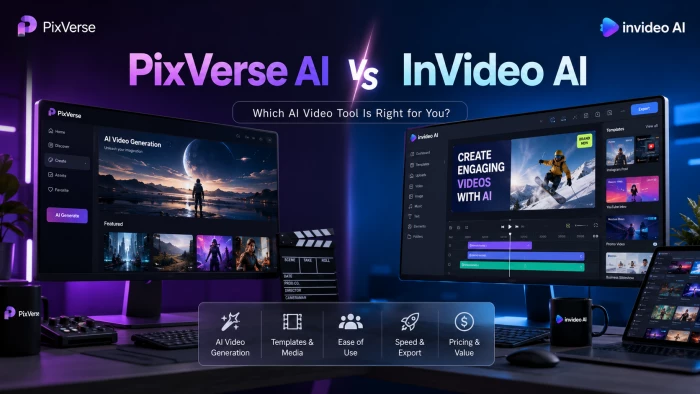
Short answer: they’re not really the same tool. One generates raw clips; the other assembles whole videos. The “better” pick comes down to which job you’re hiring it to do, so this breakdown scores them round by round, compares every price tier, and pulls real reviews from both.
THE CLIP GENERATOR Turns a text prompt or a single image into a short, eye-catching video clip in under a minute. 5–15s clips · Paid from $10/mo · Founded 2023 | THE EDITING AGENT Turns one prompt into a finished, edited video: script, voiceover, footage and music included. ~30 min videos · Paid from $25/mo · 50M+ users |
THE VERDICT AT A GLANCE
If you only read one section, read this: who comes out ahead for the things creators actually buy these tools for. The rounds below show the working.
| THE JOB | WINNER | WHY |
|---|---|---|
| Short-form social clips & viral effects | PixVerse wins | Built for fast, stylized 5–15s clips and template effects (Lego Blast, Zombie Mode, “Alive Art”). |
| Faceless YouTube, explainers & ads | InVideo wins | One prompt produces a complete edit up to ~30 min: script, voiceover, footage, captions, music. |
| AI voiceover, scripts & 50+ languages | InVideo wins | Full script generation, multilingual voiceover and voice cloning are core features here. |
| Image-to-video & character animation | PixVerse wins | Animating a still (product shot, character art) with cinematic motion is a top, much-praised path. |
| Stock footage & ready-made assets | InVideo wins | A 16M+ library (iStock, Storyblocks, Shutterstock) is built in. PixVerse has no stock library. |
| Cheapest entry & experimenting | PixVerse wins | Free daily credits plus a $10 paid tier. InVideo’s cheapest paid plan is $25/mo. |
| All-in-one workflow & output control | InVideo wins | Conversational editing plus a Studio timeline editor give more say over the final cut. |
| Predictable pricing & reliability | Draw (both criticized) | Both run credit systems with complaints: fast burn, charges on failed renders, hard refunds. |
Specs and capabilities as published on each tool’s site and docs, June 2026. Resolution, length and credit details vary by plan tier.
| FEATURE | PIXVERSE AI | INVIDEO AI |
|---|---|---|
| Core job | AI clip generation (text / image → video) | AI video creation & editing agent (prompt → finished edit) |
| Best output length | ~5–8s clips; up to ~15s single-pass; multi-shot sequences | Finished videos up to ~30 minutes from one prompt |
| Max resolution | Up to 1080p (paid tiers) | Up to 4K (Max tier and above) |
| Free plan | Yes: daily credits, 540p, watermark | Yes: limited weekly minutes, watermark |
| Watermark removed from | $10/mo (Standard) | $25/mo (Plus) |
| Script & voiceover | Basic auto-speech & lip-sync only | Full AI script + voiceover + voice cloning, 50+ languages |
| Stock media library | None (generative only) | 16M+ assets (iStock, Storyblocks, Shutterstock) |
| AI models | Own models (up to V5.6) | Aggregates 200+ incl. Sora 2, Veo 3.1, Kling, ElevenLabs |
| Signature features | Viral effect templates, character animation, extend, restyle | Prompt-to-full-video agent, conversational editing, avatars |
| Editing control | Minimal (regenerate / trim) | Chat-based editing + separate Studio timeline editor |
| Paid plans (consumer) | $10 · $30 · $60 · $199 / mo | $25 · $60 · $120 / mo (+ Team / Enterprise) |
| Best suited for | Short-form clips, effects, image animation, B-roll, teasers | Faceless YouTube, explainers, ads, listicles, repurposing |
Figures compiled from official pricing/docs pages and multiple 2026 hands-on reviews. Confirm current specs on pixverse.ai and invideo.io before buying.
ROUND BY ROUND
Five rounds, scored on what matters to working creators. The pattern is consistent: PixVerse wins on raw generation and price; InVideo wins on finished, narrated, stock-backed video.
01 · What each one actually is
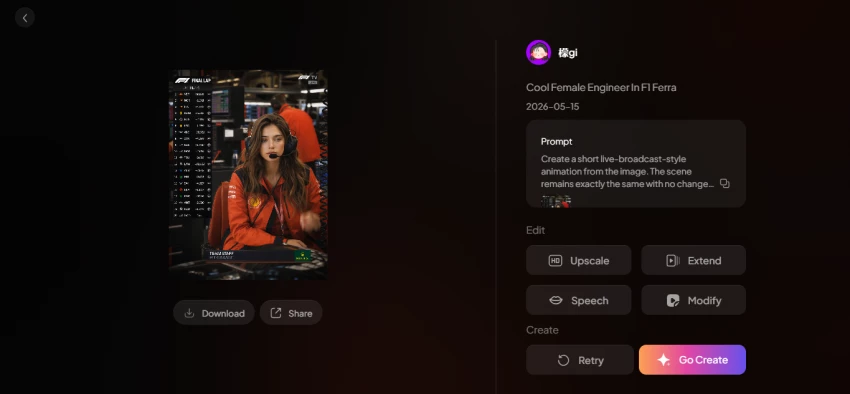
This is the whole comparison in one idea. PixVerse is a generation engine: you describe a moment or upload an image, and it returns a short clip. InVideo is an editing agent: you describe a video, and it writes a script, picks footage, records a voiceover, lays in music and hands you a finished cut.
So “which is better” is the wrong question until you know your output. Want a 7-second effect for a Reel? That’s PixVerse. Want a narrated 5-minute explainer by Friday? That’s InVideo.
Result: No single winner, different jobs.
02 · Video output & quality
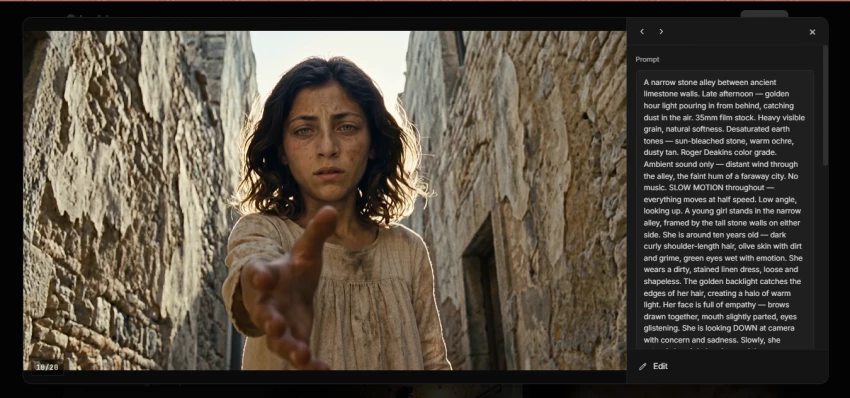
PixVerse is genuinely fast (most reviewers clock generations in the 30–120 second range), and its motion, lighting and style work earn consistent praise. The catch is length and consistency: clips top out around 5–15 seconds, character identity can drift across shots, and many generations need a retry to hit a commercial bar.
InVideo plays a different game. Its quality depends on how well it stitches stock footage and AI clips into a coherent narrated piece. For a polished single shot, PixVerse usually looks better; for a complete watchable video, InVideo delivers the whole thing.
Result: PixVerse for clips · InVideo for finished videos.
03 · Creative toolset: effects vs scripting
PixVerse leans into viral, playful effects and templates (the Lego Blast, Zombie Mode and Wizard Hat transforms that spread on TikTok), plus extend, restyle and swap tools aimed at trend-chasing creators. It’s a toy box for short-form.
InVideo’s creative weight sits in language: AI-written scripts, natural voiceovers, voice cloning and dubbing into 50+ languages, on top of a 16M+ stock library. If your content is voice-led and multilingual, that’s a decisive edge PixVerse doesn’t match.
Result: Split, effects to PixVerse, voice & scale to InVideo.
04 · Ease of use & workflow
Both are built for non-editors, and both are praised for it. PixVerse keeps things to a clean prompt-and-generate loop with sign-up in a couple of minutes. InVideo’s Agent and Autopilot modes let you describe a video in plain language and refine it through conversation, which beginners pick up quickly.
The trade-off is control. PixVerse offers little say over camera moves or transitions. You largely accept what the model produces. InVideo’s chat editing plus its Studio timeline editor give more room to fix the output, though neither replaces a real editing suite.
Result: Tie on ease · slight edge to InVideo on control.
05 · Reliability, support & the credit system
Here neither shines, and it’s worth being upfront. Both meter usage with credits, and both attract a steady stream of complaints: credits draining faster than expected, charges on failed or “ghost” generations with no refund, and confusing cancellation flows. On Trustpilot you’ll find genuine billing frustration on both sides.
InVideo’s separate pools (AI minutes, stock downloads, voiceover minutes, voice clones) can leave one bucket empty while another sits full. PixVerse’s non-deterministic output means retries quietly multiply your real cost per usable clip. Budget for 2–5 attempts per keeper on either platform.
Result: Draw, both share the “credit trap” criticism.
PixVerse starts cheaper and stretches to a pricey power-user tier; InVideo clusters in the mid-range and adds a premium “Generative” plan bundling Sora 2 and Veo 3.1. Both knock ~20% off for annual billing. All prices monthly list, USD, June 2026.
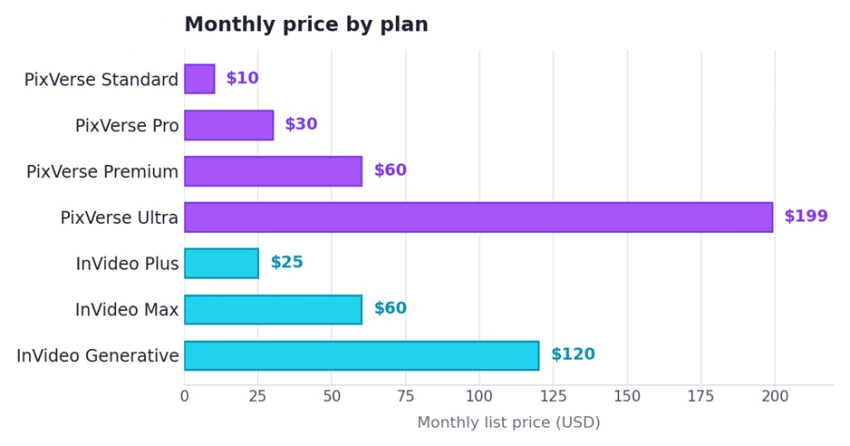
Each plan on the same scale. Annual billing lowers these ~20% (PixVerse Ultra ~40%, to ≈$149).
PixVerse AI plans
| PLAN | WHAT YOU GET | PRICE /MO |
|---|---|---|
| Basic | 540p · watermark · daily free credits | Free |
| Standard | 720p · ~1,200 credits/mo · watermark-free | $10 |
| Pro | 1080p · ~6,000 credits/mo | $30 |
| Premium | 1080p · ~15,000 credits/mo | $60 |
| Ultra | Priority · ~25,000 credits/mo · off-peak free | $199 |
InVideo AI plans
| PLAN | WHAT YOU GET | PRICE /MO |
|---|---|---|
| Free | Watermark · limited weekly minutes | $0 |
| Plus | Watermark-free · ~50 AI min/mo · 2 voice clones · all models | $25 |
| Max | 4K · ~200 AI min/mo · 320 iStock · 5 voice clones | $60 |
| Generative | Native Sora 2 + Veo 3.1 · 40 avatars · 10× concurrency | $120 |
| Team / Enterprise | Seats, admin controls, concurrency | Custom |
Credit and minute allowances are counted differently by each tool. Treat per-tier numbers as indicative; the headline price rarely equals real spend, because failed generations and re-renders consume credits.
Sentiment from G2, Capterra, Trustpilot, Google Play, Reddit and hands-on reviews. The reviews below are reworded from genuine public feedback and grouped by tool, with the platform and a star rating for each. Scores vary widely by source and date. See the scorecard for the caveats.
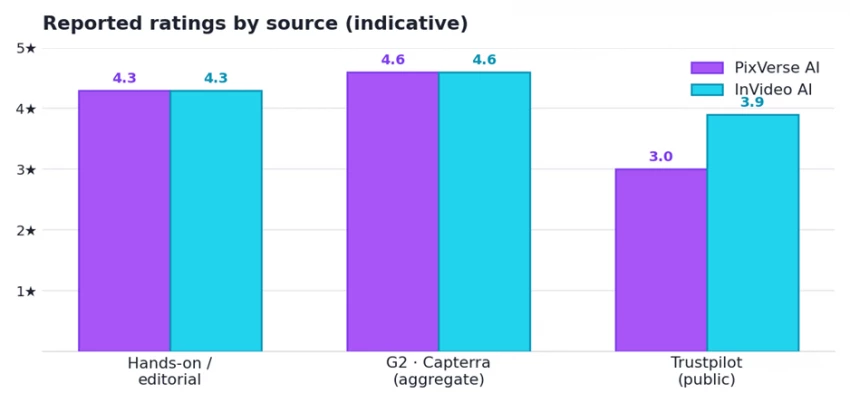
Indicative averages only. InVideo’s high G2/Capterra figures partly reflect its older Studio editor; PixVerse’s G2 sample is very small. Trustpilot pages for both are polarized.
Ratings scorecard
| SOURCE | PIXVERSE | INVIDEO | BEHIND THE NUMBER |
|---|---|---|---|
| Trustpilot | ≈3.0 / 5 (~98) | ≈3.6–4.1 / 5 (~800) | Polarized; credit burn, failed renders & refund issues recur for both |
| G2 | Very few reviews | ≈4.6 / 5 | InVideo’s G2/Capterra score overlaps the legacy Studio product |
| Capterra | Limited listing | ≈4.6 / 5 | Praise for ease & templates; criticism of AI-generation limits |
| Google Play | Strong, high volume | n/a (web-first) | Casual users rate PixVerse highly for fun, fast clips |
| Hands-on reviews | ≈4.0–4.6 / 5 | ≈4.0–4.6 / 5 | Reviewers like both for speed/ease; flag real credit costs |
PixVerse reviews
TRUSTPILOT ★★★★★ The image-to-video feature worked really well for most of my prompts, and the daily free credits are a genuinely nice touch for testing ideas. Verified reviewer · Casual creator | REDDIT ★★★★★ It’s fast and the visual style is strong. If a tool helps me get usable clips out the door quicker, that convenience matters more than chasing perfection. Reddit user · Short-form creator |
EDITORIAL ★★★★★ Best thought of as the “Midjourney for video”: quick, beginner-friendly clips with impressive lighting, though resolution caps limit serious commercial use. Reviewer · Tested over weeks | TRUSTPILOT ★★★★★ I paid for a 12-month plan and still hadn’t received my credits months later. Support kept sending automated replies asking for details and nothing got fixed. Verified reviewer · Annual subscriber |
TRUSTPILOT ★★★★★ Even simple prompts add things I didn’t ask for, and it burns credits on every attempt. Poor facial reproduction was a recurring problem for me. Verified reviewer · New user | G2 ★★★★★ Easy to create clips straight from a prompt, and the output quality is great, exactly the kind of fast video generation I wanted without editing skills. Verified reviewer · G2 community |
InVideo reviews
G2 ★★★★★ It’s intuitive and fast for TikTok-style videos. I can make clips that look like I hired a whole crew, all from my laptop, and it cuts my production cost. Verified reviewer · Short-form creator | CAPTERRA ★★★★★ I drop in my pre-written script and storyboard and it builds the video for me. It makes producing YouTube content so much easier than editing by hand. Verified reviewer · YouTuber |
G2 ★★★★★ I love that all my favourite AI models are in one place: SeeDance, Kling and the generative templates are useful, and being web-based means no installs. Verified reviewer · Web-first user | TRUSTPILOT ★★★★★ The AI agent burned through all my credits in minutes without producing a single usable video, and support refused a refund, citing real-time compute costs. Verified reviewer · New subscriber |
CAPTERRA ★★★★★ I just wanted a simple single-scene clip, but it couldn’t go past about 8 seconds without breaking the video into scenes I didn’t want. Felt misleading. Verified reviewer · Retail owner | TRUSTPILOT ★★★★★ I was frustrated by the credit usage at first, but support explained it depends on the mode you choose and shared tips on managing credits, which helped. Verified reviewer · After support contact |
PixVerse AI STRENGTHS Very fast generation (≈30–120s per clip) Standout viral effect templates & “Alive Art” motion Strong image-to-video and character animation Cheapest entry: free daily credits + $10 tier Beginner-friendly, minimal learning curve WEAKNESSES Clips capped at ~5–15s, not for long-form Limited control over camera, transitions, output Character consistency drifts on complex prompts No script engine, stock library or true editor Billing, refund & cancellation complaints | InVideo AI STRENGTHS One prompt → full edited video up to ~30 min AI script, voiceover & voice cloning in 50+ languages 16M+ stock library + 200+ models (Sora 2, Veo 3.1) Conversational editing plus a Studio timeline editor 4K export and Team/Enterprise scaling WEAKNESSES Separate credit pools drain fast and confuse users Charges for failed / regenerated AI attempts Stock-footage output can look generic Prompts can promise more than the engine delivers Cheapest paid plan is $25/mo (free tier watermarked) |
Match the tool to your output, not the other way around. Here’s the quick call for the most common creator profiles.
| IF YOU’RE A | BEST PICK |
|---|---|
TikTok / Reels / Shorts creator chasing trends Short, eye-catching clips and viral effects, fast and cheap. | PixVerse |
Faceless YouTube or explainer-channel creator Full narrated videos (script, voiceover and footage) with minimal effort. | InVideo |
Marketer making multilingual ads at scale Voice cloning, 50+ language dubbing and a stock library are non-negotiable. | InVideo |
Designer animating product shots or character art You’re starting from a still and want cinematic motion from it. | PixVerse |
Beginner testing AI video on a tight budget The lowest-risk way to learn before committing real money. | PixVerse |
Power creator who wants one tool for everything Generation, editing, voice and stock under a single subscription. | InVideo it even bundles PixVerse-style models |
Neither is “better”: they’re built for different finish lines.
PixVerse and InVideo get lumped together as “AI video tools,” but they solve opposite halves of the problem. PixVerse is the best pick when the clip is the product: short, stylish, effect-driven moments for social feeds. InVideo wins when you need a finished, narrated, stock-backed video without touching a timeline. Many creators use both: PixVerse to generate striking clips, InVideo to assemble them into something publishable (and InVideo can now even call PixVerse-style models itself).
One shared warning regardless of which you choose: both run credit systems that cost more in practice than the sticker price, and both attract real complaints about failed-generation charges and refunds. Start on a free or monthly plan, measure your true cost per usable output, and only then commit to annual billing.
Choose PixVerse if Your output is short-form clips, viral effects or image animation, you want the fastest single-clip generation, and you’re price-sensitive or just experimenting. | Choose InVideo if You need complete edited videos with scripts and voiceover, you publish faceless or multilingual content at volume, or you want one all-in-one workflow. |

New Claude Model Targets Agentic AI WorkflowsAnthropic has launched Claude Sonne...
Samuel Osei3 months ago

Gemini’s Image Tools Get a Wider RolloutGoogle is expanding access to Gemini’s p...
Alexander Hughes3 months ago

Two AI video generators, two very different first days. I ran PixVerse through i...
Alexander Hughes3 months ago

Two of the most talked-about AI chat platforms. I opened both, picked a characte...
Alexander Hughes3 months ago

The two-minute versionIf you only read one thing, read this. The rest of the doc...
Alexander Hughes3 months ago

Why Seedance 2.5 mattersSeedance 2.5 is the latest release in ByteDance’s Seedan...
Alexander Hughes3 months ago
Discussion