The verdict in 30 seconds Remaker AI is the most feature-complete AI image-and-video toolkit you can use without a subscription. Its background removal, face swap, and video enhancement are genuinely strong, the pay-as-you-go credit model is refreshingly fair, and the free tier is actually usable. The trade-offs are real too: occasional downtime, thin customer support, and limited fine-grained control for power users. Overall rating: ★★★★☆ 4.0 / 5, Very Good Best for: social creators, e-commerce sellers, marketers, and casual users who want fast, professional-looking visuals. Pricing: Free tier (30 credits + 5/day); paid credit packs from $5.99; no subscription; credits never expire. Try it: remaker.ai |
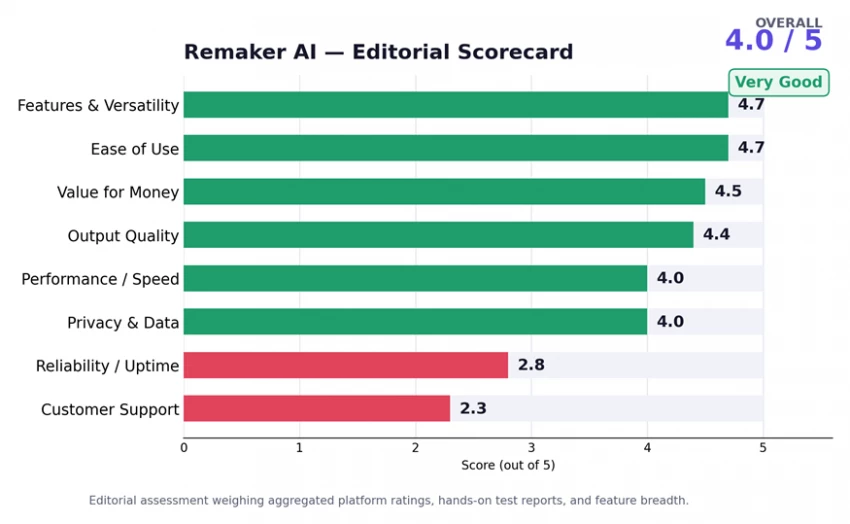
Figure 1: Remaker AI editorial scorecard across eight evaluation criteria
Remaker AI is a browser-based AI creative platform built around a single idea: let anyone edit, enhance, and generate images and video without design skills, downloads, or a monthly subscription. It launched in 2024, first known mainly for face swapping, and has since grown into a suite of 20+ AI tools spanning photo editing, background removal, upscaling, headshots, logos, tattoos, text-to-image art, video generation, and 4K video enhancement. Everything runs in the cloud, so it works the same on Windows, Mac, iOS, and Android. You can explore the full lineup on the official Remaker AI features page.
The platform's pitch is accessibility. There is no learning curve to speak of, most tools open in one click, and several can be tried without even creating an account. That positioning has paid off: Remaker AI was named to a16z's Top 50 Gen AI Web Products list for 2025, a ranking based on unique monthly visits, a strong signal that real people, not just early adopters, use it daily. It also supports content generation in multiple languages, including English, Chinese, Japanese, and German.
| Type | Browser-based AI image & video editing platform (web + iOS + Android) |
| Launched | 2024 (originally a face-swap tool, now a 20+ tool suite) |
| Core tools | Face swap, background remover, image upscaler, AI photo editor, headshot & portrait generators, text-to-image, video generator, video enhancer |
| Pricing model | Pay-as-you-go credits: no subscription, credits never expire; free tier included |
| Free tier | 30 credits on sign-up + 5 free credits per day via daily check-in |
| Payments | Stripe (credit/debit, Google Pay, Apple Pay); cards not stored by Remaker |
| Recognition | a16z Top 50 Gen AI Web Products, 2025 |
| Website | remaker.ai |
Before the deep dive, here is the single most useful thing to understand about Remaker AI: its reputation is split, and where you read reviews changes the story entirely. On software marketplaces where buyers evaluate the product feature-by-feature, it scores extremely well. On open consumer review sites, a small but vocal group reports reliability and support problems.
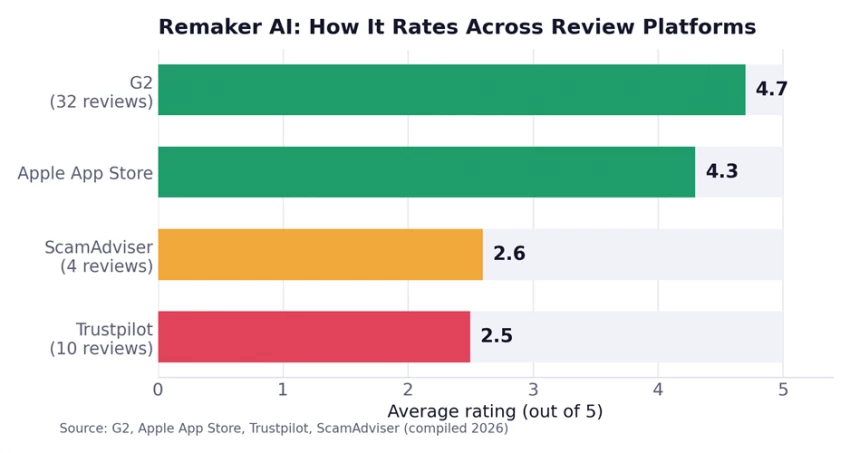
Figure 2: Remaker AI's average rating varies sharply by platform: loved on G2 and the App Store, criticized on Trustpilot.
G2 reviewers rate it 4.7 out of 5 across 32 verified reviews, praising speed, ease of use, and output quality. The Apple App Store sits around 4.3. Trustpilot, by contrast, averages just 2.5 from a handful of reviews dominated by complaints about downtime and support. Independent trust-checker ScamAdviser flags the small review pool and private domain registration but still concludes the site is “likely legit”, noting it is popular and has been registered for years. We unpack what is driving each side of this split in the user reviews section.
Remaker AI is best understood as three connected toolkits rather than one app. Below is the full map, grouped by what each pillar actually does in practice, including which tools are mature and which are still rough. Most everyday actions cost only 1–2 credits; the heavier generative and video tools cost more (see Pricing).
This is the heart of the platform and where it is strongest. These tools handle the bread-and-butter edits that creators and online sellers repeat dozens of times a day.
• AI Face Swap: single-image, multi-face, and batch modes. It maps bone structure, skin tone, and lighting from the source onto the target, so results hold up even in side-profile shots and moderate lighting changes. Downloads are advertised watermark-free, even on free credits.
• Background Remover: semantic segmentation that isolates people, products, animals, and vehicles, with batch processing of up to 50 images at once and clean PNG/WebP exports. Widely cited as the platform's most reliable tool. Try the AI Background Remover.
• AI Image Upscaler: enlarges and sharpens low-resolution photos by inferring missing detail. Clean for web use, though it can over-smooth fine texture at extreme scales. See the AI Image Upscaler.
• Magic Eraser / Object Remover: brush over unwanted people or objects and they disappear, with the background filled in automatically. Explore the Magic Eraser.
• AI Photo Editor: two modes: type a text prompt to change an image, or brush an area to repaint/remove it. It runs on multiple models at different price points (more in Pricing). The AI Photo Editor is the most flexible image tool.
• AI Portrait & Headshot Generators: turn a selfie into polished, professional portraits or LinkedIn-ready headshots with virtual attire and improved lighting. See the AI Portrait Generator and AI Headshot Generator.
• Watermark Remover, AI Tattoo Generator, AI Logo Generator & Photo Effects: niche but handy extras for cleaning sourced assets, mocking up custom tattoo art, spinning up logo concepts, and applying creative photo effects.
• Nano Banana: a newer model for generating consistent, realistic images of the same subject across edits. Try Nano Banana.
Remaker's video tools are useful for short-form content, though they consume credits quickly and can slow down under load.
• Video Face Swap: swap faces in clips (reportedly up to 30 minutes long) at roughly 1 credit per second of footage; supports MP4, AVI, and MOV.
• AI Video Generator: creates short animated clips from a text prompt or still image, with several model tiers from Turbo to Pro. NSFW prompts are blocked. See the AI Video Generator.
• AI Video Enhancer: upscales footage toward 4K, stabilizes shaky motion, and recovers facial detail. Enhanced files stay downloadable for about 30 days. Try the AI Video Enhancer.
• Video Background Remover: removes or replaces video backgrounds, useful for creators building a consistent visual identity.
The most experimental layer: tools that create new media from scratch.
• Text-to-Image Generator: turns prompts into art across roughly seven style models (realistic, anime, ink, cartoon, SDXL-style, and more), with inpainting and outpainting. See the AI Image Generator.
• Voice Cloning & Talking Photo: clone a voice from a sample, then animate a still photo to “speak” it, handy for narration, dubbing, and social explainers.
Across independent 2026 hands-on tests, the image tools clearly outperform the generative and video tools. Background removal and face swap lead the pack; text-to-image trails because it lacks the fine prompt control that dedicated art tools offer.
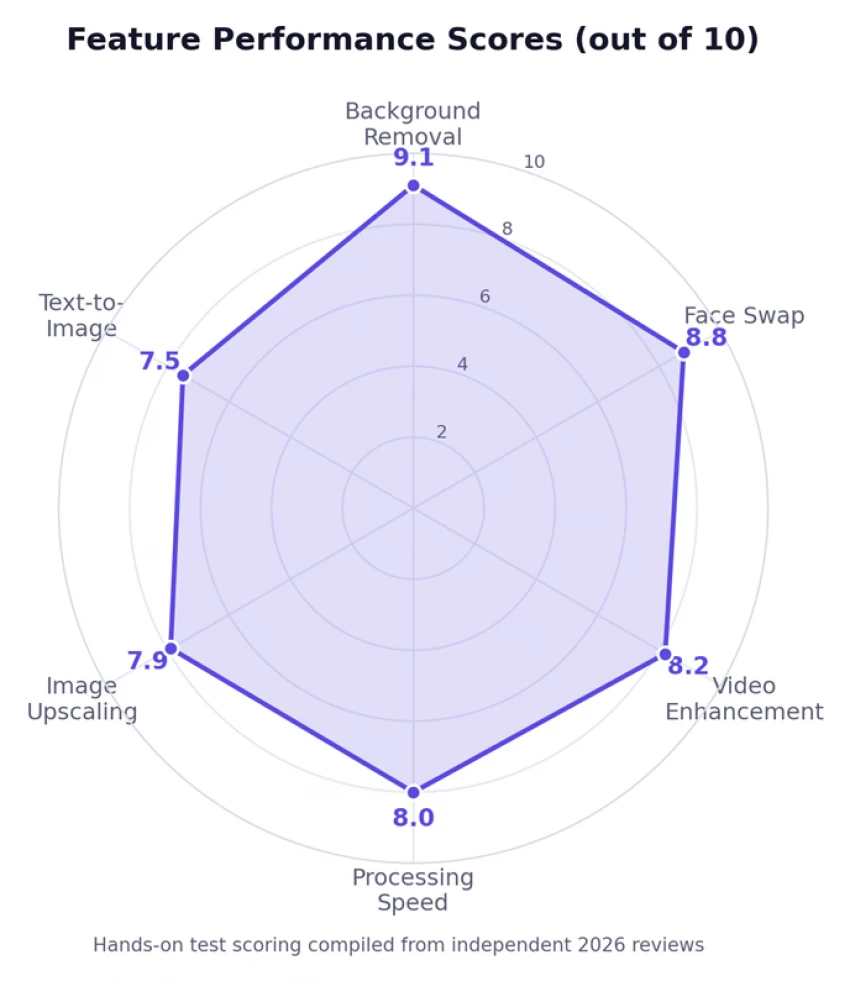
Figure 3: Feature performance scores (out of 10). Background removal (9.1) and face swap (8.8) are the standouts.
Remaker AI's biggest structural advantage is its pricing. Instead of locking you into a monthly fee, it uses a pay-as-you-go credit system: you buy credits once, spend them as you go, and they never expire. One credit usually covers one simple operation, so costs are predictable for light users. New accounts get 30 free credits, plus 5 more each day for checking in, enough to genuinely test the platform before paying. Purchases also earn bonus credits, and everything is billed through Stripe with no card data stored. See live numbers on the official pricing page.
| Credits | Price (USD) | Cost / credit | Roughly buys |
|---|---|---|---|
| 200 | $5.99 | ~3.0¢ | ~200 face swaps or background removals |
| 530 | $9.99 | ~1.9¢ | Weeks of casual edits |
| 1,100 | $19.99 | ~1.8¢ | Regular creator workload |
| 3,000 | $49.99 | ~1.7¢ | Heavy image + light video use |
| 5,000 | $79.99 | ~1.6¢ | Small team / agency |
| 10,000 | $149.99 | ~1.5¢ | High-volume production |
| 20,000 | $299.00 | ~1.5¢ | Best per-credit value |
Pricing shown is web pricing compiled in 2026 and may change. Verify on the pricing page before purchase.
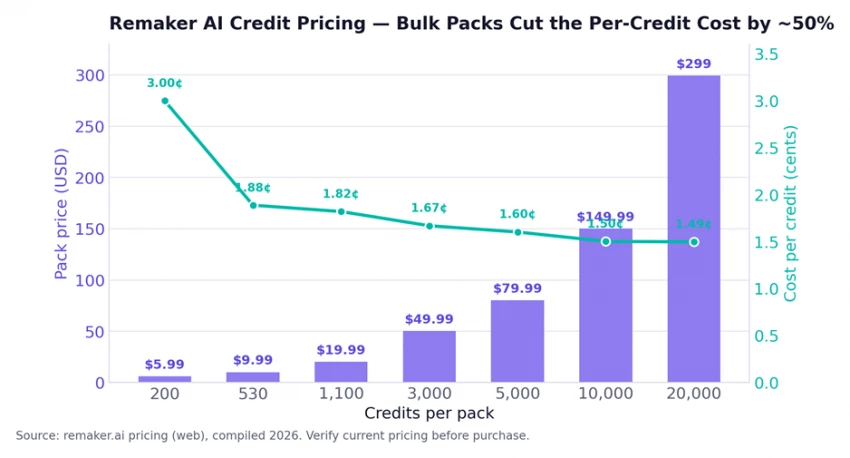
Figure 4: Pack price (bars) vs. cost per credit (line). Buying in bulk roughly halves the unit cost.
Credit consumption varies a lot by tool. Simple image edits are cheap; generative video is where balances disappear fastest. Approximate costs reported by testers:
| Action | Approx. credits |
|---|---|
| Single face swap | ~1 |
| Background removal / image upscale | ~1–2 |
| AI photo edit: Flux Kontext Dev (budget) | ~2 |
| AI photo edit: ByteDance Seedream 4 (4K) | ~6 |
| AI photo edit: Google Nano Banana | ~8 |
| Video face swap | ~1 per second of footage |
| AI video clip (5 sec, Turbo → Pro tiers) | ~11–30 |
| Video enhancement (~19-sec clip) | ~57 |
Two pricing traps to avoid 1. Never buy credits in the mobile apps. App-store fees inflate prices by roughly 40–60%. The same 200-credit pack that costs $5.99 on the website can be $9.99 in-app. Always purchase through remaker.ai in a browser. 2. Read the fine print on “no subscription.” Despite the no-subscription marketing, some reviewers report that the Terms and Conditions mention auto-renewal and trial-based subscriptions. Review the terms before any purchase so there are no surprises. |
Getting a result out of Remaker AI takes well under a minute. Here is the typical flow:
1. Go to remaker.ai and pick a tool from the AI Tools menu (for example, Face Swap, Background Remover, or AI Photo Editor). Many tools open without an account.
2. Sign in to unlock free credits. Log in with Google or another supported method to claim your 30 sign-up credits and 5 daily credits.
3. Upload your image or video, or type a text prompt for the generative tools. Drag-and-drop works for batch jobs.
4. Adjust the settings: choose a model, style, or face to swap in, and set resolution where available.
5. Generate and preview. Most edits process in seconds; longer videos take more time and more credits.
6. Download your result. Paid credits export clean, higher-resolution files with commercial rights. If you need bulk output, use batch mode to process many files at once.
Remaker AI's user feedback is genuinely two-sided, so it is worth reading both camps. Here are representative, verified reviews from across the major platforms (paraphrased; ratings as of 2026):
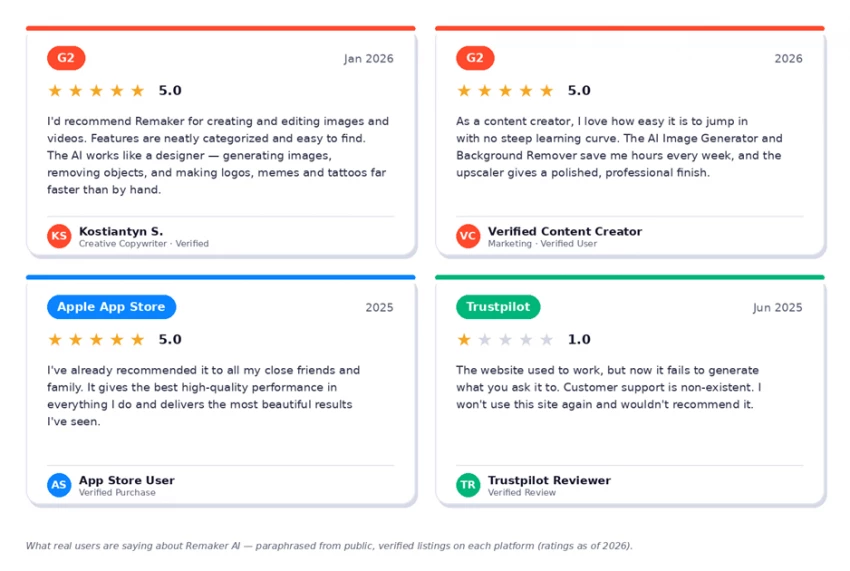
Figure 5: Representative verified reviews from G2, the Apple App Store, and Trustpilot.
On G2, where reviewers tend to be businesses evaluating the product carefully, sentiment is strongly positive: 27 of 32 reviewers gave five stars. The most-mentioned strengths are ease of use, output quality, the clean interface, and speed.
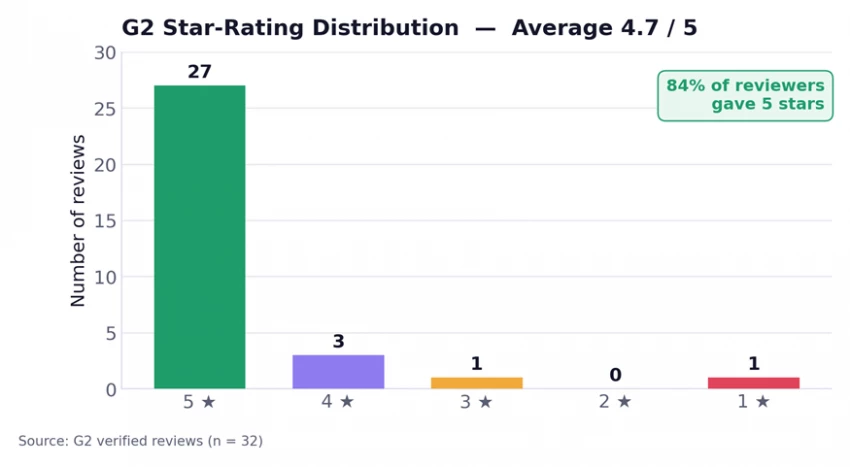
Figure 6: G2 star-rating distribution: 84% of reviewers gave 5 stars.
Verified reviewers describe it as a fast “AI designer” that generates and enhances images, removes objects, and creates logos and tattoos far quicker than manual editing, with a content creator noting the Image Generator and Background Remover save hours every week. The recurring criticisms are about depth, not trust: limited customization, credit limits, and occasional artificial-looking results in tricky lighting.
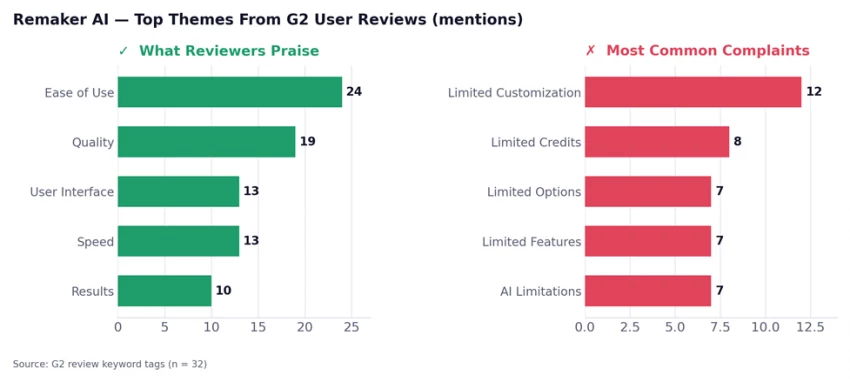
Figure 7: The most common praise and complaints from G2 reviews, by number of mentions.
Trustpilot tells a harsher story from a much smaller sample. The dominant complaints are site downtime, features (especially the video generator) failing intermittently, and unresponsive customer support, particularly around billing. A few reviewers also feel the “free” framing is misleading because meaningful use runs into paywalls quickly. The Apple App Store is more upbeat at around 4.3, with users highlighting “beautiful” results and high-quality performance, while still flagging slow processing at peak times.
How to reconcile the split: the positive reviews are about the output, and the negative reviews are about reliability and support. Both are true. Remaker AI does excellent work when it is working, but it is not yet enterprise-grade infrastructure, so keep small credit packs and don't depend on it for time-critical deadlines.
| ✓ Pros | ✗ Cons |
| 20+ tools in one place: image, video, and generative | Reliability issues: reported downtime and outages |
| No subscription; credits never expire | Weak or slow customer support, especially for billing |
| Usable free tier (30 credits + 5/day), no card required | Mobile in-app prices run 40–60% higher than web |
| Excellent background removal and face swap | Terms mention auto-renewal despite “no subscription” claim |
| Fast, beginner-friendly, no install; works on all devices | Limited fine-grained control for professional/power users |
| Batch processing (up to 50 images) for e-commerce | Video & generative tools burn credits quickly |
| 48-hour auto-deletion of uploads; Stripe payments | Text-to-image lacks granular prompt control |
No single rival matches Remaker's breadth under one credit-based roof, but specialists beat it on individual axes. Faster video pipelines (Clipfly, Pica AI) matter to high-volume creators, and some tools offer real-time face-swap previews Remaker lacks. The table below compares the headline capabilities.
| Platform | Face Swap | BG Remove | Video Tools | Text-to-Image | No Sub. |
|---|---|---|---|---|---|
| Remaker AI | ✓ Batch + video | ✓ Advanced | ✓ Up to 4K | ✓ 7 models | ✓ Credits |
| Pica AI | ✓ | ~ | ✓ Faster | ✓ | ✗ Monthly |
| Clipfly AI | ✓ | ✓ | ✓ Faster | ✓ | ✗ Monthly |
| FaceMod | ✓ Advanced | ~ | ✓ | ✗ | ✗ |
| Segmind | ✓ Real-time | ~ | ✗ | ✓ | ~ |
Legend: ✓ = strong / yes · ~ = partial · ✗ = not offered. Competitor capabilities summarized from public 2026 listings.
Bottom line on alternatives: if you want a best-in-class specialist for one job, say, the fastest possible video face swap, a dedicated tool may edge Remaker out. But if you want an all-in-one creative environment with no subscription, Remaker AI is the most complete option in its segment.
For a tool that handles faces and personal photos, privacy matters. Remaker AI's stated policy is reassuringly clear: uploaded images and generated outputs are automatically deleted from its servers within 48 hours, and user photos are not shared with third parties. Payments run exclusively through Stripe with bank-level encryption, and Remaker does not store card details.
• 48-hour auto-deletion of all uploaded media and AI-generated outputs.
• No third-party data sharing: images are not passed to advertising or analytics partners.
• Content policy bans harassment, discriminatory use, misinformation, and content using personal data to harm others; NSFW generation is prohibited.
• Browser extension reportedly collects no personally identifiable information.
One honest caveat: some third-party write-ups cite enterprise certifications such as SOC 2, GDPR, and ISO 27001, but these are not prominently published on Remaker's own site, and trust-checkers note the domain's WHOIS data is private. For sensitive brand or client work, the 48-hour deletion window is a genuine plus, but enterprises needing formal data-processing agreements should confirm details directly with the company.
| User | Why it fits (and what to use) |
|---|---|
| Social media creators | Fast face swaps, meme and GIF edits, talking-photo clips, mostly doable on free credits. |
| E-commerce sellers | Batch background removal and upscaling for product catalogs; cost-effective at bulk credit tiers. |
| Content marketers | Quick social creatives, headshots, and short promo videos without heavy software. |
| Casual / hobby users | Experiment with AI editing for free, no subscription or steep learning curve. |
| Power users & agencies | Usable as a supplementary tool, but reliability and limited fine control may frustrate high-volume, deadline-driven work. |
Remaker AI is popular by any measure, but its momentum has cooled. Third-party traffic estimates suggest visits peaked around 6.8 million per month in early 2025, then declined roughly 21% to about 5.35 million by October 2025. The likely cause is competition: rivals offering faster processing and more flexible plans have taken share. It is a useful reminder that a strong feature set alone doesn't guarantee growth in a fast-moving category.
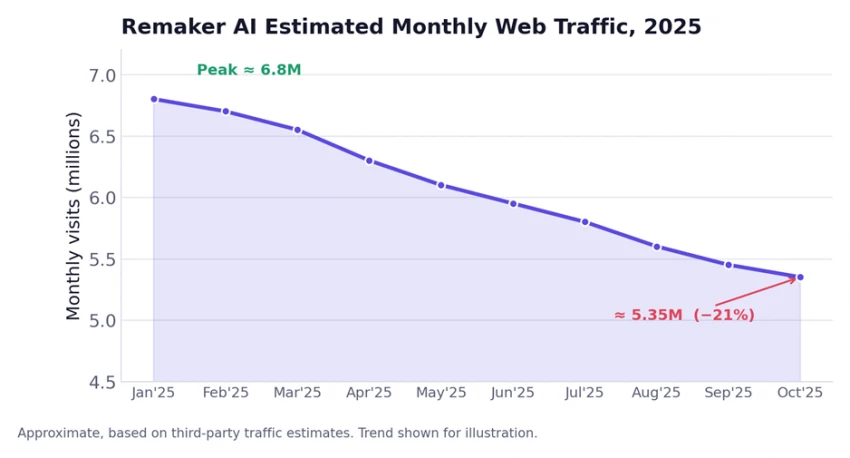
Figure 8: Estimated monthly web traffic in 2025 (approximate, third-party data).
Remaker AI is the most complete AI creative toolkit at its price point, and its no-subscription credit model is one of the most user-friendly in the entire generative-AI space. For casual creators, social pros, and small businesses producing visual content at moderate volume, it delivers real value within the first hour, especially in background removal, face swap, and video enhancement, three tools that are mature, fast, and would cost far more in manual editing time.
It is not the right pick for high-volume professionals who need guaranteed uptime, or for prompt engineers who want granular control over generative output. Those users will outgrow it. But for the broad middle of the market, Remaker AI is one of the most compelling options available today. Our advice: start on the free tier, buy small credit packs through the website (never the app), and keep a backup tool for anything deadline-critical.
Final score: ★★★★☆ 4.0 / 5, Very Good A versatile, fairly-priced, beginner-friendly AI studio that punches above its weight on image editing, held back only by reliability and support. Ready to try it? Start free at remaker.ai or compare packages on the pricing page. |

New Claude Model Targets Agentic AI WorkflowsAnthropic has launched Claude Sonne...
Samuel Osei1 month ago

The Quick verdictInSnoop is a free, browser-based tool that promises to let you...
Alexander Hughes1 month ago

Gemini’s Image Tools Get a Wider RolloutGoogle is expanding access to Gemini’s p...
Alexander Hughes1 month ago

Two AI video generators, two very different first days. I ran PixVerse through i...
Alexander Hughes1 month ago

Two of the most talked-about AI chat platforms. I opened both, picked a characte...
Alexander Hughes1 month ago

The two-minute versionIf you only read one thing, read this. The rest of the doc...
Alexander Hughes1 month ago
Discussion