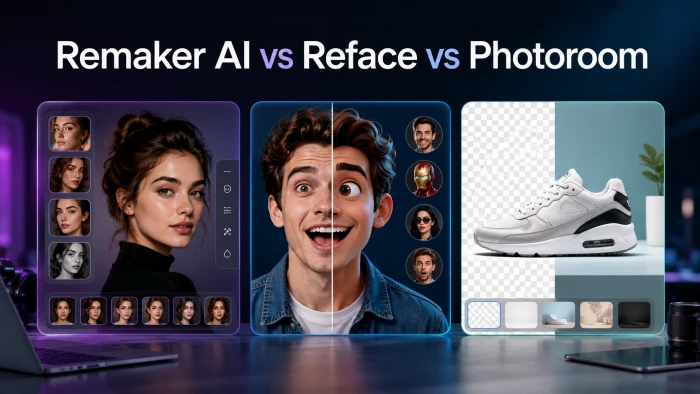
Three of the most-searched AI photo tools of 2026 are Remaker AI, Reface, and Photoroom. They keep landing on the same “best AI photo editor” lists. But here is the part most round-ups skip: they are not really fighting for the same job. One is built to make you laugh, one is built to do a bit of everything, and one is built to help you sell. Compare them by raw feature checklist and you will probably pay for tools you never touch. Compare them by what you actually want to make, and the right answer is usually obvious within thirty seconds.
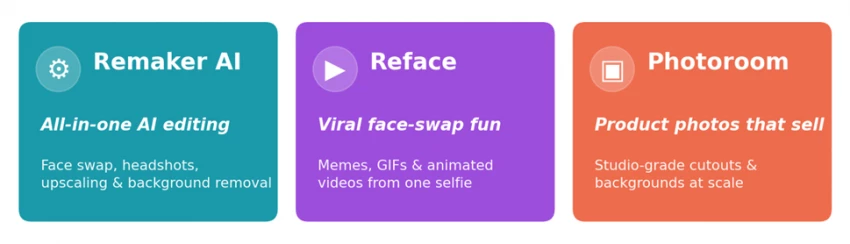
This guide gives you that thirty-second answer first, then backs it up with detailed breakdowns, real pricing, capability ratings, a side-by-side feature table, and an honest look at where each tool falls short, plus how to combine them and how to stay on the right side of the law when editing faces.
The 30-second verdict Choose Reface if you want the fastest, most fun way to make face-swap memes, GIFs, and short videos to share on social media. Choose Remaker AI if you want one web app that swaps faces, generates headshots, upscales photos, and removes backgrounds without juggling separate subscriptions. Choose Photoroom if you sell products online and need clean, professional cutouts and backgrounds produced quickly and at scale. |
How we compared Ratings in this article are an editorial assessment that synthesises multiple independent 2026 hands-on reviews and each tool’s official documentation. Pricing was observed in mid-2026 and is shown in US dollars; figures vary by region, platform (mobile apps often cost more than the web), and ongoing promotions, so always confirm the live price at checkout. |
Remaker AI is a browser-based, all-in-one creative platform that bundles a wide range of AI editing tools into a single interface. Alongside its well-known face swap (for both photos and video), it offers an AI headshot generator, image upscaling, watermark removal, background removal, a video enhancer, and text-to-image art generation. Instead of a fixed monthly plan, it runs on a pay-as-you-go credit system, which makes it appealing to people who want flexibility and a broad toolkit in one place.

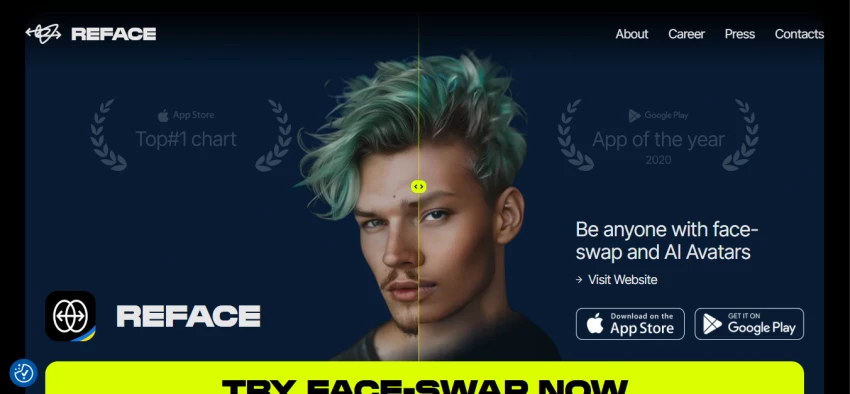
Built by Neocortext, Reface is the most downloaded consumer face-swap app, with hundreds of millions of installs across its product suite. It is mobile-first and powered by GAN-based deep learning, and it made its name by letting you drop your face into a huge library of trending video and GIF templates from a single selfie. Beyond swaps, it offers AI avatars, photo animation with motion and lip-sync, artistic restyle filters, hairstyle try-on, gender and age effects, and even a “future baby” generator. It is the tool to reach for when the goal is fun, shareable content.
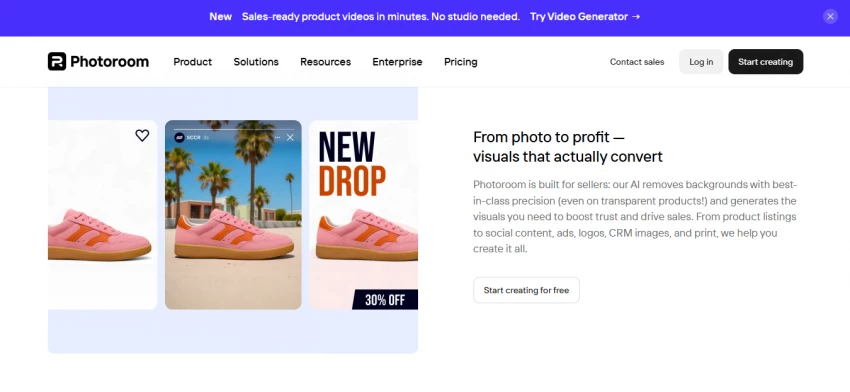
Photoroom began life as a simple iPhone background remover and has grown into a full AI photo studio aimed squarely at e-commerce. It is best known for exceptionally precise, fast cutouts, and it pairs that with AI-generated backgrounds, one-click shadows and reflections, batch processing, marketplace-ready templates, and a resize tool for every platform. Its background-removal API is good enough that it quietly powers cutouts inside many other popular apps. If your work is product photography or social commerce, this is the specialist.
Because each tool optimises for a different outcome, the cleanest way to choose is to start from the job you want done rather than the longest feature list. The map below shows which tool tends to win for the most common tasks.
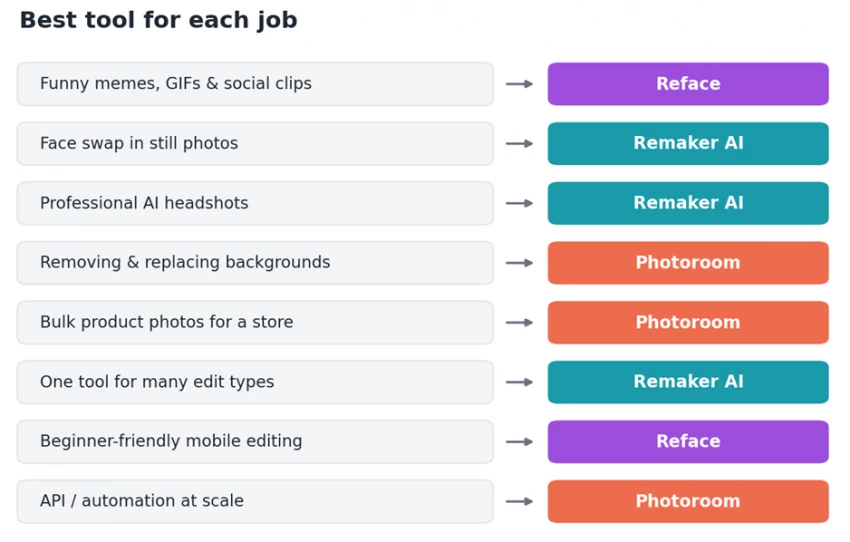
Figure 1: the best fit for each job. Overlap exists, but these are the safe default picks.
• Face swap for photos and video that matches lighting, expression, and skin tone, with the best results on single-subject images.
• AI headshot generator for quick, presentable profile photos.
• Image upscaling with batch support, plus watermark removal and one-click background removal.
• AI video enhancer that can lift low-quality footage toward 4K.
• Text-to-image generation with a built-in prompt helper for cleaner results.
Remaker AI uses credits rather than a traditional subscription. New accounts typically get 30 credits on sign-up plus a few free credits per day, and you can top up with one-time credit packs, commonly around $2.99 for 150 credits, $19.99 for 1,000, and $49.99 for 2,500. One image generation usually costs a single credit, but video tasks can burn through many credits at once. Two cautions worth repeating from independent reviews: buying through the website is usually far cheaper than buying inside the mobile app, and although the platform markets itself as subscription-free, its terms reportedly mention auto-renewing or trial-based subscriptions, so read the fine print before you pay.
Best for: creators and freelancers who want one versatile web app instead of several single-purpose subscriptions. Watch-outs: video editing eats credits quickly and makes costs hard to predict, results can dip on busy or multi-face images, mobile pricing runs higher than web, and you should check the renewal terms before buying.
• A massive library of trending templates for face-swapping into videos, GIFs, and memes from one selfie.
• Photo animation that brings still images to life with motion and lip-sync.
• AI avatars and restyle filters across dozens of artistic looks.
• Fun extras such as hairstyle try-on, gender and age effects, and a future-baby generator.
• One-tap sharing straight to TikTok, Instagram, and messaging apps.
Reface runs on a freemium model. The free tier works but includes ads, watermarked outputs, and limited template access. Paid plans are sold mainly as app subscriptions and vary a lot by platform and region. You will commonly see options around $3.99 per week, roughly $6 to $13 per month, and annual plans from about $25 up to premium tiers near $120 per year. As with most subscription apps, the annual plan is usually the best value if you use it regularly. Reviews and store comments repeatedly flag aggressive upsells and confusing or hard-to-cancel charges, so subscribe deliberately and keep an eye on your billing.
Best for: casual creators and social users who want the quickest, most accessible way to make entertaining face-swap clips and memes. Watch-outs: aggressive subscription prompts, ads on the free tier, reports of charges that are tricky to cancel, and meaningful privacy trade-offs because face-swapping involves biometric data. It is also not the tool for product photos or precise background work.
• Best-in-class background removal with strong handling of tricky edges, fine details, and even translucency.
• AI backgrounds, shadows, and reflections that make product shots look studio-made in one click.
• Batch processing for dozens of images at once, plus a developer API for automation at scale.
• Marketplace and social templates with a resize tool for every platform.
• Magic Retouch and outpainting, Shopify publishing on higher tiers, and short-clip video background removal.
Photoroom offers a free plan that includes a generous number of monthly exports but keeps a watermark on some features and throttles the heavier AI tools. Paid consumer tiers in 2026 typically run from around $7.99 to $12 per month for Pro, about $27 per month for Max, and from roughly $99 per month for Ultra, with custom Enterprise pricing for very high volumes; annual billing lowers the effective monthly rate. Many AI actions are metered as credits (one credit per background removal or AI background, for example), so high-volume sellers should map their monthly image count to a tier before committing. The API is billed separately, starting around $0.02 per image for background removal.
Best for: online sellers, social-commerce teams, and developers who need clean product imagery quickly and consistently. Watch-outs: credit limits can feel tight for high-volume catalogues, it is deliberately narrow outside product photography, apparel brands needing on-model or ghost-mannequin shots may want a fashion specialist, and it does not do face swapping at all.
Here is how the three line up across the features people compare most. “Limited” means the capability exists but is not the tool’s focus.
| Feature | Remaker AI | Reface | Photoroom |
|---|---|---|---|
| Primary use | All-in-one AI editing | Memes & social video | Product photos |
| Platform | Web (+ mobile) | Mobile-first (+ web) | Web, mobile & API |
| Photo face swap | Yes, strong | Yes, strong | No |
| Video face swap | Yes, credit-heavy | Yes, its specialty | No |
| Photo / video animation | Limited | Yes | No |
| AI headshots | Yes | Yes | No |
| Background removal | Yes | No | Yes, best-in-class |
| AI backgrounds / scenes | Limited | Limited | Yes |
| Image upscaling | Yes | No | Limited |
| Batch processing | Yes (upscaling) | No | Yes (bulk + API) |
| Free tier | 30 + 5/day credits | Yes, ads + watermark | 250 exports / month |
| Watermark on free | On some outputs | Yes | On some features |
| Pricing model | Pay-as-you-go credits | Subscription | Subscription + API |
| Best for | Versatile creators | Casual social fun | Online sellers |
The radar below plots our editorial scores across eight dimensions. Notice how little the three shapes overlap: Reface stretches toward video, animation, and ease of use; Photoroom dominates background removal, batch work, and value; and Remaker AI spreads widest overall thanks to its all-in-one breadth.
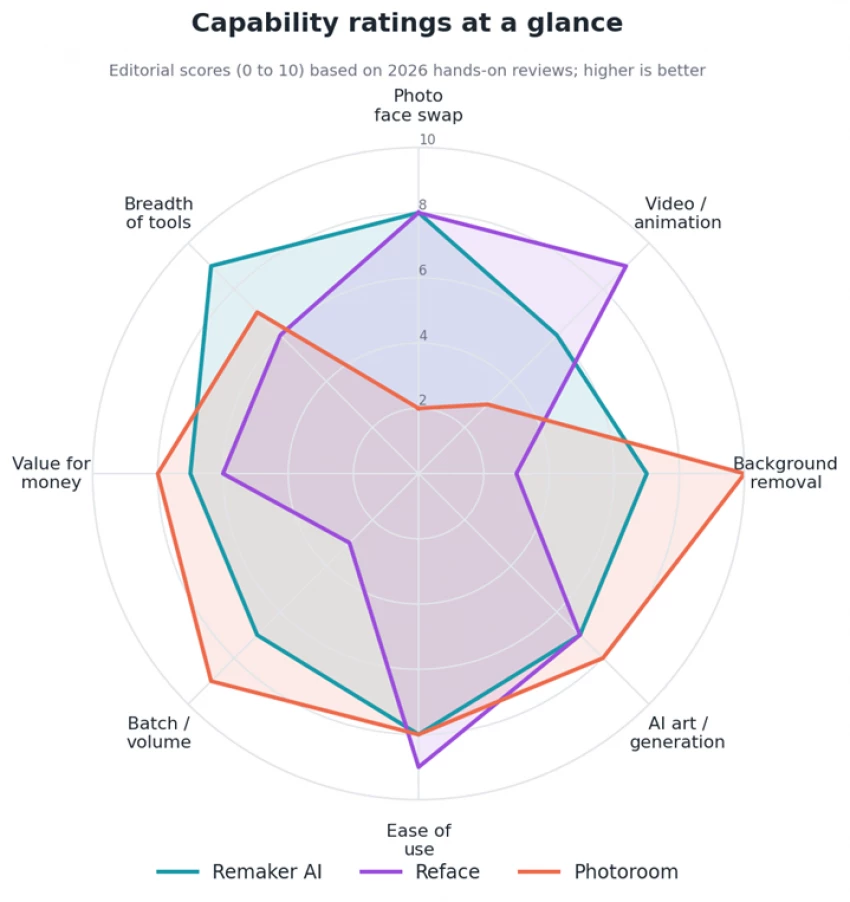
Figure 2: capability ratings (0 to 10). Editorial scores based on 2026 hands-on reviews.
The takeaway is not that one tool is “better,” but that each is shaped around a different center of gravity. A high score in one area almost always comes from focus, not luck.
Comparing prices here is genuinely tricky because the billing models differ. Remaker AI sells one-time credit packs, while Reface and Photoroom sell subscriptions. The chart below shows representative tiers converted to a rough monthly figure so you can eyeball them side by side, but treat it as a guide, not a quote.
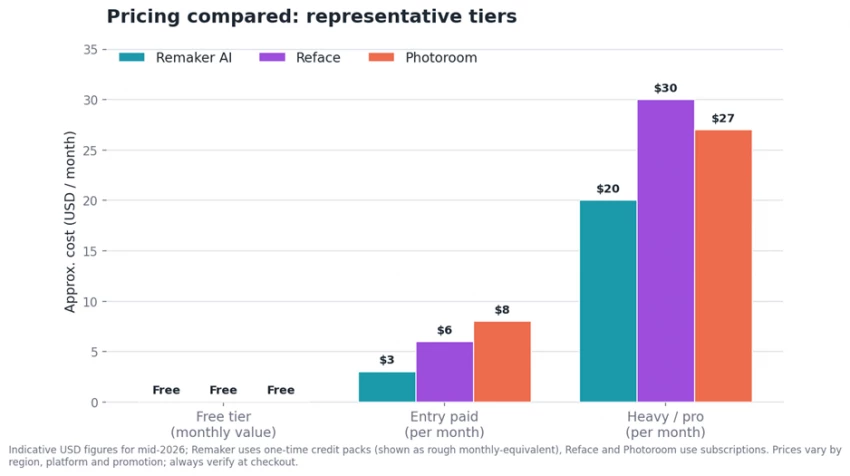
Figure 3: representative pricing. All three have a free tier; paid costs vary widely by plan, platform, and promotion.
Three things matter more than the headline numbers. First, every tool has a usable free tier, so you can test all three before paying. Second, “per-image” economics differ: credits reward light or bursty use, while subscriptions reward steady, high-volume work. Third, watch the hidden costs: Remaker’s video credits, Reface’s upsells and renewal traps, and Photoroom’s monthly credit caps can each change the real price you pay.
Start with your goal, follow the path, and you will land on a sensible default. The personas below cover the most common cases.
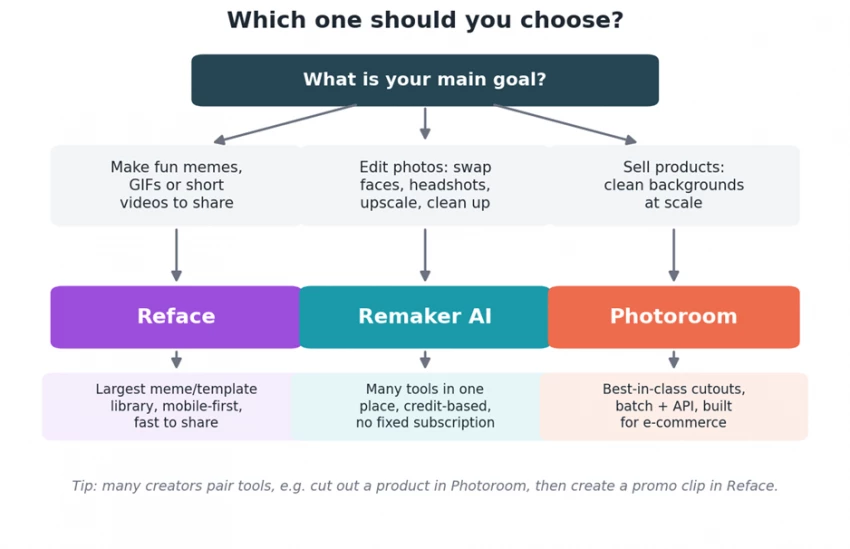
Figure 4: a quick decision path based on what you want to make.
You want laughs and shares, fast, mostly from your phone. Reface is the obvious pick: the biggest template library, the smoothest mobile experience, and one-tap export to social. Stay on the free tier until the ads annoy you, then consider an annual plan.
You touch lots of edit types (a face swap here, a headshot there, an upscale, a quick background cleanup), and you would rather not pay for several apps. Remaker AI is the value play because its credits stretch across many tools. Just budget carefully if you do much video.
Your images need to look clean, consistent, and professional, and you have a lot of them. Photoroom wins comfortably on cutout quality, batch speed, and store-ready templates. Map your monthly volume to a tier so credit caps do not surprise you.
You want background removal or editing baked into a pipeline or app. Photoroom’s API is the clear choice here, billed per image and built to scale.
If you are not ready to spend, lean on the free tiers: Remaker’s daily free credits for variety, or Photoroom’s free exports for product shots. Reface is fine too, as long as you can live with watermarks and ads.
Often the smartest move is not to pick one tool but to chain a few. Because they specialise, they hand off to each other nicely:
1. Product promo video: cut out and stage your product in Photoroom, then animate it or add a face-swapped spokesperson clip in Reface.
2. Personal brand kit: generate and upscale a headshot in Remaker AI, then remove its background and drop it into branded templates in Photoroom.
3. Social content series: batch-produce clean thumbnails in Photoroom, then spin up meme and reaction variants in Reface.
Used this way, the credit-and-subscription mix can actually be cheaper than forcing one do-everything tool to handle work it was never built for.
Consent and the law come first Face-swap and AI-editing tools are fun, but they are powerful enough to cause real harm if misused. Only edit or swap faces you have clear permission to use, and never create intimate or sexual imagery of a real person without their consent. In the United States, that is a federal offence under the TAKE IT DOWN Act, which took effect in 2025. Be mindful that face tools process biometric data, so review each app’s privacy policy and data-retention practices, and keep especially careful control of photos of other people and of minors. |
There is no single winner here, and that is the point. Reface wins for fun, fast, shareable face-swap content. Remaker AI wins as the flexible all-rounder that replaces several single-purpose subscriptions. Photoroom wins for anyone whose images need to sell. Decide what you want to make, pick the tool built for that job, lean on the free tiers to confirm the fit, and do not be afraid to combine them when a project spans more than one specialty.

New Claude Model Targets Agentic AI WorkflowsAnthropic has launched Claude Sonne...
Samuel Osei3 months ago

Gemini’s Image Tools Get a Wider RolloutGoogle is expanding access to Gemini’s p...
Alexander Hughes3 months ago

Two AI video generators, two very different first days. I ran PixVerse through i...
Alexander Hughes3 months ago

Two of the most talked-about AI chat platforms. I opened both, picked a characte...
Alexander Hughes3 months ago

The two-minute versionIf you only read one thing, read this. The rest of the doc...
Alexander Hughes3 months ago

Why Seedance 2.5 mattersSeedance 2.5 is the latest release in ByteDance’s Seedan...
Alexander Hughes3 months ago
Discussion