Verdict A fast, cheap way to a good-looking draft, not a finished deck Slidesgo's template-first AI nails speed, theme quality, and clean PowerPoint and Google Slides export. It loses points for shallow AI-written content, thin brand control, and a login wall that appears after you've done the work. |
| What I scored | Rating / 5 |
|---|---|
| Speed and ease of use | 4.7 |
| Template and theme quality | 4.5 |
| Export and compatibility | 4.6 |
| Value for money | 4.4 |
| AI content depth | 3.3 |
| Customization and brand control | 3.2 |
| Billing transparency | 3.0 |
| Overall | 4.0 |
If you need a presentation that looks decent today, Slidesgo is one of the fastest tools on the internet. You type one sentence, pick a theme, and a minute later you have an editable deck you can finish in PowerPoint or Google Slides. At roughly $3 to $5.99 a month, Premium is also one of the cheapest options around.
The trade-offs are just as clear. The AI writes outlines, not finished copy, so the words need expanding and fact-checking. You get limited control over branding, the templates are widely reused, and you have to create an account before you can see your result. It is a brilliant starting point and a mediocre finishing tool.
Slidesgo is a presentation platform built around three things: a library of 30,000+ editable templates for Google Slides and PowerPoint, a browser-based slide editor, and an AI presentation maker that turns a prompt into a themed deck. It started life as a template site for teachers and students, and that DNA still shows.
One detail most reviews skip: Slidesgo is part of Freepik Company and now ships under the banner “Slidesgo by Magnific.” You will see it on the login screen and in the footer, and it matters. It means the AI features sit inside a larger, well-funded design ecosystem (Freepik, Flaticon, Magnific) that keeps shipping new tools, rather than a small standalone app that might disappear.
I deliberately avoided a “safe” prompt. Instead of “digital marketing basics,” I asked it to build a deck on “how we can use a catapult to throw a spaceship into space,” an awkward, semi-nonsensical brief designed to see whether the AI would interpret intent, ask questions, or just panic. I ran the whole thing on the free plan, left the length on the default “Short” setting, generated the deck, opened the export menu, and then looked at what upgrading actually costs. Every screenshot below is from that single run.
Here is the full flow, seven steps from blank prompt to paywall, with what I noticed at each one.
STEP 01 / 07
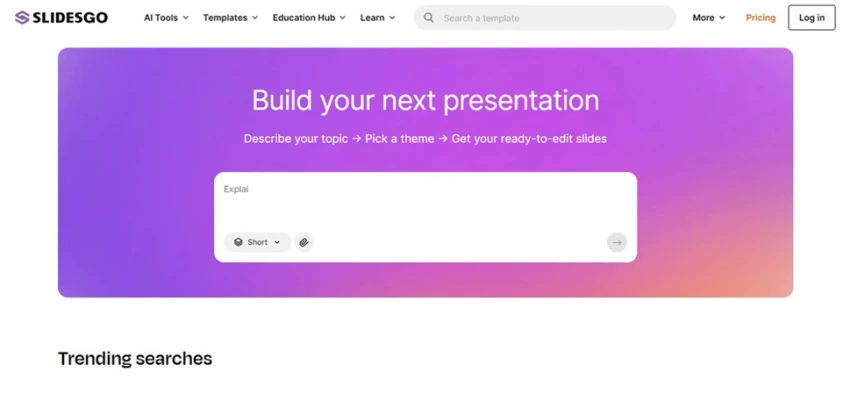
The Slidesgo homepage leads with the prompt box, a length selector, and a file-attach button.
My observation The AI maker is the homepage, no menu-digging required. There is a length selector (“Short”) and a paperclip to attach source material, and crucially there is no signup gate to start typing. Friction to begin is essentially zero. The catch, as I would find out, is parked a few clicks later. |
STEP 02 / 07
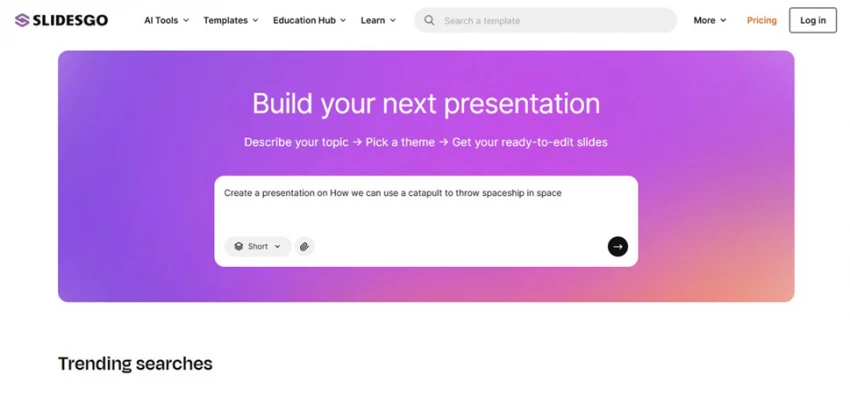
My exact brief, with the length left on “Short” and the send arrow now active.
My observation It did not blink at the odd phrasing and it did not ask a single clarifying question; the send arrow simply lit up once there was text. That is convenient but also telling: Slidesgo treats your prompt as a theme-and-topic seed, not a conversation. I left “Short” on intentionally, which (spoiler) is why I ended up with a very brief deck. |
STEP 03 / 07
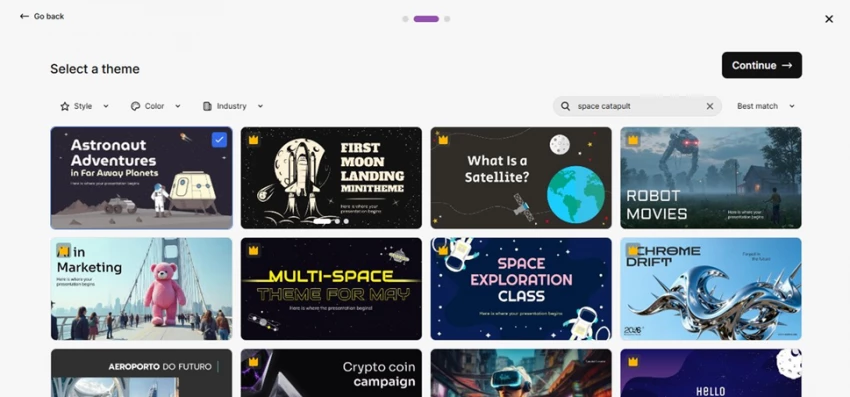
Slidesgo searched “space catapult” and surfaced on-topic themes; I picked the free “Astronaut Adventures” option.
My observation This is the moment that defines the product. Slidesgo converted my prompt into a template search (“space catapult”) and instantly matched relevant designs. You are picking a visual system, not generating a layout from scratch. This is template-first AI, closer to a smart search than to Gamma's generative design. Crowns mark premium themes; plenty of free ones were genuinely good. |
STEP 04 / 07
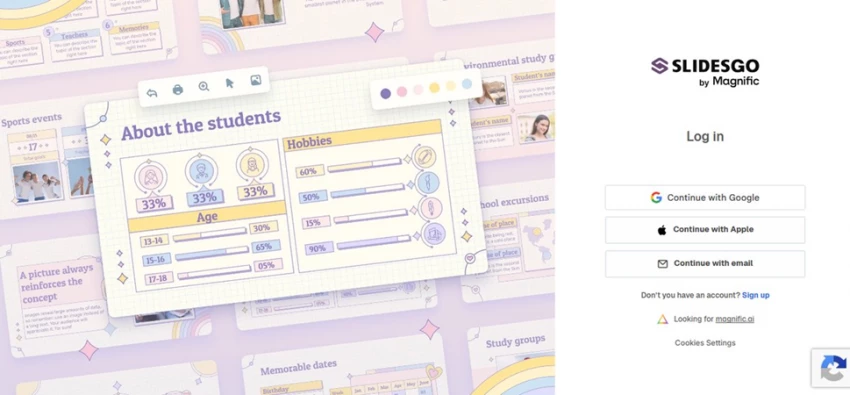
Before the deck appears, you have to sign in. Note the “Slidesgo by Magnific” branding.
My observation Here is the friction nobody warns you about: you must create an account before you can see your result. After investing effort in the prompt and theme, that is a mild bait-and-switch. On the upside, the “by Magnific” branding confirms the Freepik ownership, and Google one-tap made the actual signup take seconds. |
STEP 05 / 07
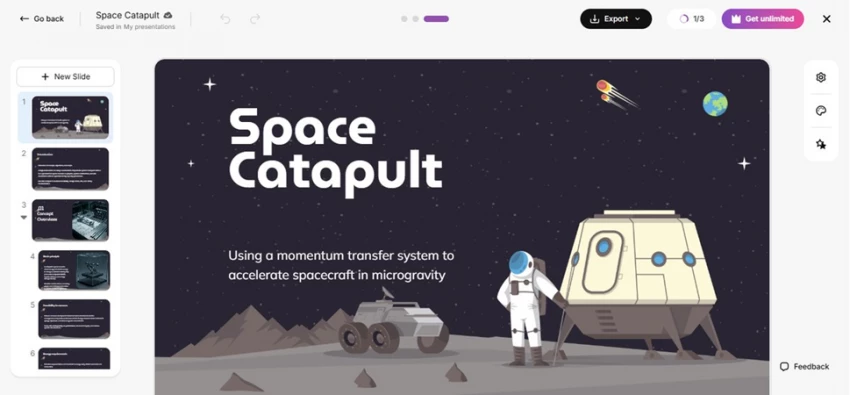
The result: a clean “Space Catapult” title slide with an accurate-sounding subtitle, but only 3 slides.
My observation This genuinely impressed me. From a half-joke prompt it produced a coherent title, a surprisingly accurate subtitle (“using a momentum transfer system to accelerate spacecraft in microgravity”), and a polished, on-theme title slide. The editor is browser-based with slide thumbnails plus settings, theme, and AI panels. The catch: it is 3 slides because of the “Short” setting, which is outline depth, not a finished deck. |
STEP 06 / 07

Two export paths: download as a PowerPoint file, or save straight to Google Slides.
My observation Two sensible, no-nonsense options: download a .pptx or push to Google Drive and Slides. There is no proprietary format trapping your work, so you finish the deck in tools you already own. That openness is a real advantage over all-in-one editors that keep your file locked inside their app. |
STEP 07 / 07
The Free vs Premium split.
My observation The free tier gives you 3 AI presentations and 3 downloads a month with a Slidesgo credit on your slides. Premium removes the attribution, opens the full 30,000+ library, and raises the limits to 150 per month. Worth noting: Slidesgo shows region-adjusted pricing, so the figure you see depends on your country. I have converted everything to standard USD below. |
Judging the “Space Catapult” deck on its own merits: the title slide was excellent, with strong type, a fitting illustration, and a subtitle that sounded like a real engineer wrote it. The theme was applied consistently across the three slides. But the body content was thin and partly placeholder-grade, the science would need verifying before anyone presented it, and three slides is nowhere near a usable talk.
That is the honest shape of Slidesgo's AI: it gets you past the blank page and about 50 to 60% of the way to a draft. The remaining 40 to 50%, the real content, accuracy, narrative, and brand polish, is still your job. If you go in expecting a scaffold rather than a finished presentation, you will not be disappointed.
Slidesgo has a free plan and a single Premium tier that scales by number of users. Here are the standard US-dollar rates for one user. Because Slidesgo localizes prices by region, your own checkout total may differ, and local taxes can apply on top.
| Plan | Price (USD) | AI presentations | Template downloads | Attribution | Full library |
|---|---|---|---|---|---|
| Free | $0 | 3 / month | 3 / month | Required | No |
| Premium · Monthly | $5.99 / mo | Unlimited* | Unlimited* | None | Yes |
| Premium · Annual | $35.99 / yr | Unlimited* | Unlimited* | None | Yes |
| Teams (3+ users) | Bigger discount | Unlimited* | Unlimited* | None | Yes |
*“Unlimited” is capped at 150 AI generations and 150 downloads per month for security. The annual plan works out to about $3.00/month and saves roughly 50% versus paying monthly. Teams scale up to 1,000 users with larger discounts; very large organizations get a custom quote.
Worth knowing before you subscribe Premium auto-renews unless you cancel, and Slidesgo does not refund the unused portion if you cancel partway through a term. Some users report friction with billing and cancellations, so if you upgrade, start monthly, keep your cancellation confirmation, and watch your renewal date. |
Chart 1
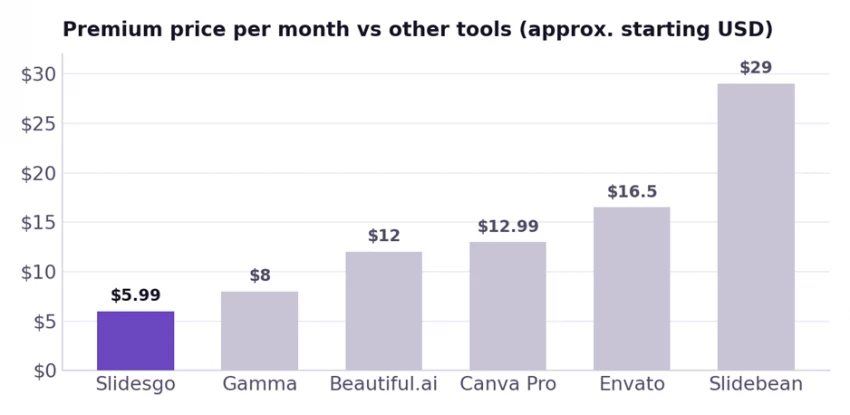
Approximate starting monthly prices in USD; some are billed annually. Slidesgo can drop to about $3/month on its annual plan. Prices change, so check each vendor before buying.
Chart 2
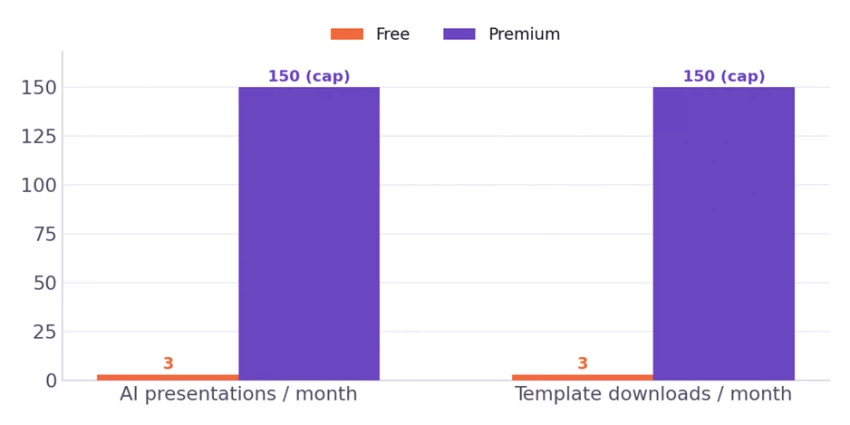
The free plan's 3-per-month ceiling is the main reason regular users upgrade. Premium is “unlimited” up to a 150/month safety cap.
This is still Slidesgo's backbone: 30,000+ templates (15,000+ of them Premium) sorted by topic, style, and color, each with the full range of slide types, including titles, sections, charts, timelines, maps, and infographics. In my test the theme matching was the standout, instantly turning a vague prompt into relevant, well-built designs.
Fast and friendly, but shallow. It excels at first drafts, student projects, and simple explainers, and it skips the blank-page problem entirely. It is not the tool for long, data-heavy, or tightly branded narratives, because the writing stays at outline depth.
The online editor handles the basics, including text, visuals, and adding or removing slides, without needing PowerPoint installed. When you are done, export to .pptx or Google Slides. That dual-format freedom is a genuine, repeatable strength.
Easy to miss: Slidesgo also bundles an AI PDF-to-PPT converter plus education-focused generators (lesson plans, quizzes, exit tickets, icebreakers). For teachers especially, these quietly add a lot of value on top of the slide maker.
What I liked
• You can start generating in seconds, with no signup to begin typing
• 30,000+ professionally designed templates with strong theme matching
• Turns a one-line prompt into a coherent, on-theme starter deck fast
• Clean exports to PowerPoint and Google Slides, with no lock-in
• Browser editor plus bonus AI tools (PDF to PPT, lesson plans, quizzes)
• Premium is genuinely cheap, from about $3/month annually
What held it back
• The login wall appears mid-flow, after you have done the work
• AI content is outline-deep, not finished or fact-checked copy
• Free plan is tight (3 generations and 3 downloads) and forces attribution
• Limited brand control; popular templates are reused everywhere
• Billing and cancellation complaints, and no refund for unused time
• The “Short” default can produce very few slides unless you change it
I read across the two biggest review platforms, and they tell almost opposite stories. On G2, where reviewers are mostly verified business users, Slidesgo is rated very highly. On Trustpilot, the score is far lower and sharply polarized. The gap between them is the most useful thing in the data, so here is what is really going on (ratings are as of mid-2026 and will shift over time).
| Platform | Score | Reviews | What stands out |
|---|---|---|---|
| G2 | ~4.7 / 5 | ~19 verified | Business users praise the template breadth, the time saved, and how easily decks export to Slides and PowerPoint |
| Trustpilot | ~2.4 / 5 | ~54 | Highly polarized: many five-star reviews from teachers and students, offset by many one-star reviews about billing and cancellation |
| Other listings | Mostly positive | varies | Software directories such as SoftwareSuggest and SaaSworthy skew favorable, echoing the same template-and-speed praise |
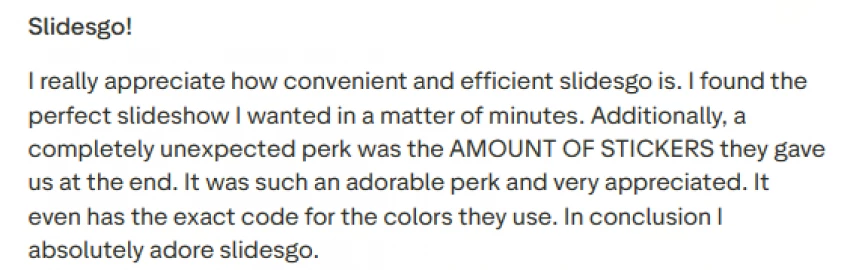
The praise is remarkably consistent. Teachers and educators are the strongest advocates: they describe refreshing their entire lesson libraries with fresh themes, and several mention that students respond well to the designs. Students like that most templates are free and that a polished deck is quick to assemble. One Trustpilot reviewer summed it up bluntly: “Once I got an A because my PowerPoint looked amazing.” Others highlight how fast the AI maker turns even a rough prompt into something presentable, the broad compatibility with Google Slides, PowerPoint, and Canva, and, in a number of cases, quick and courteous support replies.
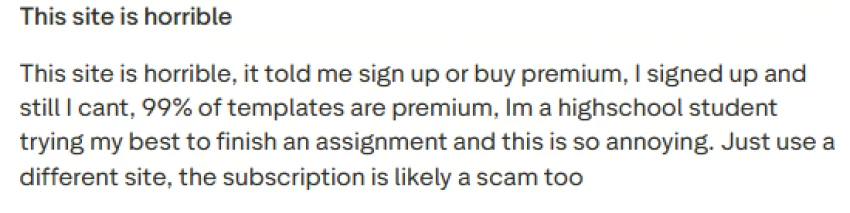
Almost all of the serious complaints cluster around one thing: billing and cancellation. Reviewers report being charged after they thought they had cancelled, struggling to find the cancel option, and waiting a long time for support to respond to refund requests. One wrote that they were “still getting invoices after canceling multiple ways months ago.” A common variation involves an annual auto-renewal that users did not expect, and at least one educator said the advertised education discount was not applied at checkout. A separate, smaller theme is the AI generator wandering off-topic on more complex prompts. It is worth keeping perspective: unhappy subscribers are far more likely to post on Trustpilot than satisfied ones, which is part of why that score skews low.
Put the two platforms together and a clear picture emerges. The product itself is genuinely well-liked, which is why business reviewers on G2 rate it so highly and why teachers keep coming back. The weak point is not the templates or the AI; it is the subscription and billing experience. So the practical advice is simple: enjoy the free tier, and if you go Premium, start on the monthly plan, set a reminder before renewal, and keep proof of any cancellation.
Slidesgo is not trying to be everything. If its gaps are deal-breakers for you, here is where the main competitors pull ahead, and where Slidesgo still wins on price.
| Tool | Best for | AI content | From (USD) | Choose it if |
|---|---|---|---|---|
| Slidesgo | Quick template-based decks for students, teachers, teams | Outline-level | about $3 to 5.99/mo | you want cheap, fast, editable decks you finish in PPT or Slides |
| Gamma | Story-driven AI decks and docs | Strong (writes and designs) | about $8/mo | you want the AI to genuinely write and lay out the content |
| Beautiful.ai | Brand-consistent business decks | Medium (smart layouts) | about $12/mo | you want automatic, on-brand formatting for a team |
| Canva | All-purpose design beyond slides | Medium | about $12.99/mo | you want brand kits, collaboration, and more than presentations |
| Envato Elements | Premium, less-reused templates | None (templates) | about $16.50/mo | you want unique, commercially safe template variety |
| Slidebean | Investor and pitch decks | Medium (structure) | about $29/mo | you are building a fundraising deck with financials |
Prices are approximate starting points and change often; several are cheaper on annual billing. Treat this as a directional comparison, not a live price sheet.
After running it end to end, the fit is easy to summarize. Slidesgo is for people who value speed and a low price over total control. Teachers, students, and small teams will get the most out of it: classroom slides, lesson decks, group projects, internal updates, and quick first drafts all come together in minutes.
It is a poor fit for brand-critical, client-facing, or data-heavy work. Agencies, marketing teams with strict guidelines, and founders pitching investors will hit the ceiling on customization and AI depth fast, and the “everyone uses these templates” problem undercuts originality where it matters most.
Slidesgo earns a solid 4.0 out of 5 from me. It does the hard part, getting you from nothing to a clean, themed, editable deck, better and cheaper than almost anything else, and the open export to PowerPoint and Google Slides means it slots into how people already work. It loses a full point on the things it is not built for: deep AI writing, real brand control, and a billing experience that inspires confidence. The external ratings echo that split, with G2 around 4.7 out of 5 and Trustpilot around 2.4 out of 5, where the gap is mostly billing rather than the product itself.
Chart 3
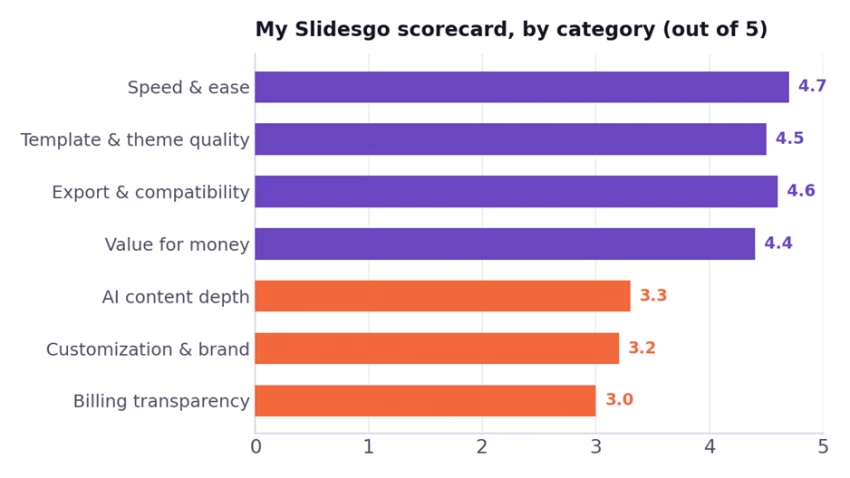
Slidesgo's strengths cluster around speed, templates, export, and price; its weak spots are AI depth, brand control, and billing clarity.
Buy Premium if: you make two or more decks a month, want the full library and no attribution, and you are happy finishing in PPT or Slides. At about $3/month annually, it pays for itself fast.
Stay on Free if: you build the occasional deck and do not mind a Slidesgo credit plus the 3-per-month cap. The free tier is genuinely usable for light, casual needs.
Look elsewhere if: you need the AI to write deep, accurate, on-brand content (try Gamma), strict brand systems (Canva or Beautiful.ai), or unique commercial templates (Envato).

New Claude Model Targets Agentic AI WorkflowsAnthropic has launched Claude Sonne...
Samuel Osei1 month ago

The Quick verdictInSnoop is a free, browser-based tool that promises to let you...
Alexander Hughes1 month ago

Gemini’s Image Tools Get a Wider RolloutGoogle is expanding access to Gemini’s p...
Alexander Hughes1 month ago

Two AI video generators, two very different first days. I ran PixVerse through i...
Alexander Hughes1 month ago

Two of the most talked-about AI chat platforms. I opened both, picked a characte...
Alexander Hughes1 month ago

The two-minute versionIf you only read one thing, read this. The rest of the doc...
Alexander Hughes1 month ago
Discussion