AI image generation in 2026 has split into two camps. On one side sit template-driven web apps that let anyone produce a finished image in three clicks. On the other side sit open-weight pipelines that demand serious hardware and a learning curve measured in weeks but reward that effort with virtually unlimited creative control. Unlucid AI and Stable Diffusion are the cleanest representatives of those two philosophies.
PATH A WINS WHEN Speed, ease and a finished image in under two minutes matter more than pixel-perfect control. Social posts, marketing mockups and quick concept tests fit here. |
PATH B WINS WHEN Output quality, character consistency, exact composition or commercial-grade detail are non-negotiable. Concept art, illustration, book covers and professional pipelines fit here. |
The full reasoning behind each verdict, plus the price, hardware and use-case maths, follows in the sections below. A direct comparison table comes first for readers who want the numbers up front.
The table below summarises every major dimension that matters for choosing between these two AI image platforms. Numbers and feature claims reflect publicly listed information as of May 2026.
| Dimension | Unlucid AI | Stable Diffusion |
|---|---|---|
| Type | Web app, cloud rendered | Open-weight model, local or cloud |
| Operator | Cygnus Space (Hong Kong) | Stability AI plus open community |
| Launched | 2024 (consumer focus) | 2022 (still actively updated) |
| Setup Time | Under 2 minutes | 30 minutes to several hours |
| Hardware | Any browser | GPU with 8 GB to 24 GB VRAM |
| Pricing Model | Freemium, gem packs from $8.99 | Free locally, cloud from $15/mo |
| Free Tier | About 5 daily gems | Fully free if hardware exists |
| Image Styles | 5 preset modes | Hundreds via community models |
| Image Resolution | Up to about 2K with upscaler | Native 1024px, upscaled to 4K+ |
| Custom Models | Not supported | LoRA, DreamBooth, fine-tunes |
| Pose / Layout Control | Limited templates | Full ControlNet integration |
| Video Generation | Built in (Fly, Squish, Dance) | Stable Video Diffusion plug-in |
| Learning Curve | Beginner friendly | Power-user oriented |
| Privacy | Cloud servers process inputs | Local processing keeps data on device |
| Best Suited For | Social posts and quick edits | Concept art and professional work |
Every AI image generator on the market sits somewhere between absolute simplicity and absolute control. Unlucid AI and Stable Diffusion anchor the two ends of that spectrum. Visualising where each lives makes the structural difference obvious.
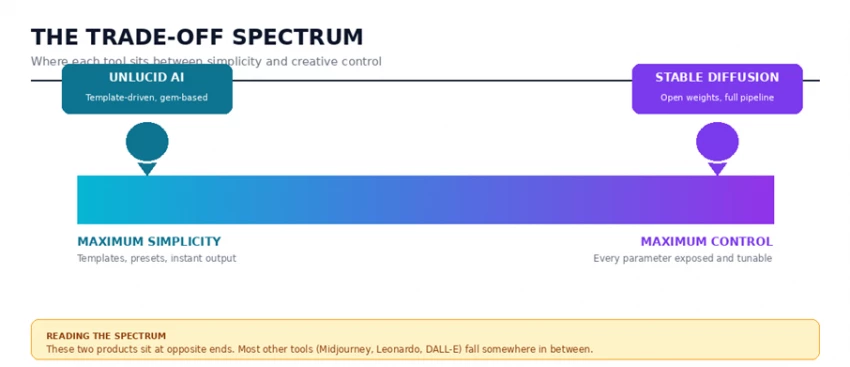
Tools like Midjourney, Leonardo AI and DALL-E sit in the middle of that spectrum. They abstract away most of the technical complexity but expose more parameters than Unlucid does. Unlucid sits at the simplicity extreme deliberately, betting that the audience for one-click generation is much larger than the audience for prompt engineering. Stable Diffusion sits at the control extreme just as deliberately, betting that creative professionals will tolerate complexity for output quality nobody else can match.
| PATH A / THE SIMPLICITY ROUTE / UNLUCID AI |
Unlucid AI is a web-based creative platform marketed under the tagline "uncensored AI tools for dreamers." The product is operated by Cygnus Space, a Hong Kong-based developer, and combines text-to-image generation, image-to-video animation, and basic photo editing inside a single browser interface. No installation, no GPU requirement, no command line.
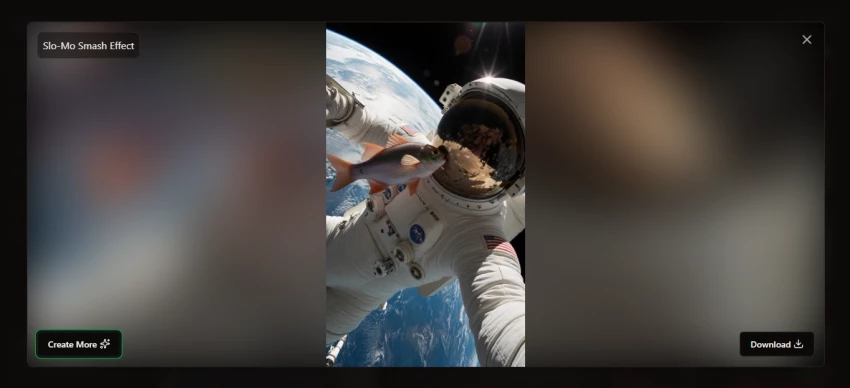
The product positions itself for speed and accessibility rather than depth. Five image style presets cover the most common requests: Realistic, Pencil, Cartoon, Anime and 3D. A library of 15 plus animation templates (Fly, Squish, Dance, Transform, Reveal, Cakify, Crush, and others) handles the image-to-video side. Image editing tools allow object removal, outfit changes and basic retouching without a separate Photoshop session.
A typical session on Unlucid runs something like this. Open the dashboard, click Text to Image, type a prompt, pick a preset, hit Generate, wait roughly 20 seconds, then download. Animation works the same way: upload an image, select an effect template, set duration, export an MP4. The platform consumes "gems" from the account balance for each generation, with images costing roughly 5 to 10 gems and videos consuming slightly more.
| Plan | Cost | Gems Included |
|---|---|---|
| Free Tier | $0 | About 5 gems daily |
| Starter Pack | $8.99 | 120 gems (single purchase) |
| Standard Pack | $29.99 | Approximately 450 gems |
| Heavy Pack | Higher tier | Larger gem bundles for power users |
The gem economy works well for occasional or hobbyist use but compounds quickly for daily workflows. Multiple iterations are often needed to land on a satisfactory result, and gem consumption scales with iteration count. Daily creative professionals can burn through a Standard Pack in a single afternoon of intensive ideation.
| STRENGTHS | TRADE-OFFS |
|---|---|
| ✓ Lowest barrier to entry of any major AI image platform | ✗ Output quality varies significantly between generations |
| ✓ Genuinely fast: under two minutes from prompt to download | ✗ Template-driven design produces visually similar results |
| ✓ No hardware investment whatsoever | ✗ No exposed parameters: no CFG scale, no negative prompts, no samplers |
| ✓ Image-to-video animation built into the same workspace | ✗ Cannot load custom models, LoRAs or community checkpoints |
| ✓ Five style presets cover most casual creative needs | ✗ Costs scale with iteration count and add up faster than expected |
| ✓ Daily free gems make experimentation realistic | ✗ AI model architecture not publicly disclosed |
| PATH B / THE CREATIVE CONTROL ROUTE / STABLE DIFFUSION | |
Stable Diffusion is a family of latent diffusion models originally developed by researchers at LMU Munich and released by Stability AI in 2022. The defining trait is that the model weights are publicly available. Anyone can download a checkpoint, run it on local hardware and modify it without permission or licensing fees. As of 2026, the active ecosystem includes SD 1.5, SDXL, SD 3.5 and Flux, alongside thousands of community-trained variants on Civitai and Hugging Face.
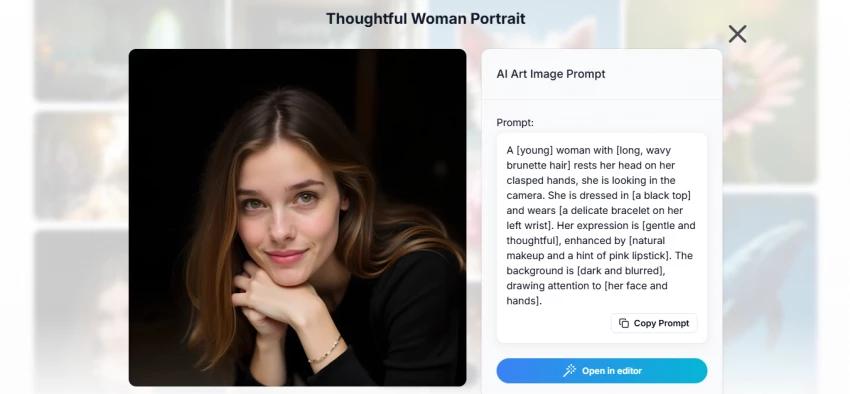
Stable Diffusion is not a single product. It is a foundational model that runs through one of several user interfaces, with AUTOMATIC1111, ComfyUI, Forge and Fooocus being the most popular in 2026. Each interface exposes a different slice of the underlying capability, ranging from streamlined preset-driven (Fooocus) to fully node-based with thousands of customisation points (ComfyUI).
Three layers make up the typical Stable Diffusion stack. The base model checkpoint determines the underlying capability. The LoRA layer adds specialised styles, characters or aesthetic fine-tuning. ControlNet adds spatial conditioning for poses, depth maps and edge guidance. Add upscaling, ADetailer for face refinement, and inpainting for surgical edits, and the result is a creative pipeline with capability ceilings that no closed platform can match.
| Component | Role | Examples in 2026 |
|---|---|---|
| Base Model | Core image generation engine | SDXL, SD 3.5 Large, Flux 2 Dev |
| LoRA | Style or character fine-tuning | Anime style packs, character LoRAs |
| ControlNet | Spatial composition control | Canny, OpenPose, Depth, Tile |
| Sampler | Denoising scheduler algorithm | DPM++ 2M Karras, Euler a, UniPC |
| Upscaler | Resolution enhancement | 4x-UltraSharp, ESRGAN, Hires Fix |
| Inpainting | Targeted area regeneration | Mask-based prompt rewrites |
| UI Layer | Interface for the pipeline | AUTOMATIC1111, ComfyUI, Forge |
The cost equation for Stable Diffusion looks completely different from a subscription tool. The model is free, but the hardware to run it well is not. Recent benchmarks place the practical entry point at an NVIDIA RTX 3060 with 12 GB of VRAM, often available used for under $200. SDXL workflows are most comfortable on 12 to 16 GB cards, with the RTX 4070 Ti or RTX 4080 sitting in the sweet spot. Bleeding-edge Flux models and complex ComfyUI pipelines comfortably consume 24 GB on an RTX 4090 or RTX 5090.
For users without a capable GPU, cloud platforms like RunDiffusion, ThinkDiffusion and DreamStudio offer Stable Diffusion as a service, typically priced between $15 and $50 per month depending on the chosen tier and runtime hours.
| STRENGTHS | TRADE-OFFS |
|---|---|
| ✓ Open-weight model: free forever, no licensing surprises | ✗ Setup process is genuinely intimidating for non-technical users |
| ✓ Thousands of community models cover any conceivable style | ✗ Hardware investment of $200 to $2,000 before the first image |
| ✓ ControlNet enables exact composition and pose control | ✗ Maintenance burden: drivers, Python versions, dependency conflicts |
| ✓ Custom LoRA training preserves brand or character consistency | ✗ Quality requires real prompt engineering skill |
| ✓ Local processing means full data privacy | ✗ Best workflows assume comfort with sampler theory and CFG scale |
| ✓ No per-image cost once the GPU is in place | ✗ Mac and AMD GPU support remains less mature than NVIDIA on Linux or Windows |
The clearest way to understand the simplicity-versus-control divide is to watch the same creative goal travel through both pipelines. Below is a side-by-side breakdown of producing a single fictional warrior queen portrait in fantasy concept-art style, end to end.
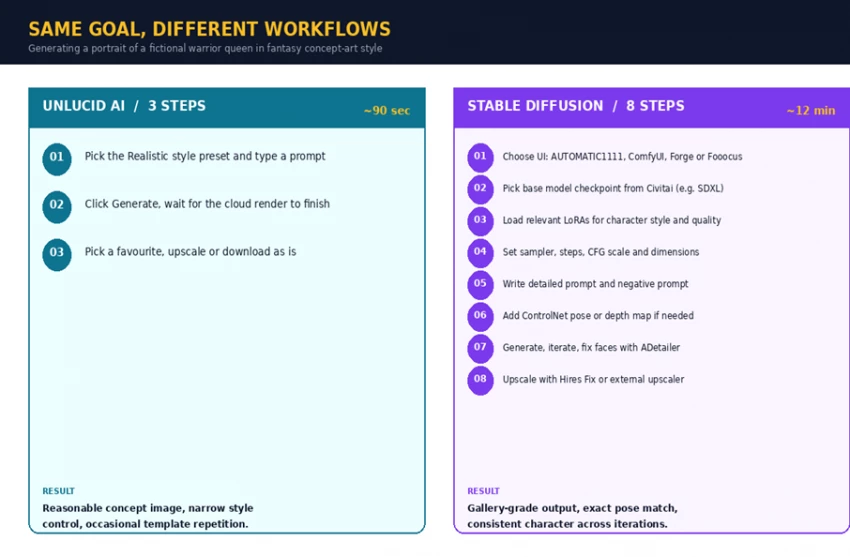
Both routes can produce the same general image. The differences sit in three places. First, time to first usable result strongly favours Unlucid (90 seconds versus 12 minutes). Second, output ceiling strongly favours Stable Diffusion: SDXL with the right LoRA and ControlNet pose can produce illustration-grade work that Unlucid simply cannot match. Third, iteration cost flips the equation again: a third or fourth Unlucid generation costs gems, while a third or fourth Stable Diffusion generation on local hardware is effectively free.
Eight categories were graded on a five-point scale, weighted toward what matters most for a working creative. Source data was drawn from official documentation, third-party reviews on Firmsuggest, AIMarketCap, ToolHalla and SaaSCRMReview, and consensus benchmarks from the Civitai community.
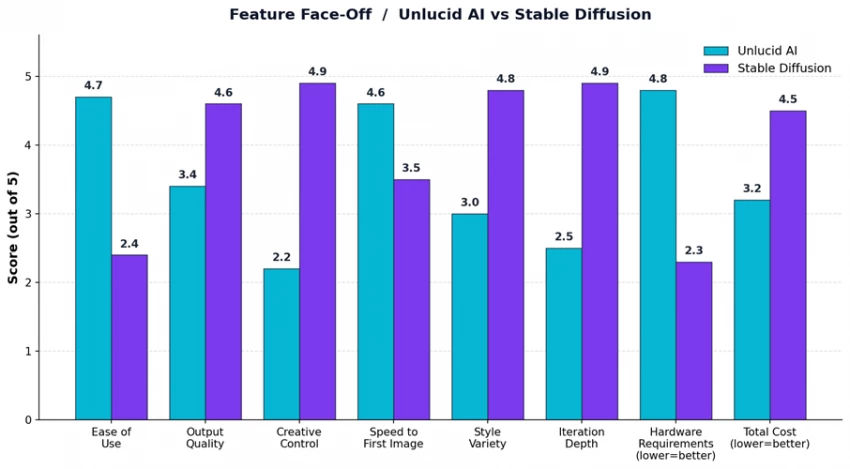
The pattern in the chart is striking. The two products almost never tie on any dimension. Unlucid wins decisively on ease of use, speed and hardware accessibility. Stable Diffusion wins decisively on output quality, creative control, style variety and iteration depth. Total cost is the only category where the answer depends entirely on use frequency, and that question deserves its own dedicated section.
Cost is the single dimension where the simplicity-versus-control framing breaks down. The chart below tracks the cumulative total spend over 12 months of active use across three realistic scenarios.
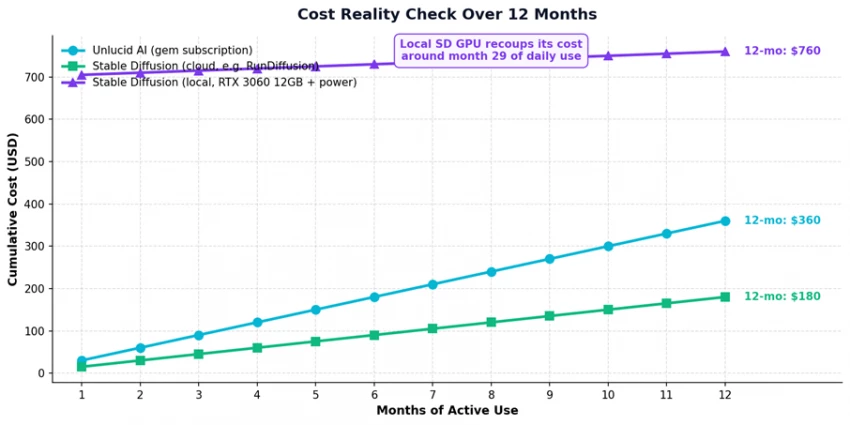
Three takeaways stand out. First, Stable Diffusion in the cloud is the cheapest paid option: $180 over 12 months versus $360 for moderate Unlucid use. Second, Stable Diffusion on local hardware looks expensive in year one ($760 including a $700 GPU) but pays for itself by month 29 against Unlucid and continues to deliver free generations indefinitely after that. Third, the truly cost-conscious option is Stable Diffusion local for users who already own a capable gaming GPU: incremental cost drops to roughly $5 per month in electricity.
COST VERDICT For occasional users (under 50 generations per month), Unlucid AI gem packs are the cheapest entry point. For regular users (over 200 generations per month), Stable Diffusion on existing hardware is dramatically cheaper. Cloud Stable Diffusion sits in the middle and works for users who want quality without buying a GPU. |
Choosing between simplicity and control is not really a choice between products. It is a choice between projects. The matrix below maps six common creative scenarios to the better-fit tool, with the reasoning behind each pick.
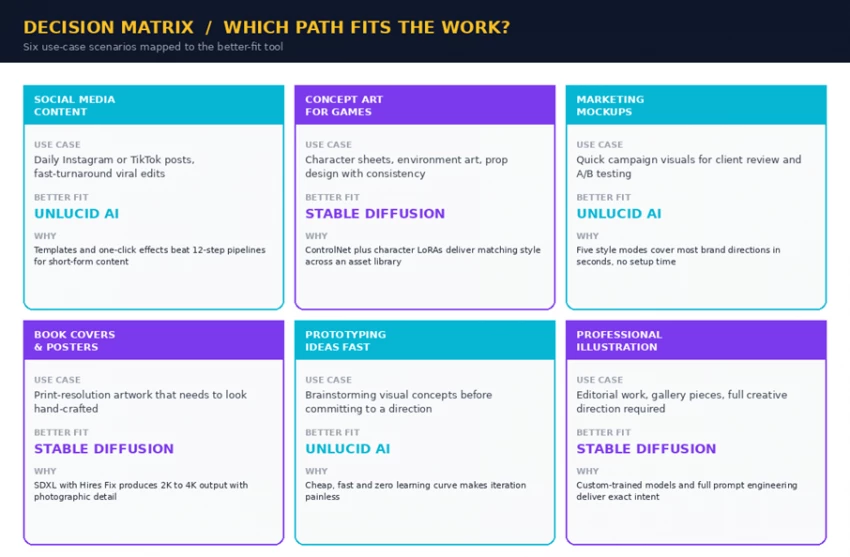
A useful pattern emerges from the matrix. Whenever a project demands speed, low effort and good-enough quality, Unlucid wins. Whenever a project demands consistency across an asset library, exact composition matching, or print-grade output, Stable Diffusion wins. Mixed workflows are common in 2026: many designers prototype on Unlucid then move final assets to Stable Diffusion for polish.
Neither platform is perfect, and both share certain category-wide limitations worth flagging before any purchasing decision.
• AI architecture is not publicly disclosed, making consistency benchmarking difficult.
• Trust signals (verifiable team, audited security) remain weaker than category leaders.
• Output uniformity issues mean repeat generations of similar prompts can produce template-like results.
• Gem economy obscures the true per-image cost until usage stabilises.
• Open-source licensing puts content moderation responsibility on the user.
• Quality consistency depends heavily on the chosen base model and LoRA combination.
• Maintenance overhead grows with custom add-ons: dependency conflicts are a real cost.
• Mac and AMD GPU support trails NVIDIA on Windows and Linux significantly.
Both tools also share a category-wide limitation: any AI image generator is only as ethical as the user. Both platforms publish content policies prohibiting illegal content and certain harmful categories, but enforcement at the individual generation level is necessarily limited.
After mapping every dimension across cost, quality, control, hardware and use-case fit, the simplicity-versus-creative-control framing resolves into a clean rule: pick the tool that matches the job, not the tool that wins on average. Both products are genuinely excellent at what they were built for, and both are genuinely bad at the other product's strengths.
PATH A FINAL VERDICT / UNLUCID AI Best for casual creators, marketers and social-media-first users who need a finished image in under two minutes and value zero setup over creative depth. The free daily gems make experimentation realistic, and the integrated animation features add genuine value. Avoid for any work where output quality, character consistency, or print-grade detail is the priority. |
PATH B FINAL VERDICT / STABLE DIFFUSION Best for serious creative professionals, concept artists, illustrators and anyone whose output will be judged on craft. The hardware investment and learning curve are real, but they buy a creative ceiling no closed platform can match. Avoid only if the work is genuinely casual or if hardware is not on the table. |
THE PRACTICAL RECOMMENDATION Many working creatives now run a hybrid stack: prototype quickly on Unlucid AI to validate concepts, then move final-quality assets to a Stable Diffusion pipeline for polish, consistency and resolution. The two paths are complementary far more often than they are competing. |

New Claude Model Targets Agentic AI WorkflowsAnthropic has launched Claude Sonne...
Samuel Osei3 months ago

Gemini’s Image Tools Get a Wider RolloutGoogle is expanding access to Gemini’s p...
Alexander Hughes3 months ago

Two AI video generators, two very different first days. I ran PixVerse through i...
Alexander Hughes3 months ago

Two of the most talked-about AI chat platforms. I opened both, picked a characte...
Alexander Hughes3 months ago

The two-minute versionIf you only read one thing, read this. The rest of the doc...
Alexander Hughes3 months ago

Why Seedance 2.5 mattersSeedance 2.5 is the latest release in ByteDance’s Seedan...
Alexander Hughes3 months ago
Discussion