Could not send a single message. Stuck in read-only and visibly shutting down.
CHARACTER AI
8.0 /10
WINNER
Worked from start to finish. Annoying ads, but a real, fun conversation.
Short version: Character AI won because I could use it. Wsup AI was frozen on read-only the whole time I tested it, so this turned into less of a fight and more of a walkover.
HOW I TESTED
Two free accounts, one browser, same afternoon. I judged each app on one simple thing first: can a normal person walk in and have a conversation? After that I looked at how the chat felt, how scenes were set up, and whether the paid plans were clear. Everything below is what actually happened on my screen, in order, screenshots and all. I have noted my reaction at each step instead of cleaning it up afterward.
ROUND 1
Wsup AI: a chat app that would not chat
Wsup AI runs in the browser on now.gg with no sign up, which is the whole pitch. Here is how my three steps went, one after another.
STEP 01 / FIRST IMPRESSION
The home screen was friendly, then it told me it was closing
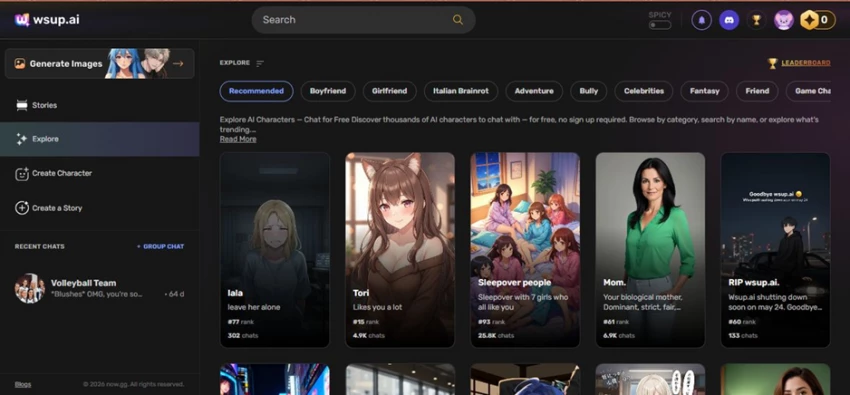
Character cards laid out like a social feed, a SPICY toggle up top, a little gem counter sitting on 0. Then I actually read the cards. A couple of them were titled things like “RIP wsup.ai” and “Goodbye wsup.ai,” with text saying the site was shutting down soon. That is not what you want to see before you have even started.
Wsup AI · Explore page. Note the cards announcing the shutdown and the gem counter on 0.
● MY NOTE · STEP 01
Before I typed a single thing, the app was already saying goodbye. Cards literally read “RIP wsup.ai.” Gems on 0. Bad omen.
STEP 02 / TRY TO CHAT
It said “read only” and refused to send my message
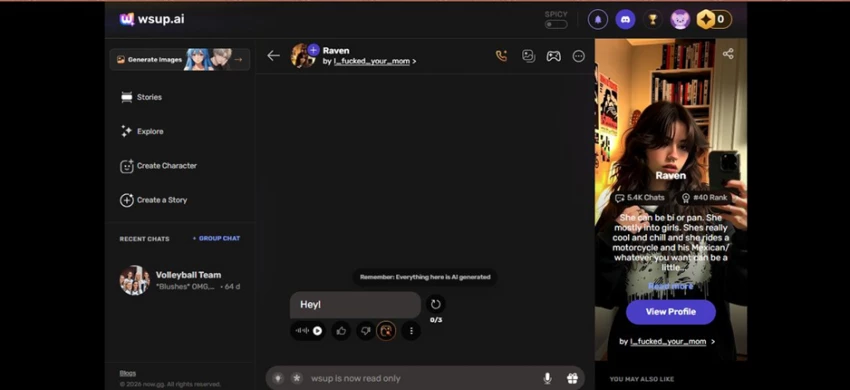
I clicked into a character called Raven and typed a simple “Hey.” The box would not let it go. Where a send button should be, it said “wsup is now read only.” I could see the old scripted intro line and the usual reminder that everything there is AI generated, but nothing I typed could move.
Wsup AI · Chat with “Raven.” The input bar reads “wsup is now read only.”
● MY NOTE · STEP 02
Typed “Hey.” The app told me it was read only and would not send it. For a chat app, that is the entire product, gone.
STEP 03 / TRY TO BUY CREDITS
I figured I needed credits, so I went to the store. It never loaded.
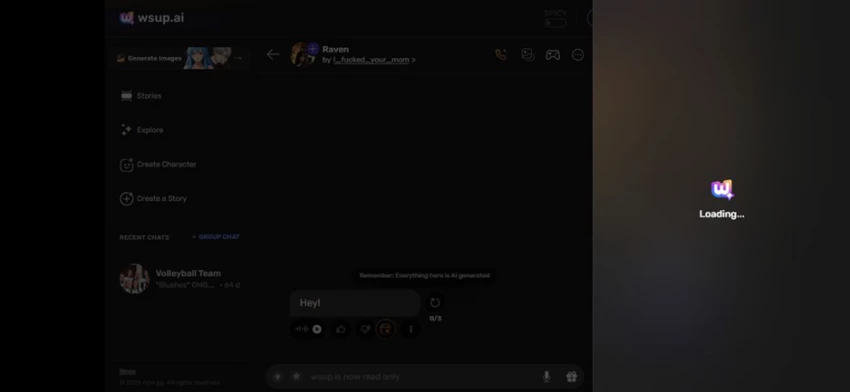
My next thought was that the read-only wall and the 0 gems meant I just needed to buy some currency. So I opened the purchase panel. It showed the logo, said “Loading,” and then sat there. It never finished. No store, no credits, no way back into a conversation.
Wsup AI · The credits/store panel, frozen on “Loading.”
● MY NOTE · STEP 03
Tried to pay my way past the wall. The store just spun on “Loading” forever. Cannot chat, cannot buy. Hard dead end.
So my honest Wsup AI experience in June 2026 was three screens and zero conversations. The app is clearly being wound down, and what is left is a museum: you can look at the characters, but you cannot touch them.
ROUND 2
Character AI: every step actually worked
Character AI makes you sign in, but once I was in, all four steps did what they were supposed to. I picked an Attack on Titan scene to see how it handles roleplay.
STEP 01 / FIRST IMPRESSION
More app than toy, with one ugly ad up top
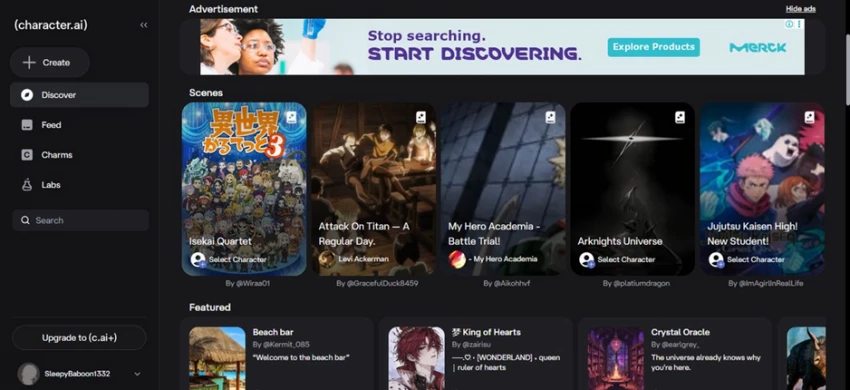
The interface feels like a proper product: a Create button, a Discover tab, rows of Scenes and Featured worlds built by the community. There was also a full-screen ad banner parked at the very top of the page, which I will come back to. I picked a scene called “Attack On Titan, A Regular Day.”
Character AI · Discover. Deep scene library, plus that ad banner across the top.
● MY NOTE · STEP 01
More app, less feed. The big ad banner is genuinely ugly. But the scene library is deep, and clicking around just worked.
STEP 02 / THE SCENE SETUP
It briefed me before throwing me into the chat
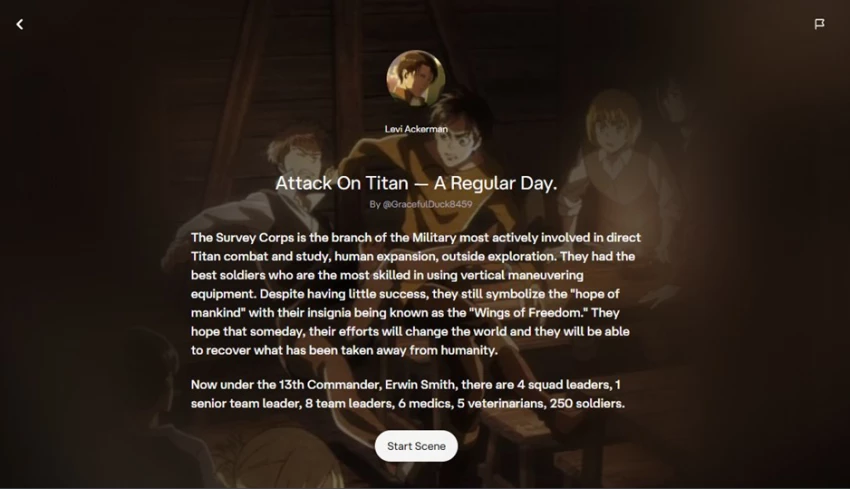
Instead of dropping me cold into a conversation, it opened a setup screen first: the character (Levi Ackerman), who built the scene, and a couple of paragraphs laying out the Survey Corps and the cast. Then a single “Start Scene” button. I liked this. It set the stage and told me what world I was walking into.
Character AI · Scene intro for the Attack on Titan roleplay, with a “Start Scene” button.
● MY NOTE · STEP 02
It briefed me first: the full scene description, the cast, the setup, then “Start Scene.” Felt like opening the first page of a chapter.
STEP 03 / THE ACTUAL CONVERSATION
I typed one line and the whole scene reacted in character
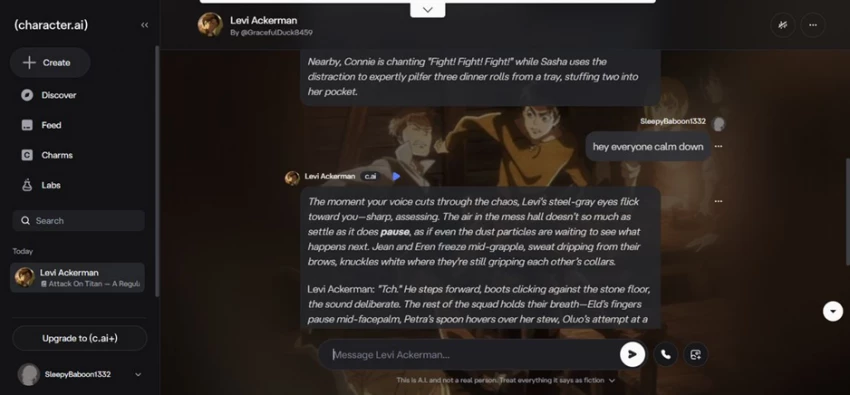
This is the exact thing Wsup AI never let me reach. I typed “hey everyone calm down,” and the scene responded. Levi answered in character with a few lines of narration, the other characters froze mid-argument, and the writing stayed true to the world. It flowed. No errors, no read-only wall, just a conversation that moved.
Character AI · The Levi Ackerman scene responding to my message in character.
● MY NOTE · STEP 03
One line in and the whole scene reacted, in character, with real detail. This is the thing I was trying to do on Wsup and could not.
STEP 04 / THE PAID PLAN
The subscription page opened and told me what I was paying for
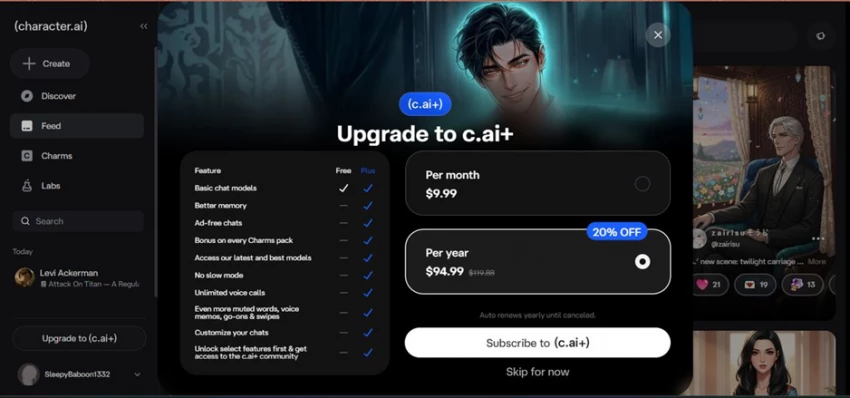
Last, I checked the paywall. The c.ai+ window opened cleanly and laid it all out: 9.99 dollars a month, or 94.99 a year at 20 percent off, with a plain table of what you get, ad-free chats, better memory, no slow mode, unlimited voice calls, and so on. Whatever you make of the price, the page loaded and was honest about the cost. The opposite of Wsup’s frozen store.
Character AI · The c.ai+ upgrade screen. Clear pricing, clear feature list, fully loaded.
● MY NOTE · STEP 04
Subscription page actually opened. 9.99 a month, clear list of perks. Exactly what Wsup’s store was supposed to do and never did.
Four steps, four working screens, one genuinely fun roleplay. That is the bar for a chat app, and Character AI cleared it without much drama.
HEAD TO HEAD
Scored on what I actually tested
Out of 10, based on my session, with the prior reviews filling in where the read-only wall stopped me from testing live.
CATEGORY
WSUP AI
CHARACTER AI
Getting in (no sign up needed)
████████░░ 8
██████░░░░ 6
Could I actually chat?
█░░░░░░░░░ 1
█████████░ 9
Conversation quality
████░░░░░░ 4
████████░░ 8
Scene setup and immersion
███░░░░░░░ 3
█████████░ 9
Pricing clarity
██░░░░░░░░ 2
████████░░ 8
Polish and stability
████░░░░░░ 4
████████░░ 8
Wsup AI scores its one clear win on friction, no account needed to start. Everything after that fell apart, because the app would not let me do anything once I was in.
FEATURE
WSUP AI
CHARACTER AI
Maker
Game.tv, on now.gg
Character.AI, tech licensed to Google
Sign up to start
None on web
Account required
Worked when I tested it (Jun 2026)
No, read only
Yes
Status
Winding down, shutdown notices
Active, around 20M monthly users
Free tier
Free chat plus credits (store frozen)
Free, unlimited messages
Paid plan
Credit packs, store would not load
c.ai+ at 9.99/mo or 94.99/yr
Ads
None seen
Full-screen ads on free tier
Content filter
Looser, with a SPICY toggle
Stricter, SFW enforced
Image generation
Built in, credit gated (off for me)
Imagine Gallery, c.ai+
Best for right now
Honestly, nothing
Roleplay, scenes, casual chat
REALITY CHECK
What other people are saying
I am not the only one who poked at these. Here is the wider mood, pulled from store ratings and other reviews.
Wsup AI
GOOGLE PLAY · TRUSTPILOT · TECHRAISAL
Before the shutdown, it sat around 3.8 to 4.0 stars on Google Play. People liked the no-signup access and the spread of characters, then ran into repetitive replies, glitchy long chats, and shaky image generation. One reviewer landed on 7.6 out of 10 and called it fine for casual fun but not something to lean on. By mid 2026 a lot of those reviews had quietly turned into goodbyes, which lines up with what I saw.
As tested by me: 3.5 / 10
Character AI
STARTUPHUB · EESEL · WEAVAI
It is the giant here, roughly 20 million monthly users spending well over an hour a day, but the mood has soured. Trustpilot sits near 1.4 out of 5 across 100-plus reviews, while Product Hunt is kinder at about 4.2. The two gripes I saw everywhere: the full-screen ads dropped into chats in early 2026, and content filters that keep tightening. Most reviewers agree c.ai+ buys you speed and convenience, not a smarter model.
As tested by me: 8.0 / 10
MY VERDICT
Character AI, and it is not close
I want to be fair to Wsup AI, because the idea is good. No account, instant chat, a looser content policy, and a wall of characters to pick from. On the one thing I could still test, walking in without signing up, it actually beats Character AI.
But a chat app has one job, and during my test Wsup AI could not do it. Read-only chat, a gem counter stuck on 0, and a store that never loaded. You cannot recommend a conversation app that will not hold a conversation, especially one that is openly winding down while you use it.
Character AI is not perfect either. The full-screen ads in the middle of chats are genuinely annoying, the filters are tighter than they used to be, and the founders leaving for Google has clearly changed the place. But it works. The scene setup was thoughtful, the roleplay was fun, the replies stayed in character, and even the paywall was honest about what it costs.
If you want to actually talk to an AI character today, Character AI is the one to use. And if the only thing you ever loved about Wsup AI was the freedom, the realistic move now is to look at the alternatives people keep naming, like Janitor AI or SpicyChat, instead of waiting for a goodbye screen to finish loading.
WINNER
Character AI
Because I could actually use it. Wsup AI lost the moment the send button stopped working.






Discussion