
Cutout Pro built a loyal following by bundling a lot into one browser tab: one-click background removal for photos and video, upscaling, retouching, passport photos, and even AI art. For someone who wants several jobs handled in one place, that breadth is appealing.
The reasons people shop around are usually practical. The credit system can drain quickly during a large catalog job, pay-as-you-go rates climb fast without a subscription, and free exports carry watermarks that limit real use. Reviewers also place its edge accuracy on tricky details like hair, fur, and glass roughly in the 85 to 92 percent range, a step behind the sharpest dedicated removers. As any detailed Cutout Pro review should note, a separate concern is the unresolved data-breach report from 2024, which the company has denied, leading some reviewers to advise caution with personal or sensitive images.
The good news: background removal has become a mature, crowded market in 2026. Several tools match or beat Cutout Pro on quality, price, or workflow fit. This guide sorts the strongest free and paid options by what each one does best, with current pricing and clear trade-offs.
AT A GLANCE Want the short version? remove.bg and Adobe Express lead on raw cutout quality, PhotoRoom and Pixelcut win for e-commerce product photos, Canva fits anyone already designing there, and Pixelcut plus a few browser tools offer genuinely free, watermark-free results. |
Skip the deep dive and jump to the tool that matches your job. Full reviews follow below.
| If you need... | Best tool | Why |
|---|---|---|
| The cleanest edges on hair and fur | remove.bg | Industry-leading accuracy, fast and consistent |
| Adobe-grade quality, free to start | Adobe Express | Strong on glass and transparency; free tier |
| E-commerce product photos at scale | PhotoRoom | Trained on products; staging and batch tools |
| Mobile-first selling and templates | Pixelcut | Millions of backgrounds; generous free use |
| Removal inside a design workflow | Canva | One-click remover built into Canva Pro |
| A multi-tool toolbox | Clipdrop | Removal plus cleanup, relight, and upscale |
| Truly free, no watermark | Browser tools | On-device removers and open-source rembg |
Table 1. Need-to-tool quick reference, synthesized from 2026 reviews.
“Free” means different things across these tools. Some are genuinely free with no watermark, some are freemium with resolution caps or watermarks, and a few reserve removal for paying users entirely. Knowing which camp a tool sits in saves a frustrating surprise at the export step.
WATCH THE WATERMARK Free previews are often high-resolution on screen but downscaled or watermarked on download. Always test a real export, not just the preview, before you commit to a tool for paid work. |
Entry paid plans sit in a tight band, mostly between 5 and 13 dollars per month. The figure that matters more for bulk work is cost per image, which is shaped by credits, resolution tiers, and whether batch processing is included.
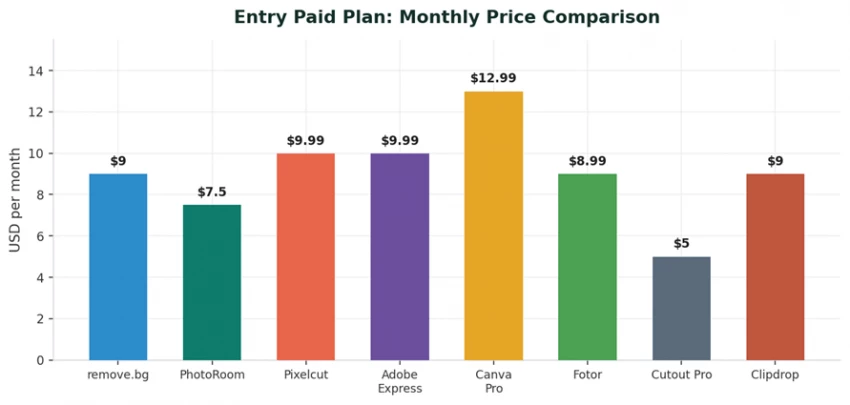
Cutout Pro looks cheapest at the headline level, starting around 5 dollars per month. The catch is its credit math: a low monthly figure disappears quickly across a large catalog, and forgetting to subscribe pushes pay-as-you-go rates much higher per image.
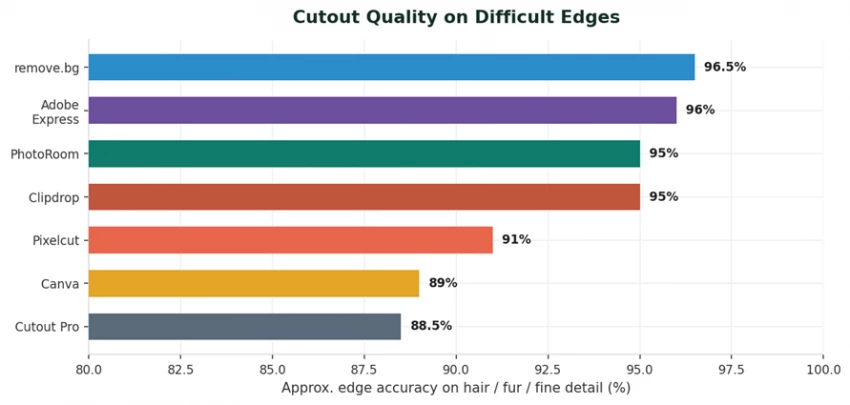
For portraits with flyaway hair, fur, or transparent objects, edge accuracy is the difference between a clean cutout and a halo that needs manual fixing. The chart below shows approximate accuracy on hard edges, drawn from hands-on 2026 review ranges rather than vendor claims.
The full comparison below brings price, quality, and best-fit use case into one reference table.
| Tool | Free tier | Entry paid | Edge quality | Best for |
|---|---|---|---|---|
| Cutout Pro | 5 credits | ~$5/mo | Good | All-in-one toolbox |
| remove.bg | Preview only | ~$9/mo | Excellent | Pure cutout accuracy |
| Adobe Express | Yes | ~$9.99/mo | Excellent | Adobe-grade, glass/transparency |
| PhotoRoom | Watermarked | ~$7.50/mo | Very good | E-commerce products |
| Pixelcut | Generous | ~$9.99/mo | Good | Mobile selling, templates |
| Canva | Pro-only | ~$12.99/mo | Good | Design workflows |
| Clipdrop | Daily limit | ~$9/mo | Very good | Multi-tool editing |
| Fotor | Limited | ~$8.99/mo | Good | Casual editing suite |
Each tool below gets a short overview, a note on how it works in practice, the trade-offs to weigh, and the bottom-line pricing and best fit. The order runs roughly from sharpest pure cutout quality to broadest all-round usefulness.
remove.bg is the tool that popularized one-click AI background removal for everyday users, and years later it still sets the bar for pure cutout quality. It does one job and does it extremely well: separate a subject from its background with edges so clean that hair, fur, and stray flyaway strands survive intact. For portraits and people-heavy images, it remains the reference point every other tool is measured against, sitting in the mid-90s for accuracy in 2026 testing.
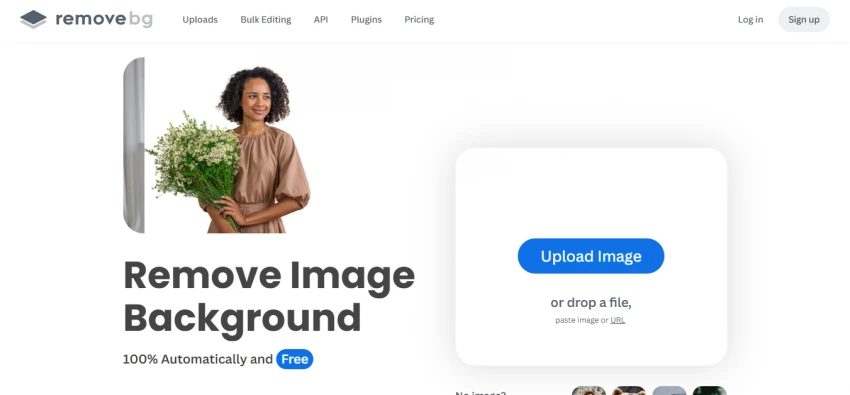
How it works. Drop in a JPG or PNG and the cutout returns in under five seconds at preview resolution. Full-resolution downloads consume credits, which you buy in packs or through a subscription. Beyond the website, it offers plugins for Photoshop and Figma and a well-documented API, so the same engine slots directly into a designer's or developer's existing pipeline. Canva's own remover runs on this engine under the hood.
Pros ✓ Best-in-class edge accuracy on hair and portraits ✓ Very fast, reliable one-click results ✓ Mature API, SDKs, and Photoshop/Figma plugins | Cons ✗ No truly free unlimited tier; preview only ✗ Per-image cost climbs for high volume ✗ Few extra editing tools beyond removal |
Pricing: Preview free; packs from ~$9/mo, HD downloads use credits Best for: Sharpest single-image cutouts
Adobe Express brings Creative Cloud-grade image processing into a lightweight browser and mobile app that needs no Photoshop skills. Its background remover is one of the strongest on the market, and it shines on the cases that trip up simpler tools: glass, plastic, smoke, and other semi-transparent objects where the AI has to judge what to keep and what to drop. Many reviewers rate its quick-action remover as effectively world-class and unlimited for Creative Cloud subscribers.
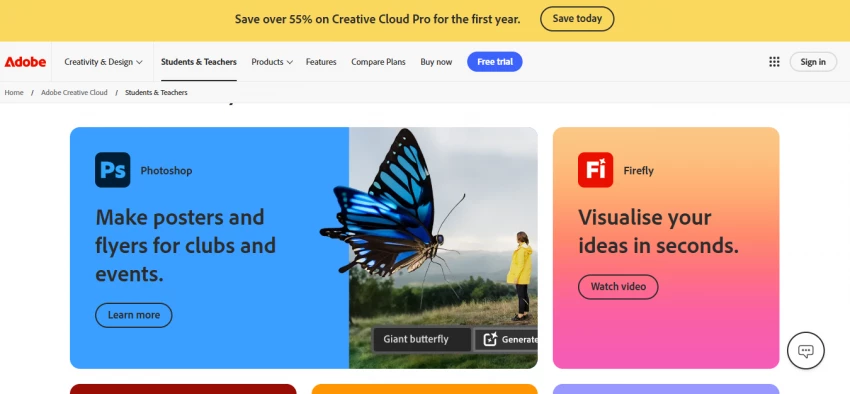
How it works. Removal is a one-tap “quick action,” after which the cutout drops straight into Express's wider toolkit: templates, text, resizing for every social format, and brand assets. That means you can go from raw photo to finished post without leaving the app. The free tier covers basic removal; the deeper design and premium features unlock with a subscription that is usually bundled into existing Adobe plans.
Pros ✓ Excellent on transparent and reflective objects ✓ Free tier available to start ✓ Flows straight into a full design toolkit | Cons ✗ Best value only if you use other Adobe apps ✗ Heavier than a single-purpose remover ✗ Premium features tied to Creative Cloud plans |
Pricing: Free tier; Premium from ~$9.99/mo (often inside CC plans) Best for: Difficult edges and existing Adobe users
PhotoRoom is purpose-built for people who sell things online, and it shows. Its AI is trained specifically on product photography, so it handles reflective surfaces, packaging, and oddly shaped items more reliably than general-purpose removers. With more than 10 million users, it has grown from a mobile background remover into a full product-photo studio aimed at marketplaces and Shopify sellers.
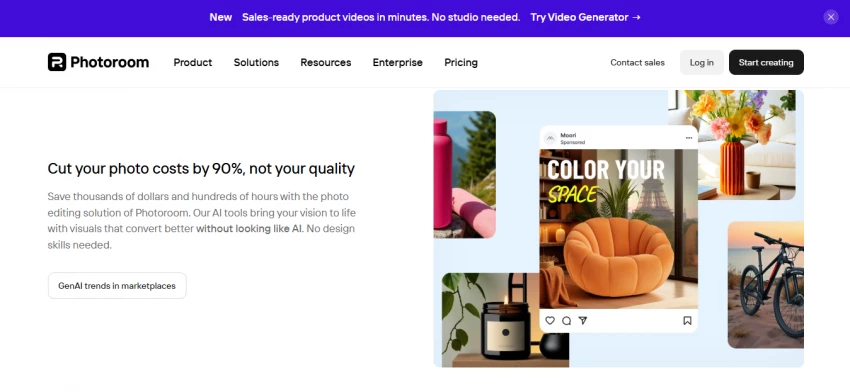
How it works. After the cutout, PhotoRoom layers on seller-specific tools: Instant AI Shadows that match the original lighting, a Ghost Mannequin mode that fills in a garment's interior so apparel looks worn without a model, Virtual Model that places clothing on a photorealistic AI person, plus product staging, recolor, and flat-lay generation. Batch mode applies any of these to up to 250 images at once, exports reach 4K, and an API priced around two cents per image automates the whole pipeline. A 2026 “AI Shot List” even suggests a full set of shot types from one photo.
Pros ✓ Product-specific tools far beyond plain removal ✓ Strong batch processing and API automation ✓ Transparent API pricing around $0.02 per image | Cons ✗ Watermarked exports on the free tier ✗ Best e-commerce features locked to upper tiers ✗ Struggles on complex knitwear and silk interiors |
Pricing: Pro ~$7.50/mo annual (~$12.99 monthly); API ~$0.02/image Best for: Online sellers and product catalogs
Pixelcut covers similar e-commerce ground to PhotoRoom but leans harder into a fast, mobile-first feel and an unusually generous free plan. The core loop is deliberately simple: remove the background, drop the subject onto one of millions of professional scenes or AI-generated backgrounds, then export. It is a favorite among solo sellers and social creators who do most of their editing on a phone.

How it works. Upload from your phone or the web, and Pixelcut auto-removes the background, then offers a vast library of backdrops, product-photo templates, a magic eraser for unwanted objects, and AI scene generation. Several reviews single out its free tier as genuinely usable with HD, watermark-free output, which is rare in this category. A published API exists for developers, though it is less battle-tested than remove.bg's or PhotoRoom's.
Pros ✓ Huge background and template library ✓ Genuinely usable free tier with HD output ✓ Fast, intuitive mobile and web apps | Cons ✗ Edge quality good but not top-tier on hard images ✗ API less mature than rivals ✗ Less suited to precision retouching |
Pricing: Generous free tier; Pro from ~$9.99/mo Best for: Mobile sellers and social creators
Canva's background remover will not win an edge-quality shootout, but for most people that misses the point. Its advantage is location: the remover lives inside the design tool where millions already build social posts, slide decks, and marketing graphics. Cut out a subject and it is immediately ready to drop into the layout you are already working on, no file shuffling between apps.
How it works. Select an image, click “BackgroundRemover,” and the subject is isolated in place on your canvas. Because it uses the remove.bg engine, the cutout quality is solid for typical portraits and products. The catch is access: the feature is locked behind Canva Pro, with no functional free version, and it shows a paywall on the free plan. For anyone already paying for Pro, though, it is effectively free and saves a round-trip to another tool.
Pros ✓ Built into a complete design platform ✓ Solid cutouts via the remove.bg engine ✓ Brand kit, templates, and team collaboration | Cons ✗ Remover is locked behind Canva Pro ✗ No functional free background removal ✗ Not aimed at high-precision catalog work |
Pricing: Requires Canva Pro ~$12.99/mo (or ~$119.99/yr) Best for: People already designing in Canva
Clipdrop is less a single remover and more a Swiss-army collection of one-click AI image tools, originally built on Stability AI's models and now operated by Jasper. Background removal is just the entry point; the appeal is finishing an entire image edit, cutout, cleanup, lighting, and resolution, without ever opening Photoshop. Its background removal is widely regarded as best-in-class for casual use.
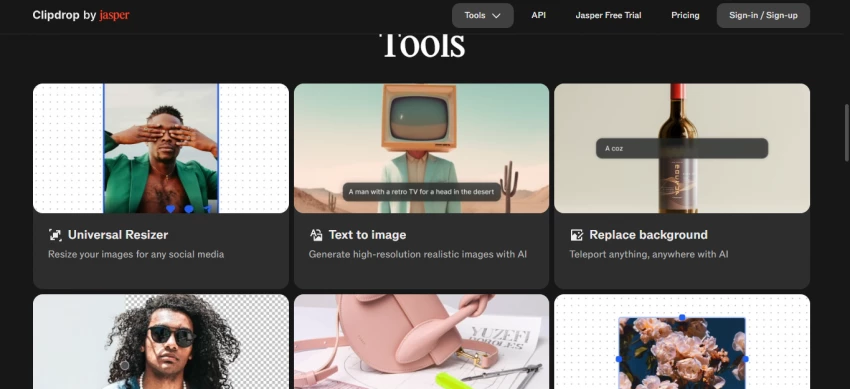
How it works. Each tool is a standalone action you can chain: Remove Background isolates the subject, Cleanup erases unwanted objects or text with context-aware inpainting, Relight lets you add and reposition light sources on a portrait or product, Upscale enlarges up to 16x, and Uncrop and Reimagine extend or regenerate scenes. The free tier allows roughly 15 images a month with watermarks and lower priority; Pro at around $9 a month removes watermarks, unlocks full resolution and a commercial license, and an API supports automated pipelines.
Pros ✓ Many specialized editing tools in one place ✓ Strong removal plus relight, cleanup, upscale ✓ Cheap Pro tier and a documented API | Cons ✗ Free tier limited and watermarked ✗ No layers, masks, or brushwork ✗ Roadmap uncertain after ownership changes |
Pricing: Free ~15 images/mo (watermarked); Pro ~$9/mo Best for: All-round one-click image fixing
For fairness, it helps to place the original side by side with its rivals. Cutout Pro's strength is breadth: photo and video background removal, upscaling, retouching, colorization, passport photos, and AI art all live under one login. Its video background removal without a green screen is a genuine differentiator that most single-purpose removers do not offer.
How it works. Everything runs in the browser on a credit system: a single image typically costs a credit or two, while video consumes several credits per second. That model is flexible for mixed tasks but punishing at catalog scale, and pay-as-you-go rates rise steeply without a subscription. Edge accuracy lands in the roughly 85 to 92 percent range, behind remove.bg and Adobe Express, and free exports carry watermarks. An unresolved 2024 data-breach report, which the company denies, leads some reviewers to advise against using it for sensitive images.
Pros ✓ Broadest toolset: photo, video, passport, AI art ✓ Video background removal without green screen ✓ Low headline entry price | Cons ✗ Credit costs escalate on large jobs ✗ Edge accuracy trails the quality leaders ✗ Watermarked free exports; unresolved breach report |
Pricing: 5 free credits; plans from ~$5/mo; pay-as-you-go available Best for: Mixed photo and video tasks in one place
If cost matters more than extra features, a few tools deliver watermark-free removal at no charge. They trade polish or convenience for price and privacy, but for many jobs they are more than enough.
• On-device browser removers: modern in-browser removers run the AI locally using your device's hardware, so images never upload to a server, and several allow bulk processing of many images at once on the free tier.
• rembg: the open-source standard with 16,000-plus GitHub stars. A single command line processes entire folders, unlimited and fully offline, and you can swap in different AI models. The trade-off is comfort with the terminal.
• Pixelcut: worth repeating here because its free plan offers unlimited HD removal without watermarks, making it the easiest no-cost option for people who want an app rather than a command line.
PRIVACY TIP For sensitive or personal images, prefer on-device or open-source tools that process locally. They avoid uploading your photos to a third-party server at all, which sidesteps the trust concerns that surround some cloud platforms. |
The best pick depends less on a leaderboard and more on the job in front of you. Use these quick decision rules:
| Your situation | Start with |
|---|---|
| Occasional, high-quality single cutouts | remove.bg or Adobe Express |
| A large product catalog every month | PhotoRoom or a removal API |
| Editing mostly from your phone | Pixelcut or PhotoRoom |
| Already designing in Canva daily | Canva's built-in remover |
| Tight budget, no watermark allowed | Browser tools or rembg |
| Sensitive or private images | On-device / open-source tools |
Table 3. A fast decision guide for matching tool to task.
Even the best AI benefits from good input. A few habits noticeably improve results:
• Maximize contrast: the more contrast between subject and background, the cleaner the cut.
• Use higher resolution: more pixels give the AI more data, which helps with fine edges.
• Mind transparency: for glass or plastic, a slight tint during photography helps the AI find the edge.
• Check the real output: download an actual export and zoom into hair and edges, not just the preview.
Cutout Pro remains a capable, versatile tool, and its all-in-one breadth still suits people who want many jobs handled in one tab. The reason to look elsewhere is rarely that it fails, but that a more focused tool often does the one job you care about better, cheaper, or more privately.
Match the tool to the task. Choose remove.bg or Adobe Express when edge quality is everything, PhotoRoom or Pixelcut for selling products, Canva to stay inside your design flow, Clipdrop for an all-round toolbox, and on-device or open-source removers when budget or privacy leads. Whatever you shortlist, run your own real images through it first; a two-minute test on your hardest photo tells you more than any rating.
New Claude Model Targets Agentic AI WorkflowsAnthropic has launched Claude Sonne...
Samuel Osei3 months ago

Gemini’s Image Tools Get a Wider RolloutGoogle is expanding access to Gemini’s p...
Alexander Hughes3 months ago

Two AI video generators, two very different first days. I ran PixVerse through i...
Alexander Hughes3 months ago

Two of the most talked-about AI chat platforms. I opened both, picked a characte...
Alexander Hughes3 months ago
The two-minute versionIf you only read one thing, read this. The rest of the doc...
Alexander Hughes3 months ago
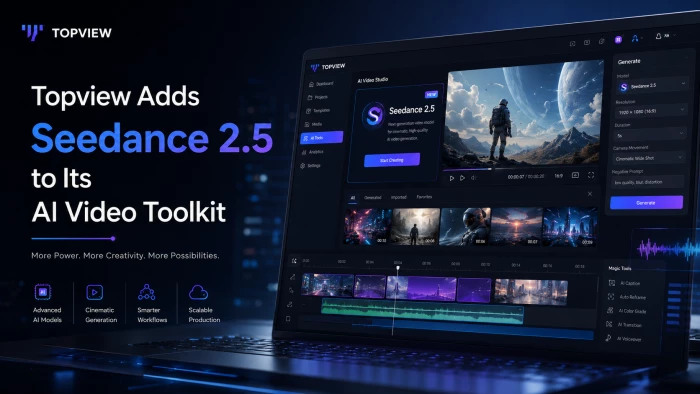
Why Seedance 2.5 mattersSeedance 2.5 is the latest release in ByteDance’s Seedan...
Alexander Hughes3 months ago
Discussion