Code explanation is the underrated half of AI-assisted development. Generating new code is what most product demos highlight, but day-to-day developers spend more time reading existing code than writing fresh code. Onboarding to an unfamiliar repo, reviewing a colleague's pull request, debugging a production incident, refactoring a tangled module: each task starts with understanding what the code already does.
Two tools come up often in this space. Blackbox AI is a multi-model coding assistant that aggregates Claude, OpenAI Codex, Gemini, and others behind a single subscription. Claude is the AI assistant from Anthropic, available through claude.ai, the API, and the Claude Code command-line tool. Both can explain code. The differences show up in depth, style, and where each fits inside a developer workflow.
Most AI coding benchmarks score how well a model writes new code from a prompt. That measures one slice of the developer experience. Reading and understanding existing code is the other slice, and it is where teams lose the most time. Industry studies have placed the read-to-write ratio for working code at roughly 10 to 1, meaning every line a developer writes is read at least ten times over the life of a project.
Quality code explanation answers questions a junior or unfamiliar developer would actually ask: what does this block do, why is it written this way, what assumptions does it make, what could break it, and what would a cleaner version look like. A tool that only paraphrases comments back as natural language adds little. A tool that walks through control flow, surfaces edge cases, and connects the code to the wider system earns its place in the workflow.
Blackbox AI and Claude approach code explanation from different angles. The sections below compare their capability depth, their pricing, where each falls short, and which kinds of developers get the most value from each.
Blackbox AI launched in 2019 and serves an estimated 30 million developers as of early 2026. The platform sits across an unusually wide surface area: the VS Code extension has crossed 4.8 million installs, JetBrains IDEs are supported natively, and the company also ships a proprietary Blackbox IDE, a command-line tool with agentic capabilities, a browser extension, mobile apps for iOS and Android, and an end-to-end encrypted desktop application.

The signature 2026 feature is Chairman LLM, a routing layer that runs Claude Sonnet, OpenAI Codex, Gemini, and Blackbox's own models in parallel on the same prompt, then surfaces the strongest response. More than 300 models are accessible through the single subscription. Other differentiated features include image-to-code conversion that turns Figma frames, wireframes, or screenshots into working components, voice coding via an ElevenLabs integration in the CLI, and a project management layer called Conductor that organizes multi-step coding agents.
For code explanation specifically, Blackbox AI uses its routing layer to pick whichever underlying model the Chairman thinks will deliver the best response for the prompt. That means the explanation a developer sees could come from Claude, Codex, Gemini, or an internal model, depending on routing decisions that are not always transparent to the user. This is one reason a detailed Blackbox AI review is useful before treating the platform as a simple code explainer, because its real value comes from the broader multi-model coding workflow rather than one isolated feature.
Claude is the AI assistant from Anthropic. Reasoning depth, structured output, and faithful execution of instructions are the qualities that show up most consistently in independent benchmarks and developer feedback. Claude is accessible through three primary surfaces: the claude.ai web, mobile, and desktop apps; the Anthropic API for direct model access; and Claude Code, a command-line tool designed for agentic coding tasks that can read entire directories and maintain context across long sessions.
The current model lineup spans Claude Haiku 4.5 for fast lightweight tasks, Claude Sonnet 4.6 for balanced workloads, and Claude Opus 4.6 and the newer Opus 4.7 for the most demanding reasoning. Context windows reach up to 1 million tokens on Opus, which matters for explaining large files or whole modules in a single pass. Output can extend to 128K tokens, enough for line-by-line walkthroughs of substantial source files without truncation.
Claude Code adds an agentic layer on top of the base model. The terminal tool reads the local file system, executes shell commands, and edits files directly, which makes it suitable for workflows where understanding code leads naturally into modifying or refactoring it. Plugins for VS Code, JetBrains, and Slack extend that agentic experience into common developer environments.
Both tools offer free tiers and scale up through paid plans, but the pricing curves differ sharply at the upper end.
| Plan tier | Blackbox AI | Claude |
|---|---|---|
| Free tier | Free with daily caps | Free, web and mobile |
| Entry paid | Pro at $10/month | Pro at $20/month ($17 with annual billing) |
| Mid paid | Pro Plus at $20/month with model credits | Max 5x at $100/month |
| Power tier | Pro Max at $40/month with expanded credits and SSO | Max 20x at $200/month |
| Team plan | Available, contact sales | Standard at $20/seat annual ($25 monthly), Premium at $100/seat annual ($125 monthly) |
| Enterprise | Custom with SAML SSO and on-prem | Custom at roughly $20/seat plus API usage |
| Annual discount | Approximately 20 percent across paid tiers | Pro: 15 percent. Team Standard and Premium: 20 percent |
| Free agentic CLI access | CLI requires Pro | Claude Code included on Pro and above |
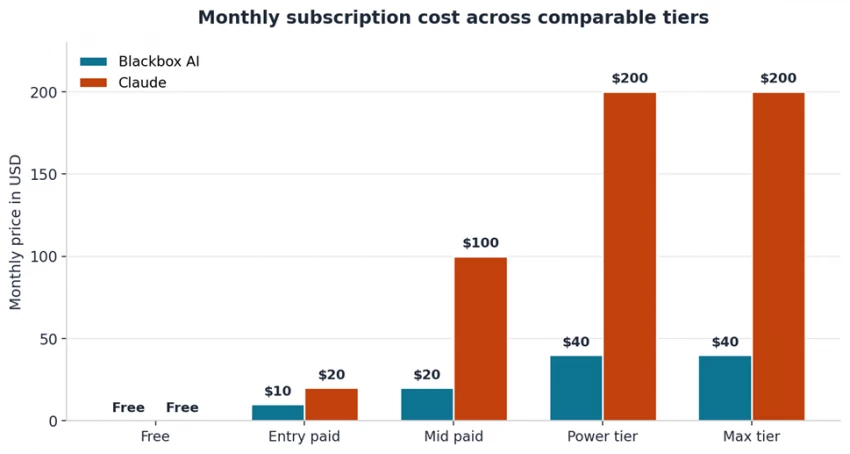
Figure 1. Monthly subscription cost across comparable tiers.
Blackbox AI is the cheaper option at every tier, with Pro at $10 per month entering at half the Claude Pro price. The Pro Max plan caps individual pricing at $40 per month and uses a credit system tied to model usage rather than rolling rate limits. Claude's individual plans run higher, with Max 20x at $200 per month aimed at heavy users who would otherwise exceed Pro rate limits during a working day. Team plans on the Claude side split into Standard at $25 per seat and Premium at $150 per seat. The Premium tier adds Claude Code, which is the relevant choice for engineering teams. Blackbox AI offers a team tier through sales conversations without published per-seat pricing.
Functional overlap is substantial, but each tool has capabilities the other does not match.
| Capability | Blackbox AI | Claude |
|---|---|---|
| Code explanation chat | Yes, multi-model routing | Yes, native via Claude |
| Inline IDE code review | VS Code, JetBrains, browser extension | VS Code and JetBrains plugins via Claude Code |
| Image-to-code conversion | Yes, Figma and screenshot input | Yes, via Claude vision capabilities |
| Voice coding | Yes, via ElevenLabs integration | Not native |
| Multi-model access | 300+ models in one subscription | Claude family only on Anthropic plans |
| Agentic CLI | Yes, Blackbox CLI with k-agents | Yes, Claude Code |
| Context window | Varies by underlying model | Up to 1 million tokens on Opus |
| Whole-repo reading | Project context across files | Whole-directory ingestion via Claude Code |
| Slack and Microsoft integrations | Slack and WhatsApp agents | Slack on Team and higher tiers |
| Artifacts and rendered output | Code blocks, app builder | Artifacts in claude.ai and Cowork app |
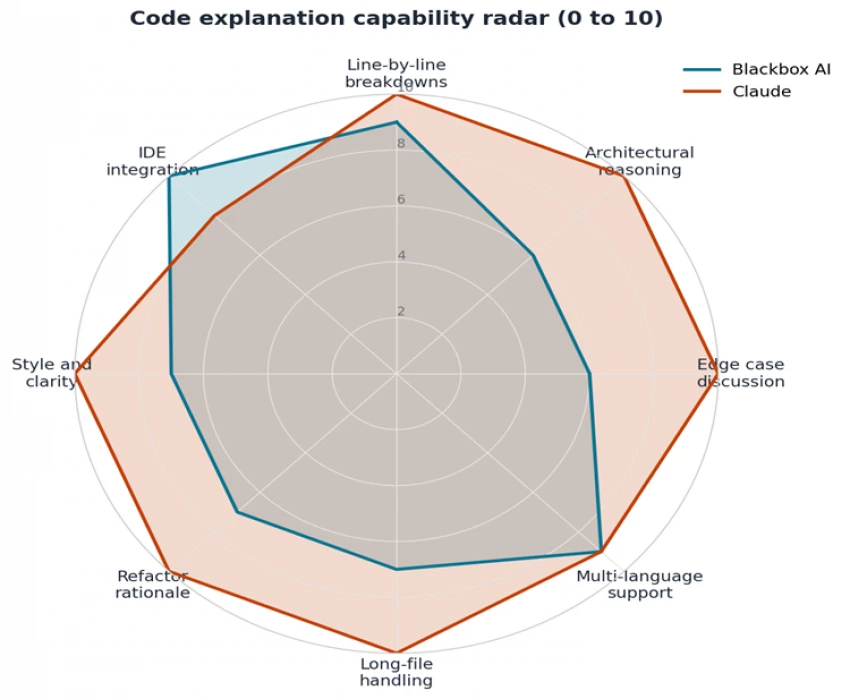
Figure 2. Code explanation capability across eight dimensions.
The biggest practical difference between the two tools shows up in the shape of an explanation output. Blackbox AI tends to produce shorter, code-centric responses that describe what the code does line by line, with limited discussion of why the design choices were made or what could fail. Claude tends to produce longer, narrative explanations that include the surface description, the logical walkthrough, edge case discussion, refactor suggestions, and connections to wider context such as concurrency models, security considerations, or alternative patterns.
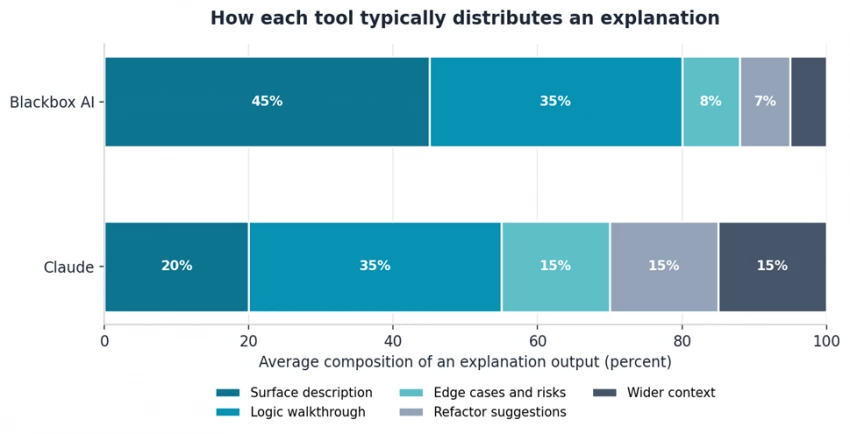
Figure 3. Typical distribution of content in an explanation output, based on developer reviews.
Neither shape is universally better. A senior developer auditing a known-good library function may prefer the tight Blackbox AI output that confirms what the code does without padding. A junior developer trying to understand a new framework benefits more from the broader Claude treatment that explains why the code is structured a certain way and what mistakes a reader should avoid. Choice of tool can also shift based on the prompt: asking Blackbox AI to include edge cases or trade-offs explicitly produces deeper output, and asking Claude to keep the explanation terse reduces verbosity.
Both tools cover the major language ecosystems competently. Python, JavaScript, TypeScript, Java, C#, Go, Rust, and SQL all receive reliable explanations from either tool. Differences emerge at the edges of the language spectrum and in framework-specific knowledge.
Blackbox AI's multi-model routing helps with less common languages because the Chairman layer can fall back to whichever underlying model has the strongest training data for that ecosystem. Niche languages such as Elixir, OCaml, Zig, Nim, or proprietary DSLs sometimes produce better Blackbox AI explanations than single-model alternatives for this reason.
Claude's strength is in framework-specific reasoning. Explanations of React Server Components, Django middleware, Spring Boot dependency injection, Kubernetes operators, or Terraform module patterns tend to include the why alongside the what, because Claude's training includes detailed coverage of design discussions, RFC documents, and engineering blog posts that inform those frameworks. Recent additions like the Model Context Protocol and async patterns in Rust 2024 edition show up in Claude explanations with appropriate context.
Surface coverage matters for code explanation because the friction of context switching often determines whether a developer actually consults the tool. Both products are available across most major surfaces, but the depth of integration differs.
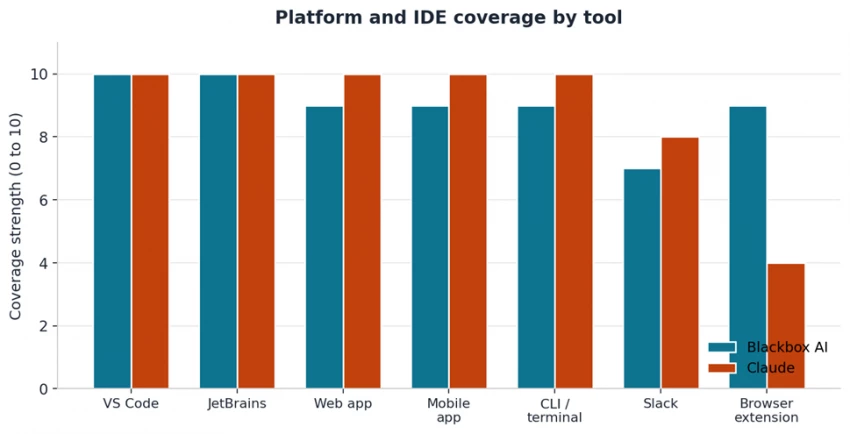
Figure 4. Platform and surface coverage strength on a 0 to 10 scale.
Blackbox AI ships native plugins for VS Code, JetBrains, a proprietary Blackbox IDE, a browser extension, mobile apps, an encrypted desktop client, and a CLI. The VS Code extension alone exceeds 4.8 million installs as of early 2026. Inline code explanation is available through right-click menus, hover tooltips, and command palette actions, which keeps the tool close to the cursor.
Claude integrates with VS Code and JetBrains through Claude Code plugins. The web app at claude.ai supports drag-and-drop file uploads and rendered code artifacts. Claude Code runs from the terminal and can read directories, run tests, and apply edits inline. Slack and Microsoft 365 integrations are available on Team and Enterprise plans. The browser extension surface is less developed than Blackbox AI's, with Claude in Chrome available as a beta browsing agent rather than a code-focused extension.
Explaining a single function is easy. Explaining how three modules interact across a 50,000-line codebase is where context window and retrieval quality become decisive.
Claude Opus models offer up to 1 million tokens of context, which translates to roughly 750,000 words or 50,000 to 75,000 lines of typical source code in a single request. That ceiling allows whole-repo ingestion for small to mid-size projects without splitting into chunks. Claude Code further automates the ingestion: pointing the CLI at a directory loads the file tree, and follow-up questions resolve against the loaded context without manual copy-paste.
Blackbox AI's context window varies by which underlying model the Chairman router picks. Gemini routes typically land in the 1 to 2 million token range; Codex routes can be narrower. The product abstracts the context choice away from the developer, which simplifies the interface but reduces predictability. A complex multi-file refactor explanation might use Gemini's long context one minute and a shorter-context model the next, producing answer quality that varies more than a single-model workflow.
For very large explanations crossing many files, Claude Code's directory-aware reading and consistent 1 million token ceiling produce more reproducible results. For mixed workloads where some files are large and others are small, Blackbox AI's routing layer can be efficient because shorter prompts run on cheaper, faster models.
Several limitations affect Blackbox AI for code explanation work specifically.
• Routing transparency is limited. The Chairman LLM picks an underlying model per prompt but does not always disclose which model handled the response, making it harder to reproduce results or attribute behavior.
• Code quality varies on complex tasks. Independent reviews report that ambitious multi-agent workflows do not always complete reliably and that generated code requires careful review on non-trivial logic.
• Customer support is reported as inconsistent. Third-party review sites mention slow or unresponsive support tickets, which becomes a problem when integration issues block a paid workflow.
• Cloud-only operation. No offline or local-first mode exists, which rules out air-gapped enterprise environments and private development networks.
• Data retention and training opt-out are reserved for Enterprise plans. Code submitted on Free, Pro, or Team plans may be used for model improvement unless the user is on Enterprise.
• Pricing has changed multiple times in the past year. Tier names and credit allocations have shifted, which makes long-term budget planning harder than with a stable price book.
Limitations apply on the Claude side as well.
• Pricing for heavy individual use runs higher than competing tools. Max 20x at $200 per month is the most expensive consumer AI subscription in this category, justified for users who burn through Pro limits daily.
• No native multi-model access. Claude users get Anthropic models only, while Blackbox AI users can call Claude, Codex, Gemini, and others from one subscription. Developers who want comparative answers from multiple model families must subscribe separately.
• Browser extension presence is limited. Claude in Chrome exists as a beta browsing agent but is not a code-focused extension on par with the Blackbox AI browser tool.
• Image-to-code workflows are available through vision capabilities but lack a dedicated Figma plugin or design-handoff feature comparable to the one Blackbox AI ships.
• Free tier limits reset on rolling windows that Anthropic does not publish exact numbers for, which produces occasional surprise rate-limit pauses for users on the free plan.
• Voice coding is not a built-in feature. Workflows that depend on dictation for code or comments require external integrations.
Both tools earn their place in different developer workflows. The chart and table below map common profiles to the better-fit option.
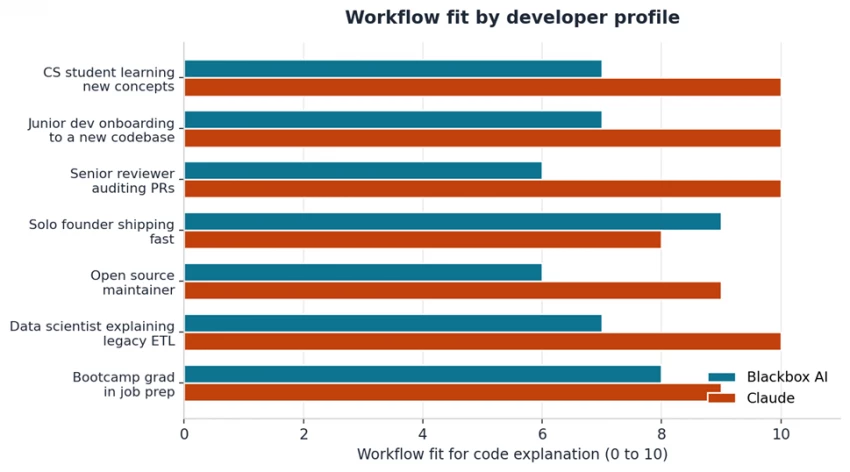
Figure 5. Workflow fit by developer profile on a 0 to 10 scale.
| Developer profile | Better fit | Reason |
|---|---|---|
| CS student learning new concepts | Claude | Narrative explanations include why, not just what |
| Junior dev onboarding to a new codebase | Claude | Long-context ingestion and architectural reasoning |
| Senior reviewer auditing PRs | Claude | Edge cases and security implications surfaced by default |
| Solo founder shipping fast | Blackbox AI | Lower price point and multi-model routing for variety |
| Open source maintainer | Claude | Better reasoning on framework-specific design choices |
| Data scientist explaining legacy ETL | Claude | Strong narrative style and 1M token context window |
| Bootcamp grad in job prep | Blackbox AI | Generous free tier and broad IDE coverage |
| Team needing multi-model comparison | Blackbox AI | 300+ models behind one subscription |
The scorecard below distils the comparison into eight capability categories scored on a 0 to 10 scale. Scores reflect editorial judgement based on documented features, pricing, context window limits, integration breadth, and explanation quality patterns observed across the article.
| Category | Blackbox AI | Claude | Category leader |
|---|---|---|---|
| Code explanation depth | 7.5 | 9.0 | Claude |
| Language and framework coverage | 8.5 | 8.5 | Tie |
| IDE and surface integration | 9.5 | 7.5 | Blackbox AI |
| Large codebase handling | 7.0 | 9.5 | Claude |
| Pricing value | 9.0 | 6.5 | Blackbox AI |
| Multi-model flexibility | 9.5 | 5.5 | Blackbox AI |
| Agentic workflow support | 8.0 | 9.0 | Claude |
| Transparency and reproducibility | 6.0 | 8.5 | Claude |
Two aggregate scores capture the trade-off. The overall capability score is an unweighted average across all eight categories. The code explanation focused score weights the three categories most relevant to understanding existing code: depth (30 percent), large codebase handling (20 percent), and language and framework coverage (15 percent), with the remaining categories splitting the balance.
| Score type | Blackbox AI | Claude | Winner |
|---|---|---|---|
| Overall capability (unweighted) | 8.1 / 10 | 8.0 / 10 | Blackbox AI by 0.1 |
| Code explanation focused | 8.0 / 10 | 8.4 / 10 | Claude by 0.4 |
The overall scores sit within a tenth of a point, confirming that neither tool is broadly superior. The category weighting matters: averaged across every dimension, breadth and price drag Blackbox AI to a marginal lead. Weighted toward the specific workload of code explanation, depth and large codebase handling pull Claude ahead by a clearer margin.
Blackbox AI · 8.1 overall, 8.0 code explanation. Strongest marks come from IDE surface coverage with 4.8 million VS Code installs, multi-model flexibility through 300 plus models behind a single subscription, and entry pricing at half the Claude Pro rate. Routing transparency and data retention practices on non-Enterprise tiers pull transparency scores down. Code explanation depth scores below Claude because outputs lean shorter and more code-centric, with edge cases and design rationale surfacing only when explicitly prompted.
Claude · 8.0 overall, 8.4 code explanation. Highest marks come from explanation depth, the 1 million token Opus context window, and reproducibility from working with a single model family. Pricing value sits lowest because Max 20x at $200 per month is the most expensive consumer subscription in the category. Multi-model flexibility scores lowest because the platform is Anthropic-only by design. Agentic workflow scores high on the strength of Claude Code's directory-aware reading and inline editing in the terminal.
| Tool | Rating | Editorial verdict |
|---|---|---|
| Blackbox AI | 8.1 / 10 | Best value pick for breadth, multi-model access, and IDE surface coverage |
| Claude | 8.4 / 10 | Best depth pick for explanation quality, large codebases, and agentic workflows |
For pure code explanation quality, Claude has the edge. Longer narrative output, deeper edge case discussion, stronger architectural reasoning, and consistent 1 million token context windows on Opus models make Claude the better choice when understanding code is the priority rather than generating it. Senior developers, students, code reviewers, and anyone onboarding into an unfamiliar codebase will get more value from a Claude subscription, even at the higher entry price.
For developers who value breadth, lower price, and multi-model access, Blackbox AI is the stronger fit. The combination of $10 Pro pricing, 300+ models behind a single subscription, image-to-code conversion, voice coding, and the broadest IDE surface coverage in the category makes Blackbox AI hard to beat on cost per feature. Solo founders, bootcamp graduates, and teams that want to compare outputs across model families will find more flexibility on the Blackbox AI side.
Many developers end up using both. A common pairing combines Blackbox AI for fast inline completions and routine explanations inside the IDE with Claude for deep architectural reviews, large-file walkthroughs, and refactor planning sessions on claude.ai or Claude Code. The combined cost of Blackbox AI Pro at $10 per month and Claude Pro at $20 per month is $30 per month, which sits well below the Claude Max 5x tier alone and covers both speed and depth of explanation. Choosing the right tool starts with naming the dominant explanation workload: line-level reading inside an IDE favors Blackbox AI, while architectural and cross-file understanding favors Claude.

New Claude Model Targets Agentic AI WorkflowsAnthropic has launched Claude Sonne...
Samuel Osei3 months ago

Gemini’s Image Tools Get a Wider RolloutGoogle is expanding access to Gemini’s p...
Alexander Hughes3 months ago

Two AI video generators, two very different first days. I ran PixVerse through i...
Alexander Hughes3 months ago

Two of the most talked-about AI chat platforms. I opened both, picked a characte...
Alexander Hughes3 months ago

The two-minute versionIf you only read one thing, read this. The rest of the doc...
Alexander Hughes3 months ago

Why Seedance 2.5 mattersSeedance 2.5 is the latest release in ByteDance’s Seedan...
Alexander Hughes3 months ago
Discussion