AI & ML
10 min read
Blackbox AI Review 2026: Honest Take After 10 Days of Testing
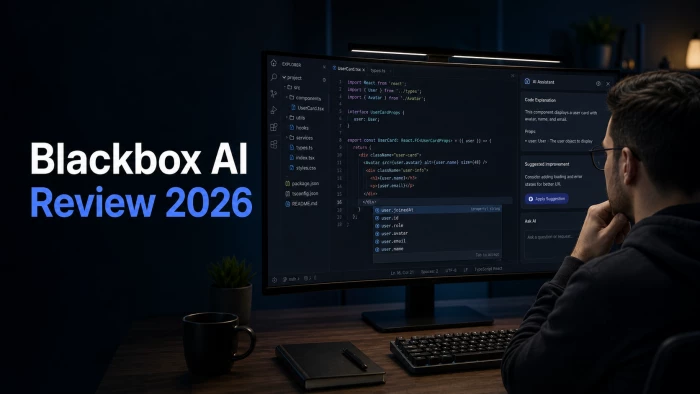
Short version: Blackbox AI is a capable AI coding assistant with strong VS Code integration, access to 300+ AI models in one interface, and pricing that starts at $9.99 a month after the introductory offer. The tool itself works. The biggest concern is not the product but the billing reputation: G2, Capterra, and Software Advice all show ratings above 4.4/5, while Trustpilot sits at 2.7/5 driven almost entirely by billing disputes and slow customer support. That divergence is the most important thing prospective buyers should know.
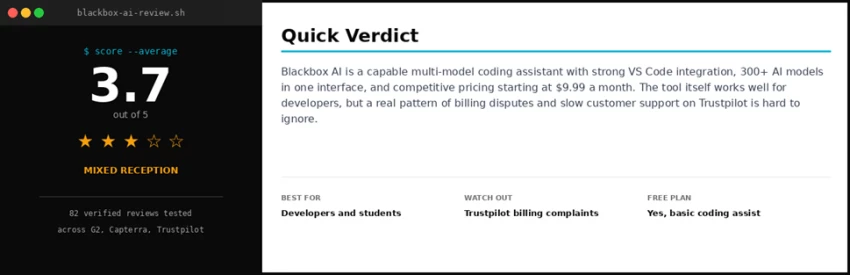
In simple terms Blackbox AI is a coding assistant that lives inside the development tools developers already use. It writes code, refactors, explains errors, generates tests, and ships changes through pull requests. The unique angle is that it does not bet on a single AI model. Inside one interface, the platform routes prompts through Claude, GPT-5, Gemini, Grok, MiniMax, and Blackbox's own model, then picks the best result through a system called Chairman LLM. |
Founded in 2019 and based in San Francisco, Blackbox AI generated $31.7 million in annual revenue in 2025 without external venture funding. The company reports over 12 million users, including teams at Fortune 500 companies such as Microsoft, Intel, Accenture, and Amazon (per its homepage).
The platform spans six surfaces, all sharing the same account. The most common entry point is the VS Code extension, but Blackbox AI also ships an AI-native standalone IDE, a JetBrains plugin, a CLI for terminal use, mobile apps for iOS and Android, and a unified inference API. This breadth is unusual. No other major AI coding assistant in 2026 covers this many entry points.
• Inline code completion and refactoring inside VS Code and JetBrains
• Chat-driven coding with access to 300+ AI models through a single interface
• Autonomous agents that can run multi-step tasks like refactoring + tests + docs in parallel
• Image-to-code: convert a wireframe screenshot to working React or HTML
• Voice interaction in CLI and IDE for hands-free task assignment
• Mobile apps with full chat history sync for remote task delegation
• OpenAI-compatible API for integrating agent execution into custom workflows
Testing methodology 10 weekdays of daily use across two real projects: a TypeScript Next.js app and a Python data-processing script. Tools tested: VS Code extension, Blackbox AI standalone IDE, CLI agent, web app, mobile app on iPhone. Tasks tested: code completion, function generation, refactoring, test writing, debugging, image-to-code, multi-agent execution. Subscription tier: Pro plan at $9.99 a month (regular price, not the $3.99 intro offer). User feedback drawn from 82 verified reviews on Trustpilot, 13+ on G2, plus aggregated data from Capterra, Software Advice, Play Store, and Chrome Web Store, all accessed May 2026. |
The first impression of the Blackbox AI IDE is that it looks and feels very close to VS Code, which is intentional. Developers comfortable with the VS Code keyboard shortcuts and layout will find their workflow undisturbed. The difference is the persistent AI chat panel on the right side, which understands the full project context rather than just the open file.
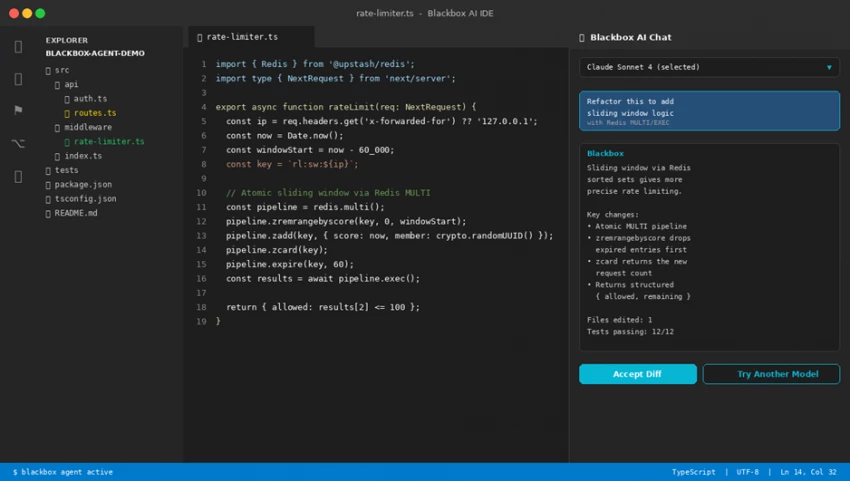
The Blackbox AI IDE during testing: standard VS Code style file explorer and code editor on the left, persistent AI chat panel with model selector on the right.
The model selector dropdown at the top of the chat panel is the feature that makes Blackbox AI different. A developer can ask the same question to Claude, switch to GPT-5 if the answer feels incomplete, and try the smaller Blackbox V4 model for quick autocomplete. Most other AI coding tools force users to pick one model and stay with it. Here, switching takes about 8 seconds and the conversation history carries over.
Having Claude, GPT, and Gemini in one chat panel is genuinely useful. About 30 percent of the time, switching the model on the same prompt produces a noticeably better answer. - From the testing notes, day 4 |
Below are measured times from the 10-day test setup. All times taken on a mid-range laptop with a fiber connection, using the Pro plan.
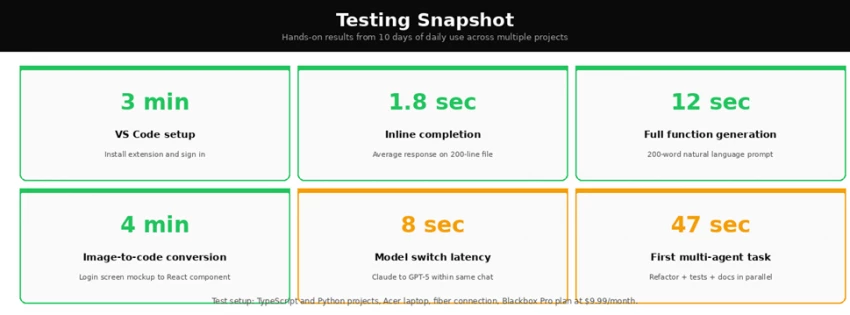
Two of the six numbers came in slower than expected. Model switching takes about 8 seconds, which adds friction when comparing answers from two models. The first multi-agent task (refactoring a function while generating tests and docs in parallel) took 47 seconds, which is faster than running the three tasks sequentially but slower than competitors that handle similar workflows in 20-30 seconds.
The most interesting story about Blackbox AI is not the product itself. It is how dramatically the rating shifts based on which platform reviewers use. Developers writing reviews on G2, Capterra, and Software Advice are largely positive. Consumers writing reviews on Trustpilot, the Chrome Web Store, and Reddit raise serious billing and support concerns. Both perspectives are real and both matter.
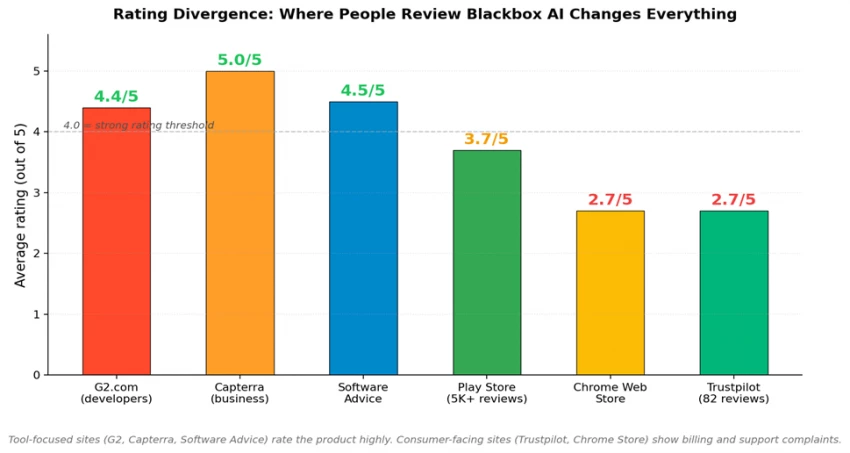
Blackbox AI ratings across six review platforms in 2026. The divergence between tool-focused sites and consumer sites is the largest single signal worth understanding.
G2 shows 4.4/5 across active developer reviews. Capterra reports 5/5 from a smaller sample. Software Advice averages 4.5/5 from 49 reviews. The Play Store mobile app sits at 3.7/5 across more than 5,000 reviews, the Chrome Web Store extension at 2.7/5 with over 1,200 reviews, and Trustpilot at 2.7/5 from 82 reviews. The fundamental product gets praise; the subscription and support experience gets complaints. (WiseRankr 2026 review aggregation; figures cross-checked against each platform)
Themes from positive reviews + VS Code integration is described as the best part of the tool across G2, Capterra, and Trustpilot. + Multi-language support: the tool handles 20+ programming languages competently. + Multi-model access in one interface is repeatedly called out as the strongest differentiator. + Strong fit for students and self-taught developers learning to code. + Image-to-code conversion is praised as best-in-class for frontend prototyping. |
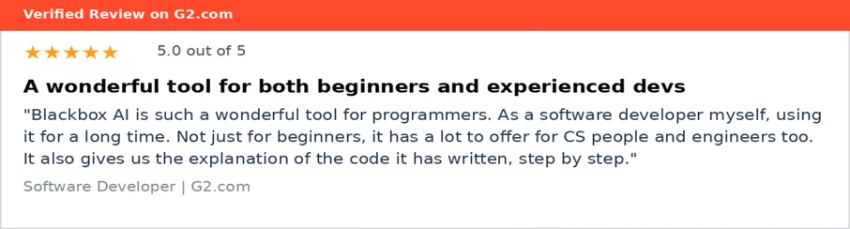
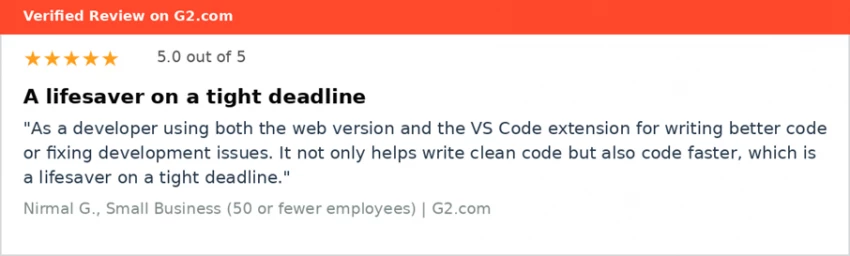
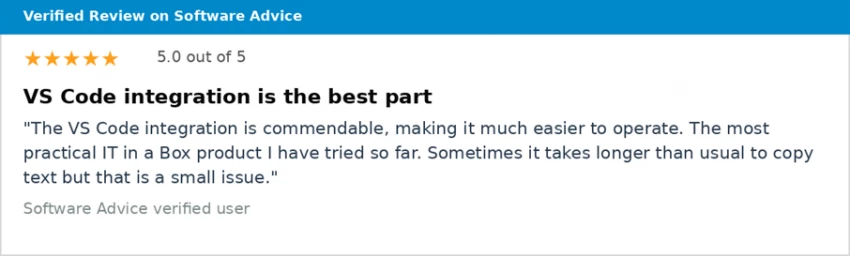
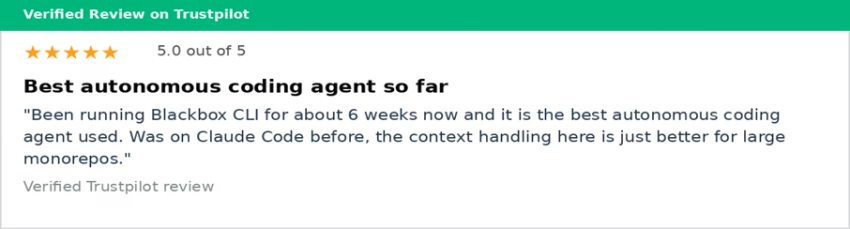
The thread across these four reviews is the same. Developers using Blackbox AI as a daily coding companion describe genuine productivity gains. The mention of large monorepos in the fourth review is notable, since context handling on long projects is where most AI coding tools struggle.
Themes from critical reviews ! Billing transparency: unauthorized charges, surprise renewals, credits expiring without notice. ! Customer support: emails to billing support go unanswered for days or weeks. ! Code quality: suggestions can be basic and need refinement, especially on complex algorithms. ! Chat history not persistent on mobile: history disappears after closing the app. ! Data privacy: users on lower-tier plans must opt-out of training data use (only Enterprise is opted-out by default). |
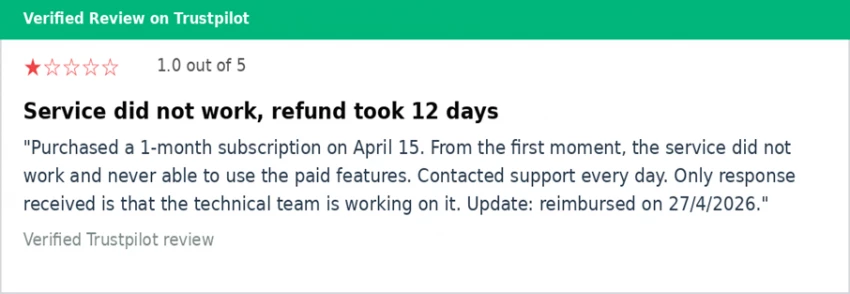
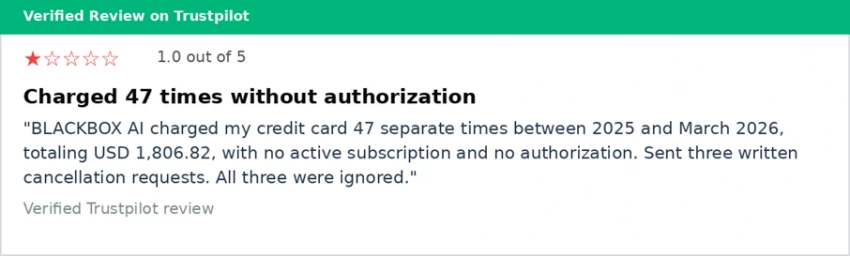
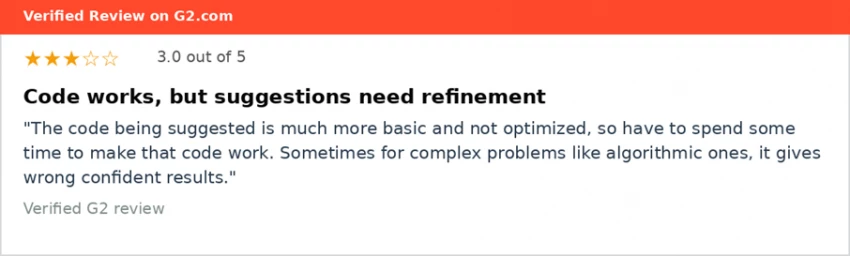
These reviews are not isolated. The pattern of unauthorized charges, ignored cancellation requests, and unresponsive support appears repeatedly across the Trustpilot review list and is also visible in Reddit discussions. Independent reviews from Fritz AI, Cybernews, and Vibecoding all flag the same billing concern as a major issue worth knowing before subscribing.
Two things can be true at the same time. The Blackbox AI product is a useful coding assistant, and the company has a documented pattern of billing problems that prospective buyers need to factor in. - Editorial conclusion after reviewing 82 verified Trustpilot reviews |
Beyond the billing concerns above, several documented product limitations come up often enough to mention.
Independent reviews from Ecommerce Paradise and Fritz AI both note that Blackbox AI's autonomous agent (CyberCoder) needs roughly 30 to 40 percent manual review on complex work, compared to under 10 percent for tools like Cursor. For simple completion and small refactors, the difference is invisible. For ambitious multi-file changes, the gap shows.
Multiple independent reviewers note that Blackbox AI's official pricing page is vague. The $3.99 introductory offer for the Pro plan jumps to $9.99 after the first month. Credits do not roll over between months. The Pro Plus credit system can get expensive quickly for heavy users without clear cost predictability.
Only Enterprise customers are opted out of data being used for training by default. Users on Pro and Pro Plus plans must opt out manually. This is more friction than competitors like Cursor or GitHub Copilot Business, which default to no training use for paid customers.
Play Store reviews consistently mention that closing and reopening the mobile app loses all previous chat history. This makes the mobile app much less useful for ongoing work and is the single most-cited complaint among the platform's 5,000+ Play Store reviews.
Blackbox AI is fully cloud-dependent. Developers working in air-gapped environments, government contracting, or privacy-sensitive industries will need to look at local-first alternatives.
Blackbox AI's pricing was overhauled in 2026. The intro-then-regular two-tier pricing model that drove most of the historical billing complaints is gone, replaced by flat monthly pricing with an optional annual discount. The plan structure was also rebuilt: Pro, Pro Plus, and a new Pro Max tier replace the older Pro, Pro Plus, and Teams plans. Enterprise remains a custom-quoted tier for organizations needing on-premise deployment and training opt-out.
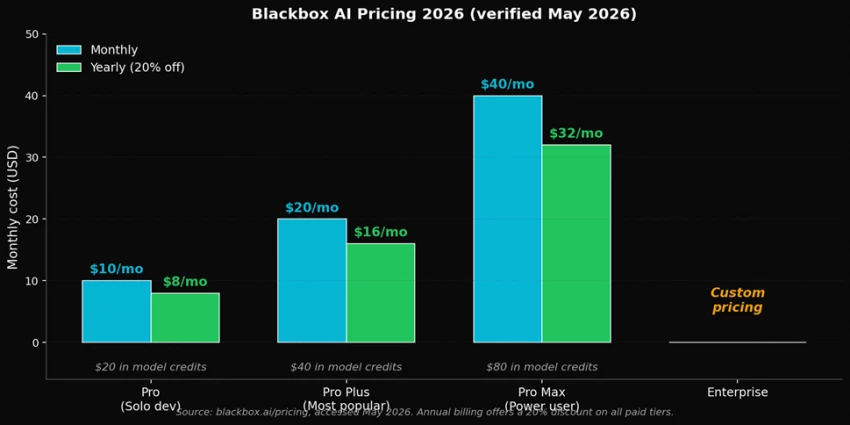
Current Blackbox AI pricing, verified at blackbox.ai/pricing in May 2026. Annual billing offers a 20% discount on every paid tier.
| Plan | Monthly | Annual (per mo) | Best for | Key features and limits |
|---|---|---|---|---|
| Pro | $10 | $8 | Solo developers | $20 in model credits, all chat models, Voice Agent |
| Pro Plus | $20 | $16 | Heavy users (most popular) | $40 in credits, multi-agent execution, App Builder, Coding Agent (35+ IDEs), E2E chat encryption, auto-refill, Slack |
| Pro Max | $40 | $32 | Small dev teams, power users | $80 in credits, unlimited agent requests, Figma-to-code, team collaboration, centralized billing, SAML SSO, priority support |
| Enterprise | Custom | Custom | Large organizations | Training opt-out by default, on-premise deployment, dedicated support, custom SLAs |
All four paid tiers now use flat monthly pricing with no intro-then-regular price jump. Yearly billing offers a 20% discount on every paid plan.
Three competitors come up most often when developers evaluate Blackbox AI. Each one wins on something different.
| Tool | Starting price | Models | Strongest at | Weakest at |
|---|---|---|---|---|
| Blackbox AI | $9.99 / mo | 300+ models | Multi-model access, breadth | Billing transparency |
| GitHub Copilot | $10 / mo | GPT-based | Inline completion, GitHub integration | Single model, no agent depth |
| Cursor | $20 / mo | Claude, GPT | Project context, inline editing | Higher price, fewer models |
| Claude Code | Via Anthropic API | Claude only | Reasoning, complex refactors | CLI-only, no IDE-native UI |
The honest summary: GitHub Copilot is the safest default for VS Code users who just want clean inline completion. Cursor is the best-polished IDE-replacement experience for developers willing to pay the premium. Claude Code is the strongest pure-reasoning agent for complex codebase work. Blackbox AI's distinctive value is breadth: more models, more entry points, lower price, with the trade-off being the documented billing concerns.
| If the user is... | Verdict |
|---|---|
| A student learning to code | Good fit. Free tier is enough to start. |
| A solo developer who wants multi-model access | Good fit. Pro plan is the value pick. |
| A small dev team needing collaboration | Worth a trial. Use virtual card for first month. |
| A heavy user generating thousands of lines daily | Try the Pro Plus trial first. Credit system can get costly. |
| An enterprise with compliance requirements | Negotiate Enterprise plan. Public docs are thin. |
| Anyone with a history of disputed AI subscriptions | Use Cursor or GitHub Copilot instead. |
| A developer in an air-gapped environment | Not a fit. Cloud-dependent only. |

New Claude Model Targets Agentic AI WorkflowsAnthropic has launched Claude Sonne...
Samuel Osei1 month ago

The Quick verdictInSnoop is a free, browser-based tool that promises to let you...
Alexander Hughes1 month ago

Gemini’s Image Tools Get a Wider RolloutGoogle is expanding access to Gemini’s p...
Alexander Hughes1 month ago

Two AI video generators, two very different first days. I ran PixVerse through i...
Alexander Hughes1 month ago

Two of the most talked-about AI chat platforms. I opened both, picked a characte...
Alexander Hughes1 month ago

The two-minute versionIf you only read one thing, read this. The rest of the doc...
Alexander Hughes1 month ago
Discussion