THE SHORT VERDICT
| Pick Cutout Pro if… | Pick Remove.bg if… |
| You want one platform for many jobs (video background removal with no green screen, upscaling, colorization, passport photos) at the lowest per-image cost, and you can tolerate occasional manual cleanup on fine edges. | Background removal is your only job, you need the cleanest hair/edge output on the first pass, predictable per-credit pricing, native Photoshop/Figma plugins, and a stronger data-security track record. |

Both tools strip backgrounds with AI in roughly five seconds, but they are built around opposite philosophies. Cutout Pro is a multi-tool visual-AI suite; Remove.bg is a single-purpose specialist now owned by Canva (Canva Austria GmbH). The table below fixes the baseline facts before the deeper analysis.
| Attribute | Cutout Pro | Remove.bg |
|---|---|---|
| Positioning | All-in-one visual-AI suite (20+ tools) | Dedicated background-removal specialist |
| Owner | Cutout.Pro (founded 2018) | Canva Austria GmbH |
| Core strength | Feature breadth + low unit cost | First-pass edge accuracy on portraits |
| Processing speed | ~5 seconds / image | Under 5 seconds / image |
| Batch ceiling | Up to 1,000 images per batch | Bulk via API / higher tiers |
| Free tier | 5 credits at signup; watermark friction | ~50 free credits / month, low-res |
| Public REST API | Yes (Growth / Scale tiers) | Yes (mature, well-documented) |
| Design-tool plugins | Shopify plugin; no PS/Figma | Photoshop + Figma plugins |
Table 1. Baseline profiles. Sources: vendor pages and 2026 third-party reviews.
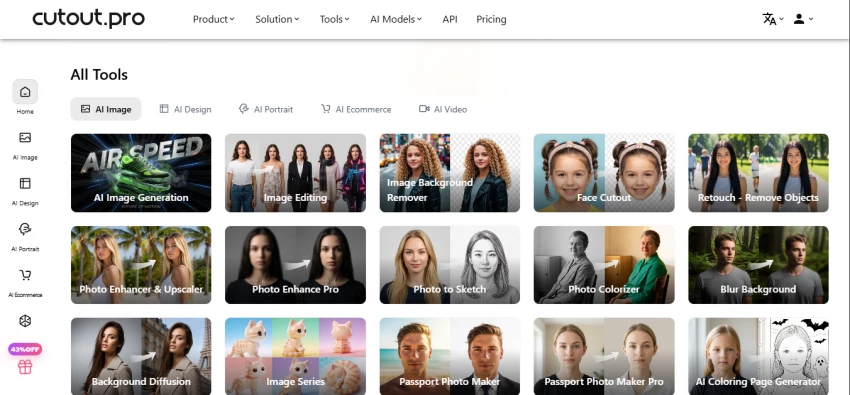
Quality is not a single number; it depends on the image type. Independent 2026 testing on complex images found a clear split: Remove.bg performs better on portraits and hair edges, while Cutout Pro leads on glass, transparency, and fine geometric patterns thanks to its more semantic, multi-scale processing. This is also why a detailed CutoutPro.review can be useful for readers who want to understand where the tool performs best and where it may still need manual cleanup.
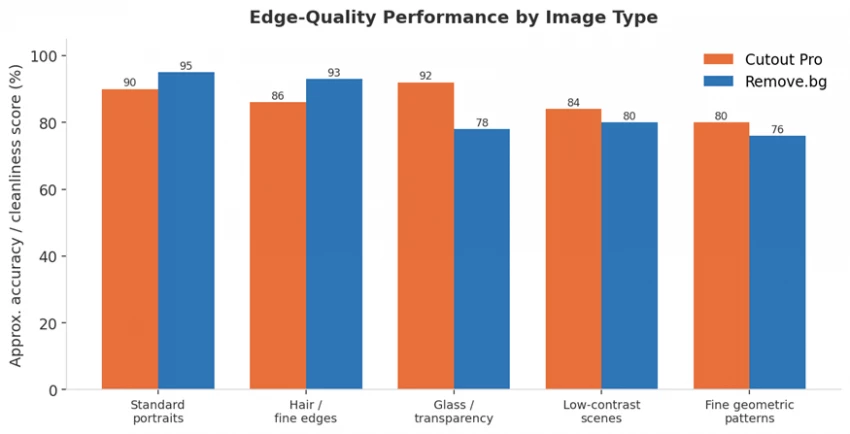
Chart 1. Approximate first-pass quality by scenario (higher = cleaner result, fewer manual fixes).
| Scenario | Stronger tool | Why |
|---|---|---|
| Standard portraits | Remove.bg | Portrait-optimised model, consistently excellent |
| Hair / fine edges | Remove.bg | Best-in-class hair-edge preservation on first pass |
| Glass / transparency | Cutout Pro | Treats glass as an object to preserve, not a hole |
| Sheer / semi-transparent fabric | Cutout Pro | Applies graduated alpha values correctly |
| Low-contrast scenes | Cutout Pro | Multi-scale processing recovers weak edge signal |
| Fine geometric / wire patterns | Cutout Pro | Captures small inter-wire gaps better |
| Group / multi-subject photos | Tie | Neither offers per-subject selection by default |
Table 2. Scenario-by-scenario quality split.
Reality check: Cutout Pro's automation lands around 85-90% on standard commercial work, meaning detailed jewelry, fur, and textured fabric frequently return needing manual touch-up, which erodes the batch-processing advantage on demanding catalogs.
Both use credit systems with roll-over, but the per-image math diverges sharply. Cutout Pro is consistently cheaper per image; Remove.bg charges a premium that buys reliability and predictability. Pay-as-you-go is the trap on both, and far more punishing on Remove.bg.
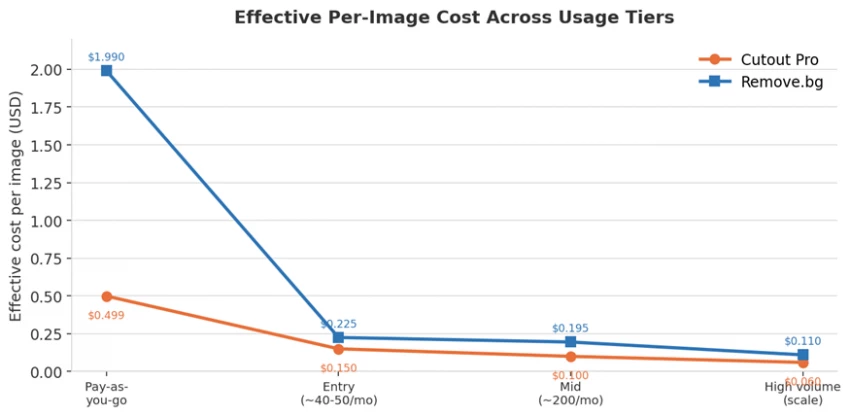
Chart 2. Effective cost per image. Cutout Pro stays well below Remove.bg at every tier.
| Plan / mode | Cutout Pro | Remove.bg |
|---|---|---|
| Free tier | 5 credits at signup; unlimited low-res previews | ~50 credits / month (low-res) |
| Entry subscription | Starter $5.99/mo → 40 credits (≈ $4.19/mo annual) | Lite ≈ €8.10/mo |
| Mid subscription | Pro $19.99/mo → 200 credits (≈ $13.99/mo annual) | Pro ≈ €35.10/mo (200 credits, $0.23/img) |
| High-volume | API Growth $49.99/mo · API Scale $149.99/mo | Volume+ ≈ €80.10/mo (500 credits) |
| Pay-as-you-go | Up to $0.499 / credit | ~$1.99 / HD image |
| Effective at scale | ≈ $0.06-$0.10 / image | ≈ $0.11 / image |
| Credit consumption | Standard 1 / HD 2 / video 3-5 per sec | 1 credit / image |
| Roll-over | Up to 5× monthly budget | Up to 5× (forfeited if you cancel) |
Table 3. Pricing structures (2026). Currency figures as published by vendors and third-party trackers; verify live rates before purchase.
Hidden-cost note: Remove.bg roll-over credits are forfeited the moment you cancel, and high-resolution exports plus API automation burn credits fast, so true monthly spend should be modelled on real volume, not headline price.
This is the widest gap between the two. Cutout Pro bundles a Swiss-army-knife of visual-AI tools; Remove.bg deliberately does one thing and integrates deeply into design software.
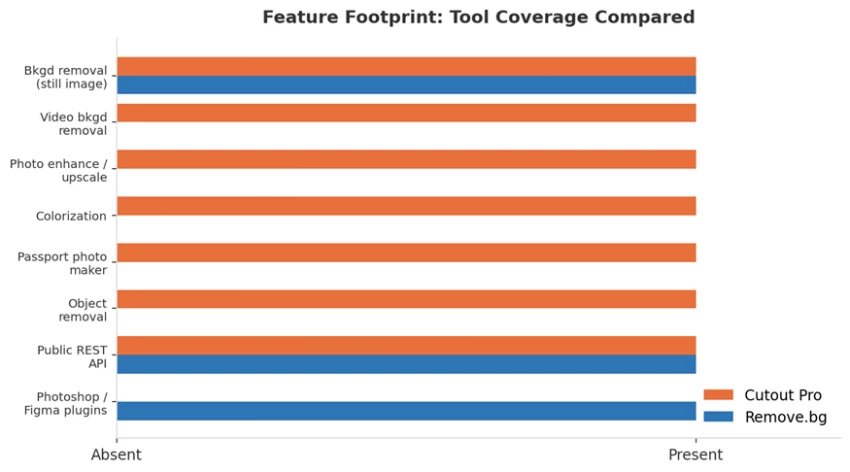
Chart 3. Capability coverage. Cutout Pro wins breadth; Remove.bg wins ecosystem integration.
Cutout Pro: distinctive extras
▸ Video background removal with no green screen (talking-head, demos, short-form)
▸ Photo enhancer / upscaler and old-photo colorization
▸ Passport / visa / ID photo maker with country-compliant sizing
▸ Object removal and a Shopify plugin for direct store workflows
Remove.bg: distinctive strengths
▸ Native Photoshop and Figma plugins for in-design cutouts
▸ Mature, well-documented API trusted for server-side pipelines
▸ Desktop, web and mobile apps with a polished, friction-free UX
▸ Consistent, predictable output prized by e-commerce catalog teams
This is a decisive, often-overlooked dimension. In February 2024, third-party cybersecurity outlets reported an alleged Cutout Pro data breach said to contain email addresses, hashed passwords, IP addresses and account metadata. Cutout Pro denied it, and no detailed technical post-mortem was published, leaving the question unresolved. Reviewers consequently advise caution with personal or sensitive images on the platform.
Remove.bg, by contrast, carries a stronger reputation for data security and customer support, with enterprise tiers offering SOC 2 certification and a flexible API. For regulated, client, or sensitive imagery, this gap matters more than a few cents per image.
| Dimension | Cutout Pro | Remove.bg |
|---|---|---|
| Security track record | Unresolved 2024 breach allegation (denied) | Strong reputation; SOC 2 at enterprise tier |
| Customer support | Thin community footprint | Stronger, more established support |
| Best-fit data sensitivity | Non-sensitive, high-volume catalog work | Client / regulated / sensitive imagery |
Table 4. Trust and support comparison.
Scoring six decision criteria out of 10 turns the trade-offs into a single picture. Neither tool sweeps the board; the right choice is workload-dependent.
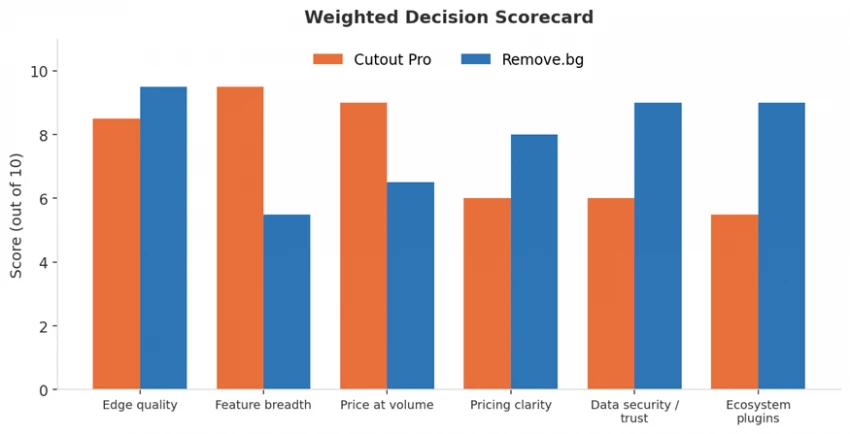
Chart 4. Criterion-by-criterion scores (out of 10).
| Criterion | Cutout Pro | Remove.bg | Edge |
|---|---|---|---|
| Edge quality (portraits/hair) | 8.5 | 9.5 | Remove.bg |
| Feature breadth | 9.5 | 5.5 | Cutout Pro |
| Price at volume | 9.0 | 6.5 | Cutout Pro |
| Pricing clarity | 6.0 | 8.0 | Remove.bg |
| Data security / trust | 6.0 | 9.0 | Remove.bg |
| Ecosystem plugins | 5.5 | 9.0 | Remove.bg |
| Average | 7.4 | 7.9 | Remove.bg |
Table 5. Unweighted average gives Remove.bg a slim edge (7.9 vs 7.4); re-weighting toward price and breadth flips it to Cutout Pro.
| Your profile | Recommended | Reason |
|---|---|---|
| E-commerce catalog (high volume, clean backgrounds) | Cutout Pro | Lowest per-image cost + 1,000-image batches |
| Editorial / portrait / hair-heavy work | Remove.bg | Best first-pass edge quality, less rework |
| Video / short-form creator | Cutout Pro | Green-screen-free video background removal |
| Developer building a pipeline | Either | Both ship mature REST APIs; weigh cost vs reliability |
| Photoshop / Figma-centric designer | Remove.bg | Native in-design plugins |
| Sensitive / client / regulated images | Remove.bg | Stronger security posture; SOC 2 at enterprise |
| Need many AI tools in one place | Cutout Pro | Colorize, upscale, passport, object removal bundled |
Table 6. Workload-based recommendation matrix.
Remove.bg is the sharper specialist: cleaner edges on the first pass, predictable pricing, deep design-tool integration, and a more trustworthy security record. Cutout Pro is the broader, cheaper generalist: lower unit cost, video and enhancement tools, and large batch ceilings, at the price of more manual cleanup on hard edges and an unresolved security question. Choose Remove.bg for quality and trust; choose Cutout Pro for breadth and budget.

New Claude Model Targets Agentic AI WorkflowsAnthropic has launched Claude Sonne...
Samuel Osei3 months ago

Gemini’s Image Tools Get a Wider RolloutGoogle is expanding access to Gemini’s p...
Alexander Hughes3 months ago

Two AI video generators, two very different first days. I ran PixVerse through i...
Alexander Hughes3 months ago

Two of the most talked-about AI chat platforms. I opened both, picked a characte...
Alexander Hughes3 months ago

The two-minute versionIf you only read one thing, read this. The rest of the doc...
Alexander Hughes3 months ago

Why Seedance 2.5 mattersSeedance 2.5 is the latest release in ByteDance’s Seedan...
Alexander Hughes3 months ago
Discussion