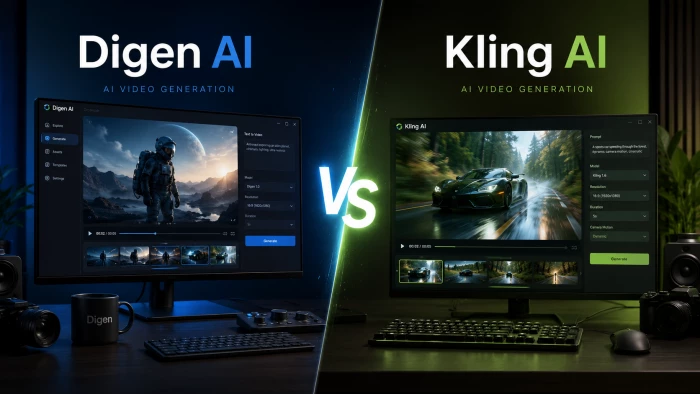
| The 10-second answer: Kling AI makes the more realistic motion, especially physics and human movement, and it tops most 2026 benchmarks. Digen AI wins for fast, accurate talking-head clips made from a single photo. Pick the tool that matches the shot, not the headline. |
A few hard numbers set the stage before we get into the detail.
1243 Kling 3.0 peak ELO score (Feb 2026) | 95% Digen lip-sync accuracy to voiceover | 4K / 60fps Kling 3.0 max output quality |
70+ Languages supported by Digen | 5M+ Digen creators worldwide | 60M+ Creators who have used Kling |
And here is the single chart that answers the headline question. Each tool is scored 0 to 10 on the six things that make motion read as real or fake.
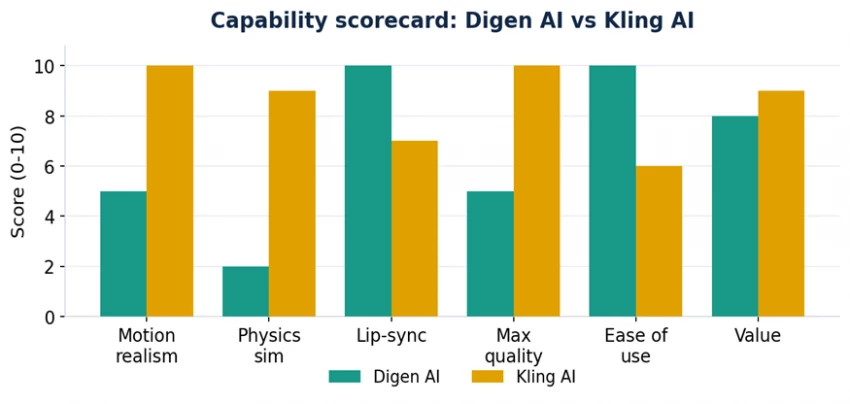
Figure 1. Capability scorecard synthesized from independent 2026 reviews. Higher is better.
Both turn ideas and images into video, but they were built for opposite ends of the creative spectrum. Knowing that upfront saves you a lot of wasted credits.
Digen is built for speed and simplicity. In the Digen AI review context, its signature trick is turning a single photo into a short clip of that person or character speaking, with lip-sync as the star feature. It runs well on everyday hardware, has passed 5 million creators, and leans heavily into multilingual voice across more than 70 languages.
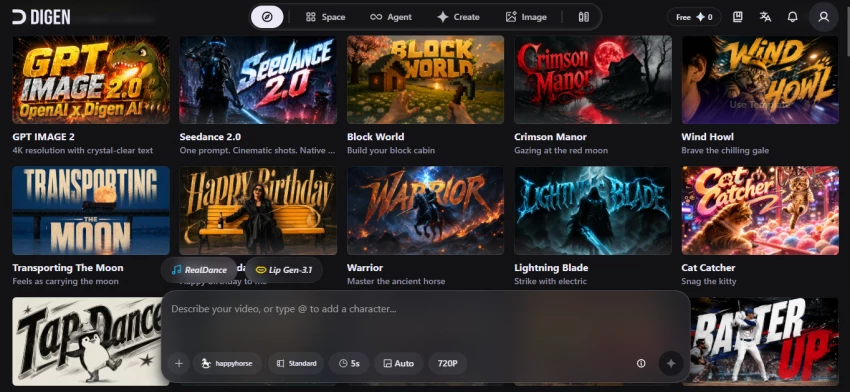
• Core job: photo-to-video and accurate lip-sync (about 95%).
• Best for: talking-head reels, explainers, multilingual social content.
• Personality: fast, beginner-friendly, almost no learning curve.
Kling, built by Chinese tech giant Kuaishou, is aimed at film-grade output. Version 3.0 launched February 4 to 5, 2026 on a unified Multi-modal Visual Language architecture that processes text, image, audio, and video in one system. It serves 60 million creators and was the fastest AI video platform to reach $100M in annual recurring revenue.
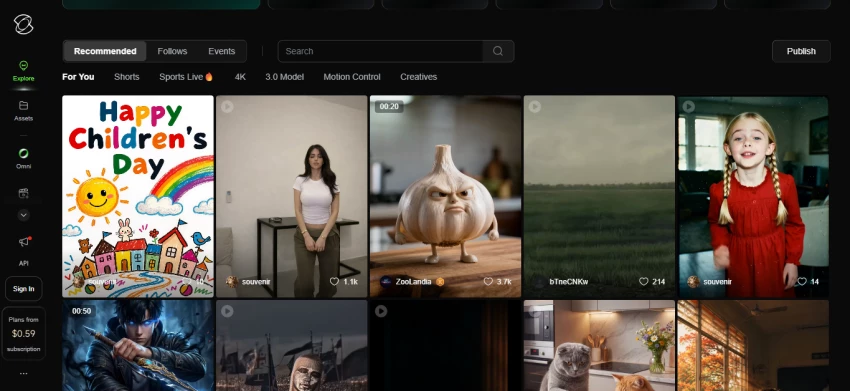
• Core job: realistic, physics-aware motion across full scenes.
• Best for: cinematic shots, product demos, action, multi-shot storytelling.
• Personality: powerful, more controls, a slightly steeper curve.
| New context worth knowing: Kling 3.0’s headline feature is the AI Director, which generates up to 6 shots inside a single 15-second clip, each with its own camera and pacing, while keeping characters consistent across cuts. It also added Motion Control, which transfers a motion pattern from a reference video onto a new subject, the feature behind millions of viral dance-transfer clips. |
Most of Kling’s realism gains are concrete spec jumps over the previous 2.6 model, not vague claims. The chart below shows the four biggest.
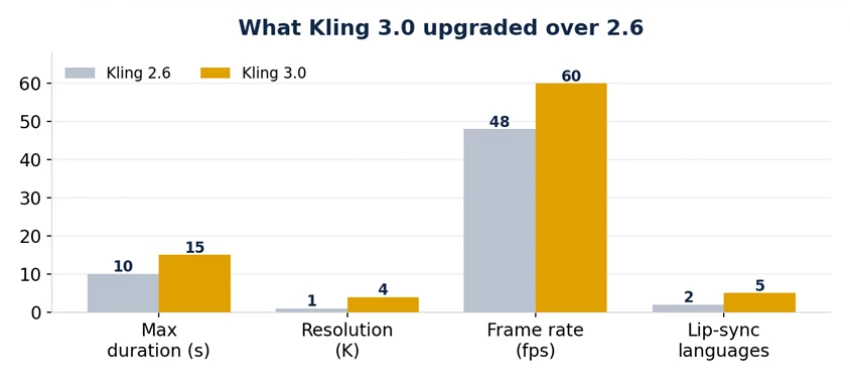
Figure 2. Verified spec upgrades from Kling 2.6 to Kling 3.0 (duration, resolution, frame rate, lip-sync languages).
In plain terms: clips went from 10 to 15 seconds, resolution jumped from 1080p to native 4K (not upscaled), frame rate climbed from 48 to 60fps, and native lip-synced audio expanded to five languages including Japanese, Korean, and Spanish with regional accents. Digen, by contrast, keeps its scope narrow on purpose, optimizing short social clips rather than chasing 4K cinematic delivery.
Kling’s realism reputation is earned, but the benchmark picture is more honest than a flat “number one.” When Kling 3.0 launched in February 2026 it captured the top ELO spot at 1243, ahead of Veo 3.1, Runway Gen-4.5, and Pika. By April 2026 the leaderboard had reshuffled as newer models arrived, so treat any ranking as a fast-moving snapshot.
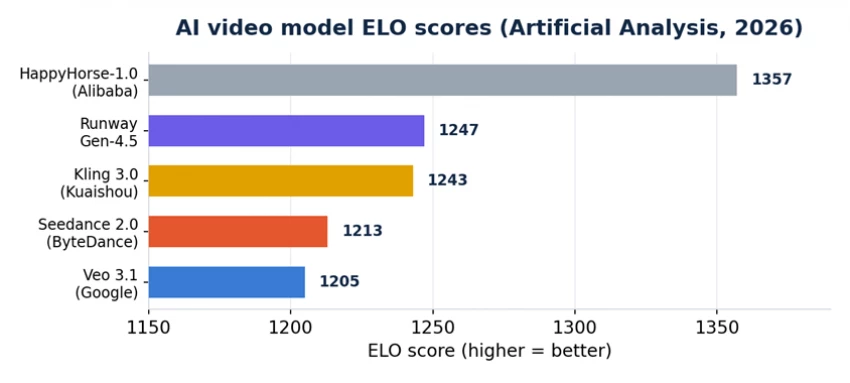
Figure 3. Artificial Analysis ELO scores, 2026. Rankings shift often as new models launch; Digen is not on this video-model leaderboard because it targets a different, talking-head niche.
| Read this carefully: Digen does not appear on cinematic motion leaderboards because it is not competing there. It is a talking-photo tool, so judging it on physics benchmarks is the wrong test. On its own turf, lip-sync, it is excellent. |
Realism is not one slider. It is five things working together. Here is how each tool handles the parts that make a clip read as real instead of fake.
This is Kling’s home turf. In hands-on tests, reviewers describe natural, fluid walking and gestures, down to details like a coat swaying and an object bouncing as a person moves. Kling’s engine is trained on real-world movement to replicate those dynamics. Digen animates a face and upper body convincingly from one image, but it is not built to choreograph a full body crossing a room.
Physics is what gives away fake video, and Kling currently leads here. Kling 3.0 specifically improved water, fabric, and anatomy simulation. The honest catch: in very complex scenes, water splashes, glass reflections, or drifting fabric can still warp mid-frame. Digen does not compete on heavy physics, because that was never its purpose.
Here the tables flip. Digen’s lip-sync is its headline feature, matching mouth movements to a voiceover with about 95% accuracy and adding natural blinks and small smiles across 70-plus languages. Kling 3.0 closed the gap with phoneme-level lip-sync and even three-person dialogue with correct voice attribution, but single-photo talking-head precision is still Digen’s edge.
Longer clips are where realism quietly falls apart. Reviewers note Kling’s background and secondary details can slowly degrade as a longer generation runs, and character consistency in complex scenes still trails some rivals. Digen sticks to short clips, which keeps its talking-head results tight and predictable.
Kling 3.0 pushes to native 4K at 60fps, which removes the stutter that plagued older models in fast action. Digen is optimized for short, social-first clips rather than 4K cinematic delivery, and its free tier caps resolution and length.
Scoring the six categories one by one makes the split obvious: Kling takes the motion-heavy rounds, Digen takes the talking-head rounds.
| Round | Winner | Why |
|---|---|---|
| Motion realism | Kling | Trained on real-world motion; fluid, weighty movement |
| Physics | Kling | Best cloth, water and anatomy simulation of current models |
| Lip-sync | Digen | ~95% accuracy from a single photo across 70+ languages |
| Max quality | Kling | Native 4K, 60fps, up to 15-second multi-shot clips |
| Ease of use | Digen | No learning curve; upload a photo and go |
| Value | Tie | Kling is cheap for video; Digen is free-friendly for talking heads |
| What you are judging | Digen AI | Kling AI |
|---|---|---|
| Motion realism | Strong for faces + light movement | Industry-leading, physics-aware |
| Physics (cloth, water) | Not a focus | Most realistic of current models |
| Lip-sync | ~95% accuracy, its signature | Phoneme-level, multi- character dialogue |
| Max quality | Short social clips, capped on free tier | Native 4K / 60fps, 15-second clips |
| Clip length | Short (approx 5-30s) | Up to 6 shots in one 15s clip |
| Languages / voice | 70+ languages | Native audio in 5 languages |
| Signature feature | Single-photo talking heads | AI Director + Motion Control |
| Ease of use | Very beginner-friendly | Powerful, steeper curve |
| Best fit | Talking-head, photo-to-video | Cinematic scenes, action, product |
Both run on credit systems, so the sticker price tells only half the story. Prices change often, so confirm on each official site before paying.
| Plan / detail | Digen AI | Kling AI |
|---|---|---|
| Free tier | Limits on length + resolution, daily login credits | ~66 credits/day, 720p, watermarked, no commercial use |
| Entry paid plan | Subscription tiers (varies by region) | Standard from $6.99 / month |
| Mid / pro tier | Mid-tier plans for higher output | Pro $25.99, Premier $64.99 / month |
| Top tier | Not the focus | Ultra $180 / month (raised from $128) |
| How you pay | Per subscription / credits | Per second; Kling 3.0 ~6-12 credits/second |
| Annual discount | Varies | Roughly 20-34% off |
| Watch the credit math: A 10-second Kling 3.0 Professional clip costs roughly 80 credits, and failed generations still cost credits on most tiers. Digen users have flagged confusing billing and cancellation, so read the terms before subscribing to either. |
On raw motion realism, the honest winner is Kling AI. For believable body movement, physics, and cinematic shots, it is the stronger engine. But realism is not the same as usefulness for your specific clip.
• Make talking-head clips, animated portraits, or explainers.
• Need fast, multilingual voiceover content across many languages.
• Value simplicity and lip-sync over cinematic motion.
• Need realistic body movement, physics, and camera control.
• Produce cinematic scenes, action, or multi-shot stories.
• Want 4K output and can invest a little time steering results.
• Produce a range of content. Many creators record talking segments in Digen, shoot cinematic b-roll in Kling, and edit them together.
1. Name your shot. Is a person mostly talking to camera, or is the movement itself the story? Talking points to Digen, motion points to Kling.
2. Run the free tier. Generate the exact clip you need on both. A single test clip tells you more than any table here.
3. Check the real cost. Estimate credits for your monthly volume, not just the headline price, since per-second and per-clip costs add up quickly.
AI video moves fast, so treat any verdict as a snapshot. Benchmark rankings in particular reshuffle within weeks, as Kling’s slide from the top ELO spot in February to a contested position by April shows. Kling’s realism lead is real today, but it still struggles with complex physics and long-clip consistency, its top tier jumped in price recently, and it carries data-sovereignty considerations some teams cannot ignore. Digen is excellent at its niche but is not a cinematic engine, and its free tier is genuinely limited. Always test on your own use case and verify current pricing before committing.
| Bottom line: Kling AI creates the more realistic motion and wins the benchmarks. Digen AI creates the more useful clip when your video is really about a person talking. Match the tool to the shot, not the hype. |
Figures and benchmarks reflect publicly reported data as of mid-2026 and are subject to change. ELO scores via Artificial Analysis. Verify on each tool’s official site before purchasing.

New Claude Model Targets Agentic AI WorkflowsAnthropic has launched Claude Sonne...
Samuel Osei3 months ago

Gemini’s Image Tools Get a Wider RolloutGoogle is expanding access to Gemini’s p...
Alexander Hughes3 months ago

Two AI video generators, two very different first days. I ran PixVerse through i...
Alexander Hughes3 months ago

Two of the most talked-about AI chat platforms. I opened both, picked a characte...
Alexander Hughes3 months ago

The two-minute versionIf you only read one thing, read this. The rest of the doc...
Alexander Hughes3 months ago

Why Seedance 2.5 mattersSeedance 2.5 is the latest release in ByteDance’s Seedan...
Alexander Hughes3 months ago
Discussion