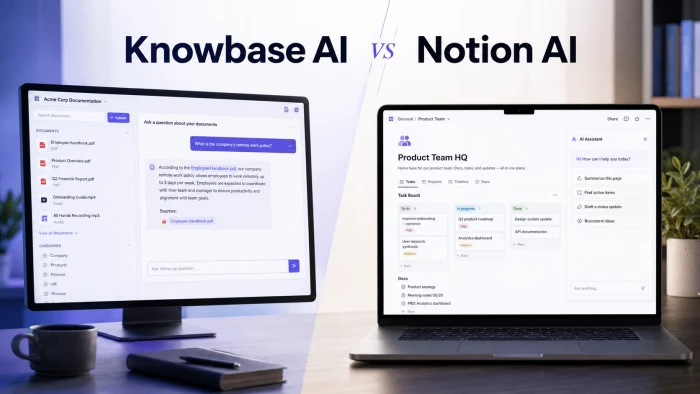
Quick answer: If your problem is a pile of mixed documents, recordings, and videos you need to interrogate with cited answers, Knowbase AI is the sharper specialist. If your problem is that work is scattered across notes, projects, and wikis and you want one place that also writes, summarizes, and searches, Notion AI is the better all-rounder. They solve genuinely different problems, and the right pick depends on whether you are buying a knowledge base or a workspace.
Knowbase AI is a knowledge base you build by uploading files; Notion AI is an assistant that lives inside a workspace you already use. That distinction sounds small, but it drives every meaningful difference in pricing, features, and who should buy which. Knowbase.ai Review context matters here because the tool is not trying to replace a full workspace. It is mainly built to turn your existing files into a searchable AI knowledge layer.
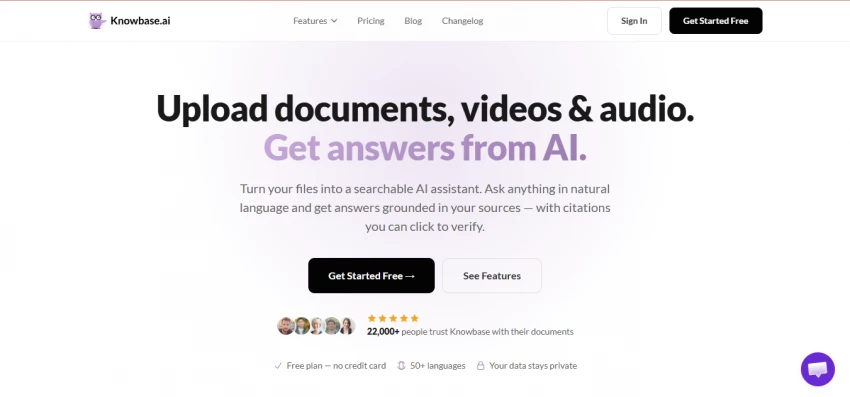
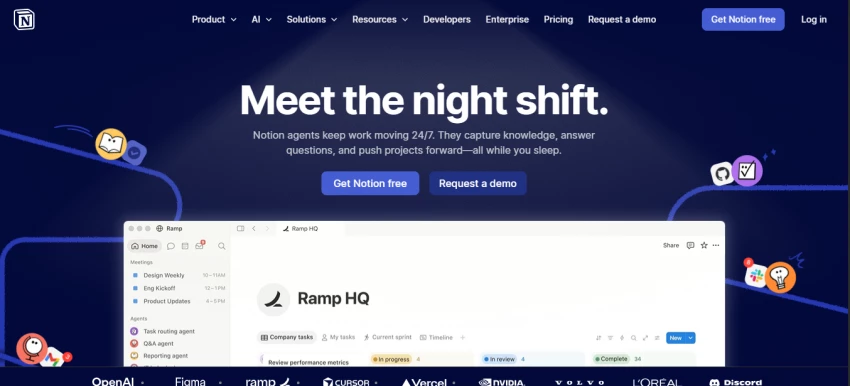
Knowbase AI takes your PDFs, Word and PowerPoint files, audio, video, and even YouTube links, processes them into a searchable store, and lets you ask questions through a ChatGPT-style chat that answers from your documents. Notion AI sits on top of the Notion workspace where teams already keep notes, docs, project boards, and wikis, and adds writing, summarizing, database automation, and an agent that can search across your content and connected apps.
| Dimension | Knowbase AI | Notion AI |
|---|---|---|
| Primary identity | Document-centric knowledge base | Workspace-centric assistant |
| You start by | Uploading files | Already working in Notion |
| Best-known strength | Cited answers from mixed media | Writing, summarizing, workspace search |
| Standout feature | Audio / video transcription (50+ languages) | Notion Agent, Ask Notion, AI Meeting Notes |
| Entry paid price | $11.99 / mo (Basic) | $10 / user / mo (Plus, annual) |
| Full-AI price | $119.99 / mo (Pro) | $20 / user / mo (Business, annual) |
| Community footprint | Small, niche | 100M+ users, 11,000+ G2 reviews |
Sources: vendor pricing pages and ToolsForHumans editorial review (Knowbase AI); Notion pricing page and G2 (Notion AI), verified 2026.
Pricing is where these two diverge most, and it is also where buyers most often get caught out. Knowbase AI charges a flat monthly fee per account regardless of seats. Notion AI charges per user, and in 2026 it bundles its full AI suite only into the Business tier.
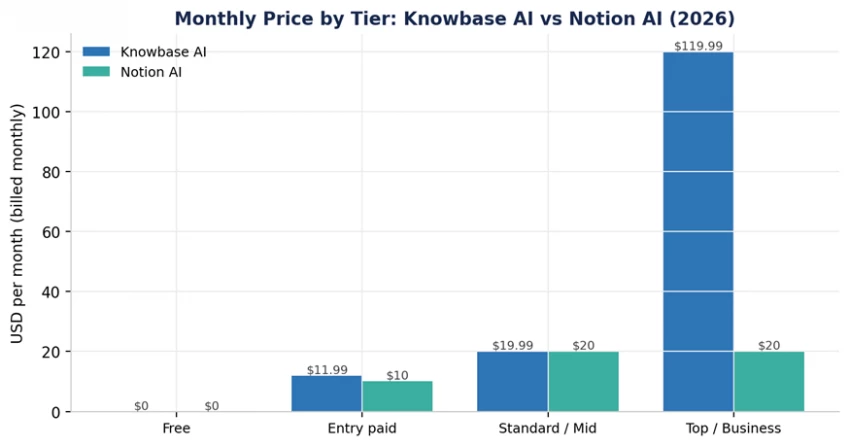
Figure 1: Monthly list price by tier. Knowbase AI is flat per-account; Notion AI is per user.
| Plan | Price (monthly) | Storage | Queries | Transcription |
|---|---|---|---|---|
| Free | $0 | 100 MB | 25 | — |
| Basic | $11.99 (~$9.99 yr) | 1 GB | 1,000 | 180 min |
| Standard | $19.99 (~$16.58 yr) | 10 GB | 3,000 | 900 min |
| Pro | $119.99 (~$99 yr) | 100 GB | 10,000 | 1,800 min |
Knowbase AI tiers as reported by ToolsForHumans (reviewed March 2026). Billed per account, not per seat.
| Plan | Price (per user) | AI access |
|---|---|---|
| Free | $0 | Limited trial allocation only |
| Plus | $10/mo annual ($12 monthly) | Basic AI writing; limited trial of full suite |
| Business | $20/mo annual ($24 monthly) | Full suite: Notion Agent, Ask Notion, AI Meeting Notes, Enterprise Search |
| Enterprise | Custom | Full suite plus enterprise controls |
The big 2026 change: Notion retired the standalone $10 AI add-on in May 2025. For new workspaces, the full AI feature set now lives in Business at $20 per user per month. Teams that previously paid Plus plus the $10 add-on saw little change, but anyone wanting AI for the first time effectively doubles their per-seat cost to reach it. Custom Agents also began billing as credits at $10 per 1,000 Notion credits in May 2026.
“The AI plan costs more than the base Pro plan, which leads to a category of users who find the writing features valuable but balk at the add-on pricing.” — Onyeka E., verified G2 reviewer (paraphrased), via eesel AI review |
• Solo user, heavy media: Knowbase AI Standard at ~$20/mo gives 10 GB and transcription. Notion Business is also ~$20 but for one seat with no media transcription focus.
• Small team (5 people) wanting AI: Notion Business is 5 x $20 = $100/mo. Knowbase AI stays flat per account, so a shared Standard plan at ~$20 can be far cheaper if light query volume is acceptable.
• Large workspace already on Notion: The AI is bundled into a plan you may already pay for, so marginal cost is low and integration is free.
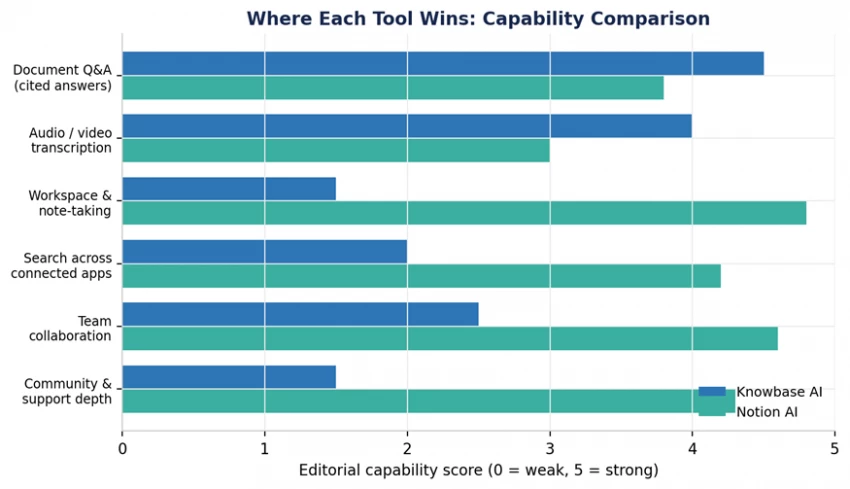
Figure 2: Editorial capability scores. Knowbase AI leads on document Q&A and transcription; Notion AI leads on workspace, search, and collaboration.
• Cited answers from mixed media. Upload PDFs, DOCX, PPTX, MP4, MP3, TXT, and YouTube links, then query them and get answers drawn from the source material rather than the open web.
• Multilingual transcription with speaker identification. Audio and video are transcribed across 50+ languages, a real edge for meeting recordings and lecture content.
• Bulk upload. Up to 100 files at once to stand up a knowledge base quickly.
• Shared knowledge bases. Teams can query the same library, useful for law firms, consultancies, and research groups.
• Writing and summarizing. Consistently the most-praised features: drafting, rewriting, tone changes, and condensing long pages.
• Ask Notion / Notion Agent. Scans your workspace to answer questions in context, and in 2026 can perform multi-step tasks like autofilling database properties and extracting meeting action items.
• Database automation. Reads a page and fills category, priority, status, and owner fields automatically, something no general chatbot does natively inside a structured tool.
• Connected search. Enterprise Search and connectors reach into tools like Slack, Google Drive, GitHub, and, as of Notion 3.4, Salesforce and Box.
• Multi-model choice. Higher tiers let users toggle between leading models for different tasks.
| Knowbase AI | Notion AI |
|---|---|
| Free tier (100 MB, 25 queries) is too thin to evaluate seriously | Free and Plus give only limited AI trial usage; full AI needs Business |
| Near-absent independent reviews; hard to verify vendor claims | Per-seat cost scales fast (5 seats = $100/mo on Business) |
| Storage gets expensive quickly with audio and video | Workspace Q&A reliability drops on very large workspaces |
| Connectors are limited on lower tiers | Connector list skews to engineering tools, not helpdesk or CRM |
| Small community means slower feature momentum | Weaker than dedicated tools on complex multi-step reasoning |
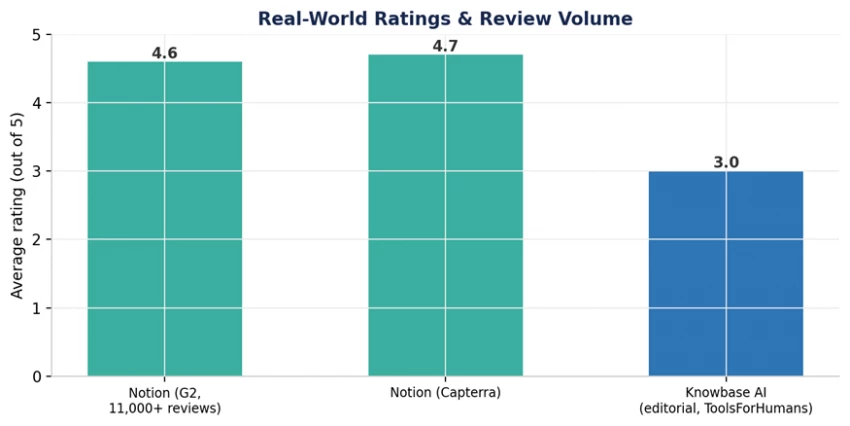
Figure 3: Ratings and review volume. Notion carries thousands of verified reviews; Knowbase AI has a small editorial footprint.
Notion is one of the most-reviewed productivity tools on the market, holding roughly 4.6/5 on G2 across more than 11,000 reviews and about 4.7/5 on Capterra. Knowbase AI, by contrast, has almost no independent review presence, which is itself a meaningful signal about its market footprint.
Reviewers tend to fall into three groups. Power users with well-organized workspaces rate the AI highly. People who hoped the AI would organize a messy workspace for them are often disappointed. And a third group loves the writing features but objects to the price.
“Notion AI stands out with its capability to understand context and brand voice, and it really reduces the time spent on repetitive tasks.” — Onyeka E., verified G2 review (paraphrased) |
“Finding things in Notion is harder than it should be. Pages nest inside pages inside pages, and it is easy to lose track of where something lives.” — Verified G2 reviewer (paraphrased) |
Independent testers reach a similar nuanced verdict: writing and summarization are the strongest features, while Q&A, search, and database automation are solid but inconsistent, and accuracy can slip on very large workspaces.
The most candid assessment comes from ToolsForHumans, which gives Knowbase AI a 3.0/5 editorial rating and notes that the tool does one thing reasonably well, letting you upload files and ask questions with cited answers, but operates in a crowded category.
“The near-total absence of independent community reviews makes it hard to trust the 22,000+ users claim without verification.” — ToolsForHumans editorial review, 2026 (paraphrased) |
Their bottom line is practical: do not subscribe until you have used the free Pro trial and compared it directly against Notion AI for your specific document workflow.
• Your source material is messy or mixed-format, especially audio and video you need to transcribe and interrogate.
• You want cited answers tied to specific uploaded documents rather than summaries.
• You are a solo professional or small team that prefers flat per-account pricing over per-seat billing.
• You work in research, legal, consulting, or education where finding a specific fact fast is the whole job.
• You already use Notion, or want one tool for notes, docs, projects, and wikis plus AI on top.
• Writing, summarizing, and database automation are your daily tasks.
• You want the AI to search across connected apps, not just uploaded files.
• Your team is willing to standardize on Business-tier seats to unlock the full AI suite.
| If your main need is… | Pick |
|---|---|
| Querying a document/media library with citations | Knowbase AI |
| A single connected workspace with AI assistance | Notion AI |
| Heavy audio / video transcription on a budget | Knowbase AI |
| Drafting, rewriting, and summarizing all day | Notion AI |
| Flat pricing for a small shared team | Knowbase AI |
| AI search across Slack, Drive, GitHub, and more | Notion AI |
This is not really a contest between two competitors so much as a choice between two categories. Knowbase AI is a focused knowledge base: feed it documents and media, get back cited answers. Notion AI is a workspace assistant: it makes a tool you may already live in smarter at writing, organizing, and searching.
Buy Knowbase AI when the documents are the point and you want answers tied to sources, especially with audio and video in the mix. Buy Notion AI when the workspace is the point and you want one connected home for work with AI baked in. The smartest move costs nothing: run Knowbase AI's free trial and Notion AI's trial side by side on your own files for a week, then let your actual workflow decide.

New Claude Model Targets Agentic AI WorkflowsAnthropic has launched Claude Sonne...
Samuel Osei3 months ago

Gemini’s Image Tools Get a Wider RolloutGoogle is expanding access to Gemini’s p...
Alexander Hughes3 months ago

Two AI video generators, two very different first days. I ran PixVerse through i...
Alexander Hughes3 months ago

Two of the most talked-about AI chat platforms. I opened both, picked a characte...
Alexander Hughes3 months ago

The two-minute versionIf you only read one thing, read this. The rest of the doc...
Alexander Hughes3 months ago

Why Seedance 2.5 mattersSeedance 2.5 is the latest release in ByteDance’s Seedan...
Alexander Hughes3 months ago
Discussion