You want to turn a text idea into a striking image, restyle a clip into anime, or animate a still photo, but you have no editing background, no design budget, and little patience for heavy software. LensGo AI is built for exactly that gap. It is a cloud-based, AI-powered creative studio that generates and transforms visual content from a few words or an uploaded file, bundling image generation, video creation, and style transfer into one approachable interface.
Launched in 2023, LensGo rode the early wave of AI content tools and has since refined its focus. This guide pulls together what the tool does today, what it costs, how to use it, where it shines, where it falls short, and how it compares with the main alternatives, so you can decide whether it belongs in your workflow.
Quick verdict LensGo AI is one of the more capable beginner-friendly AI creative tools available. The free plan is real and usable for learning; the paid tiers are reasonably priced. Output can be inconsistent on complex prompts, and there's no mobile app yet, but for students, social creators, freelancers, and small businesses, it's an easy, low-risk tool to start with. |
LensGo AI is a generative-AI platform that converts your input (text, images, or video) into polished visuals using machine-learning models. At its core it does three things: it generates custom images from text prompts, it creates and animates videos, and it applies artistic styles to existing footage and photos. You can work across more than 1,000 styles, from anime and cartoon to realistic, watercolor, and cinematic looks.
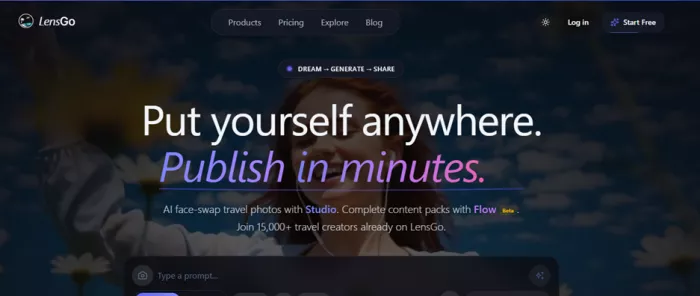
Because it runs entirely in the browser, there's nothing to download and it doesn't tax your computer. You open the site, sign in, type or upload, and create. That accessibility is the whole point: it lowers the barrier for people who would never open Photoshop, After Effects, or a 3D suite.
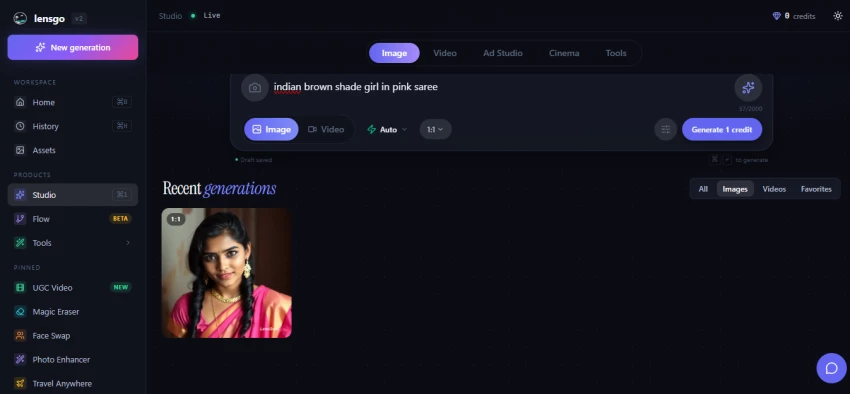
Type a description such as “indian brown shade girl in pink saree”, pick a look, and generate a high-quality image in seconds. It also supports image-to-image transformation: upload a selfie or product photo and restyle it completely. For social posts, thumbnails, and concept art, this is the feature most beginners use first.
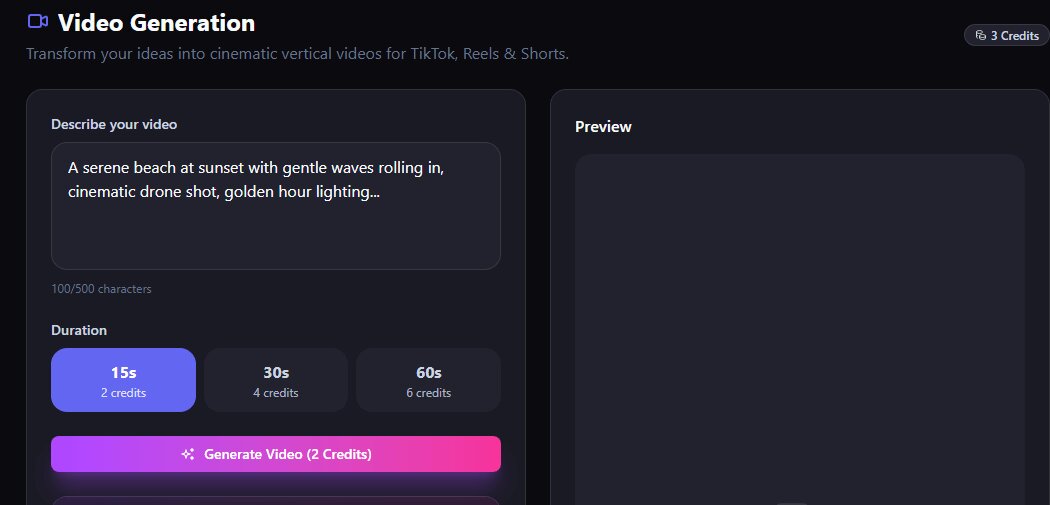
Turn a written prompt into a short cinematic clip, or add motion to a still photo so it comes alive with subtle movement and camera effects. This directly addresses the short-form content gap for Reels, Shorts, and TikTok without any animation skills.
Upload a real clip and convert it into anime, cartoon, ink-painting, Ghibli-inspired, or other artistic styles. The system aims to keep the original motion and flow while repainting each frame. It's the platform's most viral-friendly feature. Clean, well-lit source footage transfers far better than dark or shaky input, so quality in equals quality out.
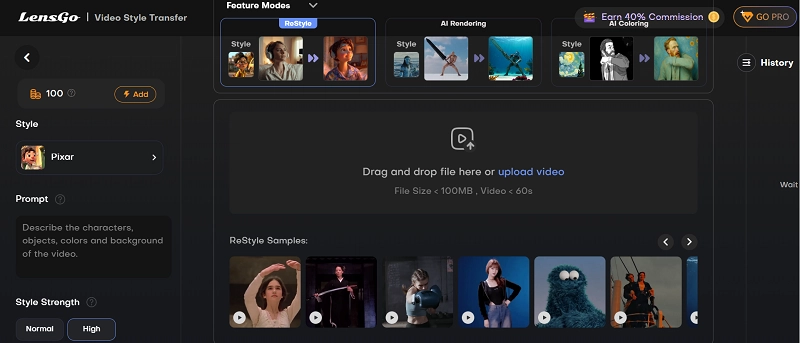
Advanced users can upload reference images to train a dedicated model that captures a specific personal or brand aesthetic. The number of models you can train each month scales with your plan; the free tier is enough to test the idea, while production use needs a paid plan.
Pre-built templates speed up social posts, blog headers, and event graphics. LensGo has also leaned into travel content, offering destination presets and a “Travel Anywhere”-style feature that places a subject into scenes around the world, which is handy for travel bloggers building destination content.
A note on availability LensGo has changed its branding, interface, and feature set over time, and some functions have shifted in and out during updates. The platform is operating, but a few features may behave differently or be temporarily limited depending on when you visit. Always confirm current behavior on the official site before relying on a specific feature. |
1. Sign in: Go to the LensGo AI website and sign up with a Google account (one click) or an email. Setup takes under two minutes.
2. Open the dashboard: From the main screen, choose your creation type, whether text-to-image, text-to-video, image-to-video, or video style transfer.
3. Write a clear prompt: Be specific. “indian brown shade girl in pink saree.” A better prompt yields a better result.

4. Pick a style or model: Select from the style library (anime, realistic, Ghibli, watercolor, cinematic) or apply a custom-trained model.
5. Adjust settings: For video, set style strength, duration, FPS, privacy, and watermark options before generating.
6. Generate, then download or share: Wait a few seconds (longer at peak times on the free plan), then download. Free output is watermarked; paid plans give clean files.
LensGo AI uses a credit-based system with a free tier and several paid plans. Prices vary by region and by promotions, so treat the figures below as approximate guidance and confirm current rates on the official site.
| Plan | Approx. Price | What You Get |
|---|---|---|
| Free | $0 | ~50 daily credits to explore core tools; watermarked output at standard resolution; limited video length and styles. |
| Standard | ~$6.75 / mo | Watermark-free HD output, a larger monthly credit pool, longer video transfers, and a few custom model trainings per month. The cheapest practical upgrade. |
| Pro | ~$21.75 / mo | Far higher monthly credits, more custom models, faster (priority) generation, and watermark removal. Aimed at frequent, volume creators. |
| Mega | ~$45 / mo | The top tier: the largest credit allowance, the most custom models, top-resolution output, API access, and priority support. Built for teams and heavy users. |
Bottom line on cost: the free plan is a genuine, non-expiring way to learn the tool. The watermark is the main limitation. Once you need clean, professional output, the Standard plan is the most affordable step up.
LensGo isn't only for artists or tech-savvy users. It fits anyone who creates visual content or wants to start:
• Students building portfolios or project presentations on a zero budget.
• YouTubers and Reels/Shorts creators who want thumbnails, anime-style clips, and animated intros.
• Freelancers offering content creation services to small clients.
• Small business owners producing social visuals without hiring a designer.
• Educators and teachers making engaging visual material for classes.
• Travel bloggers creating destination imagery and animated travel content.
If you've assumed that good content requires expensive software or a design degree, LensGo is proof otherwise. The best-fit users are short-form social creators and travel content makers; graphic designers and brand-critical professional work are less well served, where mature tools still hold an edge.
| Pros | Cons |
|---|---|
✓ Genuinely usable free plan for learning and testing ✓ Very easy interface, with no technical or design skills needed ✓ All-in-one: images, video, style transfer, and animation ✓ 1,000+ artistic styles, from anime to cinematic ✓ Runs in the browser; nothing to install ✓ Custom model training for a personal or brand look ✓ Low entry price compared with many rivals | ✗ Free downloads carry a watermark ✗ Daily credit cap can run out fast when experimenting ✗ No dedicated mobile app (browser only) ✗ Rendering can slow down at peak times on free tier ✗ Output can be inconsistent on complex prompts ✗ Smaller public community and fewer best-practice guides ✗ Not yet suited to long-form video projects |
LensGo bundles more feature categories than most single competitors, but it doesn't lead in every one. Here's how it stacks up against the tools people most often weigh it against.
| Tool | Strengths | Trade-offs |
|---|---|---|
| LensGo AI | Low entry price, all-in-one studio (image, video, style transfer), 1,000+ styles, custom model training, beginner-friendly. | Smaller public community, occasionally inconsistent output, no dedicated mobile app, some features in flux. |
| Runway | Higher-quality video, strong motion control, large active community, extensive documentation. | Higher cost; no custom model training in the same form; steeper for casual users. |
| Krea AI | Excellent video restyling with many filters and daily free credits; user-friendly. | Occasional download issues; narrower scope than a full studio. |
| DomoAI | Flexible restyling controls, preserves original motion, 4K upscaling and FPS options. | Watermarks on the free plan; focused mainly on video-to-video. |
How to choose: pick LensGo if you want an affordable all-in-one studio and the easiest possible start. Choose Runway for serious, professional-grade video. Reach for Krea or DomoAI when video restyling is your main job and you want more granular control.
• Start with clean, well-lit source footage or photos, since quality input drives quality output.
• Write detailed, specific prompts; add setting, mood, lighting, and style.
• Generate a few variations and pick the best rather than expecting a perfect first try.
• Use the free credits to test a style before committing to a paid plan.
• Train a custom model if you need a consistent personal or brand look.
LensGo AI is a legitimate, broadly safe-to-use platform that serves pages over a secure (HTTPS) connection. As with any AI generator, apply standard online caution: review the privacy policy, avoid uploading sensitive personal images you wouldn't want stored, and be mindful of copyright when generating or restyling content.
Content created with LensGo can generally be used commercially once you accept the terms of service, which makes it useful for freelancers and small businesses. Because terms can change, always check the current terms on the official site before using generated content in paid or client-facing projects. None of this is legal advice; if commercial rights are critical to your project, confirm the specifics directly.
LensGo AI is one of the most approachable AI content creation tools available in 2026. It packs image generation, video creation, style transfer, and custom model training into a platform a complete beginner can navigate within an hour, and its free plan is a real, meaningfully usable starting point rather than a bait-and-switch trial.
The limitations are honest and manageable: watermarks on free downloads, a daily credit cap, no mobile app, and occasional inconsistency on complex prompts. None of these are dealbreakers for someone starting out. If you're a student, freelancer, small business owner, social creator, or simply curious about what AI-powered creation feels like in practice, LensGo is a low-risk, high-upside place to begin. Sign in, write a prompt, and make something. The learning curve is nearly flat, and the creative potential is real.

The new Android feature aims to warn users when scammers spoof trusted contacts...
Noura Belkacem7 hours ago
Digen AI made one thing easy: upload a photo, add a script, and watch a still im...
Grace Howard7 hours ago

Weather forecasting is becoming one of the clearest real-world tests for artific...
Sandra Campos1 day ago

Quick answer: If your problem is a pile of mixed documents, recordings, and vide...
Sandra Campos1 day ago

The Quick answerThere is no single “best” AI image generator in 2026; the right...
Peter Woods1 day ago
AI coding tools have become so embedded in software development that some develo...
Sandra Campos2 days ago
Discussion