On the surface, MagicLight AI and InVideo AI promise the same thing. Type a script or an idea, wait a few minutes, and you get a finished video with visuals, a voiceover, music, and captions ready to post. That sounds identical. In practice the two tools build a video in completely different ways, and that single difference decides which one is right for you.
InVideo AI stitches together real stock footage to match your script. MagicLight AI draws original visuals with AI, one scene at a time. One behaves like a fast editor that already owns a library of clips. The other behaves like an illustrator who sketches your story from scratch. The comparison below runs through the things that actually matter when you commit to a tool, with the differences laid out in tables and charts so you can scan them quickly.
The short answer Choose InVideo AI if you make social clips, marketing promos, news-style commentary, or faceless YouTube videos that lean on real-world footage. Choose MagicLight AI if you make animated stories, narrated explainers with custom art, kids' content, or anything where you want visuals nobody else has. If you already know which camp you fall into, you can stop here. If not, the rest explains why. |
MagicLight AI is built around storytelling. You hand it a script or a story idea, and it splits the text into scenes, generates an image for each one in the art style you pick, adds a voiceover, and stitches the scenes into a video. As this MagicLight review shows, its standout trick is keeping characters and settings steady from one scene to the next, something most AI tools struggle with. You edit inside a storyboard view, swapping images, rewriting lines, and tuning scenes individually. The finished video usually looks illustrated or animated rather than filmed.

InVideo AI is built around speed and stock media. You type a prompt describing the video you want, and it writes a script, pulls matching clips from a large stock library, records an AI voiceover, drops in music, and adds captions. The clever part is the editing. Instead of dragging clips on a timeline, you type instructions like make the intro shorter or switch the voice to a British accent, and it rebuilds the cut. Because the footage is real, the output looks like a properly produced video.
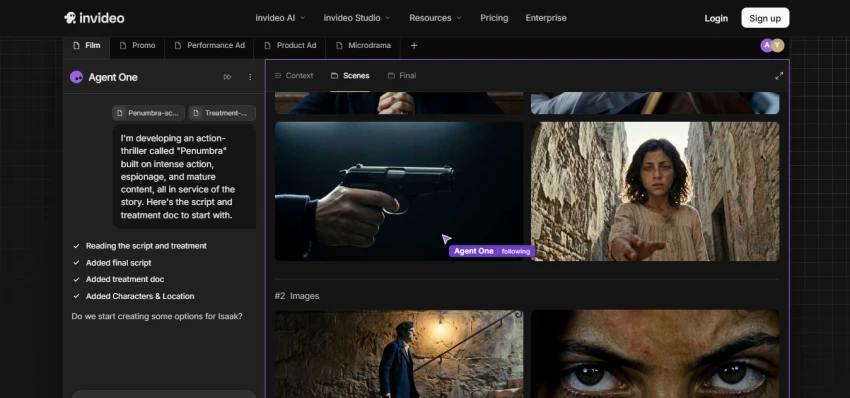
Here is the line that separates these two tools, and almost every other difference flows from it.
InVideo AI assembles. MagicLight AI generates.
When InVideo needs a shot of a city at night, it finds one in its stock library. When MagicLight needs that same shot, it draws one. This choice ripples out into visual style, originality, the kind of content each tool handles well, and even how you edit. Keep it in mind as you read on, because it explains why neither tool is simply better than the other. They are better at different jobs.
Here is the full head-to-head. Scan it first, then read the sections underneath for the points that deserve more than one line.
| Feature | MagicLight AI | InVideo AI |
|---|---|---|
| How it builds the video | Generates original AI visuals, scene by scene | Assembles matching stock footage to fit your script |
| Best suited for | Animated stories, narrated explainers, kids' content | Social clips, promos, faceless YouTube, commentary |
| Visual look | Illustrated and stylized, closer to animation | Realistic, live-action footage |
| Where visuals come from | AI-generated images | A stock video and image library |
| Character consistency | Strong, kept steady from scene to scene | Limited, tied to the stock that is available |
| How you edit | A visual storyboard, scene by scene | Typed commands plus a timeline |
| Art style choices | Several selectable styles | Not applicable, it uses real footage |
| Voiceover | AI voices with several options | AI voices with a very wide selection |
| Stock media library | Smaller, an AI-first workflow | Very large, millions of clips |
| Language support | Multiple languages | 50 plus languages |
| Learning curve | Beginner friendly | Beginner friendly |
| Free plan | Yes, limited by credits | Yes, limited time and features |
| Watermark on free exports | Varies by plan | Usually applied |
| Sweet spot for length | Short narrative pieces | Short to medium social and YouTube |
Both start from text, but they take different roads to a finished cut. InVideo reads your prompt, writes a script, and then searches its footage library for clips that fit each line. MagicLight reads your script and produces a fresh image for each scene instead of searching for one. The result is that InVideo leans on what already exists, while MagicLight creates what your story needs.
This is the clearest split. InVideo videos look like real life because they are made from real clips, which suits trends, news, ads, and product footage. MagicLight videos look illustrated, which suits fairy tales, explainers with custom characters, and anything aimed at children. If your topic needs a real human walking through a real office, InVideo wins. If it needs a talking fox in an enchanted forest, MagicLight wins.
InVideo's text-command editing is fast and friendly. You describe the change in plain language and it rebuilds the video, which is great for quick iterations but gives you less say over the exact frame. MagicLight's storyboard is more hands-on at the scene level. You can replace a single image, rewrite one line, or adjust one moment without touching the rest, which matters when a specific scene has to land just right.
Both generate solid AI voiceovers with music underneath. InVideo offers a wider catalog of voices, accents, and languages, which is part of why it suits creators publishing to a global audience. MagicLight covers the essentials well and pairs them with its visuals, which is usually enough for narrated stories and explainers.
If you need to publish the same idea in many languages, InVideo's broader language support gives it the edge for international and multilingual channels. MagicLight handles multiple languages too, just with a narrower spread. For most single-language creators the gap will not matter, but for global output it does.
InVideo tends to be quicker from prompt to export because pulling existing clips is faster than generating new artwork. MagicLight takes a little longer since it is drawing each scene, though the payoff is visuals made specifically for your script. If you value turnaround above all, InVideo feels snappier. If you value originality, the wait is worth it.
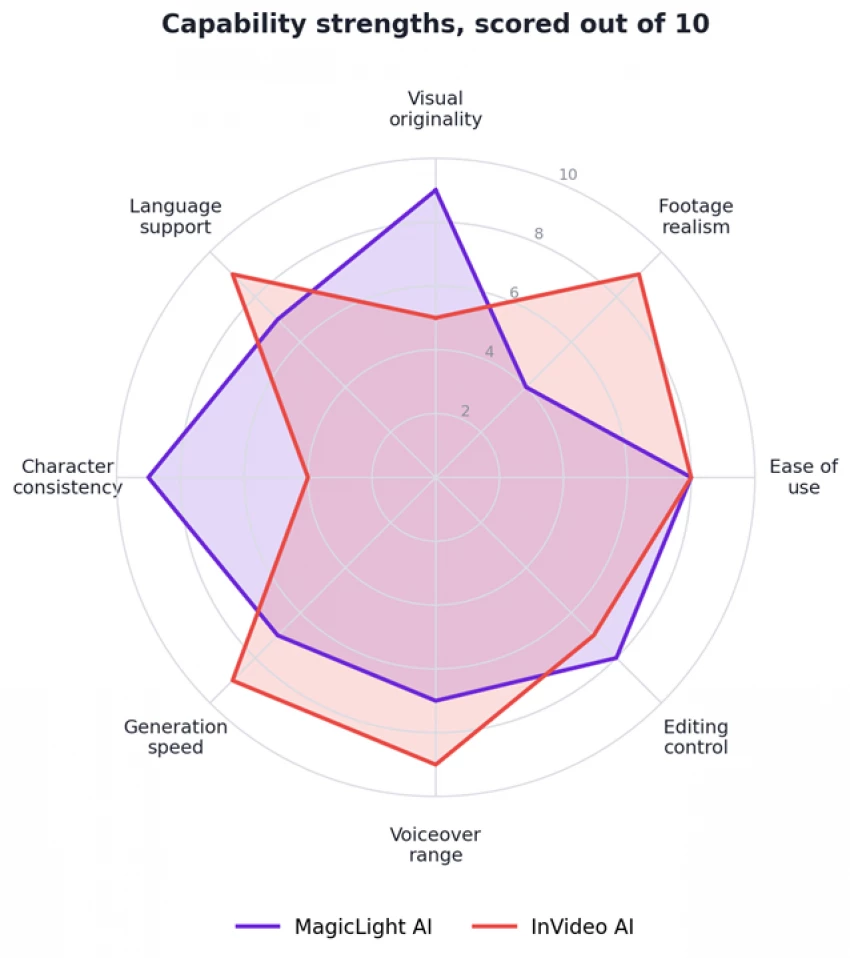
Figure 1. Where each tool is strongest. Higher is better, scored out of 10.
The shape tells the story. MagicLight stretches toward visual originality and character consistency, the things a generator does best. InVideo stretches toward footage realism, voiceover range, language support, and speed, the things a stock-based editor does best. They meet in the middle on ease of use, where both are beginner friendly.
Both tools offer a free tier and paid plans, but they charge in different shapes. InVideo runs on subscriptions with generation limits, while MagicLight runs on credits you spend per generation. That difference matters for your wallet depending on how much you produce.
| Tier | MagicLight AI | InVideo AI |
|---|---|---|
| Free tier | Limited monthly credits | Limited weekly generation, watermarked exports |
| Entry paid plan | Credit packs, roughly $10 to $20 a month | Plus plan, roughly $20 to $35 a month |
| Higher tier | Larger credit packs, roughly $30 to $50 a month | Max plan, roughly $48 to $60 a month |
| How you pay | Credits spent per generation | A subscription with monthly generation limits |
Note: the figures above are rough estimates that shift with billing cycles, regions, and promotions. Check each tool's official pricing page for current numbers before you subscribe.
Scores aside, the easiest way to choose is to match the tool to the kind of video you make most. The chart below rates each tool across seven common content types so you can find your row at a glance.
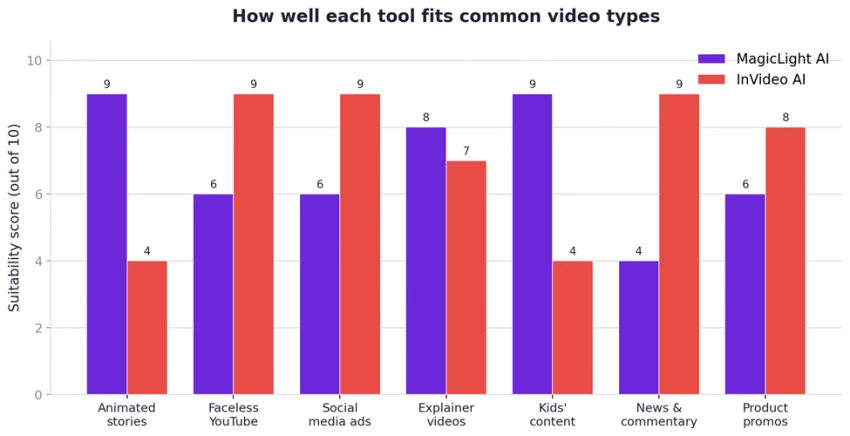
Figure 2. Suitability by content type, scored out of 10.
Read it like this. If you mostly make faceless YouTube videos, social ads, news and commentary, or product promos, InVideo is the stronger pick by a wide margin. If you mostly make animated stories or content for kids, MagicLight pulls clearly ahead. Explainer videos are the contested middle, where MagicLight's custom art and InVideo's quick footage are both reasonable, so it comes down to whether you want original visuals or speed.
Strengths
• Original visuals you will not find in anyone else's video
• Keeps characters and settings consistent across scenes
• A natural fit for stories, animation, and content for kids
• The storyboard view makes editing individual scenes simple
• Several art styles, so the look can match your tone
Trade-offs
• Not built for realistic, live-action style footage
• AI art can occasionally produce odd details
• A smaller media ecosystem than stock-based tools
• Credit usage can climb quickly if you publish a lot
Strengths
• A huge stock library that makes results look professionally shot
• Very quick to go from a prompt to a finished cut
• Editing by typed command is genuinely easy to pick up
• A wide range of voices and languages
• A strong match for social, marketing, and faceless YouTube
Trade-offs
• Footage is shared stock, so videos can feel generic
• Limited control over the exact shots you get
• Less suited to original animated storytelling
• Free plan limits and a watermark nudge you toward paying
Neither tool wins across the board, and any review that crowns a single champion is glossing over what you actually make. If your videos run on real-world footage, on trends, talking points, product demos, and ads, InVideo AI gets you there faster and looks the part. If your videos are stories that need their own visual world, animated shorts, narrated explainers, content for children, MagicLight AI hands you something stock footage cannot: art built for your script.
A good number of creators keep both. They reach for InVideo when they need quick social output and switch to MagicLight for signature narrative pieces. The cheapest way to settle it is to skip the reviews, open the free tier of whichever tool matches your main use case, and make three or four real videos. You will know which one belongs in your workflow before the afternoon is over.

New Claude Model Targets Agentic AI WorkflowsAnthropic has launched Claude Sonne...
Samuel Osei3 months ago

Gemini’s Image Tools Get a Wider RolloutGoogle is expanding access to Gemini’s p...
Alexander Hughes3 months ago

Two AI video generators, two very different first days. I ran PixVerse through i...
Alexander Hughes3 months ago

Two of the most talked-about AI chat platforms. I opened both, picked a characte...
Alexander Hughes3 months ago

The two-minute versionIf you only read one thing, read this. The rest of the doc...
Alexander Hughes3 months ago

Why Seedance 2.5 mattersSeedance 2.5 is the latest release in ByteDance’s Seedan...
Alexander Hughes3 months ago
Discussion