AI & ML
7 min read
Merlin AI vs Notion AI for Knowledge Work
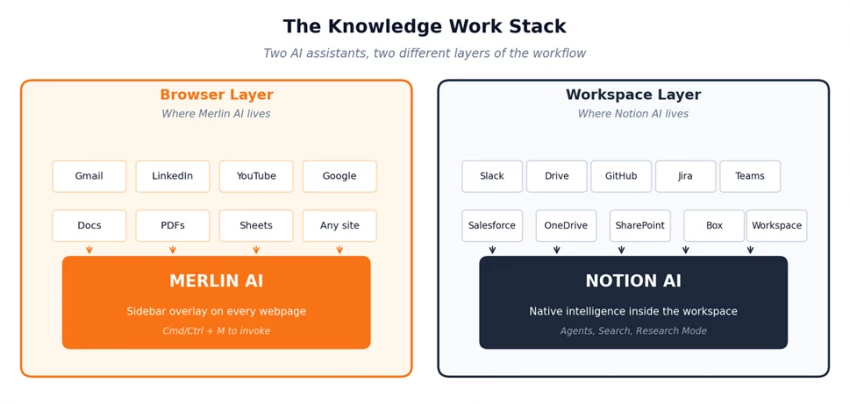
Two AI assistants positioned on two different layers of the modern knowledge worker's day.
Most comparison articles treat Merlin AI and Notion AI as if they compete for the same job. They do not. The two tools sit on different layers of the knowledge work stack, and that single fact resolves most of the confusion in the market.
Merlin AI lives in the browser layer. It overlays on Gmail, LinkedIn, YouTube, Google Docs, and any other webpage the user opens. The work happens where the user already is. Notion AI lives in the workspace layer. It sits inside Notion pages, databases, and meeting notes, with live connectors pulling context from Slack, Google Drive, GitHub, Jira, and other business systems.
Once that framing is clear, the rest of the comparison stops being a feature war and starts being a question about where most of the work actually happens.
A browser-based multi-model AI assistant that follows the user across every webpage.
| Attribute | Detail |
|---|---|
| Primary surface | Chrome and Firefox extension plus web app |
| Entry price | Free (102 daily queries) or $19/month Pro |
| Star rating | ★★★★½ (4.5 / 5) |
| Best for | Individuals, freelancers, students, researchers |
| Standout feature | YouTube and PDF summarization with timestamps |
A single Merlin AI subscription unlocks GPT-4o, GPT-4.1, Claude 3.7 Sonnet, Gemini 2.5 Pro, Gemini 2.5 Flash, Mistral Large, Llama 3.1 405B, DeepSeek R1, and Grok 3, all from one sidebar. The web app extends this with Projects for user-defined knowledge bases, Crafts for generating diagrams and lightweight web apps, Analyst Mode for Python on uploaded CSV files, plagiarism checking, and AI content detection.
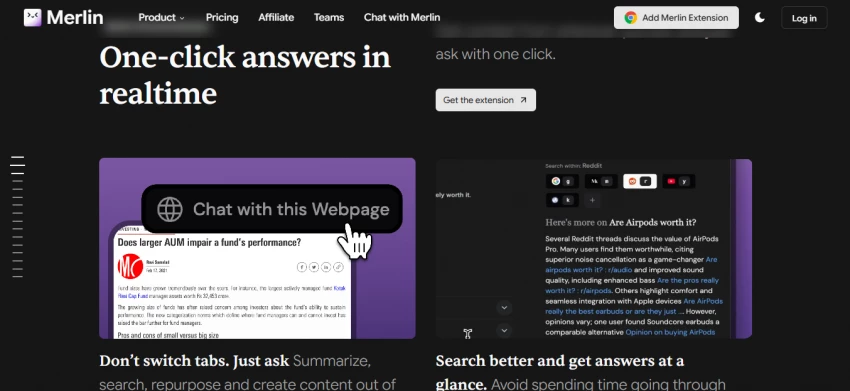
Free users get 102 daily queries on a credit system where premium model calls cost more credits than smaller models. Pro at $19 per month on annual billing covers most individual workflows comfortably.
A workspace-native AI layer built into Notion documents, wikis, and databases.
| Attribute | Detail |
|---|---|
| Primary surface | Inside Notion workspace (web, desktop, mobile) |
| Entry price | $20 per user per month (Business plan, annual) |
| Star rating | ★★★★½ (4.5 / 5) |
| Best for | Teams already using Notion as their workspace |
| Standout feature | Custom Agents and Enterprise Search across connected apps |
Notion AI brings Notion Agent (an interactive assistant that edits pages and databases), Custom Agents (background workers running on schedules or event triggers), Enterprise Search (across Slack, Google Drive, GitHub, Jira, Microsoft Teams, OneDrive, SharePoint, Salesforce, and Box), Research Mode for multi-source reports, AI Meeting Notes with mobile background transcription, and image generation.
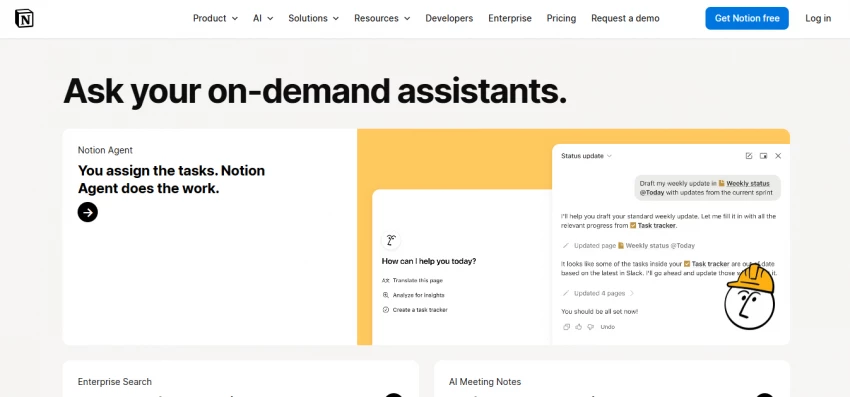
Available models include GPT-5.2, Claude Opus 4.5, Claude Opus 4.7, and Gemini 3, with an Auto mode that routes each task to the best fit. The standalone AI add-on was retired in May 2025, so production AI access starts at the Business tier.
For a single user, the two products are nearly identical in cost. At team scale, the difference becomes a small but real gap, and variable costs on Notion (Custom Agent credits) can tip the math further.
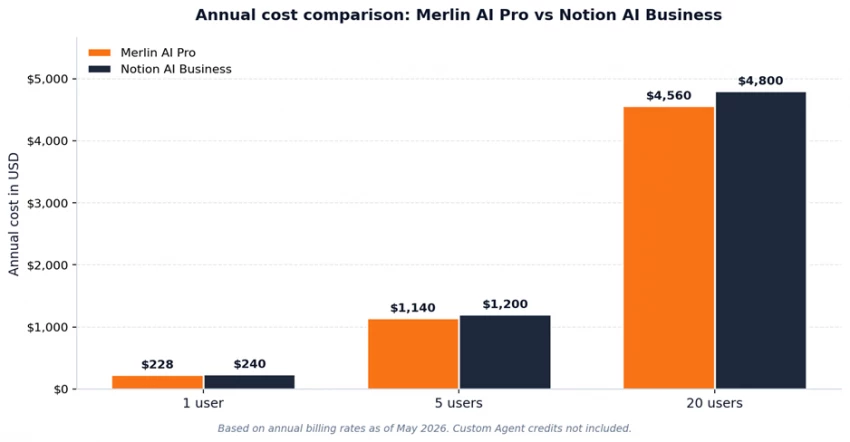
Annual cost on each platform's primary paid tier across common team sizes.
The numbers above reflect the simplest case. Merlin AI Pro has no variable costs on top of the seat fee, while Notion AI Custom Agents consume credits priced at $10 per 1,000 monthly credits starting May 4, 2026. A team that builds heavy automation workflows will see additional spend layered on the per-seat fee.
| Tool | What it can replace |
|---|---|
| Merlin AI Pro ($19/mo) | ChatGPT Plus + Claude Pro + Gemini Advanced (combined ~$60/mo) |
| Notion AI Business ($20/user) | Notion Plus + AI add-on plus parts of Confluence, Slack search, or Loom |
Eight dimensions matter for knowledge work. The chart below shows where each tool earns its score, and the table that follows breaks down the reasoning.
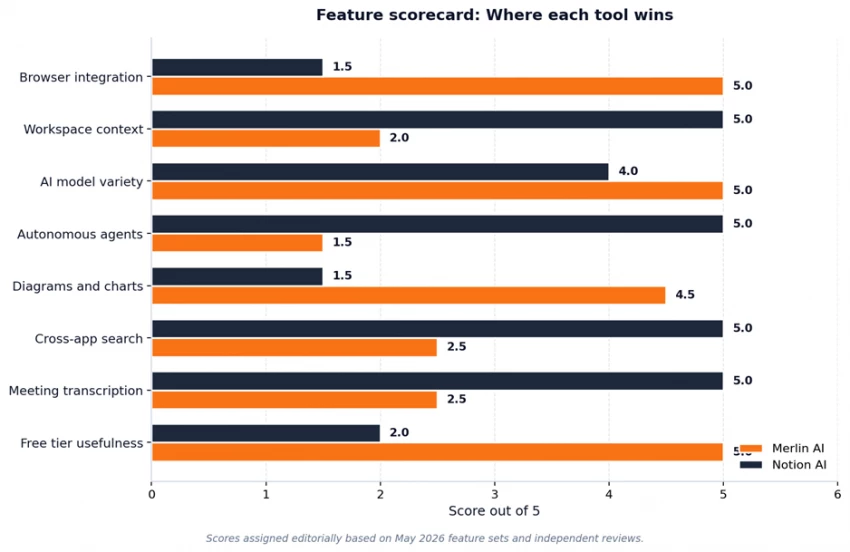
Side-by-side scoring across eight knowledge work dimensions. Higher is better.
| Dimension | Merlin AI | Notion AI | Why |
|---|---|---|---|
| Browser integration | 5.0 | 1.5 | Merlin overlays on any webpage. Notion does not. |
| Workspace context | 2.0 | 5.0 | Notion AI cites the team's own pages and databases. |
| AI model variety | 5.0 | 4.0 | Merlin includes open-source models. Notion focuses on frontier. |
| Autonomous agents | 1.5 | 5.0 | Notion Custom Agents run on schedules. Merlin has no equivalent. |
| Diagrams and charts | 4.5 | 1.5 | Merlin Crafts generates diagrams from prompts. |
| Cross-app search | 2.5 | 5.0 | Notion connects nine business systems for AI search. |
| Meeting transcription | 2.5 | 5.0 | Notion AI Meeting Notes runs in the background on mobile. |
| Free tier usefulness | 5.0 | 2.0 | 102 daily Merlin queries beats Notion's one-time AI trial. |
Both tools let users choose their model. Merlin AI exposes the picker on every chat surface; Notion AI added explicit model selection in January 2026 and also offers an Auto mode that routes by task type.
| Model Family | Merlin AI | Notion AI |
|---|---|---|
| OpenAI | GPT-4o, GPT-4.1, GPT o4-mini | GPT-5.2 |
| Anthropic | Claude 3.7 Sonnet | Claude Opus 4.5, Claude Opus 4.7 |
| Gemini 2.5 Pro, Gemini 2.5 Flash | Gemini 3 | |
| xAI | Grok 3 | Not available |
| Open source | Llama 3.1 405B, Mistral Large, DeepSeek R1 | Not available |
| Smart routing | Manual selection only | Auto mode chooses best fit |
The practical takeaway: Notion AI ships with newer flagship models for production work, while Merlin AI ships with a broader range of model families including open-source options. Breadth versus recency, in short.
Integrations are where the two products diverge most sharply. Merlin AI integrates with the browser; Notion AI integrates with business systems.
| Integration | Merlin AI | Notion AI |
|---|---|---|
| Browser sidebar (any site) | Yes | No |
| Gmail and Google Docs | Yes (overlay) | Limited |
| YouTube video summary | Yes (native) | No |
| Slack messages | No | Yes (live connector) |
| Google Drive files | Upload only | Yes (live connector) |
| GitHub, Jira, Salesforce | No | Yes |
| PDF chat | Yes | Yes |
| External AI agents | No | Yes (Claude Code, Cursor, Codex) |
The May 2026 Notion Developer Platform release added Workers (hosted custom code), External Agent partnerships, and an API for connecting in-house agents. This positions Notion as an orchestration hub rather than only a document workspace, which widens the integration gap even further.
Neither tool is without trade-offs.
• Soft fair-use cap on the Pro plan; heavy users occasionally hit it.
• Browser dependency: full experience requires Chrome, Edge, or Firefox.
• No native scheduled autonomous agents.
• Quota anxiety on premium models, since frontier queries consume 30 credits each.
• Business plan at $20/user/month is the floor for production AI access.
• Custom Agents consume credits at $10 per 1,000 monthly credits starting May 4, 2026.
• Research Mode is a limited trial on Business; only fully unlocks on Enterprise.
• Image generation capped at 10 per 24 hours and 30 per 30 days on all paid plans.
• Zero data retention with LLM providers only on Enterprise; other tiers retain for 30 days.
The flowchart below maps the most common decision paths. Each branch ends at the option that fits the situation best.
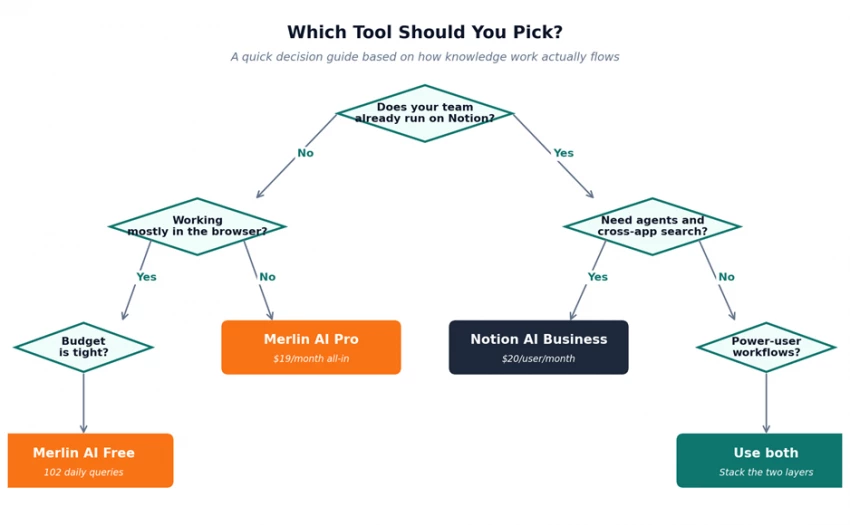
A quick decision guide. Answering two or three questions usually settles the choice.
Merlin AI and Notion AI optimize for different layers of the knowledge work stack. Merlin AI optimizes the layer between the user and the open web. Notion AI optimizes the layer between the team and its accumulated knowledge. Asking which tool is better is the wrong question; the better question is which layer of work needs the AI most.
For most individual knowledge workers, Merlin AI Pro at $19 per month delivers exceptional value, and the free tier alone outperforms several paid competitors. For teams that have already adopted Notion as their operating system, Notion AI Business at $20 per user per month adds an intelligence layer that genuinely replaces hours of search, drafting, and coordination work each week.
The most common practical answer is to use both. Merlin AI handles personal research, drafting, and quick model comparison across the web. Notion AI handles team knowledge management, meeting capture, and workflow automation. Combined, they cover the full surface area of modern knowledge work without overlap.

New Claude Model Targets Agentic AI WorkflowsAnthropic has launched Claude Sonne...
Samuel Osei3 months ago

Gemini’s Image Tools Get a Wider RolloutGoogle is expanding access to Gemini’s p...
Alexander Hughes3 months ago

Two AI video generators, two very different first days. I ran PixVerse through i...
Alexander Hughes3 months ago

Two of the most talked-about AI chat platforms. I opened both, picked a characte...
Alexander Hughes3 months ago

The two-minute versionIf you only read one thing, read this. The rest of the doc...
Alexander Hughes3 months ago

Why Seedance 2.5 mattersSeedance 2.5 is the latest release in ByteDance’s Seedan...
Alexander Hughes3 months ago
Discussion